2002 SAAB 9-5 ignition
[x] Cancel search: ignitionPage 78 of 272

78 Instruments and controlsStarting in cold weather
To start with, the system will automatically select the defroster set-
ting, maximum heat and low fan speed.
As the engine warms up, air will also be distributed through the floor
vents and the fan speed will be increased.
As the temperature inside the car nears the selected value, both the
fan speed and the heat will be decreased to a level determined by
the system.
Starting in hot weather
The system will automatically distribute air through the panel vents
at high fan speed and will switch on the A/C compressor (unless the
ECON switch has been pressed).
If the outdoor temperature is above 86
°F (30°C), the system might
select recirculation after approximately 45 seconds if this is required
in order to reach the desired temperature.
As the temperature inside the car nears the selected value, the fan
speed will be decreased to a value determined by the system.
Programming IManual selections can be programmed into the ACC system so that
these will take effect when the car is started. Note that the ignition
must be switched off for at least ten minutes after programming for
the selections to be saved in the system’s memory.
1 Make sure the ignition is ON.
2 Select the desired settings.
3 Press and , simultaneously
(the display will flash to confirm that the settings have been
recorded).
Example: If you want air distribution through the panel vents when
you start the car, press
and then save the setting by pressing
and .
Cancelling the programmed settings (I) To cancel the programmed settings, press and
simultaneously (the display will flash to confirm that the settings
have been cancelled). Panel (and center rear vent)
ACC69
ProCarManuals.com
Page 80 of 272
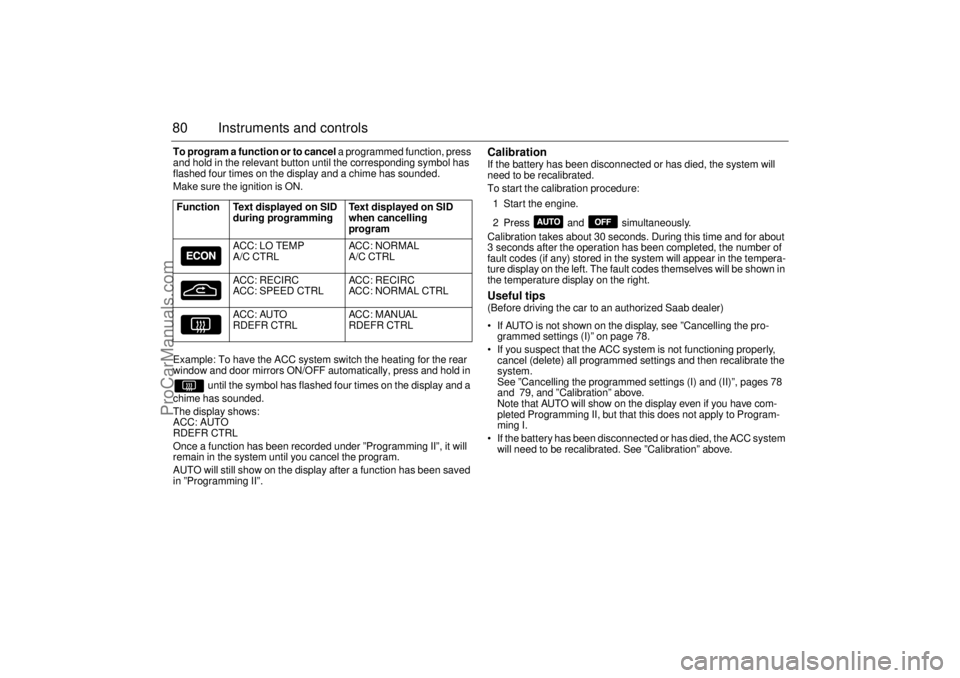
80 Instruments and controlsTo program a function or to cancel a programmed function, press
and hold in the relevant button until the corresponding symbol has
flashed four times on the display and a chime has sounded.
Make sure the ignition is ON.
Example: To have the ACC system switch the heating for the rear
window and door mirrors ON/OFF automatically, press and hold in
until the symbol has flashed four times on the display and a
chime has sounded.
The display shows:
ACC: AUTO
RDEFR CTRL
Once a function has been recorded under ”Programming II”, it will
remain in the system until you cancel the program.
AUTO will still show on the display after a function has been saved
in ”Programming II”.
Calibration If the battery has been disconnected or has died, the system will
need to be recalibrated.
To start the calibration procedure:
1 Start the engine.
2 Press and simultaneously.
Calibration takes about 30 seconds. During this time and for about
3 seconds after the operation has been completed, the number of
fault codes (if any) stored in the system will appear in the tempera-
ture display on the left. The fault codes themselves will be shown in
the temperature display on the right. Useful tips (Before driving the car to an authorized Saab dealer)
If AUTO is not shown on the display, see ”Cancelling the pro-
grammed settings (I)” on page 78.
If you suspect that the ACC system is not functioning properly,
cancel (delete) all programmed settings and then recalibrate the
system.
See ”Cancelling the programmed settings (I) and (II)”, pages 78
and 79, and ”Calibration” above.
Note that AUTO will show on the display even if you have com-
pleted Programming II, but that this does not apply to Program-
ming I.
If the battery has been disconnected or has died, the ACC system
will need to be recalibrated. See ”Calibration” above. Function Text displayed on SID
during programming Text displayed on SID
when cancelling
program
ACC: LO TEMP
A/C CTRLACC: NORMAL
A/C CTRL
ACC: RECIRC
ACC: SPEED CTRLACC: RECIRC
ACC: NORMAL CTRL
ACC: AUTO
RDEFR CTRLACC: MANUAL
RDEFR CTRL
ProCarManuals.com
Page 82 of 272

82 Instruments and controlsAfterheater, V6-engine
carsThe afterheater enables a comfortable tem-
perature to be maintained inside the car
even after the engine has been switched off.
The heater can be activated up to 10 min-
utes after the engine has stopped, although
the coolant temperature must be at least
104°F (40°C) for the heater to operate.
To start the heater:
1 The ignition should be OFF.
2 Press and hold the AUTO button on the
ACC panel for about a second, until a
chime is sounded and the following
appears on the SID:
”SPARE HEATER
ACTIVATED”.
After five seconds, the SID will indicate how
much heat is available (0 – 100%).
To switch off the heater:
1 Press the OFF button on the ACC panel.
The heater will also be switched off if the
ignition is turned ON. The following settings will be used when the
heater is running:
Air distribution in AUTO mode.
Recirculation not active but can be
selected manually.
Fan speed is automatic and cannot be
changed.
Only the fan speed is shown on the dis-
play. If AUTO is pressed, the system
selections will be indicated.
The following controls do not operate while
the afterheater is on:
Rear-window heating.
ECON.
User presets.
Some of the functions can be repro-
grammed. For further information, please
consult your Saab dealer (see page 259).
ProCarManuals.com
Page 85 of 272

85 Saab 9-5 Audio System
Quick guide to the
Saab 9-5 Audio System Radio (see page 88)
ON
To switch the system ON, press the volume but-
ton. The last settings used will be activated.
If the Audio System is switched on when the igni-
tion key is not in the switch, the system will auto-
matically be switched off after one hour has
elapsed since a control button on the radio was
last pressed.
OFF
To switch the system OFF, press the volume
button or remove the ignition key.
VOL
To adjust the volume, rotate the VOL control.
BAL
To adjust the balance between the left and right
channels, pull out and turn the VOL control.
BAS
Press to release the button, and adjust the bass
level. Lock the setting by pushing the button in.
TRE
Press to release the button, and adjust the tre-
ble. Lock the setting by pushing the button in.
FAD
Press to release the button, and adjust the fade
between the front and rear sets of speakers.
Lock the setting by pushing the button in.
VOL
BAL ON
PULL PUSH
TREFAD BAS
Preset station buttons
Press once: play the preset station.
Press & hold briefly: store a new station.
Auto tuning
Press once: auto (seek) tuning.
Press & hold briefly (a chime will sound):
manual tuning.
Press once: Autostore ON/OFF.
Press & hold briefly: automatic tuning and
storing of the 6 strongest stations.
Press once: change to radio when CD active.
Press once: change waveband.
2 13
5 46SEEKASSEARCH
ProCarManuals.com
Page 87 of 272

87 Saab 9-5 Audio System
Sound controlsON/OFF The Audio System will come on:
• When the volume control is pressed.
When the ignition is switched ON, if the
Audio System was on when the ignition
key was last removed.
The Audio System will be switched off:
When the volume control is pressed.
When the ignition key is removed.
One hour after the ignition was switched
OFF, if the ignition key has not been
removed.
When one hour has elapsed since a con-
trol button on the Audio System was last
pressed after the ignition key was
removed. VOL - Volume
BAL - Balance Pull out and rotate the VOL control to adjust
the balance between the left and right
speakers. When the control is released, it
reverts to the volume function.
BAS - Bass
TRE - Treble Rotate clockwise to increase the level and
counter-clockwise to reduce it.
The Bass and Treble controls must be
pressed first to release them.
FAD - Fader The fader control adjusts the balance
between the front and rear sets of speakers.
The Fader controls must be pressed first to
release it.
IB1842
ProCarManuals.com
Page 118 of 272

118 Interior equipment and trunkSeats Both front seats are electrically operated.
On certain models the driver´s seat is
equipped with a memory function.
To facilitate getting into the car, both seats
can be adjusted when either of the front
doors is open.
For safety reasons, if the door is closed, the
seat can only be adjusted when the ignition
is ON.
Note, however, that both seats can be
adjusted for 30 seconds after both doors
have been closed. The following seat adjustments can be
made to achieve a comfortable driving
position:
Height.
Legroom.
Backrest rake angle.
Lumbar support.
Head-restraint height.
We recommend that adjustments to the
driver’s seat be performed in the following
order:
1Height.
2 Legroom.
3 Seat tilt angle.
4 Backrest rake angle.
Lastly, adjust the steering wheel (see page
122).
Side airbags (see page 32).Head restraint(see page 18).
Height To raise the seat, lift the lower control
straight up.
To lower the seat, press the lower control
down.
The same control can be used to adjust the
height of the front and rear edges of the seat
independently.
WARNING
The seats are actuated by powerful
motors. Ensure that nothing can be
trapped when adjusting the seat.
Bear in mind that children can be injured
if they play with the electrically-operated
seats
WARNING
Never adjust the driver’s seat except
when the car is stationary.
IB401
ProCarManuals.com
Page 125 of 272
125 Interior equipment and trunk
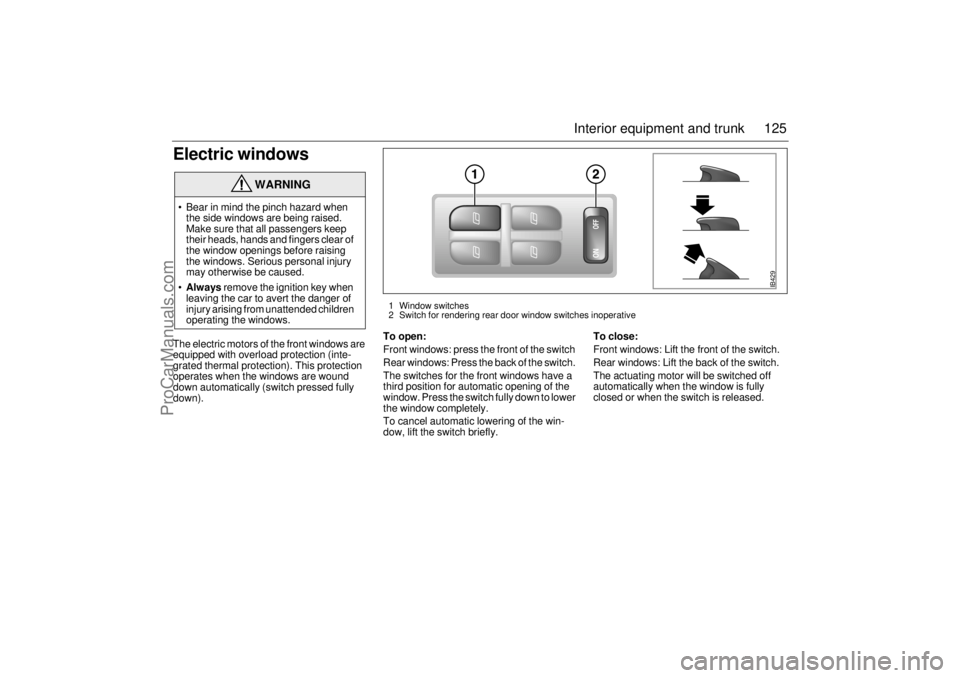
Electric windowsThe electric motors of the front windows are
equipped with overload protection (inte-
grated thermal protection). This protection
operates when the windows are wound
down automatically (switch pressed fully
down).To open:
Front windows: press the front of the switch
Rear windows: Press the back of the switch.
The switches for the front windows have a
third position for automatic opening of the
window. Press the switch fully down to lower
the window completely.
To cancel automatic lowering of the win-
dow, lift the switch briefly.To close:
Front windows: Lift the front of the switch.
Rear windows: Lift the back of the switch.
The actuating motor will be switched off
automatically when the window is fully
closed or when the switch is released.
WARNING
Bear in mind the pinch hazard when
the side windows are being raised.
Make sure that all passengers keep
their heads, hands and fingers clear of
the window openings before raising
the windows. Serious personal injury
may otherwise be caused.
Always remove the ignition key when
leaving the car to avert the danger of
injury arising from unattended children
operating the windows.
IB429
1 Window switches
2 Switch for rendering rear door window switches inoperative
ProCarManuals.com
Page 126 of 272

126 Interior equipment and trunk
Child safety: rear windows (ON/OFF)The window switches on the rear doors can
be rendered inoperative by the ON/OFF
switch in the panel on the center console.
When the switch is ON, the rear side win-
dows can be operated by the switch on each
rear door. The switch’s back lighting will be
activated.
When the switch is OFF, the rear side win-
dows can only be operated from the panel
on the center console. When off, the
switch’s back lighting will also be switched
off.
Sunroof (Option in Canada) The sunroof is operated by the switch on the
overhead panel above the rearview mirror.
The sunroof can be opened partially or fully.
WARNING
Bear in mind the pinch hazard when
operating the sunroof. Make sure that
all passengers keep their heads,
hands and fingers clear of the opening
before operating the sunroof. Serious
personal injury may otherwise be
caused.
Always remove the ignition key when
leaving the car, to avert the danger of
injury arising from unattended children
operating the sunroof.
IB445
Switch for rear side window
ProCarManuals.com