16-09-2002
General menu Switch the audio/telephone/GPS on and insert the navigation CD-ROM. Press the "NAV"button to gain
access to the "Warnings" page. Note: the "Warnings" page appears
when the engine is switched on and when you select the "Navigation"function.
YOUR BOXER IN DETAIL 85
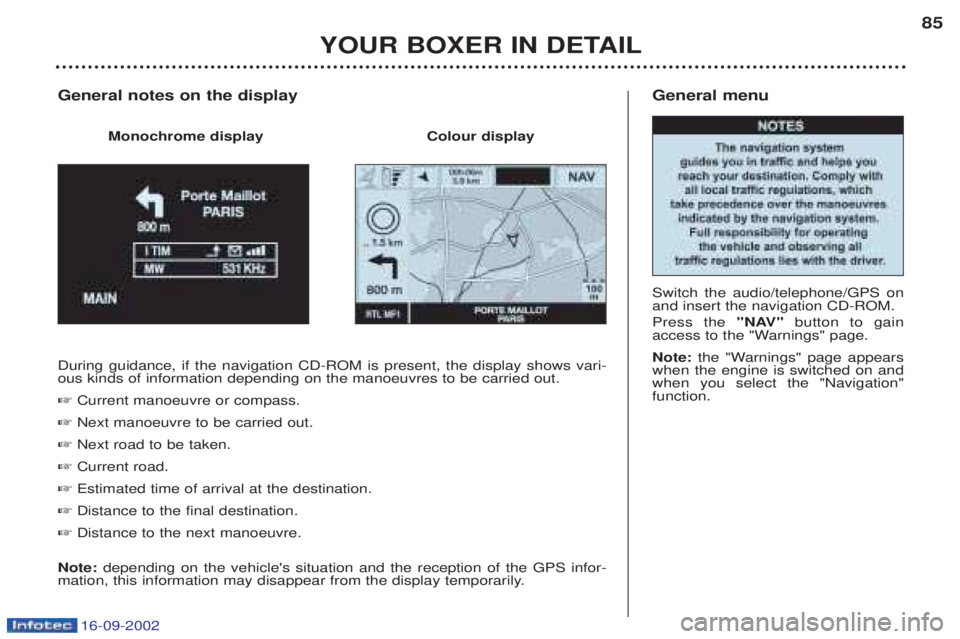
During guidance, if the navigation CD-ROM is present, the display shows vari- ous kinds of information depending on the manoeuvres to be carried out. ☞
Current manoeuvre or compass.
☞ Next manoeuvre to be carried out.
☞ Next road to be taken.
☞ Current road.
☞ Estimated time of arrival at the destination.
☞ Distance to the final destination.
☞ Distance to the next manoeuvre.
Note: depending on the vehicle's situation and the reception of the GPS infor-
mation, this information may disappear from the display temporarily.
General notes on the display
Monochrome display Colour display
16-09-2002
YOUR BOXER IN DETAIL
86
Ð
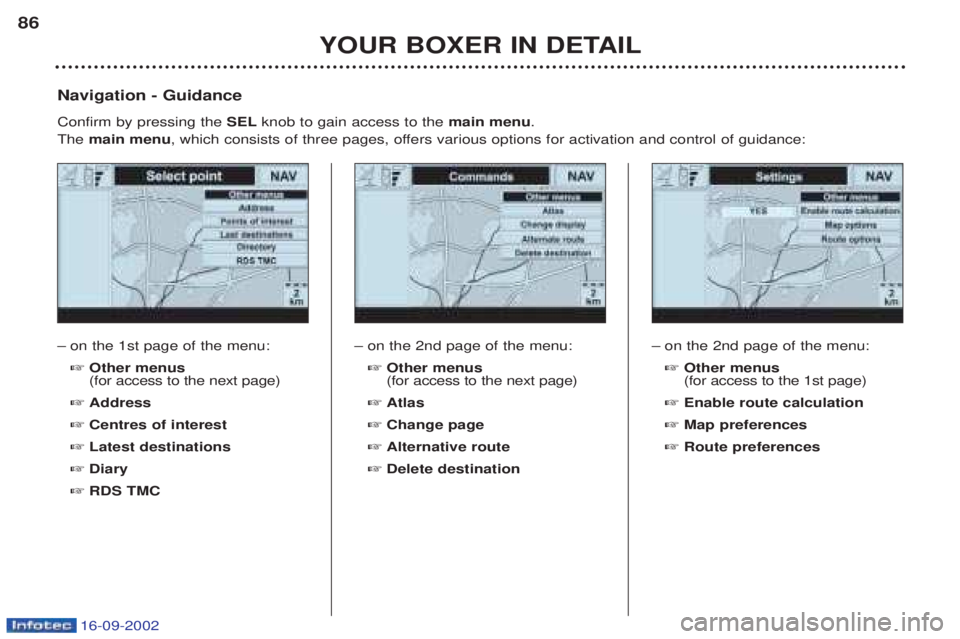
on the 1st page of the menu: ☞ Other menus (for access to the next page)
☞ Address
☞ Centres of interest
☞ Latest destinations
☞ Diary
☞ RDS TMC
Navigation - Guidance Confirm by pressing the
SELknob to gain access to the main menu.
The main menu , which consists of three pages, offers various options for activation and control of guidance:
Ðon the 2nd page of the menu: ☞ Other menus (for access to the next page)
☞ Atlas
☞ Change page
☞ Alternative route
☞ Delete destination Ð
on the 2nd page of the menu: ☞ Other menus (for access to the 1st page)
☞ Enable route calculation
☞ Map preferences
☞ Route preferences
YOUR BOXER IN DETAIL123
TRIP COMPUTER Each time the
TRIPbutton on the audio/telephone control
panel is pressed, the following sequence of data is dis- played: - the average speed,
- the distance travelled,
- the duration of the journey,
- the distance remaining,
- the time of arrival. A
verage speed
This is the average speed calculated since the computer was last set to zero (with the ignition on). Distance travelled This indicates the distance travelled since the computer was last set to zero. Duration of the journey This indicates the time elapsed since the beginning of the journey and since the computer was last set to zero. The duration is indicated in "hours and minutes". Distance remaining to be travelled This is the distance remaining to the destination. It can either be calculated at any time by the navigation if gui-
dance is activated, or entered by the user, minus the dis-tance covered since the distance was entered.
Time of arrival
This indicates the approximate time of arrival at the desti- nation. The arrival time indicated is obtained by increasing by 30%
the remaining duration of the journey, calculated from theaverage speed and added to the current time.
16-09-2002
PRACTICAL INFORMATION159
ACCESSORIES FOR YOUR BOXER
For your PEUGEOT only use accessories and original parts approved by the manufacturer.
These accessories and parts are all adapted to your PEUGEOT, after being tested and approved for reliability and safe-
ty, which PEUGEOT cannot guarantee for other products. A
wide choice of original accessories, approved by PEUGEOT, is available through the dealer network. They all carry
the PEUGEOT guarantee: – Safety : Fog lamps, driver/rear doors separation grilles, anti-theft alarms, window engraving, wheel locks, window protection film, first aid kit, warning triangle, ...
– Comfort : Covers with and without air bags, mats, luggage net, door deflectors, CD storage, sidewindows, thermoformed protectors, wood or metal fittings, mud flaps, ...
– Communication : Audio systems, telephone, hands-free kit, speakers, CD changer, navigation sys-tems,...
– Leisure : Tow bars, snow chains, roof bars with sill plate, ladder, loading roller, ...
– Maintenance products : Screenwash, interior and exterior maintenance and cleaning products, ...
Before installing any electrical accessory on your vehicle, contact a PEUGEOT dealer.