2002 NISSAN SENTRA stop start
[x] Cancel search: stop startPage 67 of 235
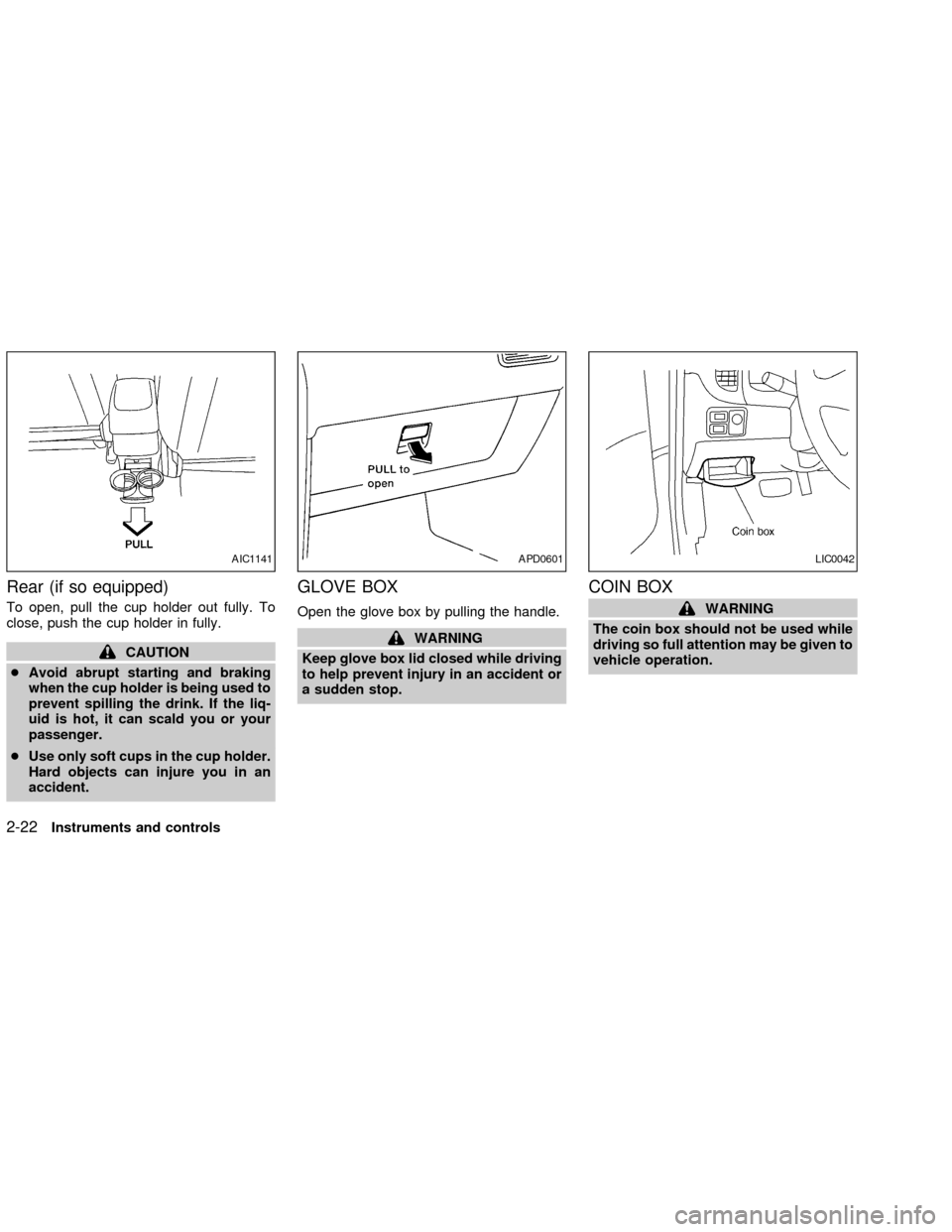
Rear (if so equipped)
To open, pull the cup holder out fully. To
close, push the cup holder in fully.
CAUTION
cAvoid abrupt starting and braking
when the cup holder is being used to
prevent spilling the drink. If the liq-
uid is hot, it can scald you or your
passenger.
cUse only soft cups in the cup holder.
Hard objects can injure you in an
accident.
GLOVE BOX
Open the glove box by pulling the handle.
WARNING
Keep glove box lid closed while driving
to help prevent injury in an accident or
a sudden stop.
COIN BOX
WARNING
The coin box should not be used while
driving so full attention may be given to
vehicle operation.
AIC1141APD0601LIC0042
2-22Instruments and controls
ZX
Page 87 of 235
WARNING
c
Gasoline is extremely flammable and
highly explosive under certain condi-
tions. You could be burned or seriously
injured if it is misused or mishandled.
Always stop the engine and do not
smoke or allow open flames or sparks
near the vehicle when refueling.
cFuel may be under pressure. Turn the
cap one-half turn and wait for any ``hiss-
ing'' sound to stop to prevent fuel from
spraying out and possibly causing per-
sonal injury. Then remove the cap.
cDo not attempt to top off the fuel
tank after the fuel pump nozzle shuts
off automatically. Continued refuel-
ing may cause fuel overflow, result-
ing in fuel spray and possibly fire.
cUse only an original equipment type
fuel filler cap as a replacement. It has
a built-in safety valve needed for
proper operation of the fuel system
and emission control system. An in-
correct cap can result in a serious
malfunction and possible injury. It
could also cause the malfunction
indicator lamp to come on.Do not fill a portable fuel container in
the vehicle or trailer. Static electric-
ity can cause an explosion of flam-
mable liquid, vapor or gas in any
vehicle or trailer. To reduce the risk
of serious injury or death when fill-
ing portable fuel containers:
Ð Always place the container on
the ground when filling.
Ð Do not use electronic devices
while filling.
Ð Keep the pump nozzle in contact
with the container while you are
filling it.
Ð Use only approved portable fuel
containers for flammable liquid.
cNever pour fuel into the throttle body
to attempt to start your vehicle.
CAUTION
cIf fuel is spilled on the vehicle body,
flush it away with water to avoid
paint damage.cTighten until the fuel filler cap clicks.
Failure to tighten the fuel filler cap
properly may cause the
mal-
function indicator lamp (MIL) to illu-
minate. If the
lamp illuminates
because the fuel filler cap is loose or
missing, tighten or install the cap
and continue to drive the vehicle.
The
lamp should turn off after a
few driving trips. If thelamp
does not turn off after a few driving
trips, have the vehicle inspected by
an authorized NISSAN dealer.
cFor additional information, see the
``Malfunction indicator lamp (MIL)''
in the ``Instruments and controls''
section earlier in this manual.
3-14Pre-driving checks and adjustments
ZX
Page 106 of 235

Use theandbuttons for manual
tuning. To move quickly through the chan-
nels, hold either of the tune buttons down
for more than 0.5 seconds.
SEEK/SCAN button
SEEK tuning
Push the SEEK/SCAN tuning button
for less than 1.5 seconds. SEEK tuning
begins from high to low frequencies or low
to high frequencies, depending on which
button is pressed, and stops at the next
broadcasting station. Once the highest
broadcasting station is reached, the radio
continues in the SEEK mode at the lowest
broadcasting station.
SCAN tuning
Push the SEEK/SCAN tuning button
for more than 1.5 seconds. SCAN illu-
minates in the display. SCAN tuning begins
from high to low frequencies or low to high
frequencies, depending on which button is
pressed. SCAN tuning stops at each broad-
casting station for five seconds. Pushing the
button again during this five second period
stops SCAN tuning and the radio remains
tuned to that station.Station memory operations
Six stations can be set for the AM band.
Twelve stations can be set for the FM band
(six for FM1, six for FM2).1. Push to select AM, FM1, or FM2. The
selected band illuminates in the display.
2. Tune to the desired station.
3. Push the desired station select button for
more than 1.5 seconds. For example, in
the illustrations, ch2 is to be memorized.
The radio mutes when the select button
is pushed.
4. When the indicator illuminates in the
display and the sound resumes, memo-
rizing is complete.
5. Other station select buttons can be set in
the same manner.
If the battery cable is disconnected, or if the
radio fuse opens, the radio memory is can-
celled. In that case, reset the desired stations.
Compact disc (CD) player operation
Turn the ignition key to the ACC or ON
position, and carefully insert the compact
disc into the slot with the label side up. The
compact disc is automatically pulled into the
slot and starts to play.
If the radio is already operating, it automati-
cally turns off and the compact disc begins
to play.LHA0034
Heater, air conditioner and audio systems4-15
ZX
Page 107 of 235
CAUTION
Do not force the compact disc into the
slot. This could damage the player.
CD
When this button is pushed with the compact
disc loaded and the radio playing, the radio
turns off and the compact disc starts to play.
When this button is pushed while the com-
pact disc is playing, the compact disc stops
playing.
FF (Fast Forward),
REW (Rewind) buttons
When the
orbutton is pushed
while the compact disc is playing, the com-
pact disc plays at an increased speed while
fast forwarding or rewinding. When the but-
ton is released, the compact disc returns to
normal play speed.
APS (Automatic Pro-
gram Search) FF, APS
REW
When the
button is pushed while the
compact disc is playing, the selection fol-
lowing the present one starts to play from
the beginning. Push the
button severaltimes to skip several selections. Each time
the button is pushed, the CD advances one
selection. (When the last selection on the
compact disc is skipped, the first selection is
played.)
When thebutton is pushed, the selection
being played returns to the beginning. Push
the
button several times to skip back
several selections. Each time the button is
pushed, the CD moves back one selection.
Repeat/Random button
When the
button is pushed while the
compact disc is playing, the play pattern
changes as follows.
1: The current selection is repeated.
RANDOM: Selections are played at ran-
dom, not following the sequence on the
compact disc. The same program may be
repeated twice.
Normal(no symbol): All selections are
played in sequence.
When a new compact disc is inserted,
the play pattern automatically changes
to the ``Normal'' play pattern.
CD EJECT button
When thebutton is pushed with a com-
pact disc loaded, the compact disc ejects.
When thebutton is pushed while the
compact disc is playing, the compact disc
ejects and the system turns off.
If the compact disc ejects and is not
removed within 10 seconds, it is pulled
back into the slot.
Disc indicator light
CD IN appears in the display when a CD is
loaded with the system ON.
4-16Heater, air conditioner and audio systems
ZX
Page 109 of 235
lights turn off and the disc selection button
turns a solid green. After all the CDs have
been loaded, the CD that was loaded first
starts to play.
Play/Stop button
Press the
button while a CD is play-
ing, the CD stops playing and the CD
changer turns off. Press the
button
while the CD changer is off, the last CD that
was loaded starts to play. Press the
button with no CDs loaded, the CD
changer enters the One Disc Loading
Mode.
FF (fast forward) REV
(reverse) buttons
When the
orbutton is pushed
while the CD is playing, the CD plays at an
increased speed while fast forwarding or
reversing. When the button is released, the
CD returns to normal play speed.
APS (Automatic Pro-
gram Search) FF, APS
REV
When the
button is pushed while the
CD is playing, the selection following the
current one starts to play from the begin-ning. Push the
button several times to
skip several selections. Each time the but-
ton is pushed, the CD advances one selec-
tion. When the last selection on the CD is
skipped, the first selection is played.
When the
button is pushed, the current
selection returns to the beginning. Push the
button several times to skip back sev-
eral selections. Each time the button is
pushed, the CD moves back one selection.
When the first selection on the CD is
skipped, the last selection is played.
Repeat Button
When the
button is pushed while a CD
is playing, the play pattern will change as
follows.
ALL - All disc repeat:All CDs are played
repeatedly in sequence.
BLANK (no symbol) - One disc repeat:
The current CD is repeated.
1 - One track repeat:The current selection
is repeated.
ALL RANDOM - All disc random:Selec-
tions from all the CDs that are stored are
played at random. The same program may
be repeated twice. Pressing the
but-ton will select the next random selection.
RANDOM - One disc random:Selections
from the current CD are played at random.
The same program may be repeated twice.
Pressing the
button will select the next
random selection.
When a new CD is inserted, the play
pattern automatically changes to the
``ALL'' play pattern.
CD Eject - Single
When the
button is pressed for less
than 1.5 seconds, then the current CD that
is playing (or if the CD changer is off, the
last CD that was played) ejects. The disc
indicator light starts flashing orange and
both WAIT and the disc selection button
number flash in the display until the CD is
ejected. When the CD is ejected, the disc
indicator light turns off and the display turns
from WAIT to EJECT. When the CD is
removed from the unit, the CD changer
automatically changes to One Disc Loading
Mode so a new CD can be loaded into the
empty holder. The disc indicator light starts
flashing green and both LOAD and the disc
selection button number appear in the dis-
play until a CD is loaded. One Disc Loading
4-18Heater, air conditioner and audio systems
ZX
Page 114 of 235
WARNING
c
The exhaust gas and the exhaust sys-
tem are very hot. Keep people, ani-
mals or flammable materials away
from the exhaust system compo-
nents.
cDo not stop or park the vehicle over
flammable materials such as dry
grass, waste paper or rags. They
may ignite and cause a fire.
CAUTION
c
Do not use leaded gasoline. Deposits
from leaded gasoline seriously re-
duce the three-way catalyst's ability
to help reduce exhaust pollutants.
cKeep your engine tuned up. Malfunc-
tions in the ignition, fuel injection, or
electrical systems can cause over-
rich fuel flow into the three-way cata-
lyst, causing it to overheat. Do not
keep driving if the engine misfires,
or if noticeable loss of performance
or other unusual operating condi-
tions are detected. Have the vehicleinspected promptly by an authorized
NISSAN dealer.
cAvoid driving with an extremely low
fuel level. Running out of fuel could
cause the engine to misfire, damag-
ing the three-way catalyst.
cDo not race the engine while warm-
ing it up.
cDo not push or tow your vehicle to
start the engine.
AVOIDING COLLISION AND
ROLLOVER
WARNING
Failure to operate this vehicle in a safe
and prudent manner may result in loss
of control or an accident.
Be alert and drive defensively at all times.
Obey all traffic regulations. Avoid excessive
speed, high speed cornering, or sudden
steering maneuvers, because these driving
practices could cause you to lose control of
your vehicle.As with any vehicle, loss of
control could result in a collision withother vehicles or objects, or cause the
vehicle to rollover, particularly if the loss
of control causes the vehicle to slide
sideways.Be attentive at all times, and
avoid driving when tired. Never drive when
under the influence of alcohol or drugs
(including prescription or over-the-counter
drugs which may cause drowsiness). Al-
ways wear your seat belt as outlined in the
``Seats, restraints and supplemental air bag
systems'' section of this manual, and also
instruct your passengers to do so.
DRINKING ALCOHOL/DRUGS
AND DRIVING
WARNING
Never drive under the influence of alco-
hol or drugs. Alcohol in the bloodstream
reduces coordination, delays reaction
time and impairs judgement. Driving after
drinking alcohol increases the likelihood
of being involved in an accident injuring
yourself and others. Additionally, if you
are injured in an accident, alcohol can
increase the severity of injury.
NISSAN is committed to safe driving. How-
ever, you must choose not to drive under
Starting and driving
5-3
ZX
Page 118 of 235
1. Apply the parking brake.
2.Automatic transmission:
Move the shift selector lever to P (Park)
or N (Neutral). (P is recommended.)
The shift selector lever cannot be
moved out of P (Park) and into any of
the other gear positions if the ignition
key is turned to LOCK or if the key is
removed.
The starter is designed not to operate
if the shift selector lever is in one of
the driving positions.
Manual transmission:
Move the selector lever to N (Neutral),
and depress the clutch pedal to the floor.
The starter is designed to operate
only when the clutch pedal is fully
depressed.
3. Crank the enginewith your foot off the
accelerator pedalby turning the ignition
key to START. Release the key when the
engine starts. If the engine starts, but
fails to run, repeat the above procedure.
Ð If the engine is very hard to start in
extremely cold or hot weather, de-press and hold the accelerator pedal
to help start the engine.
Ð In the summer, when restarting the
engine within 30 minutes after it has
been stopped, keep the accelerator
pedal fully depressed while starting.
CAUTION
Do not operate the starter for more than
15 seconds at a time. If the engine does
not start, turn the key off and wait 10
seconds before cranking again, other-
wise the starter could be damaged.
4.Warm-up
Allow the engine to idle for at least 30
seconds after starting. Drive at moderate
speed for a short distance first, especially
in cold weather.
AUTOMATIC TRANSMISSION
(if so equipped)
WARNING
cDo not depress the accelerator pedal
while shifting from P (Park) or N
(Neutral) to R (Reverse), D (Drive), 2
or 1. Always depress the brake pedal
until shifting is completed. Failure to
do so could cause you to lose con-
trol and have an accident.
cCold engine idle speed is high, so
use caution when shifting into a for-
ward or reverse gear before the en-
gine has warmed up.
cNever shift to P (Park) or R (Reverse)
while the vehicle is moving. This
could cause an accident.
CAUTION
cWhen stopping the vehicle on an
uphill grade, do not hold the vehicle
by depressing the accelerator pedal.
The foot brake should be used for
this purpose.
STARTING THE ENGINE DRIVING THE VEHICLE
Starting and driving5-7
ZX
Page 119 of 235
cDo not downshift abruptly on slip-
pery roads. This may cause a loss of
control.
The automatic transmission in your vehicle
is electronically controlled to produce maxi-
mum power and smooth operation.
The recommended operating procedures for
this transmission are shown on the following
pages. Follow these procedures for maximum
vehicle performance and driving enjoyment.
Starting the vehicle
cAfter starting the engine, fully depress
the foot brake pedal before shifting the
shift selector lever to the D (Drive), R
(Reverse), 2 or 1 position. Be sure the
vehicle is at a complete stop before
attempting to shift the shift selector lever.
cKeep the foot brake pedal depressed
and shift into a driving gear.
c
Release the foot brake, then gradually
start the vehicle in motion.
The automatic transmission is designed so
the foot brake pedal MUST be depressed
before shifting from P (Park) to any drive
position while the ignition switch is ON.
The shift selector lever cannot be moved
out of P (Park) and into any of the other
gear positions if the ignition key is
turned to LOCK or if the key is removed.
The shift selector lever can be moved if
the ignition switch is in the ON position
and the foot brake pedal is depressed.
Shifting
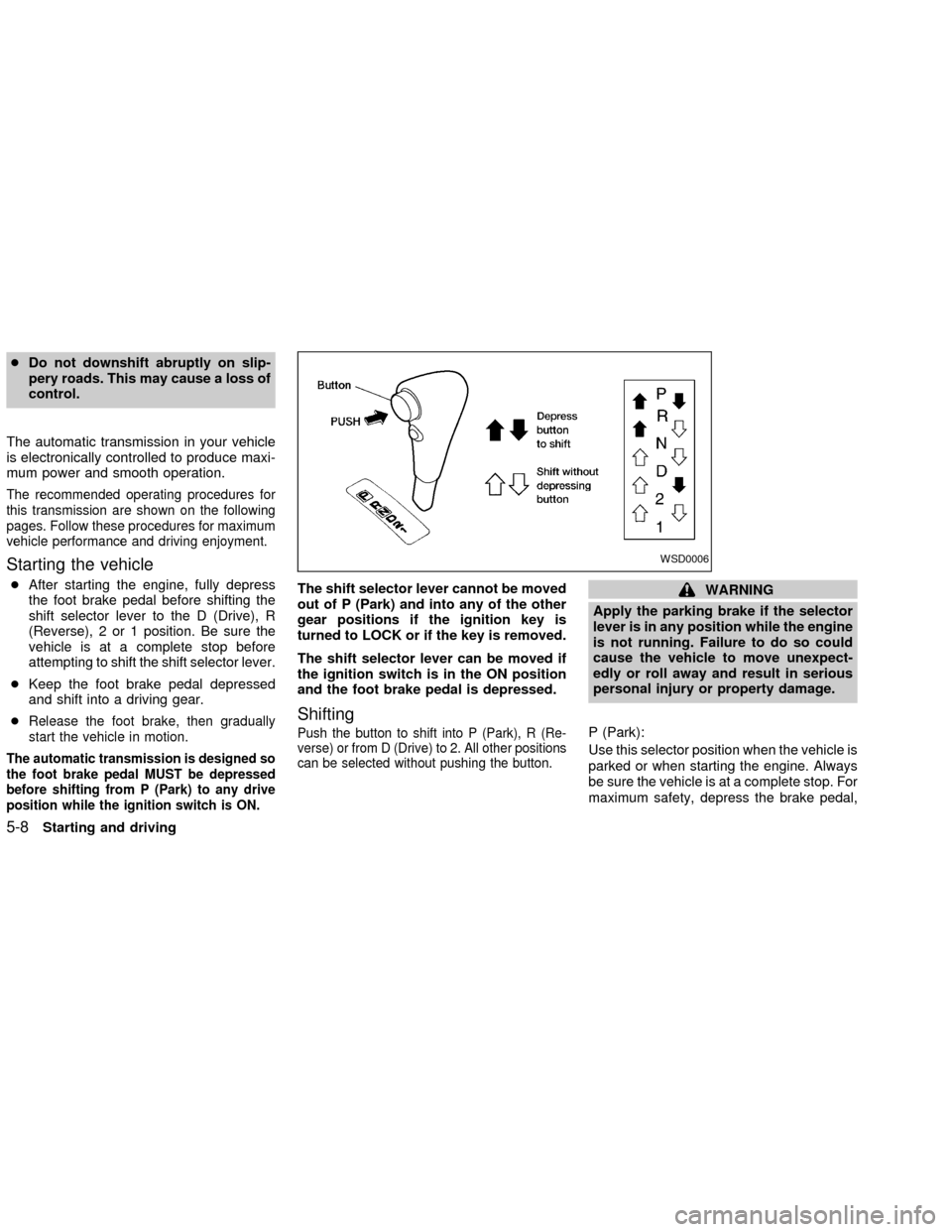
Push the button to shift into P (Park), R (Re-
verse) or from D (Drive) to 2. All other positions
can be selected without pushing the button.
WARNING
Apply the parking brake if the selector
lever is in any position while the engine
is not running. Failure to do so could
cause the vehicle to move unexpect-
edly or roll away and result in serious
personal injury or property damage.
P (Park):
Use this selector position when the vehicle is
parked or when starting the engine. Always
be sure the vehicle is at a complete stop. For
maximum safety, depress the brake pedal,
WSD0006
5-8Starting and driving
ZX