2002 NISSAN SENTRA air condition
[x] Cancel search: air conditionPage 108 of 235
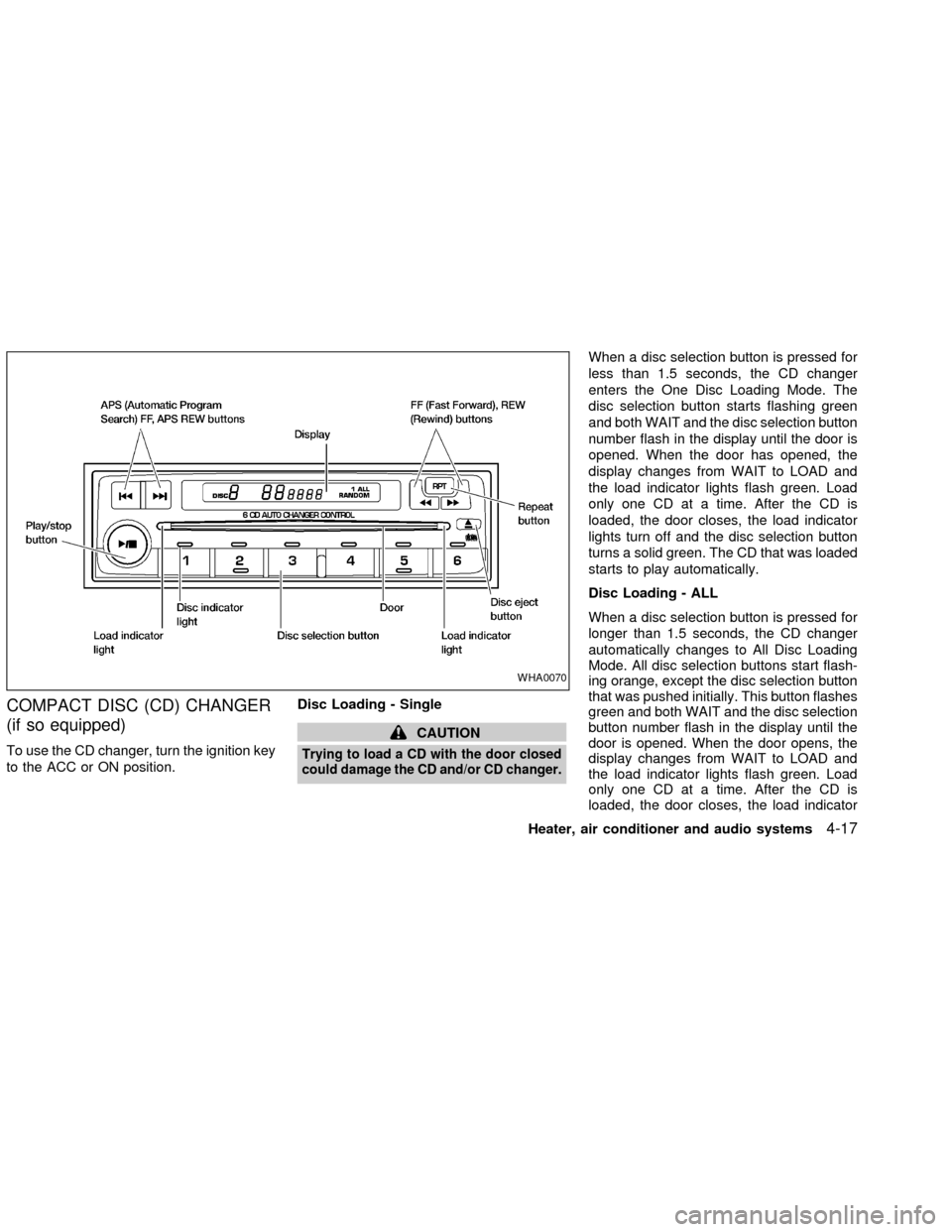
COMPACT DISC (CD) CHANGER
(if so equipped)
To use the CD changer, turn the ignition key
to the ACC or ON position.Disc Loading - Single
CAUTION
Trying to load a CD with the door closed
could damage the CD and/or CD changer.
When a disc selection button is pressed for
less than 1.5 seconds, the CD changer
enters the One Disc Loading Mode. The
disc selection button starts flashing green
and both WAIT and the disc selection button
number flash in the display until the door is
opened. When the door has opened, the
display changes from WAIT to LOAD and
the load indicator lights flash green. Load
only one CD at a time. After the CD is
loaded, the door closes, the load indicator
lights turn off and the disc selection button
turns a solid green. The CD that was loaded
starts to play automatically.
Disc Loading - ALL
When a disc selection button is pressed for
longer than 1.5 seconds, the CD changer
automatically changes to All Disc Loading
Mode. All disc selection buttons start flash-
ing orange, except the disc selection button
that was pushed initially. This button flashes
green and both WAIT and the disc selection
button number flash in the display until the
door is opened. When the door opens, the
display changes from WAIT to LOAD and
the load indicator lights flash green. Load
only one CD at a time. After the CD is
loaded, the door closes, the load indicator
WHA0070
Heater, air conditioner and audio systems4-17
ZX
Page 109 of 235

lights turn off and the disc selection button
turns a solid green. After all the CDs have
been loaded, the CD that was loaded first
starts to play.
Play/Stop button
Press the
button while a CD is play-
ing, the CD stops playing and the CD
changer turns off. Press the
button
while the CD changer is off, the last CD that
was loaded starts to play. Press the
button with no CDs loaded, the CD
changer enters the One Disc Loading
Mode.
FF (fast forward) REV
(reverse) buttons
When the
orbutton is pushed
while the CD is playing, the CD plays at an
increased speed while fast forwarding or
reversing. When the button is released, the
CD returns to normal play speed.
APS (Automatic Pro-
gram Search) FF, APS
REV
When the
button is pushed while the
CD is playing, the selection following the
current one starts to play from the begin-ning. Push the
button several times to
skip several selections. Each time the but-
ton is pushed, the CD advances one selec-
tion. When the last selection on the CD is
skipped, the first selection is played.
When the
button is pushed, the current
selection returns to the beginning. Push the
button several times to skip back sev-
eral selections. Each time the button is
pushed, the CD moves back one selection.
When the first selection on the CD is
skipped, the last selection is played.
Repeat Button
When the
button is pushed while a CD
is playing, the play pattern will change as
follows.
ALL - All disc repeat:All CDs are played
repeatedly in sequence.
BLANK (no symbol) - One disc repeat:
The current CD is repeated.
1 - One track repeat:The current selection
is repeated.
ALL RANDOM - All disc random:Selec-
tions from all the CDs that are stored are
played at random. The same program may
be repeated twice. Pressing the
but-ton will select the next random selection.
RANDOM - One disc random:Selections
from the current CD are played at random.
The same program may be repeated twice.
Pressing the
button will select the next
random selection.
When a new CD is inserted, the play
pattern automatically changes to the
``ALL'' play pattern.
CD Eject - Single
When the
button is pressed for less
than 1.5 seconds, then the current CD that
is playing (or if the CD changer is off, the
last CD that was played) ejects. The disc
indicator light starts flashing orange and
both WAIT and the disc selection button
number flash in the display until the CD is
ejected. When the CD is ejected, the disc
indicator light turns off and the display turns
from WAIT to EJECT. When the CD is
removed from the unit, the CD changer
automatically changes to One Disc Loading
Mode so a new CD can be loaded into the
empty holder. The disc indicator light starts
flashing green and both LOAD and the disc
selection button number appear in the dis-
play until a CD is loaded. One Disc Loading
4-18Heater, air conditioner and audio systems
ZX
Page 110 of 235
Mode cancels if another disc selection but-
ton is pushed or by waiting longer than 15
seconds to load a CD.
CD Eject - ALL
When the
button is pressed for longer
than 1.5 seconds, the CD changer auto-
matically changes to All Disc Eject Mode.
The disc indicator light for the current CD (or
the last CD that was played) starts flashing
orange and both WAIT and the disc selec-
tion button number flash in the display until
the CD ejects. When the CD ejects, the disc
indicator light turns off and the display turns
from WAIT to EJECT. When the CD is
removed from the unit, the next CD starts to
eject. After all the CDs are ejected, the CD
changer turns off.
If a CD is ejected and is not removed
within 10 seconds, it will be pulled back
into the slot.
CD CARE AND CLEANING
cHandle a CD by its edges. Never touch
the surface of the disc. Do not bend the
disc.
cAlways place the discs in the storage
case when they are not being used.
cTo clean a disc, wipe the surface from
the center to the outer edge using a
clean, soft cloth. Do not wipe the disc
using a circular motion.
Do not use a conventional record cleaner
or alcohol intended for industrial use.
c
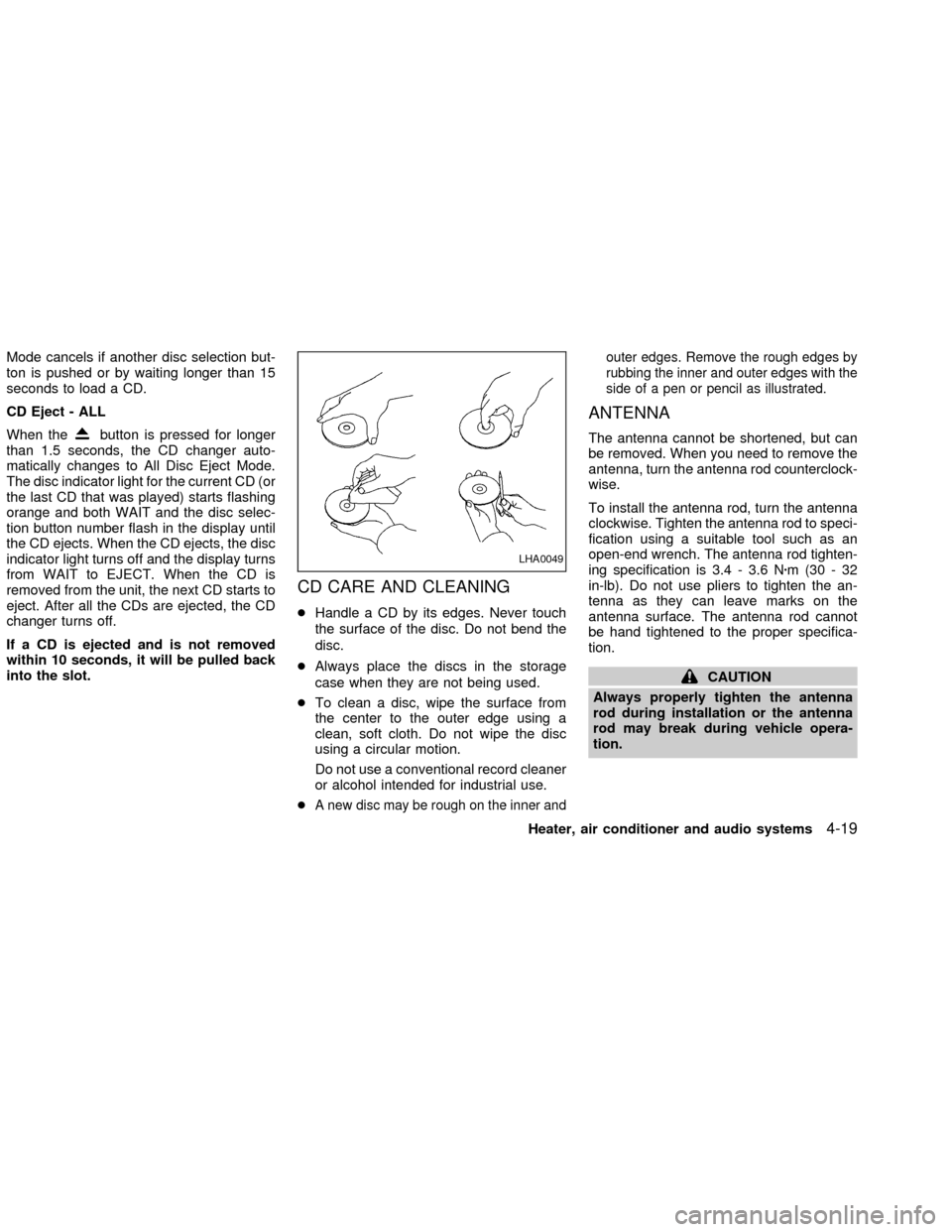
A new disc may be rough on the inner andouter edges. Remove the rough edges by
rubbing the inner and outer edges with the
side of a pen or pencil as illustrated.
ANTENNA
The antenna cannot be shortened, but can
be removed. When you need to remove the
antenna, turn the antenna rod counterclock-
wise.
To install the antenna rod, turn the antenna
clockwise. Tighten the antenna rod to speci-
fication using a suitable tool such as an
open-end wrench. The antenna rod tighten-
ing specification is 3.4 - 3.6 Nzm(30-32
in-lb). Do not use pliers to tighten the an-
tenna as they can leave marks on the
antenna surface. The antenna rod cannot
be hand tightened to the proper specifica-
tion.
CAUTION
Always properly tighten the antenna
rod during installation or the antenna
rod may break during vehicle opera-
tion.
LHA0049
Heater, air conditioner and audio systems4-19
ZX
Page 111 of 235
When installing a CB ham radio or a car
phone in your NISSAN, be sure to observe
the following cautions, otherwise the new
equipment may adversely affect the Multi-
port Fuel Injection (MFI) system and other
electronic parts.
WARNING
cA cellular telephone should not be
used while driving so full attention
may be given to vehicle operation.
Some jurisdictions prohibit the use
of cellular telephones while driving.
cIf you must make a call while your
vehicle is in motion, the hands free
cellular phone operational mode (if
so equipped) is highly recom-
mended. Exercise extreme caution
at all times so full attention may be
given to vehicle operation.
cIf a conversation in a moving vehicle
requires you to take notes, pull off
the road to a safe location and stop
your vehicle before doing so.
CAUTION
cKeep the antenna as far away as
possible from the Engine Control
Module (ECM).
c
Keep the antenna wire more than 8 in.
(20 cm) away from the Multiport Fuel
Injection harness. Do not route the
antenna wire next to any harness.
cAdjust the antenna standing-wave
ratio as recommended by the manu-
facturer.
cConnect the ground wire from the
CB radio chassis to the body.
cFor details, consult an authorized
NISSAN dealer.
CAR PHONE OR CB RADIO
4-20Heater, air conditioner and audio systems
ZX
Page 115 of 235

the influence of alcohol. Every year thou-
sands of people are injured or killed in
alcohol-related accidents. Although the lo-
cal laws vary on what is considered to be
legally intoxicated, the fact is that alcohol
affects all people differently and most
people underestimate the effects of alcohol.
Remember, drinking and driving don't mix!
And that is true for drugs, too (over-the-
counter, prescription, and illegal drugs). Do
not drive if your ability to operate your
vehicle is impaired by alcohol, drugs, or
some other physical condition.
AUTOMATIC TRANSMISSION
On automatic transmission models the igni-
tion lock is designed so the key cannot be
turned to LOCK and removed until the shift
selector lever is moved to the P (Park)
position.
When removing the key from the ignition,
make sure the shift selector lever is in the P
(Park) position.
When the key cannot be turned to the LOCK
position, proceed as follows to remove the
key.1) Move the shift selector lever into the P
(Park) position.
2) Turn the ignition key slightly toward the
ON position.
3) Turn the key to the LOCK position.
4) Remove the key.
The shift lever is designed so it cannot be
moved out of P(Park) and into any of the
other gear positions if the ignition key is
turned to OFF or if the key is removed from
the switch.
The shift selector lever can be moved if
the ignition switch is in the ON position
and the foot brake pedal is depressed.
There is an OFF position between the
LOCK and ACC positions. The OFF posi-
tion is indicated by a ``1'' on the key
cylinder. When the ignition is in OFF, the
steering wheel is not locked.
In order for the steering wheel to be
locked, it must be turned about 1/8 of a
turn clockwise from the straight up posi-
tion.
To lock the steering wheel, turn the key
to the LOCK position. To unlock the
steering wheel, insert the key and turn it
WSD0004
IGNITION SWITCH
5-4Starting and driving
ZX
Page 128 of 235
cKeep your engine tuned up.
cFollow the recommended periodic main-
tenance schedule.
cKeep the tires inflated to the correct
pressure. Low tire pressure increases
tire wear and wastes fuel.
cKeep the front wheels in correct align-
ment. Improper alignment increases tire
wear and lowers fuel economy.
cAir conditioner operation lowers fuel
economy. Use the air conditioner only
when necessary.
cWhen cruising at highway speeds, it is
more economical to use the air condi-
tioner and leave the windows closed to
reduce drag.
WARNING
Do not park the vehicle over flammable
materials such as dry grass, waste pa-
per or rags. They may ignite and cause
a fire.
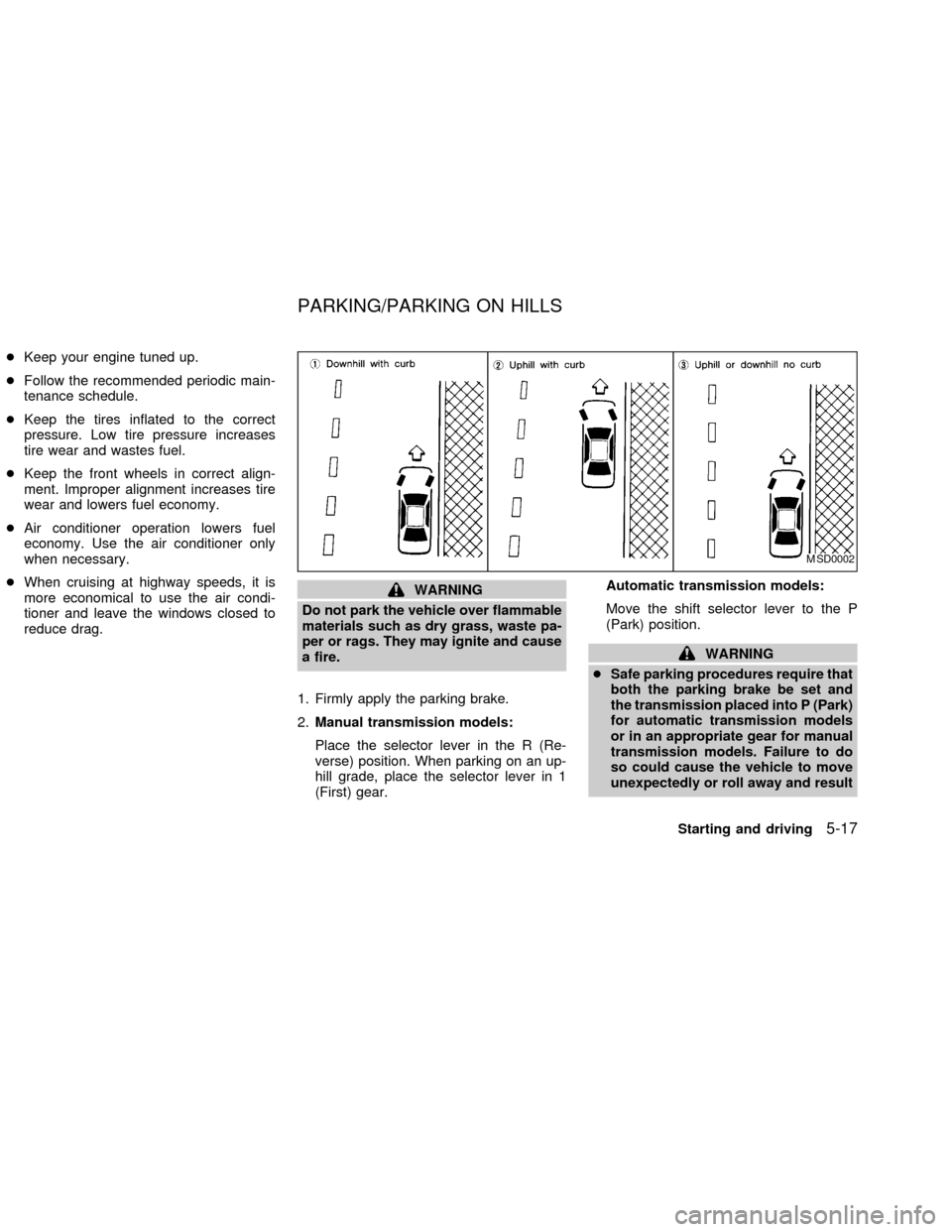
1. Firmly apply the parking brake.
2.Manual transmission models:
Place the selector lever in the R (Re-
verse) position. When parking on an up-
hill grade, place the selector lever in 1
(First) gear.Automatic transmission models:
Move the shift selector lever to the P
(Park) position.
WARNING
cSafe parking procedures require that
both the parking brake be set and
the transmission placed into P (Park)
for automatic transmission models
or in an appropriate gear for manual
transmission models. Failure to do
so could cause the vehicle to move
unexpectedly or roll away and result
MSD0002
PARKING/PARKING ON HILLS
Starting and driving5-17
ZX
Page 131 of 235
locking up, the actuator (under the hood)
rapidly applies and releases hydraulic pres-
sure (like pumping the brakes very quickly).
While the actuator is working, you may feel
a pulsation in the brake pedal and hear a
noise or vibration from the actuator under
the hood. This is normal and indicates that
the anti-lock system is working properly.
However, the pulsation may indicate that
road conditions are hazardous and extra
care is required while driving.
Self-test feature
The anti-lock brake system is a sophisti-
cated device with electronic sensors, elec-
tric pumps, and hydraulic solenoids con-
trolled by a computer. The computer has a
built-in diagnostic feature that tests the sys-
tem each time you start the engine and
move the vehicle at a low speed in forward
or reverse. When the self-test occurs, you
may hear a ``clunk'' noise and/or feel a
pulsation in the brake pedal. This is normal
and is not an indication of any malfunction.
If the computer senses any malfunction, it
switches the anti-lock brake system OFF
and turns on the ABS brake warning light in
the dashboard. The brake system then op-erates normally, but without anti-lock assis-
tance.
If the light comes on during the self-test or
while driving, take the vehicle to an autho-
rized NISSAN dealer for repair.
WARNING
c
The anti-lock brake system is a so-
phisticated device, but it cannot pre-
vent accidents resulting from care-
less or dangerous driving tech-
niques. It can help maintain vehicle
control during braking on slippery
surfaces, but remember that the stop-
ping distance on slippery surfaces
will be longer than on normal sur-
faces, even with the anti-lock brake
system. Stopping distances may also
be longer on rough, gravel or snow
covered roads, or if you are using tire
chains. Always maintain a safe dis-
tance from the vehicle in front of you.
Ultimately, the responsibility for
safety of self and others rests in the
hands of the driver.
Tire type and condition of tires may
also affect braking effectiveness.cWhen replacing tires, install the
specified tire size on all four wheels.
c
When installing a spare tire, make
sure it is the proper size and type as
specified on the tire placard. For tire
placard location information, refer to
``Tire placard'' in the ``Technical and
consumer information'' section of
this manual.
cFor additional information, refer to
``Wheels and tires'' in the ``Mainte-
nance and do-it-yourself'' section of
this manual.
5-20Starting and driving
ZX
Page 142 of 235
cWhenever working on or near a bat-
tery, always wear suitable eye pro-
tectors (for example, goggles or in-
dustrial safety spectacles) and
remove rings, metal bands, or any
other jewelry. Do not lean over the
battery when jump starting.
cDo not attempt to jump start a frozen
battery. It could explode and cause
serious injury.
cYour vehicle has an automatic en-
gine cooling fan. It could come on at
any time. Keep hands and other ob-
jects away from it.
Always follow the instructions below.
Failure to do so could result in damage
to the charging system and cause per-
sonal injury.
1.
If the booster battery is in another vehicle,
position the two vehicles to bring their
batteries into close proximity to each other.
Do not allow the two vehicles to touch.
2. Apply the parking brake. Move the selec-
tor lever to N (Neutral) (on automatic
transmission models, move the shift se-
lector lever to P (Park)). Switch off all
unnecessary electrical systems (lights,heater, air conditioner, etc.).
3. Cover the battery with an old cloth to
reduce explosion hazard.
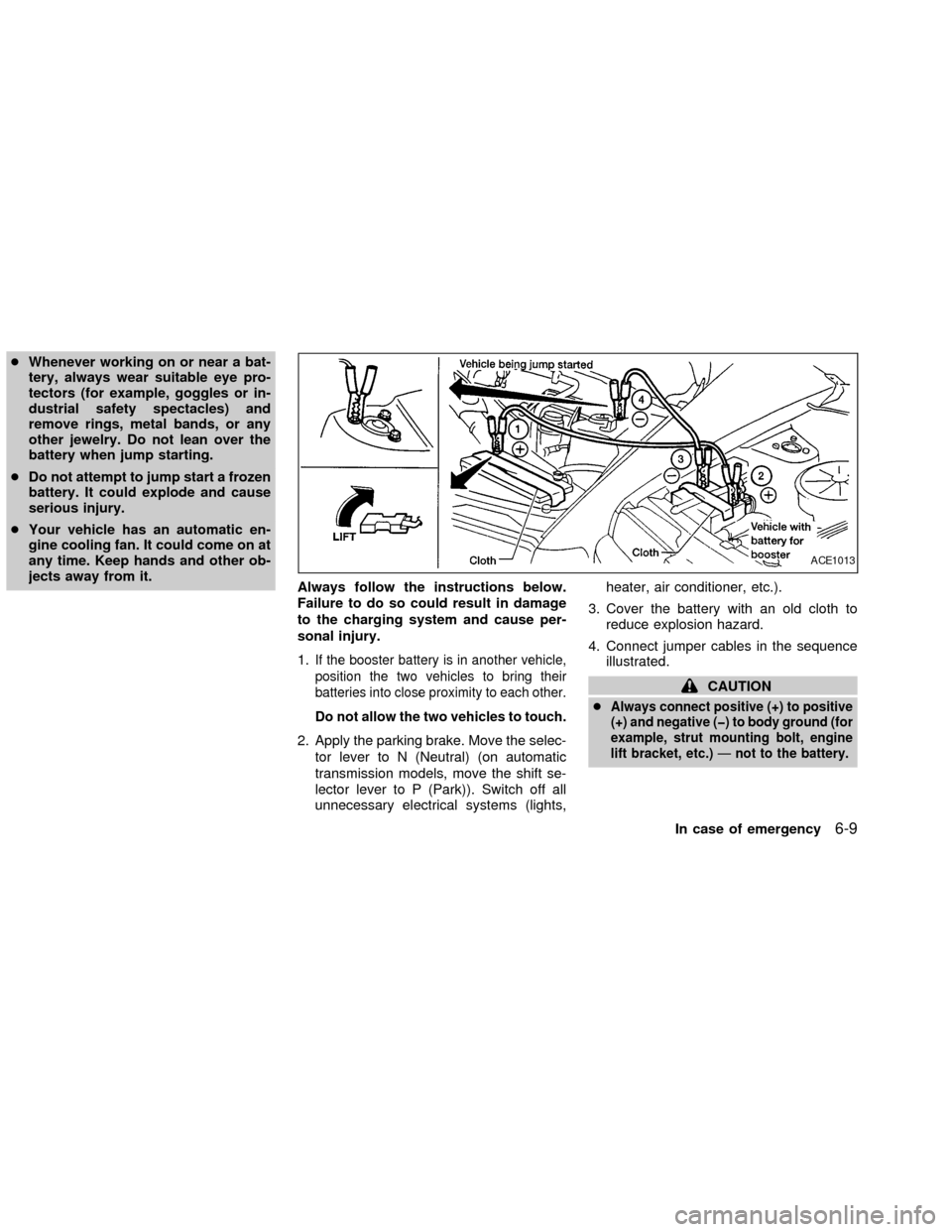
4. Connect jumper cables in the sequence
illustrated.
CAUTION
c
Always connect positive (+) to positive
(+) and negative (þ) to body ground (for
example, strut mounting bolt, engine
lift bracket, etc.)Ðnot to the battery.
ACE1013
In case of emergency6-9
ZX