2002 NISSAN QUEST phone
[x] Cancel search: phonePage 4 of 294

NISSAN CUSTOMER CARE PROGRAM
NISSAN CARES ...
Both NISSAN and your NISSAN dealer are dedicated to serving all your automotive needs. Your satisfaction with your vehicle and your
NISSAN dealer are our primary concerns. Your NISSAN dealer is always available to assist you with all your automobile sales and service
needs.
However, if there is something that your
NISSAN dealer cannot assist you with or
you would like to provide NISSAN directly
with comments or questions, please con-
tact our (NISSAN's) Consumer Affairs De-
partment using our toll-free number:
For U.S. mainland and Alaska
customers
1-800-NISSAN-1
(1-800-647-7261)
For Hawaii customers
(808) 836-0888 (Oahu Number)
For CANADIAN customers
1-800-387-0122
The Consumer Affairs Department will ask
for the following information:
Ð Your name, address, and telephone
number
Ð Vehicle identification number (Attached
to the top of the instrument panel on the
driver's side.)
Ð Date of purchase
Ð Current odometer reading
Ð Your NISSAN dealer's name
Ð Your comments or questions
OR
you may write to NISSAN with the information
on the left at:
For U.S. mainland and Alaska custom-
ers
Nissan North America Inc.
Consumer Affairs Department
P.O. Box 191
Gardena, California 90248-0191
For Hawaii customers
Nissan Motor Corporation in Hawaii
2880 Kilihau St.
Honolulu, Hawaii 96819
For Canadian customers
Nissan Canada Inc.
5290 Orbitor Drive
Mississauga, Ontario L4W 4Z5
We appreciate your interest in NISSAN and thank you for buying a quality NISSAN vehicle.
ZX
Page 111 of 294
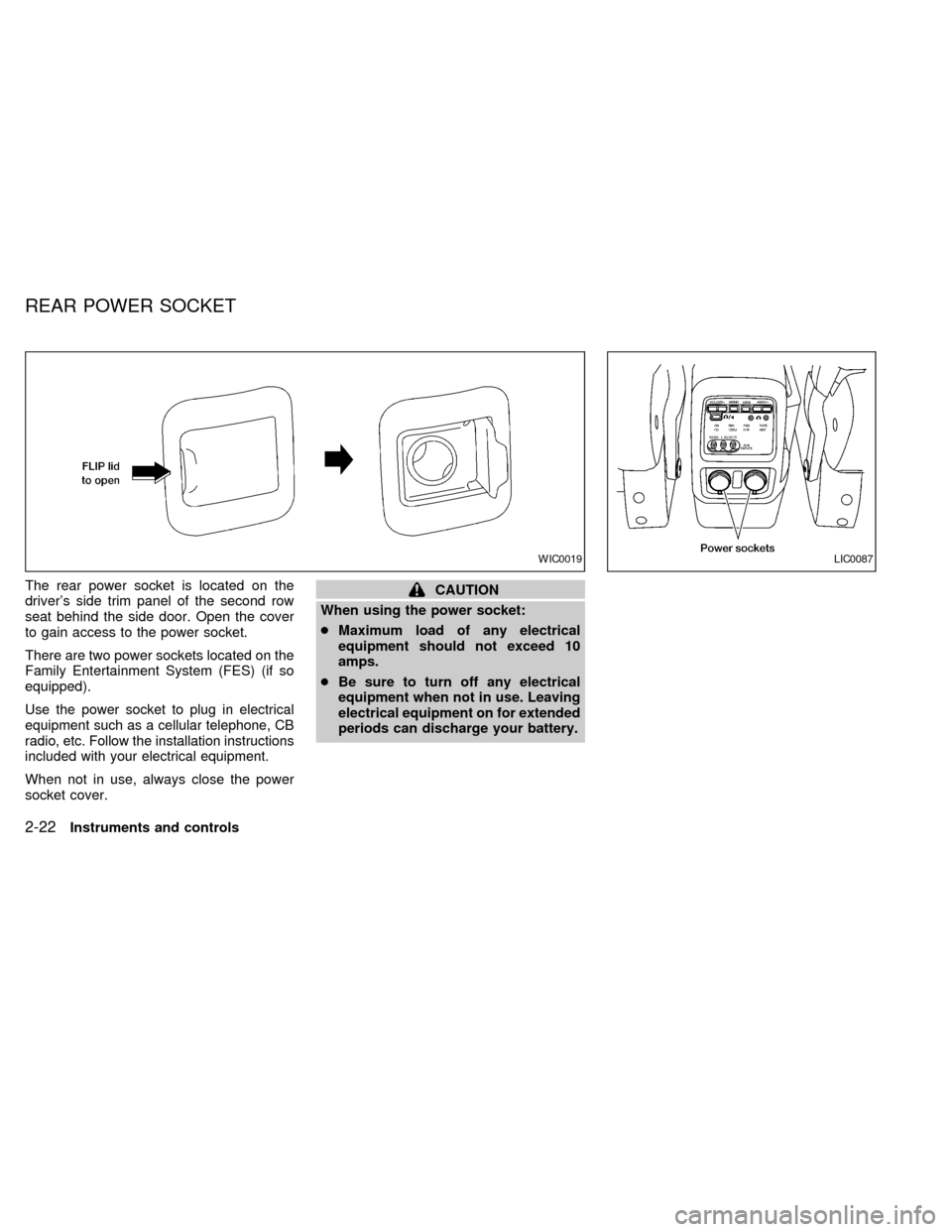
The rear power socket is located on the
driver's side trim panel of the second row
seat behind the side door. Open the cover
to gain access to the power socket.
There are two power sockets located on the
Family Entertainment System (FES) (if so
equipped).
Use the power socket to plug in electrical
equipment such as a cellular telephone, CB
radio, etc. Follow the installation instructions
included with your electrical equipment.
When not in use, always close the power
socket cover.
CAUTION
When using the power socket:
cMaximum load of any electrical
equipment should not exceed 10
amps.
cBe sure to turn off any electrical
equipment when not in use. Leaving
electrical equipment on for extended
periods can discharge your battery.
WIC0019LIC0087
REAR POWER SOCKET
2-22Instruments and controls
ZX
Page 144 of 294

4Heater, air conditioner and audio systems
Ventilators ..............................................................4-2
Center ventilators ..............................................4-2
Side ventilators ..................................................4-2
Heater and air conditioner (manual) ......................4-3
Controls .............................................................4-3
Heater operation ................................................4-4
Air conditioner operation ...................................4-5
Air flow charts ....................................................4-7
Heater and air conditioner (automatic)
(if so equipped) ....................................................4-11
Automatic operation ........................................4-12
Rear seat air conditioner (if so equipped) ...........4-14
Controls ...........................................................4-14
Servicing air conditioning .....................................4-15
Audio system ........................................................4-16
Radio ...............................................................4-16
FM radio reception ..........................................4-16
AM radio reception ..........................................4-16
Audio operation precautions ...........................4-17FM-AM radio with cassette player...................4-20
FM-AM radio with cassette player and
compact disc (CD) player ................................4-26
Compact disc (CD) player (if so
equipped) .........................................................4-32
CD care and cleaning......................................4-33
Steering wheel switch for audio controls
(if so equipped)................................................4-34
Rear audio controls (if so equipped) ...............4-35
Antenna ...........................................................4-37
AutovisionTfamily entertainment system
(FES) (if so equipped) ..........................................4-37
Rear seat entertainment module
(RSEM) (if so equipped)..................................4-41
Care and maintenance ....................................4-43
Troubleshooting ...............................................4-44
Specifications ..................................................4-45
Car phone or CB radio .........................................4-46
ZX
Page 159 of 294

RADIO
Turn the ignition key to ACC or ON and
press the power on switch to turn on the
radio. If you listen to the radio with the
engine not running, the key should be
turned to the ACC position.
Radio reception is affected by station signal
strength, distance from radio transmitter,
buildings, bridges, mountains and other ex-
ternal influences. Intermittent changes in
reception quality normally are caused by
these external influences.
Using a cellular phone in or near the
vehicle may influence radio reception
quality.
Radio reception
Your NISSAN radio system is equipped with
state-of-the-art electronic circuits to en-
hance radio reception. These circuits are
designed to extend reception range, and to
enhance the quality of that reception.
However there are some general character-
istics of both FM and AM radio signals that
can affect radio reception quality in a mov-
ing vehicle, even when the finest equipment
is used. These characteristics are com-pletely normal in a given reception area,
and do not indicate any malfunction in your
NISSAN radio system.
Reception conditions will constantly change
because of vehicle movement. Buildings,
terrain, signal distance and interference
from other vehicles can work against ideal
reception. Described below are some of the
factors that can affect your radio reception.
FM RADIO RECEPTION
Range: FM range is normally limited to 25 to
30 miles (40 to 48 km), with monaural
(single channel) FM having slightly more
range than stereo FM. External influences
may sometimes interfere with FM station
reception even if the FM station is within 25
miles (40 km). The strength of the FM signal
is directly related to the distance between
the transmitter and receiver. FM signals
follow a line-of-sight path, exhibiting many
of the same characteristics as light. For
example they will reflect off objects.
Fade and drift: As your vehicle moves away
from a station transmitter, the signals will
tend to fade and/or drift.
Static and flutter: During signal interference
from buildings, large hills or due to antennaposition, usually in conjunction with in-
creased distance from the station transmit-
ter, static or flutter can be heard. This can
be reduced by adjusting the treble control
counterclockwise to reduce treble re-
sponse.
Multipath reception: Because of the reflec-
tive characteristics of FM signals, direct and
reflected signals reach the receiver at the
same time. The signals may cancel each
other, resulting in momentary flutter or loss
of sound.
AM RADIO RECEPTION
AM signals, because of their low frequency,
can bend around objects and skip along the
ground. In addition, the signals can be
bounced off the ionosphere and bent back
to earth. Because of these characteristics.
AM signals are also subject to interference
as they travel from transmitter to receiver.
Fading: Occurs while the vehicle is passing
through freeway underpasses or in areas
with many tall buildings. It can also occur for
several seconds during ionospheric turbu-
lence even in areas where no obstacles
exist.
Static: Caused by thunderstorms, electrical
AUDIO SYSTEM
4-16Heater, air conditioner and audio systems
ZX
Page 163 of 294

FM-AM RADIO WITH CASSETTE
PLAYER
NOTE: Audio control features include com-
mand buttons for CD players which can be
installed as optional equipment to upgrade
the audio system. A CD player is not in-
cluded with this system, but can be pur-
chased as an option at any time. Consult
with an authorized NISSAN dealer for fea-
ture availability.
Audio main operation
To turn the radio on, turn the ignition key to
ACC or ON. If you listen to the radio with the
engine not running, turn the key to the ACC
position.
Radio reception is affected by station signal
strength, distance from radio transmitter,
buildings, bridges, mountains, and other
external influences. Intermittent changes in
reception quality normally are caused by
external influences.
Using a cellular phone in or near the
vehicle may influence radio reception
quality.Power/Volume control
Push the VOL knob to turn the radio on.
Push the VOL knob once more to turn the
radio OFF.
Turn the knob to the right to increase vol-
ume or to the left to decrease volume. If the
knob is set above a certain volume level and
the ignition is turned off, the volume will
come back on at a nominal listening level
when the ignition is turned back on.
Adjusting tone quality and speaker bal-
ance
Bass
Bass control allows you to adjust the lower,
bass frequencies to your preference.
Push the BASS button and the setting indi-
cator bar appears in the display window.
Pressing the SELECT button either
or
increases or decreases the level of
bass, as indicated by the number of bar
segments showing in the display window.
Following bass adjustment, the display win-
dow shows the current setting for three
seconds, then returns to the display prior to
adjustment.Treble
Treble control allows you to adjust the
higher, treble frequencies to your prefer-
ence.
Push the TREB button and the setting indi-
cator bar appears in the display window.
Pressing the SELECT button either
or
increases or decreases the level of
treble, as indicated by the number of bar
segments showing in the display window.
Following treble adjustment, the display
window shows the current setting for three
seconds, then returns to the display prior to
adjustment.
Balance
Balance control allows you to adjust the
sound distribution between the right and left
speakers.
Push the BAL button and the setting indica-
tor bar appears in the display window. Press
the SELECT button
to shift the sound
to the right speakers. The single indicator
bar moves to the right of the display win-
dow. Press the SELECT button
to shift
the sound to the left speakers. The single
indicator bar moves to the left of the display
4-20Heater, air conditioner and audio systems
ZX
Page 169 of 294

FM-AM RADIO WITH CASSETTE
PLAYER AND COMPACT DISC
(CD) PLAYER
Audio main operation
To turn the radio on, turn the ignition key to
ACC or ON. If you listen to the radio with the
engine not running, turn the key to the ACC
position.
Radio reception is affected by station signal
strength, distance from radio transmitter,
buildings, bridges, mountains, and other
external influences. Intermittent changes in
reception quality normally are caused by
external influences.
Using a cellular phone in or near the
vehicle may influence radio reception
quality.
Power/Volume control
Push the VOL knob to turn the radio on.
Push the VOL knob once more to turn the
radio OFF.
The control buttons are illuminated when
the parking lamps or headlamps are on.
Only the text for the active controls will
illuminate for each specific type of media.No bulbs or lights have malfunctioned. For
example when a cassette tape is being
played, SHUFFLE will not illuminate.
Turn the knob to the right to increase vol-
ume or to the left to decrease volume. If the
knob is set above a certain volume level and
the ignition is turned off, the volume will
come back on at a nominal listening level
when the ignition is turned back on.
Adjusting tone quality and speaker bal-
ance
Bass
Bass control allows you to adjust the lower,
bass frequencies to your preference.
Push the BASS button and the setting indi-
cator bar appears in the display window.
Pressing the SELECT button either
orincreases or decreases the level of
bass, as indicated by the number of bar
segments showing in the display window.
Following bass adjustment, the display win-
dow shows the current setting for three
seconds, then returns to the display prior to
adjustment.Treble
Treble control allows you to adjust the higher,
treble frequencies to your preference.
Push the TREB button and the setting indi-
cator bar appears in the display window.
Pressing the SELECT button either
increases or decreases the level of
treble, as indicated by the number of bar
segments showing in the display window.
Following treble adjustment, the display
window shows the current setting for three
seconds, then returns to the display prior to
adjustment.
Balance
Balance control allows you to adjust the
sound distribution between the right and left
speakers.
Push the BAL button and the setting indica-
tor bar appears in the display window. Press
the SELECT button
to shift the sound
to the right speakers. The single indicator
bar moves to the right of the display win-
dow. Press the SELECT button
to shift
the sound to the left speakers. The single
indicator bar moves to the left of the display
window. When the indicator bar is in the
center position the sound is equally distrib-
4-26Heater, air conditioner and audio systems
ZX
Page 172 of 294

FM1, or FM2. The selected band illumi-
nates in the display.
2. Tune to the desired station.
3. Push the desired station select button for
more than 1.5 seconds. The radio mutes
when the select button is pushed.
4. When the sound resumes, memorizing is
complete.
5. Other station select buttons can be set in
the same manner.
If the battery is disconnected, or if the radio
fuse opens, the radio memory is canceled.
In that case, reset the desired stations.
RDS (Radio Data System)
RDS stands for Radio Data System, and is
a data information service transmitted by
some radio stations on the FM band (not
AM band) encoded within a regular radio
broadcast. Most RDS stations are currently
in large cities, but many stations are now
considering broadcasting RDS data.
RDS can display:
cStation name or call-sign, such as
``WHFR 98.3''.cMusic or programming type such as
``Classical'', ``Country'', or ``Rock''.
cText Messages such as telephone num-
bers for dial in requests, advertisements
and other simple messages.
cTraffic reports about delays or construc-
tion.
Using RDS
To turn RDS on push the RDS/CLK button
until RDS OFF is displayed, then press the
SEL button until RDS ON is displayed.
To change display type turn RDS ON then
use the SEL button to choose between:
cSHOW TYPE - Music or program type.
cSHOW NAME - Station name or call-
sign.
cSHOW TEXT - Text Messages such as
telephone numbers for dial in requests,
advertisements and other simple mes-
sages.
cSHOW NONE - No text display.
To choose traffic reports press the
RDS/CLK button until TRAFFIC OFF is dis-
played, the use then SEL button to chooseTRAFFIC ON, then use the seek or scan
control to look for a station that may transmit
traffic reports, the radio will display a
``TRAF'' icon to show it is in traffic mode and
tuned to a station that may transmit traffic
reports. If the radio searches through the
whole band and then returns to the previous
station it was originally playing there are no
stations in the area that are transmitting
traffic reports.
If a cassette or compact disc is being played
while the traffic option is on and the station
previously tuned into displays a traffic bul-
letin the radio will pause the cassette or
compact disc and broadcast the bulletin,
then resume playing the cassette or com-
pact disc.
Using RDS to search for programming type
Certain areas have a limited number of
stations that transmit RDS. Many stations
transmit call letters and frequencies only.
Searching or scanning by program type
may yield a limited number of selections.
Press the RDS/CLK button until FIND
CLASSIC is displayed, then use the SEL
button to choose between CLASSIC,
COUNTRY, INFO, JAZZ, RELIGUS (Reli-
Heater, air conditioner and audio systems
4-29
ZX
Page 178 of 294

REAR AUDIO CONTROLS (if so
equipped)
Radio features controlled by the rear seat
remote control (if so equipped) are listed
below:cVolume: þ/+
cMedia select: AM/FM, tape, CD, CD
changer.
cSpeakers ON/OFFcMem: proceed to the next preset station
(AM/FM).
cSeek:bc
Push the Memory three and Memory five
buttons on the front radio controls simulta-
neously to turn the rear controls on. Push
them again to turn the rear audio controls off.
The(headphones symbol) illuminates
in the front display when the rear audio
controls are on. Two headphone jacks are
provided so two rear seat passengers may
listen to the audio system privately.
The rear volume controls can only increase
the volume to the level at which the front
radio volume control is set.
Headphones are not included with the ve-
hicle. Most portable radio headphones work
with the rear audio controls.
For vehicles equipped with the premium
FM-AM radio with cassette player, compact
disc player and 6 disc CD player, if the rear
passengers turn off the rear speakers and
are using headphones they may choose to
listen to a different media than the front
passengers. The rear passengers can listen
to the radio while the front passengers can
listen to the same thing, a cassette tape,
AHA1060
Heater, air conditioner and audio systems4-35
ZX