2002 NISSAN MAXIMA light
[x] Cancel search: lightPage 92 of 247

Unlocking doors1. Push the UNLOCK button on the keyfob
once.
IOnly the driver's door unlocksIThe hazard indicator flashes once if all
doors are completely closed with the igni-
tion key in any position except the ON
position.
IThe interior light turns on and the light timer
activates for 30 seconds when the switch isin the centerqposition with the ignition key
in any position except the ON position.
2. Push the UNLOCK button on the keyfob
again within 5 seconds.
IAll doors unlock
IThe hazard indicator flashes once if all
doors are completely closed.
All doors lock automatically within 5 minutes
after pressing the UNLOCK button unless all of
the following operations are performed:
Iany door is opened
Ia key is inserted into the ignition
The interior light can be turned off without
waiting for 30 seconds by turning the ignition
switch to the ON position or by locking the
doors with the keyfob.
Opening the front windowPush the UNLOCK button on the keyfob.
The driver's door will unlock.
Continue to press the UNLOCK button for 3
seconds. The driver's and front passenger's
windows will be lowered.
Continue to press the UNLOCK button until
windows are fully open.
SPA1380
Pre-driving checks and adjustments
3-7
Z
01.9.21/A33-D/V5.0
X
Page 93 of 247

To stop lowering the windows, release the
UNLOCK button.
To start lowering the windows, press the UN-
LOCK button again for 3 more seconds.
This function will operate after the ignition
switch is off and 45 seconds passed or either
the front door is opened.Releasing the trunk lid1. Push the TRUNK button on the keyfob for
longer than 0.5 seconds with the key re-
moved from the ignition key cylinder.
2. The trunk lid opens.
The trunk lid will not open when the trunk lid
cancel lever is in the CANCEL position.
It can be opened only with the key.
See ªTrunk lidº later in this section for cancel
lever.Using the panic alarmIf you are near your vehicle and feel threat-
ened, you may activate the alarm to call atten-
tion as follows:
1. Push the PANIC button on the keyfob for
longer than 0.5 secondswith the key
removed from the ignition key cylinder.
2. The theft warning alarm and headlights willstay on for 30 seconds.
3. The panic alarm stops when:
IIt has run for 30 seconds, or
IThe LOCK or the UNLOCK button is
pressed, or
IThe panic button or the trunk lid release
button is pushed on the keyfob for longer
than 0.5 seconds.
BATTERY REPLACEMENTReplace the battery as follows:
1. Open the lid using a suitable tool.
2. Replace the battery with a new one.
SPA1374
3-8
Pre-driving checks and adjustments
Z
01.9.21/A33-D/V5.0
X
Page 95 of 247
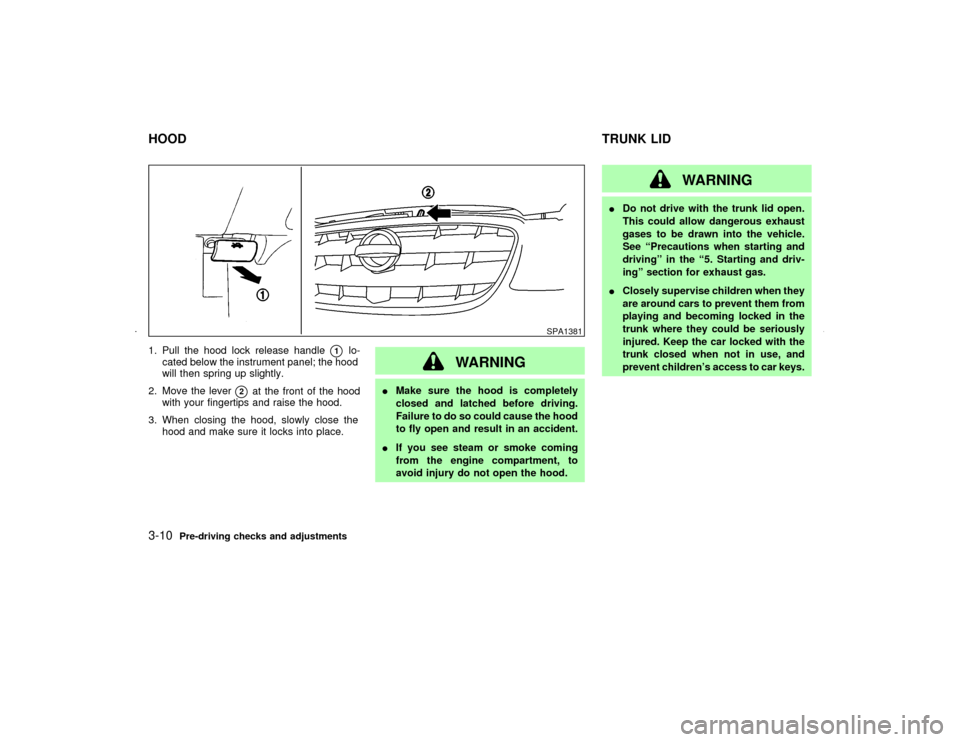
1. Pull the hood lock release handle
q1
lo-
cated below the instrument panel; the hood
will then spring up slightly.
2. Move the lever
q2
at the front of the hood
with your fingertips and raise the hood.
3. When closing the hood, slowly close the
hood and make sure it locks into place.
WARNING
IMake sure the hood is completely
closed and latched before driving.
Failure to do so could cause the hood
to fly open and result in an accident.
IIf you see steam or smoke coming
from the engine compartment, to
avoid injury do not open the hood.
WARNING
IDo not drive with the trunk lid open.
This could allow dangerous exhaust
gases to be drawn into the vehicle.
See ªPrecautions when starting and
drivingº in the ª5. Starting and driv-
ingº section for exhaust gas.
IClosely supervise children when they
are around cars to prevent them from
playing and becoming locked in the
trunk where they could be seriously
injured. Keep the car locked with the
trunk closed when not in use, and
prevent children's access to car keys.
SPA1381
HOODTRUNK LID3-10
Pre-driving checks and adjustments
Z
01.9.21/A33-D/V5.0
X
Page 97 of 247
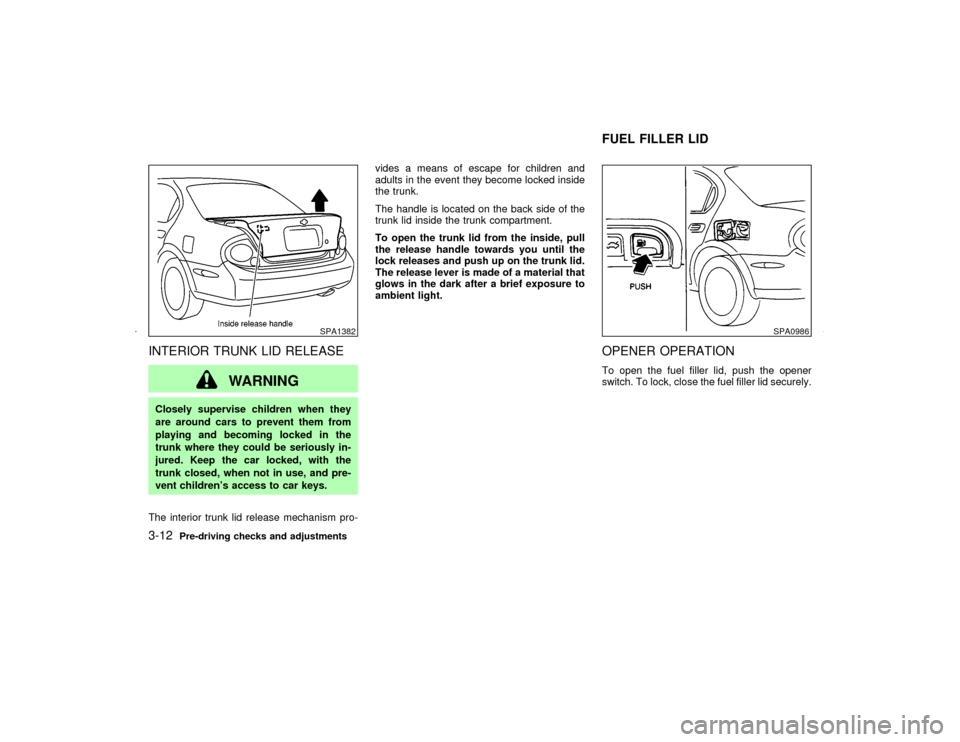
INTERIOR TRUNK LID RELEASE
WARNING
Closely supervise children when they
are around cars to prevent them from
playing and becoming locked in the
trunk where they could be seriously in-
jured. Keep the car locked, with the
trunk closed, when not in use, and pre-
vent children's access to car keys.
The interior trunk lid release mechanism pro-vides a means of escape for children and
adults in the event they become locked inside
the trunk.
The handle is located on the back side of the
trunk lid inside the trunk compartment.
To open the trunk lid from the inside, pull
the release handle towards you until the
lock releases and push up on the trunk lid.
The release lever is made of a material that
glows in the dark after a brief exposure to
ambient light.
OPENER OPERATIONTo open the fuel filler lid, push the opener
switch. To lock, close the fuel filler lid securely.
SPA1382
SPA0986
FUEL FILLER LID
3-12
Pre-driving checks and adjustments
Z
01.9.21/A33-D/V5.0
X
Page 100 of 247
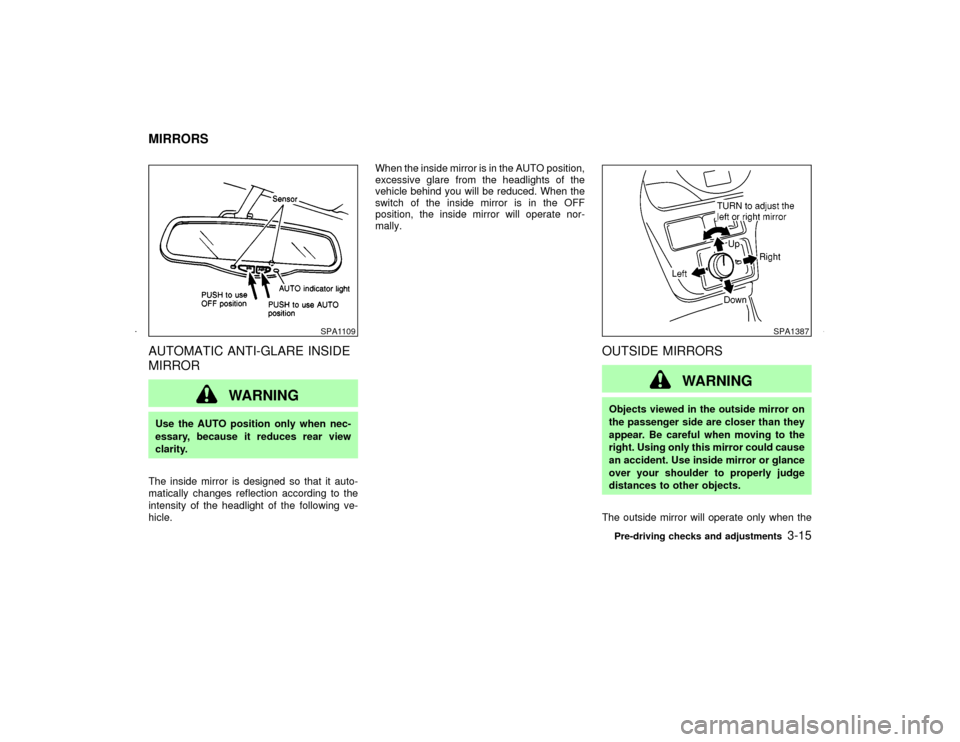
AUTOMATIC ANTI-GLARE INSIDE
MIRROR
WARNING
Use the AUTO position only when nec-
essary, because it reduces rear view
clarity.
The inside mirror is designed so that it auto-
matically changes reflection according to the
intensity of the headlight of the following ve-
hicle.When the inside mirror is in the AUTO position,
excessive glare from the headlights of the
vehicle behind you will be reduced. When the
switch of the inside mirror is in the OFF
position, the inside mirror will operate nor-
mally.
OUTSIDE MIRRORS
WARNING
Objects viewed in the outside mirror on
the passenger side are closer than they
appear. Be careful when moving to the
right. Using only this mirror could cause
an accident. Use inside mirror or glance
over your shoulder to properly judge
distances to other objects.
The outside mirror will operate only when the
SPA1109
SPA1387
MIRRORS
Pre-driving checks and adjustments
3-15
Z
01.9.21/A33-D/V5.0
X
Page 102 of 247

PROCEDURE FOR STORING
MEMORYTwo positions can be stored in the automatic
driver's seat positioner memory.Follow these
procedures to use the memory system.
1. A/T models:
Set the automatic transmission selector
lever to the P (Park) position.
M/T models:
Apply the parking brake securely when the
vehicle is stopped.
2. Turn the ignition ON.
3. Adjust the driver's seat and steering column
to the desired positions by manually oper-
ating each adjusting switch. For additional
information, see ªSeatsº in the ª1. Seats,
restraints and supplemental air bag sys-
temsº section and ªSteering wheelº earlier
in this section.During this step, do not turn the ignition to
any positions other than ON.
4. Push the SET switch and, within 5 seconds,
push the memory switch 1 or 2 fully for at
least 1 second.
The indicator light for the pushed memory
switch will come on and stay on for approxi-
mately 5 seconds after pushing the switch.
After the indicator light goes off, the se-
lected positions are stored in the selected
memory (1 or 2).
If memory is stored in the same memory
switch, the previous memory will be de-
leted.
Confirming memory storageITurn the ignition ON and push the SET
switch. If the main memory has not been
stored, the indicator light will come on for
approximately 0.5 seconds. When the
memory has stored the position, the indica-
tor light will stay on for approximately 5
seconds.
IIf the battery cable is disconnected, or if the
fuse blows, the memory will be canceled. In
such a case, reset the desired positions
using the following procedures.
1. Open and close the driver's door more than
SPA1385
Pre-driving checks and adjustments
3-17
Z
01.9.21/A33-D/V5.0
X
Page 103 of 247

two times with the ignition key in the LOCK
position.
2. Reset the desired position using the previ-
ous procedure.
Selecting the memorized position1. A/T models:
Set the automatic transmission selector le-
ver to the P (Park) position.
M/T models:
Apply the parking brake securely when the
vehicle is stopped.
2. Turn the ignition ON.
3. Push the memory switch 1 or 2 fully for at
least 1 second.
The driver's seat will move to the memo-
rized position with the indicator light flash-
ing. Then the light will stay on for approxi-
mately 5 seconds.
When memory switch 1 or 2 is pushed with the
driver's door open and then the key inserted
into the ignition switch within approximately 1
minute, the driver's seat will move to the
memorized position. Ð A/T models only
System operationThe automatic drive positioner system will not
work or will stop operating under the following
conditions:
Iwhen the vehicle speed is above 4 MPH (7
km/h).
Iwhen any two or more of the memory
switches are simultaneously pressed while
the automatic drive positioner is operating.
Iwhen the adjusting switch for the driver's
seat is turned on while the automatic drive
positioner is operating.
Iwhen the cancel switch located on the
instrument panel is pushed to cancel.
Iwhen the memory switch 1 or 2 is not
pushed for at least 1 second.
Iwhen the seat has already been moved to
the memorized position.
Iwhen no seat position is stored in the
memory switch.
Iwhen the parking brake is not applied. Ð
M/T models
Iwhen the vehicle speed is above 4 MPH (7
km/h) while the parking brake is applied. Ð
M/T models
To restart the drive positioner system,move the parking brake to off and on.
Iwhen the engine is started while moving the
automatic drive positioner. Ð M/T models
3-18
Pre-driving checks and adjustments
Z
01.9.21/A33-D/V5.0
X
Page 109 of 247

indicator and air recirculation lights will turn on.Air recirculation buttonOFF position:
Outside air is drawn into the passenger com-
partment.
Use the off position for normal heater, or air
conditioner operation.
ON position (Indicator light ON):
Interior air is recirculated inside the vehicle.
Push the air recirculation button to the ON
position when driving on a dusty road or to
avoid traffic fumes and for maximum cooling
when using the air conditioner.Air conditioning buttonStart the engine, move the fan control dial to
the desired (1 to 4) position and push the air
conditioning button to turn on the air condi-
tioner. The indicator light will come on when
the air conditioner is on. To stop the air con-
ditioner, push the switch again to return it to
the original position.
The air conditioner cooling function oper-
ates only when the engine is running.
HEATER OPERATION
HeatingThis mode is used to direct hot air from the
floor outlets. Some air will also come from the
defrost vents.
1. Push the air recirculation button to the OFF
position for normal heating.
2. Push the
button in.
3. Turn on the fan control dial.
4. Move the temperature control lever to the
desired position between the middle and
the HOT position.
For quick heating, move the air recirculation
button to the ON position. Be sure to return the
air recirculation button to the OFF position for
normal heating.
VentilationThis mode directs outside air from the side and
center vents.
1. Push the air recirculation button to the OFF
position.
2. Push the
button in.
3. Turn on the fan control dial.4. Move the temperature control lever to the
desired position.
Defrosting or defoggingThis mode is used to defrost/defog the win-
dows.
1. Push the
button in.
2. Turn on the fan control dial.
3. Move the temperature control lever to the
desired position between the middle and
the HOT position.
ITo quickly remove ice or fog from the
windows, turn on the fan control dial to 4
and the temperature control lever to the full
HOT position.
IWhen thebutton is pushed, the air
conditioner will automatically be turned on
to defog the windshield, and the air recircu-
late mode will automatically be turned off.
Outside air is drawn into the passenger
compartment to improve the defogging per-
formance.
4-4
Heater, air conditioner and audio systems
Z
01.9.21/A33-D/V5.0
X