2002 NISSAN ALTIMA trans
[x] Cancel search: transPage 2 of 249
IMPORTANT INFORMATION ABOUT
THIS MANUAL
You will see various symbols in this manual.
They are used in the following ways:
WARNING
This is used to indicate the presence of
a hazard that could cause death or
serious personal injury. To avoid or
reduce the risk, the procedures must
be followed precisely.
CAUTION
This is used to indicate the presence of
a hazard that could cause minor or
moderate personal injury or damage to
your vehicle. To avoid or reduce the
risk, the procedures must be followed
carefully.If you see this symbol, it means ``Do not do
this'' or ``Do not let this happen.''
CALIFORNIA PROPOSITION 65
WARNING
WARNING
Engine Exhaust, some of its constitu-
ents, and certain vehicle components
contain or emit chemicals known to
State of California to cause cancer and
birth defects or other reproductive
harm.
2002 NISSAN NORTH AMERICA, INC.
GARDENA, CALIFORNIA
All rights reserved. No part of this Owner's
Manual may be reproduced or stored in a
retrieval system, or transmitted in any form, or
by any means, electronic, mechanical, photo-
copying, recording or otherwise, without the
prior written permission of Nissan North
America, Inc., Gardena, California.
APD1005
The inside pages of this manual contain
a minimum of 50% recycled fibers,
including 10% post-consumer fibers.
ZX
Page 3 of 249

Welcome To The World Of NISSAN
Your new NISSAN is the result of our dedication
to produce the finest in safe, reliable and eco-
nomical transportation. Your vehicle is the prod-
uct of a successful worldwide company that
manufactures cars and trucks in over 17 coun-
tries and distributes them in 170 nations.
NISSAN vehicles are designed and manufac-
tured by Nissan Motor Co., Ltd. which was
founded in Tokyo, Japan in 1933, and NISSAN
affiliates world wide, collectively growing to be-
come the fifth largest automaker in the world. In
addition to cars and trucks, NISSAN also makes
diversified forklift trucks, marine engines, boats
and other products.
NISSAN has made a substantial and growing
investment in North America. NISSAN's commit-
ment is nearly $4 billion dollars in capital invest-
ments in facilities across the continent. Some of
the facilities include the Nissan Manufacturingfacility in Smyrna, Tennessee, vehicle styling
design at Nissan Design International in San
Diego, California, and engineering at Nissan
Technical Center North America in Farmington
Hills, Michigan. Additionally, NISSAN employs
nearly 18,000 people throughout the United
States, Canada, and Mexico. An additional
71,000 people work for the 1,500 NISSAN and
INFINITI dealers across North America.
NISSAN is also a substantial contributor to the
Canadian economy. Nissan Canada Inc., its sup-
pliers and over 140 dealers employ approxi-
mately 4,500 people. These include company
employees and the staffs of NISSAN dealers all
across Canada. In addition, many Canadians
work for companies that supply NISSAN and
NISSAN dealers with materials and services
ranging from the operation of port facilities and
transportation services, to the supply of lubri-
cants, parts and accessories.NISSAN pioneered the use of electronics and
computers in automobiles, and has led the indus-
try in improving both performance and fuel effi-
ciency through new engine designs and the use
of synthetic materials to reduce vehicle weight.
The company has also developed ways to build
quality into its vehicles at each stage of the
production process, both through extensive use
of automation and Ð most importantly Ð
through an awareness thatpeopleare the cen-
tral element in quality control.
From the time the parts arrived from our suppli-
ers until you took delivery of your new NISSAN,
dozens of checks were made to ensure that only
the best job was being done in producing and
delivering your vehicle. NISSAN also takes great
care to ensure that when you take your NISSAN
to your dealer for maintenance, the service techni-
cian will perform his work according to the quality
standards that have been established by Nissan.
Safety has also been built into your NISSAN. As
you know, seat belts are an integral part of the
safety systems that will help protect you and your
passengers in the event of a sudden stop or an
accident. We urge you to use the seat belts every
time you drive the vehicle.
The NISSAN story of growth and achievement
reflects our major goal: to provide you, our
customer, with a vehicle that is built with quality
and craftsmanship Ð a product that we can be
proud to build and you can be proud to own.
WFW0002
ZX
Page 50 of 249

Interior light...........................................................2-34
Map lights .............................................................2-34
Trunk light.............................................................2-35
HomeLinkTuniversal transceiver (if so
equipped) .............................................................2-35
Programming HomeLinkT................................2-36
Programming HomeLinkTfor Canadian
customers ........................................................2-36Operating the HomeLinkTuniversal
transceiver .......................................................2-37
Programming trouble-diagnosis.......................2-37
Clearing the programmed information.............2-37
Rolling code programming ..............................2-37
Reprogramming a single HomeLinkT
button ...............................................................2-38
If your vehicle is stolen....................................2-38
ZX
Page 61 of 249
The malfunction indicator lamp may stop
blinking and come on steady. Have the
vehicle inspected by an authorized NISSAN
dealer. You do not need to have your ve-
hicle towed to the dealer.
CAUTION
Continued vehicle operation without
having the emission control system
checked and repaired as necessary
could lead to poor driveability, reduced
fuel economy, and possible damage to
the emission control system.
Traction control off indicator
light
After turning the ignition key to the ON
position, the light will illuminate. The light
will turn off after about 2 seconds if the
traction control system (TCS) is operational.
If the light stays on or comes on when you
are driving, it may indicate the traction con-
trol system is not functioning properly. Have
the system checked by your NISSAN
dealer.The light comes on when the traction control
off switch is pushed to OFF. This indicates
the traction control system is not operating.
Push the traction control off switch again or
restart the engine and the system will oper-
ate normally. See ªTraction controlº in the
ª5. Starting and drivingº section.
Slip indicator light
This indicator will blink when the traction
control system is limiting wheelspin. Slip-
pery road conditions may exist if the slip
indicator blinks on. If this happens, adjust
your driving accordingly.
The slip indicator light also comes on when
you turn the ignition key to ON. The light will
turn off after about 2 seconds if the system
is operational. If the light does not come on
or go off, have the traction control system
checked by your NISSAN dealer. The sys-
tem operates in all transmission shift lever
positions. But the system can upshift the
transmission only as high as the indicated
shift lever position.
AUDIBLE REMINDERS
Brake pad wear warning
The disc brake pads have audible wear
warnings. When a brake pad requires re-
placement, it makes a high pitched scraping
sound when the vehicle is in motion,
whether or not the brake pedal is depressed.
Have the brakes checked as soon as pos-
sible if the warning sound is heard.
Key reminder chime
A chime sounds if the driver's door is
opened while the key is left in the ignition
switch. Remove the key and take it with you
when leaving the vehicle.
Light reminder chime
With the ignition switch in the OFF position,
a chime sounds when the driver's door is
opened with the headlight switch on.
Turn the headlight switch OFF when leaving
the vehicle.
2-12Instruments and controls
ZX
Page 84 of 249
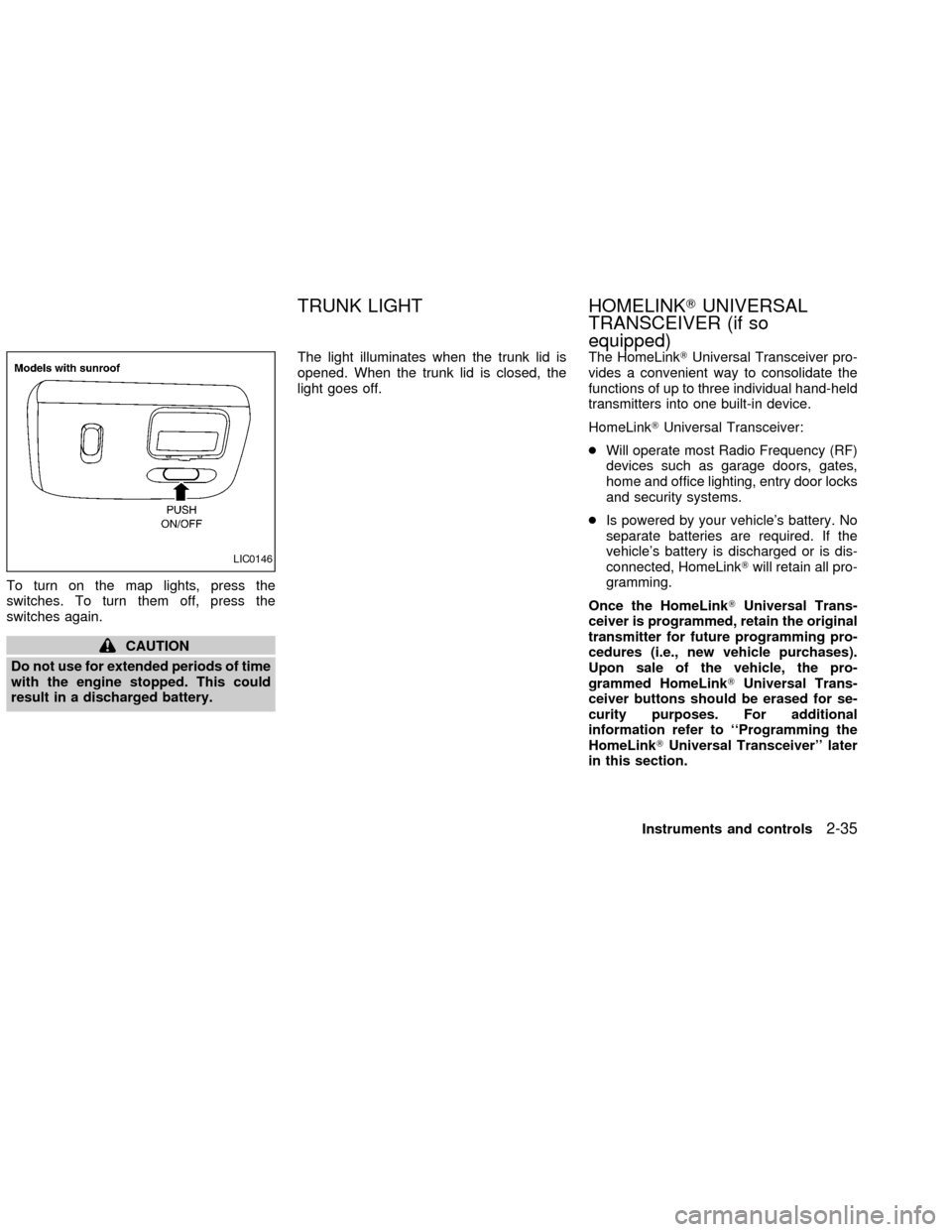
To turn on the map lights, press the
switches. To turn them off, press the
switches again.
CAUTION
Do not use for extended periods of time
with the engine stopped. This could
result in a discharged battery.The light illuminates when the trunk lid is
opened. When the trunk lid is closed, the
light goes off.The HomeLinkTUniversal Transceiver pro-
vides a convenient way to consolidate the
functions of up to three individual hand-held
transmitters into one built-in device.
HomeLinkTUniversal Transceiver:
cWill operate most Radio Frequency (RF)
devices such as garage doors, gates,
home and office lighting, entry door locks
and security systems.
cIs powered by your vehicle's battery. No
separate batteries are required. If the
vehicle's battery is discharged or is dis-
connected, HomeLinkTwill retain all pro-
gramming.
Once the HomeLinkTUniversal Trans-
ceiver is programmed, retain the original
transmitter for future programming pro-
cedures (i.e., new vehicle purchases).
Upon sale of the vehicle, the pro-
grammed HomeLinkTUniversal Trans-
ceiver buttons should be erased for se-
curity purposes. For additional
information refer to ``Programming the
HomeLinkTUniversal Transceiver'' later
in this section.
LIC0146
TRUNK LIGHT HOMELINKTUNIVERSAL
TRANSCEIVER (if so
equipped)
Instruments and controls2-35
ZX
Page 85 of 249
WARNING
cDo not use the HomeLinkTUniversal
Transceiver with any garage door
opener that lacks safety stop and
reverse features as required by fed-
eral safety standards. (These stan-
dards became effective for opener
models manufactured after April 1,
1982). A garage door opener which
cannot detect an object in the path of
a closing garage door and then au-
tomatically stop and reverse, does
not meet current federal safety stan-
dards. Using a garage door opener
without these features increases the
risk of serious injury or death.
cDuring programming, your garage
door or gate may open or close.
Make sure that people and objects
are clear of the garage door or gate
that you are programming.
cYour vehicle's engine should be
turned off while programming the
HomeLinkTUniversal Transceiver.
PROGRAMMING HomeLinkT
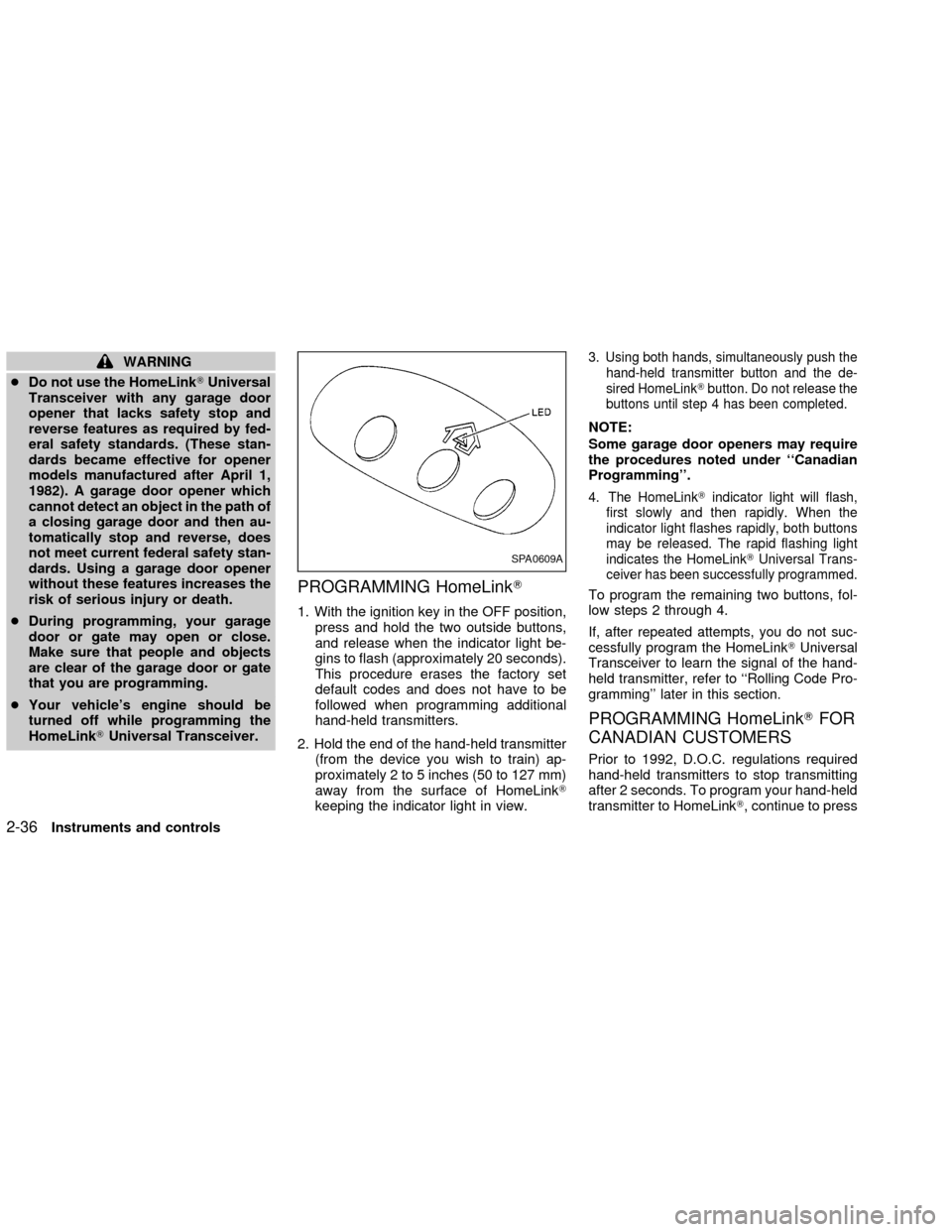
1. With the ignition key in the OFF position,
press and hold the two outside buttons,
and release when the indicator light be-
gins to flash (approximately 20 seconds).
This procedure erases the factory set
default codes and does not have to be
followed when programming additional
hand-held transmitters.
2. Hold the end of the hand-held transmitter
(from the device you wish to train) ap-
proximately 2 to 5 inches (50 to 127 mm)
away from the surface of HomeLinkT
keeping the indicator light in view.
3. Using both hands, simultaneously push the
hand-held transmitter button and the de-
sired HomeLinkTbutton. Do not release the
buttons until step 4 has been completed.
NOTE:
Some garage door openers may require
the procedures noted under ``Canadian
Programming''.
4. The HomeLinkTindicator light will flash,
first slowly and then rapidly. When the
indicator light flashes rapidly, both buttons
may be released. The rapid flashing light
indicates the HomeLinkTUniversal Trans-
ceiver has been successfully programmed.
To program the remaining two buttons, fol-
low steps 2 through 4.
If, after repeated attempts, you do not suc-
cessfully program the HomeLinkTUniversal
Transceiver to learn the signal of the hand-
held transmitter, refer to ``Rolling Code Pro-
gramming'' later in this section.
PROGRAMMING HomeLinkTFOR
CANADIAN CUSTOMERS
Prior to 1992, D.O.C. regulations required
hand-held transmitters to stop transmitting
after 2 seconds. To program your hand-held
transmitter to HomeLinkT, continue to press
SPA0609A
2-36Instruments and controls
ZX
Page 86 of 249

and hold the HomeLinkTbutton (note step 2
through 4 under ``Programming HomeLinkT'')
while you press and re-press (``cycle'') your
hand-held transmitters every 2 seconds until
the indicator light flashes rapidly (indicating
successful programming).
NOTE:
If programming a garage door opener, etc.,
it is advised to unplug the device during the
``cycling'' process to prevent possible dam-
age to the garage door opener components.
OPERATING THE HomeLinkT
UNIVERSAL TRANSCEIVER
The HomeLinkTUniversal Transceiver (once
programmed) may now be used to activate the
garage door, etc. To operate, simply press the
appropriate programmed HomeLinkTUniversal
Transceiver button. The red indicator light will
illuminate while the signal is being transmitted.
PROGRAMMING TROUBLE-
DIAGNOSIS
If the HomeLinkTdoes not quickly learn the
hand-held transmitter information:
creplace the hand-held transmitter batter-
ies with new batteries.cposition the hand-help transmitter with its
battery area facing away from the
HomeLinkTsurface.
cpress and hold both the HomeLinkTand
hand-held transmitter buttons without in-
terruption.
cposition the hand-held transmitter 2 to 5
inches (50 to 127 mm) away from the
HomeLinkTsurface. Hold the transmitter
in that position for up to 15 seconds. If
HomeLinkTis not programmed within
that time, try holding the transmitter in
another position - keeping the indicator
light in view at all times.
If you continue to have programming diffi-
culties, please contact the NISSAN Con-
sumer Affairs Department. The phone num-
bers are located in the Foreword of this
owner's manual.
CLEARING THE PROGRAMMED
INFORMATION
Individual buttons cannot be cleared, how-
ever to clear all programming, press and
hold the two outside buttons and release
when the indicator light begins to flash
(approximately 20 seconds)
ROLLING CODE PROGRAMMING
Rolling code garage door openers (or other
rolling code devices) which are ``code pro-
tected'' and manufactured after 1996, may
be determined by the following:
A. Reference the garage door opener Own-
er's Manual for verification.
B. The hand-held transmitter appears to
program the HomeLinkTUniversal
Transceiver but does not activate the
garage door.
C. Press and hold the trained HomeLinkT
button. If the garage door opener has the
rolling code feature, the HomeLinkTindi-
cator light will flash rapidly, then remains
on after 2 seconds.
To program the HomeLinkTUniversal
Transceiver to a garage door opener with
the rolling code feature, follow these instruc-
tions after completing the ``Programming
HomeLinkT'' (the aid of a second person
may make the following procedures quicker
and easier).
1. Locate the training button on the garage
door opener motor unit. Exact location
and color of the button may vary by
Instruments and controls
2-37
ZX
Page 87 of 249

garage door opener brand. If there is
difficulty locating the training button, ref-
erence the garage door opener Owner's
Manual.
2. Press the training button on the garage
door opener motor unit (which may acti-
vate a training light).
NOTE:
Following step 2, there are 30 seconds in
which to initiate step 3.
3. Firmly press and release the pro-
grammed HomeLinkTbutton. Press and
release the HomeLinkTbutton a second
time to complete the training process.
(Some garage door openers may require
you to do this procedure a third time to
complete the training.)
The garage door opener should now recog-
nize the HomeLinkTUniversal Transceiver
and activate when the HomeLinkTbutton is
pressed. The remaining two buttons may
now be programmed (if not yet pro-
grammed, follow steps 2 through 4 in the
``Programming HomeLinkT'' procedures
earlier in this section).REPROGRAMMING A SINGLE
HomeLinkTBUTTON
To reprogram an HomeLinkTUniversal
Transceiver button, complete the following.
1. Press and hold the desired HomeLinkT
button.Do notrelease the button until
step 4 has been completed.
2. When the indicator light begins to flash
slowly (after 20 seconds), position the
hand-held transmitter 2 to 5 inches (50 to
127 mm) away from the HomeLinkTsur-
face.
3. Press and hold the hand-held transmitter
button.
4. The HomeLinkTindicator light will flash,
first slowly and then rapidly. When the
indicator light begins to flash rapidly,
release both buttons.
The HomeLinkTUniversal Transceiver but-
ton has now been reprogrammed. The new
device can be activated by pushing the
HomeLinkTbutton that was just pro-
grammed. This procedure will not affect any
other programmed HomeLinkTbuttons.
IF YOUR VEHICLE IS STOLEN
If your vehicle is stolen, you should change
the codes of any non-rolling code device
that has been programmed into HomeLinkT.
Consult the Owner's Manual of each device
or call the manufacturer or dealer of those
devices for additional information.
When your vehicle is recovered, you will
need to reprogram the HomeLinkTUni-
versal Transceiver with your new trans-
mitter information.
FCC Notice:
This device complies with FCC rules part
15. Operation is subject to the following
two conditions: (1) This device may not
cause harmful interference and (2) This
device must accept any interference that
may be received, including interference
that may cause undesired operation.
This transmitter has been tested and
complies with FCC and DOC/MDC rules.
Changes or modifications not expressly
approved by the party responsible for
compliance could void the user's author-
ity to operate the device.
DOC: ISTC 1763K1313
FCC I.D. CV2V67690
2-38Instruments and controls
ZX