2002 MINI Hardtop 2 Door brake light
[x] Cancel search: brake lightPage 5 of 140
3
OVERVIEW REPAIRS OPERATION CONTROLS DATA INDEX
Driving:
Ignition lock 42
Starting the engine 42
Switching off the engine 43
Parking brake 44
Manual transmission 45
Continuously Variable automatic
Transmission (CVT) 46
Parking lamps/Low beams 49
Indicator/Headlamp flasher 49
Instrument lighting 50
Fog lamps 50
Interior lamps 50
Light-emitting diodes 51
Washer/Wiper system 51
Cruise control 53
Everything under control:
Odometer 55
Tachometer 55
Fuel gauge 55
Coolant temperature gauge 56
Service Interval Display 57
Clock 57
Computer 58
Technology for safety and driving
convenience:
Automatic Stability Control plus Traction
(ASC+T) 60
Dynamic Stability Control (DSC) 61
Flat Tire Monitor 62
Park Distance Control (PDC) 63
Controlling the climate for pleasant
driving:
Air conditioner system 64
Automatic climate control 67
Interior conveniences:
Glove compartment 70
Ashtray/Beverage holder 70
Cigarette lighter 70
Loading and transporting cargo:
Luggage compartment cover 71
Foldable rear backrest 71
Loading cargo 72
Roof-mounted luggage rack 73
Care and maintenance
Special operating instructions:
Break-in procedures 76
General driving notes 76
Refueling 77
Fuel specifications 78
Antilock Brake System (ABS) 78
Brake system 79
Wheels and tires:
Tire inflation pressure 80
Tire condition 82
Tire replacement 83
Wheel and tire combinations 84
Winter tires 85
Snow chains 85
Page 17 of 140

15
OVERVIEW REPAIRS OPERATION CONTROLS DATA INDEX
INDICATOR AND WARNING LAMPS
Technology
that monitors itself
The system runs a check on the warning
and indicator lamps marked by "
l
" each
time you switch on the ignition. They each
light up once for different periods of time.
If a malfunction should occur in one of
these systems, the corresponding lamp
does not go out after the engine is started
or it lights up while the vehicle is moving.
You will see how to react correctly to this
below.
Red: stop immediately
Battery charge current
l
The battery is no longer being
charged. Indicates a defective alter-
nator drive belt or a problem with the
charge circuit. Please contact the nearest
MINI center.
If this lamp lights up, the power-assist for
steering can be deactivated.
If the drive belt is defective, do not
continue driving. The engine could be
damaged due to overheating. When the
power-assist is deactivated, increased
steering effort is required.
<
Engine oil pressure
l
Stop immediately. Switch off
engine. Check the engine oil and
top up as required. Please contact the
nearest MINI center.
Do not continue driving, otherwise,
the engine could be damaged
because of inadequate lubrication.
<
Brake warning lamp
l
If the lamp comes on when the
parking brake is not engaged:
Check the brake fluid level. Before driving
further, be sure to comply with the infor-
mation on pages 79, 57 and 92.
Brake warning lamp for Canadian
models.
With navigation system option:
Coolant temperature warning
lamp in the speedometer
l
If the lamp comes on while oper-
ating the vehicle, the engine has over-
heated. Switch off the engine immediately
and allow to cool down, see also page 56.
Page 18 of 140

16
INDICATOR AND WARNING LAMPS
Yellow: stop immediately
Flat Tire Monitor
l
Flashes: tire failure.
Reduce speed immediately and
stop the vehicle.
With safety (run-flat) tires:
Reduce vehicle speed carefully to under
50 mph (80 km/h).
In both cases, avoid hard brake applications
and steering maneuvers. Check the tire
inflation pressures.
Conduct in the event of a flat tire, see
pages 106, 110.
General information on the system, see
page 62
Red and yellow: continue to drive;
drive cautiously
Brake warning lamp together with
yellow indicator lamps for ABS, EBV
and ASC+T/DSC:
The control system ABS, EBV and
ASC+T/DSC has failed. Drive
cautiously and defensively. Avoid
full brake applications. Please have
the system checked by your MINI
center as soon as possible.
More information on pages 60, 61
Brake warning lamp together with
the yellow indicator warning lamps
ABS, EBV and ASC+T/DSC for Cana-
dian models.
Red: an important reminder
Brake warning lamp
with parking brake applied.
More information on the parking
brake on page 44
Parking brake lamp for Canadian
models.
Fasten safety belts
l
Depending on model, with acoustic
signal
*
. Lights up either for several
seconds or until the belt is engaged, de-
pending on version.
More information on page 35
Depending on the level of equipment,
the indicator lamp is in the vicinity of
the navigation system.
<
Airbags
l
Please have the system inspected
at your MINI center.
More information on pages 31, 37
Depending on the level of equipment,
the indicator lamp is in the vicinity of
the navigation system.
<
Hood/tailgate
Lights up when the hood and/or
tailgate are open.
More information on pages 27, 86
Page 19 of 140

17
OVERVIEW REPAIRS OPERATION CONTROLS DATA INDEX
INDICATOR AND WARNING LAMPS
Yellow: check as soon as possible
Flat Tire Monitor
l
Stays lit: the system is defective.
Please have the system inspected
at your MINI center.
More information on page 62
Antilock Brake System (ABS)
l
ABS has been deactivated in
response to system malfunction.
Conventional braking efficiency is avail-
able. Please have the system inspected
at your MINI center.
More information on page 78
ABS indicator lamp for Canadian
models.
Automatic Stability Control plus
Traction (ASC+T)/Dynamic Stability
Control (DSC)
l
Indicator lamp flashes:
System active: drive and braking forces are
regulated.
The indicator lamp stays lit:
ASC+T/DSC switched off with button or
defective. In the event of a defect: please
have the system inspected at your MINI
center.
More information on pages 60, 61
Service Engine Soon
l
If the warning lamp comes on
either continuously or intermit-
tently, this indicates a malfunction in the
emissions-related electronic systems.
Although the vehicle remains operational,
you should have the systems checked by
your MINI center at the earliest possible
opportunity.
"Service Engine Soon" warning
lamp for Canadian models
.
Engine electronics
*
l
Malfunction in the engine elec-
tronics. You can continue to drive
with reduced engine output or engine
speed. Please have the system inspected at
your MINI center.
Green: for your information
Turn signal indicators
Flashes when turn signal indicator
is on, also for trailer towing.
Rapid flashing: the system is defective.
More information on page 49
Cruise control
*
Lights up when the cruise control is
activated. Operation via the multi-
function steering wheel.
More information on page 53
Blue: for your information
High beams
Comes on when the high beams
are on or the headlamp flasher is
actuated.
More information on page 49
Page 43 of 140

41
OVERVIEW REPAIRS OPERATIONCONTROLS DATA INDEX
TRANSPORTING CHILDREN VEHICLE MEMORY LATCH child-restraint systemOpen the cover.
The illustration is an example showing
the mounts for the LATCH (Lower Anchors
and Tethers for Children) child-restraint
mounting system at the right rear.
The system is also available at the left rear
position.
Always follow all manufacturer's
instructions and observe all safety
precautions when installing the LATCH
child-restraint system.<
How the system functionsDoubtless you have often reflected on how
great it would be if you could configure
your vehicle's various adjustment settings
to meet your own personal requirements.
In developing this vehicle, the manufac-
turer has incorporated a number of options
that your MINI center can program to
reflect your individual preferences. What the system can doYour MINI center can provide you with
details on the capabilities of the Vehicle
Memory system.
Examples for Vehicle Memory:
>Signals an acknowledgement when
locking or unlocking your vehicle
>Automatic locking after starting off
>Automatic unlocking when the parking
brake is applied
>Selective central locking
First open the driver's door, then the
whole car
>Automatic opening/closing of sliding/tilt
sunroof
>Opening/closing windows and/or
sliding/tilt sunroof via remote control
>Speed-dependent windshield wiper>Automatic activation of windshield
wipers on cleaning
>"Follow me home" lamps
Low beams light up for a short time after
the engine has been switched off
>Locking when engine is running (with
second key)
>Stop function of power windows on
opening/closing
>Activating/deactivating daytime driving
lamps
*
>Switching on interior lamps via remote
control.
This symbol draws your attention to
other Vehicle Memory functions
described in the Owner's Manual.<
Page 46 of 140
44
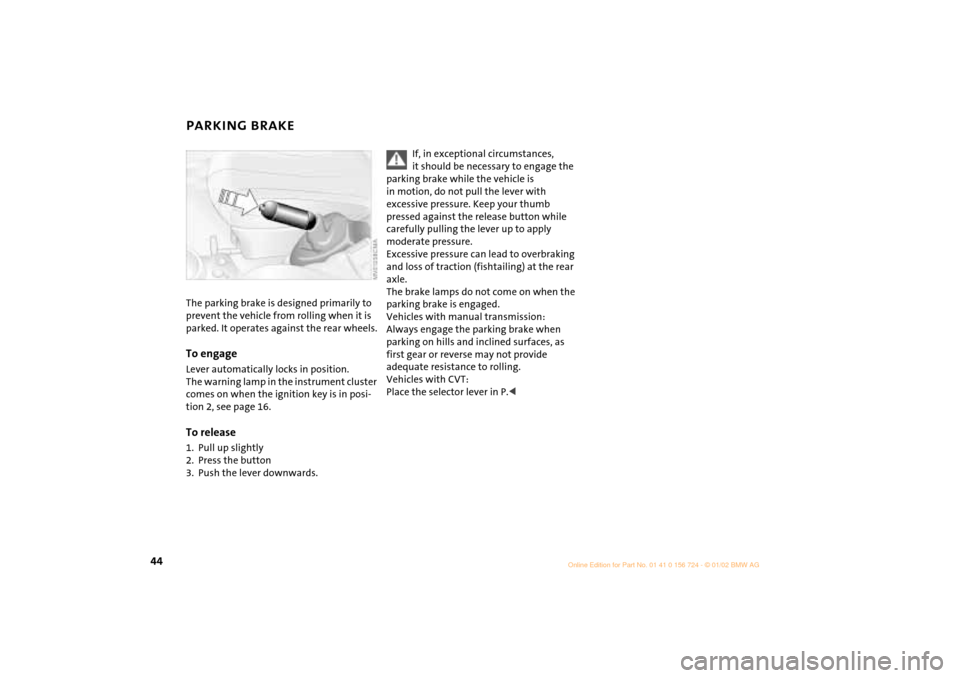
PARKING BRAKE The parking brake is designed primarily to
prevent the vehicle from rolling when it is
parked. It operates against the rear wheels.To engageLever automatically locks in position.
The warning lamp in the instrument cluster
comes on when the ignition key is in posi-
tion 2, see page 16.To release1. Pull up slightly
2. Press the button
3. Push the lever downwards.
If, in exceptional circumstances,
it should be necessary to engage the
parking brake while the vehicle is
in motion, do not pull the lever with
excessive pressure. Keep your thumb
pressed against the release button while
carefully pulling the lever up to apply
moderate pressure.
Excessive pressure can lead to overbraking
and loss of traction (fishtailing) at the rear
axle.
The brake lamps do not come on when the
parking brake is engaged.
Vehicles with manual transmission:
Always engage the parking brake when
parking on hills and inclined surfaces, as
first gear or reverse may not provide
adequate resistance to rolling.
Vehicles with CVT:
Place the selector lever in P.<
Page 47 of 140
45
OVERVIEW REPAIRS OPERATIONCONTROLS DATA INDEX
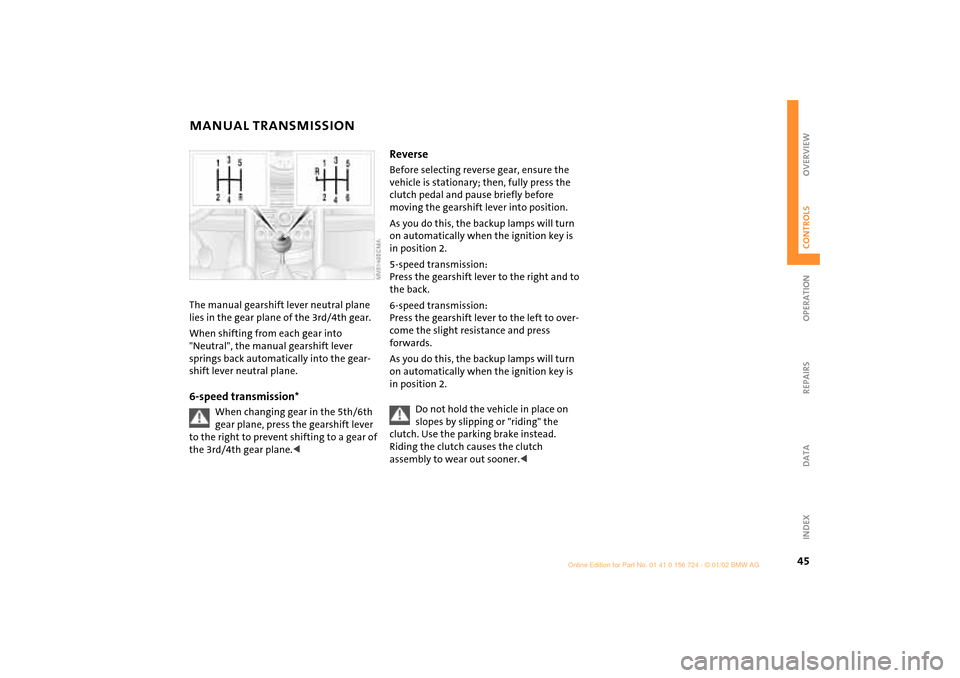
MANUAL TRANSMISSION The manual gearshift lever neutral plane
lies in the gear plane of the 3rd/4th gear.
When shifting from each gear into
"Neutral", the manual gearshift lever
springs back automatically into the gear-
shift lever neutral plane.6-speed transmission*
When changing gear in the 5th/6th
gear plane, press the gearshift lever
to the right to prevent shifting to a gear of
the 3rd/4th gear plane.<
Reverse Before selecting reverse gear, ensure the
vehicle is stationary; then, fully press the
clutch pedal and pause briefly before
moving the gearshift lever into position.
As you do this, the backup lamps will turn
on automatically when the ignition key is
in position 2.
5-speed transmission:
Press the gearshift lever to the right and to
the back.
6-speed transmission:
Press the gearshift lever to the left to over-
come the slight resistance and press
forwards.
As you do this, the backup lamps will turn
on automatically when the ignition key is
in position 2.
Do not hold the vehicle in place on
slopes by slipping or "riding" the
clutch. Use the parking brake instead.
Riding the clutch causes the clutch
assembly to wear out sooner.<
Page 59 of 140

57
OVERVIEW REPAIRS OPERATIONCONTROLS DATA INDEX
SERVICE INTERVAL DISPLAY Remaining distance for serviceThe displays shown in the illustration
appear for a few seconds when the ignition
key is in position 1 or after the engine is
started.
The next service due appears in miles (kilo-
meters) with the message INSPECTION or/
and OILSERVICE, together with the distance
remaining before the next scheduled
service. The computer bases its calculations
of the remaining distance on your driving
style in the period immediately preceding
your data request.
A flashing message and a "Ð" in front of the
number mean that the service interval has
already been exceeded by the distance
shown on the display. Please contact your
MINI center for an appointment.
For more information on the Service
Interval Display, see page 93.
Brake fluid changeYou can obtain a display of the number of
days remaining until the next due brake
fluid change, see page 92.
While the next due service is displayed,
press the button in the display element.
As of the due date of the brake fluid
change, the clock symbol also lights up in
the remaining distance display for Service,
see left column. Please contact your MINI
center for an appointment.
Periods of immobilization in which
the battery is disconnected are not
taken into account by the display.
For this reason, ensure that the brake fluid,
independent of the display, is replaced
every two years at the latest, see page 92.<