Page 18 of 385
15 Introduction
Problems with your vehicle
If you should experience a problem with your vehicle, particularly one that you believe may affect
its safe operation, we urge you to immediately contact your authorized Mercedes-Benz Light Truck
Center to have the problem diagnosed and corrected if required. If the matter is not handled to
your satisfaction, please discuss the problem with the Mercedes-Benz Light Truck Center
management, or if necessary contact us at the following addresses:
In the USA: Customer Assistance Center
Mercedes-Benz USA, LLC
One Mercedes Drive
Montvale, NJ 07645-0350
In Canada: Customer Relations Department
Mercedes-Benz Canada, Inc.
849 Eglinton Avenue East
Toronto, Ontario, M4G 2L5
J_G463.book Seite 15 Mittwoch, 19. September 2001 8:06 08
Page 24 of 385
21 Instruments and controls
Te ch n i c a l
data Instruments
and controlsOperation DrivingInstrument
cluster displayPractical hints Car care Index 11Differential-lock switch, see page 253
12Left front seat heater switch, see page 52
13Switch for rear window washer /wiper, see page 138
14Hazard warning flasher switch, see page 139
15AIRBAG OFF indicator lamp, see page 271
16Central locking switch, see page 40
17Antitheft alarm system, see page 42
Switch for Tow-away alarm, see page 4318Right front seat heater switch, see page 52
19COMAND system (Cockpit Management and Data
System), see seperate operating instructions
20Automatic climate control, see page 140
21Ashtray with lighter, see page 168
22Automatic transmission, see page 207
23Parking brake, see page 215
24Transfer case, see page 247
J_G463.book Seite 21 Mittwoch, 19. September 2001 8:06 08
Page 26 of 385
23 Instruments and controls
Te ch n i c a l
data Instruments
and controlsOperation DrivingInstrument
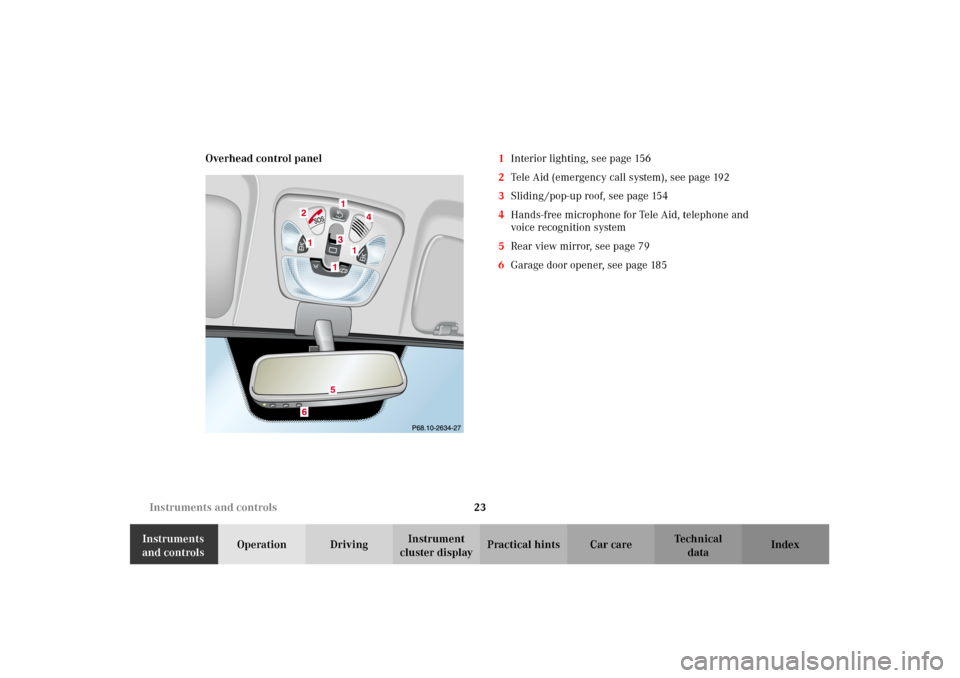
cluster displayPractical hints Car care Index Overhead control panel1Interior lighting, see page 156
2Tele Aid (emergency call system), see page 192
3Sliding /pop-up roof, see page 154
4Hands-free microphone for Tele Aid, telephone and
voice recognition system
5Rear view mirror, see page 79
6Garage door opener, see page 185
J_G463.book Seite 23 Mittwoch, 19. September 2001 8:06 08
Page 28 of 385
25 Contents - Operation
Te ch n i c a l
data Instruments
and controlsOperationDrivingInstrument
cluster displayPractical hints Car care Index Audio systems .................................. 96
Radio .............................................. 96
CD player ....................................... 97
Telephone .......................................... 98
Navigation system .......................... 103
Trip computer ................................. 104
Malfunction/warning
message memory ...................... 106
Individual settings ......................... 108
Setting the audio volume .............. 122
Coolant temperature gauge .......... 123
Flexible service system
(FSS) ............................................ 124
Engine oil level indicator .............. 127
Exterior lamp switch ..................... 129
Headlamp mode ............................. 130
Night security illumination ......... 132
Locator lighting .......................... 133Headlamp cleaning system ...........133
Combination switch .......................134
Rear window wiper/washer ..........138
Hazard warning flasher switch ....139
Climate control .............................. 140
Rear passenger compartment
adjustable air outlets ................150
Power windows ............................... 151
Sliding/pop-up roof ........................154
Interior lighting ..............................156
Door entry lamps ........................157
Rear interior lamps ....................158
Cargo compartment lamps ........159
Sun visors ........................................ 161
Illuminated vanity mirrors ........... 161
Interior .............................................162
Storage compartments,
armrest and cup holder ............162
Glove box ......................................163Ashtrays .......................................... 168
Lighter ............................................. 170
Floor mat ......................................... 170
Split rear seat bench ..................... 171
Rear seat head restraints .......... 173
Enlarged cargo area ....................... 174
Cargo tie-down rings ..................... 174
Partition net .................................... 175
Loading instructions ..................... 178
Parcel net in
front passenger footwell .......... 180
Cargo area cover blind .................. 180
Roof racks ........................................ 181
Brush guard .................................... 182
Telephone, general ........................ 184
Cellular telephone ......................... 184
Garage door opener ....................... 185
J_G463.book Seite 25 Mittwoch, 19. September 2001 8:06 08
Page 30 of 385
27 Central locking system
Te ch n i c a l
data Instruments
and controlsOperationDrivingInstrument
cluster displayPractical hints Car care Index Electronic key
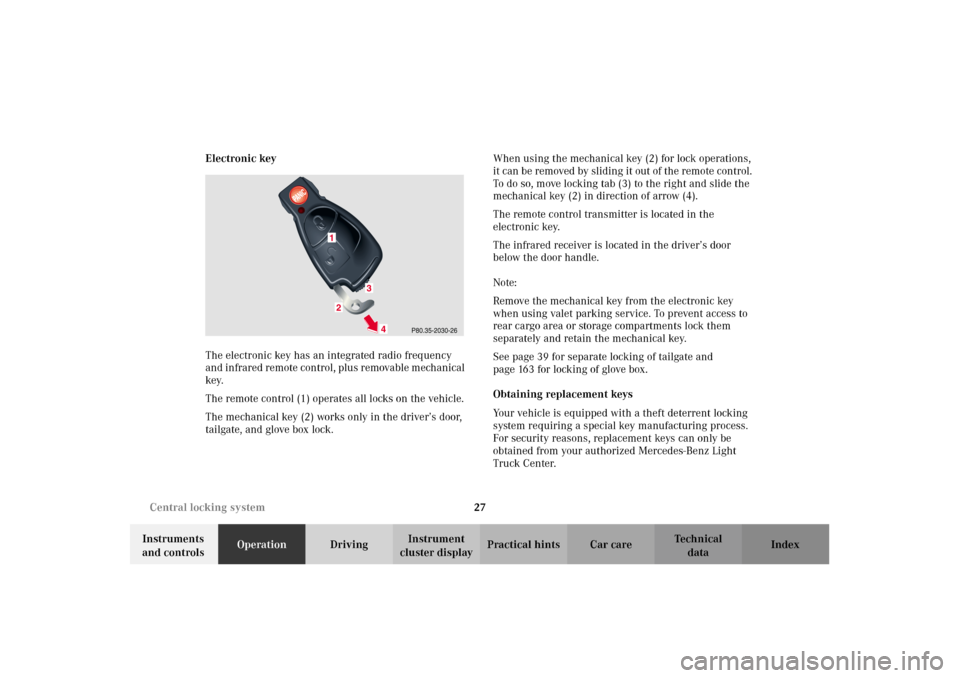
The electronic key has an integrated radio frequency
and infrared remote control, plus removable mechanical
key.
The remote control (1) operates all locks on the vehicle.
The mechanical key (2) works only in the driver’s door,
tailgate, and glove box lock.When using the mechanical key (2) for lock operations,
it can be removed by sliding it out of the remote control.
To do so, move locking tab (3) to the right and slide the
mechanical key (2) in direction of arrow (4).
The remote control transmitter is located in the
electronic key.
The infrared receiver is located in the driver’s door
below the door handle.
Note:
Remove the mechanical key from the electronic key
when using valet parking service. To prevent access to
rear cargo area or storage compartments lock them
separately and retain the mechanical key.
See page 39 for separate locking of tailgate and
page 163 for locking of glove box.
Obtaining replacement keys
Your vehicle is equipped with a theft deterrent locking
system requiring a special key manufacturing process.
For security reasons, replacement keys can only be
obtained from your authorized Mercedes-Benz Light
Truck Center.
J_G463.book Seite 27 Mittwoch, 19. September 2001 8:06 08
Page 31 of 385
28 Central locking system
Te ch n i c a l
data Instruments
and controlsOperationDrivingInstrument
cluster displayPractical hints Car care Index
Start lock-out
Important!
Removing the electronic key from the starter switch
activates the start lock-out. The engine cannot be
started.
Inserting the electronic key in the starter switch
deactivates the start lock-out.
Note:
In case the engine cannot be started (vehicle’s battery is
in order), the system is not operational. Contact an
authorized Mercedes-Benz Light Truck Center or call
1-800-FOR-MERCedes (in the USA), or 1-800-387-0100
(in Canada).General notes on the central locking system
If the electronic key is inserted in the starter switch, the
vehicle cannot be locked or unlocked with the remote
control.
If the vehicle cannot be locked or unlocked:
•Check the batteries of the electronic key, see
page 343, or synchronize the electronic key, see
page 345.
•Use the mechanical key to unlock the vehicle. To
start engine, insert the electronic key in the starter
switch. There could be a slight delay until the
electronic key can be turned in the starter switch.
Important!
When unlocking the driver’s door with the mechanical
key, the exterior lamps will flash and the alarm will
sound.
To cancel the alarm, insert the electronic key in the
starter switch or press buttonŒ or‹ on the
electronic key.
J_G463.book Seite 28 Mittwoch, 19. September 2001 8:06 08
Page 32 of 385
29 Central locking system
Te ch n i c a l
data Instruments
and controlsOperationDrivingInstrument
cluster displayPractical hints Car care Index Central locking system
Radio frequency and infrared remote control
The electronic key has an integrated radio frequency
and infrared remote control.
Due to the extended operational range of the remote
control, it could be possible to unintentionally lock or
unlock the vehicle by pressing the transmit button. If
one of the transmit buttons is pressed, the battery check
lamp lights up briefly – indicating that the batteries are
in order. See page 343 for checking batteries.
The vehicle doors, tailgate and fuel filler flap can be
centrally locked and unlocked via remote control.
Opening and closing the windows can only be done with
the infrared portion of the remote control. Aim
transmitter eye at the receiver of the driver’s door (6),
press and hold transmit button Œ or ‹,
seepage32.
If the electronic key is inserted in the starter switch, the
vehicle cannot be locked or unlocked with the remote
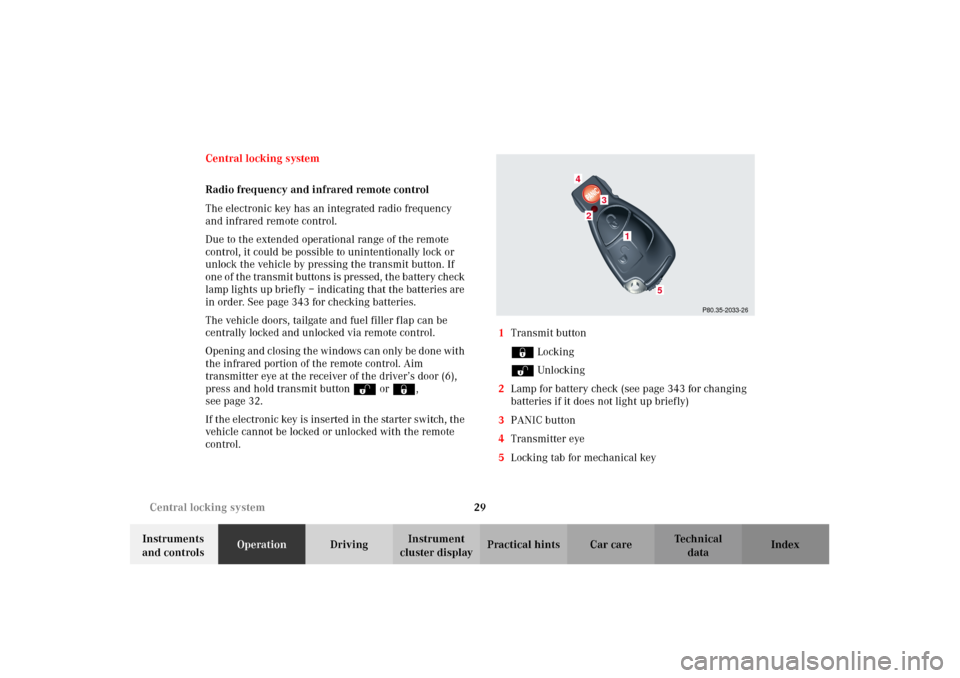
control.1Transmit button
‹ Locking
ΠUnlocking
2Lamp for battery check (see page 343 for changing
batteries if it does not light up briefly)
3PANIC button
4Transmitter eye
5Locking tab for mechanical key
P80.35-2033-26
2
1
4
3
5
J_G463.book Seite 29 Mittwoch, 19. September 2001 8:06 08
Page 34 of 385
31 Central locking system
Te ch n i c a l
data Instruments
and controlsOperationDrivingInstrument
cluster displayPractical hints Car care Index Locking and unlocking with remote control
Unlocking:
Press transmit button Œ. All turn signal lamps blink
once to indicate that the vehicle is unlocked.
The remote control can be programmed for two kinds of
unlocking modes (see below):
Selective unlocking mode –
Press transmit button Œ once to unlock driver’s door
and fuel filler flap.
Press transmit button Πtwice to unlock all doors,
fuel filler flap, and tailgate.
Global unlocking mode –
Press transmit button Πonce to unlock all doors,
fuel filler flap, and tailgate.
Notes:
If the tailgate was previously locked separately, it will
remain locked, see page 39.
The presently active unlocking mode (selective or
global) can only be determined by unlocking the vehicle
with the remote control (see below for changing mode).If within 40 seconds of unlocking with the remote
control, neither door or tailgate is opened, the electronic
key is not inserted in the starter switch, or the central
locking switch is not activated, the vehicle will
automatically lock.
Locking:
Press transmit button ‹ once. All turn signal lamps
blink three times to indicate that the vehicle is locked. If
they do not blink three times, a door or the tailgate is
not properly closed.
Note:
If the vehicle cannot be locked or unlocked by pressing
the transmit button, then it may be necessary to change
the batteries in the electronic key (if ok, battery check
lamp in electronic key will light briefly when pressing
transmit button) or to synchronize the remote control,
see pages 343 and 345.
Choosing global or selective mode on remote control
Press and hold transmit buttons‹ andŒ
simultaneously for 6 seconds to reprogram the remote
control. Battery check lamp will blink two times
indicating the completed mode change.
J_G463.book Seite 31 Mittwoch, 19. September 2001 8:06 08