Page 1 of 288
Introduction 4
Congratulations 4
Safety and environment protection 5
Symbol glossary 8
Instrument Cluster 10
Warning and control lights 10
Gauges 16
Entertainment Systems 19
AM/FM stereo cassette 19
AM/FM stereo with CD 31
CD changer 44
Climate Controls 48
Electronic automatic temperature control 48
Lights 60
Headlamps 60
Bulb replacement 65
Driver Controls 69
Steering wheel adjustment 72
Power windows 73
Mirrors 77
Message center 94
Locks and Security 108
Keys 108
Locks 108
Anti-theft system 111
Table of Contents
1
Page 10 of 288

WARNING LIGHTS AND CHIMES
Warning lights and gauges can alert you to a vehicle condition that may
become serious enough to cause expensive repairs. A warning light may
illuminate when a problem exists with one of your vehicle's functions.
Many lights will illuminate when you start your vehicle to make sure the
bulb works.If any light remains on after starting the vehicle, have
the respective system inspected immediately.
Check engine
Illuminates briefly to ensure the
system is functional. If it comes on
after the engine is started, one of
the engine's emission control
systems may be malfunctioning. The light may illuminate without a
driveability concern being noted and will not require towing.
Light turns on solid:
Temporary malfunctions may cause your light to illuminate. Examples are:
²The vehicle has run out of fuel.
²Poor fuel quality or water in the fuel.
²The fuel cap may not have been properly installed and securely
tightened.
These temporary malfunctions can be corrected by filling the fuel tank
with high quality fuel of the recommended octane and/or properly
installing and securely tightening the fuel cap. After three driving cycles
without these or any other temporary malfunctions present, the light
should turn off. (A driving cycle consists of a cold engine startup
followed by mixed city/highway driving.) No additional vehicle service is
required.
0020406080
100
120
140
160 12345
6
7P! BRAKE
H
C
40
80120160
200
240km/hRPMX1000RESETMPHA/B
F
E
CHECK
FUEL
CAPTRIPkmilesABD
5
Instrument Cluster
10
Page 67 of 288

Interior bulbs
Check the operation of the following interior bulbs frequently:
²front map lamps
²Rear dome/reading lamp
For bulb replacement, see a dealer or qualified technician.
Map lamps
For bulb replacement, see a qualified service technician or your dealer.
Replacing headlamp bulbs
To remove the high or low beam headlamp bulb:
1. Make sure headlamp switch is in
OFF position.
2. Lift the hood, push and release
four tabs and remove the protective
cover from the headlamps.
3. Disconnect the electrical
connector from the bulb by pulling
rearward.
4. Remove the old bulb from the
lamp assembly by turning to unlock
and pulling it straight out of the
lamp assembly.
To install the new bulb:
Handle a halogen headlamp bulb carefully and keep out of
children's reach. Grasp the bulb only by its plastic base and do
not touch the glass. The oil from your hand could cause the bulb to
break the next time the headlamps are operated.
1. Install the new bulb in lamp assembly by pushing straight in and
turning to lock in position. You may need to turn the bulb slightly to
align the grooves in the plastic base with the tabs in the lamp assembly.
2. Connect the electrical connector to the bulb.
3. Install the protective cover and secure with four tabs.
Lights
67
Page 86 of 288

MOON ROOF (IF EQUIPPED)
To open the moon roof:
²Push up on the control to raise
the moon roof to the vent
position (when the glass panel is
closed).
²Push the front portion of the
control rearward to open the
moon roof.
²Press the rear portion of the
control past the first detent to
activate theAuto Openfeature.
To close the moon roof:
²To close from the vent, intermediate and full open positions, push the
rear portion of the control forward.
HOMELINKTUNIVERSAL TRANSCEIVER (IF EQUIPPED)
The HomeLinktUniversal Transceiver, located on the driver's visor,
provides a convenient way to replace up to three hand-held transmitters
with a single built-in device. This feature will learn the radio frequency
codes of most current transmitters to operate garage doors, entry gates,
security systems, entry door locks, and home or office lighting.
When programming your HomeLinktUniversal Transceiver, to a
garage door or gate be sure that people and objects are out of
the way to prevent potential harm or damage.
Do not use the HomeLinktUniversal Transceiver with any garage door
opener that lacks safety stop and reverse features as required by U.S.
federal safety standards (this includes any garage door opener model
manufactured before April 1, 1982). A garage door which cannot detect
an object, signaling the door to stop and reverse, does not meet current
U.S. federal safety standards. For more information on this matter, call
toll-free: 1±800±355±3515 or on the Internet atHomeLink.jci.com.
Driver Controls
86
Page 104 of 288
DATA ERROR.These messages indicate improper operation of the
vehicle network communication between electronic modules.
²Fuel computer
²Engine sensor
²Gear selection
²Door sensor
²Trunk sensor
²Exterior lamps
²Traction Controlyand AdvanceTracy(if equipped)
Contact your dealer as soon as possible if these messages occur on a
regular basis.
TRUNK REMOTE CONTROL
Press the remote trunk release
control on the instrument panel to
open the trunk.
The remote trunk release control
and power door locks will be
disabled when the vehicle is armed.
This control will not work until the
vehicle is disarmed.
The remote trunk release control will also be disabled when the valet
switch in the glove compartment is pressed. Refer to theValet switchin
theLocks and securitychapter.
FUEL DOOR RELEASE
Press the remote fuel door release
control on the instrument panel to
open the fuel door.
Driver Controls
104
Page 107 of 288
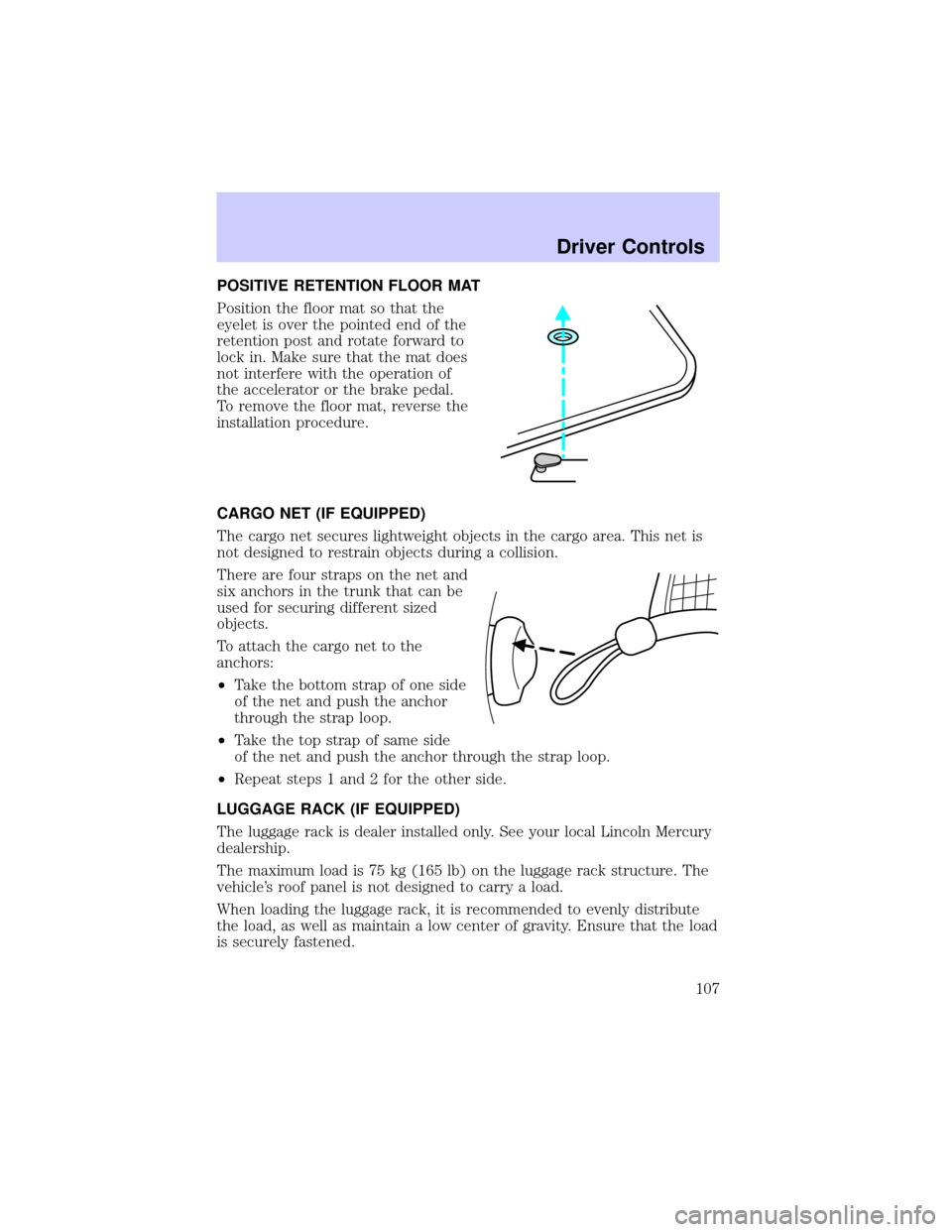
POSITIVE RETENTION FLOOR MAT
Position the floor mat so that the
eyelet is over the pointed end of the
retention post and rotate forward to
lock in. Make sure that the mat does
not interfere with the operation of
the accelerator or the brake pedal.
To remove the floor mat, reverse the
installation procedure.
CARGO NET (IF EQUIPPED)
The cargo net secures lightweight objects in the cargo area. This net is
not designed to restrain objects during a collision.
There are four straps on the net and
six anchors in the trunk that can be
used for securing different sized
objects.
To attach the cargo net to the
anchors:
²Take the bottom strap of one side
of the net and push the anchor
through the strap loop.
²Take the top strap of same side
of the net and push the anchor through the strap loop.
²Repeat steps 1 and 2 for the other side.
LUGGAGE RACK (IF EQUIPPED)
The luggage rack is dealer installed only. See your local Lincoln Mercury
dealership.
The maximum load is 75 kg (165 lb) on the luggage rack structure. The
vehicle's roof panel is not designed to carry a load.
When loading the luggage rack, it is recommended to evenly distribute
the load, as well as maintain a low center of gravity. Ensure that the load
is securely fastened.
Driver Controls
107
Page 108 of 288

KEYS
The vehicle is equipped with two master keys and a valet key lock
system. The master key will access the driver's door, trunk, glove box
and ignition. The valet key will access door and ignition only.
Refer to theSecurilock Passive Anti-Theft Systemsection for
information on Securilock keys.
Valet switch
Before using your valet key, press
the valet switch in the glove
compartment to disable the Trunk
remote control which is located on
the instrument panel, then lock the
glove compartment with your
master key.
POWER DOOR LOCKS
Press the top of the control to
unlock all doors and the bottom to
lock all doors.
When the vehicle is armed the
power door locks and remote trunk
release control are disabled. These
will not work until the vehicle is
disarmed.
Smart locks
With the key in the ignition, in any switch position, and either the
driver's or passenger's door open, the doors cannot be locked using the
power door lock switches.
The vehicle can still be locked with the key in the ignition, by pressing
the manual lock button on the door, operating the remote entry
transmitter, or operating the driver's door with a key.
VALET
Locks and Security
108
Page 109 of 288

Central locking/Two step unlocking
When unlocking the driver door with the key, turn it once toward the
front of the vehicle to unlock that door only. Turn the key a second time
to unlock all doors. When locking, turn the key toward the back of the
vehicle to lock all doors.
Childproof door locks
When these locks are set, the rear
doors cannot be opened from the
inside. The rear doors can be
opened from the outside when the
doors are unlocked.
The childproof locks are located on
rear edge of each rear door and
must be set separately for each
door. Setting the lock for one door
will not automatically set the lock
for both doors.
Rotate lock control in the direction of arrow to engage the lock. Rotate
control in the opposite direction to disengage childproof locks.
INTERIOR LUGGAGE COMPARTMENT RELEASE
Your vehicle is equipped with a mechanical interior luggage compartment
release handle that provides a means of escape for children and adults in
the event they become locked inside the luggage compartment.
Adults are advised to familiarize themselves with the operation and
location of the release handle.
Locks and Security
109

