Page 58 of 288
²Do not place items over the climate temperature sensor grid. This may
cause improper operation of the DATC system.
²With the ignition in the OFF position after operating the vehicle, some
vehicle sounds related to the climate control system may be heard.
²Approximately two minutes after key off, the air distribution doors
may adjust their positions as part of the normal operating process.
To aid in side window defogging:
1. Select
2. Set the temperature control to full heat
3. Select A/C
4. Set the fan speed to High
5. Direct the outer panel vents towards the side windows
6. In order to increase the airflow to the outer panel vents, close the
central panel vents.
Do not place objects on top of the instrument panel, as these
objects may become projectiles in a collision or sudden stop.
0020406080
100
120
140
160 12345
6
7P! BRAKE
H
C
40
80120160
200
240km/hRPMX1000RESETMPHA/B
F
E
TRIPkmilesABD 5
Climate Controls
58
Page 59 of 288

REAR WINDOW DEFROSTER
Press the rear window defroster
control to clear the rear window and
sideview mirrors of thin ice or fog.
The indicator will illuminate when
the rear window defroster is
selected.
The ignition must be in the RUN position and the engine running in
order to operate the rear window defroster.
The rear window defroster turns off automatically after 10 minutes or
sooner if a low battery condition is detected, or when the ignition is
turned to the OFF position. To manually turn off the rear window
defroster before 10 minutes have passed, push the control again.
CABIN AIR FILTER
Your vehicle is equipped with a Cabin air filter. The particulate air
filtration system is designed to reduce the concentration of airborne
particles such as dust, spores and pollen in the air being supplied to the
interior of the vehicle. The particulate filtration system gives the
following benefits to customers:
²Improves the customer's driving comfort by reducing particle
concentration
²Improves the interior compartment cleanliness
²Protects the climate control components from particle deposits
The filter is located just in front of the windshield under the cowl grille
on the passenger side of the vehicle.
For more information, or to replace the filter, see your Ford, Lincoln or
Mercury Dealer.
R
Climate Controls
59
Page 60 of 288
HEADLAMP CONTROL
Rotate the headlamp control to the
first position to turn on the parking
lamps. Rotate to the second position
to also turn on the headlamps.
Autolamp control
The autolamp system provides light
sensitive automatic on-off control of
the exterior lights normally
controlled by the headlamp control.
The autolamp system also keeps the
lights on for a preselected period of
time after the ignition switch is
turned to OFF.
²To turn autolamps on, rotate the
control counterclockwise. The
preselected time lapse is adjustable up to approximately three minutes
by continuing to rotate the control counterclockwise.
²To turn autolamps off, rotate the control clockwise to the off position
(O).
AUTO
AUTO
Lights
60
Page 61 of 288

Foglamp control
The headlamp control also operates
the foglamps. The foglamps can be
turned on when the headlamp
control is in any of the following
positions:
²Parking lamps
²Low beams
²Autolamps
Pull headlamp control towards you
to turn foglamps on. The foglamp indicator light will illuminate.
Daytime running lamps (DRL) (if equipped)
Turns the highbeam headlamps on with a reduced output.
To activate with automatic transmission:
²the ignition must be in the RUN position;
²the headlamp control is in the OFF position, Parking lamps position,
or Autolamp position when the autolamp function has not turned on
the headlamps (daytime); and
²the transmission is out of Park.
To activate with manual transmission:
²the ignition must be in the RUN position;
²the headlamp control is in the OFF position, Parking lamps position,
or Autolamp position when the autolamp function has not turned on
the headlamps (daytime); and
²the parking brake is released.
Always remember to turn on your headlamps at dusk or during
inclement weather. The Daytime Running Light (DRL) System
does not activate your tail lamps and generally may not provide
adequate lighting during these conditions. Failure to activate your
headlamps under these conditions may result in a collision.
PULL AUTO
Lights
61
Page 65 of 288
INTERIOR LAMPS
Map lamps (if equipped)
The map lamps and controls are
located on the dome lamp. Press the
controls in front of each map lamp
to activate the lamps.
Rear dome lamp
The dome lamp lights when:
²any door is opened.
²the instrument panel dimmer
switch is rotated up until the
courtesy lamps come on.
²the remote entry UNLOCK
control is pressed and the ignition is OFF.
With the ignition key in the OFF, ACC or RUN position, the reading lamp
on the dome lamp can be turned on by pressing the control.
BULBS
Replacing exterior bulbs
Check the operation of the following lamps frequently:
²Headlamps
²Tail lamps
²Brakelamps
²High-mount brakelamp
²Turn signals
²Backup lamps
²License plate lamp
²Fog lamps
Lights
65
Page 69 of 288

WINDSHIELD WIPER/WASHER CONTROLS
Rotate the windshield wiper control
to the desired interval, low or high
speed position. The ignition must be
in the ACC or RUN position to
operate the windshield wiper.
The bars of varying length are for
intermittent wipers. When in this
position rotate the control upward
for fast intervals and downward for
slow intervals.
Push the control on the end of the
stalk to activate washer. Push and
hold for a longer wash cycle. The
washer will automatically shut off
after ten seconds of continuous use.
When the washer system senses low fluid in the washer bottle and the
control is pushed to activate the system, washer fluid will spray onto the
windshield (if the reservoir still has fluid in it), but the windshield wiper
will not automatically cycle if low fluid is sensed. The wiper must be
engaged by manually selecting a position on the wiper/washer control.
This is to let you know that the washer fluid is low or empty and needs
to be refilled. Refer to theWindshield washer fluidsection of the
Maintenance and specificationschapter.
Moisture sensitive wipers (if equipped)
When the windshield wiper control
is set to INT and the intermittent
position is AUTO, moisture sensitive
front wipers automatically activate
when moisture accumulates on the
windshield. When the ignition is
turned to Off and then back to Run
and the wiper setting has remained
in AUTO position, the wipers may
cycle one time.
The moisture sensitive wiper feature should be turned off before
entering a car wash.
INT
INTOFF
AUTO
INT
INTOFF
AUTO
INT
INTOFF
AUTO
Driver Controls
69
Page 72 of 288
TILT/TELESCOPE STEERING COLUMN
Power tilt/telescope steering column
Never adjust the steering wheel when the vehicle is moving.
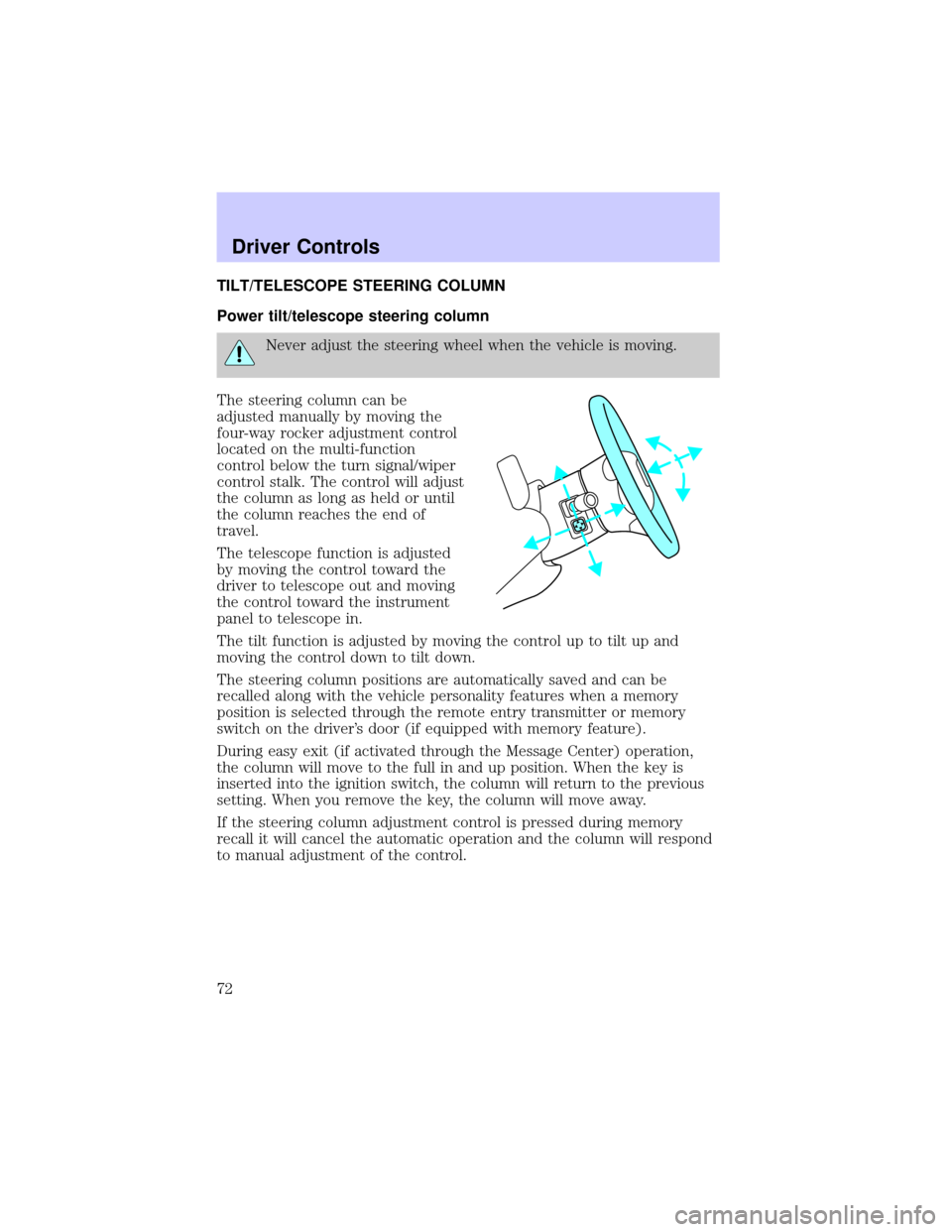
The steering column can be
adjusted manually by moving the
four-way rocker adjustment control
located on the multi-function
control below the turn signal/wiper
control stalk. The control will adjust
the column as long as held or until
the column reaches the end of
travel.
The telescope function is adjusted
by moving the control toward the
driver to telescope out and moving
the control toward the instrument
panel to telescope in.
The tilt function is adjusted by moving the control up to tilt up and
moving the control down to tilt down.
The steering column positions are automatically saved and can be
recalled along with the vehicle personality features when a memory
position is selected through the remote entry transmitter or memory
switch on the driver's door (if equipped with memory feature).
During easy exit (if activated through the Message Center) operation,
the column will move to the full in and up position. When the key is
inserted into the ignition switch, the column will return to the previous
setting. When you remove the key, the column will move away.
If the steering column adjustment control is pressed during memory
recall it will cancel the automatic operation and the column will respond
to manual adjustment of the control.
Driver Controls
72
Page 74 of 288

Express down
To make the driver window open
fully without holding the window
control, press the top portion of the
driver window control completely
down to the second detent. Press or
pull the control to stop window operation.
Window lock
The window lock feature allows only
the driver to operate the rear power
windows.
To lock out the rear window
controls press the left side of the
control. Press the right side to restore the window controls.
Accessory delay
With accessory delay, the window switches may be used for up to ten
minutes after the ignition switch is turned to the OFF position or until
either front door is opened.
MIRRORS
Automatic dimming inside rear view mirror
Your vehicle is equipped with an inside rear view mirror which has an
auto-dimming function. The electronic day/night mirror will change from
the normal state to the non-glare state when bright lights (glare) reach
the mirror. When the mirror detects bright light from front or behind, it
will automatically adjust (darken) to minimize glare.
Do not block the sensor on the backside of the mirror since this may
impair proper mirror performance.
AUTO
Driver Controls
74


