2002 JEEP GRAND CHEROKEE Skim
[x] Cancel search: SkimPage 606 of 2199

cluster circuitry that controls the lamp, (Refer to 8 -
ELECTRICAL/INSTRUMENT CLUSTER - DIAGNO-
SIS AND TESTING). If the instrument cluster turns
on the SKIS indicator lamp after the bulb test, either
solid or flashing, it indicates that a SKIS malfunction
has occurred or that the SKIS is inoperative. For
proper diagnosis of the SKIS, the PCI data bus, or
the message inputs to the instrument cluster that
control the SKIS indicator lamp, a DRBIIItscan tool
and the appropriate diagnostic information are
required.
TRANSPONDER KEY
DESCRIPTION
Each ignition key used in the Sentry Key Immobi-
lizer System (SKIS) has an integral transponder chip
(Fig. 10). Ignition keys with this feature can be
readily identified by a gray rubber cap molded onto
the head of the key, while conventional ignition keys
have a black molded rubber cap. The transponder
chip is concealed beneath the molded rubber cap,
where it is molded into the head of the metal key.
Each new Sentry Key has a unique transponder iden-
tification code permanently programmed into it by
the manufacturer. The Sentry Key transponder if
faulty or damaged, must be replaced.
OPERATION
When the ignition switch is turned to the On posi-
tion, the Sentry Key Immobilizer Module (SKIM)communicates through its antenna with the Sentry
Key transponder using a Radio Frequency (RF) sig-
nal. The SKIM then waits for a RF response from the
transponder through the same antenna. The Sentry
Key transponder chip is within the range of the
SKIM transceiver antenna ring when it is inserted
into the ignition lock cylinder. The SKIM determines
whether a valid key is present in the ignition lock
cylinder based upon the response from the transpon-
der. If a valid key is detected, that fact is communi-
cated by the SKIM to the Powertrain Control Module
(PCM) over the Programmable Communications
Interface (PCI) data bus, and the PCM allows the
engine to continue running. If the PCM receives an
invalid key message, or receives no message from the
SKIM over the PCI data bus, the engine will be dis-
abled after about two seconds of operation. The Elec-
troMechanical Instrument Cluster (EMIC) will also
respond to the invalid key message on the PCI data
bus by flashing the SKIS indicator on and off.
Each Sentry Key has a unique transponder identi-
fication code permanently programmed into it by the
manufacturer. Likewise, the SKIM has a unique
Secret Key code programmed into it by the manufac-
turer. When a Sentry Key is programmed into the
memory of the SKIM, the SKIM stores the transpon-
der identification code from the Sentry Key, and the
Sentry Key learns the Secret Key code from the
SKIM. Once the Sentry Key learns the Secret Key
code of the SKIM, it is permanently stored in the
memory of the transponder. Therefore, once a Sentry
Key has been programmed to a particular vehicle, it
cannot be used on any other vehicle. (Refer to 8 -
ELECTRICAL/VEHICLE THEFT SECURITY -
STANDARD PROCEDURE - TRANSPONDER PRO-
GRAMMING).
VTSS INDICATOR
DESCRIPTION
The Vehicle Theft Security System (VTSS) indica-
tor consists of a red Light-Emitting Diode that is
mounted and integral to the automatic headlamp
light sensor photo diode unit, which is located on the
top of the instrument panel. The remainder of the
housing including the mount and the electrical con-
nection are concealed beneath the instrument panel
top cover.
The VTSS indicator cannot be adjusted or repaired
the entire automatic headlamp light sensor/VTSS
indicator must be replaced. (Refer to 8 - ELECTRI-
CAL/LAMPS/LIGHTING - EXTERIOR/AUTO HEAD-
LAMP SENSOR - REMOVAL).
Fig. 10 Sentry Key Immobilizer Transponder
1 - MOLDED CAP
2 - TRANSPONDER CHIP
3 - MOLDED CAP REMOVED
4 - TRANSPONDER KEY
WJVEHICLE THEFT SECURITY 8Q - 15
SKIS INDICATOR LAMP (Continued)
Page 1113 of 2199
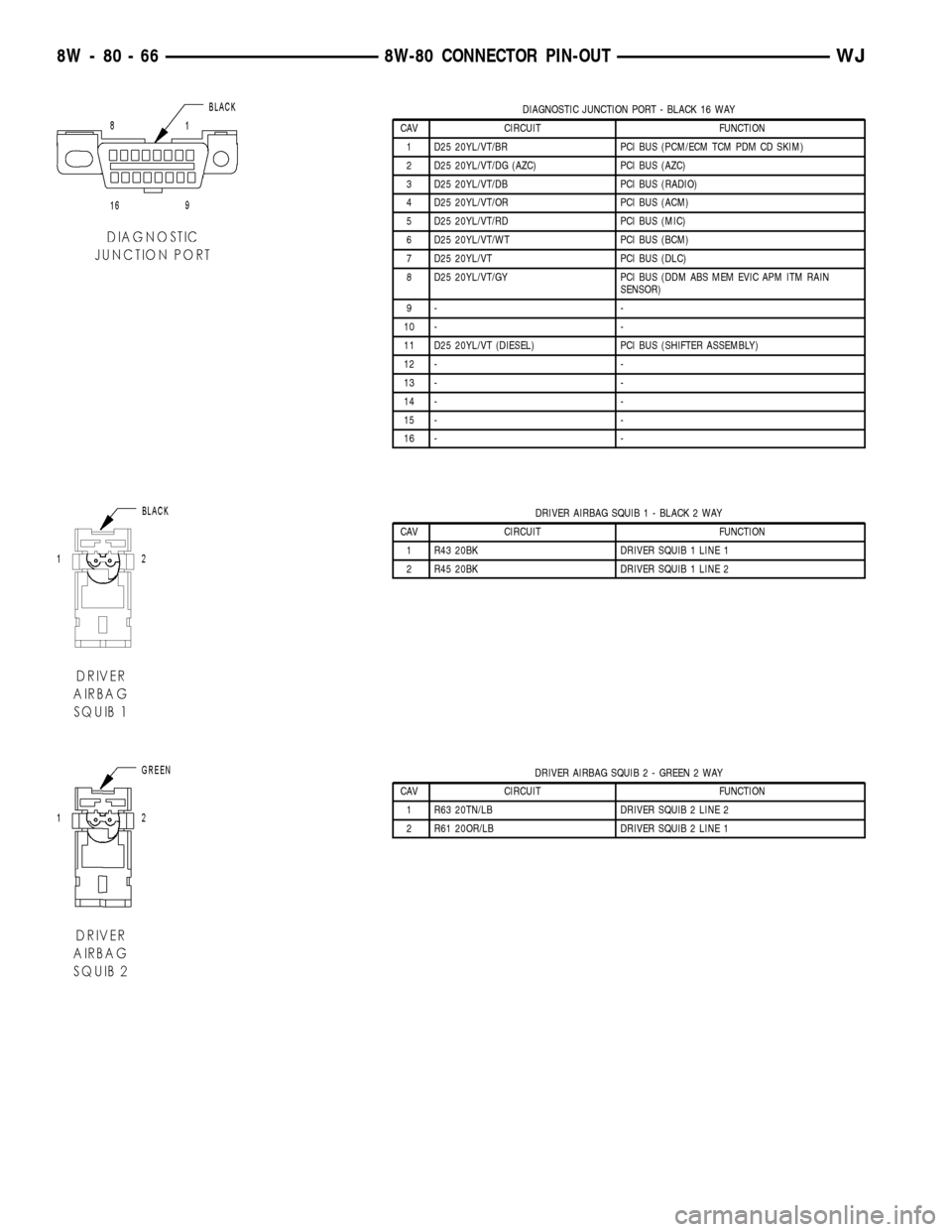
DIAGNOSTIC JUNCTION PORT - BLACK 16 WAY
CAV CIRCUIT FUNCTION
1 D25 20YL/VT/BR PCI BUS (PCM/ECM TCM PDM CD SKIM)
2 D25 20YL/VT/DG (AZC) PCI BUS (AZC)
3 D25 20YL/VT/DB PCI BUS (RADIO)
4 D25 20YL/VT/OR PCI BUS (ACM)
5 D25 20YL/VT/RD PCI BUS (MIC)
6 D25 20YL/VT/WT PCI BUS (BCM)
7 D25 20YL/VT PCI BUS (DLC)
8 D25 20YL/VT/GY PCI BUS (DDM ABS MEM EVIC APM ITM RAIN
SENSOR)
9- -
10 - -
11 D25 20YL/VT (DIESEL) PCI BUS (SHIFTER ASSEMBLY)
12 - -
13 - -
14 - -
15 - -
16 - -
DRIVER AIRBAG SQUIB 1 - BLACK 2 WAY
CAV CIRCUIT FUNCTION
1 R43 20BK DRIVER SQUIB 1 LINE 1
2 R45 20BK DRIVER SQUIB 1 LINE 2
DRIVER AIRBAG SQUIB 2 - GREEN 2 WAY
CAV CIRCUIT FUNCTION
1 R63 20TN/LB DRIVER SQUIB 2 LINE 2
2 R61 20OR/LB DRIVER SQUIB 2 LINE 1
8W - 80 - 66 8W-80 CONNECTOR PIN-OUTWJ
Page 1488 of 2199

(13) Remove the column coupler bolt (Fig. 13) and
slide the coupler off the column shaft.
(14) Remove the column mounting nuts (Fig. 13)
and lower column off mounting studs. Remove the
column from the vehicle.
(15) Remove the ignition switch, cylinder and
SKIM, (Refer to 19 - STEERING/COLUMN/LOCK
CYLINDER HOUSING - REMOVAL). (Fig. 14).INSTALLATION
WARNING: BEFORE SERVICING THE STEERING COL-
UMN THE AIRBAG SYSTEM MUST BE DISARMED.
FAILURE TO DO SO MAY RESULT IN ACCIDENTAL
DEPLOYMENT OF THE AIRBAG AND POSSIBLE PER-
SONAL INJURY. (Refer to 8 - ELECTRICAL/RE-
STRAINTS/DRIVER AIRBAG - INSTALLATION).
(1) Install the ignition switch, cylinder and SKIM-
,(Refer to 19 - STEERING/COLUMN/IGNITION
SWITCH - INSTALLATION).
(2) Install the column into the vehicle and lift the
column up onto the mounting studs. Install the
mounting nuts and tighten to 12 N´m (105 in. lbs.).
(3) Slid the coupler onto the column shaft and
install the coupler bolt. Tighten the coupler bolt to 49
N´m (36 ft. lbs.).
(4) Turn the ignition key to the on position then
release and install the shifter interlock cable (Fig.
12) into ignition lock cylinder housing.
(5) Verify ignition switch and shifter interlock
operation.,(Refer to 21 - TRANSMISSION/TRANS-
AXLE/AUTOMATIC - 42RE/GEAR SHIFT CABLE -
ADJUSTMENTS).
(6) Slide the multifuction switch and clock spring
onto the column as an assembly (Fig. 11).
(7) Install the multifuction switch mounting screw
(Fig. 10).
(8) Connect the multifuction switch (Fig. 9) and
ignition switch harness.
(9) Install the upper fixed shroud and mounting
screws (Fig. 8).
(10) Install the lower steering column shroud to
the steering column. Install and tighten the mount-
ing screw.
(11) Install the upper column shroud. Align the
upper shroud to the lower shroud and snap the two
shroud halves together.
(12) Install the knee blocker cover (Fig. 5),(Refer
to 23 - BODY/INSTRUMENT PANEL - INSTALLA-
TION).
(13) Install the cluster bezel by inserting it into
the instrument panel (Fig. 4).
(14) Align the steering wheel with the column
index spline and install the wheel on the column
shaft. Pull the clockspring wire harness through the
steering wheel armature spokes.
(15) Install and tighten the steering wheel mount-
ing nut to 61 N´m (45 ft. lbs.).
(16) Connect the steering wheel wire harness con-
nector to the clock spring connector.
(17) Install the airbag,(Refer to 8 - ELECTRICAL/
RESTRAINTS/DRIVER AIRBAG - INSTALLATION).
(18) Connect the negative (ground) cable to the
battery.
Fig. 13 Column Coupler Bolt And Mounting Nuts
1 - COLUMN MOUNTING NUTS
2 - COUPLER BOLT
Fig. 14 Ignition Switch And SKIM
1 - SKIM
2 - IGNITION SWITCH
WJCOLUMN 19 - 11
COLUMN (Continued)
Page 1911 of 2199

(12) Remove the screw that secures the lower tilt-
ing steering column shroud to the steering column
multi-function switch mounting housing (Fig. 2).
(13) Unsnap the two halves of the tilting steering
column shroud from each other and remove both
halves from the steering column.
(14) Disconnect the instrument panel wire harness
connectors from the following steering column compo-
nents (Fig. 3):
²the two lower clockspring connector receptacles
²the left multi-function switch connector recepta-
cle
²the right multi-function switch connector recep-
tacle
²the two ignition switch connector receptacles
²the shifter interlock solenoid connector recepta-
cle
²if the vehicle is so equipped, the Sentry Key
Immobilizer Module (SKIM) connector receptacle.
(15) Turn the ignition switch to the On position,
then release and remove the shifter interlock cable
connector from the ignition lock housing receptacle.
(16) Turn the ignition switch back to the Lock
position to prevent steering wheel rotation and theloss of clockspring centering following steering col-
umn removal.
(17) Remove the bolt that secures the coupler to
the lower steering column shaft (Fig. 4).
Fig. 2 Steering Column Shrouds Remove/Install
1 - UPPER TILTING COLUMN SHROUD
2 - FIXED COLUMN SHROUD
3 - LOWER TILTING COLUMN SHROUD
4 - SCREW
Fig. 3 Steering Column Connections
1 - LEFT MULTIFUNCTION SWITCH CONNECTOR
2 - LOWER CLOCKSPRING CONNECTORS
3 - RIGHT MULTIFUNCTION SWITCH CONNECTOR
4 - SHIFTER INTERLOCK CABLE CONNECTOR
5 - SHIFTER INTERLOCK SOLENOID CONNECTOR
6 - IGNITION SWITCH CONNECTOR RECEPTACLES
7 - SKIM CONNECTOR
Fig. 4 Steering Column Mounting
1 - COLUMN MOUNTING NUTS
2 - COUPLER BOLT
23 - 38 INSTRUMENT PANEL SYSTEMWJ
INSTRUMENT PANEL SYSTEM (Continued)
Page 1917 of 2199

(23) Reconnect the instrument panel wire harness
connectors to the following floor panel transmission
tunnel components:
²the Airbag Control Module (ACM) connector
receptacle
²the park brake switch terminal
²the transmission shifter connector receptacle.
(24) Reconnect the left and right body wire har-
ness connectors, the Ignition Off Draw (IOD) wire
harness connector and the fused B(+) wire harness
connector to the connector receptacles of the Junction
Block (JB) and tighten the connector screws (Fig. 5).
Tighten the screws to 4 N´m (36 in. lbs.).
(25) Engage the lower steering column shaft with
the steering shaft coupler and position the steering
column to the mounting studs on the instrument
panel steering column support bracket (Fig. 4).
(26) Install and tighten the four nuts that secure
the steering column to the studs on the instrument
panel steering column support bracket. Tighten the
nuts to 11.8 N´m (105 in. lbs.).
(27) Install and tighten the bolt that secures the
coupler to the lower steering column shaft. Tighten
the bolt to 49 N´m (36 ft. lbs.).
(28) Turn the ignition switch to the On position,
then install the shifter interlock cable connector into
the ignition lock housing receptacle.
(29) Reconnect the instrument panel wire harness
connectors to the following steering column compo-
nents (Fig. 3):
²the two lower clockspring connector receptacles
²the left multi-function switch connector recepta-
cle
²the right multi-function switch connector recep-
tacle
²the two ignition switch connector receptacles
²the shifter interlock solenoid connector recepta-
cle
²if the vehicle is so equipped, the Sentry Key
Immobilizer Module (SKIM) connector receptacle.
(30) Position the lower tilting steering column
shroud to the steering column multi-function switchmounting housing, then install and tighten the screw
that secures the shroud to the housing (Fig. 2).
Tighten the screw to 1.9 N´m (17 in. lbs.).
(31) Position the upper tilting steering column
shroud over the steering column. Align the upper and
lower shrouds with each other and snap the two
halves together.
(32) Reinstall the steering column bracket onto the
instrument panel steering column support bracket.
(Refer to 23 - BODY/INSTRUMENT PANEL/IP
STEERING COLUMN BRACKET - INSTALLA-
TION).
(33) Reinstall the steering column opening cover
onto the instrument panel. (Refer to 23 - BODY/IN-
STRUMENT PANEL/STEERING COLUMN OPEN-
ING COVER - INSTALLATION).
(34) Reinstall the cluster bezel onto the instru-
ment panel. (Refer to 23 - BODY/INSTRUMENT
PANEL/CLUSTER BEZEL - INSTALLATION).
(35) Reinstall the fuse cover onto the Junction
Block (JB). (Refer to 8 - ELECTRICAL/POWER DIS-
TRIBUTION/FUSE COVER - INSTALLATION).
(36) Reinstall the console onto the floor panel
transmission tunnel. (Refer to 23 - BODY/INTERI-
OR/FLOOR CONSOLE - INSTALLATION).
(37) Reinstall the trim panels onto the right and
left inner cowl sides. (Refer to 23 - BODY/INTERI-
OR/COWL TRIM - INSTALLATION).
(38) Reinstall the scuff plates onto the right and
left front door sills. (Refer to 23 - BODY/INTERIOR/
DOOR SILL SCUFF PLATE - INSTALLATION).
(39) Reinstall the top cover onto the instrument
panel. (Refer to 23 - BODY/INSTRUMENT PANEL/
INSTRUMENT PANEL TOP COVER - INSTALLA-
TION).
(40) Reinstall the trim onto the right and left
A-pillars. (Refer to 23 - BODY/INTERIOR/A-PILLAR
TRIM - INSTALLATION).
(41) Reconnect the battery negative cable.
23 - 44 INSTRUMENT PANEL SYSTEMWJ
INSTRUMENT PANEL SYSTEM (Continued)
Page 2169 of 2199

(M)Malfunction Indicator Lamp (MIL) illuminated during engine operation if this DTC was recorded
(depending if required by CARB and/or EPA). MIL is displayed as an engine icon on instrument panel.
(G)Generator lamp illuminated
Generic Scan
Tool P-CodeDRB Scan Tool Display Brief Description of DTC
P1498 High Speed Rad Fan Ground CTRL
Rly CircuitAn open or shorted condition detected in the control
circuit of the #3 high speed radiator fan control relay.
P1499 Hydraulic cooling fan solenoid circuit An open or shorted condition detected in the cooling fan
control solenoid circuit.
P1594 (G) Charging System Voltage Too High Battery voltage sense input above target charging voltage
during engine operation.
P1594 Charging System Voltage Too High Battery voltage sense input above target charging voltage
during engine operation.
P1595 Speed Control Solenoid Circuits An open or shorted condition detected in either of the
speed control vacuum or vent solenoid control circuits.
P1595 Speed Control Solenoid Circuits An open or shorted condition detected in the speed
control vacuum or vent solenoid circuits.
P1596 Speed Control Switch Always High Speed control switch input above maximum acceptable
voltage.
P1597 Speed Control Switch Always Low Speed control switch input below minimum acceptable
voltage.
P1597 Speed Control Switch Always Low Speed control switch input below the minimum acceptable
voltage.
P1598 A/C Pressure Sensor Volts Too High A/C pressure sensor input above maximum acceptable
voltage.
P1598 A/C Sensor Input Hi Problem detected in air conditioning electrical circuit.
P1599 A/C Pressure Sensor Volts Too Low A/C pressure sensor input below minimum acceptable
voltage.
P1599 A/C Sensor Input Lo Problem detected in air conditioning electrical circuit.
P1602 PCM not programmed
P1680 Clutch Released Switch Circuit Problem detected in clutch switch electrical circuit.
P1681 No I/P Cluster CCD/J1850
Messages ReceivedNo CCD/J1850 messages received from the cluster
control module.
P1682 (G) Charging System Voltage Too Low Battery voltage sense input below target charging voltage
during engine operation and no significant change in
voltage detected during active test of generator output
circuit.
P1682 Charging System Voltage Too Low Charging system output voltage low.
P1683 SPD CTRL PWR Relay; or S/C 12v
Driver CKTAn open or shorted condition detected in the speed
control servo power control circuit.
P1683 Spd ctrl pwr rly, or s/c 12v driver
circuitAn open or shorted condition detected in the speed
control servo power control circuit.
P1684 Batt Loss (disconnected) in last 50
StartsThe battery has been disconnected within the last 50
starts
P1685 SKIM Invalid Key - (Wrong or Invalid
Key MSG Received From SKIM)The engine controler has received an invalid key from the
SKIM.
P1686 No SKIM BUS Messages Received No CCD/J1850 messages received from the Smart Key
Immobilizer Module (SKIM).
25 - 14 EMISSIONS CONTROLWJ
EMISSIONS CONTROL (Continued)