2002 Hyundai Getz key
[x] Cancel search: keyPage 76 of 428

FEATURES OF YOUR HYUNDAI 1- 63
B500A01A-AAT GLOVE BOX
HTB101
HTB102
B491A01TB-GAT SPECTACLE CASE (If Installed) The spectacle case is located on the driver side of roof trim.Pull the end of the cover to open thespectacle case.
o OFF In the "OFF" position, the light stays off at all times even though a door is open.
WARNING:
Do not keep objects such as sharpor unsuitable things inside the spec-tacle case. Such objects can bethrown out in the event of a suddenstop or an accident, possibly injur- ing the passengers in the vehicle.
!
The interior courtesy light has a button of three positions. The three positionsare:
oDR In the "DR" position, the interior cour- tesy light comes on when any door isopened regardless of the ignition keyposition. The light goes out when thedoor is closed.
oON In the "ON" position, the light stays on at all times.
B490A01E-AAT INTERIOR LIGHT
HTB303
With Sunroof
Without unroof
Page 80 of 428

FEATURES OF YOUR HYUNDAI 1- 67
Always engage the parking brake be- fore leaving the car. This also turns onthe parking brake indicator light when the key is in the "ON" or "START" position. Before driving away, be surethat the parking brake is fully releasedand the indicator light is off.
o To engage the parking brake, pull
the lever up as far as possible.
o To release the parking brake, pull up the lever and press the thumb button. Then, while holding the but-ton in, lower the brake lever.
B530A01A-AAT PARKING BRAKE
B550A01S-GATHIGH-MOUNTED REAR STOP
LIGHT (If Installed) In addition to the lower-mounted rear stop lights on either side of the car, thehigh mounted rear stop light in the center of the rear window or inserted in the rear spoiler also lights when thebrakes are applied.
HTB251
HTB255
B570A01TB-GAT HOOD RELEASE
HTB070
1. Pull the release knob to unlatch the hood.
HTB069
2. Push the safety catch lever sidewards and lift the hood.
Page 82 of 428

FEATURES OF YOUR HYUNDAI 1- 69
break the ice and release the lid. Do not pry on the lid. If necessary,spray around the lid with an ap-proved de-icer fluid (do not useradiator anti-freeze) or move the vehicle to a warm place and allow the ice to melt.
B540A01FC-GAT TAIL GATE
HTB067WARNING:
The tail gate should always be kept completely closed while the vehicleis in motion. If it is left open or ajar,poisonous exhaust gases may en-ter the car resulting in serious ill- ness or death to the occupants. See additional warnings concerning ex-haust gases on page 2-2.
o The tail gate can be locked or un- locked with a key.
o The tail gate is opened by pulling the
outside handle up, raising the tail gate manually.
o To close, lower the tail gate, then press down on it until it is closed. Tobe sure the tail gate is fully closed, always try to pull it up again without using the outside handle.
HTB068
!!WARNING:
Fuel vapors are dangerous. Before refueling, always stop the engineand never allow sparks or open flames near the filler area. If you need to replace the filler cap, use agenuine Hyundai replacement part.If you open the fuel filler cap duringhigh ambient temperatures, a slight"pressure sound" may be heard. This is normal and not a cause for concern. Whenever you open the
fuel filler cap, turn it slowly.
Page 110 of 428

FEATURES OF YOUR HYUNDAI 1- 97
H290B03E-GAT
1. POWER ON-OFF Control Knob The radio unit may be operated when the ignition key is in the "ACC" or "ON"position. Press the button to switch the power on. The display shows the radio frequency in the radio mode, the tapedirection indicator in the tape mode or CD track in either the CD mode or CD AUTO CHANGER mode. To switchthe power off, press the button again. VOLUME Control Rotate the knob clockwise to increase the volume and turn the knob counter- clockwise to reduce the volume.
2. BASS/BALANCE
Control Knob BASS Control Knob
Press to pop the knob out. To increase the bass, rotate the knob clockwise, while to decrease the bass, rotate theknob counterclockwise. BALANCE Control knob Pull the Bass control knob out further. Rotate the knob clockwise to empha-size right speaker sound. (Left speaker sound will be attenuated) When the control knob is turned counterclock-wise, left speaker sound will be em- phasized (Right speaker sound will be attenuated).
3. TREBLE/FAD Knob
TREBLE Control Knob
Press to pop the knob out and turn to the left or right for the desired trebletone. FAD (Fader Control) Knob Pull the Bass control knob out further. Turn the control knob counterclock- wise to emphasize front speaker sound. (Rear speaker sound will be attenu-ated) When the control knob is turned clockwise, rear speaker sound will be emphasized. (Front speaker sound willbe attenuated) 4. TUNE (Manual) Select Button Press the ( ) side or ( ) side to increase or to decrease the frequency.Press either button and hold down to continuously scroll, Release button once the desired station is reached. SEEK Operation (Automatic Channel Selection) Press the TUNE select button for 0.5 sec or more. Releasing it will automati- cally tune to the next available stationwith a beep sound. When the ( ) side is pressed longer than 0.5 second, releasing will auto-matically tune to the next higher fre- quency and when the ( ) side is pressed longer than 0.5 second andreleasing will automatically tune to the next lower frequency.
5. PRESET STATION Select
Buttons
Six (6) stations for AM, FM and FM2 respectively can be preset in the elec- tronic memory circuit.
Page 111 of 428

1- 98 FEATURES OF YOUR HYUNDAI
HOW TO PRESET STATIONS Six AM and twelve FM stations may be programmed into the memory of theradio. Then, by simply pressing the band select button and/or one of the six station select buttons, you mayrecall any of these stations instantly. To program the stations, follow these steps:
o Press band selector to set the band
for AM, FM or FM2.
o Select the desired station to be stored by seek or manual tuning.
o Determine the preset station select button you wish to use to access that station.
o Press the station select button for more than two seconds. A selectbutton indicator will show in the dis- play indicating which select buttonyou have depressed. The frequency display will flash after it has been stored into the memory with beepsound. You should then release the button, and proceed to program the next desired station. A total of 18stations can be programmed by selecting one AM and two FM sta- tion per button. o When completed, any preset sta-
tion may be recalled by selectingAM, FM or FM2 band and the appro-priate station button.
6. BAND Selector Pressing the button changes the AM, FM1 and FM2 bands. The mode selected is shown on the display.
7. EQUALIZER Button Press the EQ button to select the CLASSIC, JAZZ, ROCK and DEFEATMODE for the desired tone quality. Each press of the button changes the display as follows;
CLASSIC JAZZ ROCK DEFEAT
FM/AM 8. Best Station Memory Button
(BSM) (If installed)
When the BSM button is pressed for two seconds or longer, the six chan- nels from the highest field intensity areselected next and stored in memory. The stations selected are stored in the sequence frequency from the first pre-set key. SCAN Button (If installed) When the scan button is pressed, the frequency will increase and the receiv- able stations will be tuned in one afteranother, receiving each station for 5 seconds. To stop scanning, press the scan button again.
Page 122 of 428
2. DRIVING YOUR HYUNDAI
2
Before starting the engine .............................................................. 2-3
Key position .................................................................................... 2-4Starting............................................................................................ 2-5
Operating the manual transaxle ..................................................... 2-7
Automatic transaxle ........................................................................ 2-9
Good braking practices ................................................................. 2-12
Anti-Lock brake system (ABS) ...................................................... 2-13
Driving for economy ...................................................................... 2-14
Winter Driving ............................................................................... 2-15
Trailer or vehicle towing ................................................................ 2-18
Page 124 of 428

DRIVING YOUR HYUNDAI 2- 3
C020A01O-GAT BEFORE STARTING THE EN- GINE Before you start the engine, you should always:
1. Look around the vehicle to be sure
there are no flat tires, puddles of oil, water or other indications of pos-sible trouble.
2. After entering the car, check to be
sure the parking brake is engaged.
3. Check that all windows, and lights are clean.
4. Check that the interior and exterior mirrors are clean and in position.
5. Check your seat, seatback and
headrest to be sure they are in theirproper positions.
6. Lock all the doors.
7. Fasten your seat belt and be sure
that all other occupants have fas- tened theirs.
8. Turn off all lights and accessories that are not needed.
9. When you turn the ignition switch to
"ON", check that all appropriate warning lights are operating and that you have sufficient fuel. 10.Check the operation of warning
lights and all bulbs when key is in the "ON" position.
!WARNING: (DIESEL ENGINE)
To ensure that sufficient vacuum exists within the brake system dur-ing cold weather start-up condi- tions, it is necessary to run the engine at idle for several secondsafter starting the engine. C030A01A-GAT COMBINATION IGNITION SWITCHTo Start the Engine
o If your Hyundai is equipped with a
manual transaxle, place the shift lever in neutral and depress theclutch pedal fully.
o If your Hyundai has an automatic
transaxle, place the shift lever in "P"(park).
o To start the engine, insert the igni-
tion key and turn it to the "START"position. Release it as soon as the engine starts. Do not hold the key in the "START" position for more than15 seconds.
NOTE: For safety, the engine will not start if the shift lever is not in "P" or "N"Position (Automatic transaxle).
Page 125 of 428
2- 4 DRIVING YOUR HYUNDAI
C070C01E
C070C01A-AAT
To Remove The Ignition Key
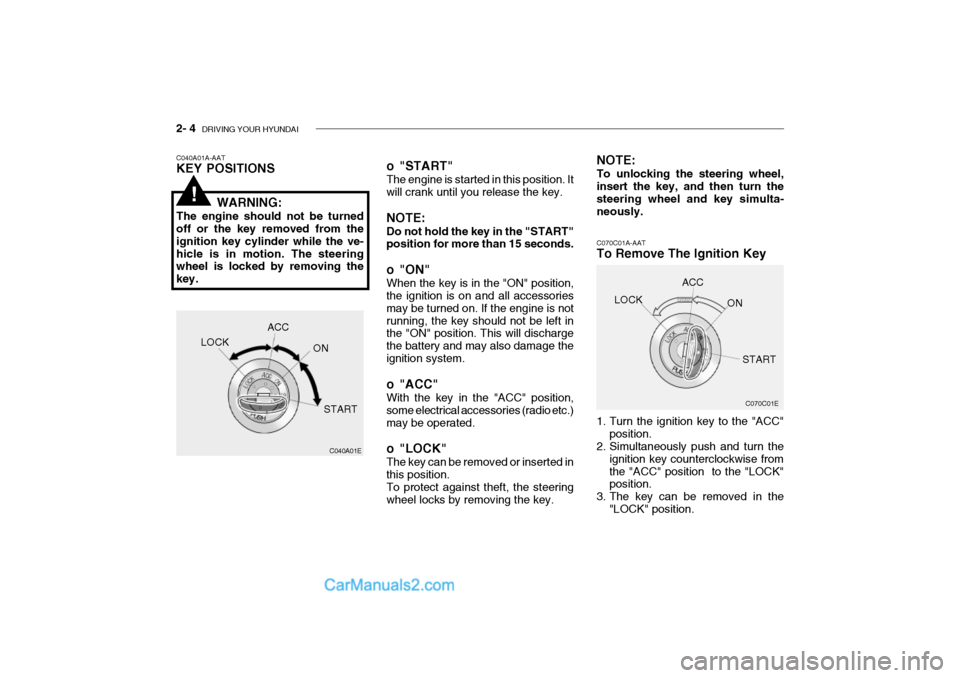
1. Turn the ignition key to the "ACC"
position.
2. Simultaneously push and turn the
ignition key counterclockwise from the "ACC" position to the "LOCK" position.
3. The key can be removed in the "LOCK" position.LOCK
ACC
ON
START
o "START" The engine is started in this position. It will crank until you release the key. NOTE: Do not hold the key in the "START" position for more than 15 seconds.
o "ON" When the key is in the "ON" position, the ignition is on and all accessories may be turned on. If the engine is notrunning, the key should not be left in the "ON" position. This will discharge the battery and may also damage theignition system.
o "ACC" With the key in the "ACC" position, some electrical accessories (radio etc.)may be operated.
o "LOCK" The key can be removed or inserted in this position. To protect against theft, the steering wheel locks by removing the key. NOTE: To unlocking the steering wheel, insert the key, and then turn the steering wheel and key simulta-neously.
C040A01A-AAT KEY POSITIONS
WARNING:
The engine should not be turned off or the key removed from the ignition key cylinder while the ve-hicle is in motion. The steering wheel is locked by removing the key.
C040A01E
LOCK
ACC
ON
START
!