Page 63 of 372

Together, airbags and
seat belts provide the best
protection.
Tampering could cause
the airbags to deploy, possibly
causing very serious injury. See page f or f urther inf ormation
and precautions relating to your
airbags.
If rain or spilled water
soaks into a seat-back, it can
prevent the side airbag system
f rom working properly. Improperly
replacing or covering f ront seat-
back covers can prevent your side
airbags f rom inf lating during a
collision.
Any
airbag that has deployed must be
replaced along with the control
unit, automatic seat belt
tensioners, and other related parts.
Do not try to remove or replace
anyairbagbyyourself.Thismust
be done by a Honda dealer or a
knowledgeable body shop.
Your f ront and side airbag systems
(if equipped) are virtually
maintenance-f ree, and there are no
parts you can saf ely service.
However, you must have your
vehicle serviced if:
Take your vehicle to
an authorized Honda dealer as
soon as possible. If you ignore this
indication, the airbags might not
inf late when you need them. 192
Airbag Service
Additional Saf ety Precautions
Donotattempttodeactivateyour
airbags.
Do not t amper wit h airbagcomponent s or wiring f or anyreason.
Do not expose t he f ront seat -backsto water. Do not cover or replace f ront seat -
back covers wit hout consult ing aHonda dealer.
Your airbags ever inf late.
T he SRS indicat or light alert s yout o a problem.
Additional Inf ormation About Your Airbags
Driver and Passenger Saf ety59
Page 71 of 372

This indicator lights when you turn
the ignition switch ON (II). If it
comes on at any other time, it
indicates that the passenger’s side
airbag has automatically shut off.
For complete inf ormation, see page.
This indicator lights when you turn
the ignition switch ON (II). If it
comes on at any other time, it
indicates a potential problem with
your f ront airbags or automatic seat
belt tensioners. On models equipped
with side airbags, this light will also
alert you to a potential problem with
your side airbags or passenger’s side
airbag automatic cutoff system. For
complete inf ormation, see page .
This indicator lights when you turn
the ignition switch ON (II). It is a
reminder to you and your passengers
to protect yourselves by f astening
the seat belts. A beeper also sounds
if you have not fastened your seat
belt.
If you do not f asten your seat belt,
the beeper will stop af ter a f ew
seconds but the light stays on until
you do. Both the light and the beeper
stay of f if you f asten your seat belt
bef ore turning on the ignition.
58
57
Only on models equipped with side airbags
Indicator L ights
Inst rument s and Cont rols
Supplemental Restraint
System Indicator Side A irbag Cutof f
Indicator
Seat Belt Reminder L ight
67
Page 81 of 372
Canadian models only
With the headlight switch off, the
high beam headlights come on with
reduced brightness when you turn
the ignition switch to ON (II) and
release the parking brake. They
remain on until you turn the ignition
of f , even if you set the parking brake.
The headlights revert to normal
operation when you turn them on
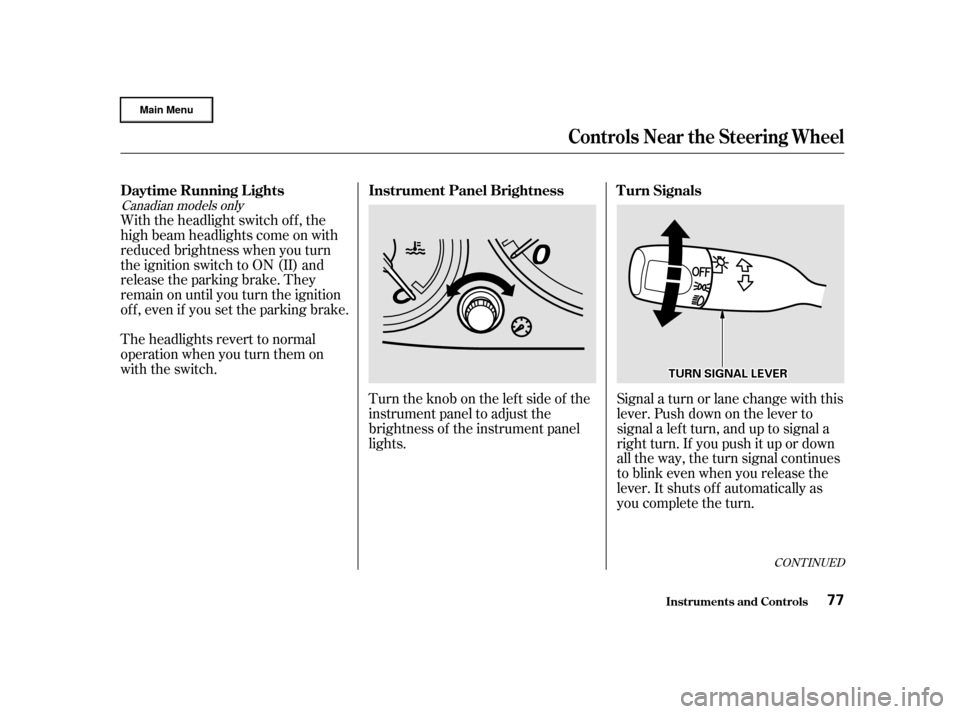
with the switch.Turntheknobontheleftsideof the
instrument panel to adjust the
brightness of the instrument panel
lights.Signal a turn or lane change with this
lever. Push down on the lever to
signal a lef t turn, and up to signal a
right turn. If you push it up or down
all the way, the turn signal continues
to blink even when you release the
lever. It shuts off automatically as
you complete the turn.
CONT INUED
Instrument Panel Brightness
Daytime Running L ights T urn Signals
Controls Near the Steering Wheel
Inst rument s and Cont rols77
T TU
UR RNN S
SIIGGN NAAL
L L
LEE V
V E
ER
R
Page 91 of 372

�µ�µ
�µ �µ
You can insert or
remove the key only in this position.
To switch f rom ACCESSORY to
LOCK, you must push the key in
slightly as you turn it. If your vehicle
has an automatic transmission, the
shif t lever must also be in Park. The
anti-thef t lock will lock the steering
column when you remove the key.
If the f ront wheels are turned, the
anti-thef t lock may sometimes make
it difficult to turn the key from
LOCK to ACCESSORY. Firmly turn
the steering wheel to the lef t or to
the right as you turn the key. Use this position
only to start the engine. The switch
returns to ON (II) when you let go of
the key.
You will hear a reminder beeper if
you leave the key LOCK (0) or
ACCESSORY (I) position and open
thedriver’sdoor.Removethekeyto
turn of f the beeper. The engine will not start if the
Immobilizer System does not
recognize the key’s coding (see page ).
This is the normal key
position when driving. All f eatures
and accessories on the vehicle are
usable. Several of the lights on the
instrument panel come on as a test
when you turn the ignition switch
f rom ACCESSORY to ON. In this position,
you can operate the audio system
and the accessory power sockets. 85
Keys and Locks
Inst rument s and Cont rols
L OCK (0)
ST A RT (III)
ON (II) A CCESSORY (I)
87
Removing the key from the
ignition switch while driving
locks the steering. This can
cause you to lose control.
Remove the key from the
ignition switch only when
parked.
Page 94 of 372

The ceiling light (if the light switch
is in the center position) will come
on when you press the UNLOCK
button. If you do not open any of the
doors or the tailgate, the light will
f ade out in about 30 seconds, the
doors and the tailgate automatically
relock. If you relock the doors and
the tailgate with the remote
transmitter before 30 seconds have
elapsed, the light will go of f
immediately.
You cannot lock the doors and the
tailgate with the remote transmitter
if any door or the tailgate is not f ully
closed. You cannot lock or unlock
thedoorsandthetailgatewiththe
key in the ignition switch.To open the hatch glass, push the
Hatch Glass Release button for
about two seconds. The hatch glass
willnotopenif thekeyisinthe
ignition switch.
Even if the hatch glass is opened, the
tailgate can be locked with the
remote transmitter. Make sure to
check the hatch glass manually.
Panic mode allows you to remotely
activate your vehicle’s horn and
lights to attract attention. When
activated, the horn will sound, and
the headlights, parking lights, side
marker lights, taillights and
instrument panel lights will f lash f or
about 30 seconds. To activate panic
mode,pressandholdthePANIC
button f or about one second.
To cancel Panic mode bef ore 30
seconds, press any button on the
remote transmitter. You can also
turn the ignition switch to ON (II).
Panic mode will not activate if the
ignition switch is in the ON (II)
position.
Keys and Locks
Inst rument s and Cont rols
Panic Mode
90
Page 102 of 372
To adjust the height of the driver’s
seat, turn the dial on the outside of
theseatbottom.Eachfrontseathasanarmreston
thesideof theseat-back.Touseit,
pivotitdown.Only on vehicles with an automatic
transmission
Driver’s Seat Height Adjustment Front Seat Armrests
Inst rument s and Cont rols
Seats
98
Page 115 of 372

�µ
The master control panel also con-
tains these extra features:
To open the driver’s
window f ully, push the window
switch f irmly down, then release it.
The window automatically goes
down all the way. To stop the
window f rom going all the way down,
pull back on the window switch
brief ly.
To close the driver’s window f ully,
pull back the window switch f irmly,
then release it. The window
automatically goes all the way up. To
stop the window f rom going all the
way up, push down on the window
switch brief ly. To open or close the driver’s window
partially, push down or pull back on
the window switch lightly and hold it.
The window will stop when you
release the switch.
The light inside the AUTO switch
comes on when you turn the ignition
switch to ON (II).
The MAIN switch controls power to
the passengers’ windows. When you
push in the MAIN switch, the
passengers’ windows cannot be
raised or lowered. The MAIN switch
does not af f ect the driver’s window.
To cancel this f eature, push on the
switch again. Keep the MAIN switch
pushed in when you have children in
the vehicle so they do not injure
themselves by operating the
windows unintentionally.
Power Windows
Inst rument s and Cont rols
AUTO
111
Page 116 of 372

If your vehicle’s battery is
disconnected or goes dead, or the
driver’s window f use is removed, the
AUTO f unction will be disabled. The
power window system needs to be
reset af ter reconnecting the battery
or installing the f use. You should do
the f ollowing.Start the engine. Push down on
the driver’s window switch until
the window is f ully open.
Pull back on the driver’s window
switch to close the window
completely, then hold the switch
f or a second or two more.
If the power windows do not operate
properly af ter resetting, have your
vehicle checked by a Honda dealer.
Auto reverse stops sensing when the
window is almost closed. You should
always check that all passengers and
objects are away from the window
bef ore closing it. If the driver’s window runs into any
obstacle while it is closing
automatically, it will reverse
direction, and then stop. To close the
window, remove the obstacle, then
use the window switch again.
1.
2.
Power Windows
Inst rument s and Cont rols
Auto Reverse
112