Page 125 of 321
�Î
�Î
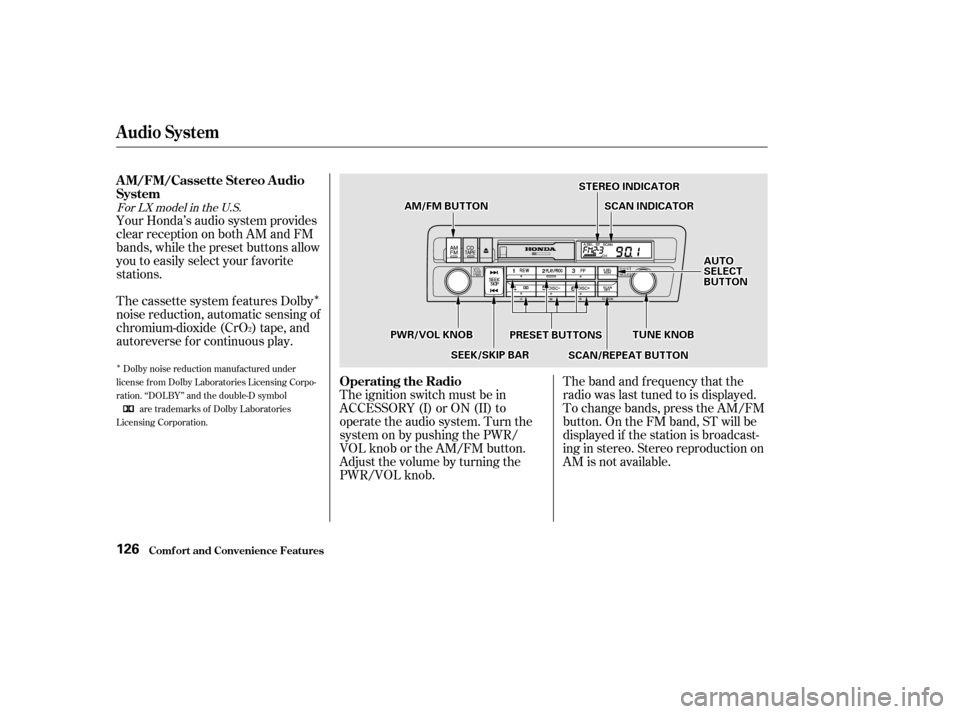
Your Honda’s audio system provides
clear reception on both AM and FM
bands, while the preset buttons allow
you to easily select your f avorite
stations.The band and f requency that the
radio was last tuned to is displayed.
To change bands, press the AM/FM
button. On the FM band, ST will be
displayed if the station is broadcast-
ing in stereo. Stereo reproduction on
AM is not available.
The cassette system f eatures Dolby
noise reduction, automatic sensing of
chromium-dioxide (CrO ) tape, and
autoreverse f or continuous play.
The ignition switch must be in
ACCESSORY (I) or ON (II) to
operate the audio system. Turn the
system on by pushing the PWR/
VOL knob or the AM/FM button.
Adjust the volume by turning the
PWR/VOL knob.
2
Dolby noise reduction manuf actured under
license from Dolby Laboratories Licensing Corpo-
ration. ‘‘DOLBY’’ and the double-D symbol are trademarks of Dolby Laboratories
Licensing Corporation.
For LX model in the U.S.
Audio System
Comf ort and Convenience Feat ures
A M/FM/Cassette Stereo A udio
System
Operating the Radio
126
SSTTEERREEOOIINNDDIICCAATTOORR
PPRREESSEETTBBUUTTTTOONNSS
AAMM//FFMMBBUUTTTTOONNSSCCAANNIINNDDIICCAATTOORR
AAUUTTOOSSEELLEECCTTBBUUTTTTOONN
TTUUNNEEKKNNOOBBPPWWRR//VVOOLLKKNNOOBB
SSEEEEKK//SSKKIIPPBBAARRSSCCAANN//RREEPPEEAATTBBUUTTTTOONN
Page 126 of 321

�µ�µ�µ
CONT INUED
You can use any of f ive methods to
f ind radio stations on the selected
band: TUNE, SEEK, SCAN, AUTO
SELECT, and the Preset buttons.
Use the TUNE knob to
tune the radio to a desired f requency.
Turn the TUNE knob to the right to
tune to a higher f requency, or to the
lef t to tune to a lower f requency.
Turn the knob right or lef t until the
display reaches the desired
f requency. The SEEK f unction
searches the band for a station with
a strong signal. To activate it, press
theSEEKbaroneitherthe or side, then release it.
Depending on which side you press,
the system scans upward or down-
ward f rom the current f requency. It
stops when it finds a station with a
strong signal. The SCAN function
samples all the stations with strong
signals on the selected band. To
activate it, press the SCAN button,
then release it. When the system is
in the SCAN mode, SCAN shows in
the display. The system will scan up
the band for a station with a strong
signal. When it f inds one, it will stop
and play that station for
approximately f ive seconds. If you do
nothing, the system will then scan
f or the next strong station and play
that f or f ive seconds. When it plays a
station that you want to continue
listening to, press the SCAN button
again.
Audio System
Comf ort and Convenience Feat ures
TUNE SEEK SCA N
127
Page 127 of 321
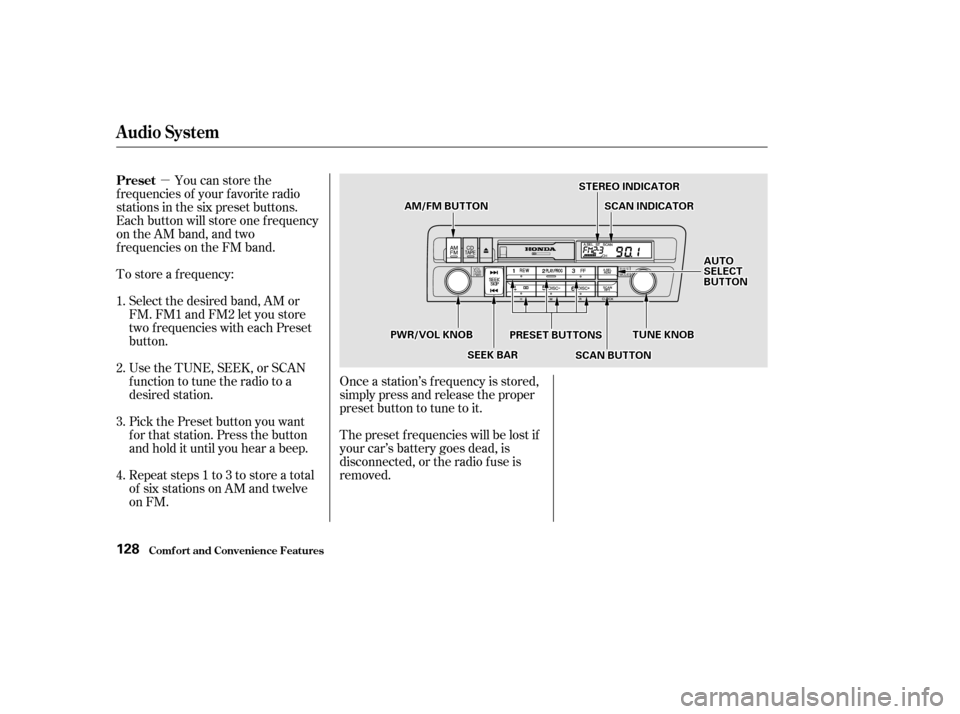
�µYou can store the
f requencies of your f avorite radio
stations in the six preset buttons.
Each button will store one f requency
on the AM band, and two
f requencies on the FM band.
To store a f requency:
Select the desired band, AM or
FM. FM1 and FM2 let you store
two f requencies with each Preset
button.
Pick the Preset button you want
for that station. Press the button
and hold it until you hear a beep.
Repeat steps 1 to 3 to store a total
of six stations on AM and twelve
on FM. Once a station’s f requency is stored,
simply press and release the proper
preset button to tune to it.
The preset f requencies will be lost if
your car’s battery goes dead, is
disconnected, or the radio f use is
removed.
UsetheTUNE,SEEK,orSCAN
function to tune the radio to a
desired station.
1. 2. 3.4.
Audio System
Comf ort and Convenience Feat ures
Preset
128
SSTTEERREEOOIINNDDIICCAATTOORR
PPRREESSEETTBBUUTTTTOONNSS
AAMM//FFMMBBUUTTTTOONNSSCCAANNIINNDDIICCAATTOORR
SSEEEEKKBBAARRSSCCAANNBBUUTTTTOONN
AAUUTTOOSSEELLEECCTTBBUUTTTTOONN
TTUUNNEEKKNNOOBBPPWWRR//VVOOLLKKNNOOBB
Page 129 of 321
�µ�µThe system will automatically return
the display to the selected audio
mode about f ive seconds af ter you
stop adjusting a mode with the
TUNE knob.
For inf ormation, See page .
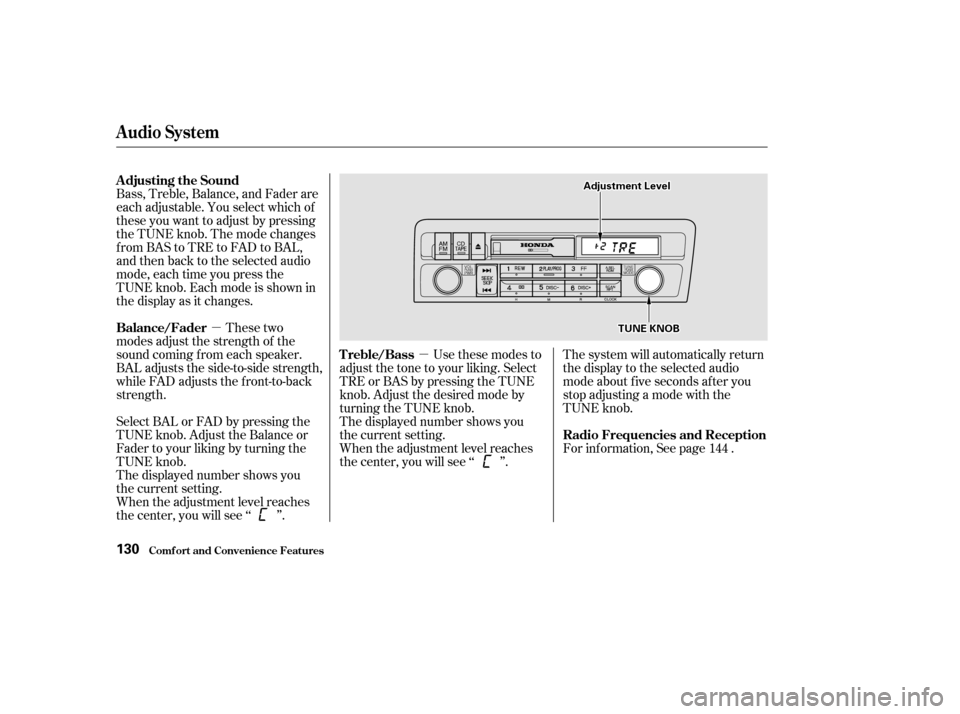
Bass, Treble, Balance, and Fader are
each adjustable. You select which of
these you want to adjust by pressing
the TUNE knob. The mode changes
fromBAStoTREtoFADtoBAL,
and then back to the selected audio
mode, each time you press the
TUNE knob. Each mode is shown in
the display as it changes.
These two
modes adjust the strength of the
sound coming f rom each speaker.
BAL adjusts the side-to-side strength,
while FAD adjusts the f ront-to-back
strength.
Select BAL or FAD by pressing the
TUNE knob. Adjust the Balance or
Fader to your liking by turning the
TUNE knob.
The displayed number shows you
the current setting.
When the adjustment level reaches
the center, you will see ‘‘ ’’. Use these modes to
adjust the tone to your liking. Select
TRE or BAS by pressing the TUNE
knob. Adjust the desired mode by
turning the TUNE knob.
The displayed number shows you
the current setting.
When the adjustment level reaches
the center, you will see ‘‘ ’’. 144
Comf ort and Convenience Feat ures
Audio System
Adjusting the Sound
Radio Frequencies and Reception
Balance/Fader
Treble/Bass
130
TTUUNNEEKKNNOOBB
AAddjjuussttmmeennttLLeevveell
Page 130 of 321
CONT INUED
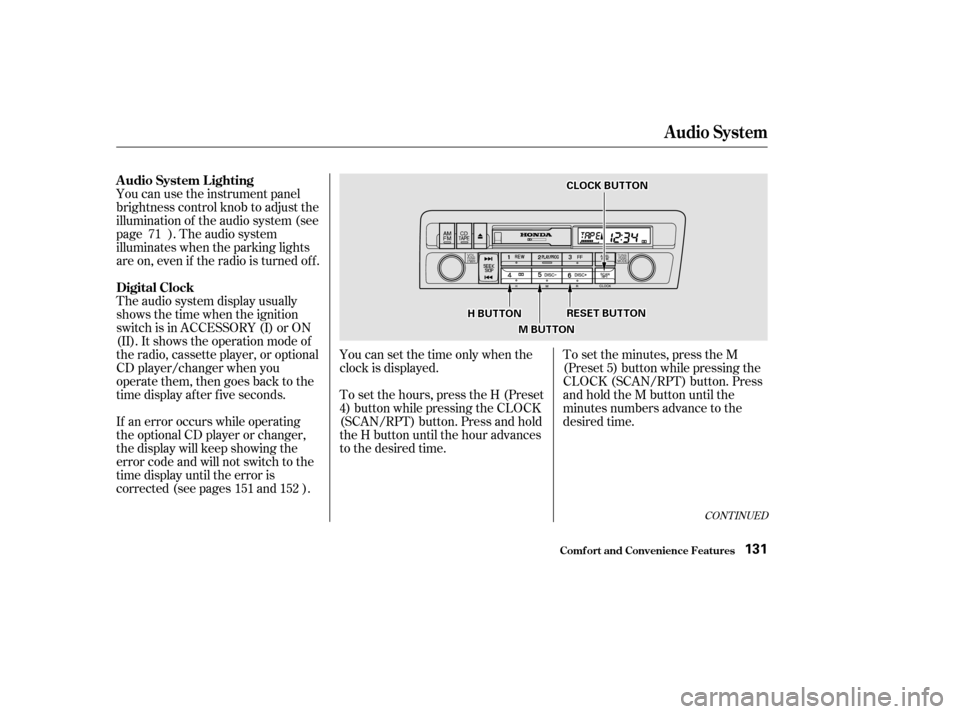
You can use the instrument panel
brightness control knob to adjust the
illumination of the audio system (see
page ). The audio system
illuminates when the parking lights
are on, even if the radio is turned of f .
The audio system display usually
shows the time when the ignition
switch is in ACCESSORY (I) or ON
(II). It shows the operation mode of
the radio, cassette player, or optional
CD player/changer when you
operate them, then goes back to the
time display af ter f ive seconds.
If an error occurs while operating
the optional CD player or changer,
the display will keep showing the
error code and will not switch to the
time display until the error is
corrected (see pages and ).You can set the time only when the
clock is displayed.
To set the hours, press the H (Preset
4) button while pressing the CLOCK
(SCAN/RPT) button. Press and hold
the H button until the hour advances
to the desired time.
To set the minutes, press the M
(Preset 5) button while pressing the
CLOCK (SCAN/RPT) button. Press
andholdtheMbuttonuntilthe
minutes numbers advance to the
desired time.
71
152
151
Audio System
Comf ort and Convenience Feat ures
A udio System L ighting
Digital Clock
131
CCLLOOCCKKBBUUTTTTOONN
RREESSEETTBBUUTTTTOONN
MMBBUUTTTTOONN
HHBBUUTTTTOONN
Page 132 of 321

�µ
�µ
CONT INUED
The Skip Function allows
youtofindthebeginningof asong
or passage. To f ind the beginning of
the song or passage currently
playing, push the lower part of the
SKIP bar. You will see REW f lashing
in the display as the tape rewinds. To
f ind the beginning of the next song,
push the upper part of the SKIP bar.
You will see FF f lashing in the
display as the tape f ast f orwards.
When the system finds the
beginning of a song or passage, it
goes back to PLAY mode.
To switch to the radio or optional CD
changer while listening to a tape,
press the AM/FM or CD/TAPE
button. To change back to the
cassette player, press the CD/TAPE
button.
With a cassette playing, you can use
the FF, REW, SKIP, or REPEAT
f unction to f ind a desired program.
Dolby noise reduction turns on when
you insert a cassette. The indi-
cator will light in the display. If the
tape was not recorded with Dolby
noise reduction, turn it of f by
pressing the button.
Noise reduction remains of f until you
turn it on by pressing the button
again.
When the system reaches the end of
the tape, it will automatically reverse
direction and play the other side. If
you want to remove the cassette
f rom the drive, press the EJECT
button.
If you turn the system of f while a
tape is playing, either with the PWR/
VOL knob or by turning of f the
ignition, the cassette will remain in
the drive. When you turn the system
back on, the tape will begin playing
where it lef t of f . Fast Forward and Re-
wind move the tape rapidly. To re-
wind the tape, push the REW button.
You will see REW in the display. To
fast forward the tape, push the FF
button. You will see FF displayed.
Press the PLAY/PROG button to
take the system out of rewind or fast
f orward. If the system reaches the
end of the tape while in f ast f orward
or rewind, it automatically stops that
f unction, reverses direction, and
begins to play.
Audio System
Comf ort and Convenience Feat ures
SK IP
T ape Search Functions
FF/REW
133
Page 134 of 321
�µ�µ
�´�´
CONT INUED
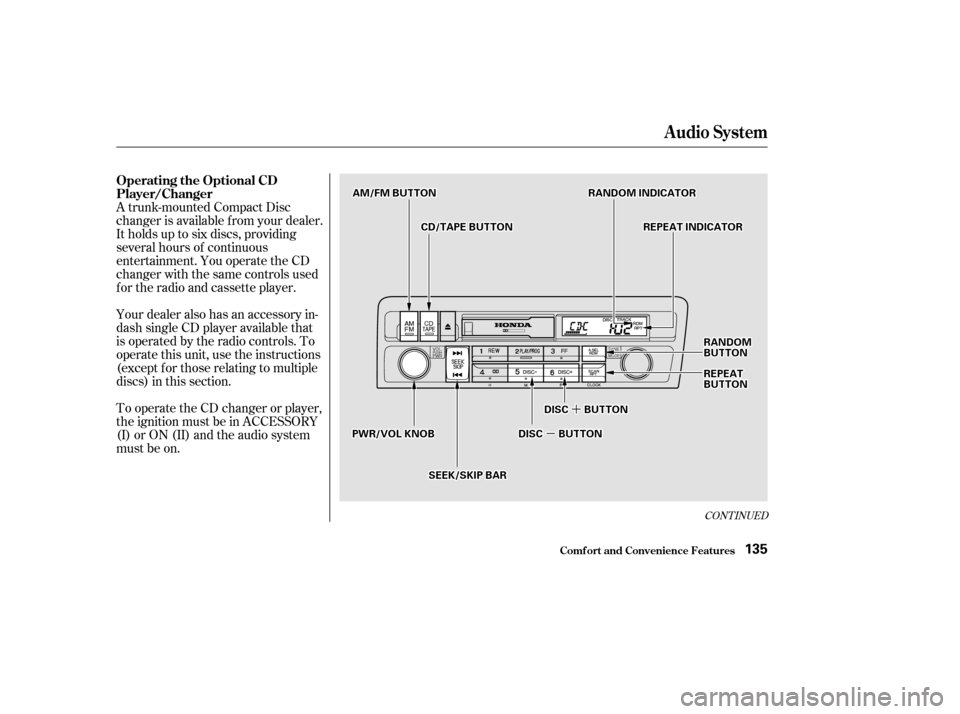
Your dealer also has an accessory in-
dash single CD player available that
is operated by the radio controls. To
operate this unit, use the instructions
(except f or those relating to multiple
discs) in this section.
To operate the CD changer or player,
the ignition must be in ACCESSORY
(I) or ON (II) and the audio system
must be on.
A trunk-mounted Compact Disc
changer is available from your dealer.
It holds up to six discs, providing
several hours of continuous
entertainment. You operate the CD
changer with the same controls used
f or the radio and cassette player.
Audio System
Comf ort and Convenience Feat ures
Operating the Optional CD
Player/Changer
135
RRAANNDDOOMMIINNDDIICCAATTOORRAAMM//FFMMBBUUTTTTOONN
RREEPPEEAATTIINNDDIICCAATTOORR
PPWWRR//VVOOLLKKNNOOBB
RRAANNDDOOMMBBUUTTTTOONN
RREEPPEEAATTBBUUTTTTOONN
CCDD//TTAAPPEEBBUUTTTTOONN
SSEEEEKK//SSKKIIPPBBAARR
DDIISSCCBBUUTTTTOONN
DDIISSCCBBUUTTTTOONN
Page 137 of 321
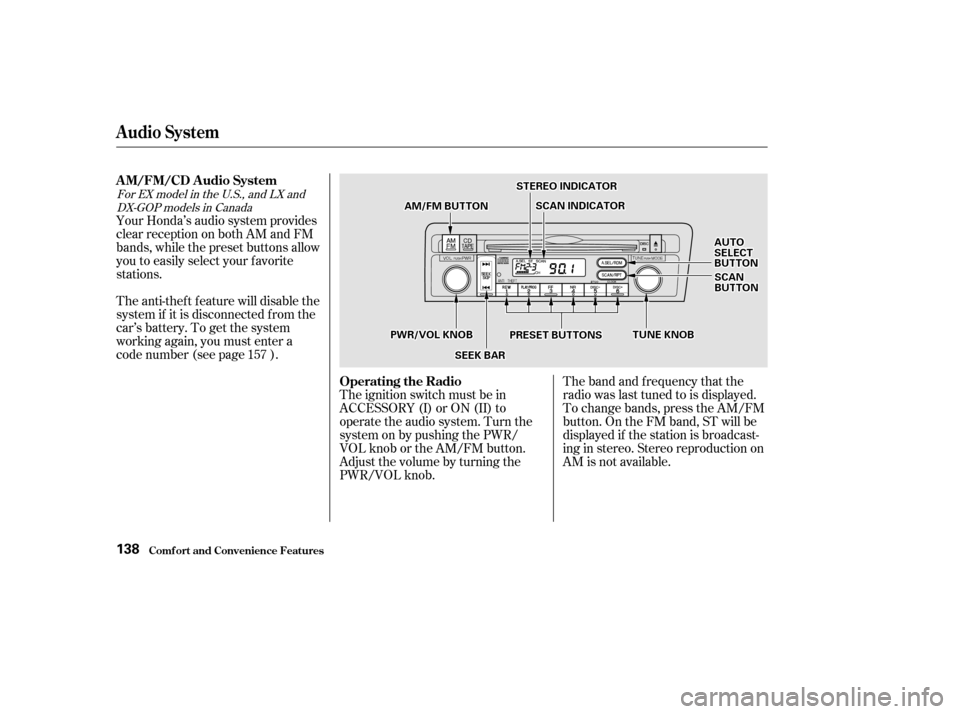
The band and f requency that the
radio was last tuned to is displayed.
To change bands, press the AM/FM
button. On the FM band, ST will be
displayed if the station is broadcast-
ing in stereo. Stereo reproduction on
AM is not available.
Your Honda’s audio system provides
clear reception on both AM and FM
bands, while the preset buttons allow
you to easily select your f avorite
stations.
The anti-thef t f eature will disable the
system if it is disconnected f rom the
car’s battery. To get the system
working again, you must enter a
code number (see page ).
The ignition switch must be in
ACCESSORY (I) or ON (II) to
operate the audio system. Turn the
system on by pushing the PWR/
VOL knob or the AM/FM button.
Adjust the volume by turning the
PWR/VOL knob.
157
For EX model in the U.S., and LX and
DX-GOP models in Canada
Audio System
Comf ort and Convenience Feat ures
AM/FM/CD Audio System
Operating the Radio
138
SSTTEERREEOOIINNDDIICCAATTOORR
PPRREESSEETTBBUUTTTTOONNSS
AAMM//FFMMBBUUTTTTOONN
SSEEEEKKBBAARR
AAUUTTOOSSEELLEECCTTBBUUTTTTOONN
TTUUNNEEKKNNOOBBPPWWRR//VVOOLLKKNNOOBB
SSCCAANNIINNDDIICCAATTOORR
SSCCAANNBBUUTTTTOONN