Page 116 of 312

must accept any interference received, including interference that may
cause undesired operation.
Changes or modifications not expressly approved by the party
responsible for compliance could void the user's authority to
operate the equipment.
The remote entry system allows you to lock or unlock all vehicle doors
and liftgate without a key.
The remote entry features only operate with the vehicle in P (Park) or N
(Neutral) and the ignition in the LOCK position.
If there is any potential remote keyless entry problem with your vehicle,
ensureALL key fobs(remote entry transmitters) are brought to the
dealership, to aid in troubleshooting.
Unlocking the doors/liftgate
Press this control to unlock the
driver's door. The interior lamps will
illuminate with the ignition OFF.
Press the control a second time
within three seconds to unlock all
doors and liftgate.
Locking the doors/liftgate
Press this control to lock all doors
and liftgate. The doors and liftgate
will lock and the lamps will flash.
To confirm all doors are closed and
locked, press the control a second
time within three seconds. The
doors will lock again and the horn
will chirp.
If any of the doors or liftgate are
ajar, the horn will make two quick
chirps, reminding you to properly close all doors.
Controls and features
116
Page 117 of 312
Opening the liftgate window
Press the control to open the
liftgate window.
Sounding a panic alarm
Press this control to activate the
alarm.
To deactivate the alarm, press the
control again or turn the ignition to
ACC or ON.
Memory seat feature (if equipped)
The remote entry system can also
control the memory seat feature.
Press the control once to unlock the
driver's door and move the memory
seat feature to the corresponding
memory position, just as if you had
pressed the memory control in the
vehicle.
Controls and features
117
Page 120 of 312

Programming remote transmitters
It is necessary to haveall(maximum of four Ð original and/or new) of
your remote transmitters available prior to beginning this procedure.
To program the transmitters yourself:
²Insert a key in the ignition and
turn from 1 (LOCK) to 2 (ACC)
and cycle between 2 (ACC) and 3
(ON) eight times in rapid
succession (within 10 seconds)
with the eighth turn ending in the
3 (ON) position. The doors will
lock/unlock to confirm that
programming mode has been
entered.
²Within 20 seconds, program a remote transmitter by pressing any
button on a transmitter. The doors will lock/unlock to confirm that the
remote transmitter has been programmed. (If more than 20 seconds
pass before pressing a remote transmitter button, the programming
mode will exit and the procedure will have to be repeated.)
²Repeat the previous step to program additional remote transmitters.
The doors will lock/unlock to confirm that each remote transmitter has
been programmed.
²When you have completed programming the remote transmitters, turn
the ignition to 2 (ACC) or wait 20 seconds. Again the doors will
lock/unlock to confirm programming has been completed.
Illuminated entry
The interior lamps illuminate when the remote entry system is used to
unlock the door(s).
The system automatically turns off after 25 seconds or when the ignition
is turned to the ON or ACC position. The dome lamp control (if
equipped) mustnotbe set to the OFF position for the illuminated entry
system to operate.
The inside lights will not turn off if:
²they have been turned on with the dimmer control or
²any door is open.
The battery saver will shut off the interior lamps 10 minutes after the
ignition has been turned to the OFF position.
4
3
2
1
Controls and features
120
Page 121 of 312

KEYLESS ENTRY SYSTEM (IF EQUIPPED)
With the keyless entry keypad, you
can:
²lock or unlock the vehicle doors
and liftgate without using the key
²open the liftgate
²arm and disarm the perimeter
alarm system (if equipped)
See alsoRemote entry systemand
Perimeter alarm systemin this
chapter for more information.
Your vehicle has a factory-set 5±digit
code that operates the keyless entry
system. You can also program your own 5±digit personal entry code.
The factory-set code is located:
²on the owner's wallet card in the glove compartment
²taped to the computer module
²or at your dealer
When pressing the controls on the keyless entry keypad, press the
middle of the controls to ensure a good activation.
Programming your own personal entry code
1. Enter the factory-set code (keypad will illuminate when pressed).
2. Press the 1/2 control within five
seconds of step 1.
3. Enter your personal 5 digit code.
Enter each digit within five seconds
of the previous one.
Do not set a code that includes
three of the same number or
presents them in sequential order.
Thieves can easily figure out these
types of codes.
Your personal code does not replace
the permanent code that the
dealership gave you. You can use
Controls and features
121
Page 122 of 312

either code to unlock your vehicle. If a second personal code is entered,
the module will erase the first personal code in favor of the new code.
To exit, press 7/8 and 9/0 simultaneously or allow more than 5 seconds
to elapse since a button press occured and the 5 digit keycode will be
programed.
If you wish to erase your personal code, use the following instructions:
Erasing personal code
1. Enter the factory-set code.
2. Press 1/2 within five seconds of
step 1 and release.
3. Press the 1/2 control and hold for
2 seconds to erase the customer
programmed keycode, within five
seconds of step 2.
The system will now only respond
to the factory-set code.
Unlocking the doors and releasing the liftgate with the keyless
entry system
The driver's door must be unlocked before any other. If more than five
seconds pass between pressing numbers, enter the code again. The
system has shut down if the keypad light is out. If the keyless entry
system does not work, use the key or remote entry transmitter(s).
1. To unlock the driver's door, enter one of the two codes. After pressing
the fifth number, the driver's door unlocks.
Controls and features
122
Page 123 of 312
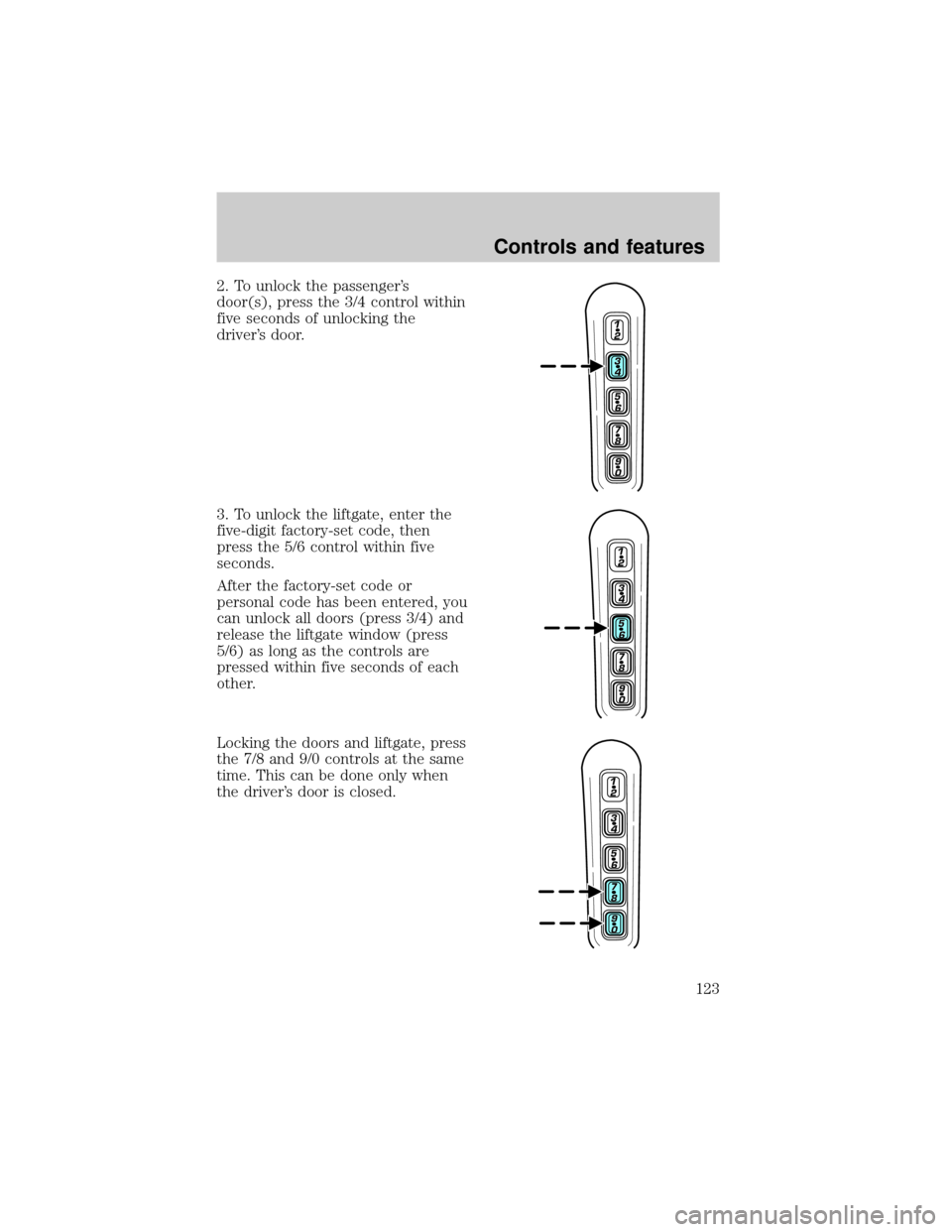
2. To unlock the passenger's
door(s), press the 3/4 control within
five seconds of unlocking the
driver's door.
3. To unlock the liftgate, enter the
five-digit factory-set code, then
press the 5/6 control within five
seconds.
After the factory-set code or
personal code has been entered, you
can unlock all doors (press 3/4) and
release the liftgate window (press
5/6) as long as the controls are
pressed within five seconds of each
other.
Locking the doors and liftgate, press
the 7/8 and 9/0 controls at the same
time. This can be done only when
the driver's door is closed.
Controls and features
123
Page 124 of 312

Autolock
The autolock feature will lock all of the vehicle doors when:
²all doors are closed
²the engine is running and
²you shift into any gear putting the vehicle in motion
The autolock feature repeats when:
²any door, except the drivers door, is opened then closed while the
engine is running and
²you put the vehicle in motion
Deactivating/activating autolock
There are 2 methods to enable/disable this feature. One through your
dealer and the second with a door lock sequence using the following
instructions:
1. Turn the ignition key to RUN, then press the door UNLOCK control
button 3 times.
2. Turn the ignition key to OFF, then press the door UNLOCK control
button 3 times.
3. Turn the ignition key to RUN, within five seconds press the door
UNLOCK control button 1 time.
The user should receive ahorn chirpto indicate the system has been
altered.
Pressing the power door UNLOCK control button again will toggle the
Autolock/Relock states.
²Turn ignition to OFF to exit.
Deactivating/activating horn chirp
There are 2 methods to enable/disable this feature. One through your
dealer and the second with a door lock sequence using the following
instructions:
1. Turn the ignition key to RUN, then press the door UNLOCK control
button 3 times.
2. Turn the ignition key to OFF, then press the door UNLOCK control
button 3 times.
3. Turn the ignition key to RUN, within five seconds press the door
UNLOCK control button 2 times.
Controls and features
124
Page 125 of 312
The user should receive twohorn chirpsto indicate the system had
been altered.
Pressing the power door UNLOCK control button two times again will
toggle the Autolock/Relock states.
²Turn ignition to OFF to exit.
PERIMETER ALARM SYSTEM (IF EQUIPPED)
The perimeter anti-theft system will help prevent your vehicle from
unauthorized entry.
If there is any potential perimeter anti-theft problem with your vehicle,
ensureALL key fobs(remote entry transmitters) are brought to the
dealership, to aid in troubleshooting.
Arming the system
When armed, this system will help protect your vehicle from
unauthorized entry. When unauthorized entry occurs, the system will
flash the headlamps and/or parking lamps, and will chirp the horn.
The system is ready to arm whenever the key is removed from the
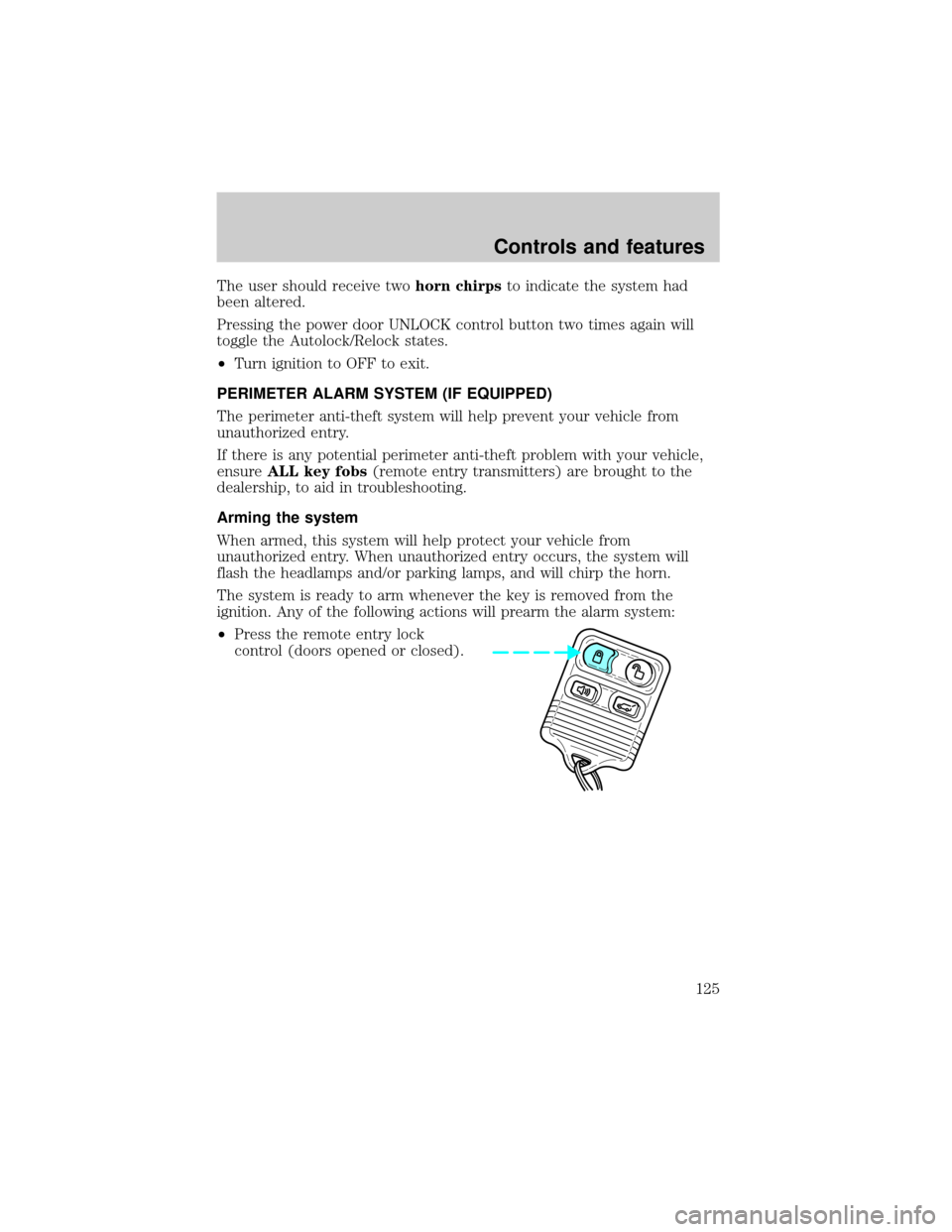
ignition. Any of the following actions will prearm the alarm system:
²Press the remote entry lock
control (doors opened or closed).
Controls and features
125