2002 FIAT DUCATO 244 manual
[x] Cancel search: manualPage 4 of 246

CONNECT Nav
3
ADVICE, CONTROLS AND GENERAL
INFORMATION ............................................................ 7
ADVICE ................................................................................ 7
Road safety .......................................................................... 7
Reception conditions ........................................................ 7
Care and maintenance ...................................................... 7
System software updating ................................................ 8
BUTTONS AND SELECTORS ...................................... 10
Front panel controls ......................................................... 11
Controls on steering wheel ............................................ 13
GENERAL INFORMATION ........................................... 15
Important notes for use
and road safety ................................................................... 15
System power on ............................................................... 15
System power off ............................................................... 16
PROTECTION AGAINST THEFT ................................ 17
MAIN MODE ...................................................................... 18Standard information ........................................................ 18
SETUP FUNCTION .......................................................... 19
Video ..................................................................................... 20
Power off ............................................................................. 21
Serial - modem (data interface) ...................................... 22
Fleet management .............................................................. 25
AUDIO............................................................................... 29
SCREEN OPTIONS AND FUNCTIONS .................... 29
RADIO MODE ................................................................... 30
Manual tuning ...................................................................... 31
Automatic tuning ............................................................... 32
Manual station storage ..................................................... 32
Listening to stored stations ............................................. 32
AUDIO SETUP function (audio adjustments) ............ 33
TA function (traffic information) ................................... 33
AF function (seeking alternative frequencies) ............. 35
RDS function ....................................................................... 35
CONNECT Nav
Page 5 of 246

CONNECT Nav
4
PTY-PROG. TYPE function
(choosing a type of programme) .................................... 36
AUTOSTORE function
(automatic station storage) ............................................. 37
BAND SCAN function ..................................................... 38
PRESET SCAN function ................................................... 38
STATION LIST function .................................................. 38
RADIO SETUP function ................................................... 38
LOC-DX function
(tuner sensitivity adjustment) ......................................... 39
MONO/STEREO function ............................................... 39
REGIONAL function ......................................................... 39
NEWS function .................................................................. 40
CD MODE .......................................................................... 40
CD SHUFFLE function (random playing) ..................... 41
CD TA function (traffic information) ........................... 41
CD REPEAT function ........................................................ 42
CD PROG function ........................................................... 42
CD SCAN function ........................................................... 42
CD COMPRESSION function ........................................ 42
CD SETUP menu ............................................................... 43
AUDIO SETUP function (audio adjustments) ............ 46AUDIO SETTINGS ........................................................... 47
Info ......................................................................................... 47
Bass ........................................................................................ 47
Treble ................................................................................... 48
Loudness .............................................................................. 48
Equalizer ............................................................................... 48
Manual equalizer ................................................................. 49
Auto. vol. cont. ................................................................... 50
Balance/fader ....................................................................... 50
Autoclip detect ................................................................... 51
Max. vol. at. on ................................................................... 51
MP3 MODE ......................................................................... 52
Main screen options and functions ................................ 53
AUDIO SETUP function (audio adjustments) ............ 54
DEFINE PLAYLIST function ............................................ 54
PLAYLIST function ............................................................ 54
VIEW PLAYLIST function ................................................ 55
COMPRESSION function ................................................ 55
TA function ......................................................................... 55
SCAN function ................................................................... 55
SHUFFLE function .............................................................. 55
REPEAT function ................................................................ 56
Page 16 of 246
CONNECT Nav
15
GENERAL
INFORMATION
IMPORTANT NOTES FOR
USE AND ROAD SAFETY
The CONNECT system makes it
possible to easily control the main
functions of the vehicle.
To avoid creating dangerous situa-
tions for yourself and others in use of
the system, please pay attention to the
following points:
– the system must be used keeping
full control of the vehicle; in the case
of doubt in the use of the functions,
it is necessary to stop before per-
forming the various operations;
– use of the cell phone is prohibited
near explosive substances.
The navigation system allows you to
reach your destination, indicating each
route change stored on the navigation
CD-ROM. In fact, in calculating the
route, the system takes into account
of all the information stored concern-
ing the roads, advising the best route.
However it cannot take account of the
traffic, sudden interruptions or any
other inconvenience.In carrying out any manoeuvre it is
always necessary to follow the rules of
the road, regardless of the advice giv-
en by the navigation system. If you
leave the suggested route, the naviga-
tion system will calculate a new one
and suggest it to you.SYSTEM POWER ON
The system can be switched on ac-
cording to two different methods:
automatic switching onwith ig-
nition key to MAR;
manual switching on:
– by pressing knob 16-fig. 1;
– with direct access to SOS menu by
pressing button
•25-fig. 1.
Automatic switching on
Turning the ignition key to MARwill
turn the system on automatically, thus
activating or making available all the
functions described in this manual.
The navigation system
helps the driver while dri-
ving by suggesting, vocally and
graphically, the best route to be fol-
lowed to reach the preset destina-
tion. The suggestions given by the
navigation system do not exempt
the driver from full responsibility
due to driving behaviour and com-
pliance with road and other traffic
regulations. The responsibility for
road safety always and anyway lies
with the vehicle’s driver.
WARNING
Page 17 of 246
CONNECT Nav
16
Manual switching on
With ignition key at STOPpress
knob 16-fig. 1, to switch the system
on, thus making available the following
modules:
– MAIN,
– AUDIO,
– NAV,
– TEL,
– Targasys
•.
IMPORTANTIn this mode, the
SETUP and TRIP modules can be ac-
tivated; however, it will not be possi-
ble to validate any operation con-
cerning parameter change, language
change, units change and any other
type of adjustment provided by the
system. These limitations are normal
when switching the system on manu-
ally by the knob 16-fig. 1, since with
engine off (key at STOP) the vehicle
data transmission devices are not op-
erating.
Turning the ignition key to MAR, will
make all system functions active.SYSTEM POWER OFF
The CONNECT system can be
switched off according to two differ-
ent modes:
– deactivation independentof ig-
nition key
– deactivation dependenton ig-
nition key
To choose the power-off mode, see
the Power OFF submenu in the SET-
UP menu.
Deactivation independent
of ignition key
With this mode active, the system
can be turned off by pressing the knob
16-fig. 1.
The display will show the message
“PLEASE WAIT WHILE SYSTEM
TURNS OFF”.
IMPORTANTWith ignition key at
STOP, deactivation is delayed and will
take place after 20 minutes if the sys-
tem has a destination set or a phone
call is in progress.Deactivation dependent
on ignition key
With this mode active, the system
can be switched off by turning the ig-
nition key to STOPor pressing the
knob 16-fig. 1.
IMPORTANTDeactivation with
ignition key to STOPis delayed and
will take place after 20 minutes if the
system has a destination set or a
phone call is in progress.
Page 32 of 246
31
CONNECT Nav
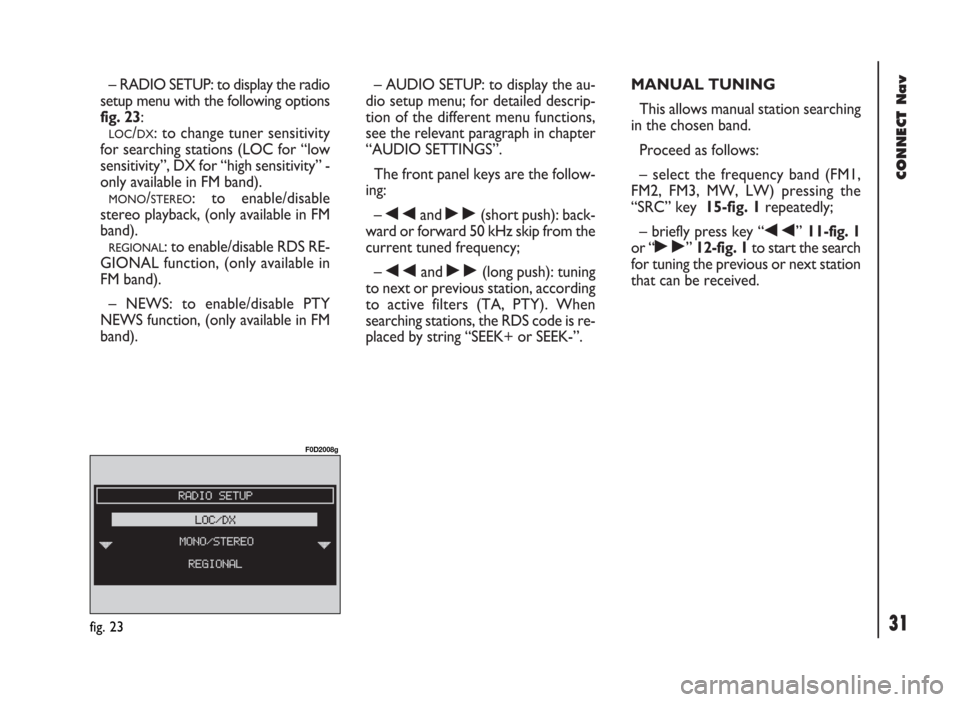
– RADIO SETUP: to display the radio
setup menu with the following options
fig. 23:
LOC/DX: to change tuner sensitivity
for searching stations (LOC for “low
sensitivity”, DX for “high sensitivity” -
only available in FM band).
MONO/STEREO: to enable/disable
stereo playback, (only available in FM
band).
REGIONAL: to enable/disable RDS RE-
GIONAL function, (only available in
FM band).
– NEWS: to enable/disable PTY
NEWS function, (only available in FM
band).– AUDIO SETUP: to display the au-
dio setup menu; for detailed descrip-
tion of the different menu functions,
see the relevant paragraph in chapter
“AUDIO SETTINGS”.
The front panel keys are the follow-
ing:
–
÷and ˜(short push): back-
ward or forward 50 kHz skip from the
current tuned frequency;
–
÷and ˜(long push): tuning
to next or previous station, according
to active filters (TA, PTY). When
searching stations, the RDS code is re-
placed by string “SEEK+ or SEEK-”.MANUAL TUNING
This allows manual station searching
in the chosen band.
Proceed as follows:
– select the frequency band (FM1,
FM2, FM3, MW, LW) pressing the
“SRC” key 15-fig. 1repeatedly;
– briefly press key “
÷” 11-fig. 1
or “
˜” 12-fig. 1to start the search
for tuning the previous or next station
that can be received.
fig. 23
F0D2008g
Page 33 of 246
CONNECT Nav
32
AUTOMATIC TUNING
This function seeks automatically sta-
tions in the chosen band.
Proceed as follows:
– select the frequency band (FM1,
FM2, FM3, MW, LW) pressing repeat-
edly the “SRC” key 15-fig. 1;
– press “
÷” 11-fig. 1or “˜”
12-fig. 1to start the search for tun-
ing the previous or next station that
can be received.
If the “TA” function is on (traffic in-
formation), the tuner only seeks sta-
tions that broadcast traffic bulletins.
If the “PTY” function is on, the tuner
only seeks PTY stations.MANUAL STATION
STORAGE
The station being heard can be
stored in the range chosen with the
multifunction keys 1÷ 6-fig. 1.
Keep one of these keys pressed until
the display shows the number of the key
with which the station has been stored.
A confirmation beep will indicate that
the station has been stored.LISTENING TO STORED
STATIONS
Proceed as follows:
– choose the required frequency
band (FM1, FM2, FM3, FMST, LW,
MW or AMST) pressing repeatedly
the “SRC” key 15-fig. 1;
– press briefly one of the multifunc-
tion keys 1÷ 6-fig. 1.
In the FM1, FM2, FM3 and FMST
bands, if reception is poor and the
“AF” alternative frequency seek func-
tion is on, a station with the strongest
signal that is broadcasting the same
programme is automatically sought.
Page 36 of 246

35
CONNECT Nav
“AF” FUNCTION
(SEEKING ALTERNATIVE
FREQUENCIES)
Within the RDS system the radio can
work in two different modes:
– AF ENABLED: alternative fre-
quency search on;
– AF DISABLED: alternative fre-
quency search off.
When the signal of the RDS station
tuned weakens, the following two cas-
es may occur:
– With AF ENABLED the RDS sys-
tem activates automatic tuning of the
optimum frequency of the station cho-
sen, with the stations enabled, there-
fore the radio is automatically tuned
to the station with the strongest sig-
nal that is broadcasting the same pro-
gramme. During the journey it will
thus be possible to continue listening
to the station chosen without having
to change the frequency when chang-
ing area. Of course, the station being
listened to must be receivable in the
area the vehicle is crossing.– With AF DISABLED the radio will
not tune the strongest station auto-
matically and it will have to be found
manually using the tuner buttons.
To turn the “AF” function on/off, se-
lect and confirm “AF” by the knob 22-
fig. 1, from the main audio menu
fig. 21. Then, select and confirm “EN-
ABLED” or “DISABLED” by the knob
22-fig. 1.
When the AF function is on, “AF” is
displayed in the vertical list of main au-
dio screen.
The RDS channel name (if available)
is still shown on the display.“RDS” FUNCTION
The “RDS” function enables/disables
RDS string (showing the tuned station
name) display.
To turn the “RDS” function on/off,
select “RDS” by the knob22-fig. 1
from the main audio menu fig. 21,
then press the knob to select “YES” or
“NO”.
When the “RDS” function is on, the
display shows the string with tuned sta-
tion name.
Page 48 of 246
47
CONNECT Nav
AUDIO SETTINGS
The audio parameters described in this
paragraph can be activated and adjust-
ed with all the audio sources (Radio,
CD).
To display the main menu press the
knob 22-fig. 1, with any audio source
on.
Selezionare tramite la manopola 22-
fig. 1la funzione “AUDIO SETUP” dal
menu principale di una delle sorgenti
audio e confermarla premendo la stes-
sa. In questo modo si accede al seguente
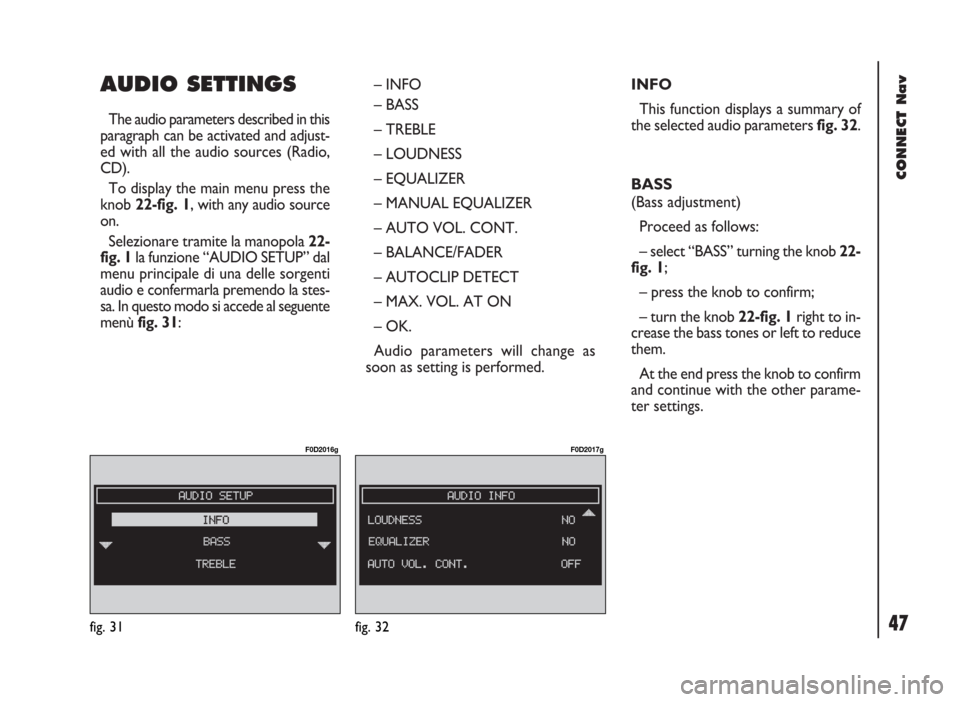
menù fig. 31: – INFO
– BASS
– TREBLE
– LOUDNESS
– EQUALIZER
– MANUAL EQUALIZER
– AUTO VOL. CONT.
– BALANCE/FADER
– AUTOCLIP DETECT
– MAX. VOL. AT ON
– OK.
Audio parameters will change as
soon as setting is performed.INFO
This function displays a summary of
the selected audio parameters fig. 32.
BASS
(Bass adjustment)
Proceed as follows:
– select “BASS” turning the knob 22-
fig. 1;
– press the knob to confirm;
– turn the knob 22-fig. 1right to in-
crease the bass tones or left to reduce
them.
At the end press the knob to confirm
and continue with the other parame-
ter settings.
fig. 31
F0D2016g
fig. 32
F0D2017g