2002 DODGE RAM Fuel
[x] Cancel search: FuelPage 504 of 2255

played when the ignition switch was turned to the
Off position.
²Trip Odometer Reset- When the trip odome-
ter reset switch is pressed and held for longer than
about two seconds, the trip odometer will be reset to
000.0 kilometers (miles). The VFD must be display-
ing the trip odometer information in order for the
trip odometer information to be reset.
²Message Failure- If the cluster fails to receive
a distance message during normal operation, it will
flash the odometer/trip odometer distance informa-
tion on and off repeatedly until a distance message is
received, or until the ignition switch is turned to the
Off position, whichever occurs first. If the cluster
does not receive a distance message within one sec-
ond after the ignition switch is turned to the On posi-
tion, it will display the last distance message stored
in the cluster memory. If the cluster is unable to dis-
play distance information due to an error internal to
the cluster, the VFD display will be blank.
²Actuator Test- Each time the cluster is put
through the actuator test, the VFD will display all of
its characters at once, then step through each char-
acter segment individually during the VFD portion of
the test to confirm the functionality of the VFD and
the cluster control circuitry.
The PCM continually monitors the vehicle speed
sensor, then sends the proper distance messages to
the instrument cluster. For further diagnosis of the
odometer/trip odometer or the instrument cluster cir-
cuitry that controls these functions, (Refer to 8 -
ELECTRICAL/INSTRUMENT CLUSTER - DIAGNO-
SIS AND TESTING). For proper diagnosis of the
vehicle speed sensor, the PCM, the CCD data bus, or
the message inputs to the instrument cluster that
control the odometer/trip odometer, a DRBIIItscan
tool is required. Refer to the appropriate diagnostic
information.
OIL PRESSURE GAUGE
DESCRIPTION
An oil pressure gauge is standard equipment on all
instrument clusters. The oil pressure gauge is located
in the upper right quadrant of the instrument clus-
ter, above the fuel gauge. The oil pressure gauge con-
sists of a movable gauge needle or pointer controlled
by the instrument cluster circuitry and a fixed 90
degree scale on the cluster overlay that reads left-to-
right either from 0 kPa (0 psi) to 758 kPa (110 psi).
An International Control and Display Symbol icon for
ªEngine Oilº is located on the cluster overlay, directly
below the highest graduation of the gauge scale. The
oil pressure gauge graphics are white against a black
field except for a single red graduation at the lowend of the gauge scale, making them clearly visible
within the instrument cluster in daylight. When illu-
minated from behind by the panel lamps dimmer
controlled cluster illumination lighting with the exte-
rior lamps turned On, the white graphics appear
blue-green and the red graphics appear red. The
orange gauge needle is internally illuminated. Gauge
illumination is provided by replaceable incandescent
bulb and bulb holder units located on the instrument
cluster electronic circuit board. The oil pressure
gauge is serviced as a unit with the instrument clus-
ter.
OPERATION
The oil pressure gauge gives an indication to the
vehicle operator of the engine oil pressure. This
gauge is controlled by the instrument cluster circuit
board based upon the cluster programming and elec-
tronic messages received by the cluster from the
Powertrain Control Module (PCM) over the Chrysler
Collision Detection (CCD) data bus. The oil pressure
gauge is an air core magnetic unit that receives bat-
tery current on the instrument cluster electronic cir-
cuit board through the fused ignition switch output
(st-run) circuit whenever the ignition switch is in the
On or Start positions. The cluster is programmed to
move the gauge needle back to the low end of the
scale after the ignition switch is turned to the Off
position. The instrument cluster circuitry controls
the gauge needle position and provides the following
features:
²Engine Oil Pressure Message- The instru-
ment cluster circuitry restricts the oil pressure gauge
needle operation in order to provide readings that
are consistent with customer expectations. Each time
the cluster receives a message from the PCM indicat-
ing the engine oil pressure is between about 6.9 kPa
(1 psi) and 137.9 kPa (20 psi) for gasoline engines, or
55 kPa (8 psi) and 58.6 kPa (8.5 psi) for diesel
engines, the cluster holds the gauge needle at a point
about 11 degrees above the low end of normal incre-
ment on the gauge scale. Each time the cluster
receives a message from the PCM indicating the
engine oil pressure is between about 517.1 kPa (75
psi) and 755 kPa (109.5 psi) for gasoline engines, or
551.6 kPa (80 psi) and 755 kPa (109.5 psi) for diesel
engines, the cluster holds the gauge needle at a point
about 7.4 degrees below the high end of normal
increment on the gauge scale. When the cluster
receives messages from the PCM indicating the
engine oil pressure is between about 137.9 kPa (20
psi) and 517.1 kPa (75 psi) for gasoline engines, or
58.6 kPa (8.5 psi) and 551.6 kPa (80 psi) for diesel
engines], the gauge needle is moved to the actual
pressure position on the gauge scale.
BR/BEINSTRUMENT CLUSTER 8J - 25
ODOMETER (Continued)
Page 509 of 2255

illumination lighting with the exterior lamps turned
On, the white graphics appear blue-green, while the
red graphics still appear red. The orange gauge nee-
dle is internally illuminated. Gauge illumination is
provided by replaceable incandescent bulb and bulb
holder units located on the instrument cluster elec-
tronic circuit board. The speedometer is serviced as a
unit with the instrument cluster.
OPERATION
The speedometer gives an indication to the vehicle
operator of the vehicle road speed. This gauge is con-
trolled by the instrument cluster circuit board based
upon the cluster programming and electronic mes-
sages received by the cluster from the Powertrain
Control Module (PCM) over the Chrysler Collision
Detection (CCD) data bus. The speedometer is an air
core magnetic unit that receives battery current on
the instrument cluster electronic circuit board
through the fused ignition switch output (st-run) cir-
cuit whenever the ignition switch is in the On or
Start positions. The cluster is programmed to move
the gauge needle back to the low end of the scale
after the ignition switch is turned to the Off position.
The instrument cluster circuitry controls the gauge
needle position and provides the following features:
²Message Failure- If the cluster fails to receive
a speedometer message, it will hold the gauge needle
at the last indication for about four seconds, or until
the ignition switch is turned to the Off position,
whichever occurs first. If a new speedometer message
is not received after about four seconds, the gauge
needle will return to the far left (low) end of the
scale.
²Actuator Test- Each time the cluster is put
through the actuator test, the gauge needle will be
swept to several calibration points on the gauge scale
in a prescribed sequence in order to confirm the func-
tionality of the gauge and the cluster control cir-
cuitry.
The PCM continually monitors the vehicle speed
sensor to determine the vehicle road speed, then
sends the proper vehicle speed messages to the
instrument cluster. For further diagnosis of the
speedometer or the instrument cluster circuitry that
controls the gauge, (Refer to 8 - ELECTRICAL/IN-
STRUMENT CLUSTER - DIAGNOSIS AND TEST-
ING). For proper diagnosis of the vehicle speed
sensor, the PCM, the CCD data bus, or the message
inputs to the instrument cluster that control the
speedometer, a DRBIIItscan tool is required. Refer
to the appropriate diagnostic information.
TACHOMETER
DESCRIPTION
A tachometer is standard equipment on all instru-
ment clusters. The tachometer is located just to the
left of the speedometer near the center of the instru-
ment cluster. The tachometer consists of a movable
gauge needle or pointer controlled by the instrument
cluster circuitry and a fixed 210 degree scale on the
gauge dial face that reads left-to-right either from 0
to 6 for gasoline engines, or from 0 to 4 for diesel
engines. The text ªRPM X 1000º imprinted on the
cluster overlay directly below the hub of the tachom-
eter needle identifies that each number on the
tachometer scale is to be multiplied times 1000 rpm.
The gauge scale of the gasoline engine tachometer is
red lined at 5000 rpm, while the diesel engine
tachometer is red lined at 3375 rpm. The diesel
engine tachometer also includes text that specifies
ªDIESEL FUEL ONLYº located just above the hub of
the tachometer needle. The tachometer graphics are
white and red against a black field, making them
clearly visible within the instrument cluster in day-
light. When illuminated from behind by the panel
lamps dimmer controlled cluster illumination lighting
with the exterior lamps turned On, the white graph-
ics appear blue-green, while the red graphics still
appear red. The orange gauge needle is internally
illuminated. Gauge illumination is provided by
replaceable incandescent bulb and bulb holder units
located on the instrument cluster electronic circuit
board. The tachometer is serviced as a unit with the
instrument cluster.
OPERATION
The tachometer gives an indication to the vehicle
operator of the engine speed. This gauge is controlled
by the instrument cluster circuit board based upon
the cluster programming and electronic messages
received by the cluster from the Powertrain Control
Module (PCM) over the Chrysler Collision Detection
(CCD) data bus. The tachometer is an air core mag-
netic unit that receives battery current on the instru-
ment cluster electronic circuit board through the
fused ignition switch output (st-run) circuit whenever
the ignition switch is in the On or Start positions.
The cluster is programmed to move the gauge needle
back to the low end of the scale after the ignition
switch is turned to the Off position. The instrument
cluster circuitry controls the gauge needle position
and provides the following features:
²Message Failure- If the cluster fails to receive
an engine speed message, it will hold the gauge nee-
dle at the last indication for about four seconds, or
until the ignition switch is turned to the Off position,
whichever occurs first. If a new engine speed mes-
8J - 30 INSTRUMENT CLUSTERBR/BE
SPEEDOMETER (Continued)
Page 511 of 2255
TURN SIGNAL INDICATOR
DESCRIPTION
Two turn signal indicators are standard equipment
on all instrument clusters. The turn signal indicators
are located near the upper edge of the instrument
cluster overlay, between the speedometer and the
tachometer. Each turn signal indicator consists of a
stenciled cutout of the International Control and Dis-
play Symbol icon for ªTurn Warningº in the opaque
layer of the instrument cluster overlay. The dark
outer layer of the overlay prevents these icons from
being clearly visible when their lamps are not illumi-
nated. The icons appear in green through the trans-
lucent outer layer of the overlay when the indicator
is illuminated from behind by a replaceable incandes-
cent bulb and bulb holder unit located on the instru-
ment cluster electronic circuit board. The turn signal
indicators are serviced as a unit with the instrument
cluster.
OPERATION
The turn signal indicators give an indication to the
vehicle operator that the turn signal (left or right
indicator flashing) or hazard warning (both left and
right indicators flashing) have been selected. These
indicators are controlled by two individual hard
wired inputs to the instrument cluster electronic cir-
cuit board. The turn signal indicator bulbs are
grounded on the instrument cluster electronic circuit
board at all times. The turn signal indicator bulbs
only illuminate when they are provided with battery
current by the turn signal and hazard warning
switch circuitry of the left multi-function switch on
the steering column through separate left and right
turn signal inputs to the instrument cluster; there-
fore, these indicators can be illuminated, regardless
of the ignition switch position.
The turn signal indicators are connected in series
between ground and the output of the turn signal
and hazard warning switch circuitry, but in parallel
with the other turn signal circuits. This arrangement
allows the turn signal indicators to remain functional
regardless of the condition of the other circuits in the
turn signal and hazard warning system. For more
information on the turn signal and hazard warning
system, (Refer to 8 - ELECTRICAL/LAMPS/LIGHT-
ING - EXTERIOR - OPERATION - TURN SIGNAL &
HAZARD WARNING SYSTEM). The turn signal
indicators can be diagnosed using conventional diag-
nostic tools and methods.
DIAGNOSIS AND TESTING - TURN SIGNAL
INDICATOR
The diagnosis found here addresses an inoperative
turn signal indicator lamp condition. If the problem
being diagnosed is related to inoperative turn signals
or hazard warning lamps, be certain to repair the
turn signal and hazard warning system before
attempting to diagnose or repair the turn signal indi-
cators. If no turn signal or hazard warning system
problems are found, the following procedure will help
locate a short or open in the left or right turn signal
indicator circuit. Refer to the appropriate wiring
information. The wiring information includes wiring
diagrams, proper wire and connector repair proce-
dures, details of wire harness routing and retention,
connector pin-out information and location views for
the various wire harness connectors, splices and
grounds.
(1) Disconnect and isolate the battery negative
cable. Remove the instrument cluster.
(2) Connect the battery negative cable. Activate
the hazard warning system by moving the hazard
warning switch button to the On position. Check for
battery voltage at the inoperative (right or left) turn
signal circuit cavity of the instrument panel wire
harness connector (Connector C2) for the instrument
cluster. There should be a switching (on and off) bat-
tery voltage signal. If OK, replace the faulty turn sig-
nal indicator bulb. If not OK, repair the open (right
or left) turn signal circuit to the left multi-function
switch as required.
UPSHIFT INDICATOR
DESCRIPTION
An upshift indicator is standard equipment on all
instrument clusters. However, on vehicles not
equipped with a manual transmission, this indicator
is disabled. The upshift indicator is located near the
fuel gauge in the instrument cluster overlay, to the
left of center. The upshift indicator consists of an
upward pointed arrow icon that is a stenciled cutout
in the opaque layer of the instrument cluster overlay.
The dark outer layer of the overlay prevents the indi-
cator from being clearly visible when it is not illumi-
nated. An amber lens behind the cutout in the
opaque layer of the overlay causes the icon to appear
in amber through the translucent outer layer of the
overlay when the indicator is illuminated from
behind by a replaceable incandescent bulb and bulb
holder unit located on the instrument cluster elec-
tronic circuit board. The upshift indicator is serviced
as a unit with the instrument cluster.
8J - 32 INSTRUMENT CLUSTERBR/BE
Page 512 of 2255
OPERATION
The upshift indicator gives an indication to the
vehicle operator when the transmission should be
shifted to the next highest gear in order to achieve
the best fuel economy. This indicator is controlled by
a transistor on the instrument cluster circuit board
based upon the cluster programming and electronic
messages received by the cluster from the Powertrain
Control Module (PCM) over the Chrysler Collision
Detection (CCD) data bus. The upshift indicator bulb
receives battery current on the instrument cluster
electronic circuit board through the fused ignition
switch output (st-run) circuit whenever the ignition
switch is in the On or Start positions; therefore, the
lamp will always be off when the ignition switch is in
any position except On or Start. The bulb only illu-
minates when it is provided a path to ground by the
instrument cluster transistor. On models not
equipped with a manual transmission, the incandes-
cent bulb and bulb holder unit are not installed at
the factory when the vehicle is built. The instrument
cluster will turn on the upshift indicator for the fol-
lowing reasons:
²Upshift Lamp-On Message- Each time the
cluster receives an upshift lamp-on message from the
PCM indicating the engine speed and load conditions
are right for a transmission upshift to occur, the
upshift indicator is illuminated. The indicator
remains illuminated until the cluster receives an
upshift lamp-off message from the PCM or until the
ignition switch is turned to the Off position, which-
ever occurs first. The PCM will normally send an
upshift lamp-off message three to five seconds after a
lamp-on message, if an upshift is not performed. The
indicator will then remain off until the vehicle stops
accelerating and is brought back into the range of
indicator operation, or until the transmission is
shifted into another gear.
²Actuator Test- Each time the cluster is put
through the actuator test, the indicator will be
turned on during the bulb check portion of the test to
confirm the functionality of the indicator and the
cluster control circuitry.
The PCM continually monitors the engine speed
and load conditions to determine the proper fuel and
ignition requirements. The PCM then sends the
proper messages to the instrument cluster. If the
upshift indicator fails to light during normal vehicle
operation, replace the bulb with a known good unit.
For further diagnosis of the upshift indicator or the
instrument cluster circuitry that controls the indica-
tor, (Refer to 8 - ELECTRICAL/INSTRUMENT
CLUSTER - DIAGNOSIS AND TESTING). For
proper diagnosis of the PCM, the CCD data bus, or
the message inputs to the instrument cluster that
control the upshift indicator, a DRBIIItscan tool isrequired. Refer to the appropriate diagnostic infor-
mation.
VOLTAGE GAUGE
DESCRIPTION
A voltage gauge is standard equipment on all
instrument clusters. The voltage gauge is located in
the upper left quadrant of the instrument cluster,
above the temperature gauge. The voltage gauge con-
sists of a movable gauge needle or pointer controlled
by the instrument cluster circuitry and a fixed 90
degree scale on the cluster overlay that reads left-to-
right from 8 volts to 18 volts. An International Con-
trol and Display Symbol icon for ªBattery Charging
Conditionº is located directly below the lowest grad-
uation of the gauge scale. The voltage gauge graphics
are white against a black field except for a single red
graduation at each end of the gauge scale, making
them clearly visible within the instrument cluster in
daylight. When illuminated from behind by the panel
lamps dimmer controlled cluster illumination lighting
with the exterior lamps turned On, the white graph-
ics appear blue-green and the red graphics appear
red. The orange gauge needle is internally illumi-
nated. Gauge illumination is provided by replaceable
incandescent bulb and bulb holder units located on
the instrument cluster electronic circuit board. The
voltage gauge is serviced as a unit with the instru-
ment cluster.
OPERATION
The voltage gauge gives an indication to the vehi-
cle operator of the electrical system voltage. This
gauge is controlled by the instrument cluster circuit
board based upon the cluster programming and elec-
tronic messages received by the cluster from the
Powertrain Control Module (PCM) over the Chrysler
Collision Detection (CCD) data bus. The voltage
gauge is an air core magnetic unit that receives bat-
tery current on the instrument cluster electronic cir-
cuit board through the fused ignition switch output
(st-run) circuit whenever the ignition switch is in the
On or Start positions. The cluster is programmed to
move the gauge needle back to the low end of the
scale after the ignition switch is turned to the Off
position. The instrument cluster circuitry controls
the gauge needle position and provides the following
features:
²Charge Fail Message- Each time the cluster
receives a message from the PCM indicating a charge
fail condition (system voltage is 10.8 volts or lower),
the gauge needle is moved to the 8 volt graduation
on the gauge scale and the check gauges indicator is
illuminated. The gauge needle remains on the 8 volt
BR/BEINSTRUMENT CLUSTER 8J - 33
UPSHIFT INDICATOR (Continued)
Page 515 of 2255

INDICATOR DOES NOT ILLUMINATE WITH WASHER
RESERVOIR EMPTY
(1) Disconnect and isolate the battery negative
cable. Disconnect the headlamp and dash wire har-
ness connector for the washer fluid level switch from
the washer fluid level switch connector receptacle.
Check for continuity between the ground circuit cav-
ity of the headlamp and dash wire harness connector
for the washer fluid level switch and a good ground.
There should be continuity. If OK, go to Step 2. If not
OK, repair the open ground circuit to ground (G100)
as required.
(2) Remove the instrument cluster from the instru-
ment panel. Check for continuity between the washer
fluid switch sense circuit cavities of the headlamp
and dash wire harness connector for the washer fluid
level switch and the instrument panel wire harness
connector (Connector C2) for the instrument cluster.
If OK, replace the faulty washer fluid level switch. If
not OK, repair the open washer fluid switch sense
circuit between the washer fluid level switch and the
instrument cluster as required.
INDICATOR STAYS ILLUMINATED WITH WASHER
RESERVOIR FULL
(1) Disconnect and isolate the battery negative
cable. Disconnect the headlamp and dash wire har-
ness connector for the washer fluid level switch from
the washer fluid level switch connector receptacle.
Check for continuity between the ground circuit ter-
minal and the washer fluid switch sense terminal in
the washer fluid level switch connector receptacle.
There should be no continuity. If OK, go to Step 2. If
not OK, replace the faulty washer fluid level switch.
(2) Remove the instrument cluster from the instru-
ment panel. Check for continuity between the washer
fluid switch sense circuit cavity of the headlamp and
dash wire harness connector for the washer fluid
level switch and a good ground. There should be no
continuity. If not OK, repair the shorted washer fluid
switch sense circuit between the washer fluid level
switch and the instrument cluster as required.
WATER-IN-FUEL INDICATOR
DESCRIPTION
A water-in-fuel indicator is standard equipment on
all instrument clusters, but is only functional in vehi-
cles equipped with an optional diesel engine. The
water-in-fuel indicator is located near the lower edge
of the instrument cluster overlay, to the left of center.
The water-in-fuel indicator consists of a stencilled
cutout of the text ªWATER IN FUELº in the opaque
layer of the instrument cluster overlay. The dark
outer layer of the overlay prevents the indicator from
being clearly visible when it is not illuminated. A redlens located behind the cutout causes the ªWATER
IN FUELº text to appear in red through the translu-
cent outer layer of the overlay when the indicator is
illuminated from behind by a Light Emitting Diode
(LED) soldered onto the instrument cluster electronic
circuit board. The water-in-fuel indicator is serviced
as a unit with the instrument cluster.
OPERATION
The water-in-fuel indicator gives an indication to
the vehicle operator when the water accumulated in
the diesel engine fuel filter/separator filter bowl
requires draining. This indicator is controlled by a
transistor on the instrument cluster circuit board
based upon cluster programming and electronic mes-
sages received by the cluster from the Engine Control
Module (ECM) over the Chrysler Collision Detection
(CCD) data bus. The water-in-fuel indicator Light
Emitting Diode (LED) receives battery current on the
instrument cluster electronic circuit board through
the fused ignition switch output (st-run) circuit
whenever the ignition switch is in the On or Start
positions; therefore, the indicator will always be off
when the ignition switch is in any position except On
or Start. The LED only illuminates when it is
switched to ground by the instrument cluster transis-
tor. The instrument cluster will turn on the water-in-
fuel indicator for the following reasons:
²Bulb Test- Each time the ignition switch is
turned to the On position the indicator is illuminated
for about two seconds as a bulb test.
²Water-In-Fuel Lamp-On Message- Each time
the cluster receives a water-in-fuel lamp-on message
from the ECM, the indicator will be illuminated. The
indicator remains illuminated until the cluster
receives a water-in-fuel lamp-off message from the
ECM or until the ignition switch is turned to the Off
position, whichever occurs first.
²Actuator Test- Each time the cluster is put
through the actuator test, the indicator will be
turned on during the bulb check portion of the test to
confirm the functionality of the LED and the cluster
control circuitry.
The ECM continually monitors the water-in-fuel
sensor, then sends the proper messages to the instru-
ment cluster. For further diagnosis of the water-in-
fuel indicator or the instrument cluster circuitry that
controls the indicator, (Refer to 8 - ELECTRICAL/IN-
STRUMENT CLUSTER - DIAGNOSIS AND TEST-
ING). For proper diagnosis of the water-in-fuel
sensor, the ECM, the CCD data bus, or the message
inputs to the instrument cluster that control the
water-in-fuel indicator, a DRBIIItscan tool is
required. Refer to the appropriate diagnostic
information.
8J - 36 INSTRUMENT CLUSTERBR/BE
WASHER FLUID INDICATOR (Continued)
Page 537 of 2255
VEHICLE PREPARATION FOR HEADLAMP
ALIGNMENT
(1) Verify headlamp dimmer switch and high beam
indicator operation.
(2) Verify headlamps are set for low beam opera-
tion.
(3) Correct defective components that could hinder
proper headlamp alignment.
(4) Verify proper tire inflation.
(5) Clean headlamp lenses.
(6) Verify that luggage area is not heavily loaded.
(7) Fuel tank should be FULL. Add 2.94 kg (6.5
lbs.) of weight over the fuel tank for each estimated
gallon of missing fuel.
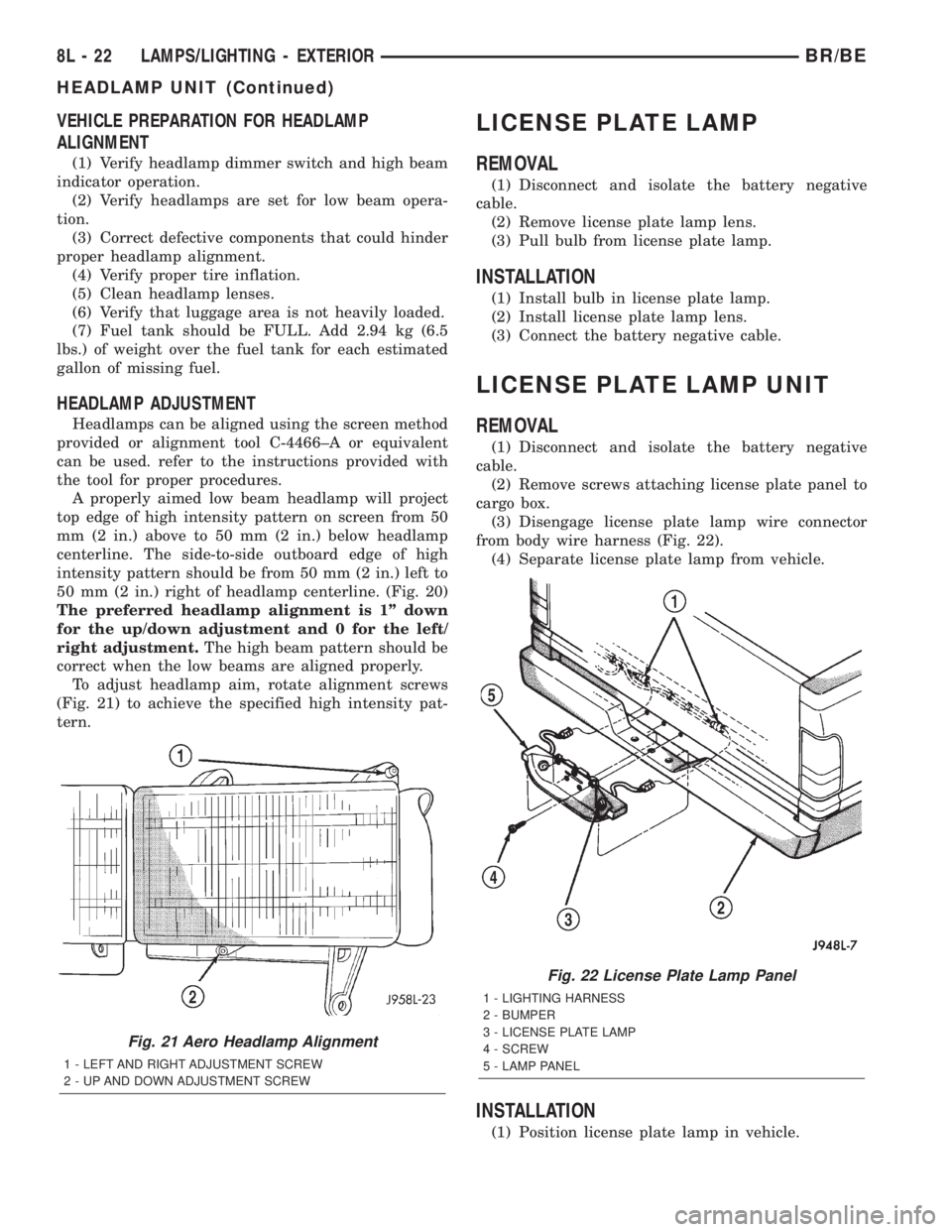
HEADLAMP ADJUSTMENT
Headlamps can be aligned using the screen method
provided or alignment tool C-4466±A or equivalent
can be used. refer to the instructions provided with
the tool for proper procedures.
A properly aimed low beam headlamp will project
top edge of high intensity pattern on screen from 50
mm (2 in.) above to 50 mm (2 in.) below headlamp
centerline. The side-to-side outboard edge of high
intensity pattern should be from 50 mm (2 in.) left to
50 mm (2 in.) right of headlamp centerline. (Fig. 20)
The preferred headlamp alignment is 1º down
for the up/down adjustment and 0 for the left/
right adjustment.The high beam pattern should be
correct when the low beams are aligned properly.
To adjust headlamp aim, rotate alignment screws
(Fig. 21) to achieve the specified high intensity pat-
tern.
LICENSE PLATE LAMP
REMOVAL
(1) Disconnect and isolate the battery negative
cable.
(2) Remove license plate lamp lens.
(3) Pull bulb from license plate lamp.
INSTALLATION
(1) Install bulb in license plate lamp.
(2) Install license plate lamp lens.
(3) Connect the battery negative cable.
LICENSE PLATE LAMP UNIT
REMOVAL
(1) Disconnect and isolate the battery negative
cable.
(2) Remove screws attaching license plate panel to
cargo box.
(3) Disengage license plate lamp wire connector
from body wire harness (Fig. 22).
(4) Separate license plate lamp from vehicle.
INSTALLATION
(1) Position license plate lamp in vehicle.
Fig. 21 Aero Headlamp Alignment
1 - LEFT AND RIGHT ADJUSTMENT SCREW
2 - UP AND DOWN ADJUSTMENT SCREW
Fig. 22 License Plate Lamp Panel
1 - LIGHTING HARNESS
2 - BUMPER
3 - LICENSE PLATE LAMP
4 - SCREW
5 - LAMP PANEL
8L - 22 LAMPS/LIGHTING - EXTERIORBR/BE
HEADLAMP UNIT (Continued)
Page 548 of 2255

LAMPS/LIGHTING - INTERIOR
TABLE OF CONTENTS
page page
LAMPS/LIGHTING - INTERIOR
SPECIFICATIONS
INTERIOR LAMPS.....................33
DOME LAMP
REMOVAL.............................34
INSTALLATION.........................34
DOOR AJAR SWITCH
DESCRIPTION.........................34
DIAGNOSIS AND TESTING - DOOR AJAR
SWITCH............................34
REMOVAL.............................35
INSTALLATION.........................35GLOVE BOX LAMP AND SWITCH
REMOVAL.............................35
INSTALLATION.........................36
READING LAMP
DESCRIPTION.........................36
OPERATION...........................36
REMOVAL.............................36
INSTALLATION.........................37
VANITY LAMP
REMOVAL.............................37
INSTALLATION.........................37
LAMPS/LIGHTING - INTERIOR
SPECIFICATIONS
INTERIOR LAMPS
LAMP BULB
A/C HEATER CONTROL 158
ASH RECEIVER 161
CIGAR LIGHTER 161
HEADLAMP SWITCH 158
HEATER CONTROL 158
INSTRUMENT CLUSTER PC194
RADIO ASC
AIRBAG HIGH LINE PC194
AIRBAG LOW LINE PC74
ANTI-LOCK BRAKE PC74
BATTERY VOLTAGE PC194
BRAKE WARNING PC194LAMP BULB
CHECK ENGINE PC74
ENGINE OIL PRESSURE PC74
FOUR WHEEL DRIVE PC194
HIGH BEAM PC194
LOW FUEL PC194
LOW WASHER FLUID PC74
MAINTENANCE
REQUIREDPC74
MESSAGE CENTER PC194
SEAT BELT PC74
TURN SIGNAL PC194
UPSHIFT PC74
DOME 1004
GLOVE COMPARTMENT 1891
VANITY MIRROR LAMP P/N 6501966
BR/BELAMPS/LIGHTING - INTERIOR 8L - 33
Page 562 of 2255

(3) Engage the two mounting hooks on the rear of
the overhead console housing in the mounting holes
in the inner roof panel.
(4) Slide the overhead console forward far enough
to align the two latches on the front of the housing
with their receptacles in the inner roof panel.
(5) Push upward firmly and evenly on the front of
the overhead console until each of the two latches is
fully engaged in its receptacle in the inner roof panel.
(6) Close the garage door opener storage bin door.
(7) Reconnect the battery negative cable.
SPECIAL TOOLS
OVERHEAD CONSOLE SPECIAL TOOL
COMPASS/MINI-TRIP
COMPUTER
DESCRIPTION
The compass mini-trip computer is located in the
premium overhead console on models equipped with
this option. Two compass mini-trip computer units
are available. One unit is used on vehicles not
equipped with the Vehicle Theft Security System
(VTSS) option, and the other is used on vehicles with
the VTSS option. Both compass mini-trip computer
units include the electronic control module, a Vacu-
um-Fluorescent Display (VFD), a compass flux-gate
unit and two push button function switches.
Compass mini-trip computer units for vehicles
equipped with the VTSS include a red Light-Emit-
ting Diode (LED) on their electronic circuit board.
This LED protrudes through the bottom of the lens
on the front of the overhead console unit, and serves
as the security indicator lamp. Refer toSecurity
Indicator Lampin Vehicle Theft/Security Systems
for more information on this feature.
The compass mini-trip computer module contains a
central processing unit and interfaces with other
electronic modules in the vehicle on the Chrysler Col-
lision Detection (CCD) data bus network. The CCD
data bus network allows the sharing of sensor infor-
mation. This helps to reduce wire harness complexity,
reduce internal controller hardware, and reduce com-
ponent sensor current loads. At the same time, thissystem provides increased reliability, enhanced diag-
nostics, and allows the addition of many new feature
capabilities.
The compass mini-trip computer provides several
electronic functions and features. Some of the func-
tions and features that the compass mini-trip com-
puter module supports and/or controls, include the
following display options:
²Compass and temperature- provides the out-
side temperature and one of eight compass readings
to indicate the direction the vehicle is facing.
²Compass and compass in degrees- provides
one of eight compass readings to indicate the direc-
tion the vehicle is facing and provides the compass
direction in degrees.
²Trip odometer (ODO)- shows the distance
travelled since the last trip computer reset.
²Average fuel economy (AVG ECO)- shows
the average fuel economy since the last trip computer
reset.
²Instant fuel economy (ECO)- shows the
present fuel economy based upon the current vehicle
distance and fuel used information.
²Distance to empty (DTE)- shows the esti-
mated distance that can be travelled with the fuel
remaining in the fuel tank. This estimated distance
is computed using the average miles-per-gallon from
the last 30 gallons of fuel used.
²Elapsed time (ET)- shows the accumulated
ignition-on time since the last trip computer reset.
²Blank screen- the compass mini-trip VFD is
turned off.
The ambient temperature sensor is hard wired to
the compass mini-trip computer module. Data input
for all other compass mini-trip computer functions,
including VFD dimming level, is received through
CCD data bus messages. The compass mini-trip com-
puter uses its internal programming and all of these
inputs to calculate and display the requested data. If
the data displayed is incorrect, perform the self-diag-
nostic tests as described in this group. If these tests
prove inconclusive, the use of a DRBIIItscan tool
and the proper Diagnostic Procedures manual are
recommended for further testing of the compass
mini-trip computer module and the CCD data bus.
The compass mini-trip computer module cannot be
repaired, and is available for service only as a unit. If
faulty or damaged, the complete module must be
replaced.
OPERATION
The compass mini-trip computer only operates with
the ignition switch in the On position. When the igni-
tion switch is turned to the On position, all of the
segments in the compass mini-trip computer VFD
will be turned on for one second, then the display
Degaussing Tool 6029
BR/BEMESSAGE SYSTEMS 8M - 9
OVERHEAD CONSOLE (Continued)