2002 DODGE RAM light
[x] Cancel search: lightPage 1417 of 2255
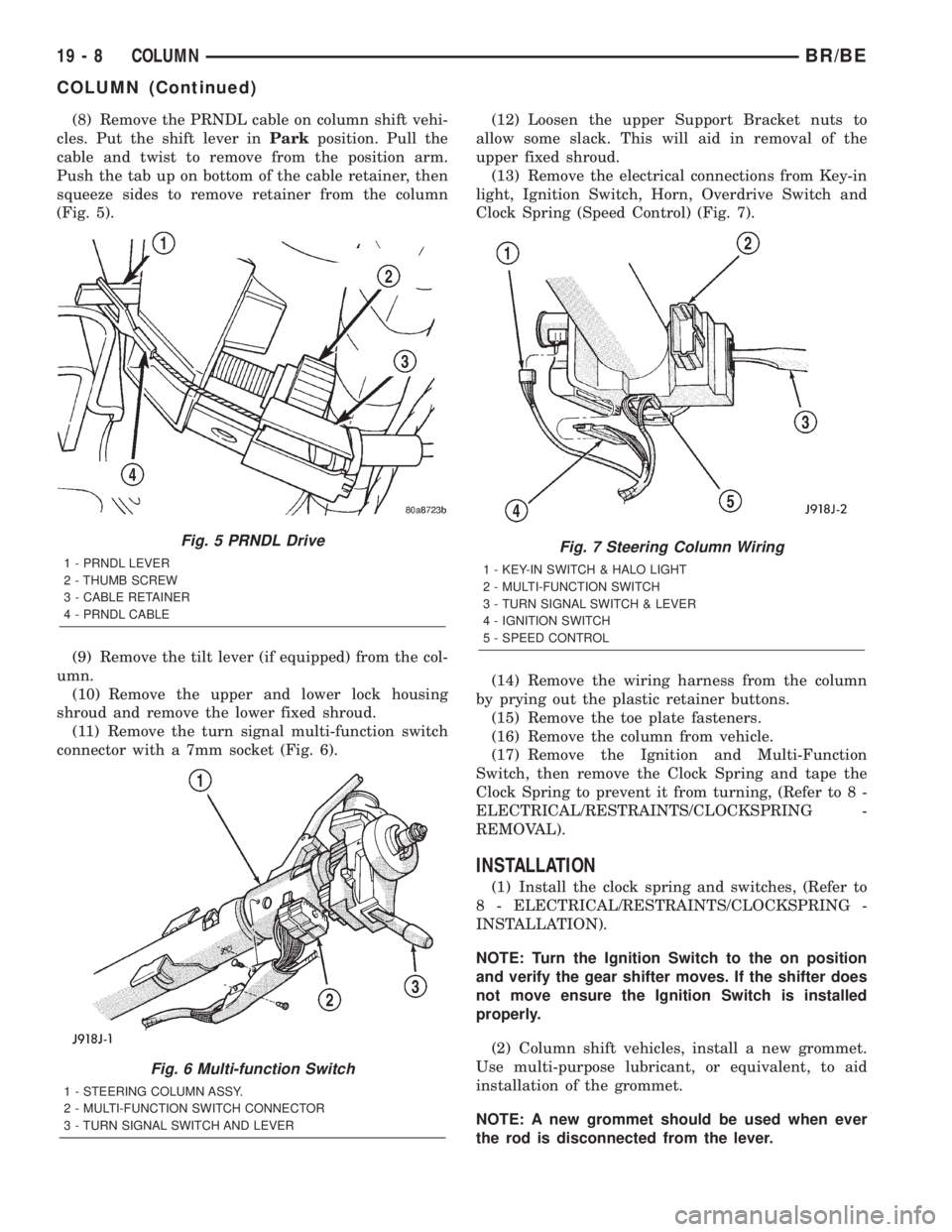
(8) Remove the PRNDL cable on column shift vehi-
cles. Put the shift lever inParkposition. Pull the
cable and twist to remove from the position arm.
Push the tab up on bottom of the cable retainer, then
squeeze sides to remove retainer from the column
(Fig. 5).
(9) Remove the tilt lever (if equipped) from the col-
umn.
(10) Remove the upper and lower lock housing
shroud and remove the lower fixed shroud.
(11) Remove the turn signal multi-function switch
connector with a 7mm socket (Fig. 6).(12) Loosen the upper Support Bracket nuts to
allow some slack. This will aid in removal of the
upper fixed shroud.
(13) Remove the electrical connections from Key-in
light, Ignition Switch, Horn, Overdrive Switch and
Clock Spring (Speed Control) (Fig. 7).
(14) Remove the wiring harness from the column
by prying out the plastic retainer buttons.
(15) Remove the toe plate fasteners.
(16) Remove the column from vehicle.
(17) Remove the Ignition and Multi-Function
Switch, then remove the Clock Spring and tape the
Clock Spring to prevent it from turning, (Refer to 8 -
ELECTRICAL/RESTRAINTS/CLOCKSPRING -
REMOVAL).
INSTALLATION
(1) Install the clock spring and switches, (Refer to
8 - ELECTRICAL/RESTRAINTS/CLOCKSPRING -
INSTALLATION).
NOTE: Turn the Ignition Switch to the on position
and verify the gear shifter moves. If the shifter does
not move ensure the Ignition Switch is installed
properly.
(2) Column shift vehicles, install a new grommet.
Use multi-purpose lubricant, or equivalent, to aid
installation of the grommet.
NOTE: A new grommet should be used when ever
the rod is disconnected from the lever.
Fig. 5 PRNDL Drive
1 - PRNDL LEVER
2 - THUMB SCREW
3 - CABLE RETAINER
4 - PRNDL CABLE
Fig. 6 Multi-function Switch
1 - STEERING COLUMN ASSY.
2 - MULTI-FUNCTION SWITCH CONNECTOR
3 - TURN SIGNAL SWITCH AND LEVER
Fig. 7 Steering Column Wiring
1 - KEY-IN SWITCH & HALO LIGHT
2 - MULTI-FUNCTION SWITCH
3 - TURN SIGNAL SWITCH & LEVER
4 - IGNITION SWITCH
5 - SPEED CONTROL
19 - 8 COLUMNBR/BE
COLUMN (Continued)
Page 1421 of 2255
REMOVAL
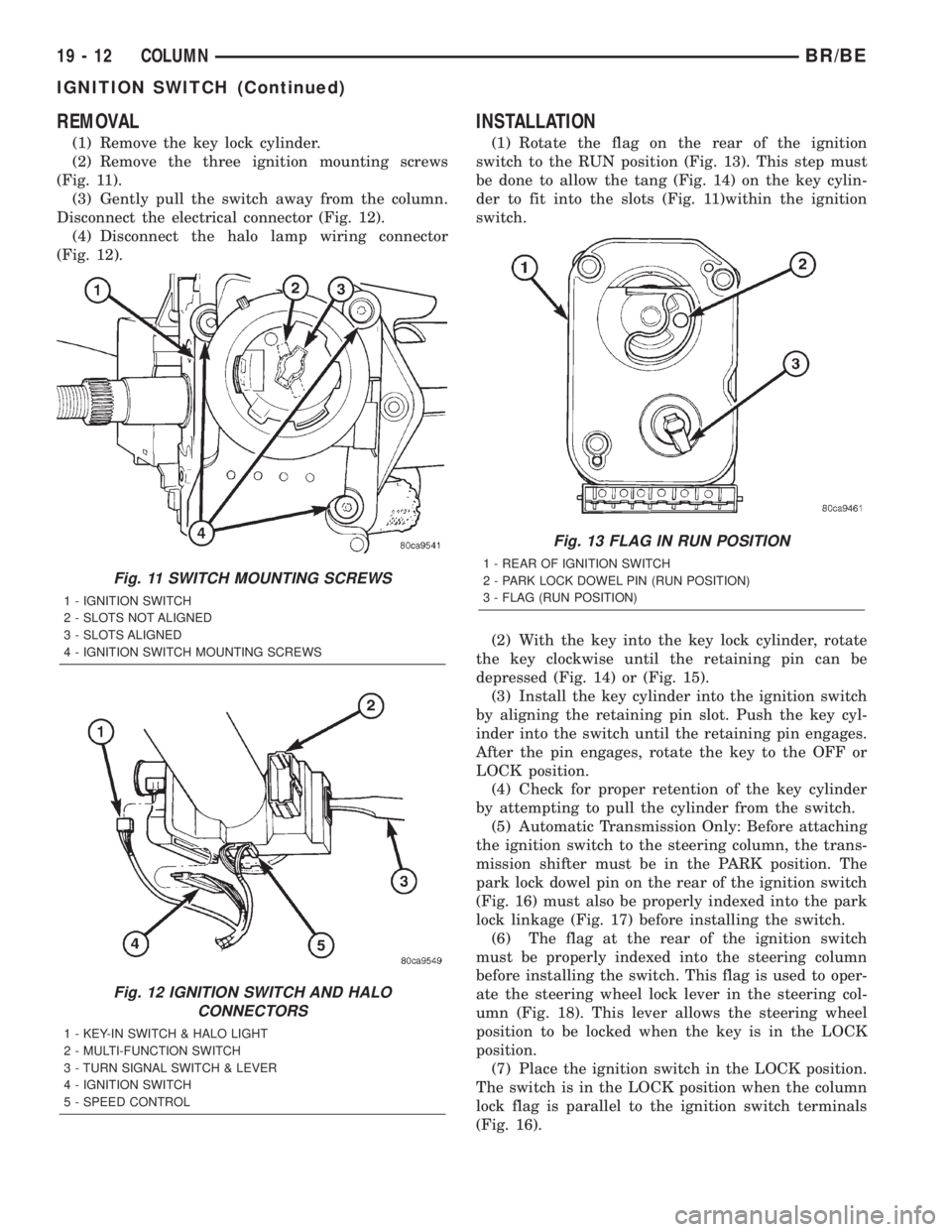
(1) Remove the key lock cylinder.
(2) Remove the three ignition mounting screws
(Fig. 11).
(3) Gently pull the switch away from the column.
Disconnect the electrical connector (Fig. 12).
(4) Disconnect the halo lamp wiring connector
(Fig. 12).
INSTALLATION
(1) Rotate the flag on the rear of the ignition
switch to the RUN position (Fig. 13). This step must
be done to allow the tang (Fig. 14) on the key cylin-
der to fit into the slots (Fig. 11)within the ignition
switch.
(2) With the key into the key lock cylinder, rotate
the key clockwise until the retaining pin can be
depressed (Fig. 14) or (Fig. 15).
(3) Install the key cylinder into the ignition switch
by aligning the retaining pin slot. Push the key cyl-
inder into the switch until the retaining pin engages.
After the pin engages, rotate the key to the OFF or
LOCK position.
(4) Check for proper retention of the key cylinder
by attempting to pull the cylinder from the switch.
(5) Automatic Transmission Only: Before attaching
the ignition switch to the steering column, the trans-
mission shifter must be in the PARK position. The
park lock dowel pin on the rear of the ignition switch
(Fig. 16) must also be properly indexed into the park
lock linkage (Fig. 17) before installing the switch.
(6) The flag at the rear of the ignition switch
must be properly indexed into the steering column
before installing the switch. This flag is used to oper-
ate the steering wheel lock lever in the steering col-
umn (Fig. 18). This lever allows the steering wheel
position to be locked when the key is in the LOCK
position.
(7) Place the ignition switch in the LOCK position.
The switch is in the LOCK position when the column
lock flag is parallel to the ignition switch terminals
(Fig. 16).
Fig. 11 SWITCH MOUNTING SCREWS
1 - IGNITION SWITCH
2 - SLOTS NOT ALIGNED
3 - SLOTS ALIGNED
4 - IGNITION SWITCH MOUNTING SCREWS
Fig. 12 IGNITION SWITCH AND HALO
CONNECTORS
1 - KEY-IN SWITCH & HALO LIGHT
2 - MULTI-FUNCTION SWITCH
3 - TURN SIGNAL SWITCH & LEVER
4 - IGNITION SWITCH
5 - SPEED CONTROL
Fig. 13 FLAG IN RUN POSITION
1 - REAR OF IGNITION SWITCH
2 - PARK LOCK DOWEL PIN (RUN POSITION)
3 - FLAG (RUN POSITION)
19 - 12 COLUMNBR/BE
IGNITION SWITCH (Continued)
Page 1422 of 2255
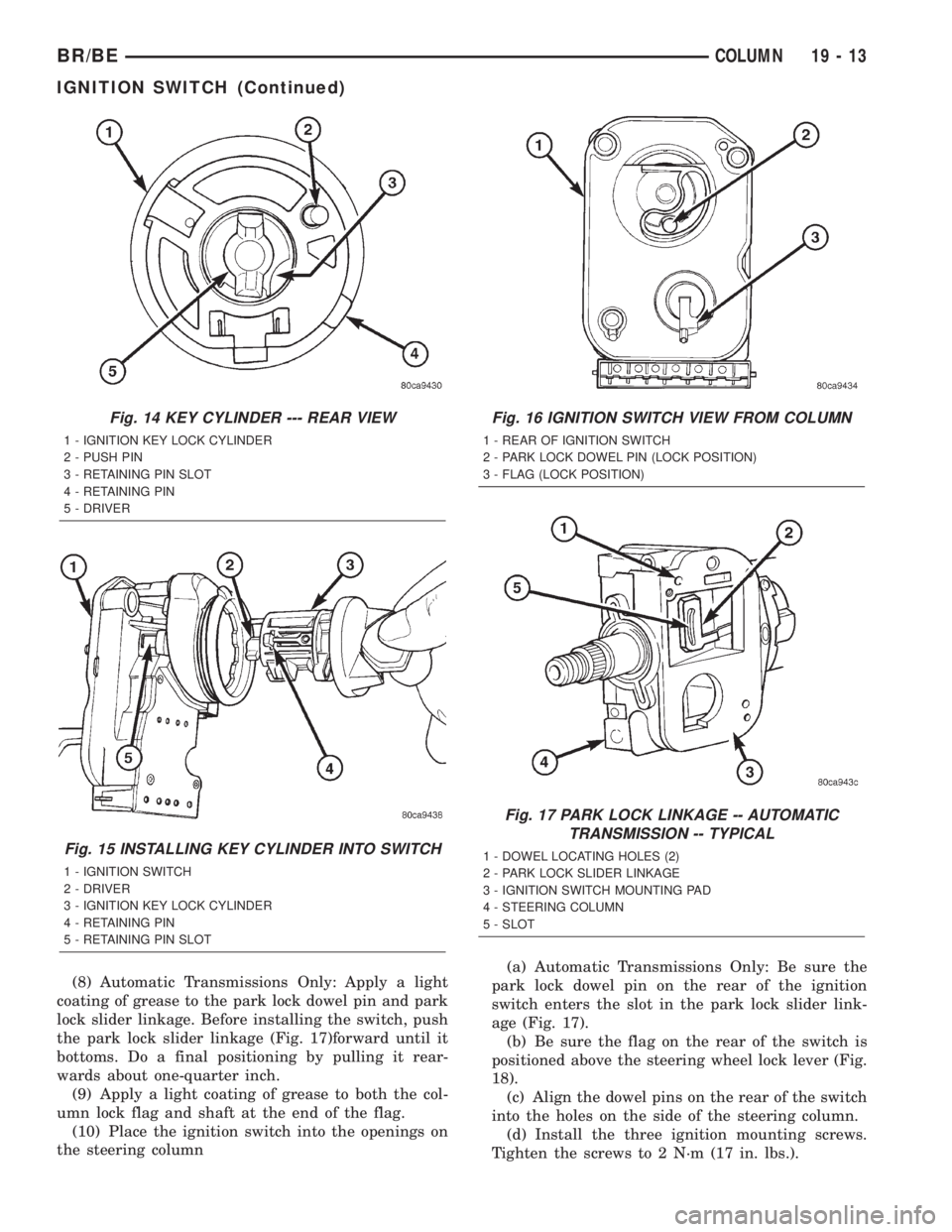
(8) Automatic Transmissions Only: Apply a light
coating of grease to the park lock dowel pin and park
lock slider linkage. Before installing the switch, push
the park lock slider linkage (Fig. 17)forward until it
bottoms. Do a final positioning by pulling it rear-
wards about one-quarter inch.
(9) Apply a light coating of grease to both the col-
umn lock flag and shaft at the end of the flag.
(10) Place the ignition switch into the openings on
the steering column(a) Automatic Transmissions Only: Be sure the
park lock dowel pin on the rear of the ignition
switch enters the slot in the park lock slider link-
age (Fig. 17).
(b) Be sure the flag on the rear of the switch is
positioned above the steering wheel lock lever (Fig.
18).
(c) Align the dowel pins on the rear of the switch
into the holes on the side of the steering column.
(d) Install the three ignition mounting screws.
Tighten the screws to 2 N´m (17 in. lbs.).
Fig. 14 KEY CYLINDER --- REAR VIEW
1 - IGNITION KEY LOCK CYLINDER
2 - PUSH PIN
3 - RETAINING PIN SLOT
4 - RETAINING PIN
5 - DRIVER
Fig. 15 INSTALLING KEY CYLINDER INTO SWITCH
1 - IGNITION SWITCH
2 - DRIVER
3 - IGNITION KEY LOCK CYLINDER
4 - RETAINING PIN
5 - RETAINING PIN SLOT
Fig. 16 IGNITION SWITCH VIEW FROM COLUMN
1 - REAR OF IGNITION SWITCH
2 - PARK LOCK DOWEL PIN (LOCK POSITION)
3 - FLAG (LOCK POSITION)
Fig. 17 PARK LOCK LINKAGE -- AUTOMATIC
TRANSMISSION -- TYPICAL
1 - DOWEL LOCATING HOLES (2)
2 - PARK LOCK SLIDER LINKAGE
3 - IGNITION SWITCH MOUNTING PAD
4 - STEERING COLUMN
5 - SLOT
BR/BECOLUMN 19 - 13
IGNITION SWITCH (Continued)
Page 1436 of 2255
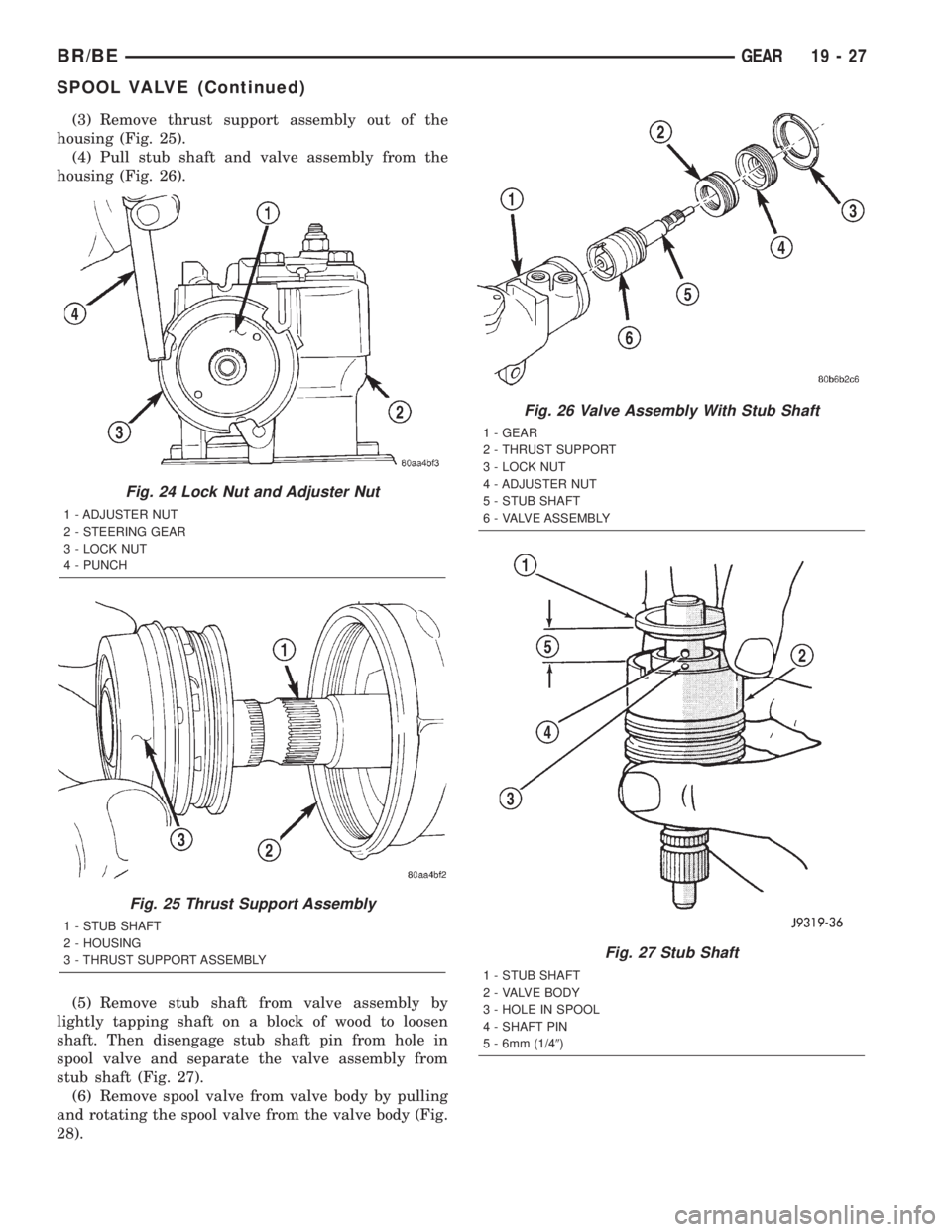
(3) Remove thrust support assembly out of the
housing (Fig. 25).
(4) Pull stub shaft and valve assembly from the
housing (Fig. 26).
(5) Remove stub shaft from valve assembly by
lightly tapping shaft on a block of wood to loosen
shaft. Then disengage stub shaft pin from hole in
spool valve and separate the valve assembly from
stub shaft (Fig. 27).
(6) Remove spool valve from valve body by pulling
and rotating the spool valve from the valve body (Fig.
28).
Fig. 24 Lock Nut and Adjuster Nut
1 - ADJUSTER NUT
2 - STEERING GEAR
3 - LOCK NUT
4 - PUNCH
Fig. 25 Thrust Support Assembly
1 - STUB SHAFT
2 - HOUSING
3 - THRUST SUPPORT ASSEMBLY
Fig. 26 Valve Assembly With Stub Shaft
1 - GEAR
2 - THRUST SUPPORT
3 - LOCK NUT
4 - ADJUSTER NUT
5 - STUB SHAFT
6 - VALVE ASSEMBLY
Fig. 27 Stub Shaft
1 - STUB SHAFT
2 - VALVE BODY
3 - HOLE IN SPOOL
4 - SHAFT PIN
5 - 6mm (1/49)
BR/BEGEAR 19 - 27
SPOOL VALVE (Continued)
Page 1439 of 2255
INSTALLATION
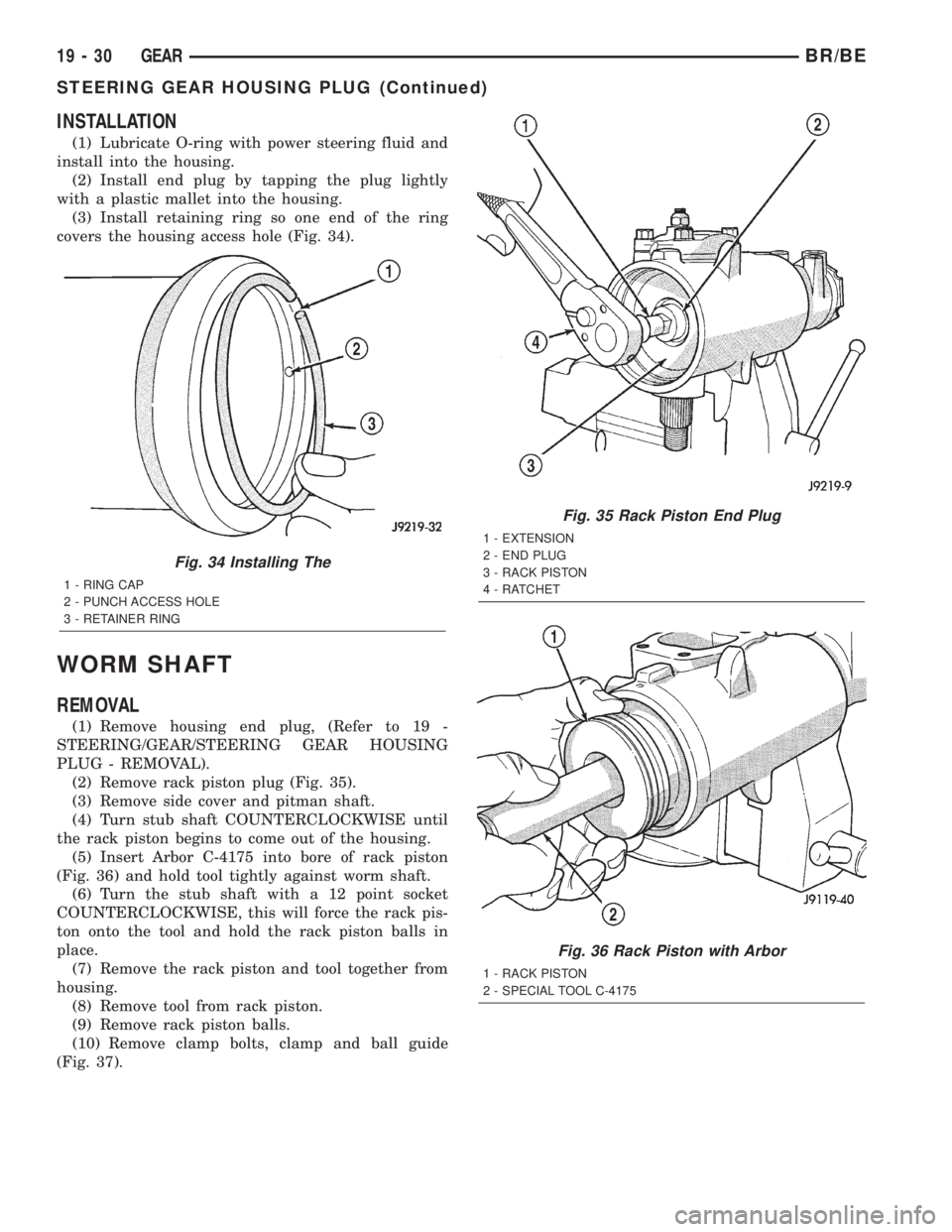
(1) Lubricate O-ring with power steering fluid and
install into the housing.
(2) Install end plug by tapping the plug lightly
with a plastic mallet into the housing.
(3) Install retaining ring so one end of the ring
covers the housing access hole (Fig. 34).
WORM SHAFT
REMOVAL
(1) Remove housing end plug, (Refer to 19 -
STEERING/GEAR/STEERING GEAR HOUSING
PLUG - REMOVAL).
(2) Remove rack piston plug (Fig. 35).
(3) Remove side cover and pitman shaft.
(4) Turn stub shaft COUNTERCLOCKWISE until
the rack piston begins to come out of the housing.
(5) Insert Arbor C-4175 into bore of rack piston
(Fig. 36) and hold tool tightly against worm shaft.
(6) Turn the stub shaft with a 12 point socket
COUNTERCLOCKWISE, this will force the rack pis-
ton onto the tool and hold the rack piston balls in
place.
(7) Remove the rack piston and tool together from
housing.
(8) Remove tool from rack piston.
(9) Remove rack piston balls.
(10) Remove clamp bolts, clamp and ball guide
(Fig. 37).
Fig. 34 Installing The
1 - RING CAP
2 - PUNCH ACCESS HOLE
3 - RETAINER RING
Fig. 35 Rack Piston End Plug
1 - EXTENSION
2 - END PLUG
3 - RACK PISTON
4 - RATCHET
Fig. 36 Rack Piston with Arbor
1 - RACK PISTON
2 - SPECIAL TOOL C-4175
19 - 30 GEARBR/BE
STEERING GEAR HOUSING PLUG (Continued)
Page 1440 of 2255
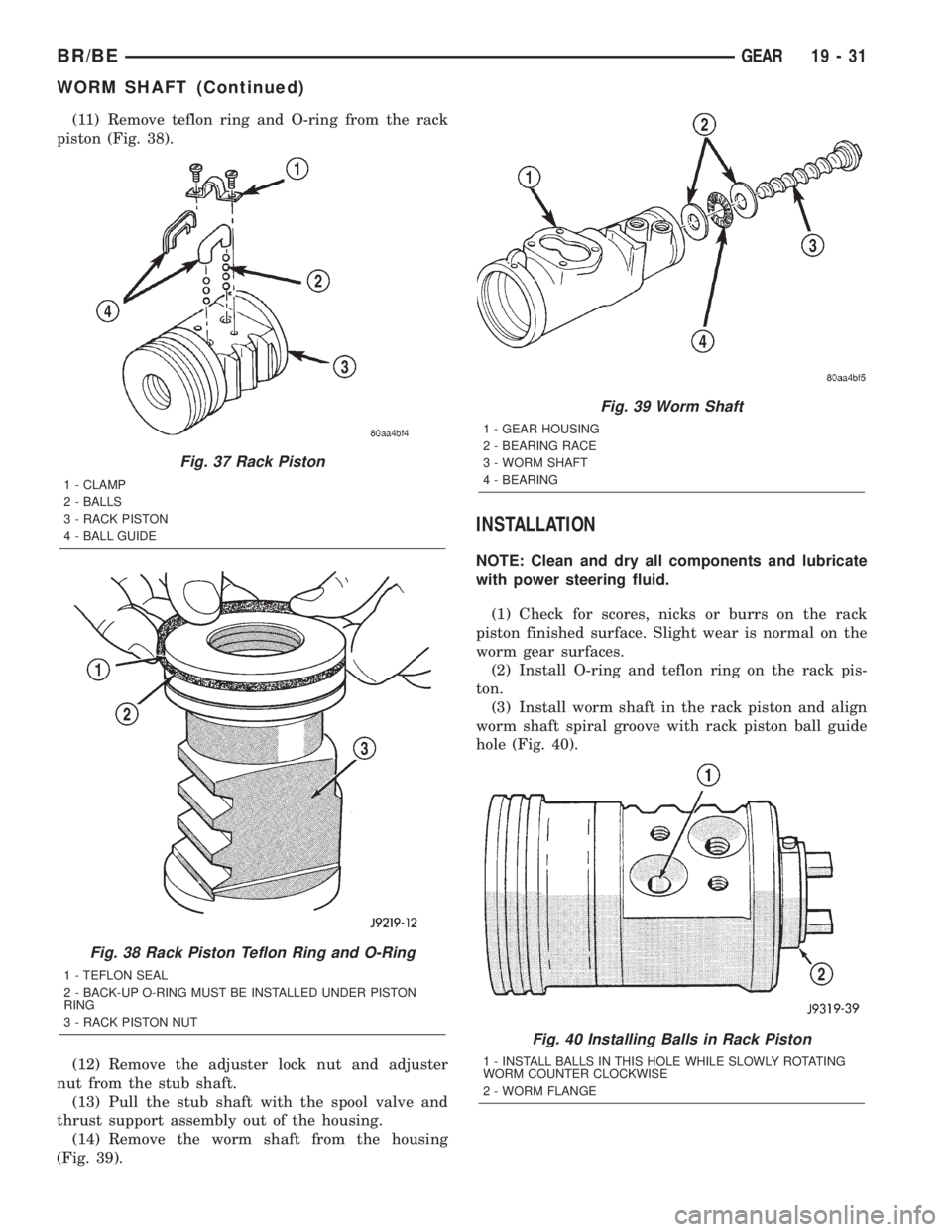
(11) Remove teflon ring and O-ring from the rack
piston (Fig. 38).
(12) Remove the adjuster lock nut and adjuster
nut from the stub shaft.
(13) Pull the stub shaft with the spool valve and
thrust support assembly out of the housing.
(14) Remove the worm shaft from the housing
(Fig. 39).
INSTALLATION
NOTE: Clean and dry all components and lubricate
with power steering fluid.
(1) Check for scores, nicks or burrs on the rack
piston finished surface. Slight wear is normal on the
worm gear surfaces.
(2) Install O-ring and teflon ring on the rack pis-
ton.
(3) Install worm shaft in the rack piston and align
worm shaft spiral groove with rack piston ball guide
hole (Fig. 40).
Fig. 37 Rack Piston
1 - CLAMP
2 - BALLS
3 - RACK PISTON
4 - BALL GUIDE
Fig. 38 Rack Piston Teflon Ring and O-Ring
1 - TEFLON SEAL
2 - BACK-UP O-RING MUST BE INSTALLED UNDER PISTON
RING
3 - RACK PISTON NUT
Fig. 39 Worm Shaft
1 - GEAR HOUSING
2 - BEARING RACE
3 - WORM SHAFT
4 - BEARING
Fig. 40 Installing Balls in Rack Piston
1 - INSTALL BALLS IN THIS HOLE WHILE SLOWLY ROTATING
WORM COUNTER CLOCKWISE
2 - WORM FLANGE
BR/BEGEAR 19 - 31
WORM SHAFT (Continued)
Page 1449 of 2255
LINKAGE - 2WD
TABLE OF CONTENTS
page page
LINKAGE - 2WD
DESCRIPTION.........................40
STANDARD PROCEDURE - LUBRICATION....40
REMOVAL.............................40
INSTALLATION.........................41SPECIFICATIONS
TORQUE CHART......................41
SPECIAL TOOLS
STEERING LINKAGE...................41
LINKAGE - 2WD
DESCRIPTION
Light duty (LD) and heavy duty (HD) steering link-
age is used with IFS suspensions. The linkage is
comprised of a idler arm, pitman arm, center link
and tie rod ends. Heavy duty linkage is used on 8800
and 10500 lb. GVW vehicles.
CAUTION: If any steering components are replaced
or serviced an alignment must be performed.
NOTE: When servicing the steering linkage, use
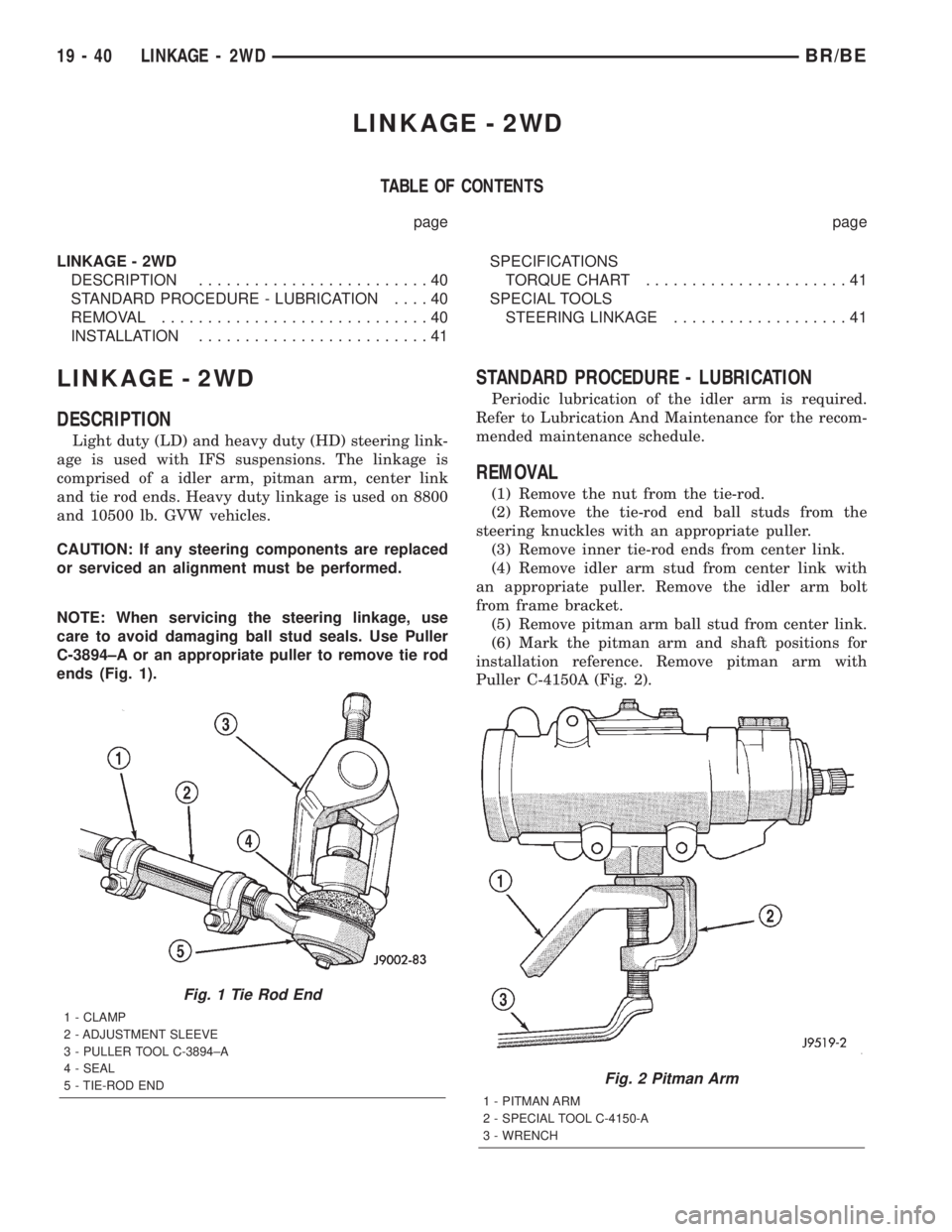
care to avoid damaging ball stud seals. Use Puller
C-3894±A or an appropriate puller to remove tie rod
ends (Fig. 1).
STANDARD PROCEDURE - LUBRICATION
Periodic lubrication of the idler arm is required.
Refer to Lubrication And Maintenance for the recom-
mended maintenance schedule.
REMOVAL
(1) Remove the nut from the tie-rod.
(2) Remove the tie-rod end ball studs from the
steering knuckles with an appropriate puller.
(3) Remove inner tie-rod ends from center link.
(4) Remove idler arm stud from center link with
an appropriate puller. Remove the idler arm bolt
from frame bracket.
(5) Remove pitman arm ball stud from center link.
(6) Mark the pitman arm and shaft positions for
installation reference. Remove pitman arm with
Puller C-4150A (Fig. 2).
Fig. 1 Tie Rod End
1 - CLAMP
2 - ADJUSTMENT SLEEVE
3 - PULLER TOOL C-3894±A
4 - SEAL
5 - TIE-ROD END
Fig. 2 Pitman Arm
1 - PITMAN ARM
2 - SPECIAL TOOL C-4150-A
3 - WRENCH
19 - 40 LINKAGE - 2WDBR/BE
Page 1457 of 2255
HARD SHIFTING
Hard shifting is usually caused by a low lubricant
level, improper or contaminated lubricants. The con-
sequence of using non-recommended lubricants is
noise, excessive wear, internal bind and hard shift-
ing. Substantial lubricant leaks can result in gear,
shift rail, synchro, and bearing damage. If a leak
goes undetected for an extended period, the first indi-
cations of component damage are usually hard shift-
ing and noise.
Component damage, incorrect clutch adjustment or
damaged clutch pressure plate or disc are additional
probable causes of increased shift effort. Incorrect
adjustment or a worn/damaged pressure plate or disc
can cause incorrect release. If clutch problem is
advanced, gear clash during shifts can result. Worn
or damaged synchro rings can cause gear clash when
shifting into any forward gear. In some new or
rebuilt transmissions, new synchro rings may tend to
stick slightly causing hard or noisy shifts. In most
cases this condition will decline as the rings wear-in.
TRANSMISSION NOISE
Most manual transmissions make some noise dur-
ing normal operation. Rotating gears generate a mild
whine that is audible, but generally only at extreme
speeds. Severe highly audible transmission noise is
generally the initial indicator of a lubricant problem.
Insufficient, improper or contaminated lubricant
will promote rapid wear of gears, synchros, shift
rails, forks and bearings. The overheating caused by
a lubricant problem, can also lead to gear breakage.
REMOVAL
(1) Disconnect battery negative cable.
(2) Shift transmission into Neutral.
(3) Remove shift boot screws from floorpan and
slide boot upward on the shift lever.
(4) Remove shift lever extension from shift tower
and lever assembly.
(5) Remove shift tower bolts holding tower to iso-
lator plate and transmission shift cover.
(6) Remove shift tower and isolator plate from
transmission shift cover.
(7) Raise and support vehicle.
(8) Remove skid plate, if equipped.
(9) Mark propeller shaft and axle yokes for instal-
lation reference and remove shaft/shafts.
(10) Remove exhaust system Y-pipe.
(11) Disconnect speed sensor and backup light
switch connectors.
(12) Support engine with safety stand and a wood
block.
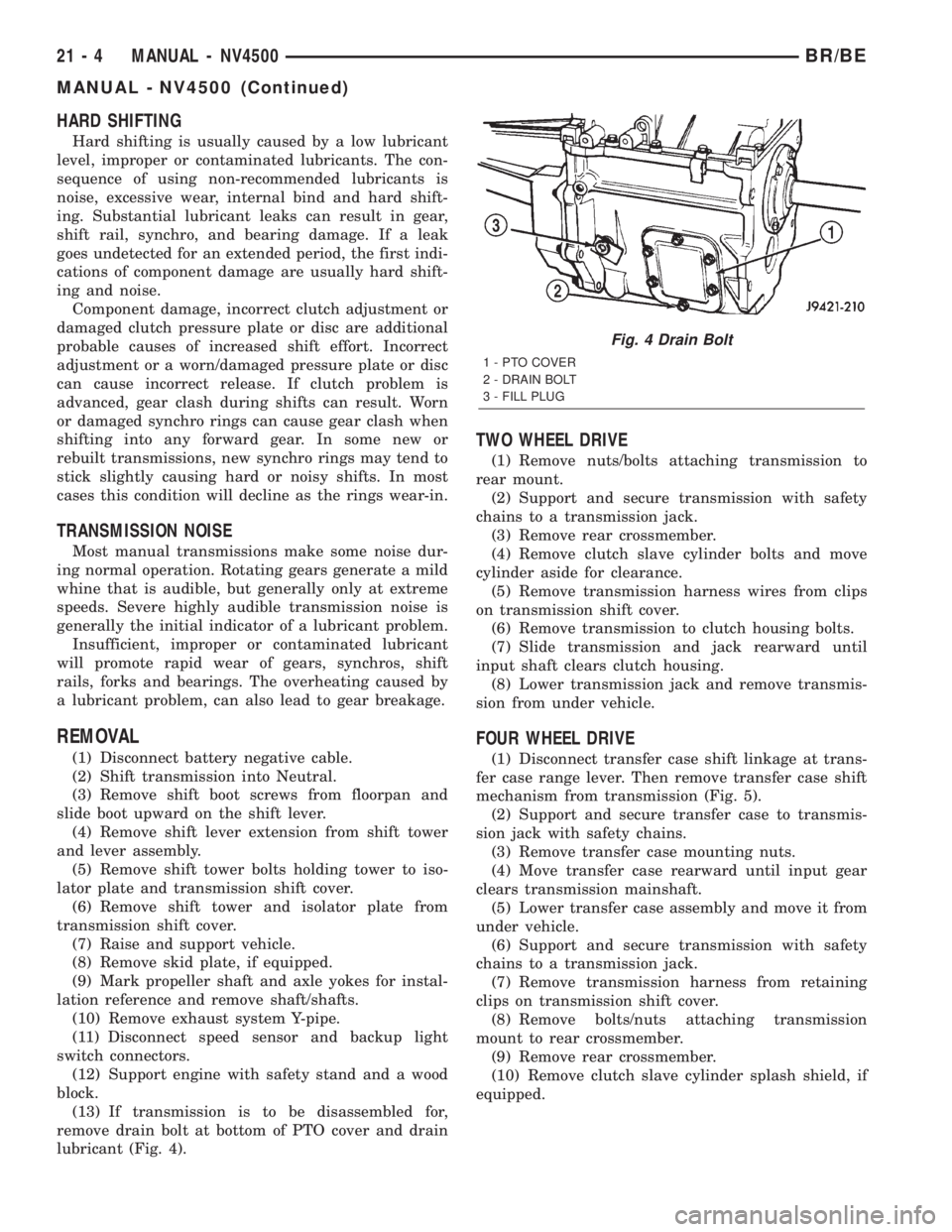
(13) If transmission is to be disassembled for,
remove drain bolt at bottom of PTO cover and drain
lubricant (Fig. 4).
TWO WHEEL DRIVE
(1) Remove nuts/bolts attaching transmission to
rear mount.
(2) Support and secure transmission with safety
chains to a transmission jack.
(3) Remove rear crossmember.
(4) Remove clutch slave cylinder bolts and move
cylinder aside for clearance.
(5) Remove transmission harness wires from clips
on transmission shift cover.
(6) Remove transmission to clutch housing bolts.
(7) Slide transmission and jack rearward until
input shaft clears clutch housing.
(8) Lower transmission jack and remove transmis-
sion from under vehicle.
FOUR WHEEL DRIVE
(1) Disconnect transfer case shift linkage at trans-
fer case range lever. Then remove transfer case shift
mechanism from transmission (Fig. 5).
(2) Support and secure transfer case to transmis-
sion jack with safety chains.
(3) Remove transfer case mounting nuts.
(4) Move transfer case rearward until input gear
clears transmission mainshaft.
(5) Lower transfer case assembly and move it from
under vehicle.
(6) Support and secure transmission with safety
chains to a transmission jack.
(7) Remove transmission harness from retaining
clips on transmission shift cover.
(8) Remove bolts/nuts attaching transmission
mount to rear crossmember.
(9) Remove rear crossmember.
(10) Remove clutch slave cylinder splash shield, if
equipped.
Fig. 4 Drain Bolt
1 - PTO COVER
2 - DRAIN BOLT
3 - FILL PLUG
21 - 4 MANUAL - NV4500BR/BE
MANUAL - NV4500 (Continued)