2002 DODGE RAM reset
[x] Cancel search: resetPage 483 of 2255
The EMIC circuitry operates on battery current
received through a fused B(+) fuse in the Junction
Block (JB) on a non-switched fused B(+) circuit, and
on battery current received through a fused ignition
switch output (st-run) fuse in the JB on a fused igni-
tion switch output (st-run) circuit. This arrangement
allows the EMIC to provide some features regardless
of the ignition switch position, while other features
will operate only with the ignition switch in the Start
or On positions. The EMIC circuitry is grounded
through two separate ground circuits located in one
of the two instrument cluster connectors and take
outs of the instrument panel wire harness. One
ground circuit receives ground through a take out
with an eyelet terminal connector of the instrument
panel wire harness that is secured by a nut to a
ground stud located on the left instrument panel end
bracket, while the other ground circuit receives
ground through a take out with an eyelet terminal
connector of the instrument panel wire harness that
is secured by a nut to a ground stud located on the
back of the instrument panel armature above the
inboard side of the instrument panel steering column
opening.
The EMIC also has a self-diagnostic actuator test
capability, which will test each of the CCD bus mes-
sage-controlled functions of the cluster by lighting
the appropriate indicators and positioning the gauge
needles at several predetermined locations on the
gauge faces in a prescribed sequence. (Refer to 8 -
ELECTRICAL/INSTRUMENT CLUSTER - DIAGNO-
SIS AND TESTING). See the owner's manual in the
vehicle glove box for more information on the fea-
tures, use and operation of the EMIC.
GAUGES
All gauges receive battery current through the
EMIC circuitry when the ignition switch is in the On
or Start positions. With the ignition switch in the Off
position battery current is not supplied to any
gauges, and the EMIC circuitry is programmed to
move all of the gauge needles back to the low end of
their respective scales. Therefore, the gauges do not
accurately indicate any vehicle condition unless the
ignition switch is in the On or Start positions. All of
the EMIC gauges, except the odometer, are air core
magnetic units. Two fixed electromagnetic coils are
located within each gauge. These coils are wrapped
at right angles to each other around a movable per-
manent magnet. The movable magnet is suspended
within the coils on one end of a pivot shaft, while the
gauge needle is attached to the other end of the
shaft. One of the coils has a fixed current flowing
through it to maintain a constant magnetic field
strength. Current flow through the second coil
changes, which causes changes in its magnetic fieldstrength. The current flowing through the second coil
is changed by the EMIC circuitry in response to mes-
sages received over the CCD data bus. The gauge
needle moves as the movable permanent magnet
aligns itself to the changing magnetic fields created
around it by the electromagnets.
The gauges are diagnosed using the EMIC self-di-
agnostic actuator test. (Refer to 8 - ELECTRICAL/
INSTRUMENT CLUSTER - DIAGNOSIS AND
TESTING). Proper testing of the CCD data bus and
the data bus message inputs to the EMIC that con-
trol each gauge require the use of a DRBIIItscan
tool. Refer to the appropriate diagnostic information.
Specific operation details for each gauge may be
found elsewhere in this service manual.
VACUUM-FLUORESCENT DISPLAY
The Vacuum-Fluorescent Display (VFD) module is
soldered to the EMIC circuit board. The display is
active with the ignition switch in the On or Start
positions, and inactive when the ignition switch is in
any other position. The VFD has several display
capabilities including odometer, trip odometer, and
an amber ªCRUISEº indication whenever the
optional speed control system is turned On. The
cruise indicator function of the VFD is automatically
enabled or disabled by the EMIC circuitry based
upon whether the vehicle is equipped with the speed
control option. An odometer/trip odometer switch on
the EMIC circuit board is used to control several of
the display modes. This switch is actuated manually
by depressing the odometer/trip odometer switch
knob that extends through the lower edge of the clus-
ter lens, just right of center. Actuating this switch
momentarily with the ignition switch in the On posi-
tion will toggle the VFD between the odometer and
trip odometer modes. The word ªTRIPº will also
appear in blue-green text when the VFD trip odome-
ter mode is active. Depressing the switch button for
about two seconds while the VFD is in the trip odom-
eter mode will reset the trip odometer value to zero.
Holding this switch depressed while turning the igni-
tion switch from the Off position to the On position
will activate the EMIC self-diagnostic actuator test.
The EMIC will automatically flash the odometer or
trip odometer information on and off if there is a loss
of CCD data bus communication. The VFD will also
display various information used in several diagnos-
tic procedures. Refer to the appropriate diagnostic
information for additional details on this VFD func-
tion.
The VFD is diagnosed using the EMIC self-diag-
nostic actuator test. (Refer to 8 - ELECTRICAL/IN-
STRUMENT CLUSTER - DIAGNOSIS AND
TESTING). Proper testing of the CCD data bus and
the data bus message inputs to the EMIC that con-
8J - 4 INSTRUMENT CLUSTERBR/BE
INSTRUMENT CLUSTER (Continued)
Page 487 of 2255

INSTRUMENT CLUSTER FAILURE MESSAGE
Message Description Correction
940 The cluster is not receiving an airbag lamp-on
message from the ACM.1. Check the CCD data bus connections at the
ACM.
2. Check the ACM fuse.
950 The cluster is not receiving an ABS lamp-on
message from the CAB.1. Check the CCD data bus connections at the
CAB.
2. Check the CAB fuse.
999 An error has been discovered. 1. Record the failure message.
2. Depress the trip odometer reset button to
continue the Self-Diagnostic Test.
(6) The instrument cluster will begin the Vacuum
Fluorescent Display (VFD) walking segment test.
This test will require the operator to visually inspect
each VFD segment as it is displayed to determine a
pass or fail condition. First, all of the segments will
be illuminated at once; then, each individual segment
of the VFD will be illuminated in sequence. If any
segment in the display fails to illuminate, repeat the
test to confirm the failure. If the failure is confirmed,
replace the faulty instrument cluster. Following com-
pletion of the VFD walking segment test, the actua-
tor test will proceed as described in Step 7.
(7) The instrument cluster will perform a bulb
check of each indicator that the instrument cluster
circuitry controls. If the wait-to-start indicator does
not illuminate during this test, the instrument clus-
ter should be removed. However, check that the
incandescent bulb is not faulty and that the bulb
holder is properly installed on the instrument cluster
electronic circuit board before considering instrument
cluster replacement. If the bulb and bulb holder
check OK, replace the faulty instrument cluster.
Each of the remaining instrument cluster circuitry
controlled indicators except the cruise indicator are
illuminated by a Light Emitting Diode (LED). If an
LED or the cruise indicator in the VFD, fails to illu-
minate during this test, the instrument cluster must
be replaced. Following the bulb check test, the actua-
tor test will proceed as described in Step 8.
(8) The instrument cluster will perform a gauge
actuator test. In this test the instrument cluster cir-
cuitry positions each of the gauge needles at three
different calibration points, then returns the gauge
needles to their relaxed positions. If an individual
gauge does not respond properly, or does not respondat all during the gauge actuator test, the instrument
cluster should be removed. However, check that the
gauge terminal pins are properly inserted through
the spring-clip terminal pin receptacles on the instru-
ment cluster electronic circuit board before consider-
ing instrument cluster replacement. If the gauge
terminal connections are OK, replace the faulty
instrument cluster.
(9) The actuator test is now completed. The instru-
ment cluster will automatically exit the self-diagnos-
tic mode and return to normal operation at the
completion of the test, if the ignition switch is turned
to the Off position during the test, or if a vehicle
speed message indicating that the vehicle is moving
is received from the PCM on the CCD data bus dur-
ing the test.
(10) Go back to Step 1 to repeat the test, if
required.
CHIME WARNING REQUEST DIAGNOSIS
Before performing this test, complete the testing of
the seat belt switch and the Central Timer Module
(CTM). (Refer to 8 - ELECTRICAL/RESTRAINTS/
SEAT BELT SWITCH - DIAGNOSIS AND TESTING)
and (Refer to 8 - ELECTRICAL/ELECTRONIC CON-
TROL MODULES/BODY CONTROL/CENTRAL
TIMER MODULE - DIAGNOSIS AND TESTING).
The diagnosis found here consists of confirming the
viability of the hard wired tone request circuit
between the instrument cluster and the Central
Timer Module (CTM). For diagnosis of the CCD data
bus and the data bus message inputs that cause the
instrument cluster to issue a request for chime ser-
vice, a DRBIIItscan tool is required. Refer to the
appropriate diagnostic information.
8J - 8 INSTRUMENT CLUSTERBR/BE
INSTRUMENT CLUSTER (Continued)
Page 489 of 2255
headlamp switch. Rotate the headlamp switch panel
lamps dimmer thumbwheel upward to just before the
interior lamps detent. Check for battery voltage at
the fused panel lamps dimmer switch signal circuit
cavity of the instrument panel wire harness connec-
tor (Connector C2) for the instrument cluster. If OK,
replace the faulty bulb and bulb holder units. If not
OK, repair the open fused panel lamps dimmer
switch signal circuit between the instrument cluster
and the JB as required.
REMOVAL
WARNING: ON VEHICLES EQUIPPED WITH AIR-
BAGS, DISABLE THE AIRBAG SYSTEM BEFORE
ATTEMPTING ANY STEERING WHEEL, STEERING
COLUMN, OR INSTRUMENT PANEL COMPONENT
DIAGNOSIS OR SERVICE. DISCONNECT AND ISO-
LATE THE BATTERY NEGATIVE (GROUND) CABLE,
THEN WAIT TWO MINUTES FOR THE AIRBAG SYS-
TEM CAPACITOR TO DISCHARGE BEFORE PER-
FORMING FURTHER DIAGNOSIS OR SERVICE. THIS
IS THE ONLY SURE WAY TO DISABLE THE AIRBAG
SYSTEM. FAILURE TO TAKE THE PROPER PRE-
CAUTIONS COULD RESULT IN ACCIDENTAL AIR-
BAG DEPLOYMENT AND POSSIBLE PERSONAL
INJURY.
(1) Disconnect and isolate the battery negative
cable.
(2) Remove the cluster bezel from the instrument
panel. (Refer to 23 - BODY/INSTRUMENT PANEL/
CLUSTER BEZEL - REMOVAL).
(3) Remove the four screws that secure the instru-
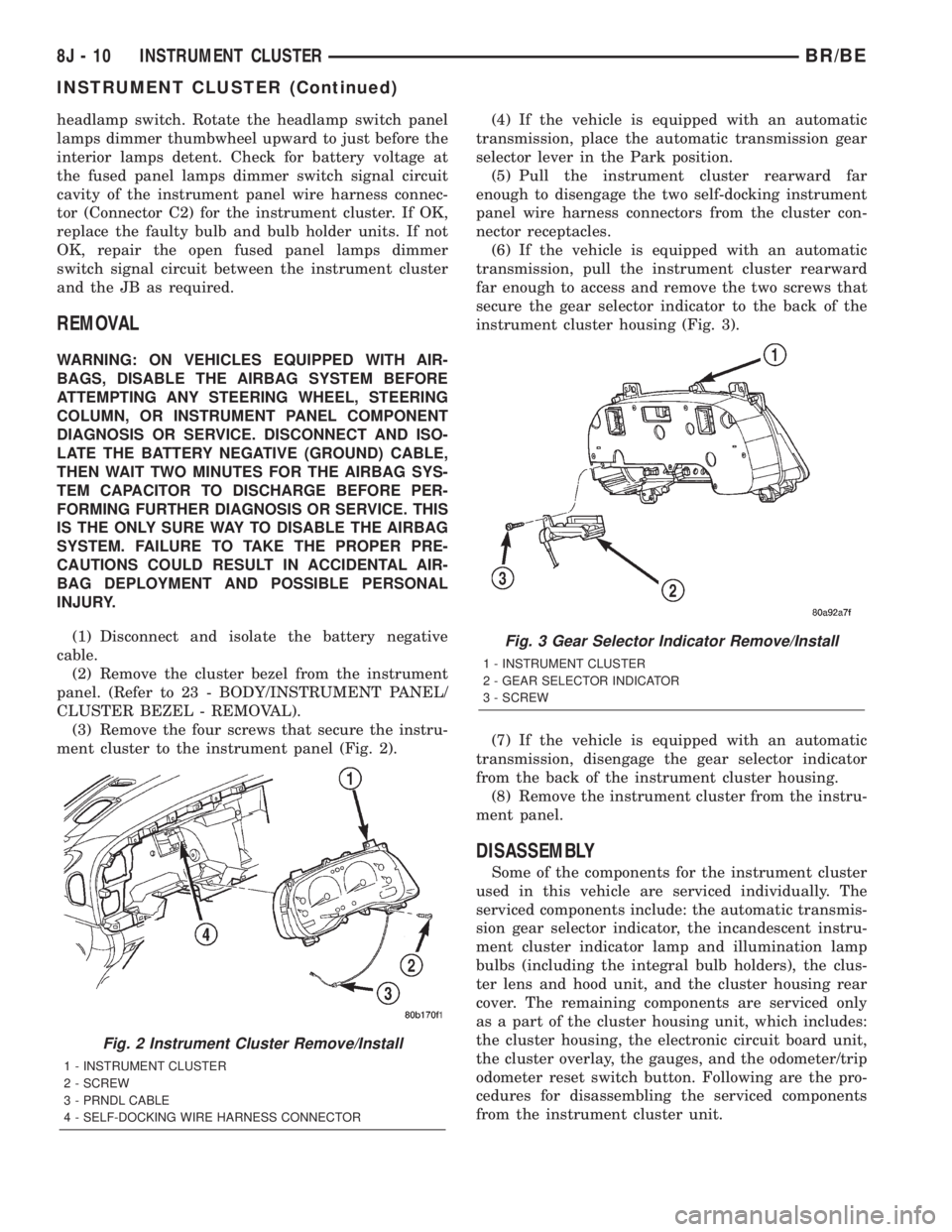
ment cluster to the instrument panel (Fig. 2).(4) If the vehicle is equipped with an automatic
transmission, place the automatic transmission gear
selector lever in the Park position.
(5) Pull the instrument cluster rearward far
enough to disengage the two self-docking instrument
panel wire harness connectors from the cluster con-
nector receptacles.
(6) If the vehicle is equipped with an automatic
transmission, pull the instrument cluster rearward
far enough to access and remove the two screws that
secure the gear selector indicator to the back of the
instrument cluster housing (Fig. 3).
(7) If the vehicle is equipped with an automatic
transmission, disengage the gear selector indicator
from the back of the instrument cluster housing.
(8) Remove the instrument cluster from the instru-
ment panel.
DISASSEMBLY
Some of the components for the instrument cluster
used in this vehicle are serviced individually. The
serviced components include: the automatic transmis-
sion gear selector indicator, the incandescent instru-
ment cluster indicator lamp and illumination lamp
bulbs (including the integral bulb holders), the clus-
ter lens and hood unit, and the cluster housing rear
cover. The remaining components are serviced only
as a part of the cluster housing unit, which includes:
the cluster housing, the electronic circuit board unit,
the cluster overlay, the gauges, and the odometer/trip
odometer reset switch button. Following are the pro-
cedures for disassembling the serviced components
from the instrument cluster unit.
Fig. 2 Instrument Cluster Remove/Install
1 - INSTRUMENT CLUSTER
2 - SCREW
3 - PRNDL CABLE
4 - SELF-DOCKING WIRE HARNESS CONNECTOR
Fig. 3 Gear Selector Indicator Remove/Install
1 - INSTRUMENT CLUSTER
2 - GEAR SELECTOR INDICATOR
3 - SCREW
8J - 10 INSTRUMENT CLUSTERBR/BE
INSTRUMENT CLUSTER (Continued)
Page 491 of 2255
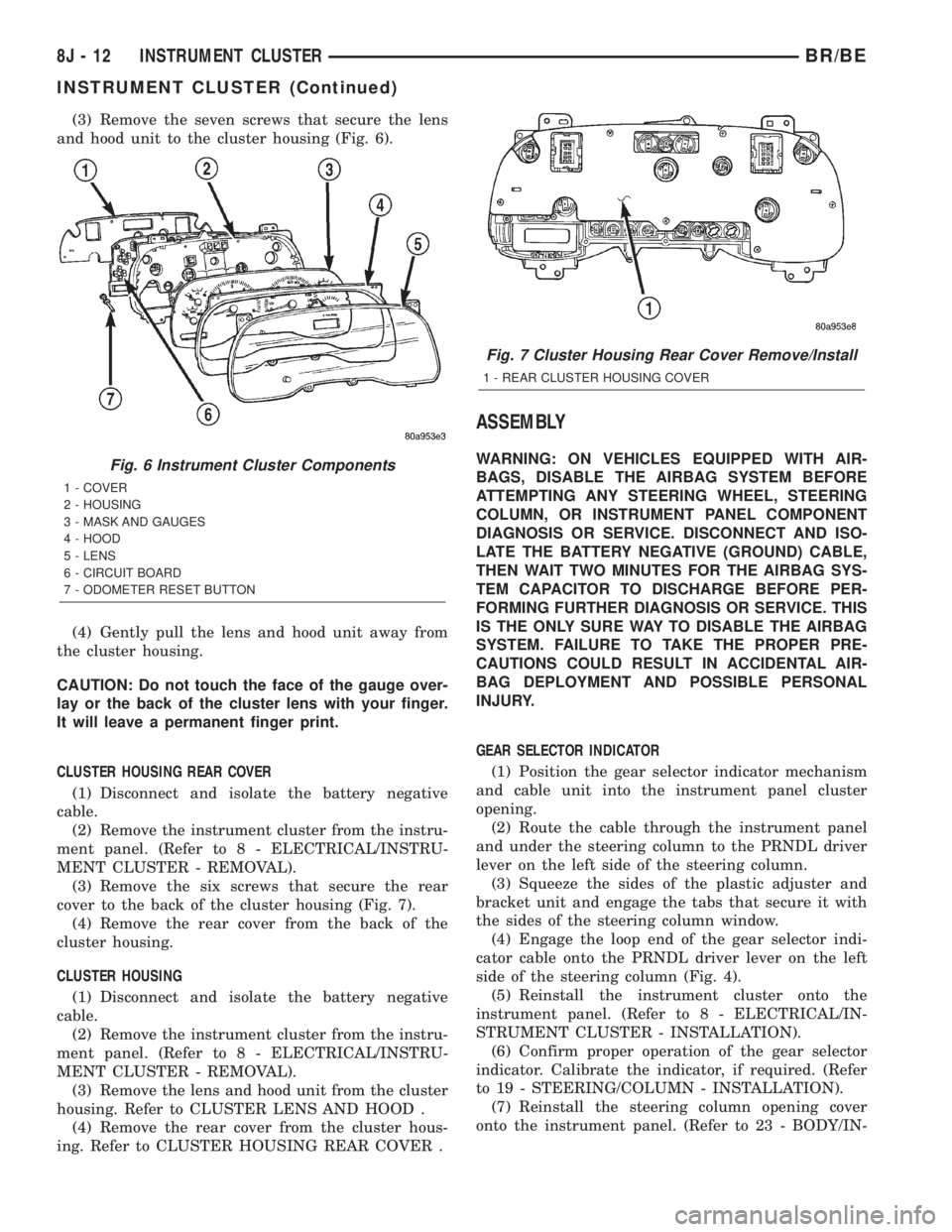
(3) Remove the seven screws that secure the lens
and hood unit to the cluster housing (Fig. 6).
(4) Gently pull the lens and hood unit away from
the cluster housing.
CAUTION: Do not touch the face of the gauge over-
lay or the back of the cluster lens with your finger.
It will leave a permanent finger print.
CLUSTER HOUSING REAR COVER
(1) Disconnect and isolate the battery negative
cable.
(2) Remove the instrument cluster from the instru-
ment panel. (Refer to 8 - ELECTRICAL/INSTRU-
MENT CLUSTER - REMOVAL).
(3) Remove the six screws that secure the rear
cover to the back of the cluster housing (Fig. 7).
(4) Remove the rear cover from the back of the
cluster housing.
CLUSTER HOUSING
(1) Disconnect and isolate the battery negative
cable.
(2) Remove the instrument cluster from the instru-
ment panel. (Refer to 8 - ELECTRICAL/INSTRU-
MENT CLUSTER - REMOVAL).
(3) Remove the lens and hood unit from the cluster
housing. Refer to CLUSTER LENS AND HOOD .
(4) Remove the rear cover from the cluster hous-
ing. Refer to CLUSTER HOUSING REAR COVER .
ASSEMBLY
WARNING: ON VEHICLES EQUIPPED WITH AIR-
BAGS, DISABLE THE AIRBAG SYSTEM BEFORE
ATTEMPTING ANY STEERING WHEEL, STEERING
COLUMN, OR INSTRUMENT PANEL COMPONENT
DIAGNOSIS OR SERVICE. DISCONNECT AND ISO-
LATE THE BATTERY NEGATIVE (GROUND) CABLE,
THEN WAIT TWO MINUTES FOR THE AIRBAG SYS-
TEM CAPACITOR TO DISCHARGE BEFORE PER-
FORMING FURTHER DIAGNOSIS OR SERVICE. THIS
IS THE ONLY SURE WAY TO DISABLE THE AIRBAG
SYSTEM. FAILURE TO TAKE THE PROPER PRE-
CAUTIONS COULD RESULT IN ACCIDENTAL AIR-
BAG DEPLOYMENT AND POSSIBLE PERSONAL
INJURY.
GEAR SELECTOR INDICATOR
(1) Position the gear selector indicator mechanism
and cable unit into the instrument panel cluster
opening.
(2) Route the cable through the instrument panel
and under the steering column to the PRNDL driver
lever on the left side of the steering column.
(3) Squeeze the sides of the plastic adjuster and
bracket unit and engage the tabs that secure it with
the sides of the steering column window.
(4) Engage the loop end of the gear selector indi-
cator cable onto the PRNDL driver lever on the left
side of the steering column (Fig. 4).
(5) Reinstall the instrument cluster onto the
instrument panel. (Refer to 8 - ELECTRICAL/IN-
STRUMENT CLUSTER - INSTALLATION).
(6) Confirm proper operation of the gear selector
indicator. Calibrate the indicator, if required. (Refer
to 19 - STEERING/COLUMN - INSTALLATION).
(7) Reinstall the steering column opening cover
onto the instrument panel. (Refer to 23 - BODY/IN-Fig. 6 Instrument Cluster Components
1 - COVER
2 - HOUSING
3 - MASK AND GAUGES
4 - HOOD
5 - LENS
6 - CIRCUIT BOARD
7 - ODOMETER RESET BUTTON
Fig. 7 Cluster Housing Rear Cover Remove/Install
1 - REAR CLUSTER HOUSING COVER
8J - 12 INSTRUMENT CLUSTERBR/BE
INSTRUMENT CLUSTER (Continued)
Page 503 of 2255

²PCM Lamp-On Message- Each time the clus-
ter receives a lamp-on message from the PCM or
ECM, the indicator will be illuminated. The indicator
can be flashed on and off, or illuminated solid, as dic-
tated by the PCM or ECM message. For some DTC's,
if a problem does not recur, the PCM or ECM will
send a lamp-off message automatically. Other DTC's
may require that a fault be repaired and the PCM or
ECM be reset before a lamp-off message will be sent.
For more information on the PCM, the ECM, and the
DTC set and reset parameters, (Refer to 25 - EMIS-
SIONS CONTROL - OPERATION).
²Communication Error- If the cluster receives
no lamp-on message from the PCM or ECM for
twenty seconds, the MIL is illuminated by the instru-
ment cluster to indicate a loss of bus communication.
The indicator remains controlled and illuminated by
the cluster until a valid lamp-on message is received
from the PCM or ECM.
²Actuator Test- Each time the cluster is put
through the actuator test, the indicator will be
turned on during the bulb check portion of the test to
confirm the functionality of the LED and the cluster
control circuitry.
The PCM/ECM continually monitor the fuel and
emissions system circuits and sensors to decide
whether the system is in good operating condition.
The PCM or ECM then sends the proper lamp-on or
lamp-off messages to the instrument cluster. For fur-
ther diagnosis of the MIL or the instrument cluster
circuitry that controls the LED, (Refer to 8 - ELEC-
TRICAL/INSTRUMENT CLUSTER - DIAGNOSIS
AND TESTING). If the instrument cluster turns on
the MIL after the bulb test, it may indicate that a
malfunction has occurred and that the fuel and emis-
sions systems may require service. For proper diag-
nosis of the fuel and emissions systems, the PCM,
the ECM, the CCD data bus, or the message inputs
to the instrument cluster that control the MIL, a
DRBIIItscan tool is required. Refer to the appropri-
ate diagnostic information.
ODOMETER
DESCRIPTION
An odometer and trip odometer are standard
equipment in all instrument clusters. The odometer
and trip odometer information are displayed in a
common electronic Vacuum-Fluorescent Display
(VFD), which is visible through a small window cut-
out located in the left lower quadrant of the cluster
overlay. However, the odometer and trip odometer
information are not displayed simultaneously. The
trip odometer reset switch on the instrument cluster
circuit board toggles the display between odometerand trip odometer modes by depressing the odometer/
trip odometer switch knob that extends through the
lower edge of the cluster lens, just right of the
tachometer. Both the odometer and the trip odometer
information is stored in the instrument cluster mem-
ory.
The odometer can display values up to 499,999
kilometers (499,999 miles). The odometer latches at
these values, and will not roll over to zero. The trip
odometer can display values up to 999.9 kilometers
(999.9 miles) before it rolls over to zero. The odome-
ter display does not have a decimal point and will
not show values less than a full unit (kilometer or
mile), the trip odometer display does have a decimal
point and will show tenths of a unit (kilometer or
mile). The unit of measure (kilometers or miles) for
the odometer and trip odometer display is not shown
in the VFD. The unit of measure for the instrument
cluster odometer/trip odometer is selected at the time
that it is manufactured, and cannot be changed. Dur-
ing daylight hours (exterior lamps Off) the VFD is
illuminated at full brightness for clear visibility. At
night (exterior lamps are On) the VFD lighting level
is adjusted with the other cluster illumination lamps
using the panel lamps dimmer thumbwheel on the
headlamp switch. However, a ªParadeº mode position
of the panel lamps dimmer thumbwheel allows the
VFD to be illuminated at full brightness while the
exterior lamps are turned On during daylight hours.
The VFD, the trip odometer switch, and the trip
odometer switch button are serviced as a unit with
the instrument cluster.
OPERATION
The odometer and trip odometer give an indication
to the vehicle operator of the distance the vehicle has
traveled. This gauge is controlled by the instrument
cluster circuit board based upon the cluster program-
ming and electronic messages received by the cluster
from the Powertrain Control Module (PCM) over the
Chrysler Collision Detection (CCD) data bus. The
odometer and trip odometer information is displayed
by the instrument cluster Vacuum Fluorescent Dis-
play (VFD), and the VFD will not display odometer
or trip odometer information after the ignition switch
is turned to the Off position. The instrument cluster
circuitry controls the VFD and provides the following
features:
²Odometer/Trip Odometer Display Toggling-
Actuating the trip odometer reset switch momen-
tarily with the ignition switch in the On position will
toggle the VFD between the odometer and trip odom-
eter display. Each time the ignition switch is turned
to the On position the VFD will automatically return
to the mode (odometer or trip odometer) last dis-
8J - 24 INSTRUMENT CLUSTERBR/BE
MALFUNCTION INDICATOR LAMP MIL (Continued)
Page 504 of 2255

played when the ignition switch was turned to the
Off position.
²Trip Odometer Reset- When the trip odome-
ter reset switch is pressed and held for longer than
about two seconds, the trip odometer will be reset to
000.0 kilometers (miles). The VFD must be display-
ing the trip odometer information in order for the
trip odometer information to be reset.
²Message Failure- If the cluster fails to receive
a distance message during normal operation, it will
flash the odometer/trip odometer distance informa-
tion on and off repeatedly until a distance message is
received, or until the ignition switch is turned to the
Off position, whichever occurs first. If the cluster
does not receive a distance message within one sec-
ond after the ignition switch is turned to the On posi-
tion, it will display the last distance message stored
in the cluster memory. If the cluster is unable to dis-
play distance information due to an error internal to
the cluster, the VFD display will be blank.
²Actuator Test- Each time the cluster is put
through the actuator test, the VFD will display all of
its characters at once, then step through each char-
acter segment individually during the VFD portion of
the test to confirm the functionality of the VFD and
the cluster control circuitry.
The PCM continually monitors the vehicle speed
sensor, then sends the proper distance messages to
the instrument cluster. For further diagnosis of the
odometer/trip odometer or the instrument cluster cir-
cuitry that controls these functions, (Refer to 8 -
ELECTRICAL/INSTRUMENT CLUSTER - DIAGNO-
SIS AND TESTING). For proper diagnosis of the
vehicle speed sensor, the PCM, the CCD data bus, or
the message inputs to the instrument cluster that
control the odometer/trip odometer, a DRBIIItscan
tool is required. Refer to the appropriate diagnostic
information.
OIL PRESSURE GAUGE
DESCRIPTION
An oil pressure gauge is standard equipment on all
instrument clusters. The oil pressure gauge is located
in the upper right quadrant of the instrument clus-
ter, above the fuel gauge. The oil pressure gauge con-
sists of a movable gauge needle or pointer controlled
by the instrument cluster circuitry and a fixed 90
degree scale on the cluster overlay that reads left-to-
right either from 0 kPa (0 psi) to 758 kPa (110 psi).
An International Control and Display Symbol icon for
ªEngine Oilº is located on the cluster overlay, directly
below the highest graduation of the gauge scale. The
oil pressure gauge graphics are white against a black
field except for a single red graduation at the lowend of the gauge scale, making them clearly visible
within the instrument cluster in daylight. When illu-
minated from behind by the panel lamps dimmer
controlled cluster illumination lighting with the exte-
rior lamps turned On, the white graphics appear
blue-green and the red graphics appear red. The
orange gauge needle is internally illuminated. Gauge
illumination is provided by replaceable incandescent
bulb and bulb holder units located on the instrument
cluster electronic circuit board. The oil pressure
gauge is serviced as a unit with the instrument clus-
ter.
OPERATION
The oil pressure gauge gives an indication to the
vehicle operator of the engine oil pressure. This
gauge is controlled by the instrument cluster circuit
board based upon the cluster programming and elec-
tronic messages received by the cluster from the
Powertrain Control Module (PCM) over the Chrysler
Collision Detection (CCD) data bus. The oil pressure
gauge is an air core magnetic unit that receives bat-
tery current on the instrument cluster electronic cir-
cuit board through the fused ignition switch output
(st-run) circuit whenever the ignition switch is in the
On or Start positions. The cluster is programmed to
move the gauge needle back to the low end of the
scale after the ignition switch is turned to the Off
position. The instrument cluster circuitry controls
the gauge needle position and provides the following
features:
²Engine Oil Pressure Message- The instru-
ment cluster circuitry restricts the oil pressure gauge
needle operation in order to provide readings that
are consistent with customer expectations. Each time
the cluster receives a message from the PCM indicat-
ing the engine oil pressure is between about 6.9 kPa
(1 psi) and 137.9 kPa (20 psi) for gasoline engines, or
55 kPa (8 psi) and 58.6 kPa (8.5 psi) for diesel
engines, the cluster holds the gauge needle at a point
about 11 degrees above the low end of normal incre-
ment on the gauge scale. Each time the cluster
receives a message from the PCM indicating the
engine oil pressure is between about 517.1 kPa (75
psi) and 755 kPa (109.5 psi) for gasoline engines, or
551.6 kPa (80 psi) and 755 kPa (109.5 psi) for diesel
engines, the cluster holds the gauge needle at a point
about 7.4 degrees below the high end of normal
increment on the gauge scale. When the cluster
receives messages from the PCM indicating the
engine oil pressure is between about 137.9 kPa (20
psi) and 517.1 kPa (75 psi) for gasoline engines, or
58.6 kPa (8.5 psi) and 551.6 kPa (80 psi) for diesel
engines], the gauge needle is moved to the actual
pressure position on the gauge scale.
BR/BEINSTRUMENT CLUSTER 8J - 25
ODOMETER (Continued)
Page 507 of 2255
overlay causes the ªMAINT REQDº text to appear in
amber through the translucent outer layer of the
overlay when the indicator is illuminated from
behind by a Light Emitting Diode (LED) soldered
onto the instrument cluster electronic circuit board.
The SRI is serviced as a unit with the instrument
cluster.
OPERATION
The Service Reminder Indicator (SRI) gives an
indication to the vehicle operator when engine emis-
sions maintenance procedures should be performed.
This indicator is controlled by a transistor on the
instrument cluster circuit board based upon the clus-
ter programming and electronic messages received by
the cluster from the Powertrain Control Module
(PCM) over the Chrysler Collision Detection (CCD)
data bus. The SRI Light Emitting Diode (LED)
receives battery current on the instrument cluster
electronic circuit board through the fused ignition
switch output (st-run) circuit whenever the ignition
switch is in the On or Start positions; therefore, the
LED will always be off when the ignition switch is in
any position except On or Start. The LED only illu-
minates when it is provided a path to ground by the
instrument cluster transistor. The instrument cluster
will turn on the SRI for the following reasons:
²Bulb Test- Each time the ignition switch is
turned to the On position the SRI is illuminated for
about two seconds as a bulb test.
²Service Required Lamp-On Message- Each
time the cluster receives a service required lamp-on
message from the PCM indicating that an emissions
maintenance interval has been reached, the SRI will
be illuminated. The indicator remains illuminated
until the cluster receives a service required lamp-off
message from the PCM, or until the ignition switch
is turned to the Off position, whichever occurs first.
²Actuator Test- Each time the cluster is put
through the actuator test, the SRI will be turned on
during the bulb check portion of the test to confirm
the functionality of the LED and the cluster control
circuitry.
The PCM continually monitors the vehicle speed
sensor to determine the distance the vehicle has been
driven, then sends the proper messages to the instru-
ment cluster. Once the SRI has been illuminated and
the required emissions maintenance procedures have
been completed, the PCM must be reset using a
DRBIIItscan tool before it will send the proper ser-
vice required lamp-off message to the instrument
cluster. Refer to the appropriate diagnostic informa-
tion. For further diagnosis of the SRI or the instru-
ment cluster circuitry that controls the LED, (Refer
to 8 - ELECTRICAL/INSTRUMENT CLUSTER -
DIAGNOSIS AND TESTING). For proper diagnosisof the PCM, the CCD data bus, or the message
inputs to the instrument cluster that control the SRI,
a DRBIIItscan tool is required. Refer to the appro-
priate diagnostic information.
SHIFT INDICATOR (TRANSFER
CASE)
DESCRIPTION
A four-wheel drive indicator is standard equipment
on all instrument clusters. However, on vehicles not
equipped with the optional four-wheel drive system,
this indicator is mechanically disabled. The four-
wheel drive indicator is located near the lower edge
of the instrument cluster overlay, to the right of cen-
ter. The four-wheel drive indicator consists of a sten-
cilled cutout of the text ª4WDº in the opaque layer of
the instrument cluster overlay. The dark outer layer
of the overlay prevents the indicator from being
clearly visible when it is not illuminated. An amber
lens behind the cutout in the opaque layer of the
overlay causes the ª4WDº text to appear in amber
through the translucent outer layer of the overlay
when the indicator is illuminated from behind by a
Light Emitting Diode (LED) soldered onto the instru-
ment cluster electronic circuit board. The four-wheel
drive indicator is serviced as a unit with the instru-
ment cluster.
OPERATION
The four-wheel drive indicator lamp gives an indi-
cation to the vehicle operator that a four-wheel drive
operating mode is engaged. The indicator will be illu-
minated when either high range (4H) or low range
(4L) have been selected with the transfer case shift
lever. This indicator is controlled by a transistor on
the instrument cluster circuit board based upon the
cluster programming, and a hard wired input from
the four-wheel drive switch on the front axle discon-
nect housing. The four-wheel drive indicator Light
Emitting Diode (LED) receives battery current on the
instrument cluster electronic circuit board through
the fused ignition switch output (st-run) circuit
whenever the ignition switch is in the On or Start
positions; therefore, the lamp will always be off when
the ignition switch is in any position except On or
Start. The LED only illuminates when it is switched
to ground by the instrument cluster transistor.
The four-wheel drive switch is connected in series
between ground and the four-wheel drive switch
sense input to the instrument cluster. For further
information on the transfer case and the transfer
case operating ranges, (Refer to 21 - TRANSMIS-
SION/TRANSAXLE/TRANSFER CASE - OPERA-
TION. For further information on the front axle
8J - 28 INSTRUMENT CLUSTERBR/BE
SERVICE REMINDER INDICATOR (Continued)
Page 562 of 2255

(3) Engage the two mounting hooks on the rear of
the overhead console housing in the mounting holes
in the inner roof panel.
(4) Slide the overhead console forward far enough
to align the two latches on the front of the housing
with their receptacles in the inner roof panel.
(5) Push upward firmly and evenly on the front of
the overhead console until each of the two latches is
fully engaged in its receptacle in the inner roof panel.
(6) Close the garage door opener storage bin door.
(7) Reconnect the battery negative cable.
SPECIAL TOOLS
OVERHEAD CONSOLE SPECIAL TOOL
COMPASS/MINI-TRIP
COMPUTER
DESCRIPTION
The compass mini-trip computer is located in the
premium overhead console on models equipped with
this option. Two compass mini-trip computer units
are available. One unit is used on vehicles not
equipped with the Vehicle Theft Security System
(VTSS) option, and the other is used on vehicles with
the VTSS option. Both compass mini-trip computer
units include the electronic control module, a Vacu-
um-Fluorescent Display (VFD), a compass flux-gate
unit and two push button function switches.
Compass mini-trip computer units for vehicles
equipped with the VTSS include a red Light-Emit-
ting Diode (LED) on their electronic circuit board.
This LED protrudes through the bottom of the lens
on the front of the overhead console unit, and serves
as the security indicator lamp. Refer toSecurity
Indicator Lampin Vehicle Theft/Security Systems
for more information on this feature.
The compass mini-trip computer module contains a
central processing unit and interfaces with other
electronic modules in the vehicle on the Chrysler Col-
lision Detection (CCD) data bus network. The CCD
data bus network allows the sharing of sensor infor-
mation. This helps to reduce wire harness complexity,
reduce internal controller hardware, and reduce com-
ponent sensor current loads. At the same time, thissystem provides increased reliability, enhanced diag-
nostics, and allows the addition of many new feature
capabilities.
The compass mini-trip computer provides several
electronic functions and features. Some of the func-
tions and features that the compass mini-trip com-
puter module supports and/or controls, include the
following display options:
²Compass and temperature- provides the out-
side temperature and one of eight compass readings
to indicate the direction the vehicle is facing.
²Compass and compass in degrees- provides
one of eight compass readings to indicate the direc-
tion the vehicle is facing and provides the compass
direction in degrees.
²Trip odometer (ODO)- shows the distance
travelled since the last trip computer reset.
²Average fuel economy (AVG ECO)- shows
the average fuel economy since the last trip computer
reset.
²Instant fuel economy (ECO)- shows the
present fuel economy based upon the current vehicle
distance and fuel used information.
²Distance to empty (DTE)- shows the esti-
mated distance that can be travelled with the fuel
remaining in the fuel tank. This estimated distance
is computed using the average miles-per-gallon from
the last 30 gallons of fuel used.
²Elapsed time (ET)- shows the accumulated
ignition-on time since the last trip computer reset.
²Blank screen- the compass mini-trip VFD is
turned off.
The ambient temperature sensor is hard wired to
the compass mini-trip computer module. Data input
for all other compass mini-trip computer functions,
including VFD dimming level, is received through
CCD data bus messages. The compass mini-trip com-
puter uses its internal programming and all of these
inputs to calculate and display the requested data. If
the data displayed is incorrect, perform the self-diag-
nostic tests as described in this group. If these tests
prove inconclusive, the use of a DRBIIItscan tool
and the proper Diagnostic Procedures manual are
recommended for further testing of the compass
mini-trip computer module and the CCD data bus.
The compass mini-trip computer module cannot be
repaired, and is available for service only as a unit. If
faulty or damaged, the complete module must be
replaced.
OPERATION
The compass mini-trip computer only operates with
the ignition switch in the On position. When the igni-
tion switch is turned to the On position, all of the
segments in the compass mini-trip computer VFD
will be turned on for one second, then the display
Degaussing Tool 6029
BR/BEMESSAGE SYSTEMS 8M - 9
OVERHEAD CONSOLE (Continued)