2002 DODGE RAM ignition
[x] Cancel search: ignitionPage 590 of 2255
POWER WINDOWS
TABLE OF CONTENTS
page page
POWER WINDOWS
DESCRIPTION.........................23
OPERATION...........................23
DIAGNOSIS AND TESTING - POWER
WINDOWS...........................23
POWER WINDOW SWITCH
DESCRIPTION.........................24
OPERATION...........................24
DIAGNOSIS AND TESTING - POWER
WINDOW SWITCH.....................24REMOVAL.............................25
INSTALLATION.........................26
WINDOW MOTOR
DESCRIPTION.........................26
DIAGNOSIS AND TESTING - WINDOW
MOTOR .............................26
REMOVAL.............................26
POWER WINDOWS
DESCRIPTION
Power windows are available as factory-installed
optional equipment on this model. The power lock
system is included on vehicles equipped with the
power window option.
OPERATION
The power window system allows each of the front
door windows to be raised and lowered electrically by
actuating a switch on the trim panel of each respec-
tive door. Additionally, the master switch on the
driver side door trim panel allows the driver to raise
or lower the passenger side front door window. The
power window system receives battery feed through a
circuit breaker in the junction block, only when the
ignition switch is in the On position.
The power window system includes the power win-
dow switches on each front door trim panel, the cir-
cuit breaker in the junction block, and the power
window motors inside each front door. This group
covers diagnosis and service of only the electrical
components in the power window system. For service
of mechanical components, such as the regulator, lift
plate, window tracks, or glass refer to Group 23 -
Body.
Refer to the owner's manual in the vehicle glove
box for more information on the features, use and
operation of the power window system.
DIAGNOSIS AND TESTING - POWER
WINDOWS
For circuit descriptions and diagrams, refer to the
appropriate wiring information. The wiring informa-
tion includes wiring diagrams, proper wire and con-
nector repair procedures, details of wire harnessrouting and retention, connector pin-out information
and location views for the various wire harness con-
nectors, splices and grounds.
ALL WINDOWS INOPERATIVE
(1) Check the circuit breaker in the junction block.
If OK, go to Step 2. If not OK, replace the faulty cir-
cuit breaker.
(2) Disconnect and isolate the battery negative
cable. Remove the power window and lock switch and
bezel unit from the driver side front door trim panel.
Unplug the wire harness connector from the switch
and bezel unit.
(3) Check for continuity between the ground cir-
cuit cavity of the switch and bezel unit wire harness
connector and a good ground. If OK, (Refer to 8 -
ELECTRICAL/POWER WINDOWS/POWER WIN-
DOW SWITCH - DIAGNOSIS AND TESTING). If not
OK, repair the circuit to ground as required.
ONE WINDOW INOPERATIVE
The window glass must be free to slide up and
down for the power window motor to function prop-
erly. If the glass is not free to move up and down, the
motor will overload and trip the integral circuit
breaker. To determine if the glass is free, disconnect
the regulator plate from the glass. Then slide the
window up and down by hand.
There is an alternate method to check if the glass
is free. Position the glass between the up and down
stops. Then, shake the glass in the door. Check that
the glass can be moved slightly from side to side,
front to rear, and up and down. Then check that the
glass is not bound tight in the tracks. If the glass is
free, proceed with the diagnosis that follows. If the
glass is not free, (Refer to 23 - BODY/DOOR -
FRONT/DOOR GLASS - REMOVAL).
BR/BEPOWER WINDOWS 8N - 23
Page 591 of 2255

(1) Disconnect and isolate the battery negative
cable. Remove the power window and lock switch and
bezel unit from the door trim panel on the side of the
vehicle with the inoperative window. Unplug the wire
harness connector from the switch and bezel unit.
(2) Connect the battery negative cable. Turn the
ignition switch to the On position. Check for battery
voltage at the fused ignition switch output (run) cir-
cuit cavity in the body half of the switch and bezel
unit wire harness connector. If OK, and the inopera-
tive power window is on the driver side, go to Step 4.
If OK, and the inoperative power window is on the
passenger side, go to Step 3. If not OK, repair the
open circuit to the junction block as required.
(3) Disconnect and isolate the battery negative
cable. Check for continuity between each of the two
master window switch right up/down control circuit
cavities in the body half of the passenger side switch
and bezel unit wire harness connector and a good
ground. In each case, there should be continuity. If
OK, go to Step 4. If not OK, repair the open circuit to
the driver side switch and bezel unit as required.
(4) Test the power window switch continuity.
(Refer to 8 - ELECTRICAL/POWER WINDOWS/
POWER WINDOW SWITCH - DIAGNOSIS AND
TESTING). If OK, go to Step 5. If not OK, replace
the faulty power window and lock switch and bezel
unit.
(5) Refer to the appropriate wiring information.
The wiring information includes wiring diagrams,
proper wire and connector repair procedures, details
of wire harness routing and retention, connector pin-
out information and location views for the various
wire harness connectors, splices and grounds. Check
the continuity in each circuit between the inoperative
power window and lock switch and bezel unit wire
harness connector cavities and the corresponding
power window motor wire harness connector cavities.
If OK, (Refer to 8 - ELECTRICAL/POWER WIN-
DOWS/WINDOW MOTOR - DIAGNOSIS AND TEST-
ING). If not OK, repair the open circuit(s) as
required.
NOTE: The passenger side power window switch
receives the ground feed for operating the passen-
ger side power window motor through the driver
side power window switch and wire harness con-
nector.
POWER WINDOW SWITCH
DESCRIPTION
The power windows are controlled by two-way
switches integral to the power window and lock
switch and bezel unit on the trim panel of each frontdoor. A second power window switch in the driver
side switch and bezel unit allows the driver to control
the passenger side window. A Light-Emitting Diode
(LED) in the paddle of each switch is illuminated
whenever the ignition switch is in the On position.
OPERATION
The power window switch for the driver side front
door has an Auto label on it. This switch has a sec-
ond detent position beyond the normal Down position
that provides an automatic one-touch window down
feature. This feature is controlled by an electronic
circuit and a relay that are integral to the driver side
front door power window and lock switch unit.
The power window switches control the battery
and ground feeds to the power window motors. The
passenger side power window switch receives a
ground feed through the driver side power window
switch for operating the passenger side power win-
dow motor.
The power window and lock switch and bezel unit
cannot be repaired and, if faulty or damaged, the
entire switch and bezel unit must be replaced.
DIAGNOSIS AND TESTING - POWER WINDOW
SWITCH
The auto down feature of the driver side power
window switch is controlled by an electronic circuit
within the switch unit. The auto down circuitry is
activated when the driver side power window switch
is moved to the second detent in the Down direction.
The outputs from the auto down circuitry are carried
through the same switch pins that provide the nor-
mal down function. The auto down circuit cannot be
tested. If the driver side power window switch conti-
nuity tests are passed, but the auto down feature is
inoperative, replace the faulty driver side power win-
dow switch unit.
The Light-Emitting Diode (LED) illumination
lamps for all of the power window and lock switch
and bezel unit switch paddles receive battery current
through the power window circuit breaker in the
junction block. If all of the LEDs are inoperative in
either or both power window and lock switch and
bezel units and the power windows are inoperative,
perform the diagnosis for Power Window System in
this group. If the power windows operate, but any or
all of the LEDs are inoperative, the power window
and lock switch and bezel unit with the inoperative
LED(s) is faulty and must be replaced. For circuit
descriptions and diagrams, refer to the appropriate
wiring information. The wiring information includes
wiring diagrams, proper wire and connector repair
procedures, details of wire harness routing and
retention, connector pin-out information and location
8N - 24 POWER WINDOWSBR/BE
POWER WINDOWS (Continued)
Page 592 of 2255
views for the various wire harness connectors, splices
and grounds.
(1) Check the circuit breaker in the junction block.
If OK, go to Step 2. If not OK, replace the faulty cir-
cuit breaker.
(2) Turn the ignition switch to the On position.
Check for battery voltage at the circuit breaker in
the junction block. If OK, turn the ignition switch to
the Off position and go to Step 3. If not OK, repair
the circuit to the ignition switch as required.
(3) Disconnect and isolate the battery negative
cable. Remove the power window and lock switch and
bezel unit from the door trim panel. Unplug the wire
harness connector from the switch and bezel unit.
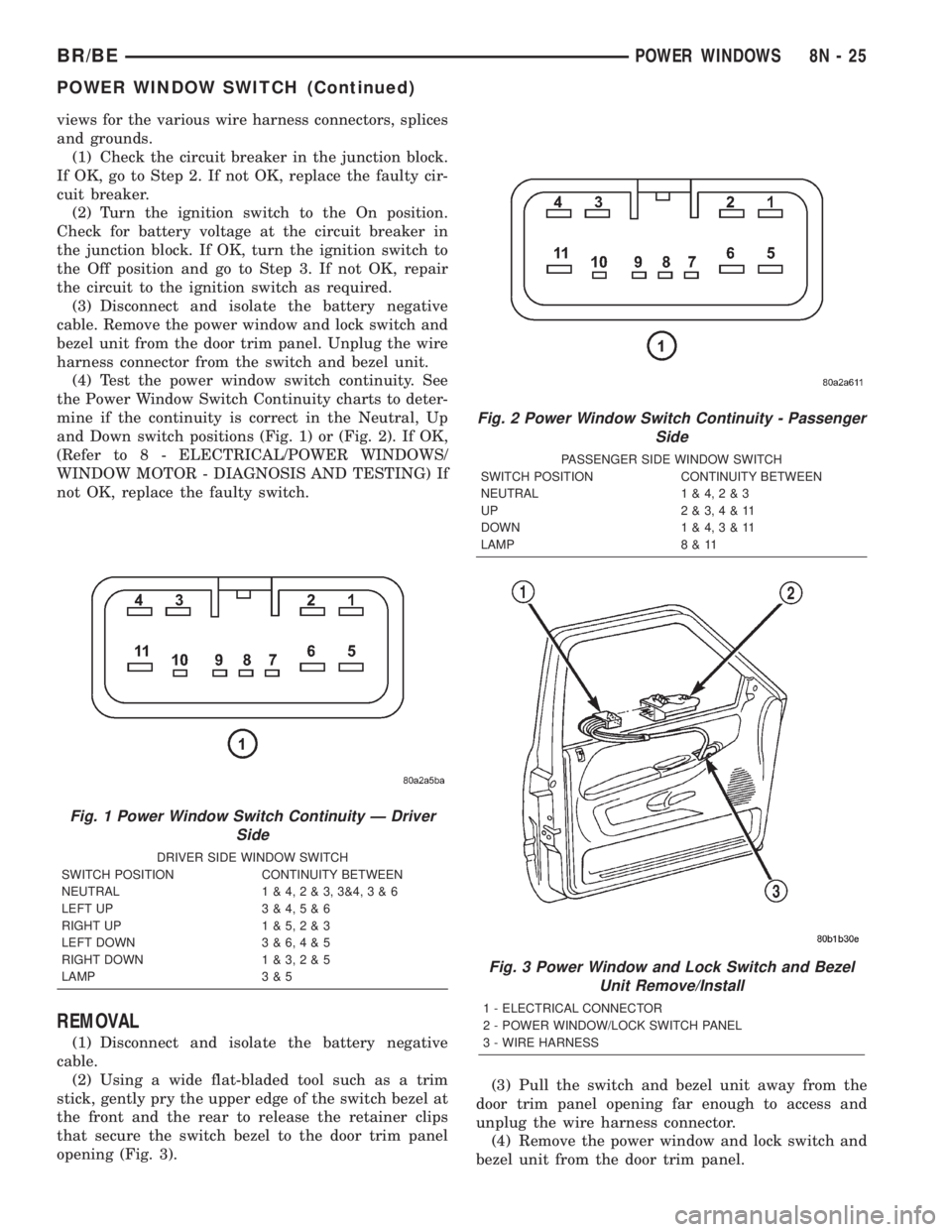
(4) Test the power window switch continuity. See
the Power Window Switch Continuity charts to deter-
mine if the continuity is correct in the Neutral, Up
and Down switch positions (Fig. 1) or (Fig. 2). If OK,
(Refer to 8 - ELECTRICAL/POWER WINDOWS/
WINDOW MOTOR - DIAGNOSIS AND TESTING) If
not OK, replace the faulty switch.
REMOVAL
(1) Disconnect and isolate the battery negative
cable.
(2) Using a wide flat-bladed tool such as a trim
stick, gently pry the upper edge of the switch bezel at
the front and the rear to release the retainer clips
that secure the switch bezel to the door trim panel
opening (Fig. 3).(3) Pull the switch and bezel unit away from the
door trim panel opening far enough to access and
unplug the wire harness connector.
(4) Remove the power window and lock switch and
bezel unit from the door trim panel.
Fig. 1 Power Window Switch Continuity Ð Driver
Side
DRIVER SIDE WINDOW SWITCH
SWITCH POSITION CONTINUITY BETWEEN
NEUTRAL 1 & 4,2&3,3&4,3&6
LEFT UP 3 & 4,5&6
RIGHT UP 1 & 5,2&3
LEFT DOWN 3 & 6,4&5
RIGHT DOWN 1 & 3,2&5
LAMP 3 & 5
Fig. 2 Power Window Switch Continuity - Passenger
Side
PASSENGER SIDE WINDOW SWITCH
SWITCH POSITION CONTINUITY BETWEEN
NEUTRAL 1 & 4,2&3
UP 2&3,4&11
DOWN 1 & 4,3&11
LAMP 8 & 11
Fig. 3 Power Window and Lock Switch and Bezel
Unit Remove/Install
1 - ELECTRICAL CONNECTOR
2 - POWER WINDOW/LOCK SWITCH PANEL
3 - WIRE HARNESS
BR/BEPOWER WINDOWS 8N - 25
POWER WINDOW SWITCH (Continued)
Page 594 of 2255
RESTRAINTS
TABLE OF CONTENTS
page page
RESTRAINTS
DESCRIPTION..........................1
OPERATION............................2
WARNING.............................3
DIAGNOSIS AND TESTING - AIRBAG SYSTEM . 4
STANDARD PROCEDURE
STANDARD PROCEDURE - HANDLING
NON-DEPLOYED AIRBAGS...............4
STANDARD PROCEDURE - SERVICE
AFTER AN AIRBAG DEPLOYMENT.........4
STANDARD PROCEDURE - VERIFICATION
TEST................................5
SPECIAL TOOLS - AIRBAG SYSTEM.........6
AIRBAG CONTROL MODULE
DESCRIPTION..........................6
OPERATION............................6
REMOVAL.............................7
INSTALLATION..........................8
CHILD TETHER
REMOVAL.............................9
INSTALLATION..........................9
CLOCKSPRING
DESCRIPTION.........................10
OPERATION...........................10
STANDARD PROCEDURE - CLOCKSPRING
CENTERING.........................11
REMOVAL.............................12
INSTALLATION.........................13
DRIVER AIRBAG
DESCRIPTION.........................14
OPERATION...........................14
REMOVAL.............................14
DISASSEMBLY.........................15
ASSEMBLY............................16
INSTALLATION.........................17
FRONT SEAT BELT & RETRACTOR
REMOVAL
REMOVAL - STANDARD CAB............18REMOVAL - CLUB/QUAD CAB............19
INSTALLATION
INSTALLATION - STANDARD CAB.........19
INSTALLATION - CLUB/QUAD CAB........20
FRONT SEAT BELT BUCKLE
REMOVAL.............................20
INSTALLATION.........................20
PASSENGER AIRBAG
DESCRIPTION.........................21
OPERATION...........................21
REMOVAL.............................21
INSTALLATION.........................23
PASSENGER AIRBAG ON/OFF SWITCH
DESCRIPTION.........................23
OPERATION...........................24
REMOVAL.............................24
INSTALLATION.........................25
REAR SEAT BELT & RETRACTOR
REMOVAL.............................26
INSTALLATION.........................26
REAR SEAT BELT BUCKLE
REMOVAL.............................27
INSTALLATION.........................27
SEAT BELT SWITCH
DESCRIPTION.........................28
OPERATION...........................28
DIAGNOSIS AND TESTING - SEAT BELT
SWITCH............................28
SEAT BELT TURNING LOOP ADJUSTER
REMOVAL.............................29
INSTALLATION.........................29
TURNING LOOP HGT ADJUSTER KNOB
REMOVAL.............................30
INSTALLATION.........................30
RESTRAINTS
DESCRIPTION
A dual front airbag system is standard factory-in-
stalled safety equipment on this model. The airbag
system is a passive, inflatable, Supplemental
Restraint System (SRS) and vehicles with this equip-
ment can be readily identified by the ªSRS - AIR-
BAGº logo molded into the driver airbag trim coverin the center of the steering wheel and also into the
passenger airbag door on the instrument panel above
the glove box (Fig. 1). Vehicles with the airbag sys-
tem can also be identified by the airbag indicator,
which will illuminate in the instrument cluster for
about seven seconds as a bulb test each time the
ignition switch is turned to the On position.
The dual front airbag system consists of the follow-
ing major components, which are described in further
detail elsewhere in this service manual:
BR/BERESTRAINTS 8O - 1
Page 595 of 2255
²Airbag Control Module- The Airbag Control
Module (ACM) is located in a stamped mounting
bracket on the floor panel transmission tunnel, below
the center of the instrument panel.
²Airbag Indicator- The airbag indicator is inte-
gral to the ElectroMechanical Instrument Cluster
(EMIC), which is located on the instrument panel in
front of the driver.
²Clockspring- The clockspring is located near
the top of the steering column, directly beneath the
steering wheel.
²Driver Airbag- The driver airbag is located in
the center of the steering wheel, beneath the driver
airbag trim cover.
²Driver Knee Blocker- The driver knee blocker
is a molded plastic structural unit secured to the
back side of and integral to the instrument panel
steering column opening cover.
²Passenger Airbag- The passenger airbag is
located on the instrument panel, beneath the passen-
ger airbag door on the instrument panel above the
glove box on the passenger side of the vehicle.
²Passenger Airbag On/Off Switch- The pas-
senger airbag on/off switch is located in a dedicated
opening in the upper right corner of the instrument
panel cluster bezel, to the right of the center panel
outlets of the climate control system.
²Passenger Knee Blocker- The passenger knee
blocker is a structural reinforcement that is integral
to and concealed within the glove box door.
The ACM and the EMIC each contain a central
processing unit and programming that allow them to
communicate with each other using the Chrysler Col-
lision Detection (CCD) data bus network. This
method of communication is used for control of the
airbag indicator on all models. (Refer to 8 - ELEC-
TRICAL/ELECTRONIC CONTROL MODULES/
COMMUNICATION - DESCRIPTION).Hard wired circuitry connects the airbag system
components to each other through the electrical sys-
tem of the vehicle. These hard wired circuits are
integral to several wire harnesses, which are routed
throughout the vehicle and retained by many differ-
ent methods. These circuits may be connected to each
other, to the vehicle electrical system, and to the air-
bag system components through the use of a combi-
nation of soldered splices, splice block connectors,
and many different types of wire harness terminal
connectors and insulators. Refer to the appropriate
wiring information. The wiring information includes
wiring diagrams, proper wire and connector repair
procedures, further details on wire harness routing
and retention, as well as pin-out and location views
for the various wire harness connectors, splices and
grounds.OPERATION
The airbag system is referred to as a supplemental
restraint system because it was designed and is
intended to enhance the protection for the front seat
occupants of the vehicleonlywhen used in conjunc-
tion with the seat belts. It is referred to as a passive
system because the vehicle occupants are not
required to do anything to make it work. The pri-
mary passenger restraints in this or any other vehi-
cle are the standard equipment factory-installed seat
belts. Seat belts are referred to as an active restraint
because the vehicle occupants are required to physi-
cally fasten and properly adjust these restraints in
order to benefit from them. The vehicle occupants
must be wearing their seat belts in order to obtain
the maximum safety benefit from the factory-in-
stalled airbag system.
The airbag system electrical circuits are continu-
ously monitored and controlled by a microprocessor
and software contained within the Airbag Control
Module (ACM). An airbag indicator in the ElectroMe-
chanical Instrument Cluster (EMIC) lights for about
seven seconds as a bulb test each time the ignition
switch is turned to the On or Start positions. Follow-
ing the bulb test, the airbag indicator is turned on or
off by the ACM to indicate the status of the airbag
system. If the airbag indicator comes on at any time
other than during the bulb test, it indicates that
there is a problem in the airbag system electrical cir-
cuits. Such a problem may cause the airbags not to
deploy when required, or to deploy when not
required.
The clockspring on the top of the steering column
allows a continuous electrical circuit to be main-
tained between the stationary steering column and
the driver airbag inflator, which rotates with the
steering wheel. The passenger airbag on/off switch
allows the passenger side airbag to be disabled when
Fig. 1 SRS Logo
8O - 2 RESTRAINTSBR/BE
RESTRAINTS (Continued)
Page 598 of 2255

CAUTION: All damaged, faulty, or non-deployed air-
bags which are replaced on vehicles are to handled
and disposed of properly. If an airbag unit is faulty
or damaged and non-deployed, refer to the Hazard-
ous Substance Control System for proper disposal.
Dispose of all non-deployed and deployed airbags
in a manner consistent with state, provincial, local
and federal regulations.
Next, use a vacuum cleaner to remove any residual
powder from the vehicle interior. Clean from outside
the vehicle and work your way inside, so that you
avoid kneeling or sitting on a non-cleaned area. Be
certain to vacuum the heater and air conditioning
outlets as well (Fig. 3). Run the heater and air con-
ditioner blower on the lowest speed setting and vac-
uum any powder expelled from the outlets. You may
need to vacuum the interior of the vehicle a second
time to recover all of the powder.
STANDARD PROCEDURE - VERIFICATION TEST
The following procedure should be performed using
a DRBIIItscan tool to verify proper airbag system
operation following the service or replacement of any
airbag system component.
WARNING: ON VEHICLES EQUIPPED WITH AIR-
BAGS, DISABLE THE AIRBAG SYSTEM BEFORE
ATTEMPTING ANY STEERING WHEEL, STEERING
COLUMN, OR INSTRUMENT PANEL COMPONENT
DIAGNOSIS OR SERVICE. DISCONNECT AND ISO-
LATE THE BATTERY NEGATIVE (GROUND) CABLE,
THEN WAIT TWO MINUTES FOR THE AIRBAG SYS-
TEM CAPACITOR TO DISCHARGE BEFORE PER-
FORMING FURTHER DIAGNOSIS OR SERVICE. THIS
IS THE ONLY SURE WAY TO DISABLE THE AIRBAG
SYSTEM. FAILURE TO TAKE THE PROPER PRE-
CAUTIONS COULD RESULT IN ACCIDENTAL AIR-
BAG DEPLOYMENT AND POSSIBLE PERSONAL
INJURY.
(1) During the following test, the battery negative
cable remains disconnected and isolated, as it was
during the airbag component removal and installa-
tion procedures.
(2) Be certain that the DRBIIItscan tool contains
the latest version of the proper DRBIIItsoftware.
Connect the DRBIIItto the 16-way Data Link Con-
nector (DLC). The DLC is located on the driver side
lower edge of the instrument panel, outboard of the
steering column (Fig. 4).
(3) Turn the ignition switch to the On position and
exit the vehicle with the DRBIIIt.
(4) Check to be certain that nobody is in the vehi-
cle, then reconnect the battery negative cable.
(5) Using the DRBIIIt, read and record the active
(current) Diagnostic Trouble Code (DTC) data.
(6) Next, use the DRBIIItto read and record any
stored (historical) DTC data.
(7) If any DTC is found in Step 5 or Step 6, refer
to the appropriate diagnostic information.
(8) Use the DRBIIItto erase the stored DTC data.
If any problems remain, the stored DTC data will not
erase. Refer to the appropriate diagnostic informa-
tion to diagnose any stored DTC that will not erase.
If the stored DTC information is successfully erased,
go to Step 9.
(9) Turn the ignition switch to the Off position for
about fifteen seconds, and then back to the On posi-
tion. Observe the airbag indicator in the instrument
cluster. It should light for six to eight seconds, and
then go out. This indicates that the airbag system is
functioning normally and that the repairs are com-
plete. If the airbag indicator fails to light, or lights
and stays on, there is still an active airbag system
Fig. 2 Wear Safety Glasses and Rubber Gloves -
Typical
Fig. 3 Vacuum Heater and A/C Outlets - Typical
BR/BERESTRAINTS 8O - 5
RESTRAINTS (Continued)
Page 599 of 2255

fault or malfunction. Refer to the appropriate diag-
nostic information to diagnose the problem.
SPECIAL TOOLS - AIRBAG SYSTEM
AIRBAG CONTROL MODULE
DESCRIPTION
The Airbag Control Module (ACM) is concealed
underneath the plastic ACM trim cover (automatic
transmission) or center console (manual transmis-
sion), directly below the instrument panel in the pas-
senger compartment of the vehicle. The ACM is
secured with screws to a stamped steel mounting
bracket located under the instrument panel center
support bracket on the floor panel transmission tun-
nel. The ACM contains an electronic microprocessor,
an electronic impact sensor, an electromechanical saf-
ing sensor, and an energy storage capacitor. TheACM is connected to the vehicle electrical system
through a take out and connector of the instrument
panel wire harness.
The ACM cannot be repaired or adjusted and, if
damaged or faulty, it must be replaced.
OPERATION
The microprocessor in the ACM contains the airbag
system logic circuits, and it monitors and controls all
of the airbag system components. The ACM also uses
On-Board Diagnostics (OBD) and can communicate
with other electronic modules in the vehicle as well
as with the DRBIIItscan tool using the Chrysler
Collision Detection (CCD) data bus network. This
method of communication is used for control of the
airbag indicator in the ElectroMechanical Instrument
Cluster (EMIC) and for airbag system diagnosis and
testing through the 16-way data link connector
located on the lower left edge of the instrument
panel. (Refer to 8 - ELECTRICAL/ELECTRONIC
CONTROL MODULES/COMMUNICATION - OPER-
ATION). The ACM microprocessor continuously mon-
itors all of the airbag system electrical circuits to
determine the system readiness. If the ACM detects
a monitored system fault, it sets an active Diagnostic
Trouble Code (DTC) and sends messages to the
EMIC over the CCD data bus to turn on the airbag
indicator. (Refer to 8 - ELECTRICAL/INSTRUMENT
CLUSTER/AIRBAG INDICATOR - OPERATION). If
the airbag system fault is still present when the igni-
tion switch is turned to the Off position, the DTC is
stored in memory by the ACM. However, if a fault
does not recur for a number of ignition cycles, the
ACM will automatically erase the stored DTC.
The ACM receives battery current through two cir-
cuits, on a fused ignition switch output (run) circuit
through a fuse in the Junction Block (JB), and on a
fused ignition switch output (start-run) circuit
through a second fuse in the JB. The ACM is
grounded through a ground circuit and take out of
the instrument panel wire harness. This take out has
a single eyelet terminal connector secured by a nut to
a ground stud located on the forward extension of the
left front fender wheel housing in the engine com-
partment. Therefore, the ACM is operational when-
ever the ignition switch is in the Start or On
positions. The ACM also contains an energy-storage
capacitor. When the ignition switch is in the Start or
On positions, this capacitor is continually being
charged with enough electrical energy to deploy the
airbags for up to one second following a battery dis-
connect or failure. The purpose of the capacitor is to
provide backup airbag system protection in case
there is a loss of battery current supply to the ACM
during an impact. The capacitor is only serviced as a
unit with the ACM.
Fig. 4 16-Way Data Link Connector - Typical
1 - 16±WAY DATA LINK CONNECTOR
2 - BOTTOM OF INSTRUMENT PANEL
Puller C-3428-B
8O - 6 RESTRAINTSBR/BE
RESTRAINTS (Continued)
Page 617 of 2255
switch is in its installed position, the only compo-
nents visible through the dedicated opening of the
cluster bezel are the switch face plate and nomencla-
ture, the key cylinder actuator, and a small round
lens with the text9Off9imprinted on it. The ªOnº
position of the switch is designated by text imprinted
upon the face plate of the switch, but is not illumi-
nated. The remainder of the switch is concealed
behind the switch face plate and the instrument
panel cluster bezel.
The passenger airbag on-off switch housing is con-
structed of molded plastic and has three integral
mounting tabs. These mounting tabs are used to
secure the switch to the back of the molded plastic
switch face plate with three small screws. The
molded plastic face plate also has three integral
mounting tabs that are used to secure the switch and
face plate unit to the instrument panel carrier with
three additional screws. Two short pigtail wires with
molded plastic connector insulators exit the back of
the switch housing and connect the switch to the
vehicle electrical system through two dedicated take
outs of the instrument panel wire harness. The har-
ness take outs are equipped with molded plastic con-
nector insulators that are keyed and latched to
ensure proper and secure switch electrical connec-
tions. The passenger airbag on/off switch cannot be
adjusted or repaired and, if faulty or damaged, the
switch must be replaced.
OPERATION
The passenger airbag on/off switch allows the cus-
tomer to turn the passenger airbag function On or
Off to accommodate certain uses of the right front
seating position where airbag protection may not be
desired. See the owner's manual in the vehicle glove
box for specific recommendations on when to enable
or disable the passenger airbag. The Off indicator of
the switch will be illuminated whenever the switch is
turned to the Off position. The ignition key is the
only key or object that should ever be inserted into
the switch. The on/off switch requires only a partial
key insertion to fully depress a spring-loaded locking
plunger. The spring-loaded locking plunger prevents
the user from leaving the key in the switch. The key
will be automatically ejected when force is not
applied. To actuate the passenger side airbag on/off
switch, insert the ignition key into the switch key
actuator far enough to fully depress the plunger and
rotate to the desired switch position. When the
switch key actuator is rotated to its clockwise stop
(the key actuator slot will be aligned with the Off
indicator lamp), the Off indicator is illuminated and
the passenger airbag is disabled. When the switch is
rotated to its counterclockwise stop (the key actuator
slot will be in a vertical position), the Off indicatorwill be extinguished and the passenger airbag is
enabled.
The passenger airbag on/off switch is connected in
series between the Airbag Control Module (ACM) and
the passenger airbag inflator unit. When the switch
is in the On position, the switch connects the ACM
directly to the passenger airbag inflator. When the
switch is in the Off position it interrupts the inflator
circuits, but replaces the normal resistance in these
circuits with an internal resistor. Thus, the ACM is
unable to distinguish the mode of the switch and still
sends an electrical signal as though it were deploying
the passenger airbag when it detects a sufficient
impact. However, the switch position should not be
changed while the ignition switch is in the On posi-
tion, as the ACM may detect a fault, record a Diag-
nostic Trouble Code (DTC), and illuminate the Airbag
indicator in response to a momentary open it senses
in the passenger airbag inflator circuits as the on/off
switch changes states.
REMOVAL
WARNING: DISABLE THE AIRBAG SYSTEM
BEFORE ATTEMPTING ANY STEERING WHEEL,
STEERING COLUMN, OR INSTRUMENT PANEL
COMPONENT DIAGNOSIS OR SERVICE. DISCON-
NECT AND ISOLATE THE BATTERY NEGATIVE
(GROUND) CABLE, THEN WAIT TWO MINUTES FOR
THE AIRBAG SYSTEM CAPACITOR TO DISCHARGE
BEFORE PERFORMING FURTHER DIAGNOSIS OR
SERVICE. THIS IS THE ONLY SURE WAY TO DIS-
ABLE THE AIRBAG SYSTEM. FAILURE TO TAKE
THE PROPER PRECAUTIONS COULD RESULT IN
ACCIDENTAL AIRBAG DEPLOYMENT AND POSSI-
BLE PERSONAL INJURY.
(1) Disconnect and isolate the battery negative
cable. If either of the airbags has not been deployed,
wait two minutes for the system capacitor to dis-
charge before further service.
(2) Remove the cluster bezel from the instrument
panel. (Refer to 23 - BODY/INSTRUMENT PANEL/
CLUSTER BEZEL - REMOVAL).
(3) Remove the glove box from the instrument
panel. (Refer to 23 - BODY/INSTRUMENT PANEL/
GLOVE BOX - REMOVAL).
(4) Reach through the glove box opening to access
and disconnect the two passenger airbag on/off
switch pigtail wire harness connectors from the
instrument panel wire harness connectors. These
connectors are retained on a bracket located on the
inboard glove box opening reinforcement (Fig. 20).
(5) Remove the three screws that secure the pas-
senger airbag on/off switch face plate to the instru-
ment panel (Fig. 21).
8O - 24 RESTRAINTSBR/BE
PASSENGER AIRBAG ON/OFF SWITCH (Continued)