Page 220 of 486

2-112
Here are four things that some owners ask about. All
these things are normal and do not indicate that anything
is wrong with the fuel gage.
�At the gas station, the gas pump shuts off before the
gage reads full.
�It takes a little more (or less) fuel to fill up than the
gage reads. For example, the gage reads half full, but
it took more (or less) than half of the tank's capacity
to fill it.
�The gage pointer may move while cornering, braking
or speeding up.
�The gage may not indicate empty when the ignition
is turned off.
Message Center
The message center is located in the instrument
panel cluster. It gives you important safety and
maintenance facts.
Charging System Indicator Message
The charging system
battery symbol will come
on in the message center
when you turn on the
ignition as a check to
show you it is working.
It will remain on as long as the engine is not running. It
should go out once the engine is running. If it stays on,
or comes on while you are driving, you may have a
problem with the charging system. It could indicate that
you have problems with a generator drive belt, or
another electrical problem. Have it checked right away.
Driving while this indicator appears in the message
center could drain your battery.
If you must drive a short distance with the message on,
be certain to turn off all your accessories, such as the
radio and air conditioner.
Page 234 of 486
3-2
Comfort Controls
This section tells you how to make your air system work
for you.
With this system, you can control the heating, cooling
and ventilation in your vehicle. Your vehicle also has
a flow
-through ventilation system described later in
this section.
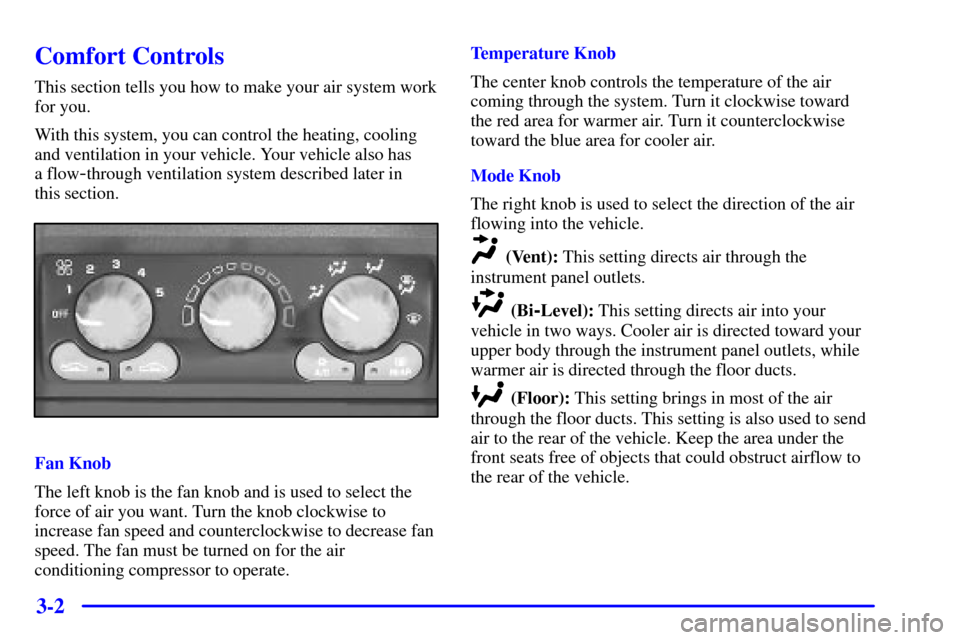
Fan Knob
The left knob is the fan knob and is used to select the
force of air you want. Turn the knob clockwise to
increase fan speed and counterclockwise to decrease fan
speed. The fan must be turned on for the air
conditioning compressor to operate.Temperature Knob
The center knob controls the temperature of the air
coming through the system. Turn it clockwise toward
the red area for warmer air. Turn it counterclockwise
toward the blue area for cooler air.
Mode Knob
The right knob is used to select the direction of the air
flowing into the vehicle.
(Vent): This setting directs air through the
instrument panel outlets.
(Bi-Level): This setting directs air into your
vehicle in two ways. Cooler air is directed toward your
upper body through the instrument panel outlets, while
warmer air is directed through the floor ducts.
(Floor): This setting brings in most of the air
through the floor ducts. This setting is also used to send
air to the rear of the vehicle. Keep the area under the
front seats free of objects that could obstruct airflow to
the rear of the vehicle.
Page 237 of 486

3-5
Your vehicle is equipped with side window defogger
vents located on the top of the instrument panel. For
additional side window defogging, turn the mode knob
to the bi
-level setting and adjust the fan to the highest
speed. Aim the side vents on the instrument panel
toward the side windows. For increased airflow to the
side vents, close the center vents.
Operating the HVAC system in the recirculation mode
may cause fogging of the vehicle's windows when the
weather is cold and damp. To clear the fog, switch the
HVAC system to either the defog or defrost mode and
increase the fan speed. To avoid re
-fogging of the
windows, operate the HVAC system in the outside
air mode.
For additional information, refer to ªRecirculationº
earlier in this section.
Rear Window Defogger (If Equipped)
Press the REAR button
to warm the defogger grid
on the rear window and
to turn on the heated
outside rearview mirrors.
The system will turn off automatically after about
10 minutes of use. If you turn it on again, the defogger
will operate for about five minutes. You can also turn
the defogger off by turning off the ignition or by
pressing the button again.
Do not attach a temporary vehicle license across the
defogger grid on the rear window.
NOTICE:
Don't use a razor blade or something else sharp
on the inside of the rear window. If you do, you
could cut or damage the warming grid, and the
repairs wouldn't be covered by your warranty.
Page 238 of 486

3-6 Rear Climate Control (Vehicles without the
Entertainment System) (Option)
If you have the optional rear climate control, the rear
seat passengers can control the temperature and the
amount of air directed to the rear of the vehicle. You can
also adjust the amount of air directed to the rear of the
vehicle using the front fan control knob.
When it's cold outside, set the main climate control
mode knob to lower, defog or defrost to send air to the
rear of the vehicle through the floor ducts.
Set the main climate control mode knob to vent or
bi
-level to send air to the rear of the vehicle through
the headliner outlets.
To send conditioned air to the rear of the vehicle, press
the A/C button on the main climate controls. If you do
not select A/C, air directed to the rear of the vehicle will
be cabin temperature.Rear Fan Control
This option comes with the rear climate controls.
Keep the area around the base of the center instrument
panel console and the area between and under the front
seats free of objects that would obstruct airflow to the
rear of the vehicle.
The rear fan control
is located below the
climate control system,
in the switchbank.
Turn the fan control to the desired setting for the amount
of air to be directed to the rear of the vehicle. The
temperature of the air will be the same as the air in the
front of the vehicle. The rear fan control in the
instrument panel switchbank has an R setting which
allows the rear passengers to use the rear climate control
knobs to adjust the air through the rear air outlets.
Page 239 of 486
3-7
Rear Comfort Controls
The rear climate control knobs are located in the panel
above the driver's seat.
Turn the temperature knob counterclockwise to the blue
area for cooler air, or clockwise to the red area for
warmer air.
Turn the rear fan knob to adjust the force of air coming
through the rear outlets.
Select the desired climate control mode using the
directional controls on the instrument panel. See ªMode
Knobº earlier in this section. The mode you choose will
regulate both the front and rear climate control systems.Rear Air Vents
To maximize airflow through the rear floor outlet, place
the left bucket seat in the second row in the forward
position. See ªAdjusting Rear Seatsº in the Index.
The vent behind the left rear seat is the cold air return
vent. Be sure to keep it free of obstructions.
Keep the area around the base of the center instrument
panel console, between and under the front seats, free of
objects that could obstruct airflow to the rear.
Page 240 of 486
3-8 Rear Climate Control (Vehicles with the
Entertainment System) (Option)
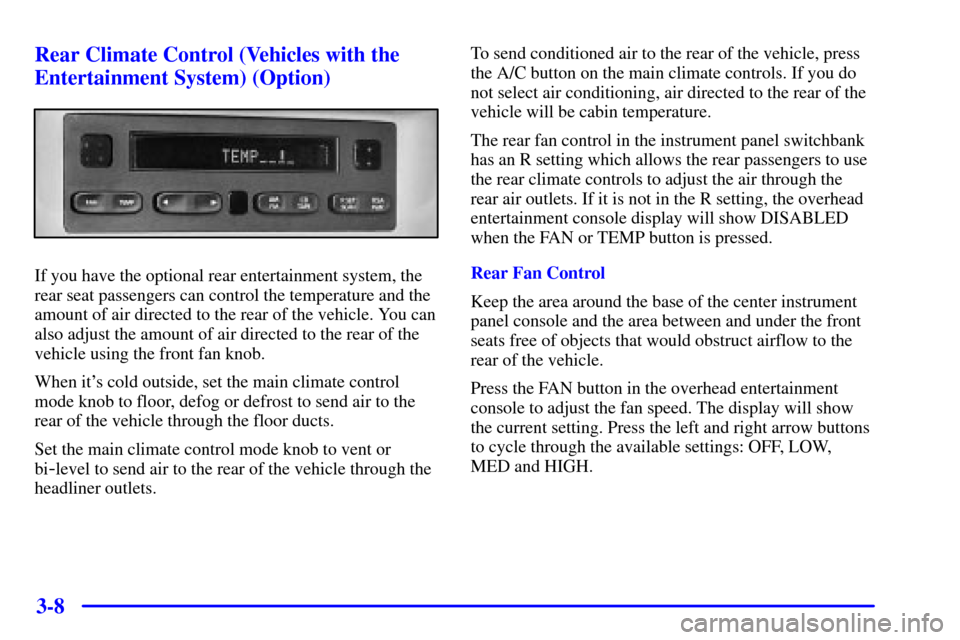
If you have the optional rear entertainment system, the
rear seat passengers can control the temperature and the
amount of air directed to the rear of the vehicle. You can
also adjust the amount of air directed to the rear of the
vehicle using the front fan knob.
When it's cold outside, set the main climate control
mode knob to floor, defog or defrost to send air to the
rear of the vehicle through the floor ducts.
Set the main climate control mode knob to vent or
bi
-level to send air to the rear of the vehicle through the
headliner outlets.To send conditioned air to the rear of the vehicle, press
the A/C button on the main climate controls. If you do
not select air conditioning, air directed to the rear of the
vehicle will be cabin temperature.
The rear fan control in the instrument panel switchbank
has an R setting which allows the rear passengers to use
the rear climate controls to adjust the air through the
rear air outlets. If it is not in the R setting, the overhead
entertainment console display will show DISABLED
when the FAN or TEMP button is pressed.
Rear Fan Control
Keep the area around the base of the center instrument
panel console and the area between and under the front
seats free of objects that would obstruct airflow to the
rear of the vehicle.
Press the FAN button in the overhead entertainment
console to adjust the fan speed. The display will show
the current setting. Press the left and right arrow buttons
to cycle through the available settings: OFF, LOW,
MED and HIGH.
Page 241 of 486
3-9
Rear Temperature Control
Press the TEMP button in the overhead entertainment
console to adjust the temperature of the air to the rear
seat. Press the left arrow button to make air cooler.
Press the right arrow button to make the air warmer.
Rear Air Vents
To maximize airflow through the rear floor outlet, place
the left bucket seat in the second row in the forward
position. See ªAdjusting Rear Seatsº in the Index.
The vent behind the left rear seat is the cold air return
vent. Be sure to keep it free of obstructions.
Keep the area around the base of the center instrument
panel console, between and under the front seats, free of
objects that could obstruct airflow to the rear.
Page 243 of 486
3-11
Ventilation Tips
�Keep the hood and front air inlet free of ice, snow or
any other obstruction (such as leaves). This will
allow the heater and defroster to work much better,
reducing the chance of fogging the inside of
your windows.
�When you enter a vehicle in cold weather, turn the
fan knob to 5, the highest setting, for a few moments
before driving off. This helps clear the intake ducts
of snow and moisture, and reduces the chance of
fogging the inside of your windows.
�Keep the area around the base of the center
instrument panel console and the air path under the
front seats clear of objects. This helps air to circulate
throughout your vehicle.
�In cold weather, operating the system in the
outside air mode will improve the time it takes to
warm the vehicle.Audio Systems
Your audio system has been designed to operate easily
and give years of listening pleasure. You will get the
most enjoyment out of it if you acquaint yourself with it
first. Find out what your audio system can do and how
to operate all of its controls to be sure you're getting the
most out of the advanced engineering that went into it.
Your vehicle may have a feature called Retained
Accessory Power (RAP). With RAP, you can play your
audio system even after the ignition is turned off. See
ªRetained Accessory Powerº in the Index.
Setting the Clock for Systems without
Radio Data System
Press and hold the HR or MIN arrow for two seconds.
Then press the HR arrow until the correct hour appears.
Press and hold the MIN arrow until the correct minute
appears. The clock may be set with the ignition on
or off.