Page 164 of 432

2-95
Choose one of the three options and press the
personalization button while it is displayed on the DIC
to select it and move on to the next feature. For more
information on seat position recall see ªMemory Seat
and Mirrorsº in the Index.
Perimeter Lighting
Press the personalization button until PERIMETER
LIGHTING appears in the display. To select your
personalization for perimeter lighting, press the select
button while PERIMETER LIGHTING is displayed on
the DIC. Pressing the select button will scroll through
the following choices:
�PERIMETER LIGHTING ON (default)
�PERIMETER LIGHTING OFF
If you choose for perimeter lighting to be on, the
headlamps and back
-up lamps will come on for
40 seconds, if it is dark enough outside, when you
unlock the vehicle with the remote keyless entry
transmitter.
Choose one of the two options and press the
personalization button while it is displayed on the
DIC to select it and move on to the next feature.Remote Lock Feedback
Press the personalization button until REMOTE LOCK
FEEDBACK appears in the display. To select your
personalization for the feedback you will receive when
locking the vehicle with the remote keyless entry
transmitter, press the select button while REMOTE
LOCK FEEDBACK is displayed on the DIC.
Pressing the select button will scroll through the
following choices:
�LOCK FEEDBACK: BOTH (default)
�LOCK FEEDBACK: OFF
�LOCK FEEDBACK: HORN
�LOCK FEEDBACK: LAMPS
If you choose both, the parking lamps will flash each
time you press the button with the lock symbol on the
remote keyless entry transmitter and the horn will chirp
the second time you press the lock button.
If you choose off, there will be no feedback when
locking the vehicle.
If you choose horn, the horn will chirp the second time
you press the button with the lock symbol on the remote
keyless entry transmitter.
Page 165 of 432

2-96
If you choose lamps, the parking lamps will flash each
time you press the button with the lock symbol on the
remote keyless entry transmitter.
Choose one of the four options and press the
personalization button while it is displayed on the DIC
to select it and move on to the next feature.
Remote Unlock Feedback
Press the personalization button until REMOTE
UNLOCK FEEDBACK appears in the display. To select
your personalization for the feedback you will receive
when unlocking the vehicle with the remote keyless
entry transmitter, press the select button while
REMOTE UNLOCK FEEDBACK is displayed on the
DIC. Pressing the select button will scroll through the
following choices:
�UNLOCK FEEDBACK: LAMPS (default)
�UNLOCK FEEDBACK: BOTH
�UNLOCK FEEDBACK: OFF
�UNLOCK FEEDBACK: HORNIf you choose lamps, the parking lamps will flash each
time you press the button with the unlock symbol on the
remote keyless entry transmitter.
If you choose both, the parking lamps will flash each
time you press the button with the unlock symbol on the
remote keyless entry transmitter and the horn will chirp
the second time you press the unlock button.
If you choose off, there will be no feedback when
unlocking the vehicle.
If you choose horn, the horn will chirp the second time
you press the button with the unlock symbol on the
remote keyless entry transmitter.
Choose one of the four options and press the
personalization button while it is displayed on the DIC
to select it and move on to the next feature.
Page 172 of 432

2-103
LEFT REAR DOOR AJAR
If the driver's side rear door is not fully closed this
message will appear on the display and you will hear a
chime. Stop and turn off the vehicle, check the door for
obstacles, and close the door again. Check to see if the
message still appears on the DIC. Pressing the select
button will acknowledge this message and clear it from
the DIC display.
RIGHT REAR DOOR AJAR
If the passenger's side rear door is not fully closed this
message will appear on the display and you will hear a
chime. Stop and turn off the vehicle, check the door for
obstacles, and close the door again. Check to see if the
message still appears on the DIC. Pressing the select
button will acknowledge this message and clear it from
the DIC display.RFA # BATTERY LOW
If a remote keyless entry transmitter battery is low this
message will appear on the DIC. The battery needs to
be replaced in the transmitter. Pressing the select button
will acknowledge this message and clear it from the
DIC display.
Page 174 of 432
3-2
Comfort Controls
This section tells you how to use the comfort controls.
With these systems, you can control the heating, cooling
and ventilation in your vehicle.
Comfort Controls Personalization
(If Equipped)
If your vehicle is equipped with the automatic comfort
control system and memory seats and mirrors, you
can store and recall the climate control settings for
temperature, air delivery mode and fan speed for
two different drivers. The personal choice settings
recalled are determined by the transmitter used to enter
the vehicle. After the button with the unlock symbol on
a remote keyless entry transmitter is pressed, the climate
control will adjust to the last settings of the identified
driver. The settings can also be changed by pressing one
of the memory buttons (1 or 2) located on the driver's
door. When adjustments are made, the new settings are
automatically saved for that driver.
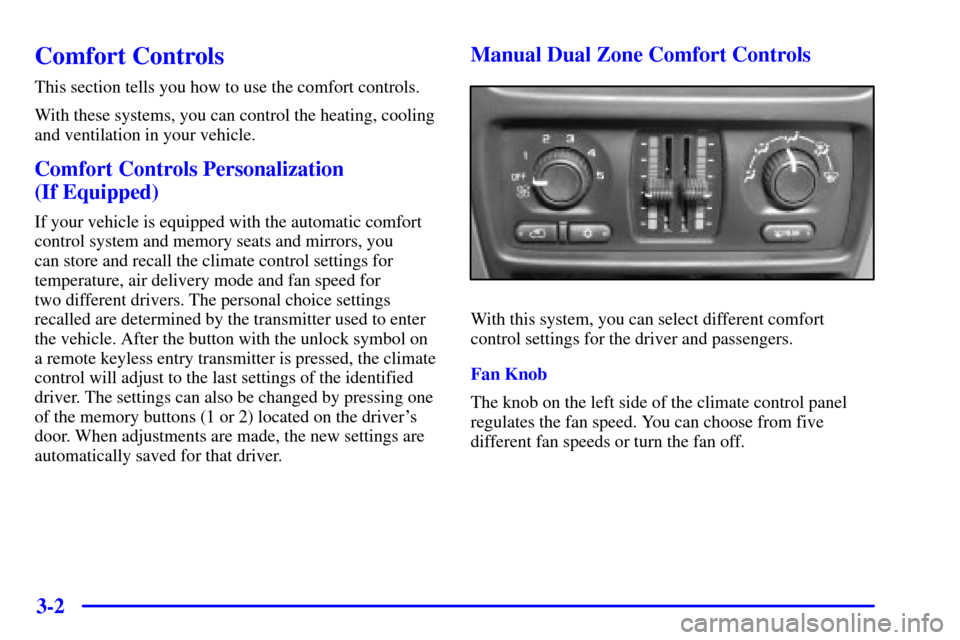
Manual Dual Zone Comfort Controls
With this system, you can select different comfort
control settings for the driver and passengers.
Fan Knob
The knob on the left side of the climate control panel
regulates the fan speed. You can choose from five
different fan speeds or turn the fan off.
Page:
< prev 1-8 9-16 17-24