Page 122 of 384
2-64
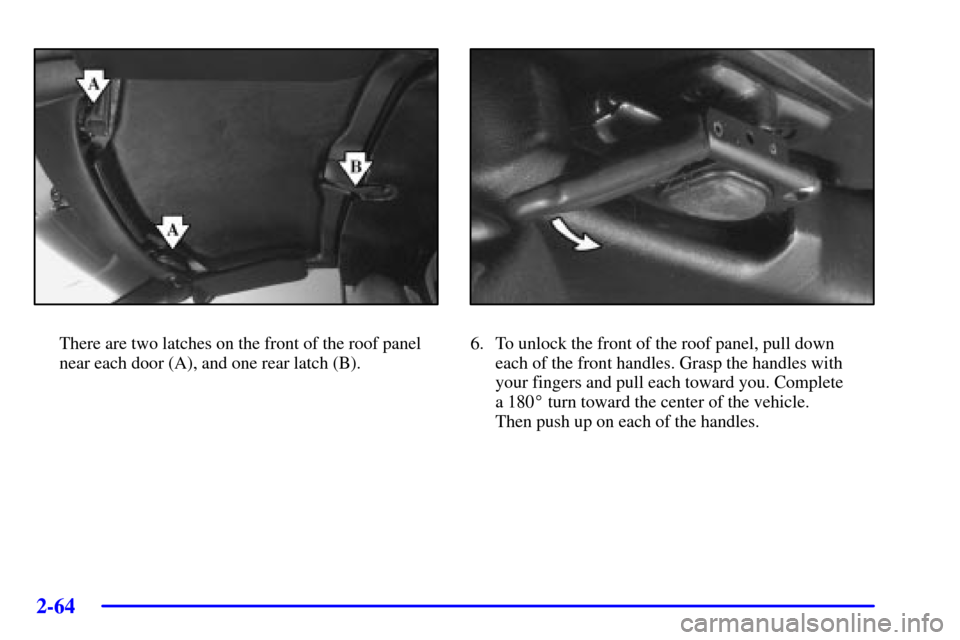
There are two latches on the front of the roof panel
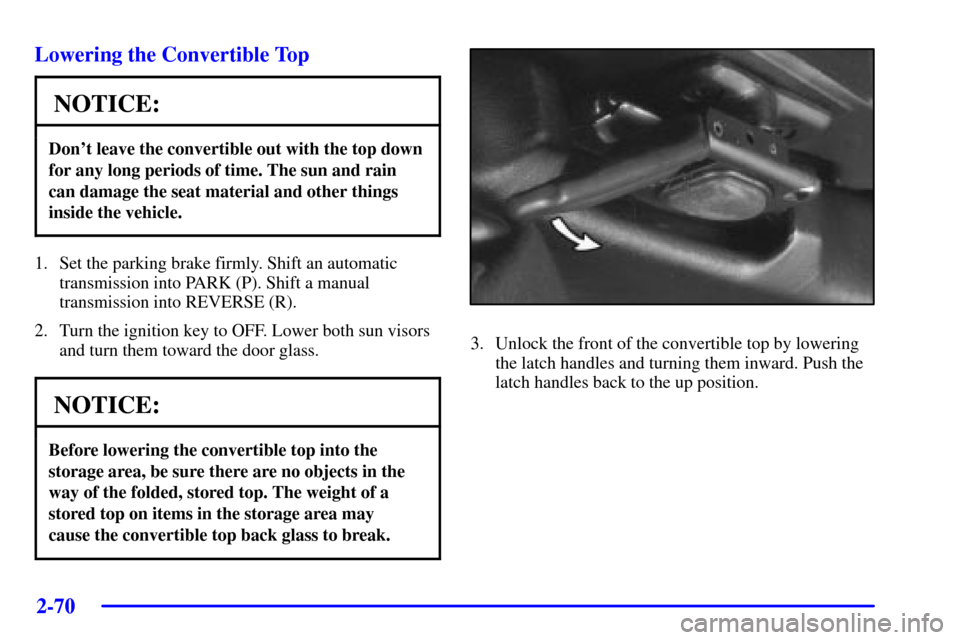
near each door (A), and one rear latch (B).6. To unlock the front of the roof panel, pull down
each of the front handles. Grasp the handles with
your fingers and pull each toward you. Complete
a 180� turn toward the center of the vehicle.
Then push up on each of the handles.
Page 126 of 384
2-68
1. Check to be sure that the front handles and rear latch
on the ceiling are in their opened positions before
attempting to install the roof panel.
2. If the roof panel is stored in the rear area, grasp it
with your right hand at the middle edge near the
seatbacks, and with your left hand at the middle of
the edge closest to you. Reverse the steps described
previously under ªStoring the Roof Panel.º
3. Remove the roof panel from the storage compartment.
4. In most cases, it is easier to install the removable
roof with two people rather than one. Place the roof
panel over the vehicle.
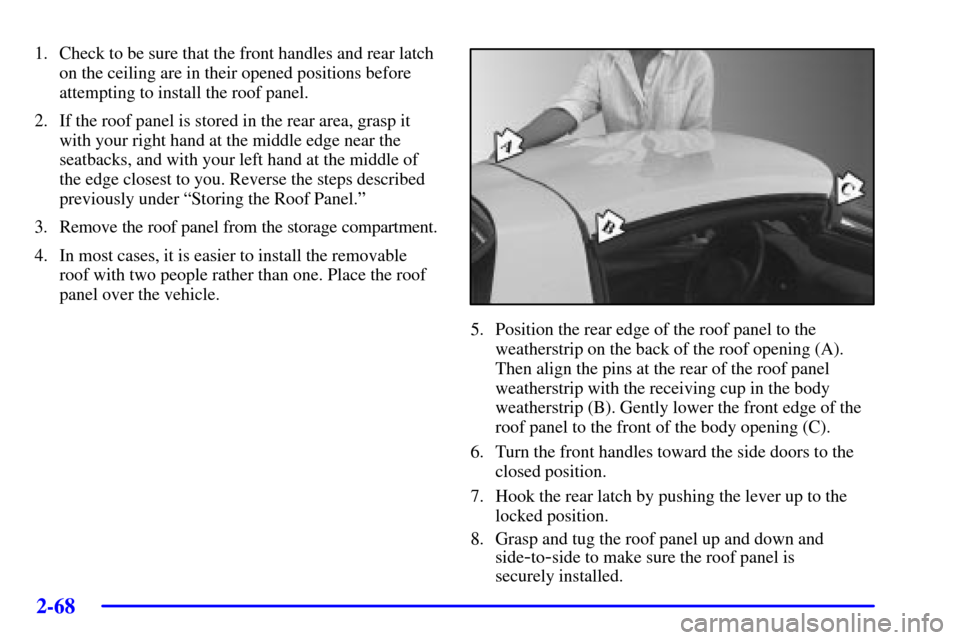
5. Position the rear edge of the roof panel to the
weatherstrip on the back of the roof opening (A).
Then align the pins at the rear of the roof panel
weatherstrip with the receiving cup in the body
weatherstrip (B). Gently lower the front edge of the
roof panel to the front of the body opening (C).
6. Turn the front handles toward the side doors to the
closed position.
7. Hook the rear latch by pushing the lever up to the
locked position.
8. Grasp and tug the roof panel up and down and
side
-to-side to make sure the roof panel is
securely installed.
Page 128 of 384
2-70
Lowering the Convertible Top
NOTICE:
Don't leave the convertible out with the top down
for any long periods of time. The sun and rain
can damage the seat material and other things
inside the vehicle.
1. Set the parking brake firmly. Shift an automatic
transmission into PARK (P). Shift a manual
transmission into REVERSE (R).
2. Turn the ignition key to OFF. Lower both sun visors
and turn them toward the door glass.
NOTICE:
Before lowering the convertible top into the
storage area, be sure there are no objects in the
way of the folded, stored top. The weight of a
stored top on items in the storage area may
cause the convertible top back glass to break.
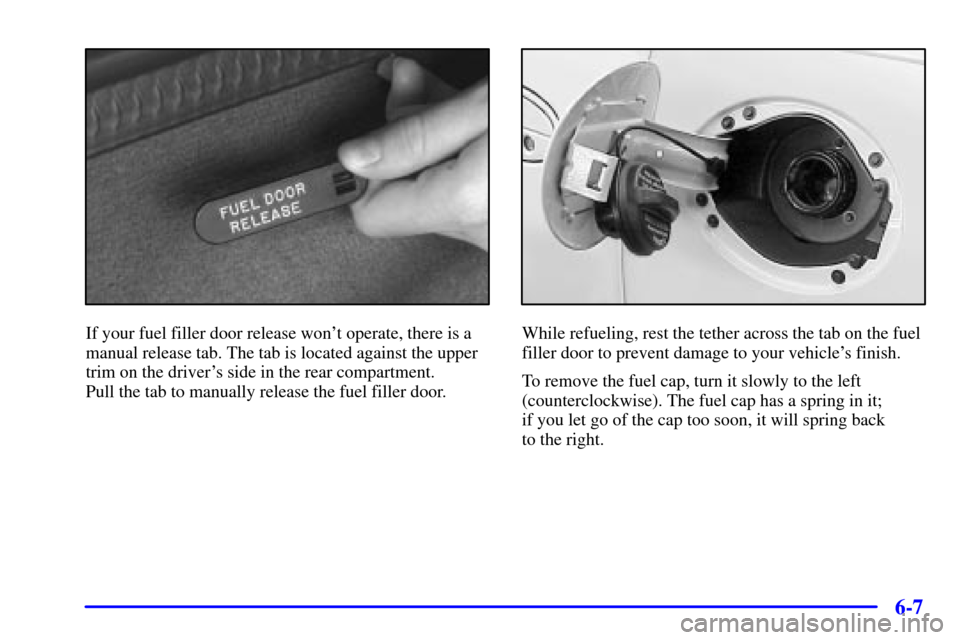
3. Unlock the front of the convertible top by lowering
the latch handles and turning them inward. Push the
latch handles back to the up position.
Page 135 of 384

2-77
The main components of your instrument panel are the following:
A. Instrument Panel Brightness Control
B. Head
-Up Display Controls (Option)
C. Turn Signal/Multifunction Lever
D. Driver Information Center (DIC)
(Located in the Instrument Cluster)
E. Instrument Panel Cluster
F. Windshield Wiper/Washer Lever
G. Driver Information Center (DIC) Buttons
H. Hazard Warning Flasher Button
I. Center Air Vents
J. Audio System
K. Comfort Controls
L. Fog Lamp Button (If Equipped)
M. Remote Hatch Release Button (Coupe) or
Remote Trunk Release Button (Convertible/Z06)
N. Ignition SwitchO. Shift Lever (Automatic Shown)
P. Traction Control System (TCS)
Button/Active Handling Button
Q. Accessory Power Outlet
(Located in the Center Console)
R. Selective Real Time Damping (Option)
S. Air Bag Off Light
T. Instrument Panel Cupholder
U. Remote Fuel Door Release Button
(Located in the Center Console)
V. Ashtray and Cigarette Lighter
W. Parking Brake
X. Glove Box
Y. Instrument Panel Fuse Block
(Located behind the Toe
-Board)
Z. Air Bag Off Switch (Located in Glove Box)
Page 152 of 384

2-94
Driver Information Center (DIC)
The Driver Information Center (DIC) will display
information about how your vehicle is functioning,
as well as warning messages if a system problem is
detected. The DIC display area is located in the
instrument panel cluster below the speedometer and
tachometer, directly above the steering column.
The following buttons are located on the DIC control
panel which is located to the right of the instrument
panel cluster.
1 FUEL: Press this button to display fuel information
such as fuel economy and range.
2 GAGES: Use this button to display gage information
like oil pressure and temperature, coolant temperature,
automatic transmission fluid temperature, battery
voltage and front/rear tire pressures.
3 TRIP: Use this button to display your total and trip
miles, the elapsed time function, your average speed and
the engine oil life.
4 OPTIONS: This button allows you to choose personal
options that are available on your vehicle, depending on
the options your vehicle is equipped with, such as
security, door locks, easy entry seats and language.
5 E/M (English/Metric): Use this button to change
the display between English and metric units.
RESET: This button, used along with the other buttons,
will reset system functions and turn off or acknowledge
messages on the Driver Information Center (DIC).
At the top of the DIC control buttons is a light sensor.
Be sure not to block the sensor or your lighting
functions may be disrupted.
Page 160 of 384

2-102
Auto Lock
Press the OPTIONS button until AUTO LOCK appears
on the display, then use the RESET button to page
through the following choices:
�AUTO LOCK ON
�AUTO LOCK OFF
If you choose AUTO LOCK ON, both doors will
automatically lock when the vehicle exceeds 10 mph
(16 km/h) in a manual transmission. In a vehicle with
an automatic transmission, both doors will automatically
lock when you move the shift lever out of PARK (P).
Choose AUTO LOCK OFF to turn this option off.Auto Unlock
The AUTO UNLOCK will be available only if
AUTO LOCK is set to ON as described previously.
Press the OPTIONS button until AUTO UNLOCK
appears on the display, then use the RESET button
to page through the following choices:
�AUTO UNLOCK DRIVER
�AUTO UNLOCK BOTH
�AUTO UNLOCK OFF
If you choose AUTO UNLOCK DRIVER, the driver's
door will automatically unlock when you turn the
vehicle off and pull the key out of the ignition.
Choose AUTO UNLOCK BOTH, and both doors will
automatically unlock when you turn the vehicle off and
pull the key out of the ignition.
AUTO UNLOCK OFF turns off this option.
Page 205 of 384

3-29
Compact Disc Messages
If an error occurs while trying to play a CD in the
compact disc player or changer, the following conditions
may have caused the error:
�The road is too rough. The disc should play when
the road is smoother.
�The disc is dirty, scratched, wet or loaded label
side up.
�The air is very humid. If so, wait about an hour
and try again.
�The CD changer door is open. Completely close
the changer door to restore normal operation.
�An empty magazine is in the CD changer.
Try the magazine again with a disc loaded on
one of the trays.
�If the CD is not playing correctly, for any other
reason, try a known good CD.
If any error occurs repeatedly or if an error can't be
corrected, contact your dealer. If your radio displays
an error message, write it down and provide it to your
dealer when reporting the problem.Theft-Deterrent Feature
THEFTLOCK� is designed to discourage theft of your
radio. It works by using a secret code to disable all radio
functions whenever battery power is removed.
The THEFTLOCK feature for the radio may be used or
ignored. If ignored, the system plays normally and the
radio is not protected by the feature. If THEFTLOCK is
activated, your radio will not operate if stolen.
When THEFTLOCK is activated, the radio will display
LOC to indicate a locked condition anytime battery
power has been interrupted. If your battery loses power
for any reason, you must unlock the radio with the secret
code before it will operate.
Activating the Theft
-Deterrent Feature
The instructions which follow explain how to enter
your secret code to activate the THEFTLOCK system.
It is recommended that you read through all nine steps
before starting the procedure.
If you allow more than 15 seconds to elapse between
any steps, the radio automatically reverts to time and
you must start the procedure over at Step 4.
Page 279 of 384
6-7
If your fuel filler door release won't operate, there is a
manual release tab. The tab is located against the upper
trim on the driver's side in the rear compartment.
Pull the tab to manually release the fuel filler door.While refueling, rest the tether across the tab on the fuel
filler door to prevent damage to your vehicle's finish.
To remove the fuel cap, turn it slowly to the left
(counterclockwise). The fuel cap has a spring in it;
if you let go of the cap too soon, it will spring back
to the right.