Page 144 of 187
144n
Remote controlChanging batteryRenew when the LED no longer lights
up when a button is pressed and it is
not possible to lock the vehicle using
the remote key.
Install only a battery of the specification
(CR 2016) indicated in the battery
compartment and make sure that the
battery is installed in the correct posi-
tion.
1. Use a screwdriver to lift the cover at
the recess (arrow)365de017
2. Loosen the two screws (arrows) and
remove the cover.
The battery type and its installation
position are stamped into the base of
the battery compartment.
Return used batteries to a recy-
cling point or your BMW center.< 365de018
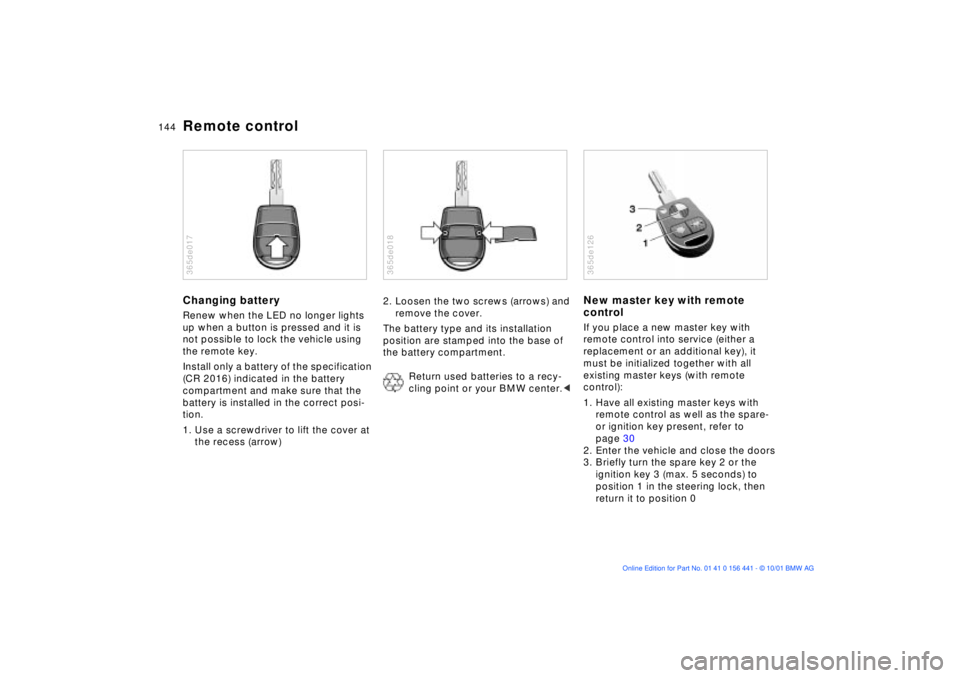
New master key with remote
controlIf you place a new master key with
remote control into service (either a
replacement or an additional key), it
must be initialized together with all
existing master keys (with remote
control):
1. Have all existing master keys with
remote control as well as the spare-
or ignition key present, refer to
page 30
2. Enter the vehicle and close the doors
3. Briefly turn the spare key 2 or the
ignition key 3 (max. 5 seconds) to
position 1 in the steering lock, then
return it to position 0365de126
Page 145 of 187

145n
IndexDataTechnologyRepairsMaintenanceControlsOverview
Remote control4. Press and hold down button 1 (see
illustration). Maintain pressure on
button 1 while rapidly pressing
button 2 three times in succession
within a period of 10 seconds
5. Release button 1. LED 3 flashes
slowly for a maximum of 10 seconds
6. The central locking system engages
and releases all lock mechanisms in
rapid succession to indicate that the
initialization procedure has been
successfully completed.
If the LED does not flash or if the
central locking system fails to respond,
the initialization procedure will have to
be repeated.
All additional master keys with remote
control for your vehicle (up to a
maximum of four units) must now be
initialized. Make sure that no more than
30 seconds is allowed to elapse
between the individual initialization
procedures. Repeat steps 4 and 5. The
central locking system will respond to
each initialization procedure as
descriped in step 6.
In the event of a system malfunction,
please contact your BMW center, who
can also provide you with replacement
keys.Turn each new master key into
ignition position 2 (ignition
switched on) and back again to allow
the electronic vehicle immobilizer (refer
to page 31) to recognize the new key.
To prevent unauthorized use of the
master key, surrender only the door and
ignition key 3 or the spare key 2 (refer
to page 30) for valet parking, for
instance.<
Page 179 of 187

Everything from A to Z
179n
IndexDataTechnologyRepairsMaintenanceControlsOverview
Care of paintwork, refer to
the "Caring for your
vehicle" manual
Care of upholstery materials,
refer to the "Caring for your
vehicle" manual
Cargo loading94
Caring for the vehicle finish,
refer to the "Caring for your
vehicle" manual
Catalytic converter100
CBC (Cornering Brake
Control)102
Cellular phone107
refer also to the separate
Owner's Manual
Center (high-mount) brake
lamp141
Central locking system32
Changing a wheel146t
Charge condition of the
battery154t
Charging the battery154t
Chassis number127
Checking oil level123t
Checking tire
pressure26t, 110
Child seat56
Child-restraint device56Child-restraint system56
installation57
Z3 coupe with tether
strap57
Cigarette lighter92
Cleaning the headlamps66
Cleaning the rear
window66
Cleaning the windshield65
Clock70
Cockpit16
Coin box91
Cold start59
Compartments90
Computer70
refer also to the "Owner's
Manual for Onboard
Computer"
Connecting a car vacuum
cleaner92
Controls, cockpit16
Convertible top
electrical
malfunction157t
manual operation157t
operation40, 44
weather protection44
Coolant105, 126Coolant temperature69
Coolant, antifreeze
protection105
Copyright4
Cornering Brake Control
(CBC)102
Cover, convertible
top41, 46
Cruise control67
Cruising range72
Cup holder, refer to
beverage holder91
Curb weight172
DDashboard16
Data link connector for
Onboard Diagnostics133
Daytime driving lamps76
DBC (Dynamic Brake
Control)103
Deep water99
Defrost windows and
remove
condensation83, 88
Defrosting
rear window66
mirrors51Difficult steering106t
Digital clock70
Dimensions171
Dipstick, engine oil123
Disc brakes103
Displacement170
Display lighting76
Displays18
Disposal
batteries154t
brake fluid127t
coolant125t
engine oil125t
Door key30
Doors
electrical
malfunction32t
manual operation32t
operating with the remote
control33
unlocking and locking32
DOT Quality Grades,
tires111
Drive belts174
Driving notes99
Driving through water99
Page 181 of 187

Everything from A to Z
181n
IndexDataTechnologyRepairsMaintenanceControlsOverview
Heated seats89
Heating and
ventilation80, 84
Heat-up, rapid83
Height171
Height adjustment, seats49
Help with jump starting158
High beams23, 64
bulb replacement137t
High Performance Synthetic
Oil124
High-mount brake lamp
(center)141
Hood release118t
Horn17
Hub cover150
Hydraulic brake assistant,
refer to DBCIIce warning71
Identification number of the
vehicle127
Identification, tires114
Ignition key30
Ignition switch58
Immobilizer, electronic31
Immobilizer, vehicle31Imprint4
Indicator lamps20
Inflation
pressures26t, 110
Inflation pressures,
tires26t
INSPECTION69
Instrument panel16
lighting76
Instruments18
Interface socket for onboard
diagnostics (OBD)133
Interior lamps77
bulb replacement142t
Interlock58
Intermittent wipe switch65
JJack146t
Jump-starting158tKKeys30
Keys with remote
control30, 33
Key, battery change143t
Kickdown63
LLamp switch76
Lashing eyes94
Leather care, refer to the
"Caring for your vehicle"
manual
Length171
License plate lamps
bulb replacement141t
Light-alloy wheel116
LIGHTS ON warning76
Limited slip differential166
Load-securing devices94
Lock buttons36
Locks, care105
Low beams76
bulb replacement137t
Low-fuel indicator lamp68
Lug bolts150, 151
Lug wrench147t
Luggage compartment36
capacity172
locking separately37
Luggage compartment lamp
bulb replacement142tLuggage compartment
lid36
electrical
malfunction37t
emergency release from
luggage compartment's
interior38
manual operation37t
MM + S tires115
Magic Eye
refer to Battery charge
condition154
Maintenance69, 128
Malfunction, cellular
phone107
Manual operation
doors32t
fuel filler door157t
luggage
compartment37t
luggage compartment
lid37t
Manual transmission61
Master key with battery
lamp143
Page 182 of 187

Everything from A to ZMaster keys30
changing battery144
initializing144
replacements144
Mirrors50
adjusting51
defrosting51
Mobile phone107
refer also to the separate
Owner's Manual
Modifications,
technical6, 132
Multifunction switch64
M+S radial tires115NNet93
Non-smoker's equipment
package92
Notes on driving99OOBD interface socket133
Odometer68
Oil
adding123t
additives123
consumption123
grades124Oil change intervals, refer to
the Service and Warranty
Information Booklet (US
models) or the Warranty
and Service Guide Booklet
(Canadian models)
Oil dipstick123
Oil level, checking123t
Oil level, indicator lamp21
Oil pressure, indicator
lamp20
OILSERVICE69
Old batteries154
Onboard computer70
refer to the "Owner's
Manual for Onboard
Computer"
Onboard Diagnostics, data
link connector133
Onboard tool kit136t
Opening and closing
from the inside36
from the outside32
with the remote control33
Outside mirrors50
Outside temperature
display71
PParking brake21, 60
Parking lamps76
Parking, winter106
Partition net93
Phone, mobile107
refer also to the separate
Owner's Manual
Please wear your safety belt
warning lamp21
Position lamps
bulb replacement138t
Power convertible top
electrical
malfunction157t
manual operation157t
Power seat adjustment49
Power steering106
Pressures, tires26, 110
Pressure, tires110QQuality Grades, tires111
RRadiator, frost
protection105
Radio reception166
Radio, refer to the separate
Owner's Manual
Rapid heating83, 88
Reading lamps78
Rear lamps, bulb
replacement139t
Rear window defroster66
Rear window washer,
automatic65
Rear window wiper65
blade replacement136t
Rearview mirrors50
Recirculated air mode86
refer to spare wheel147t
Refueling25
Releasing the hood118t
Remote control33, 144
for computer70
Remove condensation from
windows83
Replacement keys30
Replacement,
tires111, 112