2002 BMW M5 SEDAN lock
[x] Cancel search: lockPage 89 of 154

89n
OverviewControlsMaintenanceRepairsDataIndex
Automatic climate controlTips for pleasant drivingUse the automatic system (switch on
with AUTO button 6). Select the desired
interior temperature.
The following description will lead you
through additional individual adjust-
ments.
Your BMW center can program
the settings of your vehicle in such
a manner that, when you unlock the
vehicle with your individualized key,
your own personalized setting for the
automatic climate control is initiated.
assumes the adjustment of
the air distribution and the air supply for
you and Ð in addition to that Ð adapts
the temperature to external influences
(summer, winter) to meet preferences
you can specify.
Individual air distribution
You also have the option of
individually configuring the
air distribution pattern to
suit your own personal pref-
erences. While the AUTO
program is then deactivated, the auto-
matic airflow control remains in opera-
tion. The system directs air to the
windows , the upper body and
into the footwells . You can reacti-
vate the automatic air distribution mode
by selecting the AUTO button.
Temperature
You can make individual
temperature adjustments on
the driver's side or the front
passenger side. The figures in the
display provide a general indication of
interior temperature. We recommend a
setting of 72 7 (22 6) for a congenial
interior climate, even when the air
conditioner is in operation. When you
start the vehicle, the system ensures
that the selected temperature is
achieved as quickly as possible. It then
maintains this temperature, regardless
of the season.
Air supply
In the AUTO program, the
airflow is controlled auto-
matically. AUTO will appear in display
9, refer to the overview on page 87.
Use "+" and "Ð" to vary the airflow. Your
setting is displayed with bars and the
automatic air supply is switched off.
The automatic air distribution setting is
maintained. You can reactivate the
automatic air supply by pressing the
AUTO button.
When you press "Ð" during operation at
the lowest blower speed, all displays
are canceled: the blower, heating and
air conditioning are switched off. The
outside air supply is deactivated. By
pressing the desired button on the
automatic climate control (except MAX
button 16), you can switch the system
back on.
To defrost windows and remove
condensation
This program quickly
removes ice and conden-
sation from the windshield and the side
windows.
Page 90 of 154

90n
Automatic climate control Air conditioning
The air is cooled and
dehumidified and Ð
depending on the temperature setting Ð
warmed again when the air conditioning
is switched on.
Depending on the weather, the wind-
shield may fog over briefly when the
engine is started. You can reduce
condensation forming on the windows
by switching on the air conditioning.
Condensation forms in the air
conditioning during operation,
which then exits under the vehicle.
Traces of condensed water of this kind
are thus normal.<
Maximum cooling
At outside temperatures
above roughly 41 7 (5 6)
this program furnishes maximum
cooling whenever the engine is running.
The temperature displays 9 jump to
60 7 (16 6), the system reverts to
operating in the recirculated-air mode
and maximum airflow emerges from the
ventilation outlets only. That is why you
need to keep these open if you select
this program.
Automatic recirculated-air control
You can respond to
unpleasant external odors
by temporarily excluding the flow of
outside air. The system then recircu-
lates the air currently within the vehicle.
By repeated actuations of the button,
you can select one of three different
operation modes.
>Indicator lamps off: outside airflow
operational
>Left-hand indicator lamp on Ð AUC
mode: the system recognizes pollut-
ants in the outside air and blocks the
flow of air when necessary. The
system then recirculates the air
currently within the vehicle.
Depending on the air quality, the
automatic system then switches back
and forth between outside air supply
and recirculation of the air within the
vehicle
>Right indicator lamp on Ð recircu-
lated-air mode: the flow of external air
into the vehicle is permanently
blocked. The system then recirculates
the air currently within the vehicle.
If the windows should fog over in
the recirculated-air mode, switch
it off and increase the air supply as
required.<
Rear window defroster
When the rear window
defroster is activated, the
indicator lamp comes on. The rear
window defroster switches off automat-
ically.
Residual heat mode
The heat which is stored in
the engine is utilized for
heating the interior when the engine
has been switched off (while waiting at
a railroad crossing, for instance). In
ignition key position 1, you can alter the
settings of the automatic climate
control. With the ignition key in posi-
tion 0, the system automatically directs
heated air to the windshield, side
windows and footwells.
This function is available for oper-
ation when the outside tempera-
ture is below approximately 59 7
(15 6), with the engine warm from
recent operation and an adequate
charge in the battery. The LED on the
button will light up when all conditions
have been met.<
Page 93 of 154

93n
OverviewControlsMaintenanceRepairsDataIndex
The conceptThe BMW Universal Transmitter
replaces up to 3 hand-held transmitters,
e.g. for garage-door openers, alarm
systems or a door-locking system. The
BMW Universal Transmitter recognizes
and "learns" the signal transmitted from
each of the original hand-held transmit-
ters.
The signal of an original hand-held
transmitter can be programmed to one
of three channel keys. Following that,
each of the devices can be actuated
with the appropriately-programmed
channel key. The indicator lamp flashes
to confirm transmission of the signal.
Before you sell your vehicle, the
program data in the channel keys
should be deleted. Refer to page 95 for
the description of this process.
To prevent potential injuries or
damage: during the programming
operation and before every remote trig-
gering of a programmed device using
the BMW Universal Transmitter, be sure
that there are no persons, animals or
objects within the range of movement of
the respective device. Read and comply
with the safety instructions for the orig-
inal hand-held transmitter also.<
To Canadian residents
During programming, your hand-
held transmitter may automatically stop
transmitting after two seconds. This
may not be long enough to program the
BMW Universal Transmitter. If you are
programming from one of these hand-
held transmitters, the BMW Universal
Transmitter's light may begin to flash in
a series of double-blinks. If this occurs,
continue to hold the key on the BMW
Universal Transmitter while you reacti-
vate your hand-held transmitter. You
may have to repeat this function several
times while programming.<
Before programming, read the
"User's information" section on
page 95.<
The original hand-held transmitter
If this symbol is depicted on the
packaging or in the user's
instructions for the original
hand-held transmitter, it may be
assumed that this original hand-held
transmitter is compatible with the BMW
Universal Transmitter.
Checking for the change codeIn order to determine whether the orig-
inal hand-held transmitter is equipped
with a change code system, you may
either refer to the instructions for the
original hand-held transmitter or
program a channel key as described in
the left-hand column on page 94 under
"Programming."
Following that, press and hold the
programmed channel key on the BMW
Universal Transmitter. If the indicator
lamp on the BMW Universal Transmitter
flashes rapidly for two seconds and
then stays on continuously, the original
hand-held transmitter is equipped with
a change code system. If the change
code system is available, program the
channel keys as described on page 94
in the right-hand column under
"Programming a hand-held transmitter
with change code."
If you have additional questions,
please consult your BMW center
or call 1-800-355-3515.<
BMW Universal Transmitter
*
Page 96 of 154

96n
Glove compartment Storage facilities To openPull the handle and the lamp comes on. To closeFold the cover up.
To prevent injury in the event of an
accident, close the glove
compartment immediately after use.<390de738
To lockUse one of the master keys to lock the
vehicle. A master key can also be used
for unlocking.
If you turn over only your door and
ignition key for valet parking, for
example (refer to page 26), access to
the glove compartment is not
possible.
Located on the left-hand side of the
glove compartment.
Features integral overload-protection,
so it can be left in its holder continu-
ously.
Be sure that the flashlight is
switched off when it is inserted
into its holder. To avoid completely
discharging and possibly damaging the
lamp, always ensure that it is switched
off before inserting it in the socket.<
You can open and close the cover for
the center console's storage compart-
ment by pushing on the slanted front
part (arrow). If your vehicle is equipped
with a cassette holder
*, open each
cassette compartment by pressing the
small button.
Storage compartment on the center
console between the front seats: to
open, reach into the recess at the front
and pull upward. If a cellular phone has
been installed, this compartment is
occupied by the phone.
You will find additional storage
compartments in all of the doors as well
as in the backrests of the front seats
*.
390de739
Page 99 of 154

99n
OverviewControlsMaintenanceRepairsDataIndex
Fold the rear backrests downReach into the recess and pull forward
(arrow 1).
When you close the backrest, be sure
that the catch engages securely. The
red slide (arrow 2) must retract
completely.394de745
The central belt has an additional small
buckle.
>If you connect the two belt sections,
you can use the central belt as any
normal 3-point belt
>It is easier to fold the rear-seat back-
rest up and down if you unbuckle the
belt (arrow).394de746
With a master key you can lock each
backrest in the rear seat.
This also prevents access to the
luggage compartment from the interior
of the vehicle when you turn over the
door and ignition key 3 to someone else
(refer to page 26). This is convenient for
valet parking, for instance.394de747
Through-loading system
*
Page 101 of 154

101n
OverviewControlsMaintenanceRepairsDataIndex
Ski bag
*
Loading1. Press the release button (arrow 1):
the cover panel in the luggage
compartment is unlocked
2. Press the detent levers (arrows 2)
inward and fold the cover to the front
3. Extend the ski bag between the front
seats. The zipper provides conve-
nient access to stored items. It may
be opened to allow the ski bag to dry394de749
4. Use the magnetic retainers to attach
the cover panel to the upper surface
(metal surface below rear tray) of the
luggage compartment.
To store the ski bag, perform the above
steps in reverse sequence.
An unsecured ski bag could lead
to loss of vehicle control and in
case of an accident to personal injury.< 394de750
Securing the load
Secure the bag's contents by
tightening down the retaining
strap at the buckle.<
Please be sure that the skis are clean
before loading them into the bag. Be
careful to avoid damage from sharp
edges.
530de284
Page 102 of 154
102n
Ski bag
*
Cargo loading
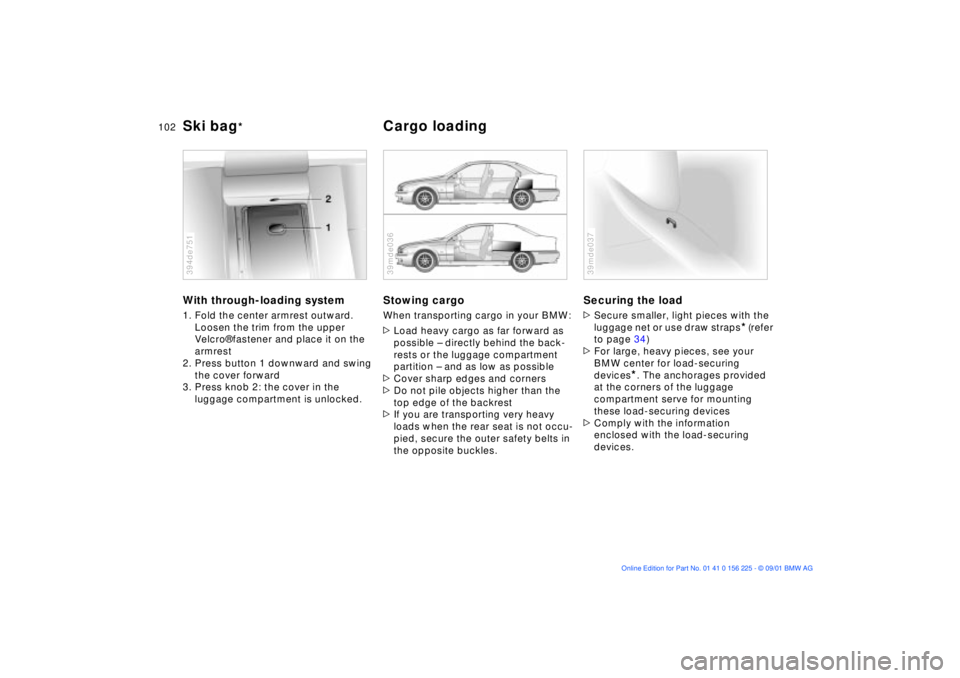
With through-loading system1. Fold the center armrest outward.
Loosen the trim from the upper
Velcro¨ fastener and place it on the
armrest
2. Press button 1 downward and swing
the cover forward
3. Press knob 2: the cover in the
luggage compartment is unlocked. 394de751
Stowing cargo When transporting cargo in your BMW:
>Load heavy cargo as far forward as
possible Ð directly behind the back-
rests or the luggage compartment
partition Ð and as low as possible
>Cover sharp edges and corners
>Do not pile objects higher than the
top edge of the backrest
>If you are transporting very heavy
loads when the rear seat is not occu-
pied, secure the outer safety belts in
the opposite buckles.39mde036
Securing the load >Secure smaller, light pieces with the
luggage net or use draw straps
* (refer
to page 34)
>For large, heavy pieces, see your
BMW center for load-securing
devices
*. The anchorages provided
at the corners of the luggage
compartment serve for mounting
these load-securing devices
>Comply with the information
enclosed with the load-securing
devices.
39mde037
Page 107 of 154

107n
OverviewControlsMaintenanceRepairsDataIndex
Driving notes Antilock Brake System
Brakes:
Do not rest your foot on the brake
pedal while driving. Even light but
consistent pedal pressure can lead to
high temperatures, brake wear and
possibly even brake failure.
Aquaplaning:
When driving on wet or slushy roads,
reduce vehicle speed. If you do not, a
wedge of water may form between the
tires and the road surface. This
phenomenon is referred to as aqua-
planing, or hydroplaning, and can lead
to partial or complete loss of traction,
vehicle control and braking effective-
ness.
Driving through water:
When there is water on the roads, do
not drive in it if it is deeper than 1 ft
(30 cm). If the water is at that depth,
drive only at walking speed, otherwise
the vehicle can sustain damage to the
engine, the electrical systems and the
transmission.
Rear parcel tray:
Do not place heavy or hard objects on
the rear parcel tray. If you do so, they
could pose a danger to vehicle occu-
pants during a braking or evasive
maneuver.
Clothes hooks:
When suspending clothing from the
hooks, ensure that they will not obstruct
the driver's vision. Do not hang any
heavy objects on the hooks, otherwise,
passengers could be injured e.g. during
any hard braking or evasive maneuvers,
or during an accident.<
The conceptThe Antilock Brake System (ABS) keeps
the wheels from locking during braking,
thereby enhancing active driving safety.Braking with ABSIf you are in a situation that requires full
braking, you will exploit the full benefits
of the ABS system if you apply
maximum pedal pressure ("panic stop").
Since the vehicle maintains steering
responsiveness, you can avoid possible
obstacles with a minimum of steering
effort, despite the full brake application.
Pulsation at the brake pedal combined
with sounds from the hydraulic circuits
indicates to the driver that ABS is in its
active mode.