2002 BMW 745LI SEDAN light
[x] Cancel search: lightPage 47 of 208
Adjustments
46 notice on the active head restraints on
page 48.
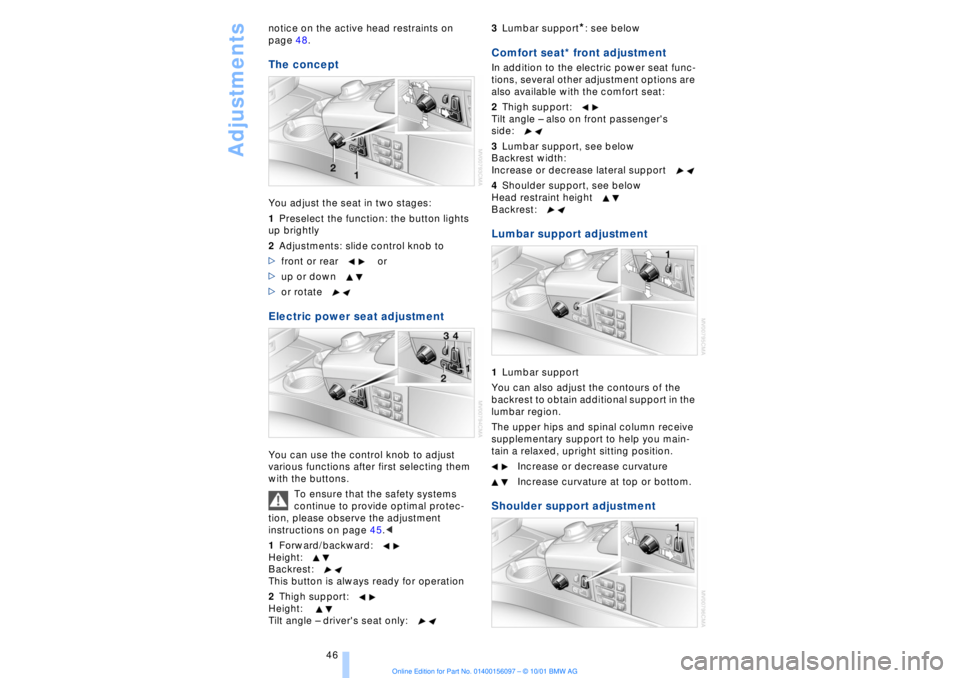
The conceptYou adjust the seat in two stages:
1Preselect the function: the button lights
up brightly
2Adjustments: slide control knob to
>front or rear or
>up or down
>or rotate Electric power seat adjustment You can use the control knob to adjust
various functions after first selecting them
with the buttons.
To ensure that the safety systems
continue to provide optimal protec-
tion, please observe the adjustment
instructions on page 45.<
1Forward/backward:
Height:
Backrest:
This button is always ready for operation
2Thigh support:
Height:
Tilt angle Ð driver's seat only:3Lumbar support
*: see below
Comfort seat* front adjustment In addition to the electric power seat func-
tions, several other adjustment options are
also available with the comfort seat:
2Thigh support:
Tilt angle Ð also on front passenger's
side:
3Lumbar support, see below
Backrest width:
Increase or decrease lateral support
4Shoulder support, see below
Head restraint height
Backrest: Lumbar support adjustment1Lumbar support
You can also adjust the contours of the
backrest to obtain additional support in the
lumbar region.
The upper hips and spinal column receive
supplementary support to help you main-
tain a relaxed, upright sitting position.
Increase or decrease curvature
Increase curvature at top or bottom. Shoulder support adjustment
Page 53 of 208
Adjustments
52
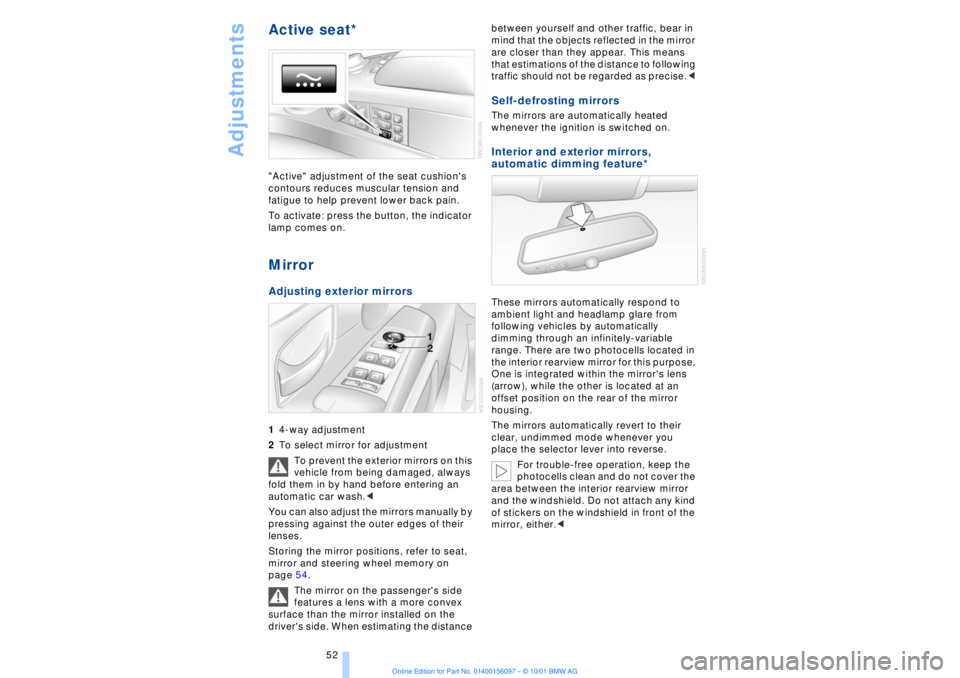
Active seat* "Active" adjustment of the seat cushion's
contours reduces muscular tension and
fatigue to help prevent lower back pain.
To activate: press the button, the indicator
lamp comes on. MirrorAdjusting exterior mirrors 14-way adjustment
2To select mirror for adjustment
To prevent the exterior mirrors on this
vehicle from being damaged, always
fold them in by hand before entering an
automatic car wash.<
You can also adjust the mirrors manually by
pressing against the outer edges of their
lenses.
Storing the mirror positions, refer to seat,
mirror and steering wheel memory on
page 54.
The mirror on the passenger's side
features a lens with a more convex
surface than the mirror installed on the
driver's side. When estimating the distance between yourself and other traffic, bear in
mind that the objects reflected in the mirror
are closer than they appear. This means
that estimations of the distance to following
traffic should not be regarded as precise.<
Self-defrosting mirrors The mirrors are automatically heated
whenever the ignition is switched on. Interior and exterior mirrors,
automatic dimming feature*
These mirrors automatically respond to
ambient light and headlamp glare from
following vehicles by automatically
dimming through an infinitely-variable
range. There are two photocells located in
the interior rearview mirror for this purpose.
One is integrated within the mirror's lens
(arrow), while the other is located at an
offset position on the rear of the mirror
housing.
The mirrors automatically revert to their
clear, undimmed mode whenever you
place the selector lever into reverse.
For trouble-free operation, keep the
photocells clean and do not cover the
area between the interior rearview mirror
and the windshield. Do not attach any kind
of stickers on the windshield in front of the
mirror, either.<
Page 54 of 208
At a glanceControlsDriving tipsCommunicationsNavigationEntertainmentMobilityReference
53
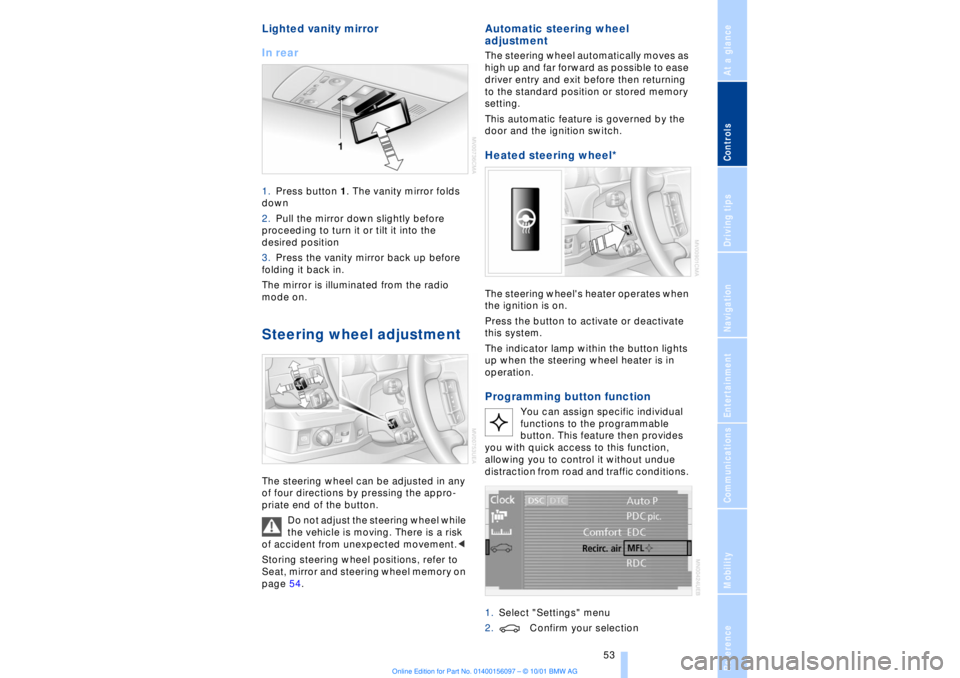
Lighted vanity mirror
In rear 1.Press button 1. The vanity mirror folds
down
2.Pull the mirror down slightly before
proceeding to turn it or tilt it into the
desired position
3.Press the vanity mirror back up before
folding it back in.
The mirror is illuminated from the radio
mode on. Steering wheel adjustment The steering wheel can be adjusted in any
of four directions by pressing the appro-
priate end of the button.
Do not adjust the steering wheel while
the vehicle is moving. There is a risk
of accident from unexpected movement.<
Storing steering wheel positions, refer to
Seat, mirror and steering wheel memory on
page 54.
Automatic steering wheel
adjustment The steering wheel automatically moves as
high up and far forward as possible to ease
driver entry and exit before then returning
to the standard position or stored memory
setting.
This automatic feature is governed by the
door and the ignition switch. Heated steering wheel*
The steering wheel's heater operates when
the ignition is on.
Press the button to activate or deactivate
this system.
The indicator lamp within the button lights
up when the steering wheel heater is in
operation.Programming button function
You can assign specific individual
functions to the programmable
button. This feature then provides
you with quick access to this function,
allowing you to control it without undue
distraction from road and traffic conditions.
1.Select "Settings" menu
2.Confirm your selection
Page 62 of 208
At a glanceControlsDriving tipsCommunicationsNavigationEntertainmentMobilityReference
61
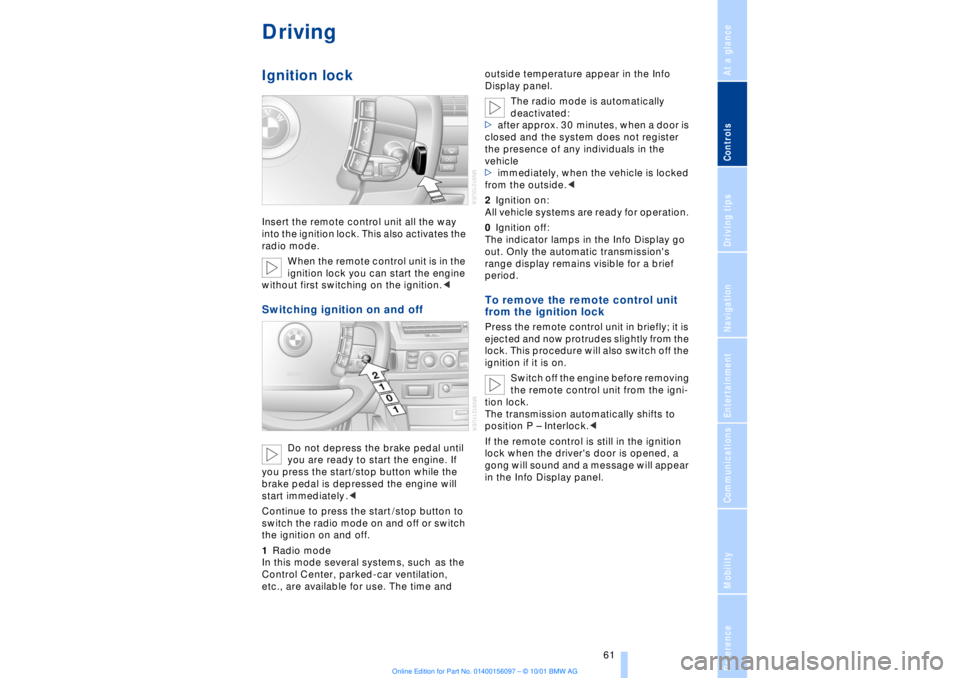
DrivingIgnition lockInsert the remote control unit all the way
into the ignition lock. This also activates the
radio mode.
When the remote control unit is in the
ignition lock you can start the engine
without first switching on the ignition.
you are ready to start the engine. If
you press the start/stop button while the
brake pedal is depressed the engine will
start immediately .<
Continue to press the start /stop button to
switch the radio mode on and off or switch
the ignition on and off.
1Radio mode
In this mode several systems, such as the
Control Center, parked-car ventilation,
etc., are available for use. The time and outside temperature appear in the Info
Display panel.
The radio mode is automatically
deactivated:
>after approx. 30 minutes, when a door is
closed and the system does not register
the presence of any individuals in the
vehicle
>immediately, when the vehicle is locked
from the outside.<
2Ignition on:
All vehicle systems are ready for operation.
0Ignition off:
The indicator lamps in the Info Display go
out. Only the automatic transmission's
range display remains visible for a brief
period.
To remove the remote control unit
from the ignition lock Press the remote control unit in briefly; it is
ejected and now protrudes slightly from the
lock. This procedure will also switch off the
ignition if it is on.
Switch off the engine before removing
the remote control unit from the igni-
tion lock.
The transmission automatically shifts to
position P Ð Interlock.<
If the remote control is still in the ignition
lock when the driver's door is opened, a
gong will sound and a message will appear
in the Info Display panel.
Page 64 of 208
At a glanceControlsDriving tipsCommunicationsNavigationEntertainmentMobilityReference
63
You have two separate options for
engaging the parking brake:
>Manually, by briefly pressing the button
>Automatically, through activation of the
Automatic Hold mode, refer to next
column.
An electrohydraulic mechanism then
engages the parking brakes to prevent the
rear wheels from turning whenever you
switch off the engine.
When the engine is running, parking brake
engagement is controlled by the brake
system's hydraulic circuits, which act on
the disc brakes at the front and rear
wheels. Brake pedal feel Because this function is activated using the
brake system's hydraulic circuits, the
response of the brake pedal may change
slightly. Engagement may also be accom-
panied by activation noise Ð this is normal. Manual engagement
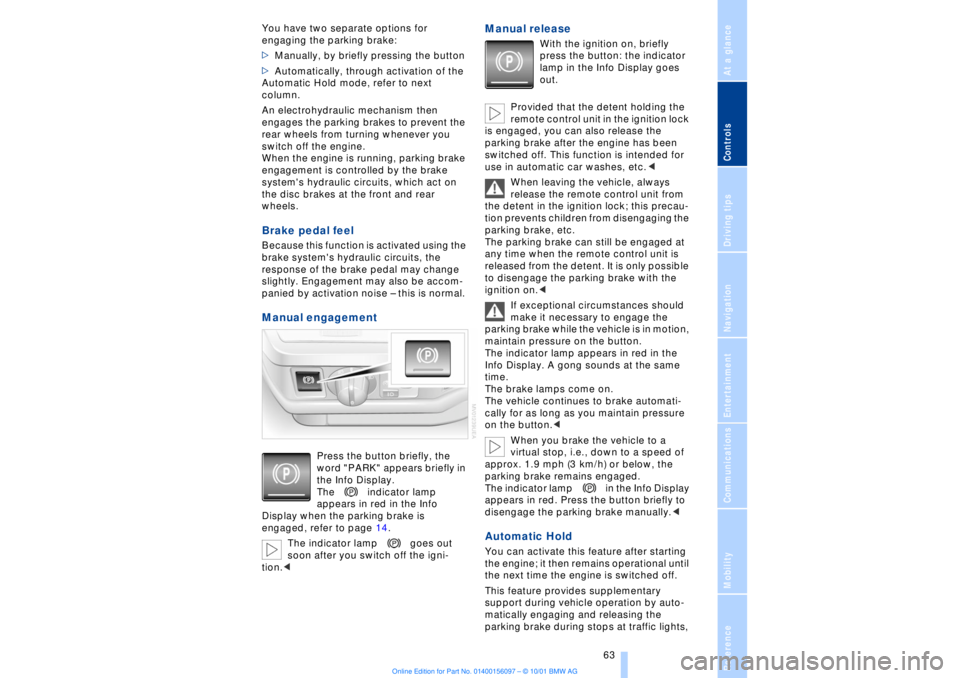
Press the button briefly, the
word "PARK" appears briefly in
the Info Display.
The indicator lamp
appears in red in the Info
Display when the parking brake is
engaged, refer to page 14.
The indicator lamp goes out
soon after you switch off the igni-
tion.<
Manual release
With the ignition on, briefly
press the button: the indicator
lamp in the Info Display goes
out.
Provided that the detent holding the
remote control unit in the ignition lock
is engaged, you can also release the
parking brake after the engine has been
switched off. This function is intended for
use in automatic car washes, etc.<
When leaving the vehicle, always
release the remote control unit from
the detent in the ignition lock; this precau-
tion prevents children from disengaging the
parking brake, etc.
The parking brake can still be engaged at
any time when the remote control unit is
released from the detent. It is only possible
to disengage the parking brake with the
ignition on.<
If exceptional circumstances should
make it necessary to engage the
parking brake while the vehicle is in motion,
maintain pressure on the button.
The indicator lamp appears in red in the
Info Display. A gong sounds at the same
time.
The brake lamps come on.
The vehicle continues to brake automati-
cally for as long as you maintain pressure
on the button.<
When you brake the vehicle to a
virtual stop, i.e., down to a speed of
approx. 1.9 mph (3 km/h) or below, the
parking brake remains engaged.
The indicator lamp in the Info Display
appears in red. Press the button briefly to
disengage the parking brake manually.<
Automatic Hold You can activate this feature after starting
the engine; it then remains operational until
the next time the engine is switched off.
This feature provides supplementary
support during vehicle operation by auto-
matically engaging and releasing the
parking brake during stops at traffic lights,
Page 66 of 208
At a glanceControlsDriving tipsCommunicationsNavigationEntertainmentMobilityReference
65
>the hood is opened while the engine is
running
>the luggage compartment is opened
with the transmission in reverse while the
engine is running, and
>when the parking brake is used to bring
the vehicle to a stop.
The indicator lamp shifts from green
to red, and the "Auto P" message disap-
pears from the Info Display.
Before starting off again, briefly press the
button to disengage the parking brake
manually, refer to page 63, or reactivate
Automatic Hold, refer to page 64.
Before leaving the vehicle with the
engine running, always move the
automatic transmission's selector lever to
position P and ensure that the parking
brake is engaged. The vehicle could start to
roll if you fail to observe these precautions.
Never leave an unattended vehicle with the
engine running, as such a vehicle repre-
sents a potential safety hazard.<
Automatic Hold is automatically
deactivated whenever the system
detects any tendency for the wheels to spin
in response to slippery road surfaces. Note
the status displays in the Check Control
panel. You can find more detailed informa-
tion on Check Control on page 80.< Malfunctions In the event of malfunction, the indicator
lamp in the Info Display will light up
yellow, and a status report will appear in
the Check Control panel. Please remember
to observe the supplementary information
provided in the Control Display. To disengage the parking brake
manually You can respond to any interruptions in the
supply of electrical power, for instance, if
the battery is discharged or disconnected,
by releasing the parking brake manually.
Before proceeding to release the
parking brake manually, and each
time you park the vehicle without engaging the parking brake, always ensure that the
automatic transmission's selector lever is
in position P, refer to page 66. Note the
range indicated in the Info Display.
If it is not possible to avoid parking on an
extremely steep slope, use some supple-
mentary means, such as a wheel chock, to
make certain that the vehicle will not roll,
refer to page 184. Otherwise the danger
exists that the vehicle could roll when
parked on a very steep hill.<
Should it be necessary to release the auto-
matic transmission's lockout manually, for
instance, if the battery is discharged,
always adhere to the following sequence:
1.If necessary, start by manually releasing
the parking brake
2.Then release the automatic transmis-
sion's lockout manually, refer to page 70.
Towing and jump-starting, refer to
pages 187 and 188.
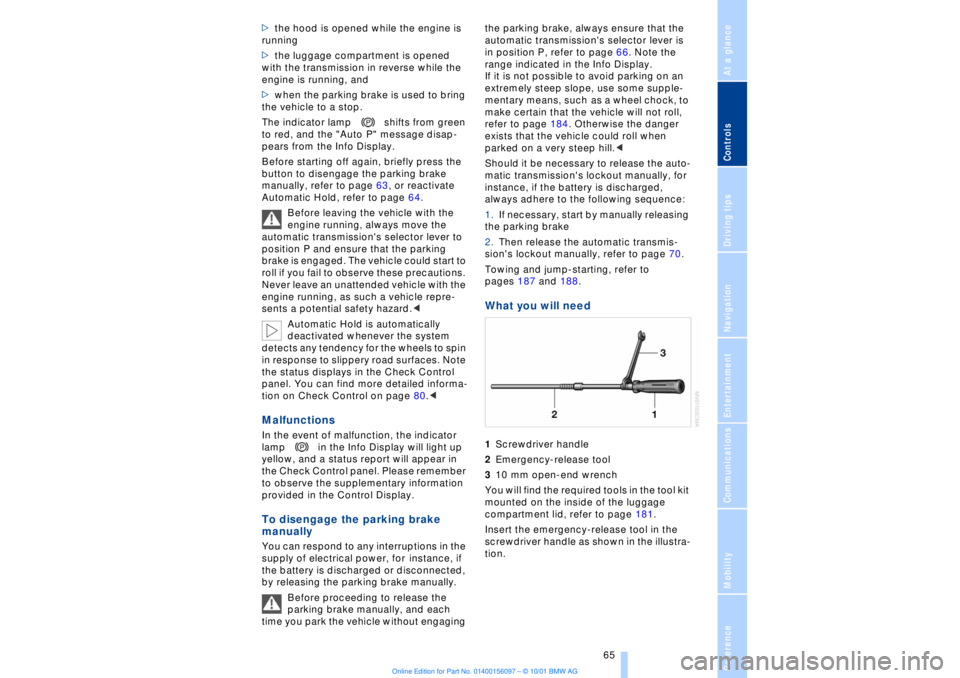
What you will need 1Screwdriver handle
2Emergency-release tool
310 mm open-end wrench
You will find the required tools in the tool kit
mounted on the inside of the luggage
compartment lid, refer to page 181.
Insert the emergency-release tool in the
screwdriver handle as shown in the illustra-
tion.
Page 76 of 208
At a glanceControlsDriving tipsCommunicationsNavigationEntertainmentMobilityReference
75
3 Interrupt cruise control Briefly press the lever up or down while the
cruise control is active. The status
message 5 in the Info Display is no longer
highlighted. You can use the cruise control
again as required.
In addition, cruise control is interrupted
automatically
>When you apply pressure to the brake
pedal
>when you select the automatic transmis-
sion's neutral range N
>when the DSC (Dynamic Stability
Control) system is in active operation. 4 To recall stored speed Briefly press button 4: The vehicle acceler-
ates to and maintains the last speed stored. To deactivate the cruise control The stored speed is deleted from the
system memory when you switch off the
ignition. To activate multilevel preset mode Push 1 or pull 2 the lever beyond the
detent.
The system maintains and stores the
current speed, which is also displayed as a
preset speed 5 and as the desired speed 6.
If no levels are programmed, with the
graduated function in operation you
can push or pull the lever past the detent to
increase or decrease the vehicle's speed in
increments of 6.2 mph (10 km/h).<1 Change preset level Press 1 or pull 2 the lever beyond the
detent: The preset speed progresses to the
next desired speed. The lowest desired
speed that it is possible to select is roughly
18 mph (30 km/h).3 Interrupt cruise control With the cruise control active, briefly tap
the lever up or down.
To deactivate the multilevel preset
modeThe multilevel preset mode is deactivated
when you switch off the ignition. Multilevel preset mode Ð Storing
speeds
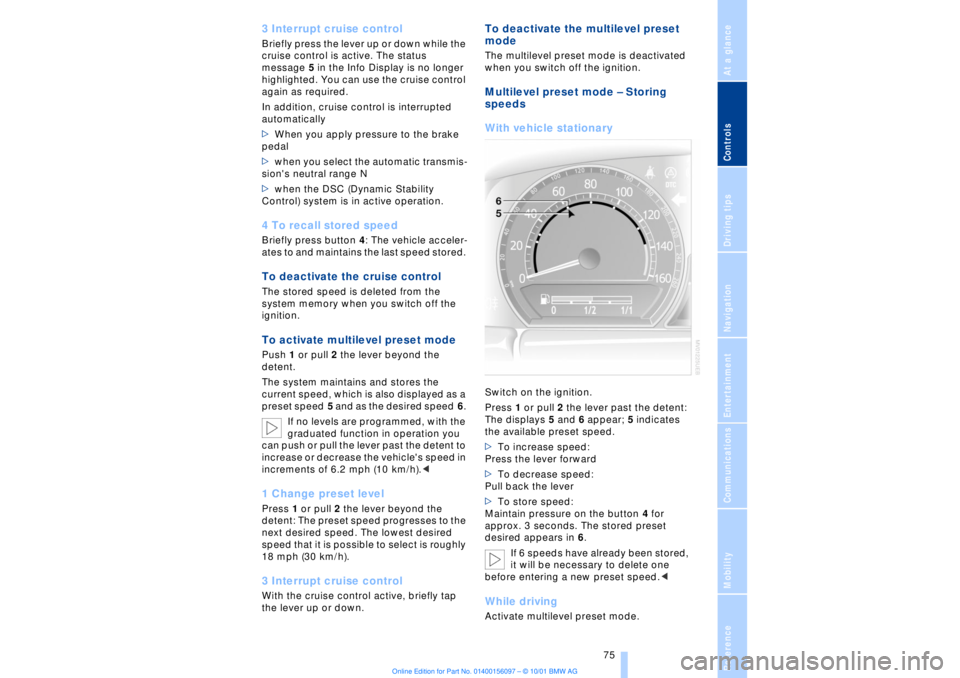
With vehicle stationary Switch on the ignition.
Press 1 or pull 2 the lever past the detent:
The displays 5 and 6 appear; 5 indicates
the available preset speed.
>To increase speed:
Press the lever forward
>To decrease speed:
Pull back the lever
>To store speed:
Maintain pressure on the button 4 for
approx. 3 seconds. The stored preset
desired appears in 6.
If 6 speeds have already been stored,
it will be necessary to delete one
before entering a new preset speed.
Page 83 of 208
Everything under control
82
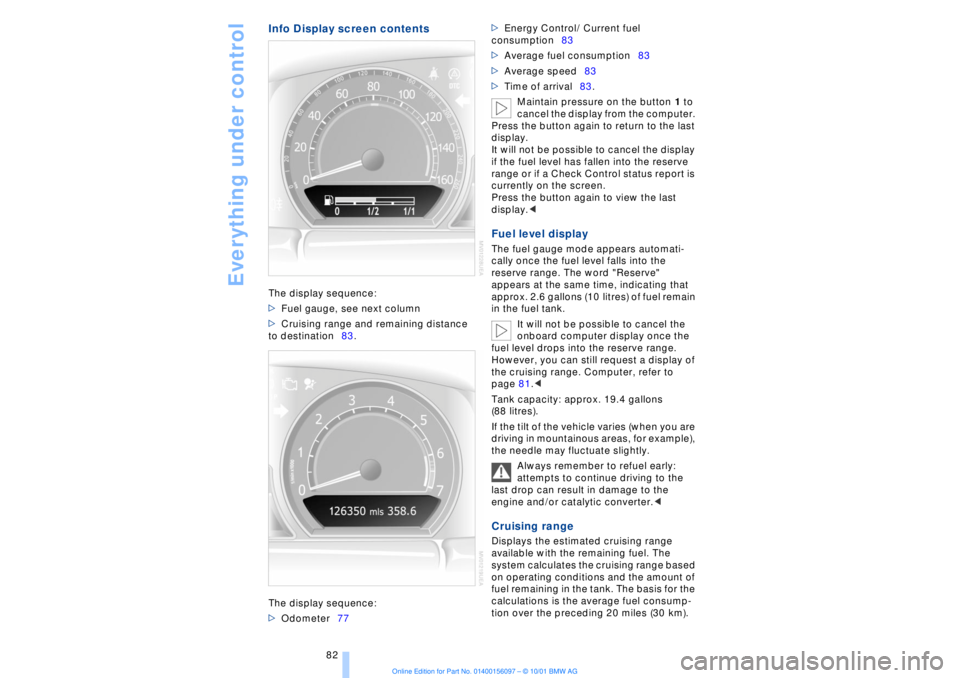
Info Display screen contentsThe display sequence:
>Fuel gauge, see next column
>Cruising range and remaining distance
to destination83.
The display sequence:
>Odometer77 >Energy Control/ Current fuel
consumption83
>Average fuel consumption83
>Average speed83
>Time of arrival83.
Maintain pressure on the button 1 to
cancel the display from the computer.
Press the button again to return to the last
display.
It will not be possible to cancel the display
if the fuel level has fallen into the reserve
range or if a Check Control status report is
currently on the screen.
Press the button again to view the last
display.<
Fuel level display The fuel gauge mode appears automati-
cally once the fuel level falls into the
reserve range. The word "Reserve"
appears at the same time, indicating that
approx. 2.6 gallons (10 litres) of fuel remain
in the fuel tank.
It will not be possible to cancel the
onboard computer display once the
fuel level drops into the reserve range.
However, you can still request a display of
the cruising range. Computer, refer to
page 81.<
Tank capacity: approx. 19.4 gallons
(88 litres).
If the tilt of the vehicle varies (when you are
driving in mountainous areas, for example),
the needle may fluctuate slightly.
Always remember to refuel early:
attempts to continue driving to the
last drop can result in damage to the
engine and/or catalytic converter.< Cruising range Displays the estimated cruising range
available with the remaining fuel. The
system calculates the cruising range based
on operating conditions and the amount of
fuel remaining in the tank. The basis for the
calculations is the average fuel consump-
tion over the preceding 20 miles (30 km).