2001 VOLVO S60 reset
[x] Cancel search: resetPage 6 of 128

2 0 0 1
VOLVO S60
Instruments and controls
pg. 29 Instruments and controls
Instrument panel 30
Indicator and warning symbols31
Steering wheel adjustment36
Switches in the center console37
Lighting panel39
Turn signals40
Windshield wipers/ washer41
Hazard warning flashers, rear window/ sideview mirror defroster, heated front seats42
Trip computer (option)43
Cruise control44
Parking brake, electric socket/ cigarette lighter45
Electrically operated windows46
Rearview mirror/ sideview mirrors48
Electrically operated sun roof49
pg. 30 Instrument panel
1. Turn signal indicators - right - left
2. Text window
The text window displays information and warning messages.
3. Temperature gauge
The pointer should be approximately midway on the gauge when driving. Do not drive the car if the warning light is
on. The text window will provide you with additional information. If the engine temperature remains high, check
coolant level - see page 169
.
4. Trip odometer
The trip odometers are used for measuring shorter distances. The right- hand digit gives tenth of a mile/ kilometer.
Press the button for more than 2 seconds to reset. Change between trip odometers 1 and 2 using one short press on the
button.
ProCarManuals.com
Page 8 of 128

Anti-lock brake system ABS If the warning light comes on, there is a malfunction of the ABS system (the
standard braking system will still function). The vehicle should be driven to a Volvo retailer for inspection. See page
138 for additional information.
pg. 32 Indicator and warning symbols
BRAKE Brake failure warning light
If the light comes on while driving or braking, stop immediately, open the hood and check the brake fluid level in the
reservoir. See page 170
for reservoir position and page 174 for instructions.
Canadian models are equipped with this warning light:
If the BRAKE and ABS warning lights come on at the same time, this could indicate a fault in the brake
system.
Stop the car in a suitable place and switch off the engine.
Restart the engine.
If both warning lights go off, no further action is required.
If both lights are still on after the engine has been restarted, switch off the engine again and check the brake fluid
level (see page 170
for the location of the brake fluid reservoir).
WARNING!
If the fluid level is below the MIN mark in the reservoir or if a "Brake failure - Service urgent" message is
displayed in the text window: DO NOT DRIVE. Have the car towed to an authorized Volvo retailer and have the
brake system inspected.
If the brake fluid level is above the MIN mark, drive carefully to an authorized Volvo retailer and have the brake
system inspected.
pg. 33 Indicator and warning symbols
Supplemental Restraint System SRS
If the light comes on (or stays on after the vehicle has started), the SRS diagnostic system has detected a fault. Drive
to an authorized Volvo retailer for an inspection of the system. See the SRS section for more information.
Generator warning light
If the light comes on while the engine is running, have the charging system checked.
Service reminder indicator
This light will come on at 7,500 mile (12,000 km) intervals, after 750 hours of driving or after 12 months, whichever
occurs first, to remind the driver that the service interval has been exceeded. The light will stay on for 2 minutes after
start until reset by the servicing retailer.
ProCarManuals.com
Page 16 of 128

to remove ice or condensation. An LED in the switch will light up.
A timer automatically switches off the heating to the sideview mirrors after approximately 6 minutes and to the rear
window after approxi- mately 12 minutes. The LED will go out correspondingly.
Heated front seats (option)
The front seat heating can be switched on and off as required.
Press the switch once for maximum seat heating. Both LEDs in the switch will be lit.
Press the switch a second time for comfort heating. One LED in the switch will be lit.
Press the switch a third time to turn the heating off completely. The seat heating for the passenger seat should be
switched off when the seat is not occupied.
pg. 43 Trip computer (option)
The trip computer stores information gathered from several systems in your car and has four menus that can be
displayed in the text window.
Driving distance on current fuel reserve
Average fuel consumption
Current fuel consumption
Average speed
NOTE: Warning messages from the car's monitoring systems will override the trip computer function. If a warning
message is displayed in the text window while you are using the trip computer, you must acknowledge the message
by pressing button A. Press button A again to return to the trip computer function.
Trip computer controls
The four trip computer functions can be accessed by twisting control B one step at a time in either direction. Twisting
a fifth time returns you to the original function.
The trip computer can be reset (current data will be erased from system memory) by pressing RESET (button C).
Trip computer functions
Driving distance on current fuel reserve This function shows the approximate distance that can be driven on the fuel
remaining in the tank. This calculation is based on average fuel consumption during the last 12 miles (20 km) of
driving and the amount of fuel remaining in the tank when the reading was taken.
When the driving distance on current fuel reserve is less than 12 miles (20 km), "----" will be displayed in the text
window.
Average fuel consumption
ProCarManuals.com
Page 17 of 128

This value indicates fuel consumption since the last time the trip computer was reset (by pressing RESET, button C).
When the engine is switched off, information on fuel consumption is stored and remains in system memory until the
RESET (button C) is pressed again.
Current fuel consumption
This value indicates the current fuel consumption, based on readings taken once per second. When the car is not
moving, "----" will be displayed.
Average speed
This value indicates average speed since the last time the trip computer was reset (by pressing RESET, button C).
When the engine is switched off, information on average speed is stored and remains in system memory until the
RESET (button C) is pressed again.
pg. 44 Cruise control
Cruise control
The cruise control panel is located on the left side of the steering wheel hub.
Engaging cruise control/ setting speed
Press the CRUISE button
Press + or - to set the current speed
Increase or decrease speed as desired
NOTE: Cruise control will not function at speeds below 22 mph (35 km/ h).
Braking
Cruise control is automatically disengaged when the brake pedal is depressed. The currently set speed is stored in
memory. Quickly pressing resume
will return the car to the previously set speed.
Acceleration
Momentary acceleration, such as when passing another car, does not affect cruise control operation. The car will
automati- cally return to the previously set speed when you release the accelerator pedal.
When the cruise control is already engaged, the car's speed can be increased or decreased by holding down + or -
until the car reaches the desired speed. One short press on either symbol corresponds to a speed change of
approximately 1 mph (1.6 km/ h).
Disengaging cruise control
Cruise control can also be disengaged by:
Pressing the CRUISE button.
Putting the gear selector in (N) eutral.
NOTE: Cruise control is automatically disen- gaged if the engine is switched off, if the gear selector is placed in (N)
eutral, if the car's speed drops to under 70% of the currently set speed or if the wheels start to spin.
ProCarManuals.com
Page 30 of 128
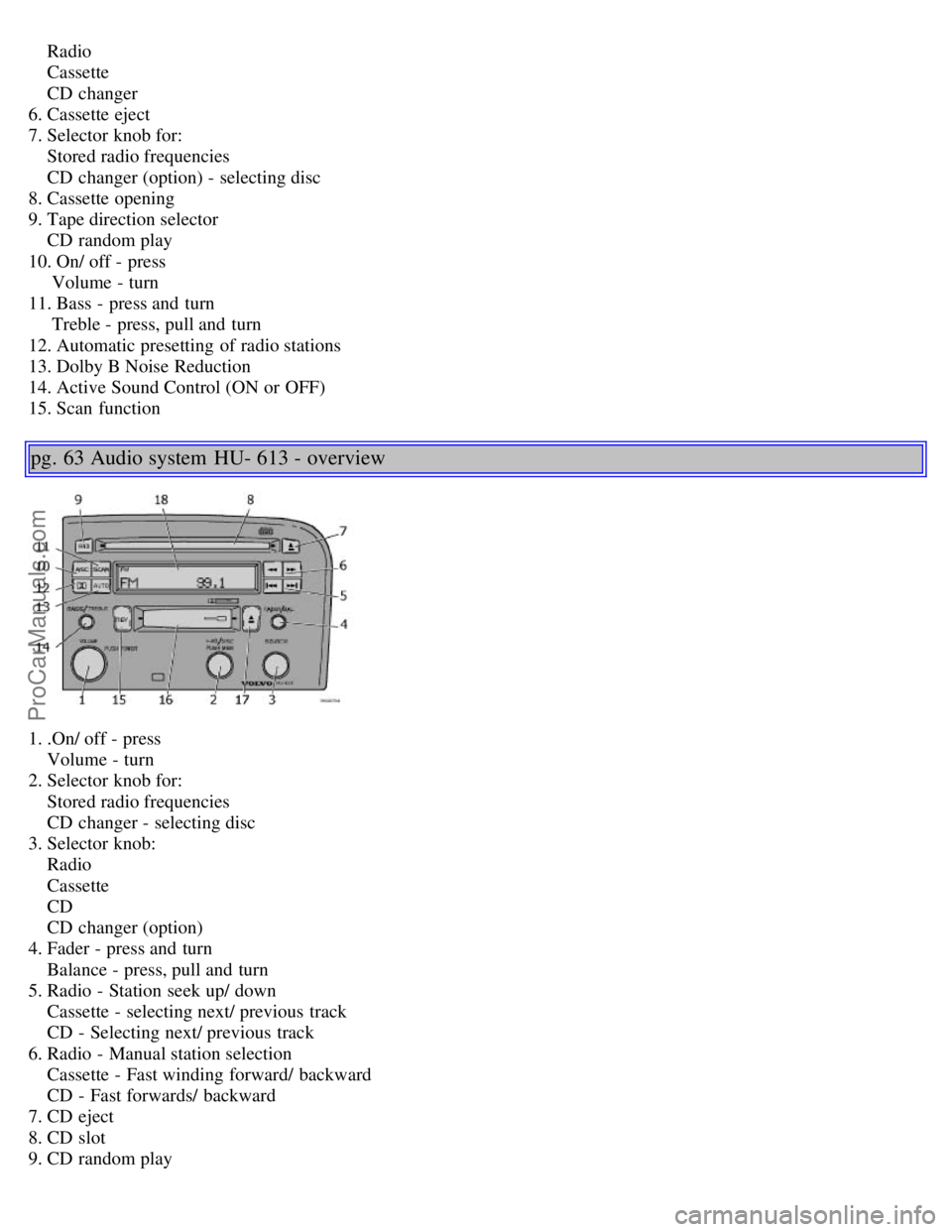
Radio
Cassette
CD changer
6. Cassette eject
7. Selector knob for:
Stored radio frequencies
CD changer (option) - selecting disc
8. Cassette opening
9. Tape direction selector
CD random play
10. On/ off - press
Volume - turn
11. Bass - press and turn
Treble - press, pull and turn
12. Automatic presetting of radio stations
13. Dolby B Noise Reduction
14. Active Sound Control (ON or OFF)
15. Scan function
pg. 63 Audio system HU- 613 - overview
1. .On/ off - press
Volume - turn
2. Selector knob for:
Stored radio frequencies
CD changer - selecting disc
3. Selector knob:
Radio
Cassette
CD
CD changer (option)
4. Fader - press and turn
Balance - press, pull and turn
5. Radio - Station seek up/ down
Cassette - selecting next/ previous track
CD - Selecting next/ previous track
6. Radio - Manual station selection
Cassette - Fast winding forward/ backward
CD - Fast forwards/ backward
7. CD eject
8. CD slot
9. CD random play
ProCarManuals.com
Page 31 of 128

10. Active Sound Control (ON or OFF)
11. Scan function
12. Dolby B Noise Reduction
13. Automatic presetting of radio stations
14. Bass - press and turn
Treble - press, pull and turn
15. Tape direction selector
16. Cassette opening
17. Cassette eject
18. Display
pg. 64 Audio system HU- 803 - overview
1. On/ off - press
Volume - turn
2. Bass - press and turn
Treble - press, pull and turn
3. Fader - press and turn
Balance - press, pull and turn
4. Center volume - press and turn
Effect channel volume - press, pull and turn
5. Selector knob for:
Stored radio frequencies
CD - selecting disc
6. Selector knob:
Radio
Internal CD changer
Station scan - press
External CD changer (option)
7. 7 Radio - Station seek up/ down
CD - Selecting next/ previous track
8. Radio - Manual station selection
CD - Fast forward/ backward
9. CD eject
10. Dolby Pro Logic - switching on
11. 2 channel stereo
12. 3 channel stereo
13. CD slot
14. CD random play
15. Program type
16. News
17. Traffic information
ProCarManuals.com
Page 32 of 128

18. Automatic presetting of radio stations
19. Display
pg. 65 Audio systems HU- 413/ HU- 613/ HU- 803
Switch on/off
Press the knob to switch on or turn off the radio.
Volume control
Turn the knob clockwise to increase volume. Volume control is electronic and does not have an end stop. If you have
a key pad in the steering wheel, increase or decrease the volume with the + or - buttons.
Band selector
Turn "SOURCE" knob to select FM or AM. The station and band are displayed. You can also select cassette deck,
CD, or the optional CD changer if connected, with this knob. Active sound control (ASC) The ASC (Active Sound
Control) automatically adapts volume to vehicle speed.
Press the ASC button (HU- 613) for several seconds to switch this function ON or OFF. This function is included in
the Advanced User Mode on the HU - 803 equipped with this feature.
"ASC ON" or "ASC OFF" will be shown in the display for several seconds.
Bass
Adjust the bass by pressing the button to extend the control and turning it to the left (less bass) or to the right (more
bass). A "detent" indicates "equalized" bass. Press the button back in when you have made the adjustment.
Treble
Adjust the treble by pressing the button to extend the control, pulling it out as far as possible, and then turning it to
the left (less treble) or to the right (more treble). A "detent" indicates "equalized" treble. Press the button back in
when you have made the adjustment.
ProCarManuals.com
Page 34 of 128

Steering wheel keypad
If you have a keypad in the steering wheel, press the right or left arrow to select preset stations.
Scan function
Press the SCAN button (HU- 613) or the SOURCE knob (HU- 803) to start the station scan function. When a station
is found, scanning stops for several seconds, after which scanning will continue.
Press the SCAN button or SOURCE knob when a station has been found if you would like to listen to that station and
to discontinue the scan function.
pg. 68 Audio systems HU- 413/ HU- 613/ HU- 803
Automatic station preset
This function seeks and stores up to 10 strong AM or FM stations in a separate memory. This function is especially
useful in areas where you are not familiar with the radio stations.
1. Press in the "AUTO" button. A number of strong signal stations (max. 10) from the currently selected waveband are
now stored automatically in the memory. An "A" and "AUTO" is displayed. If there is no station with sufficient
signal strength "NO STATION" is displayed.
2. Turn "1- 20/ DISC" knob if you wish to change to another of the auto-stored stations.
Another auto-stored station is selected with each turn.
Programming stations
1. Tune in the desired frequency.
2. Press the "1-20/ DISC" knob. Select a number by turning forwards or backwards. Press again to store the selected
frequency and station.
Preset
To choose a pre-set station, turn "1-20/ DISC" knob to the stored number. The currently selected station is displayed.
Radio Data System (RDS, also referred to as RBDS) - HU- 803 only
This feature, which may not work in your area, functions only with FM broadcasts. The HU - 803 radio in your car is
equipped with an advanced system allowing information from broadcasters to be transmitted visually, as text, together
with the audio signal. This information is then decoded by the radio and made available for several new and unique
features. The RDS or Radio Data System operates in the FM band only, and the information transmitted is
supplied exclusively by participating broadcasters. Volvo has no control over the accuracy of the data or
information. Please refer to the following pages regarding specific descriptions and operation of these functions.
ProCarManuals.com