Programming the memory
Please note that only the driver' s seat is equipped with the memory function. Three seat positions can be
programmed. To program a seat position:
1. Adjust the seat to the desired position.
2. Hold down the MEM button.
3. While holding down the MEM button, press button 1 to program the current position of the seat.
Buttons 2 and 3 can be programmed in the same way.
To move the seat to a programmed position, press and hold down button 1, 2 or 3 until the seat moves to the preset
position and stops.
As a safety precaution, the seat will stop automatically if the button is released before the seat has reached the
programmed position.
pg. 104 Interior lighting
Courtesy light
The courtesy light can be turned on or off by pressing the button. The light also has a timer function which turns the
light on for 30 seconds if:
You unlock the car from the outside with the key or remote control.
You switch off the ignition (turn the key to position 0).
The courtesy light stays on for 10 minutes if one of the doors is left open after the car is unlocked. The courtesy light
switches off if:
The engine is started.
The car is locked from the outside with the key or remote control.
The courtesy light can be switched off or on in all situations by briefly pressing the button. When you switch the light
on, it remains lit for 10 minutes.
ProCarManuals.com
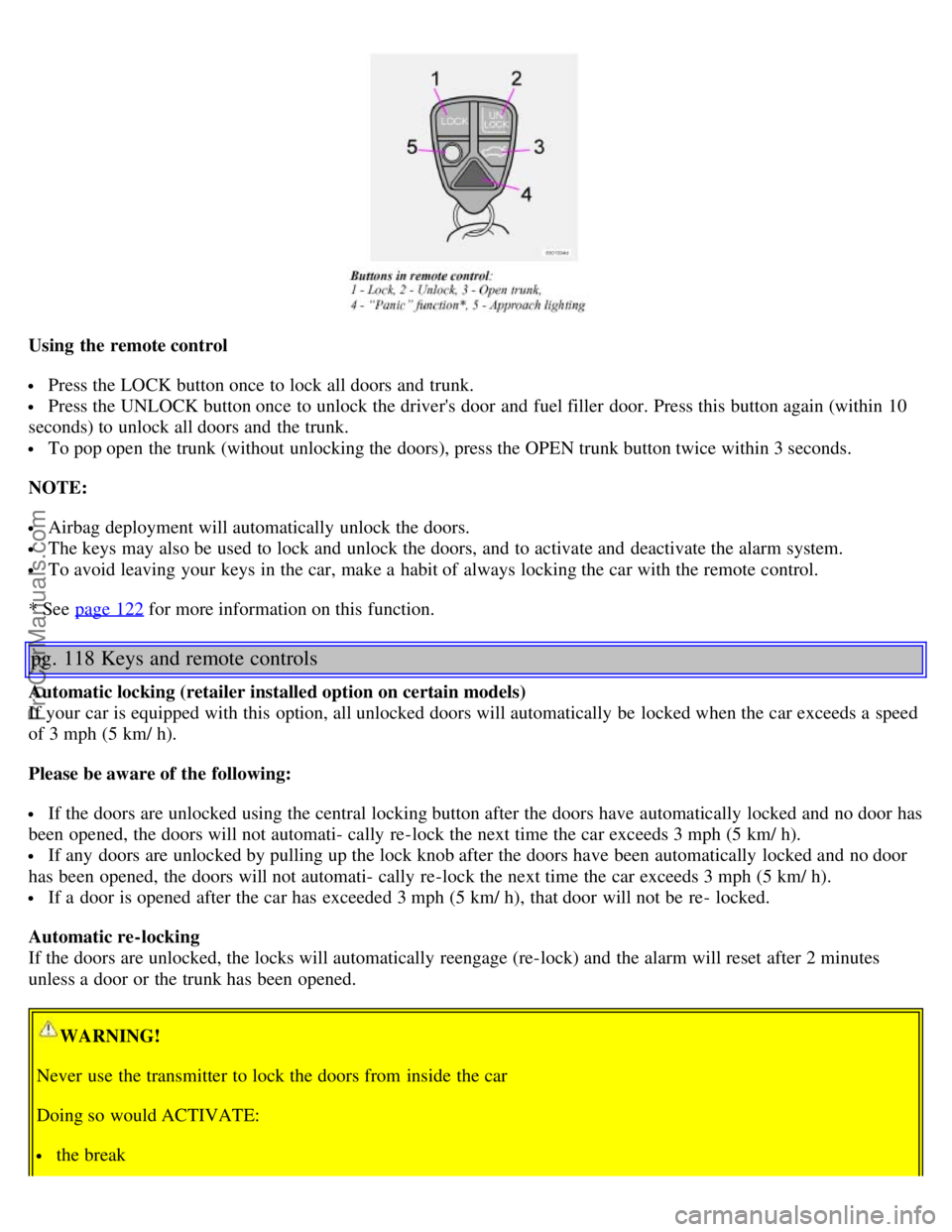
Using the remote control
Press the LOCK button once to lock all doors and trunk.
Press the UNLOCK button once to unlock the driver's door and fuel filler door. Press this button again (within 10
seconds) to unlock all doors and the trunk.
To pop open the trunk (without unlocking the doors), press the OPEN trunk button twice within 3 seconds.
NOTE:
Airbag deployment will automatically unlock the doors.
The keys may also be used to lock and unlock the doors, and to activate and deactivate the alarm system.
To avoid leaving your keys in the car, make a habit of always locking the car with the remote control.
* See page 122
for more information on this function.
pg. 118 Keys and remote controls
Automatic locking (retailer installed option on certain models)
If your car is equipped with this option, all unlocked doors will automatically be locked when the car exceeds a speed
of 3 mph (5 km/ h).
Please be aware of the following:
If the doors are unlocked using the central locking button after the doors have automatically locked and no door has
been opened, the doors will not automati- cally re-lock the next time the car exceeds 3 mph (5 km/ h).
If any doors are unlocked by pulling up the lock knob after the doors have been automatically locked and no door
has been opened, the doors will not automati- cally re-lock the next time the car exceeds 3 mph (5 km/ h).
If a door is opened after the car has exceeded 3 mph (5 km/ h), that door will not be re- locked.
Automatic re-locking
If the doors are unlocked, the locks will automatically reengage (re-lock) and the alarm will reset after 2 minutes
unless a door or the trunk has been opened.
WARNING!
Never use the transmitter to lock the doors from inside the car
Doing so would ACTIVATE:
the break
ProCarManuals.com