2001 VOLVO S60 warning light
[x] Cancel search: warning lightPage 16 of 128

to remove ice or condensation. An LED in the switch will light up.
A timer automatically switches off the heating to the sideview mirrors after approximately 6 minutes and to the rear
window after approxi- mately 12 minutes. The LED will go out correspondingly.
Heated front seats (option)
The front seat heating can be switched on and off as required.
Press the switch once for maximum seat heating. Both LEDs in the switch will be lit.
Press the switch a second time for comfort heating. One LED in the switch will be lit.
Press the switch a third time to turn the heating off completely. The seat heating for the passenger seat should be
switched off when the seat is not occupied.
pg. 43 Trip computer (option)
The trip computer stores information gathered from several systems in your car and has four menus that can be
displayed in the text window.
Driving distance on current fuel reserve
Average fuel consumption
Current fuel consumption
Average speed
NOTE: Warning messages from the car's monitoring systems will override the trip computer function. If a warning
message is displayed in the text window while you are using the trip computer, you must acknowledge the message
by pressing button A. Press button A again to return to the trip computer function.
Trip computer controls
The four trip computer functions can be accessed by twisting control B one step at a time in either direction. Twisting
a fifth time returns you to the original function.
The trip computer can be reset (current data will be erased from system memory) by pressing RESET (button C).
Trip computer functions
Driving distance on current fuel reserve This function shows the approximate distance that can be driven on the fuel
remaining in the tank. This calculation is based on average fuel consumption during the last 12 miles (20 km) of
driving and the amount of fuel remaining in the tank when the reading was taken.
When the driving distance on current fuel reserve is less than 12 miles (20 km), "----" will be displayed in the text
window.
Average fuel consumption
ProCarManuals.com
Page 18 of 128
Temporarily disengaging cruise control
Press 0 to temporarily disengage cruise control. Press "resume" to return to the previously set speed.
Press the brake pedal. Press "resume" to return to the previously set speed..
WARNING!
Cruise control should not be used in heavy traffic or when driving on wet or slippery roads. Cruise control may not
maintain set speed on steep downgrades.
pg. 45 Parking brake, electric socket/ cigarette lighter
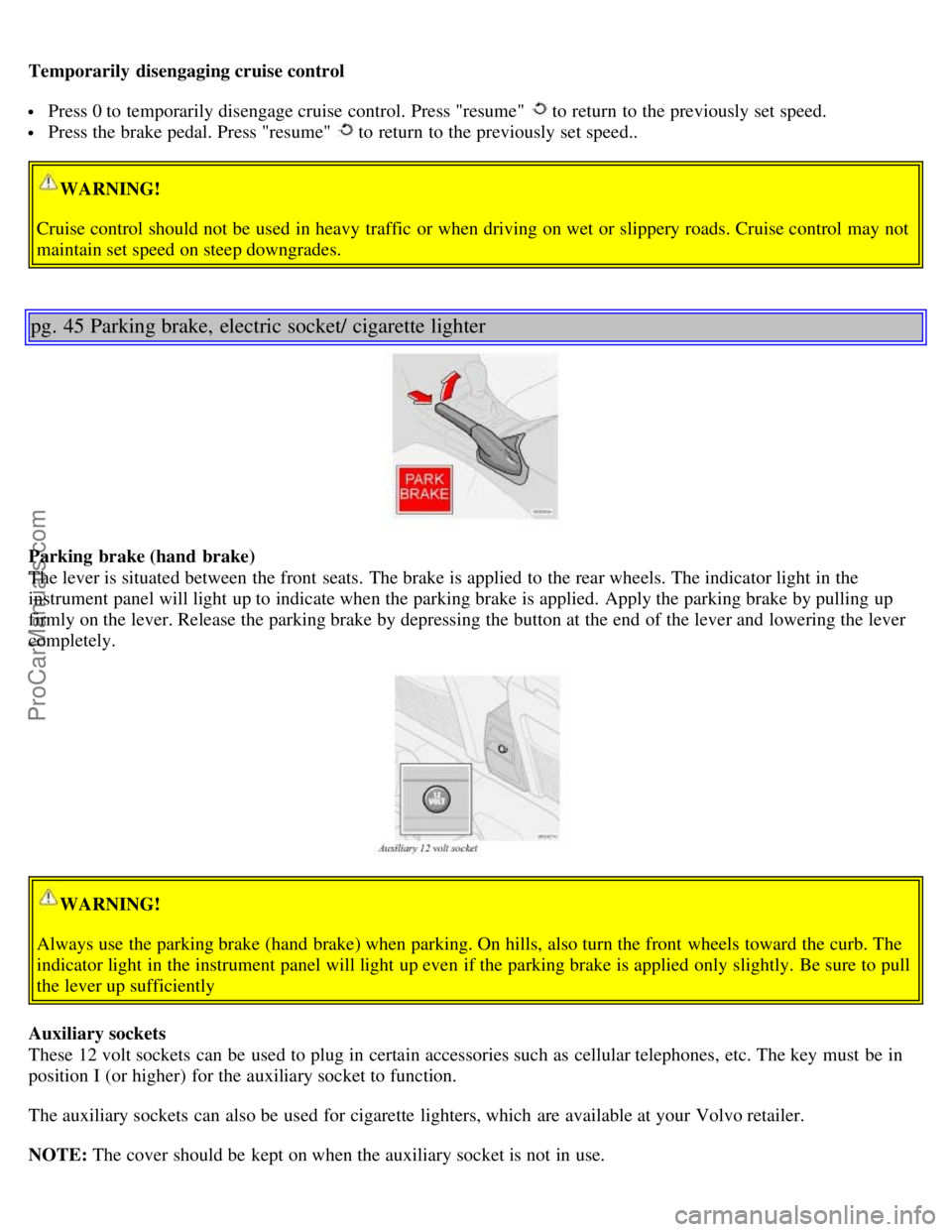
Parking brake (hand brake)
The lever is situated between the front seats. The brake is applied to the rear wheels. The indicator light in the
instrument panel will light up to indicate when the parking brake is applied. Apply the parking brake by pulling up
firmly on the lever. Release the parking brake by depressing the button at the end of the lever and lowering the lever
completely.
WARNING!
Always use the parking brake (hand brake) when parking. On hills, also turn the front wheels toward the curb. The
indicator light in the instrument panel will light up even if the parking brake is applied only slightly. Be sure to pull
the lever up sufficiently
Auxiliary sockets
These 12 volt sockets can be used to plug in certain accessories such as cellular telephones, etc. The key must be in
position I (or higher) for the auxiliary socket to function.
The auxiliary sockets can also be used for cigarette lighters, which are available at your Volvo retailer.
NOTE: The cover should be kept on when the auxiliary socket is not in use.
ProCarManuals.com
Page 19 of 128

Ashtrays
Volvo cars in North America do not have an ashtray in the front seat as standard equipment. If you want to have an
ashtray in the front seat, please contact your Volvo retailer.
pg. 46 Electrically operated windows
Electrically operated windows
The electrically operated windows are controlled by buttons in the arm rests. The ignition switch must be ON *
(ignition key in position I, II or the engine running) for the electrically operated windows to function.
To lower: Press down the front edge of the button to the first detent (" stop").
To raise: Lightly pull up the front edge of the button to the first detent (" stop").
* The electrically operated windows will also function after the ignition has been switched off as long as neither of
the front doors has been opened.
Auto up/ down function (front doors only):
Either front door window can be opened or closed automatically.
Auto down: Press the front part of the button as far down as possible and release it immediately. To stop the window
at any time, pull the button up.
Auto up: Pull the front part of the button up as far as possible and release it immediately. To stop the window at any
time, press the button down.
NOTE: The electrically operated windows in the front seat have an overload protecting circuit breaker which reverses
movement of the electrically operated windows to their starting points if they are obstructed in any way. There- after
the windows will operate normally again.
WARNING!
Always remove the ignition key when the vehicle is unattended.
Make sure that childrens' hands are clear before raising the windows.
Never leave children unattended in the car.
ProCarManuals.com
Page 21 of 128
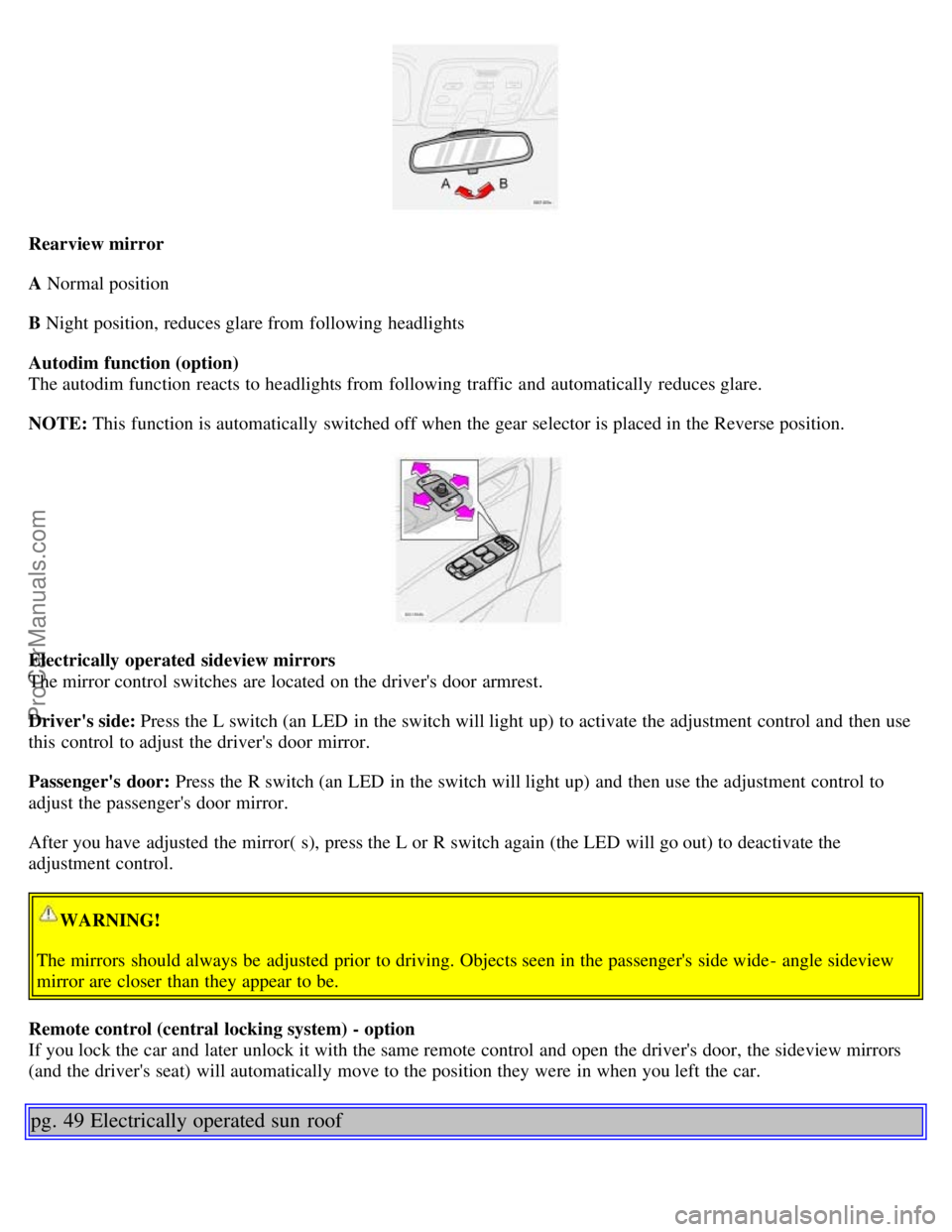
Rearview mirror
A Normal position
B Night position, reduces glare from following headlights
Autodim function (option)
The autodim function reacts to headlights from following traffic and automatically reduces glare.
NOTE: This function is automatically switched off when the gear selector is placed in the Reverse position.
Electrically operated sideview mirrors
The mirror control switches are located on the driver's door armrest.
Driver's side: Press the L switch (an LED in the switch will light up) to activate the adjustment control and then use
this control to adjust the driver's door mirror.
Passenger's door: Press the R switch (an LED in the switch will light up) and then use the adjustment control to
adjust the passenger's door mirror.
After you have adjusted the mirror( s), press the L or R switch again (the LED will go out) to deactivate the
adjustment control.
WARNING!
The mirrors should always be adjusted prior to driving. Objects seen in the passenger's side wide - angle sideview
mirror are closer than they appear to be.
Remote control (central locking system) - option
If you lock the car and later unlock it with the same remote control and open the driver's door, the sideview mirrors
(and the driver's seat) will automatically move to the position they were in when you left the car.
pg. 49 Electrically operated sun roof
ProCarManuals.com
Page 27 of 128
6. Horn4
7. Instrument panel30
8. Audio controls67
9. Windshield wipers41
10. Parking brake (hand brake)45
11. Center console switches37, 38
12. Climate control51
13. Audio system61
14. 12 V socket45
15. Hazard warning flashers42
16. Glove compartment108
17. Panel vents53
18. Text window30
19. Temperature gauge30
20. Odometer/ Trip odometer/Cruise control indicator30/ 44
21. Speedometer30
22. Turn signal indicators30
23. Tachometer30
24. Ambient temperature/ Clock/Selected gear indicator30
25. Fuel gauge30
26. Indicator and warning symbols31
27. Cup holder (option)108
28. Panel vents53
29. Instrument lighting39
30. Lighting panel39
31. Reading lights104
32. Interior lighting104
33. Sun roof control49
34. Seat belt reminder4, 10
35. Rearview mirror48
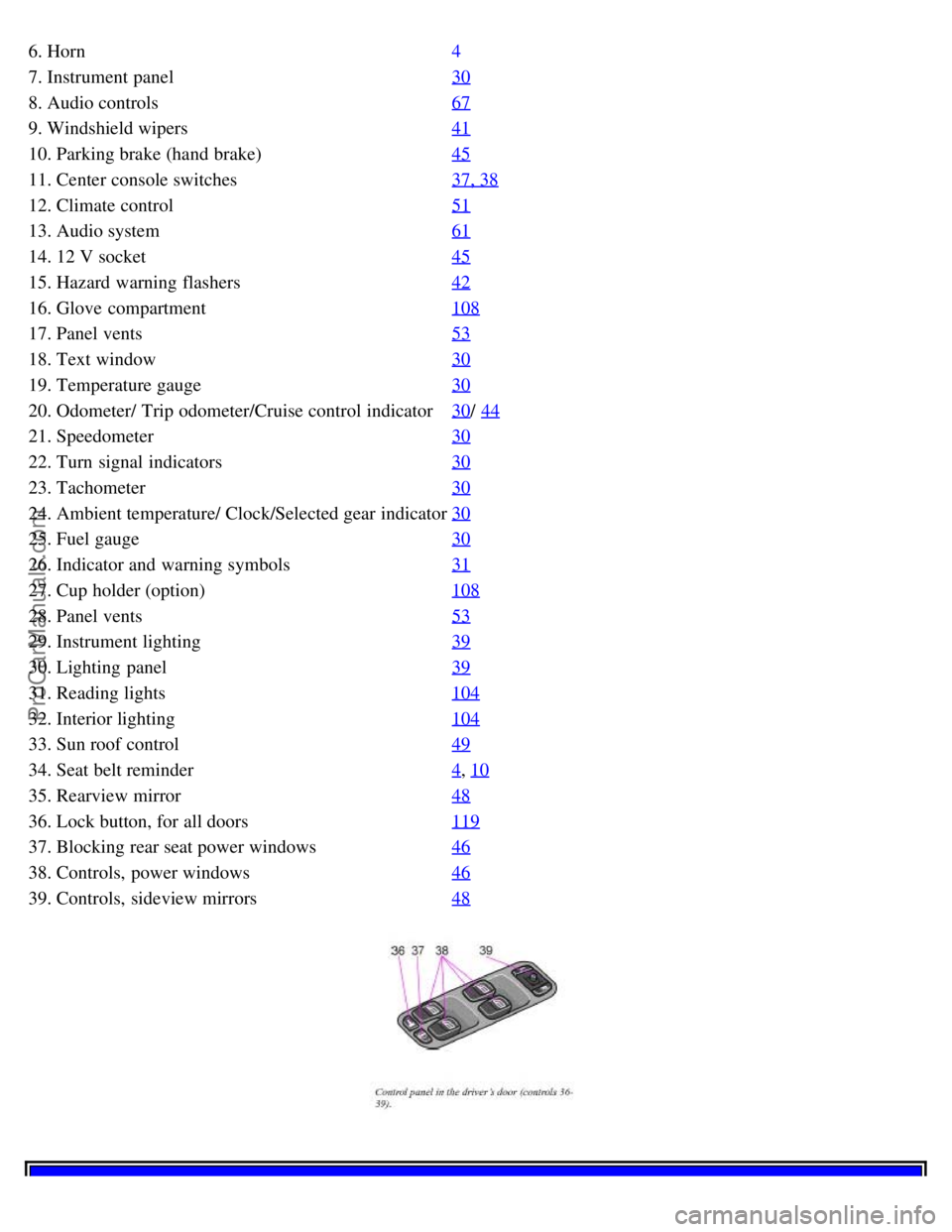
36. Lock button, for all doors119
37. Blocking rear seat power windows46
38. Controls, power windows46
39. Controls, sideview mirrors48
ProCarManuals.com
Page 52 of 128
Center head restraints
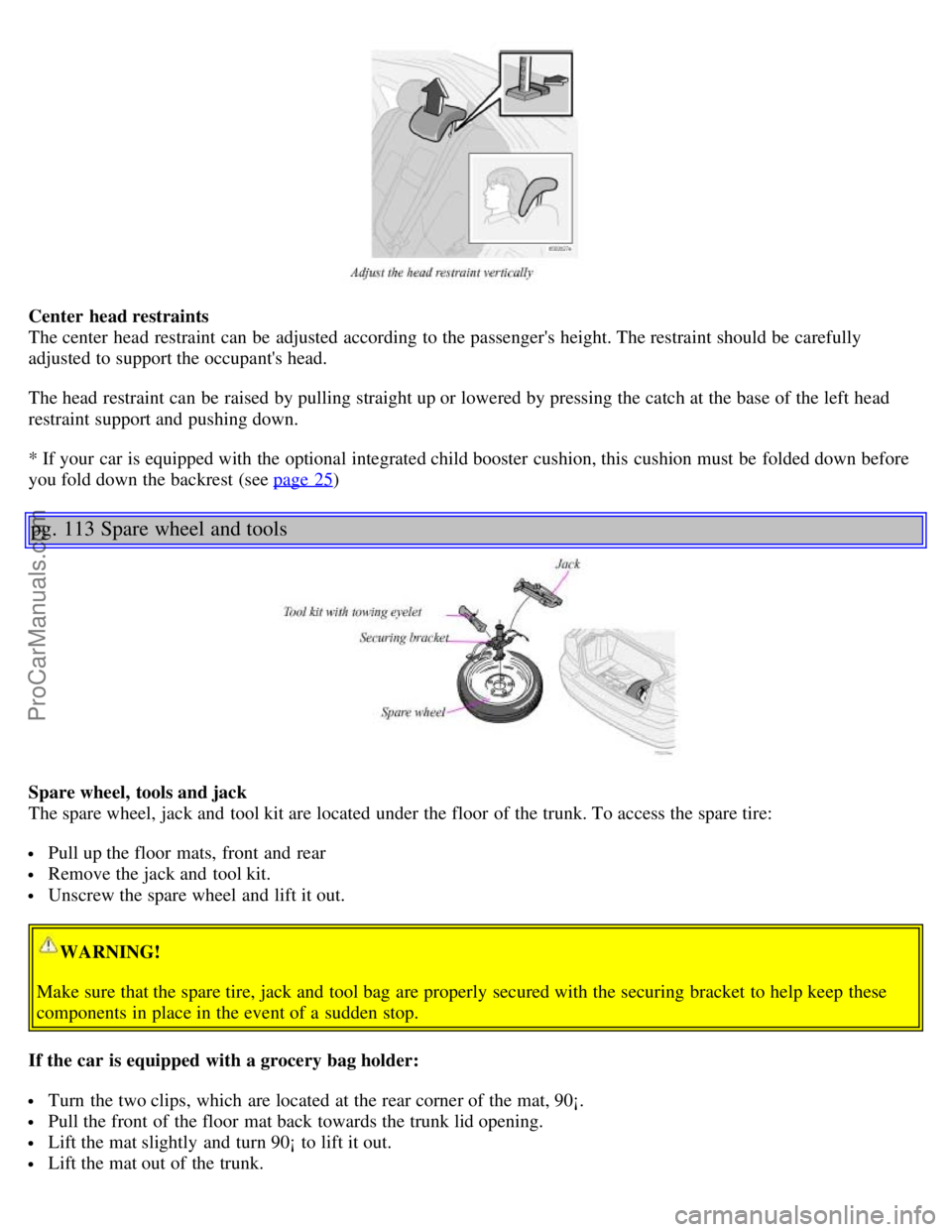
The center head restraint can be adjusted according to the passenger's height. The restraint should be carefully
adjusted to support the occupant's head.
The head restraint can be raised by pulling straight up or lowered by pressing the catch at the base of the left head
restraint support and pushing down.
* If your car is equipped with the optional integrated child booster cushion, this cushion must be folded down before
you fold down the backrest (see page 25
)
pg. 113 Spare wheel and tools
Spare wheel, tools and jack
The spare wheel, jack and tool kit are located under the floor of the trunk. To access the spare tire:
Pull up the floor mats, front and rear
Remove the jack and tool kit.
Unscrew the spare wheel and lift it out.
WARNING!
Make sure that the spare tire, jack and tool bag are properly secured with the securing bracket to help keep these
components in place in the event of a sudden stop.
If the car is equipped with a grocery bag holder:
Turn the two clips, which are located at the rear corner of the mat, 90¡.
Pull the front of the floor mat back towards the trunk lid opening.
Lift the mat slightly and turn 90¡ to lift it out.
Lift the mat out of the trunk.
ProCarManuals.com
Page 54 of 128
2 0 0 1
VOLVO S60
Interior
pg. 99 Interior
Front seats 100
Interior lighting104
Floor mats (option)105
Storage compartments106
Rear seat and trunk111
Spare wheel and tools113
pg. 100 Front seats
Manual height adjustment - front seat
The front edges of the driver and passenger seat cushions can be adjusted to seven different settings and the rear
edges to nine different settings.
Lever (A) - adjusting the front edge of the seat.
Lever (B) - adjusting the rear edge of the seat.
Manual front-rear adjustment
The seat can be moved forward or rearward by pulling up on the front -rear adjustment bar.
Check that the seat is securely locked into position after adjusting.
WARNING!
Do not adjust the seat while driving. The seat should be adjusted so that the brake pedal can be depressed fully. In
addition, position the seat as far rearward as comfort and control allow.
ProCarManuals.com
Page 58 of 128

You can disconnect the automatic function by pressing the courtesy light button for more than 3 seconds. Briefly
pressing the courtesy light button again automatically reconnects the function.
The courtesy light timer periods can be changed. Contact your Volvo retailer.
Reading lights - front/ rear
The reading lights can be switched on or off by pressing the respective buttons. These lights switch off automatically
after 10 minutes if the engine is not running. If the engine is running, the lights stay on indefinitely. The lights can be
switched off at any time by pressing the button.
pg. 105 Floor mats (option)
Vanity mirror
The light comes on when you open the cover.
Floor mats (option)
Volvo offers floor mats specially manufactured for your car. They must be properly placed and secured in the mat
clips.
WARNING!
An extra mat on the driver's floor can cause the accelerator pedal to catch. Check that the movement of the
accelerator pedal is not impeded. No more than one protective floor covering may be used at one time.
ProCarManuals.com