Page 75 of 128

Arming the alarm
Press the LOCK button on the remote control, lock the car using the key in the driver's door or press the central lock
button on one of the front doors with the door open. One long flash of the turn signals will confirm that the alarm is
armed.
Disarming the alarm
Press the UNLOCK button on the remote control or unlock the doors with the key.
Turning off (stopping) the alarm
If the alarm is sounding, it can be stopped by pressing the UNLOCK button on the remote control or by unlocking the
driver's door with the key.
Visual alarm signal
The visual alarm signal is given by flashing all turn signals and turning on the interior lighting for approximately 5
minutes.
Audible alarm signal
An audible alarm signal is given by a battery powered siren. One alarm cycle lasts for 25 seconds.
"Panic" button
In an emergency situation, this feature can be used to attract attention.
Activate the "panic" button by pressing the red button on the remote control (see illustration on page 117
) for at least
3 seconds or by pressing this button twice within 3 seconds. The turn signals will flash, the interior lights will go on
and the car's horn will sound.
The function can be turned off by pressing any of the buttons on the remote control or will stop automatically after 25
seconds. When a button is pressed, there is a 5 second delay before the panic alarm is deactivated.
NOTE: This button will NOT unlock the car.
pg. 123 Alarm
Temporarily turning off the alarm sensor( s) - option
This button will only be found in cars equipped with the optional inclination and/ or movement sensors.
In certain situations it may be desirable to turn off the optional inclination and movement alarm sensors if, for
example, you drive your car onto a ferry where the rocking of the boat could trigger the alarm or if a pet is left in the
car with the doors locked.
To temporarily turn off the inclination and movement alarm sensors from the alarm system: B From the time the
ignition key is turned from the Drive position (position II) until you lock the car, you can press the button in the
ProCarManuals.com
Page 76 of 128

center console*. The LED in the switch will light up and a message will be displayed in the text window to indicate
that the sensors are disconnected.
The car can then be locked in the usual way to set the alarm.
NOTE: The optional sensors are automatically reconnected to the alarm system the next time the car is unlocked and
then locked again.
LED alarm status signals The status of the alarm system is indicated by the red LED at the top of the dash:
LED off - the alarm is not armed
LED flashes once per second - the alarm is armed
LED flashes rapidly before the ignition is switched on - the alarm has been triggered
Fault in the alarm system: If a fault has been detected in the alarm system, a message will be displayed in the text
window. Contact your Volvo retailer.
Automatic re-lock/ re-arm system
If the car is unlocked with the remote, the car will re- lock and the alarm will re- arm after 2 minutes unless a door or
the trunk has been opened.
* The position of this button may vary, depending on the specifications of your car.
Contents | Top of Page
ProCarManuals.com
Page 119 of 128
2 0 0 1
VOLVO S60
Index
pg. 203 Index
A
A/ C (air conditioning) 56
, 59
ABS2 , 31 , 138
Accessory bracket109
Adjustable steering wheel36
Advanced User Mode (AUM) - radio72
Air bags - dual threshold/ stage13
Air distribution53 , 56 , 60
Air filter170
Air quality sensor57
Air vents53
Airbag - Side Impact (SIPS)18
Airbags (front)12
Alarm115 , 122
Anti-lock Brake System (ABS)02 , 31
Approach lighting40
Ashtray45 , 107
Audio61
Audio systems - general information81
Audio systems - specifications80
AUTO (climate control)55
Electronic Climate Control, ECC54
Automatic transmission130 , 133
Automatic transmission - adaptive system134
Automatic transmission - kickdown134
Auxiliary lamps37
Average speed43
B
Back up light183
Backrest111
Bass65
Battery168 , 176 , 199
Battery - replacing177
Belt check169
ProCarManuals.com
Page 126 of 128
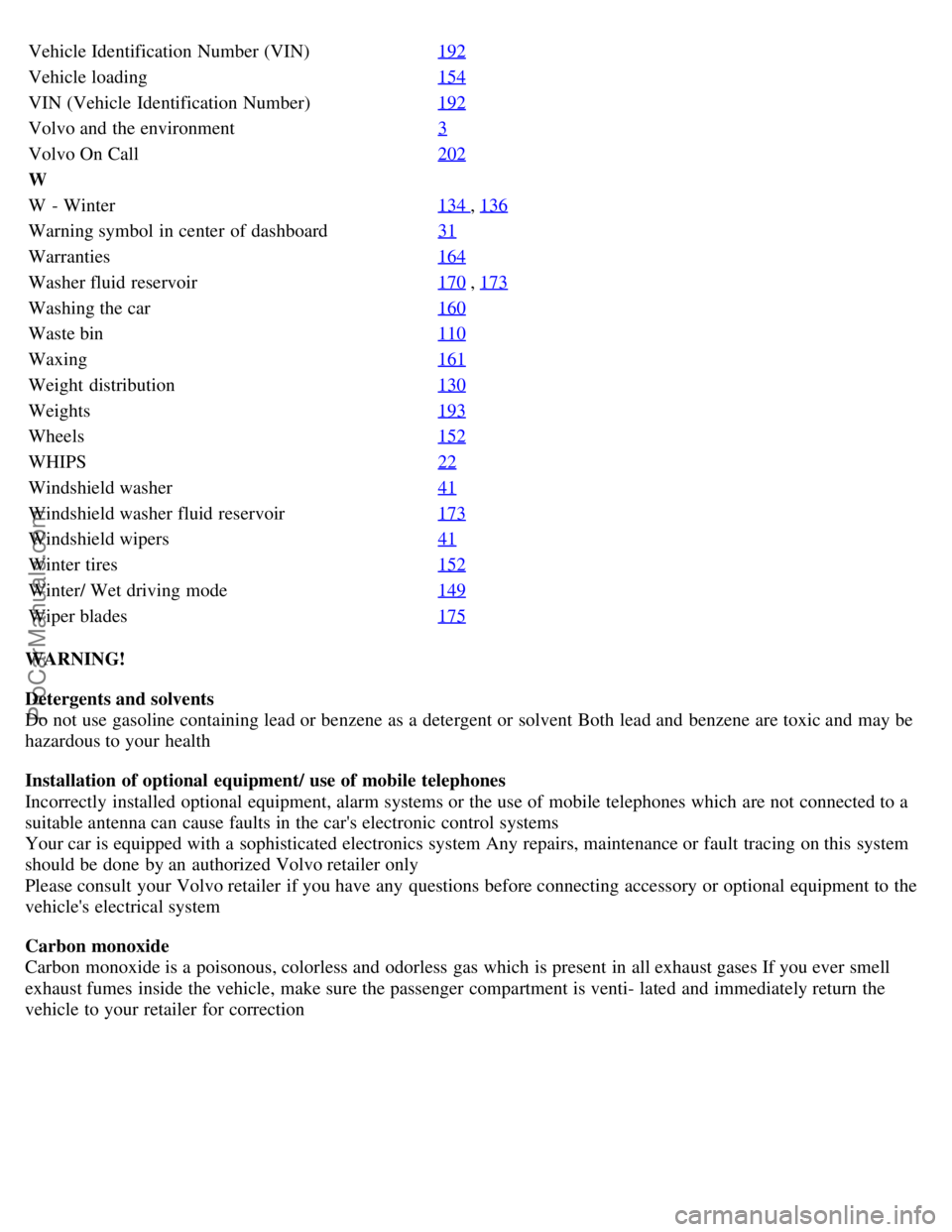
Vehicle Identification Number (VIN)192
Vehicle loading154
VIN (Vehicle Identification Number)192
Volvo and the environment3
Volvo On Call202
W
W - Winter134
, 136
Warning symbol in center of dashboard31
Warranties164
Washer fluid reservoir170 , 173
Washing the car160
Waste bin110
Waxing161
Weight distribution130
Weights193
Wheels152
WHIPS22
Windshield washer41
Windshield washer fluid reservoir173
Windshield wipers41
Winter tires152
Winter/ Wet driving mode149
Wiper blades175
WARNING!
Detergents and solvents
Do not use gasoline containing lead or benzene as a detergent or solvent Both lead and benzene are toxic and may be
hazardous to your health
Installation of optional equipment/ use of mobile telephones
Incorrectly installed optional equipment, alarm systems or the use of mobile telephones which are not connected to a
suitable antenna can cause faults in the car's electronic control systems
Your car is equipped with a sophisticated electronics system Any repairs, maintenance or fault tracing on this system
should be done by an authorized Volvo retailer only
Please consult your Volvo retailer if you have any questions before connecting accessory or optional equipment to the
vehicle's electrical system
Carbon monoxide
Carbon monoxide is a poisonous, colorless and odorless gas which is present in all exhaust gases If you ever smell
exhaust fumes inside the vehicle, make sure the passenger compartment is venti- lated and immediately return the
vehicle to your retailer for correction
ProCarManuals.com
