Page 13 of 268
’01Camry_U (L/O 0009)
52001 MY CAMRY (OM33528U)
Indicator symbols on the instrument panel
Brake system warning light∗
1
Seat belt reminder light∗
1
Discharge warning light∗
1
Malfunction indicator lamp∗
1
Low oil pressure warning light∗
1
Anti−lock brake system warning light∗
1
Open door warning light∗
1
Rear light failure warning light∗
1
SRS warning light∗
1
Low windshield washer fluid level warning
light∗
1
or or
Overdrive−off indicator light
Cruise control indicator light
∗
2
Headlight high beam indicator light Turn signal indicator lights Traction control system off indicator/warning
light
∗
1
Automatic transmission indicator lights
ProCarManuals.com
Page 85 of 268
’01Camry_U (L/O 0009)
772001 MY CAMRY (OM33528U)
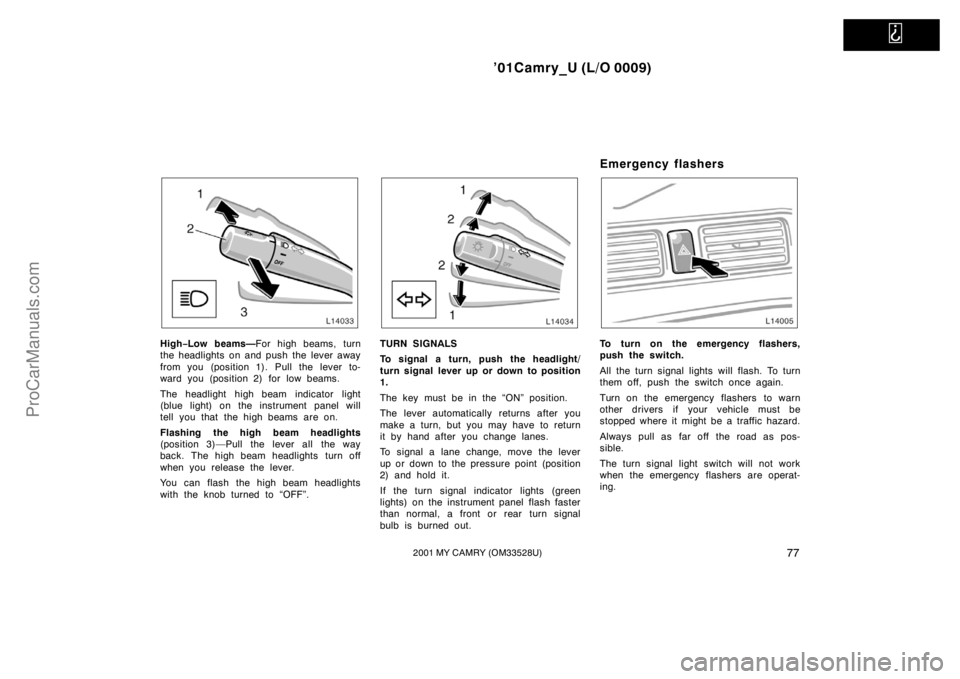
High−Low beams—For high beams, turn
the headlights on and push the lever away
from you (position 1). Pull the lever to-
ward you (position 2) for low beams.
The headlight high beam indicator light
(blue light) on the instrument panel will
tell you that the high beams are on.
Flashing the high beam headlights
(position 3)—Pull the lever all the way
back. The high beam headlights turn off
when you release the lever.
You can flash the high beam headlights
with the knob turned to “OFF”.TURN SIGNALS
To signal a turn, push the headlight/
turn signal lever up or down to position
1.
The key must be in the “ON” position.
The lever automatically returns after you
make a turn, but you may have to return
it by hand after you change lanes.
To signal a lane change, move the lever
up or down to the pressure point (position
2) and hold it.
If the turn signal indicator lights (green
lights) on the instrument panel flash faster
than normal, a front or rear turn signal
bulb is burned out.
Emergency flashers
To turn on the emergency flashers,
push the switch.
All the turn signal lights will flash. To turn
them off, push the switch once again.
Turn on the emergency flashers to warn
other drivers if your vehicle must be
stopped where it might be a traffic hazard.
Always pull as far off the road as pos-
sible.
The turn signal light switch will not work
when the emergency flashers are operat-
ing.
ProCarManuals.com
Page 134 of 268
’01Camry_U (L/O 0009)
1262001 MY CAMRY (OM33528U)
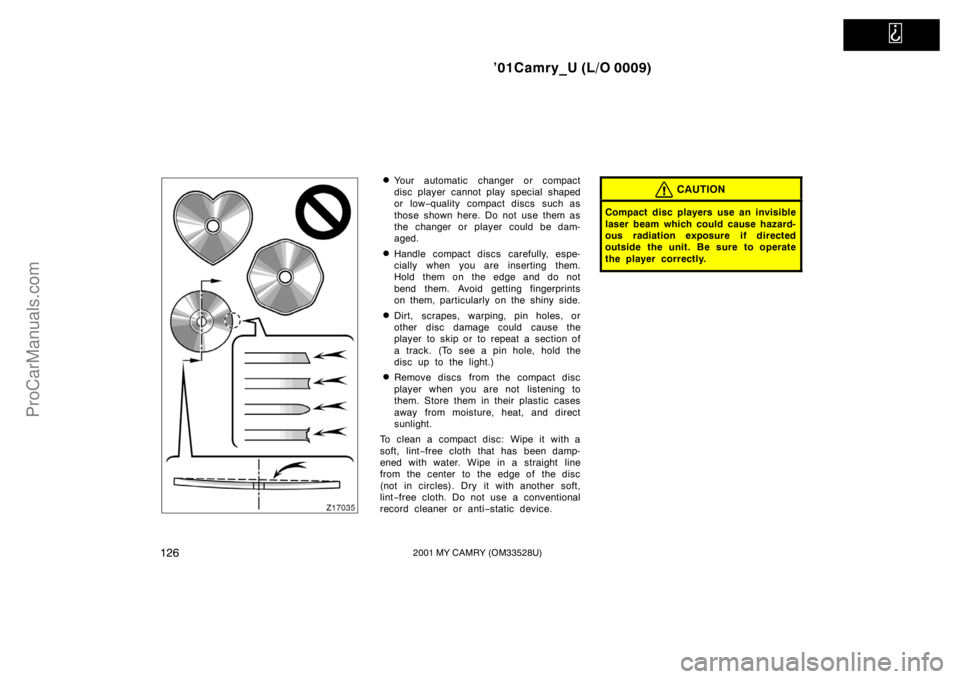
�Your automatic changer or compact
disc player cannot play special shaped
or low−quality compact discs such as
those shown here. Do not use them as
the changer or player could be dam-
aged.
�Handle compact discs carefully, espe-
cially when you are inserting them.
Hold them on the edge and do not
bend them. Avoid getting fingerprints
on them, particularly on the shiny side.
�Dirt, scrapes, warping, pin holes, or
other disc damage could cause the
player to skip or to repeat a section of
a track. (To see a pin hole, hold the
disc up to the light.)
�Remove discs from the compact disc
player when you are not listening to
them. Store them in their plastic cases
away from moisture, heat, and direct
sunlight.
To clean a compact disc: Wipe it with a
soft, lint−free cloth that has been damp-
ened with water. Wipe in a straight line
from the center to the edge of the disc
(not in circles). Dry it with another soft,
lint−free cloth. Do not use a conventional
record cleaner or anti−static device.
CAUTION
Compact disc players use an invisible
laser beam which could cause hazard-
ous radiation exposure if directed
outside the unit. Be sure to operate
the player correctly.
ProCarManuals.com
Page 247 of 268
’01Camry_U (L/O 0009)
2392001 MY CAMRY (OM33528U)
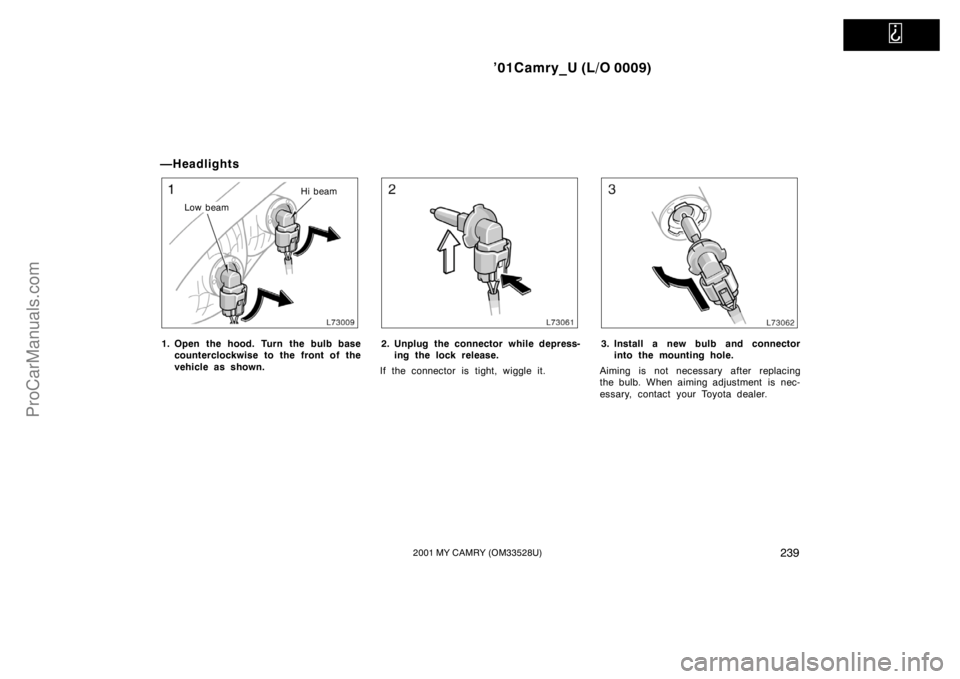
—Headlights
Low beamHi beam
1. Open the hood. Turn the bulb base
counterclockwise to the front of the
vehicle as shown.2. Unplug the connector while depress-
ing the lock release.
If the connector is tight, wiggle it.3. Install a new bulb and connector
into the mounting hole.
Aiming is not necessary after replacing
the bulb. When aiming adjustment is nec-
essary, contact your Toyota dealer.
ProCarManuals.com