Page 3 of 268

’01Camry_U (L/O 0009)
iv2001 MY CAMRY (OM33528U)
Spark ignition system of
your Toyota
The spark ignition system in your Toyota meets all re-
quirements of the Canadian Interference−Causing Equip-
ment Standard.
Installation of a mobile
two−way radio system
As the installation of a mobile two−way radio system in
your vehicle could affect electronic systems such as
multiport fuel injection system/sequential multiport fuel
injection system, cruise control system, anti−lock brake
system, traction control system, SRS airbag system and
seat belt pretensioner system, be sure to check with
your Toyota dealer for precautionary measures or special
instructions regarding installation.
Scrapping of your Toyota
The SRS airbag and seat belt pretensioner devices in
your Toyota contain explosive chemicals. If the vehicle
is scrapped with the airbags and pretensioners left as
they are, this may cause an accident such as fire. Be
sure to have the systems of the SRS airbag and seat
belt pretensioner removed and disposed of by the quali-
fied service shop or by your Toyota dealer before you
dispose of your vehicle.
ProCarManuals.com
Page 11 of 268
’01Camry_U (L/O 0009)
32001 MY CAMRY (OM33528U)
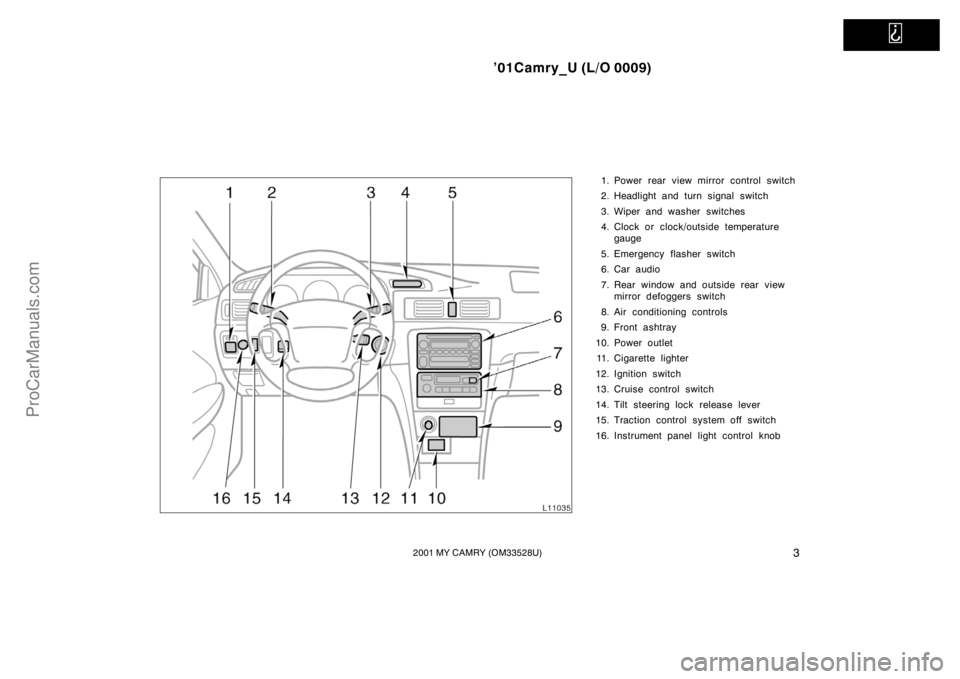
1. Power rear view mirror control switch
2. Headlight and turn signal switch
3. Wiper and washer switches
4. Clock or clock/outside temperature
gauge
5. Emergency flasher switch
6. Car audio
7. Rear window and outside rear view
mirror defoggers switch
8. Air conditioning controls
9. Front ashtray
10. Power outlet
11. Cigarette lighter
12. Ignition switch
13. Cruise control switch
14. Tilt steering lock release lever
15. Traction control system off switch
16. Instrument panel light control knob
ProCarManuals.com
Page 13 of 268
’01Camry_U (L/O 0009)
52001 MY CAMRY (OM33528U)
Indicator symbols on the instrument panel
Brake system warning light∗
1
Seat belt reminder light∗
1
Discharge warning light∗
1
Malfunction indicator lamp∗
1
Low oil pressure warning light∗
1
Anti−lock brake system warning light∗
1
Open door warning light∗
1
Rear light failure warning light∗
1
SRS warning light∗
1
Low windshield washer fluid level warning
light∗
1
or or
Overdrive−off indicator light
Cruise control indicator light
∗
2
Headlight high beam indicator light Turn signal indicator lights Traction control system off indicator/warning
light
∗
1
Automatic transmission indicator lights
ProCarManuals.com
Page 14 of 268
’01Camry_U (L/O 0009)
62001 MY CAMRY (OM33528U)
Slip indicator light
∗
1: For details, see “Service reminder indicators and warning
buzzers” in Section 1−5.
∗
2: If this light flashes, see “Cruise control” in Section 1−6.
ProCarManuals.com
Page 99 of 268
’01Camry_U (L/O 0009)
912001 MY CAMRY (OM33528U)
OPERATION OF INSTRUMENTS AND
CONTROLS
Ignition switch, Transmission and Parking
brake
Ignition switch with steering lock92 . . . . . . . . . . . . . . . . . . . . . . . . . . . . . . .
Automatic transmission93 . . . . . . . . . . . . . . . . . . . . . . . . . . . . . . . . . . . . . .
Manual transmission97 . . . . . . . . . . . . . . . . . . . . . . . . . . . . . . . . . . . . . . . . .
Parking brake98 . . . . . . . . . . . . . . . . . . . . . . . . . . . . . . . . . . . . . . . . . . . . . . .
Cruise control98 . . . . . . . . . . . . . . . . . . . . . . . . . . . . . . . . . . . . . . . . . . . . . . .
SECTION 1− 6
ProCarManuals.com
Page 102 of 268
’01Camry_U (L/O 0009)
942001 MY CAMRY (OM33528U)
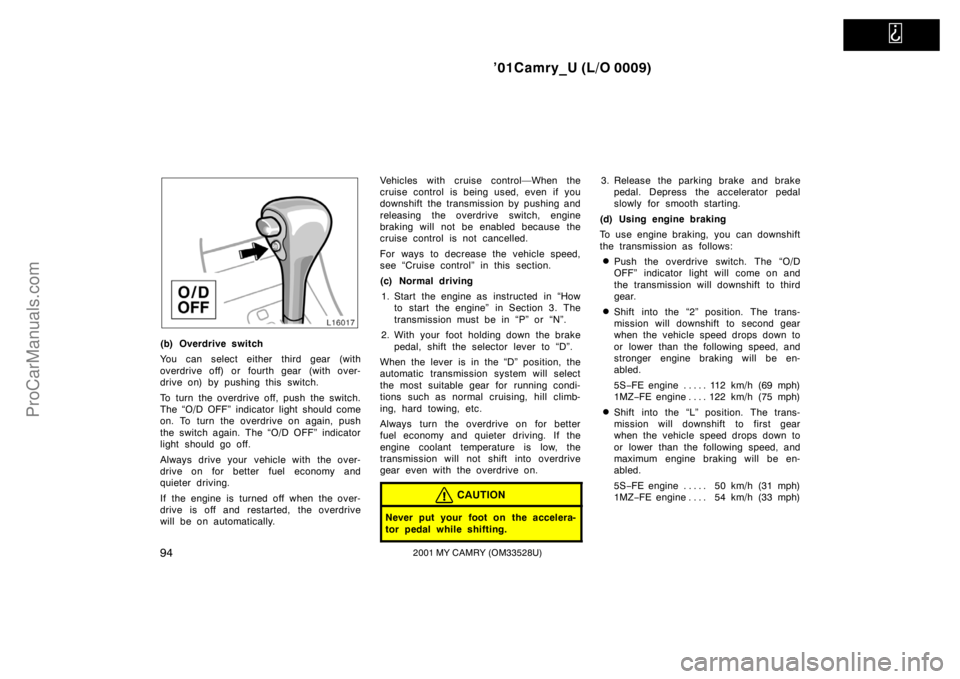
(b) Overdrive switch
You can select either third gear (with
overdrive off) or fourth gear (with over-
drive on) by pushing this switch.
To turn the overdrive off, push the switch.
The “O/D OFF” indicator light should come
on. To turn the overdrive on again, push
the switch again. The “O/D OFF” indicator
light should go off.
Always drive your vehicle with the over-
drive on for better fuel economy and
quieter driving.
If the engine is turned off when the over-
drive is off and restarted, the overdrive
will be on automatically.Vehicles with cruise control—When the
cruise control is being used, even if you
downshift the transmission by pushing and
releasing the overdrive switch, engine
braking will not be enabled because the
cruise control is not cancelled.
For ways to decrease the vehicle speed,
see “Cruise control” in this section.
(c) Normal driving
1. Start the engine as instructed in “How
to start the engine” in Section 3. The
transmission must be in “P” or “N”.
2. With your foot holding down the brake
pedal, shift the selector lever to “D”.
When the lever is in the “D” position, the
automatic transmission system will select
the most suitable gear for running condi-
tions such as normal cruising, hill climb-
ing, hard towing, etc.
Always turn the overdrive on for better
fuel economy and quieter driving. If the
engine coolant temperature is low, the
transmission will not shift into overdrive
gear even with the overdrive on.
CAUTION
Never put your foot on the accelera-
tor pedal while shifting.
3. Release the parking brake and brake
pedal. Depress the accelerator pedal
slowly for smooth starting.
(d) Using engine braking
To use engine braking, you can downshift
the transmission as follows:
�Push the overdrive switch. The “O/D
OFF” indicator light will come on and
the transmission will downshift to third
gear.
�Shift into the “2” position. The trans-
mission will downshift to second gear
when the vehicle speed drops down to
or lower than the following speed, and
stronger engine braking will be en-
abled.
5S−FE engine 112 km/h (69 mph). . . . .
1MZ−FE engine 122 km/h (75 mph). . . .
�Shift into the “L” position. The trans-
mission will downshift to first gear
when the vehicle speed drops down to
or lower than the following speed, and
maximum engine braking will be en-
abled.
5S−FE engine 50 km/h (31 mph). . . . .
1MZ−FE engine 54 km/h (33 mph). . . .
ProCarManuals.com
Page 103 of 268
’01Camry_U (L/O 0009)
952001 MY CAMRY (OM33528U)
Vehicles with cruise control—When the
cruise control is being used, even if you
downshift the transmission by pushing and
releasing the overdrive switch, engine
braking is not enabled because the cruise
control is not cancelled.
For ways to decrease the vehicle speed,
see “Cruise control” in this section.
CAUTION
Be careful when downshifting on a
slippery surface. Abrupt shifting
could cause the vehicle to spin or
skid.
(e) Using “2” and “L” positions
The “2” and “L” positions are used for
strong engine braking as described pre-
viously.
With the selector lever in “2” or “L”, you
can start the vehicle in motion as with the
lever in “D”.
With the selector lever in “2”, the vehicle
will start in first gear and automatically
shift to second gear.
With the selector lever in “L”, the trans-
mission is engaged in first gear.
NOTICE
�Be careful not to over−rev the en-
gine. Watch the tachometer to keep
engine rpm from going into the red
zone. The approximate maximum al-
lowable speed for each position is
given below for your reference:
“2” 125 km/h (77 mph). . . . . . . . . . . .
“L” 69 km/h (42 mph). . . . . . . . . . . .
�Do not continue hill climbing or
hard towing for a long time in the
“2” or “L” position. This may cause
severe automatic transmission dam-
age from overheating. To prevent
such damage, “D” position should
be used in hill climbing or hard
towing.
(f) Backing up
1. Bring the vehicle to a complete stop.
2. With the brake pedal held down with
your foot, shift the selector lever to the
“R” position.
NOTICE
Never shift into reverse while the ve-
hicle is moving.
(g) Parking
1. Bring the vehicle to a complete stop.
2. Pull the parking brake lever up fully to
securely apply the parking brake.
3. With the brake pedal pressed down,
shift the selector lever to the “P” posi-
tion.
CAUTION
Never attempt to move the selector
lever into “P” position under any cir-
cumstances while the vehicle is mov-
ing. Serious mechanical damage and
loss of vehicle control may result.
(h) Good driving practice
�If the transmission repeatedly shifts up
and down between third gear and over-
drive when climbing a gentle slope, the
overdrive should be turned off. Be sure
to turn the switch on immediately after-
ward.
�When towing a trailer, in order to main-
tain engine braking efficiency, do not
use overdrive.
ProCarManuals.com
Page 106 of 268
’01Camry_U (L/O 0009)
982001 MY CAMRY (OM33528U)
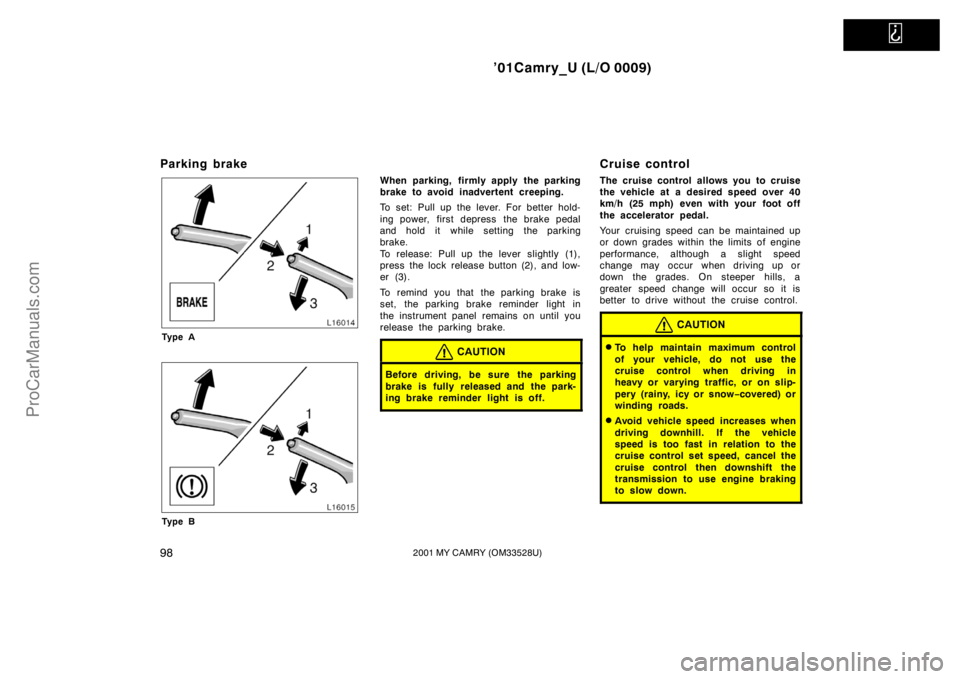
Parking brake
Ty p e A
Ty p e B
When parking, firmly apply the parking
brake to avoid inadvertent creeping.
To set: Pull up the lever. For better hold-
ing power, first depress the brake pedal
and hold it while setting the parking
brake.
To release: Pull up the lever slightly (1),
press the lock release button (2), and low-
er (3).
To remind you that the parking brake is
set, the parking brake reminder light in
the instrument panel remains on until you
release the parking brake.
CAUTION
Before driving, be sure the parking
brake is fully released and the park-
ing brake reminder light is off.
Cruise control
The cruise control allows you to cruise
the vehicle at a desired speed over 40
km/h (25 mph) even with your foot off
the accelerator pedal.
Your cruising speed can be maintained up
or down grades within the limits of engine
performance, although a slight speed
change may occur when driving up or
down the grades. On steeper hills, a
greater speed change will occur so it is
better to drive without the cruise control.
CAUTION
�To help maintain maximum control
of your vehicle, do not use the
cruise control when driving in
heavy or varying traffic, or on slip-
pery (rainy, icy or snow−covered) or
winding roads.
�Avoid vehicle speed increases when
driving downhill. If the vehicle
speed is too fast in relation to the
cruise control set speed, cancel the
cruise control then downshift the
transmission to use engine braking
to slow down.
ProCarManuals.com