Page 22 of 268
’01Camry_U (L/O 0009)
142001 MY CAMRY (OM33528U)
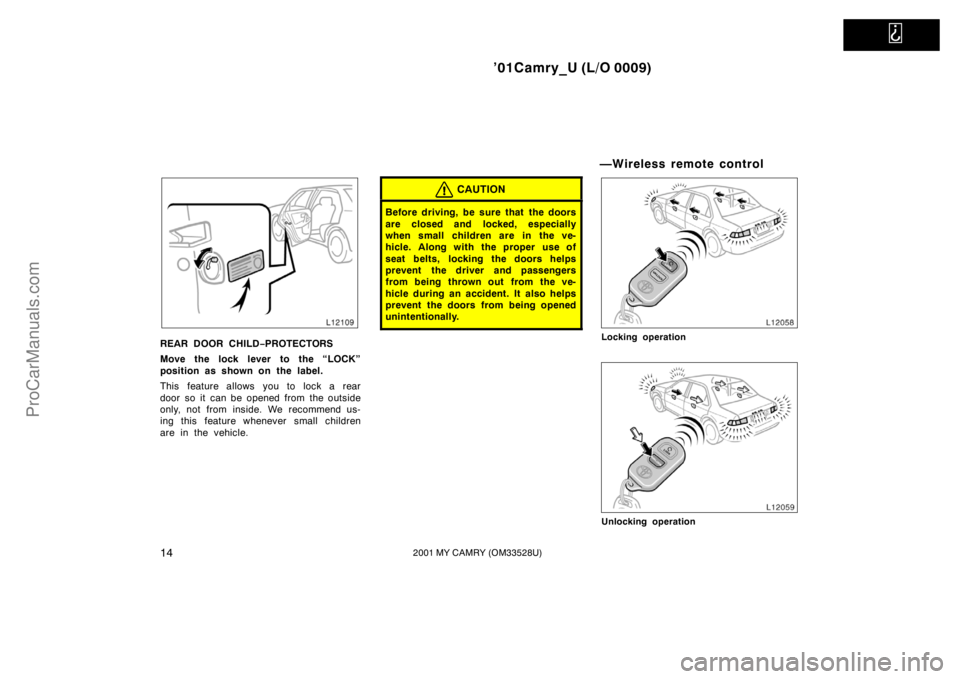
REAR DOOR CHILD−PROTECTORS
Move the lock lever to the “LOCK”
position as shown on the label.
This feature allows you to lock a rear
door so it can be opened from the outside
only, not from inside. We recommend us-
ing this feature whenever small children
are in the vehicle.
CAUTION
Before driving, be sure that the doors
are closed and locked, especially
when small children are in the ve-
hicle. Along with the proper use of
seat belts, locking the doors helps
prevent the driver and passengers
from being thrown out from the ve-
hicle during an accident. It also helps
prevent the doors from being opened
unintentionally.
—Wireless remote control
Locking operation
Unlocking operation
ProCarManuals.com
Page 23 of 268

’01Camry_U (L/O 0009)
152001 MY CAMRY (OM33528U)
Your vehicle has a wireless remote
control system that can lock or unlock
all the doors, or activate the theft
deterrent system from a distance within
approximately 1 m (3 ft.) of the vehicle.
LOCKING AND UNLOCKING THE
DOORS
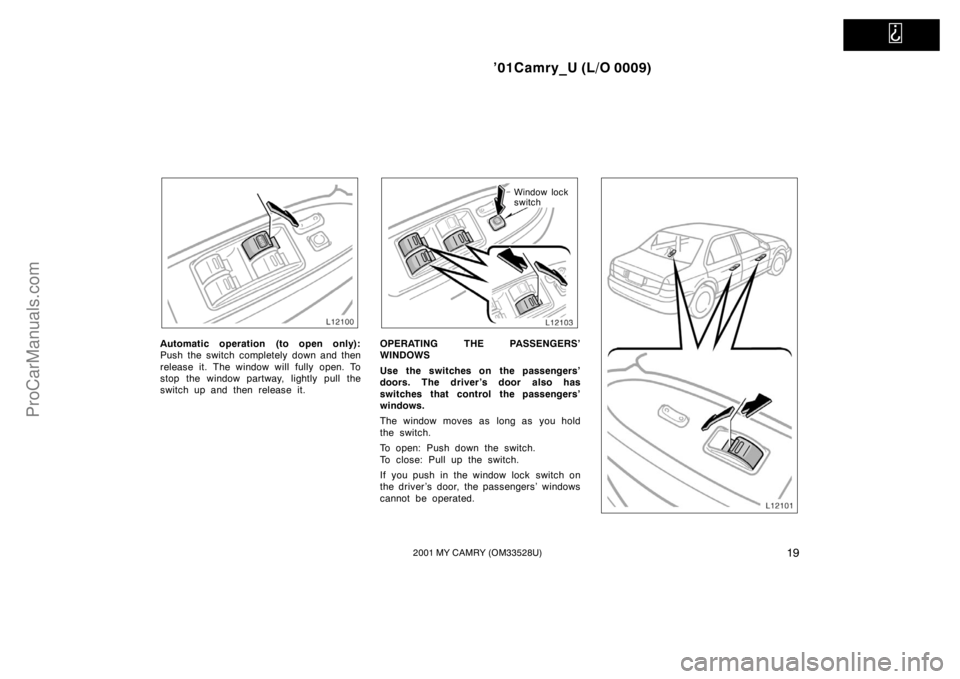
To lock and unlock all the doors, push
the switches of the transmitter slowly
and securely.
To lock: Push the “LOCK” switch. All the
doors are locked simultaneously. At this
time one beep will be heard, and the
parking lights, side marker lights, license
plate lights and tail lights will flash once.
Check to see that the doors are securely
locked.
If any door is not securely closed, locking
cannot be performed by the “LOCK”
switch and a beep will sound continuously
for 10 seconds. However, if the key is in
the ignition, a beep will not sound.
To stop the beep, close all the doors se-
curely or push the “UNLOCK” switch.To unlock: Push the “UNLOCK” switch
once to unlock the driver ’s door alone.
Pushing the switch twice within 3 seconds
unlocks all the doors simultaneously. Each
time the “UNLOCK” switch is pushed, two
beeps will be heard, and the parking
lights, side marker lights, license plate
lights and tail lights will flash twice.
When the “UNLOCK” switch is pressed,
the interior light and/or ignition key light
come on. The light remains on for about
15 seconds unless any door is opened
and closed. (For further information, see
“Interior lights” and/or “Ignition switch
light” in Section 1−4.)
You have 30 seconds to open a door after
using the wireless remote unlock feature.
If a door is not opened by then, all the
doors will be automatically locked again
and one beep will be heard.
If the “LOCK” or “UNLOCK” switch is kept
pressed in, the locking or unlocking opera-
tion is not repeated. Release the button
and then push again.SWITCHING BEEP SOUND ON AND OFF
You can switch the beep on and off. (The
beep is on initially and after battery re-
placement.)
To switch the beep on and off:
With the driver ’s door opened—
1. Insert the ignition key and remove it.
2. Within 5 seconds, insert the ignition
key again and turn it to the “ON” posi-
tion.
3. After 10 seconds, push the same
“LOCK”, “UNLOCK” or “PANIC” button
twice within 10 seconds.
Two beep sounds inform you that the
program has been switched on or off.
If this procedure is not followed exactly,
the beep will not operate as expected.
Check the beep ON/OFF operation by
pushing the transmitter switch after you
finish this procedure. If the beep does not
operate as expected, repeat this proce-
dure from step 1.
ProCarManuals.com
Page 24 of 268
’01Camry_U (L/O 0009)
162001 MY CAMRY (OM33528U)
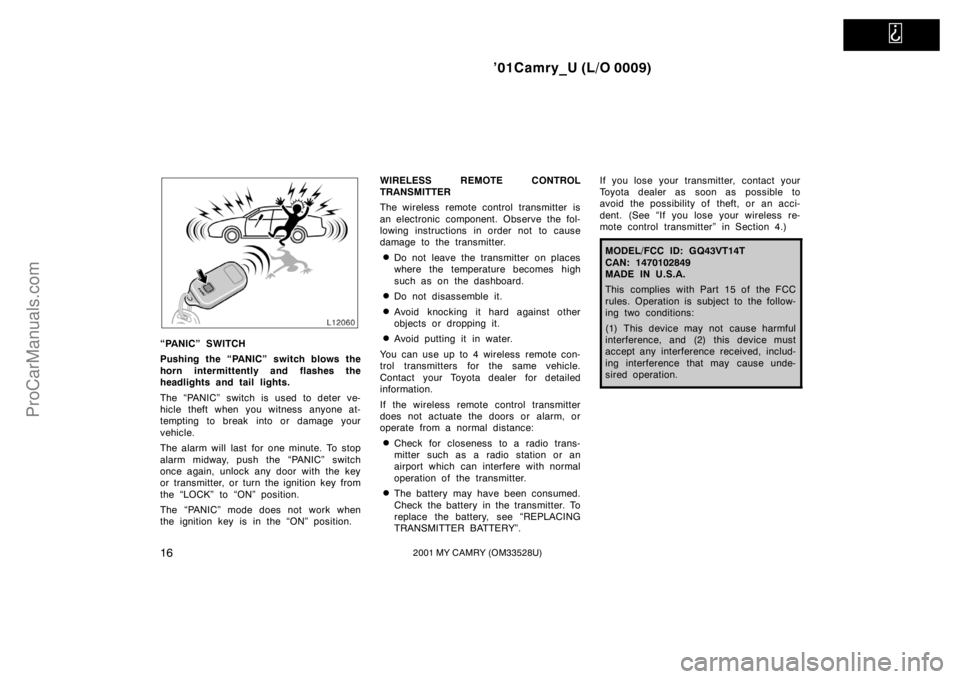
“PANIC” SWITCH
Pushing the “PANIC” switch blows the
horn intermittently and flashes the
headlights and tail lights.
The “PANIC” switch is used to deter ve-
hicle theft when you witness anyone at-
tempting to break into or damage your
vehicle.
The alarm will last for one minute. To stop
alarm midway, push the “PANIC” switch
once again, unlock any door with the key
or transmitter, or turn the ignition key from
the “LOCK” to “ON” position.
The “PANIC” mode does not work when
the ignition key is in the “ON” position.WIRELESS REMOTE CONTROL
TRANSMITTER
The wireless remote control transmitter is
an electronic component. Observe the fol-
lowing instructions in order not to cause
damage to the transmitter.
�Do not leave the transmitter on places
where the temperature becomes high
such as on the dashboard.
�Do not disassemble it.
�Avoid knocking it hard against other
objects or dropping it.
�Avoid putting it in water.
You can use up to 4 wireless remote con-
trol transmitters for the same vehicle.
Contact your Toyota dealer for detailed
information.
If the wireless remote control transmitter
does not actuate the doors or alarm, or
operate from a normal distance:
�Check for closeness to a radio trans-
mitter such as a radio station or an
airport which can interfere with normal
operation of the transmitter.
�The battery may have been consumed.
Check the battery in the transmitter. To
replace the battery, see “REPLACING
TRANSMITTER BATTERY”.If you lose your transmitter, contact your
Toyota dealer as soon as possible to
avoid the possibility of theft, or an acci-
dent. (See “If you lose your wireless re-
mote control transmitter” in Section 4.)
MODEL/FCC ID: GQ43VT14T
CAN: 1470102849
MADE IN U.S.A.
This complies with Part 15 of the FCC
rules. Operation is subject to the follow-
ing two conditions:
(1) This device may not cause harmful
interference, and (2) this device must
accept any interference received, includ-
ing interference that may cause unde-
sired operation.
ProCarManuals.com
Page 27 of 268
’01Camry_U (L/O 0009)
192001 MY CAMRY (OM33528U)
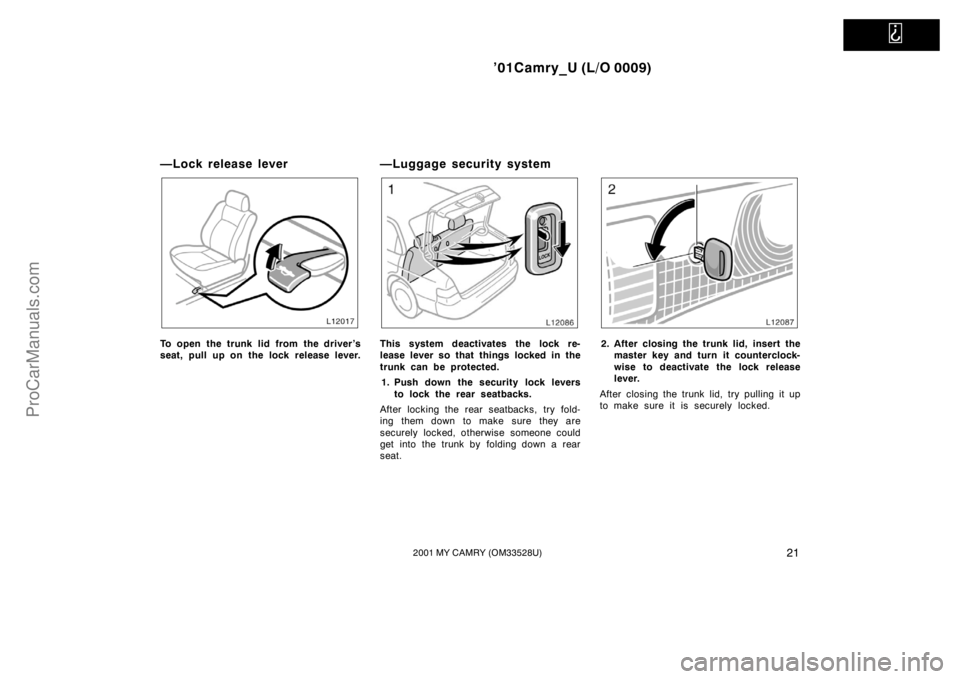
Automatic operation (to open only):
Push the switch completely down and then
release it. The window will fully open. To
stop the window partway, lightly pull the
switch up and then release it.
Window lock
switch
OPERATING THE PASSENGERS’
WINDOWS
Use the switches on the passengers’
doors. The driver ’s door also has
switches that control the passengers’
windows.
The window moves as long as you hold
the switch.
To open: Push down the switch.
To close: Pull up the switch.
If you push in the window lock switch on
the driver ’s door, the passengers’ windows
cannot be operated.
ProCarManuals.com
Page 28 of 268
’01Camry_U (L/O 0009)
202001 MY CAMRY (OM33528U)
CAUTION
To avoid serious personal injury, you
must do the following.
�Always make sure the head, hands
and other parts of the body of all
occupants are kept completely in-
side the vehicle before you close
the power windows. If someone’s
neck, head or hands gets caught in
a closing window, it could result in
a serious injury. When anyone
closes the power windows, be sure
that they operate the windows safe-
ly.
�When small children are in the ve-
hicle, never let them use the power
window switches without supervi-
sion. Use the window lock switch to
prevent them from making unex-
pected use of the switches.
�Never leave small children alone in
the vehicle, especially with the igni-
tion key still inserted. They could
use the power window switches and
get trapped in a window. Unat-
tended children can become in-
volved in serious accidents.
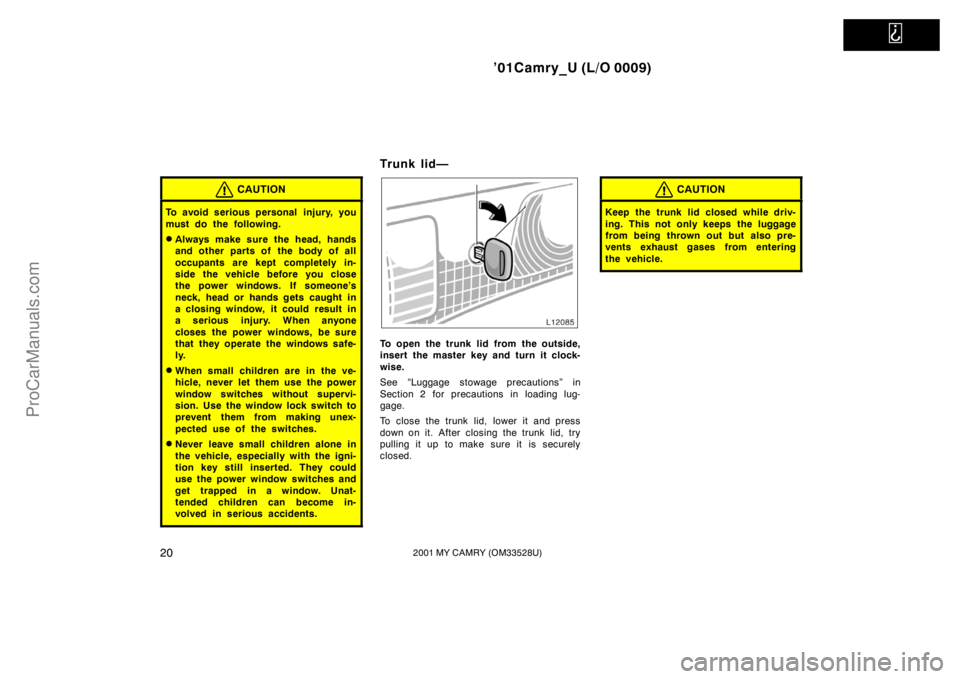
Trunk lid—
To open the trunk lid from the outside,
insert the master key and turn it clock-
wise.
See “Luggage stowage precautions” in
Section 2 for precautions in loading lug-
gage.
To close the trunk lid, lower it and press
down on it. After closing the trunk lid, try
pulling it up to make sure it is securely
closed.
CAUTION
Keep the trunk lid closed while driv-
ing. This not only keeps the luggage
from being thrown out but also pre-
vents exhaust gases from entering
the vehicle.
ProCarManuals.com
Page 29 of 268
’01Camry_U (L/O 0009)
212001 MY CAMRY (OM33528U)
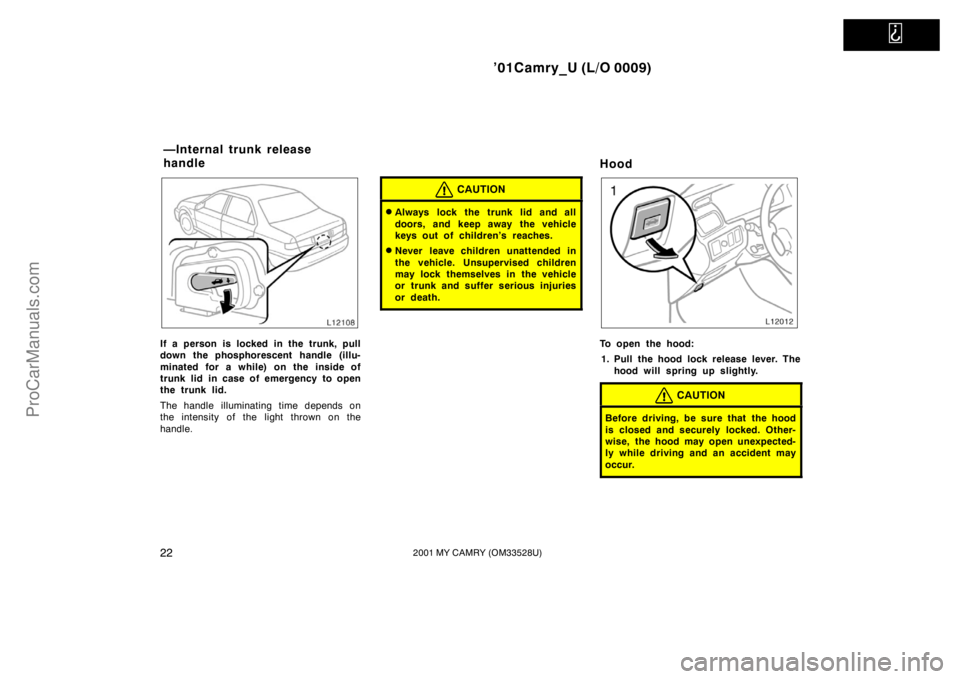
—Lock release lever
To open the trunk lid from the driver’s
seat, pull up on the lock release lever.
—Luggage security system
This system deactivates the lock re-
lease lever so that things locked in the
trunk can be protected.
1. Push down the security lock levers
to lock the rear seatbacks.
After locking the rear seatbacks, try fold-
ing them down to make sure they are
securely locked, otherwise someone could
get into the trunk by folding down a rear
seat.2. After closing the trunk lid, insert the
master key and turn it counterclock-
wise to deactivate the lock release
lever.
After closing the trunk lid, try pulling it up
to make sure it is securely locked.
ProCarManuals.com
Page 30 of 268
’01Camry_U (L/O 0009)
222001 MY CAMRY (OM33528U)
If a person is locked in the trunk, pull
down the phosphorescent handle (illu-
minated for a while) on the inside of
trunk lid in case of emergency to open
the trunk lid.
The handle illuminating time depends on
the intensity of the light thrown on the
handle.
CAUTION
�Always lock the trunk lid and all
doors, and keep away the vehicle
keys out of children’s reaches.
�Never leave children unattended in
the vehicle. Unsupervised children
may lock themselves in the vehicle
or trunk and suffer serious injuries
or death.
Hood
To open the hood:
1. Pull the hood lock release lever. The
hood will spring up slightly.
CAUTION
Before driving, be sure that the hood
is closed and securely locked. Other-
wise, the hood may open unexpected-
ly while driving and an accident may
occur.
—Internal trunk release
handle
ProCarManuals.com
Page 31 of 268

’01Camry_U (L/O 0009)
232001 MY CAMRY (OM33528U)
2. In front of the vehicle, pull up the
auxiliary catch lever and lift the
hood.
Before closing the hood, check to see that
you have not forgotten any tools, rags,
etc. Then lower the hood and make sure
it locks into place. If necessary, press
down gently on the front edge to lock it.
Theft deterrent system
To deter the vehicle theft, the system
is designed to give an alarm if any of
the doors, trunk or hood is forcibly un-
locked or the battery terminal is discon-
nected and then reconnected when the
vehicle is locked.
The alarm blows the horn intermittently
and flashes the headlights and tail lights.SETTING THE SYSTEM
1. Turn the ignition key to the “LOCK”
position and remove it.
The indicator light will start flashing when
the key is removed from the ignition
switch. (See “Engine immobiliser system”
for details.)
2. Have all passengers get out of the
vehicle.
3. Close and lock all the doors, trunk and
hood.
The indicator light will come on when all
the doors, trunk and hood are closed and
locked.
ProCarManuals.com