Page 580 of 656
AIR BAG SYSTEM 10B-3
General Description
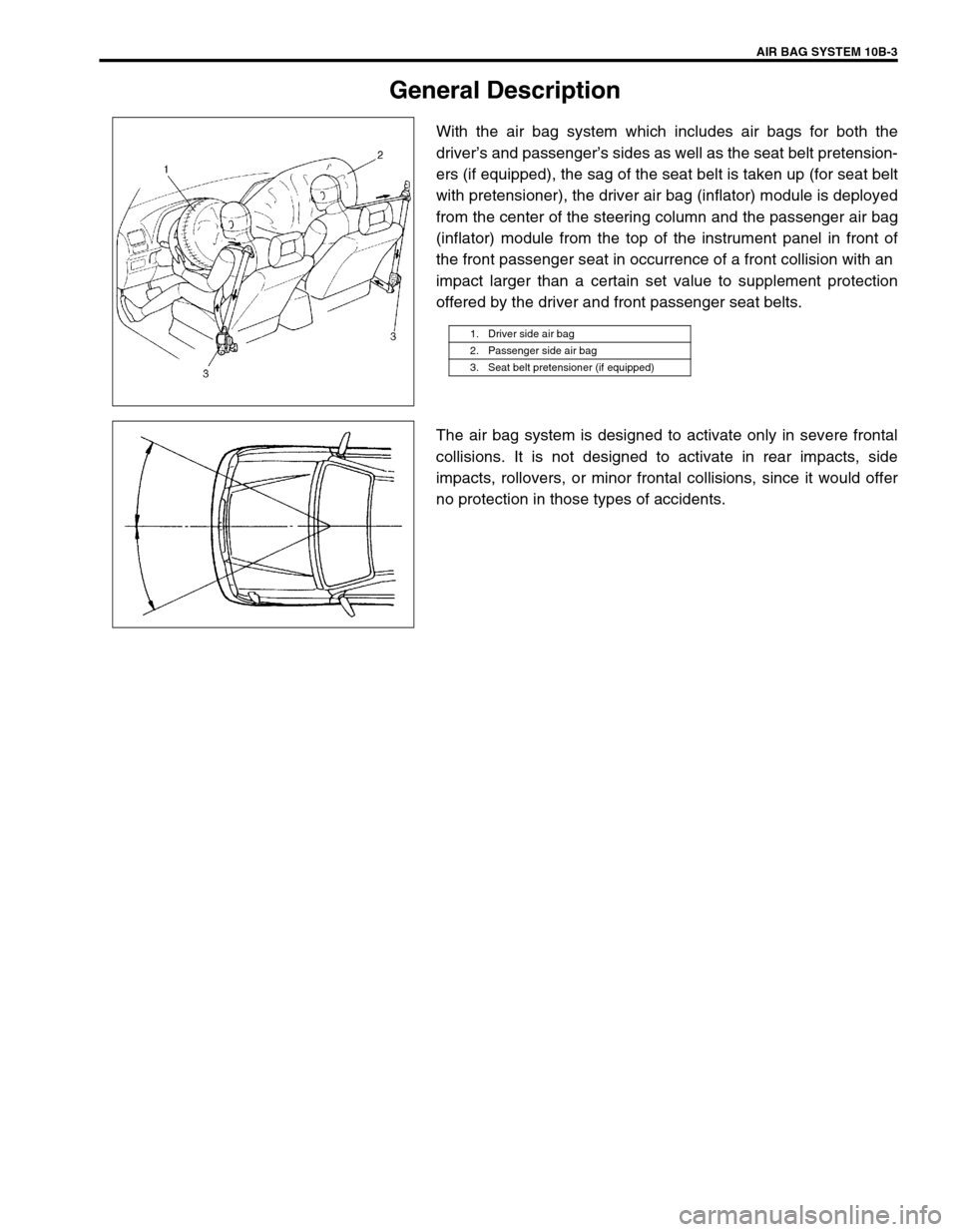
With the air bag system which includes air bags for both the
driver’s and passenger’s sides as well as the seat belt pretension-
ers (if equipped), the sag of the seat belt is taken up (for seat belt
with pretensioner), the driver air bag (inflator) module is deployed
from the center of the steering column and the passenger air bag
(inflator) module from the top of the instrument panel in front of
the front passenger seat in occurrence of a front collision with an
impact larger than a certain set value to supplement protection
offered by the driver and front passenger seat belts.
The air bag system is designed to activate only in severe frontal
collisions. It is not designed to activate in rear impacts, side
impacts, rollovers, or minor frontal collisions, since it would offer
no protection in those types of accidents.
1. Driver side air bag
2. Passenger side air bag
3. Seat belt pretensioner (if equipped)
Page 581 of 656
10B-4 AIR BAG SYSTEM
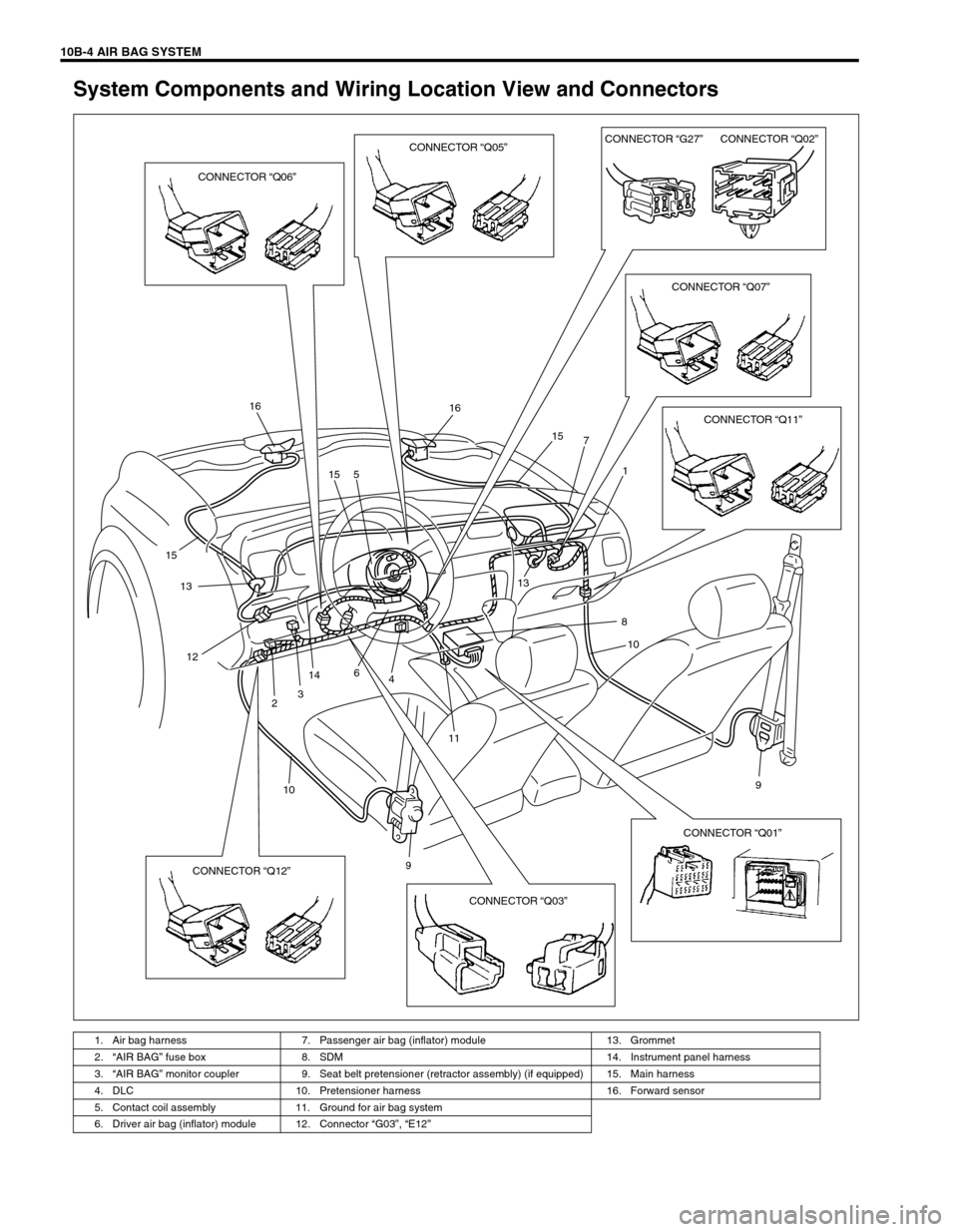
System Components and Wiring Location View and Connectors
1. Air bag harness 7. Passenger air bag (inflator) module 13. Grommet
2.“AIR BAG” fuse box 8. SDM 14. Instrument panel harness
3.“AIR BAG” monitor coupler 9. Seat belt pretensioner (retractor assembly) (if equipped) 15. Main harness
4. DLC 10. Pretensioner harness 16. Forward sensor
5. Contact coil assembly 11. Ground for air bag system
6. Driver air bag (inflator) module 12. Connector “G03”, “E12”
16 16
15
13
12
14
1113
10 15 5
6
3
248
9 1 7 15
9
10
CONNECTOR “Q06”CONNECTOR “Q05”CONNECTOR “G27”CONNECTOR “Q02”
CONNECTOR “Q07”
CONNECTOR “Q11”
CONNECTOR “Q03” CONNECTOR “Q12”CONNECTOR “Q01”
Page 588 of 656

AIR BAG SYSTEM 10B-11
DTC Check
Using SUZUKI scan tool
1) Turn ignition switch to OFF position.
2) After setting cartridge to SUZUKI scan tool, connect it to
data link connector (DLC) located on underside of instru-
ment panel at driver’s seat side.
Special tool
(A) : SUZUKI scan tool
3) Turn ignition switch to ON position.
4) Read DTC according to instructions displayed on SUZUKI
scan tool and print it or write it down. Refer to SUZUKI scan
tool operator’s manual for further details.
If communication between scan tool and SDM is not possi-
ble, proceed to Diagnostic Flow Table E (Serial data check
circuit).
5) After completing the check, turn ignition switch to OFF posi-
tion and disconnect SUZUKI scan tool from data link connec-
tor (DLC).
Not using SUZUKI scan tool
1) Check that malfunction indicator lamp (“AIR BAG” warning
lamp) comes ON when ignition switch is turned to ON posi-
tion.
If it does not come “ON”, proceed to Diagnostic Flow Table B
(“AIR BAG” warning lamp circuit).
2) Using service wire, ground diagnosis switch terminal in mon-
itor coupler.
3) Read DTC from flashing pattern of malfunction indicator
lamp (“AIR BAG” warning lamp). (Refer to DTC TABLE.)
If lamp does not indicate DTC, proceed to Diagnostic Flow
Table D (Diagnosis switch terminal circuit check).
4) After completing the check, turn ignition switch to OFF posi-
tion and disconnect service wire from “AIR BAG” monitor
coupler.
1. Data link connector (DLC)
1.“AIR BAG” monitor coupler
2. Body ground
3. Diagnosis switch terminal
4. Service wire
Page 635 of 656

10B-58 AIR BAG SYSTEM
•Instrument panel member, reinforcement and knee bolster &
panel (1) (passenger)
–Check for any distortion, bending, cracking or other dam-
age.
•If any faulty condition is found in above checks, replace.
•Passenger air bag (inflator) module
–Check for dents, cracks, damage or fitness.
–Check trim cover for cracks or deformities.
–Check harness and connector for damage or tightness.
•If any faulty condition is found in above checks, replace.
•SDM
–Check for external damage such as deformation, scratch,
crack, peeled paint, etc.
–Check that SDM cannot be installed properly due to a
cause in itself. (There is a gap between SDM and SDM
plate, or it cannot be fixed securely.)
–Check that connector or lead wire of SDM has a scorching,
melting or damage.
–Check SDM connector and terminals for tightness.
–Check SDM sets a diagnostic trouble code (Refer to “DTC
CHECK”.) and the diagnostic table leads to a malfunction-
ing SDM.
If any faulty condition is found in above checks, replace.
•Air bag wire harness and connections
–Check for damages, deformities or poor connections.
(Refer to “INTERMITTENTS AND POOR CONNEC-
TIONS”.)
–Check wire harness clamps for tightness.
If any faulty condition is found, correct or replace.
15
Page 636 of 656
AIR BAG SYSTEM 10B-59
•Forward sensor
–Check sensor (1), sensor bracket (2), and front panel (3) for
damage bend or rust.
–Check that connector (4) or lead wire (5) of forward sensor
has a scorching, melting or damage.
If any faulty condition is found in above checks, replace.
•Seat belt pretensioner
–Check for dents, cracks, damage or fitness
–Check harness and connector for damage or tightness.
If any faulty condition is found in above checks, replace.
•Seat belts and mounting points
–Refer to “FRONT SEAT BELT WITH PRETENSIONER” in
SECTION 10A.
•“AIR BAG” warning lamp
–After vehicle is completely repaired, perform “AIR BAG
DIAGNOSTIC SYSTEM CHECK”.
543
2
1
Page 637 of 656
10B-60 AIR BAG SYSTEM
SDM
REMOVAL
1) Disconnect negative (–) cable at battery.
2) Disable air bag system. Refer to “DISABLING AIR BAG
SYSTEM” in this section.
3) Remove rear and front center console box (1) by removing
screw and clips.
4) Remove center garnish panel (2).
5) Remove ashtray (3) and tuner assembly, clock assembly (5),
tuner pocket, radio hole cover (4), etc.
6) Disconnect SDM connector (1) from SDM (2).
7) Remove SDM (2) from vehicle.WARNING:
During service procedures, be very careful when han-
dling a Sensing and Diagnostic Module (SDM).
Be sure to read “Service Precautions” in this section
before starting to work and observe every precaution
during work. Neglecting them may result in personal
injury or inactivation of the air bag system when neces-
sary.
2
1FORWARD
Page 638 of 656

AIR BAG SYSTEM 10B-61
INSPECTION
•Check SDM and SDM plate for dents, cracks or deformation.
•Check SDM connector for damage, cracks or lock mecha-
nism.
•Check SDM terminal for bent, corrosion or rust.
If any faulty condition is found in above checks, replace.
INSTALLATION
1) Check that none of following faulty conditions exists.
•Bend, scratch, deformity in vehicle body mounted on SDM
•Foreign matter or rust on mating surface of vehicle body
mounted on SDM
2) Install SDM (2) to vehicle.
3) Tighten SDM bolts to specified torque.
Tightening torque
SDM bolt (a) : 6 N·m (0.6 kg-m, 4.5 lb-ft)
4) Connect SDM connector (1) to SDM (2) securely.
5) Install tuner assembly, clock assembly (5), tuner pocket,
radio hole cover (4), etc. and ashtray (3).
6) Install center garnish panel (2).
7) Install front and rear center console box (1).
8) Connect negative cable to battery.
9) Enable air bag system. Refer to “ENABLING AIR BAG SYS-
TEM” in this section. CAUTION:
Do not connect a tester whatever type it may be.
Never repair or disassemble SDM.
If SDM has been dropped, it should be replaced.
CAUTION:
Ensure that arrow on the SDM is pointing toward the front
of the vehicle.(a)
2
1
FORWARD
Page 639 of 656
10B-62 AIR BAG SYSTEM
Forward Sensor
REMOVAL
1) Disconnect negative cable at battery.
2) Disable air bag system. Refer to “DISABLING AIR BAG
SYSTEM” in this section.
3) Remove front grill referring to “FRONT BUMPER” in Section
9.
4) Disconnect forward sensor connector sliding connector outer
(1) as shown.
5) Remove forward sensor bolts (1), and forward sensor (2)
from front panel (3). WARNING:
During service procedures, be very careful when han-
dling a sensor.
Never strike or jar a sensor.
Under some circumstances, it could cause improper
operation of the air bag system. A sensor and mount-
ing bracket bolts must be carefully torqued to assure
proper operation.
1
1
1
3
2