Page 132 of 656
ANTILOCK BRAKE SYSTEM (ABS) 5E2-7
1) MALFUNCTION ANALYSIS
a) Customer Complaint Analysis
Record details of the problem (failure, complaint) and how it occurred as described by the customer.
For this purpose, use of such a questionnaire form as shown below will facilitate collecting information to
the point required for proper analysis and diagnosis.
CUSTOMER QUESTIONNAIRE (EXAMPLE)
Page 135 of 656
5E2-10 ANTILOCK BRAKE SYSTEM (ABS)
Diagnostic Trouble Code (DTC) Check (Using
ABS Warning Lamp)
1) Perform ABS WARNING LAMP CHECK described above.
2) Using service wire (4), connect diagnosis switch terminal (2)
of monitor coupler (1) to ground (3).
3) Turn ignition switch ON.
4) Read flashing of ABS warning lamp which represents DTC
as shown in example below and write it down. When more
than 2 DTCs are stored in memory, flashing for each DTC is
repeated three times starting with the smallest DTC number
in increasing order.
For details of DTC, refer to “DTC TABLE”.
Example : When right-front wheel speed sensor circuit opens (DTC 21)
5) After completing the check, turn ignition switch off, discon-
nect service wire from monitor coupler.
Page 136 of 656

ANTILOCK BRAKE SYSTEM (ABS) 5E2-11
Diagnostic Trouble Code (DTC) Check (Using
SUZUKI Scan Tool)
1) After setting cartridge for ABS to SUZUKI scan tool, connect
SUZUKI scan tool to data link connector.
Special tool
(A) : SUZUKI scan tool
2) Turn ignition switch ON.
3) Read DTC according to instructions displayed on SUZUKI
scan tool and print it or write it down. Refer to SUZUKI scan
tool operator’s manual for further details.
4) After completing the check, turn ignition switch off and dis-
connect SUZUKI scan tool from DLC.
Diagnostic Trouble Code (DTC) Clearance
After repair or replace malfunction part(s), clear all DTCs by per-
forming the following procedure.
1) Turn ignition switch OFF.
2) Using service wire (4), connect diagnosis switch terminal (2)
of diagnosis monitor coupler (1) to ground terminal (3).
3) With connection described in above Step 2) maintained, turn
ignition switch ON.
WARNING:
When performing a driving test, select a safe place where
there is neither any traffic nor any traffic accident possi-
bility and be very careful during testing to avoid occur-
rence of an accident.
Page 167 of 656
6-1-6 ENGINE GENERAL INFORMATION AND DIAGNOSIS (H27 ENGINE)
Engine Diagnosis
General Description
This vehicle is equipped with an engine and emission control system which are under control of ECM (PCM).
The engine and emission control system in this vehicle are controlled by ECM (PCM). ECM (PCM) has an On-
Board Diagnostic system which detects a malfunction in this system and abnormality of those parts that influ-
ence the engine exhaust emission. When diagnosing engine troubles, be sure to have full understanding of the
outline of “ON-BOARD DIAGNOSTIC SYSTEM” and each item in “PRECAUTION IN DIAGNOSING TROUBLE”
and execute diagnosis according to “ENGINE DIAGNOSTIC FLOW TABLE” in this section.
There is a close relationship between the engine mechanical, engine cooling system, ignition system, exhaust
system, etc. and the engine and emission control system in their structure and operation. In case of an engine
trouble, even when the malfunction indicator lamp (MIL) doesn’t turn ON, it should be diagnosed according to
“ENGINE DIAGNOSTIC FLOW TABLE” in this section.
On-Board Diagnostic System (Vehicle without
Monitor Connector)
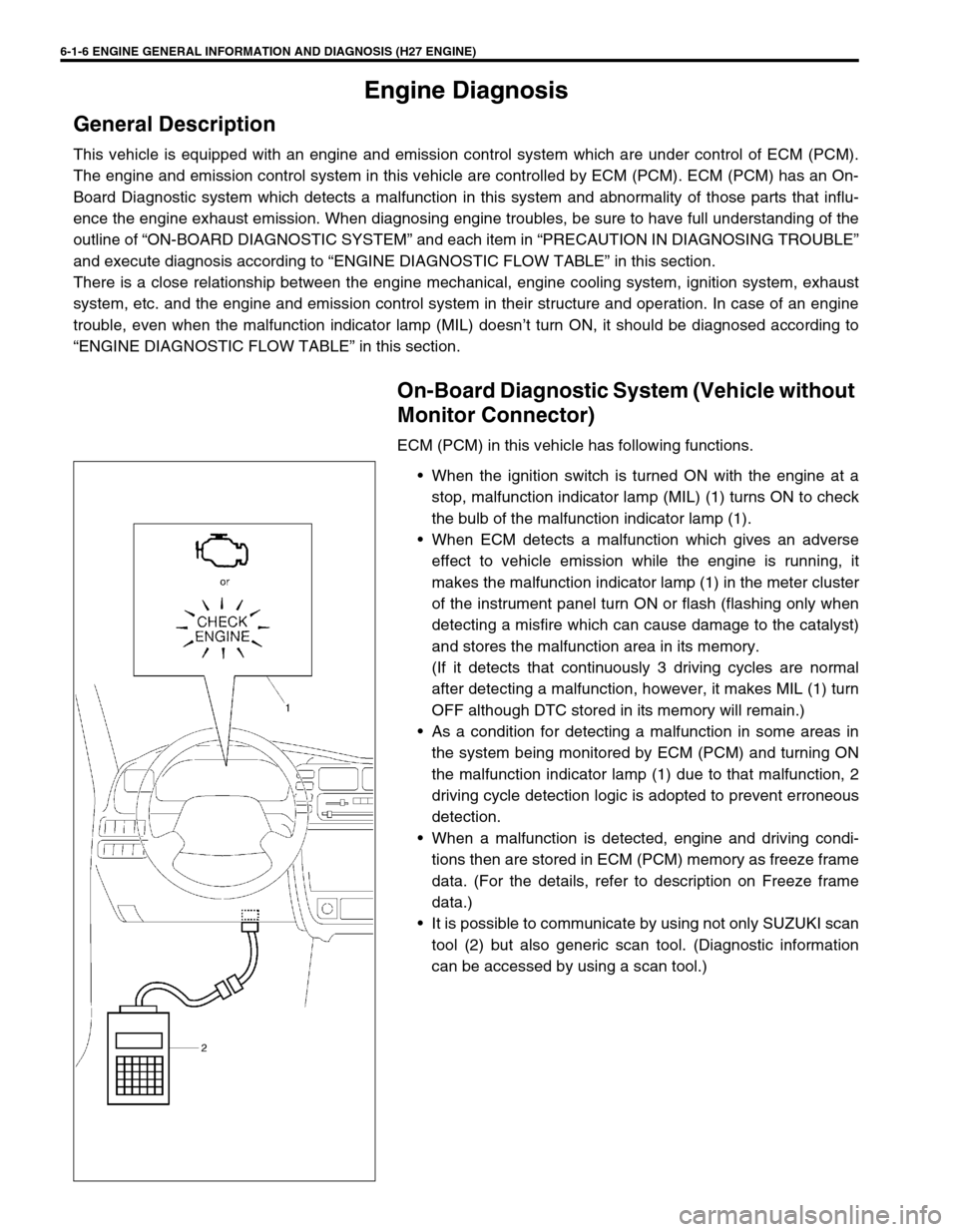
ECM (PCM) in this vehicle has following functions.
When the ignition switch is turned ON with the engine at a
stop, malfunction indicator lamp (MIL) (1) turns ON to check
the bulb of the malfunction indicator lamp (1).
When ECM detects a malfunction which gives an adverse
effect to vehicle emission while the engine is running, it
makes the malfunction indicator lamp (1) in the meter cluster
of the instrument panel turn ON or flash (flashing only when
detecting a misfire which can cause damage to the catalyst)
and stores the malfunction area in its memory.
(If it detects that continuously 3 driving cycles are normal
after detecting a malfunction, however, it makes MIL (1) turn
OFF although DTC stored in its memory will remain.)
As a condition for detecting a malfunction in some areas in
the system being monitored by ECM (PCM) and turning ON
the malfunction indicator lamp (1) due to that malfunction, 2
driving cycle detection logic is adopted to prevent erroneous
detection.
When a malfunction is detected, engine and driving condi-
tions then are stored in ECM (PCM) memory as freeze frame
data. (For the details, refer to description on Freeze frame
data.)
It is possible to communicate by using not only SUZUKI scan
tool (2) but also generic scan tool. (Diagnostic information
can be accessed by using a scan tool.)
Page 172 of 656

ENGINE GENERAL INFORMATION AND DIAGNOSIS (H27 ENGINE) 6-1-11
Engine Diagnostic Flow Table
Refer to following pages for the detail of each step.
Step Action Yes No
1 Customer Complaint Analysis
1) Perform customer complaint analysis.
Was customer complaint analysis performed?Go to Step 2. Perform customer com-
plaint analysis.
2 DTC(s)/Freeze Frame Data Check
1) Check DTC(s)/Freeze frame data.
Is there any malfunction DTC(s)?Record DTC(s)/Freeze
frame data.
Clear DTC(s).
Go to Step 3.Go to Step 4.
3 Visual Inspection
1) Perform visual inspection.
Is there any faulty condition?Repair or replace mal-
function part.
Go to Step 11.Go to Step 5.
4 Visual Inspection
1) Perform visual inspection.
Is there any faulty condition?Repair or replace mal-
function part.
Go to Step 11.Go to Step 8.
5 Trouble Symptom Confirmation
1) Confirm trouble symptom based on cus-
tomer complaint analysis, DTC(s)/freeze
frame data in Step 1.
Is trouble symptom identified?Go to Step 6. Go to Step 7.
6 DTC/Freeze Frame Data Recheck
1) Recheck DTC/freeze frame data.
Is there any malfunction DTC(s)?Go to Step 9. Go to Step 8.
7 DTC/Freeze Frame Data Recheck
1) Recheck DTC/freeze frame data.
Is there any malfunction DTC(s)?Go to Step 9. Go to Step 10.
8 Engine Basic Inspection
1) Check and repair according to “ENGINE
BASIC INSPECTION FLOW TABLE” and
“ENGINE DIAGNOSIS TABLE” in this sec-
tion.
Are check and repair complete?Go to Step 11. Check and repair mal-
function part(s).
Go to Step 11.
9 DTC Trouble Shooting
1) Check and repair according to applicable
“DTC Diag. flow table” in this section.
Are check and repair complete?Go to Step 11. Check and repair mal-
function part(s).
Go to Step 11.
10 Intermittent Problems Check
1) Check for intermittent problems referring to
“Check for Intermittent Problem” in “GEN-
ERAL INFORMATION” section.
Is there any faulty condition?Repair or replace mal-
function part.
Go to Step 11.Go to Step 11.
11 Final Confirmation Test
1) Clear DTC if any.
2) Perform final confirmation test referring to
“DTC CONFIRMATION PROCEDURE” in
this section.
Is there any problem symptom, malfunction
DTC or abnormal condition?Go to Step 6. END.
Page 173 of 656
6-1-12 ENGINE GENERAL INFORMATION AND DIAGNOSIS (H27 ENGINE)
STEP 1. CUSTOMER COMPLAINT ANALYSIS
Record details of the problem (failure, complaint) and how it occurred as described by the customer. For this
purpose, use of such an inspection form will facilitate collecting information to the point required for proper anal-
ysis and diagnosis.
NOTE:
The above form is a standard sample. It should be modified according to conditions characteristic of
each market.
Page 177 of 656

6-1-16 ENGINE GENERAL INFORMATION AND DIAGNOSIS (H27 ENGINE)
Malfunction Indicator Lamp (MIL) Check
1) Turn ON ignition switch (but the engine at stop) and check
that MIL (1) lights.
If MIL does not light up, go to “Diagnostic Flow Table A-1” for
troubleshooting.
2) Start engine and check that MIL turns OFF.
3) If MIL remains ON, and no DTC is stored in ECM (PCM), go
to “Diagnostic Flow Table A-2” for troubleshooting.
Diagnostic Trouble Code (DTC) Check
[Using SUZUKI scan tool]
1) Prepare generic scan tool or SUZUKI scan tool (2).
2) With ignition switch OFF, connect it to data link connector
(DLC) (3) located on underside of instrument panel at
driver’s seat side.
Special tool
(A) : SUZUKI scan tool
3) Turn ignition switch ON and confirm that MIL lights.
4) Read DTC and freeze frame data according to instructions
displayed on scan tool and print them or write them down.
Refer to scan tool operator’s manual for further details.
If communication between scan tool and ECM (PCM) is not
possible, check if scan tool is communicable by connecting it
to ECM (PCM) in another vehicle. If communication is possi-
ble in this case, scan tool is in good condition. Then check
data link connector and serial data line (circuit) in the vehicle
with which communication was not possible.
5) After completing the check, turn ignition switch off and dis-
connect scan tool from data link connector.
Page 178 of 656
![SUZUKI GRAND VITARA 2001 2.G Owners Manual ENGINE GENERAL INFORMATION AND DIAGNOSIS (H27 ENGINE) 6-1-17
[Without Using SUZUKI Scan Tool] (Vehicle with Monitor
Connector)
1) Check malfunction indicator lamp referring to “Malfunction
Indicato](/manual-img/20/7584/w960_7584-177.png "SUZUKI GRAND VITARA 2001 2.G Owners Manual ENGINE GENERAL INFORMATION AND DIAGNOSIS (H27 ENGINE) 6-1-17
[Without Using SUZUKI Scan Tool] (Vehicle with Monitor
Connector)
1) Check malfunction indicator lamp referring to “Malfunction
Indicato")
ENGINE GENERAL INFORMATION AND DIAGNOSIS (H27 ENGINE) 6-1-17
[Without Using SUZUKI Scan Tool] (Vehicle with Monitor
Connector)
1) Check malfunction indicator lamp referring to “Malfunction
Indicator Lamp Check” in this section.
2) With the ignition switch OFF position, disconnect SUZUKI
scan tool if connected and using service wire (4), connect
diagnosis switch terminal (1) to ground terminal (2) in moni-
tor connector (3).
3) With the ignition switch ON position and leaving engine OFF,
read DTC from flashing pattern of malfunction indicator
lamp. Refer to “Diagnostic Trouble Code Table”.
If lamp remains ON, go to “Diagnostic Flow Table A-4”.
4) After completing the check, turn the ignition switch OFF posi-
tion and disconnect service wire from monitor coupler.
Diagnostic Trouble Code (DTC) Clearance
[Using scan tool]
1) With ignition switch OFF, connect generic scan tool or
SUZUKI scan tool to data link connector (DLC).
2) Turn ignition switch ON.
3) Erase DTC according to instructions displayed on scan tool.
Freeze frame data is cleared with the DTC. Refer to scan tool
operator’s manual for further details.
4) After completing the clearance, turn ignition switch off and
disconnect scan tool from data link connector. NOTE:
If abnormality or malfunction lies in two or more areas,
malfunction indicator lamp indicates applicable codes
three times each.
And flashing of these codes is repeated as long as
diagnosis terminal is grounded and ignition switch is
held at ON position.
Take a note of diagnostic trouble code indicated first.
NOTE:
DTC and freeze frame data stored in ECM (PCM) memory
are also cleared in following cases. Be careful not to
clear them before keeping their record.
When power to ECM (PCM) is cut off (by disconnecting
battery cable, removing fuse or disconnecting ECM
(PCM) connectors)
When the same malfunction (DTC) is not detected
again during 40 engine warm-up cycles (refer to
“WARM-UP CYCLE” of “ON-BOARD DIAGNOSTIC SYS-
TEM” in this section) (Vehicle without monitor connec-
tor)


