2001 SAAB 9-5 warning light
[x] Cancel search: warning lightPage 54 of 272

54 Instruments and controlsAutochecking of lights,
main instrument panel The above warning and indicator lights
should come on when the ignition is
switched on prior to starting. They should go
out after about 3 seconds.
The following lights light up until the engine
is started, presuming that no fault exists:
Central warning light .
Oil pressure warning light .
Warning, charging .
InstrumentsTachometerThe tachometer indicates the engine speed
in thousands of revolutions per minute. The
needle may be allowed to enter the broken
red zone on the dial only for an instant.
A safety cut-out function (in the fuel system)
prevents the engine speed from exceeding
approximately 6,200 rpm.
Odometer and trip meter The odometer records the distance traveled
in miles on U.S. vehicles and on Canadian
vehicles the distance indicated is in kilome-
tres, and the trip meter in miles and tenths
(kilometres and tenths of kilometres on
Canadian vehicles). Reset button The reset button has two functions, deter-
mined by whether the ignition is ON or OFF.
When the ignition is ON, pressing the
button will reset the trip meter.
When the ignition is OFF, pressing the
button will bring up the display for
20 seconds to allow the odometer and
trip-meter readings to be viewed.
IB1279
IB340
IB341
1 Cars with automatic transmission
ProCarManuals.com
Page 55 of 272

55 Instruments and controls
Speedometer (U.S. speedometer
shown)The speedometer receives signals from the
wheel sensors in the ABS system.
If the NIGHT PANEL mode has been
selected, the scale will be illuminated up to
87 mph (140 km/h). The remainder of the
scale will be illuminated if the speed of the
car exceeds 84 mph (135 km/h).
Fuel gauge Fuel-tank capacity, 18.5 US gal. (70 liters).
The fuel gauge shows the amount of fuel left
in the tank. When this is down to about
2.5 gal. (10 liters), a warning light on the
main instrument panel will come on (see
page 51).
Use the Saab Information display (SID) to
check the approximate distance that can be
traveled on the remaining fuel
(see page 57).
Temperature gauge The temperature gauge shows the temper-
ature of the coolant. The needle should be
in the middle of the scale when the engine
is at normal operating temperature.
If the needle approaches the red zone,
which can occur in very hot weather or when
the engine is under a heavy load, drive in the
highest gear possible, keep the engine revs
low and avoid shifting down.
If the needle enters the red zone, the
warning light will come on and an alarm
chime will sound.
IB606
IB345
IB343
ProCarManuals.com
Page 61 of 272

61 Instruments and controls
CHECK messages When the engine is started, CHECKING will
appear on the display for about four sec-
onds, while the SID checks are being per-
formed.
When a CHECK message is generated
while the car is being driven, a chime will
sound, INFO DISPL will illuminate on on the
main instrument panel, and the message
will appear on the SID. The number of mes-
sages that can be displayed by the SID
varies with the specification of the car.
If more than one CHECK message has
been generated, the
+ symbol will appear to
the left of the text on the display. The mes-
sages appear in order of priority.
If a new fault occurs while another message
is being displayed, the message relating to
the new one will appear for 10 seconds,
after which the display will return to the ear-
lier one.
Press CLEAR once to acknowledge a mes-
sage, whereupon it will be cleared from the
display. It will not be displayed again before
the ignition has been switched off and then
on again. The following messages may be displayed:
1 This message will be displayed approxi-
mately 600 miles (1,000 km) before the next
scheduled service is due, or when 365 days
have elapsed since the last service. The
message should be cleared at the time of that
service (see the Saab Warranties & Service
Record Booklet).
This message can also be deleted by first
briefly pressing the CLEAR button, then
depressing it a second time for at least eight
seconds until ”SERVICE” appears on the dis-
play and a chime sounds. The message can
only be deleted when it is shown on the SID.
Night panelTo improve night-driving conditions inside
the car, the Night Panel mode can be
selected. In this mode, the amount of infor-
mation displayed is reduced, and only the
most important instruments and displays
will be illuminated.
When the Night Panel button is pressed,
only the speedometer will be illuminated (up
to the 87-mph or 140-km/h graduation), all
the other instruments illumination being
extinguished and their needles moved to
zero. Both the SID and the ACC displays will
be extinguished and the backlighting for
switches and other controls will be dimmed.
Note: All indicator and warning lights,
together with the display of CHECK mes-
sages, will operate as normal, except ”Out-
door temperature (Frost warning)”, see
page 58. Message See
page
FRONT LIGHT FAILURE 205
REAR LIGHT FAILURE 208
FOG LIGHT FAILURE 209
BRAKE LIGHT FAILURE 208
WASHER FLUID LEVEL LOW 204
FILL COOLANT FLUID 196
REPLACE KEY BATTERY 37
KEY NOT ACCEPTED 45
SERVICE THEFT ALARM 45
TRANSMISSION OVERHEATING 162
TIGHTEN FUEL FILLER CAP 154
TIME FOR SERVICE
1)
242
ProCarManuals.com
Page 64 of 272

64 Instruments and controlsCourtesy Headlight FeatureA delay function allows the headlights to
remain on low beam for about 30 seconds
after the driver’s door has been closed.
To activate this function,
Switch off the ignition and remove the key
Open the driver’s door
Pull the high/low beam control stalk
towards the steering wheel like you are
flashing the high beam, see page 63. The
low beam headlights will now come on
immediately after the driver’s door has
been closed (within 30 seconds) and will
remain on for about 30 seconds.
The length of time for this function can be
adjusted by your authorized Saab dealer.
Rear fog lightPress the button to switch on the rear fog
light, which will only come on if the head-
lights are on.
The rear fog light will go off automatically
when the engine is switched off. When the
fog light is next needed, it will have to be
switched on manually again.
The rear fog light consists of one light so it
should not be mistaken for brake lights.
Make sure you are familiar with the appli-
cable provincial/state law regarding the
use of rear fog lights.
WARNING
In poor visibility, avoid following the tail
lights of the vehicle in front. If the vehicle
stops suddenly, you may be unable to
avoid a collision and therefore risk injury
to yourself and others.
IB351
Rear fog light
ProCarManuals.com
Page 66 of 272

66 Instruments and controlsFront fog lightsThe front fog lights can be activated in both
dimmed headlight and parking light posi-
tions. Fog lights should only be used in poor
visibility conditions.
Make sure you are familiar with the appli-
cable provincial/state law regarding the
use of fog lights. Reversing lightsThe reversing lights come on automatically
when reverse gear is engaged or selected
with the ignition switched on.
Hazard warning lightsWhen this button is pressed, all the turn
signal indicators and a symbol in the button
flash simultaneously. If the ignition is on,
both indicator lights on the instrument panel
will also flash.
If the hazard warning lights are left on for
some time, the flasher frequency will be
reduced to save the battery.
Hazard warning lights should only be used
if the car constitutes a hazard to other road
users.
WARNING
Switch on the hazard flashers if the car
has to be left at the roadside on account
of an accident, engine trouble or a punc-
ture. If you carry a warning triangle or
flares, they should be set up along side of
the road 300 ft. (100 m) behind your vehi-
cle. If the car is not clearly visible (e.g.
over the brow of a hill or bridge), place the
triangle/flare even further back.
IB355
IB356
Hazard warning lights
ProCarManuals.com
Page 103 of 272

103 Saab 9-5 Audio System
Installation of car phone
(option)Provision has been made on the Saab 9-5
for the installation of a hands-free car
phone.
A car-phone mount is available as an acces-
sory.
Your Saab dealer has details of proper
phone installation procedures. Roof loads can negatively affect tele-
communication.
Provision for hands-free phone
Car phone connects to car’s circuitry.
External antenna is fitted.
Microphone for hands-free phone use
incorporated in overhead panel at front.
Audio System mute function when phone
activated.
Phone conversation amplified through
Audio System speakers.
TELEPHONE appears on the SID when
phone in use. Volume level for ongoing conversation
can be adjusted by volume controls on
steering wheel or on Audio System
module (see also ”Volume-preset mode”,
page 97).
If the sound is distorted, adjust by means
of the volume control on
telephone set
.
Phone battery charging when phone is in
its cradle.
Please refer to the instructions supplied with
the phone for details of how to make and
receive calls. In order to fully utilize the
hands-free function, certain circuits must be
available from the telephone to be installed.
Your authorized Saab dealer has this infor-
mation available.
WARNING
To prevent crashes while using a cell
phone:
Don’t use the phone in distracting traf-
fic situations. Turn it off if traffic is
heavy.
Dial sensibly, at a stoplight or safely off
the road.
Consider installing hands-free or
speaker phone.
Avoid stressful and intense phone
conversations.
Acquaint yourself with the legal provi-
sions governing the use of car phones
while driving.
Do not use the phone when refueling
the vehicle. Gasoline fumes are highly
explosive.
NOTEThe A-pillar area (area beside the wind-
shield) and the headlining of your Saab
contain padding designed to reduce head
injuries. No modifications to these areas
should be made unless done by your
authorized Saab dealer.
ProCarManuals.com
Page 128 of 272

128 Interior equipment and trunk
Child safety: rear windows (ON/OFF)The window switches on the rear doors can
be rendered inoperative by the ON/OFF
switch in the panel on the center console.
When the switch is ON, the rear side win-
dows can be operated by the switch on each
rear door. The switch’s back lighting will be
activated.
When the switch is OFF, the rear side win-
dows can only be operated from the panel
on the center console. When off, the
switch’s back lighting will also be switched
off.
Sunroof (Option in Canada) The sunroof is operated by the switch on the
overhead panel above the rearview mirror.
The sunroof can be opened partially or fully.
WARNING
Bear in mind the pinch hazard when
operating the sunroof. Make sure that
all passengers keep their heads,
hands and fingers clear of the opening
before operating the sunroof. Serious
personal injury may otherwise be
caused.
Always remove the ignition key when
leaving the car, to avert the danger of
injury arising from unattended children
operating the sunroof.
IB445
Switch for rear side window
ProCarManuals.com
Page 131 of 272
131 Interior equipment and trunk
Cigarette lighters
(certain markets only)The car is provided with cigarette lighters
next to the front ashtray and in the rear end
of the centre console.
The cigarette lighter socket can also be
used as power point, e.g. for a mobile
phone. The ignition should be in the ON
position.
The cigarette lighter sockets can also be
used for accessories (e.g. to charge a
mobile phone) when the ignition is ON.
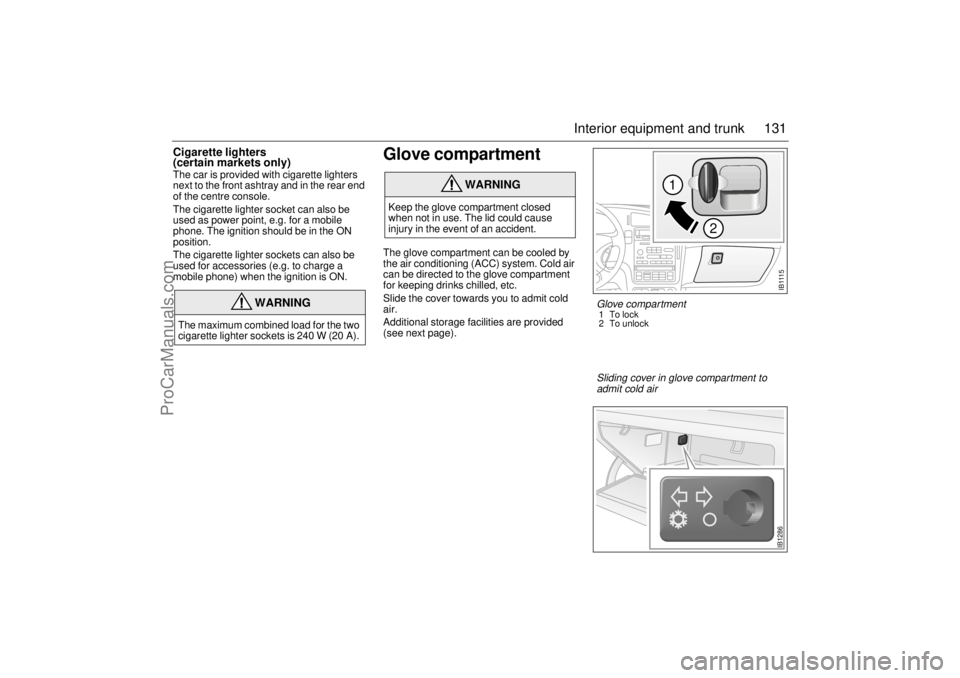
Glove compartment The glove compartment can be cooled by
the air conditioning (ACC) system. Cold air
can be directed to the glove compartment
for keeping drinks chilled, etc.
Slide the cover towards you to admit cold
air.
Additional storage facilities are provided
(see next page).
WARNING
The maximum combined load for the two
cigarette lighter sockets is 240 W (20 A).
WARNING
Keep the glove compartment closed
when not in use. The lid could cause
injury in the event of an accident.
I B 111 5
1
2
Glove compartment 1To lock
2 To unlock
IB1286
Sliding cover in glove compartment to
admit cold air
ProCarManuals.com