2001 SAAB 9-5 radio
[x] Cancel search: radioPage 100 of 272
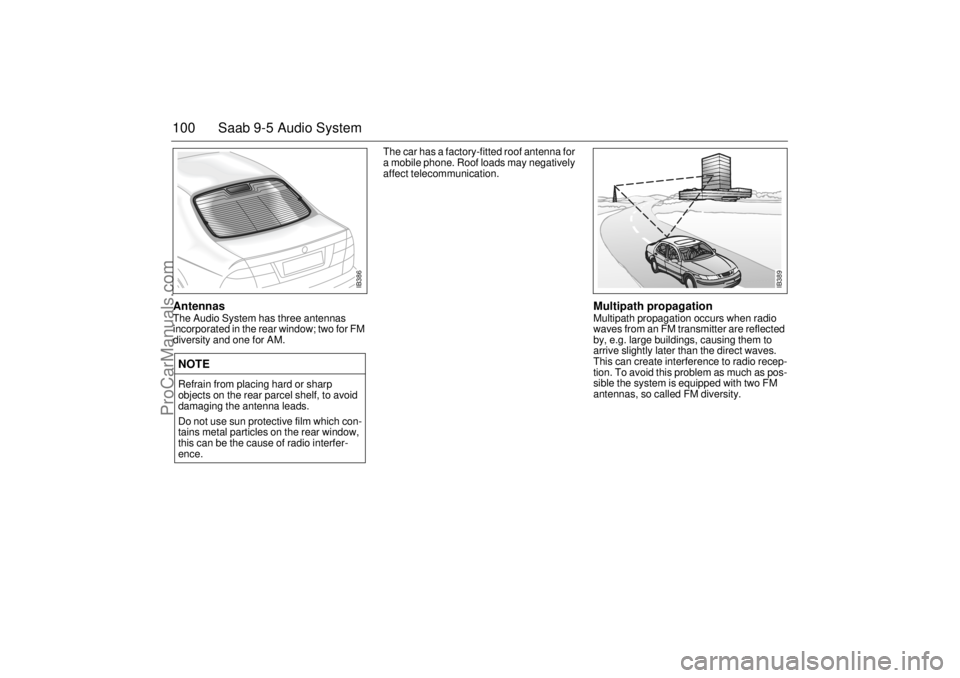
100 Saab 9-5 Audio SystemAntennas The Audio System has three antennas
incorporated in the rear window; two for FM
diversity and one for AM. The car has a factory-fitted roof antenna for
a mobile phone. Roof loads may negatively
affect telecommunication.
Multipath propagation Multipath propagation occurs when radio
waves from an FM transmitter are reflected
by, e.g. large buildings, causing them to
arrive slightly later than the direct waves.
This can create interference to radio recep-
tion. To avoid this problem as much as pos-
sible the system is equipped with two FM
antennas, so called FM diversity.
NOTERefrain from placing hard or sharp
objects on the rear parcel shelf, to avoid
damaging the antenna leads.
Do not use sun protective film which con-
tains metal particles on the rear window,
this can be the cause of radio interfer-
ence.
IB386
IB389
ProCarManuals.com
Page 101 of 272
101 Saab 9-5 Audio System
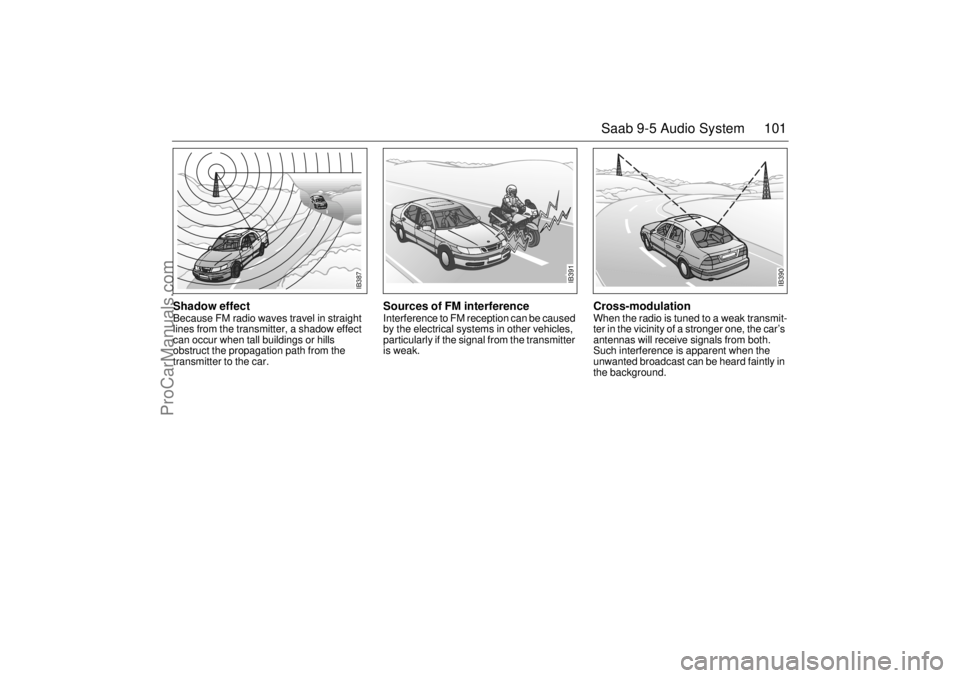
Shadow effect Because FM radio waves travel in straight
lines from the transmitter, a shadow effect
can occur when tall buildings or hills
obstruct the propagation path from the
transmitter to the car.
Sources of FM interference Interference to FM reception can be caused
by the electrical systems in other vehicles,
particularly if the signal from the transmitter
is weak.
Cross-modulation When the radio is tuned to a weak transmit-
ter in the vicinity of a stronger one, the car’s
antennas will receive signals from both.
Such interference is apparent when the
unwanted broadcast can be heard faintly in
the background.
IB391
IB390
IB387
ProCarManuals.com
Page 102 of 272
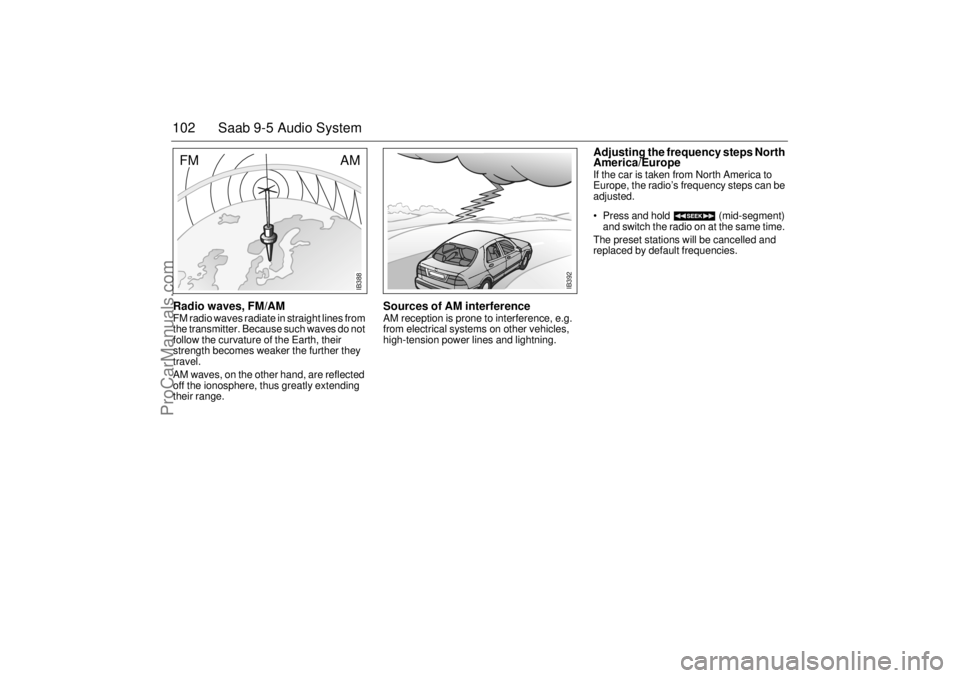
102 Saab 9-5 Audio SystemRadio waves, FM/AM FM radio waves radiate in straight lines from
the transmitter. Because such waves do not
follow the curvature of the Earth, their
strength becomes weaker the further they
travel.
AM waves, on the other hand, are reflected
off the ionosphere, thus greatly extending
their range.
Sources of AM interference AM reception is prone to interference, e.g.
from electrical systems on other vehicles,
high-tension power lines and lightning.
Adjusting the frequency steps North
America/Europe If the car is taken from North America to
Europe, the radio’s frequency steps can be
adjusted.
Press and hold (mid-segment)
and switch the radio on at the same time.
The preset stations will be cancelled and
replaced by default frequencies.
IB392
IB388
AM
FM
ProCarManuals.com
Page 104 of 272
104 Saab 9-5 Audio SystemMobile phones and
communications radios Mobile phones and communications radios
that do not have a separate external
antenna radiate an electromagnetic field
inside the car.Saab therefore recommends that a car
phone/radio transmitter should always be
connected to an external antenna.
An external antenna also provides
improved transmission/reception and a
greater range. Roof loads can negatively
affect telecommunication.
Mobile phones and communications radios
that are not supplied as standard equipment
by Saab can interfere with the car’s electri-
cal system and cause spurious fault codes
to be generated.
Fault codesThe Audio System has a built-in diagnostics
function. If a fault is detected, a fault code is
generated to help dealer technicians to
diagnose the fault. Below are the codes for
some faults that you might be able to rectify
yourself.
WARNING
The electromagnetic field produced, for
example, by a mobile telephone in the
passenger compartment may be detri-
mental to health. We therefore recom-
mend the use of an external antenna.
Do not use the phone when refueling with
gasoline. Gasoline fuels are highly explo-
sive.NOTEThe electromagnetic field can cause
interference to other electrical systems in
the car, such as the Audio System.
WARNING
Always consult an authorized Saab
dealer for installation guidance.
If you feel that any of the warnings or fault
indications are unclear, have the equip-
ment checked by an authorized Saab
dealer.
NOTEGreat care should be exercised in trying
to rectify a fault. If you are at all unsure,
contact an authorized Saab dealer.
Fault code Possible cause
CD/CDC
ERROR
12/17/19 CD is dirty, loaded
wrong side up or defec-
tive.
TAPE ERR 01 Tape broken or
mechanical fault in
deck.
TAPE ERR
02/03 Tape snarled up or
mechanical fault in
deck.
TAPE ERR 11 Cassette jammed: can-
not be loaded/ejected.
ProCarManuals.com
Page 111 of 272

111 OnStar - Telematics
Roadside assistance**There’s nothing worse than being stranded
on the road with car trouble. No matter what
the problem is (flat tire, out of gas, or engine
trouble), just call OnStar. We will contact the
help you need to get you quickly back on the
road.Stolen vehicle trackingOnStar doesn’t just protect you, it protects
your Saab, too. If your vehicle is ever stolen,
just contact OnStar by calling
1-888-4-ONSTAR. We will put you in touch
with the authorities and aid them in locating
your Saab. Ask your insurance carrier about
possible premium discounts.Accident Assist™Accident Assist™ provides step-by-step
guidance about what to do in case of an
accident. Working with leading insurance
companies we have developed a ”best
practices” list to assist you through most
accident situations. OnStar Accident
Assist™ can make the process of complet-
ing a police report and/or insurance claim
less stressful.
OnStar Med-Net***OnStar MED-NET securely stores your per-
sonal medical information (e.g., physician’s
name, emergency contacts, medications,
chronic conditions) and, in an emergency,
can quickly send it to a medical facility. This
important information can help assist with
diagnosis and treatment. **There will be no charge for Roadside Assistance as
long as your vehicle is under warranty.
***Requires activation and additional fee.Hands-free communicationTalking to an OnStar Advisor is easy and
hands-free. Simply press the OnStar but-
ton, and a small microphone picks up your
voice while the OnStar Advisor talks to you
through your stereo speakers. You can
even adjust the volume to your liking with
the steering wheel controls or the radio
volume knob. Your hands remain on the
steering wheel, while your eyes remain on
the road.Being safe on the road is important, but
there’s more to life than security. There’s liv-
ing. That’s why we have created the OnStar
Premium Plan. It gives you not only the
important protections of the Safety and
Security Plan, but also a whole range of ser-
vices which truly change driving from a
chore to a luxury. All new Saab models
come with a full year of the OnStar Premium
Service Plan.* * New retail deliveries only.
The OnStar Premium
Plan *Route supportWith OnStar Route Support, an Advisor can
help you find your way, no matter how far off
course you are. You can get exact street
directions, or guidance to nearby gas sta-
tions, restaurants, hotels or ATMs.Ride AssistIf you need a lift, anytime of the day or night,
just call OnStar. We’ll contact transportation
and send it right to you.Information and Convenience ser-
vicesOur Advisors have access to over five mil-
lion service listings including hotels, restau-
rants, gas stations, dealerships, hospitals,
ATMs and airports — more than 250 service
categories in all. Our Advisors can even
assist you with hotel and restaurant reser-
vations.*All Saab models come with a full year of Premium Ser-
vice. New retail deliveries only.
ProCarManuals.com
Page 115 of 272

115 OnStar - Telematics
Contact OnStar
You will need your OnStar Personal Identi-
fication Number (PIN) to authorize the
charge to your credit card on file.
If you are not in your Saab, you may call an
OnStar Advisor at 1-888-4-ONSTAR
(1-888-466-7827) to request unit replenish-
ment.
Security/Locking your SystemYou can set up a four-digit Personal Secu-
rity Code to ensure that unauthorized
people do not use the calling capability of
your system. With security set to ON, the
system will not allow any personal calls. You
must turn security OFF before calls can be
made.
Volume ControlIf your Saab is equipped with steering wheel
controls, the volume of the audio portion of
Personal Calling is controlled with your
steering wheel volume control. In vehicles
without steering wheel controls, and in
some other vehicles, you can control the
volume with the radio volume knob. 1Press the
OnStar DOT
buttonOnStar will respond
”Ready”
2 Say ”Units” OnStar will respond
”Verify or Add”
3 Say ”Add” You will be connected to
OnStar for replenish-
ment
1 Press the
OnStar DOT but-
tonOnStar will respond
”Ready”
2 Say ”Security” OnStar will respond
”Enter Four-Digit
Security Code”
3 Say the 1st Digit OnStar will repeat
the digit
4 Say the 2nd Digit OnStar will repeat
the digit
5 Say the 3rd Digit OnStar will repeat
the digit
6 Say the 4th Digit OnStar reply ”Secu-
rity (code # # # #) is
now ON/OFF”
ProCarManuals.com
Page 183 of 272

183 Starting and driving
Jump startingIf your battery has run down, you may want
to use another vehicle and some jumper
cables to start your Saab. Follow the steps
below to do it safely.
To jump start your vehicle:
1 Check the other vehicle. It must have a
12-volt battery with a negative ground
system.
2 Get the vehicles close enough so the
jumper cables can reach, but be sure the
vehicles are not touching each other. If
a poor connection on the negative
jumper cable should exist, it is possible
for damage to be caused to electrical
systems/components of either vehicle
should inadvertent contact be made.
You would not be able to start your car and bad grounding could damage elec-
trical systems.
3 Turn off the ignition on both vehicles.
Turn off all lights that are not needed,
and radios. This will avoid sparks and
help save both batteries and it could
save your radio.
4 Open the hood and locate the battery.
Find the positive (+) and negative (-) termi-
nals on the battery.
WARNING
Batteries can cause injury. They can be
dangerous because:
They contain acid that can burn you.
They contain gas that can explode or
ignite.
They contain enough electricity to
injure you.
If you do not follow these steps exactly,
some or all of these things can hurt you.NOTEIgnoring these steps could result in costly
damage to your vehicle that would not be
covered by your warranty.
Trying to start your car by pushing or pull-
ing it could damage your vehicle, even if
you have a manual transmission. If you
have an automatic transmission, your
vehicle cannot be started by pushing or
pulling it.
NOTEIf the other system is not a 12-volt system
with a negative ground, both vehicles can
be damaged.
WARNING
You could be injured if the vehicles roll.
Set the parking brake firmly on each vehi-
cle. Put an automatic transmission in P
(Park) or a manual transmission in Neu-
tral.NOTEIf you leave your radio on, it could be
badly damaged. The repairs would not be
covered by your warranty.
+
–
+
–
IB484
ProCarManuals.com
Page 261 of 272

261 Specifications
Several of the systems in your Saab
car can be adjusted to better fit your
individual needsSome functions are governed by legal
requirements and cannot therefore be
reprogrammed.
Consult an authorized Saab dealer for fur-
ther information.
Car alarm/central locking system:
The sound level of the siren when locking/
unlocking, HIGH or LOW.
The number of blinks when locking/
unlocking, 1 to 7.
Automatic locking of the trunk when the
car is driven, 1 to 8 mph (2-14 km/h), YES
or NO.
Preclude the unlocking of the trunk while
the car is driven, YES or NO.
Automatic locking of the trunk after
1 second-4 minutes if it has not been
opened, YES or NO.
Automatic locking of the trunk when it is
closed, YES or NO.Saab Information Display:
Outdoor temperature display can be
adjusted.
Miscellaneous:
Select the on-time for heated rear seat.
Coolant temperature gauge adjustment
can be increased/decreased.
Fuel level gauge adjustment can be
increased/decreased.
Additional sweep of the wipers after wind-
shield washer function (ON or OFF).
Follow me home on-time can vary from 20
to 50 seconds.
Night panel illumination deactivation
speed for the speedometer can be
adjusted.
Following adjustments can be done
by the driver:Automatic Climate Control (ACC):
To alter the preprogrammed ”AUTO” start
up mode with your own preferences you can
manually select the desired settings for:
Temperature.
Fan speed.
Air distribution.
See ”Programming I” on page 76 and ”Pro-
gramming II” on page 77.
Saab 9-5 Audio System (see page 97):
Maximum starting volume (when the
radio is switched on).
Telephone volume (if the car is equipped
with a phone connected to the audio sys-
tem).
Speed dependent volume (volume
increases or decreases with vehicle
speed).
Loudness.
Alarm system:
The glass breakage sensor can be tempo-
rarily disabled, see page 42.
Daytime Running Lights:
To disable, turn off the ignition and pull out
fuse 35, see page 217.
ProCarManuals.com