Page 138 of 413

2-71 Speedometer and Odometer
Your speedometer lets you see your speed in miles
per hour (mph) or kilometers per hour (km/h). Your
odometer shows how far your vehicle has been driven,
in either miles (used in the United States) or
kilometers (used in Canada).
The speedometer shows a top speed of 140 mph
(220 km/h). This is not intended to be the vehicle's
top speed.
Your vehicle is equipped with a tamper resistant
odometer. If you see ERROR displayed, you'll know
that someone has probably tried to turn it back.
You may wonder what happens if your vehicle needs a
new odometer installed. If the new one can be set to the
mileage total of the old odometer, then it must be. But if
it can't, then it's set at zero and a label must be put on
the driver's door to show the old mileage reading when
the new odometer was installed.
Trip Odometer
The trip odometer can tell you how far you have driven
since you last reset it.
To set it to zero, press the
trip reset button next to the
instrument panel cluster on
the right side.
Tachometer
The tachometer shows your
engine speed in revolutions
per minute (rpm). Do not
run your engine at speeds in
the red area.
Page 156 of 413
2-89
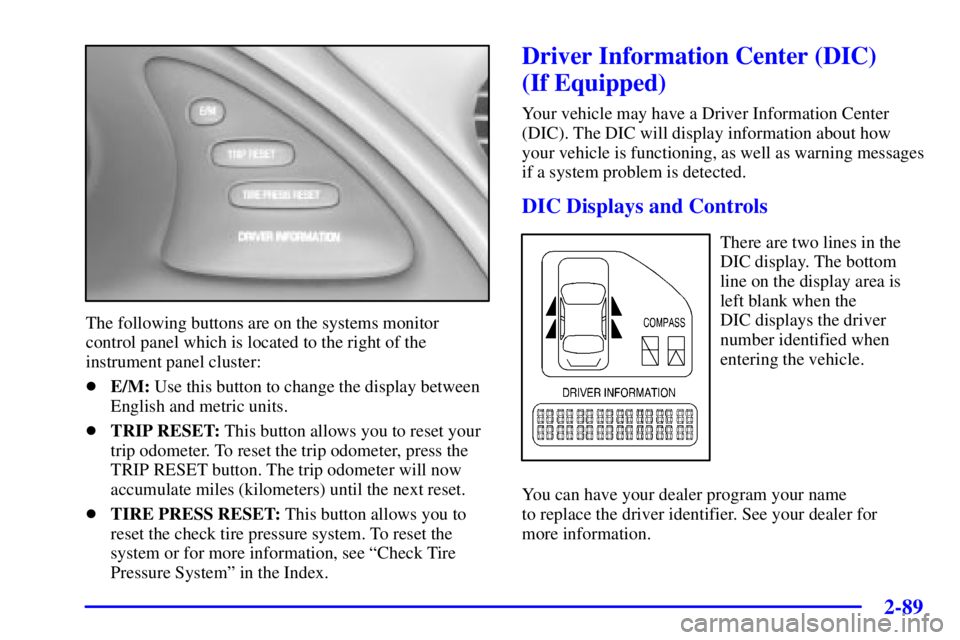
The following buttons are on the systems monitor
control panel which is located to the right of the
instrument panel cluster:
�E/M: Use this button to change the display between
English and metric units.
�TRIP RESET: This button allows you to reset your
trip odometer. To reset the trip odometer, press the
TRIP RESET button. The trip odometer will now
accumulate miles (kilometers) until the next reset.
�TIRE PRESS RESET: This button allows you to
reset the check tire pressure system. To reset the
system or for more information, see ªCheck Tire
Pressure Systemº in the Index.
Driver Information Center (DIC)
(If Equipped)
Your vehicle may have a Driver Information Center
(DIC). The DIC will display information about how
your vehicle is functioning, as well as warning messages
if a system problem is detected.
DIC Displays and Controls
There are two lines in the
DIC display. The bottom
line on the display area is
left blank when the
DIC displays the driver
number identified when
entering the vehicle.
You can have your dealer program your name
to replace the driver identifier. See your dealer for
more information.
Page 157 of 413
2-90
When you turn the ignition on, the DIC will display
your DRIVER NUMBER. The system will then perform
a status check and display any messages if a problem
is detected.
If there are no problems detected, the display will return
to the mode selected by that driver the last time the
ignition was turned off.
If a problem is detected, a diagnostic message will
appear in the display. The following information will
show the messages you may see on the DIC display.
The message center is continuously updated with the
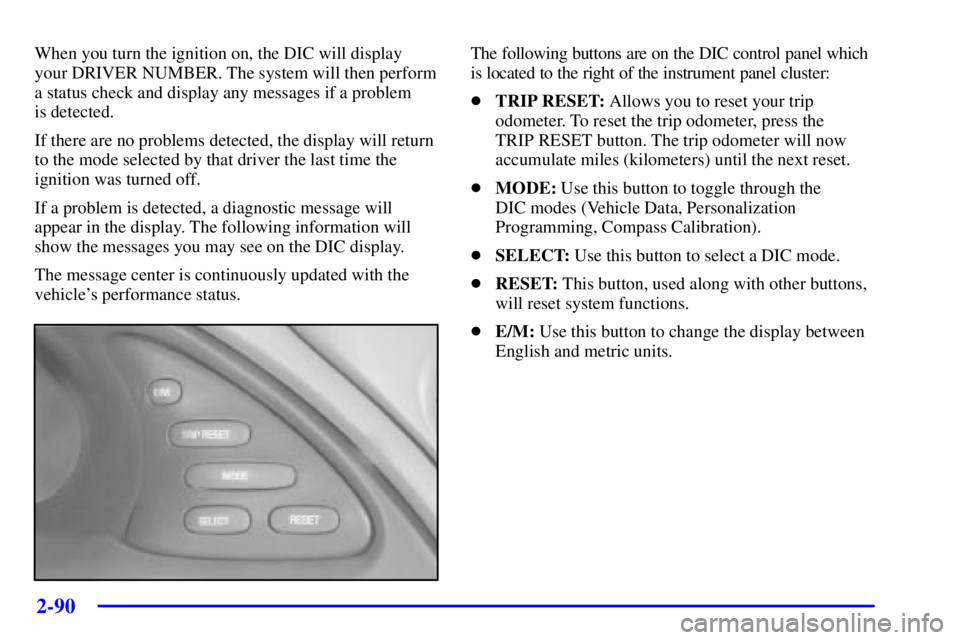
vehicle's performance status.The following buttons are on the DIC control panel which
is located to the right of the instrument panel cluster:
�TRIP RESET: Allows you to reset your trip
odometer. To reset the trip odometer, press the
TRIP RESET button. The trip odometer will now
accumulate miles (kilometers) until the next reset.
�MODE: Use this button to toggle through the
DIC modes (Vehicle Data, Personalization
Programming, Compass Calibration).
�SELECT: Use this button to select a DIC mode.
�RESET: This button, used along with other buttons,
will reset system functions.
�E/M: Use this button to change the display between
English and metric units.
Page 337 of 413
6-52 Wheel Alignment and Tire Balance
The wheels on your vehicle were aligned and balanced
carefully at the factory to give you the longest tire life
and best overall performance.
Scheduled wheel alignment and wheel balancing are not
needed. However, if you notice unusual tire wear or your
vehicle pulling one way or the other, the alignment may need
to be reset. If you notice your vehicle vibrating when driving
on a smooth road, your wheels may need to be rebalanced.
Wheel Replacement
Replace any wheel that is bent, cracked, or badly rusted or
corroded. If wheel nuts keep coming loose, the wheel,
wheel bolts and wheel nuts should be replaced. If the
wheel leaks air, replace it (except some aluminum wheels,
which can sometimes be repaired). See your dealer if any
of these conditions exist.
Your dealer will know the kind of wheel you need.
Each new wheel should have the same load
-carrying
capacity, diameter, width, offset and be mounted the
same way as the one it replaces.
If you need to replace any of your wheels, wheel bolts
or wheel nuts, replace them only with new GM original
equipment parts. This way, you will be sure to have the
right wheel, wheel bolts and wheel nuts for your vehicle.
CAUTION:
Using the wrong replacement wheels, wheel bolts
or wheel nuts on your vehicle can be dangerous.
It could affect the braking and handling of your
vehicle, make your tires lose air and make you
lose control. You could have a collision in which
you or others could be injured. Always use the
correct wheel, wheel bolts and wheel nuts
for replacement.
NOTICE:
The wrong wheel can also cause problems with
bearing life, brake cooling, speedometer or
odometer calibration, headlamp aim, bumper
height, vehicle ground clearance and tire or tire
chain clearance to the body and chassis.
See ªChanging a Flat Tireº in the Index for
more information.
Page 395 of 413
7-37
Part E: Maintenance Record
After the scheduled services are performed, record the date, odometer reading and who performed the service in the
boxes provided after the maintenance interval. Any additional information from ªOwner Checks and Servicesº or
ªPeriodic Maintenanceº can be added on the following record pages. Also, you should retain all maintenance receipts.
Your owner information portfolio is a convenient place to store them.
Maintenance Record
DATEODOMETER
READINGSERVICED BYMAINTENANCE PERFORMED
Page 396 of 413
7-38
Maintenance Record
DATEODOMETER
READINGSERVICED BYMAINTENANCE PERFORMED
Page 397 of 413
7-39
Maintenance Record
DATEODOMETER
READINGSERVICED BYMAINTENANCE PERFORMED
Page 398 of 413
7-40
Maintenance Record
DATEODOMETER
READINGSERVICED BYMAINTENANCE PERFORMED