Page 2 of 149
REMOTE CONTROL5I-1
Do not throw away used batteries.
Return them to a member of the dealer
network or an authorised collection point (photo shops, etc...).
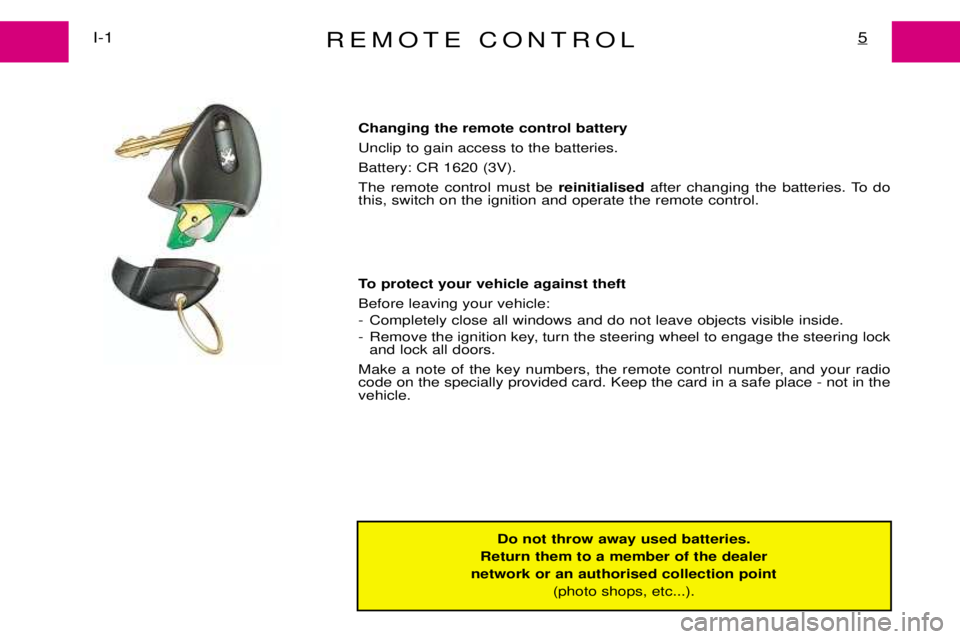
Changing the remote control battery Unclip to gain access to the batteries.Battery: CR 1620 (3V). The remote control must be
reinitialised after changing the batteries. To do
this, switch on the ignition and operate the remote control.
To protect your vehicle against theft Before leaving your vehicle:
- Completely close all windows and do not leave objects visible inside.
- Remove the ignition key, turn the steering wheel to engage the steering lock and lock all doors.
Make a note of the key numbers, the remote control number, and your radio code on the specially provided card. Keep the card in a safe place - not in thevehicle.
Page 3 of 149
KEYSI-2
6
Should you lose your key or remote control, the dealer network
can supply replacements.
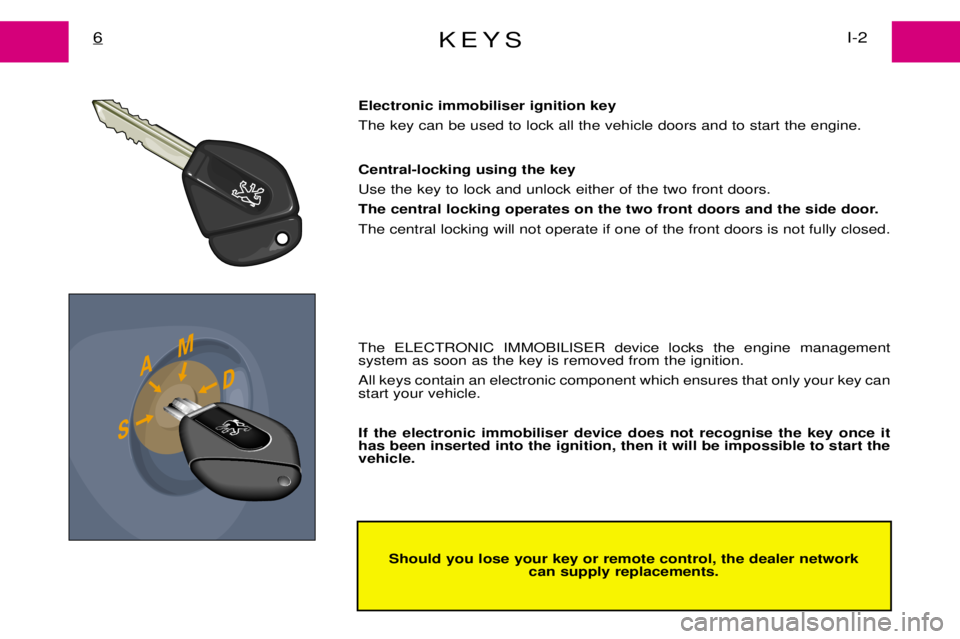
Electronic immobiliser ignition key The key can be used to lock all the vehicle doors and to start the engine. Central-locking using the key Use the key to lock and unlock either of the two front doors.
The central locking operates on the two front doors and the side door.The central locking will not operate if one of the front doors is not fully closed. The ELECTRONIC IMMOBILISER device locks the engine management system as soon as the key is removed from the ignition. All keys contain an electronic component which ensures that only your key can start your vehicle. If the electronic immobiliser device does not recognise the key once it has been inserted into the ignition, then it will be impossible to start thevehicle.
Page 23 of 149
DASHBOARD*23I-11
1Left hand air vent & Side glass demister vent.
2 Controls for: ¥ Lighting ¥ Direction indicators ¥ Horn ¥ Foglamp
3 Instrument panel.
4 Controls for: ¥ Windscreen wash ¥ Windscreen wiper
5 Centre air vents. 6
Radio housing or oddments pocket.
7 Right hand air vent & Side glassdemister vent.
8 Glovebox.
9 Heating/ventilation controls.
10 Ashtray & Cigar lighter.
11 Gear lever. 12
Controls for: ¥ Hazard warning lamps.
¥ Heated glass of hinged rear
doors.
¥ Air conditioning
¥ Demisting and defrosting of the rear view mirrors.
13 Steering lock and ignition switch.
14 Fuse box access.
15 Adjusting the headlamps.
16 Cruise control lever.
17 Bonnet release lever.
18 Cruise control switch.
* According to model or country
Page 27 of 149
INSTRUMENT PANEL*I-12
26
Multifunction Display On switching the ignition on, the display shows in turn:
- Maintenance indicator.
- Engine oil level indicator.
- Total mileage recorder. Engine oil level indicator When the ignition is switched on, the maintenance indicator is displayed for several seconds followed by the engine oil level for approximately 10 seconds.
Max Min Check using the oil dipstick.
Check with the vehicle on level ground, and the engine off for at least 10 minutes.
Shortage of oil = Warning lamps flashing It is essential to top up the level. Risk of damage to the engine. Flashing can indicate either a malfunction of the gauge or a shortage of oil
Contact your dealer.
* According to model or country
Page 29 of 149
INSTRUMENT PANEL*I-12
28
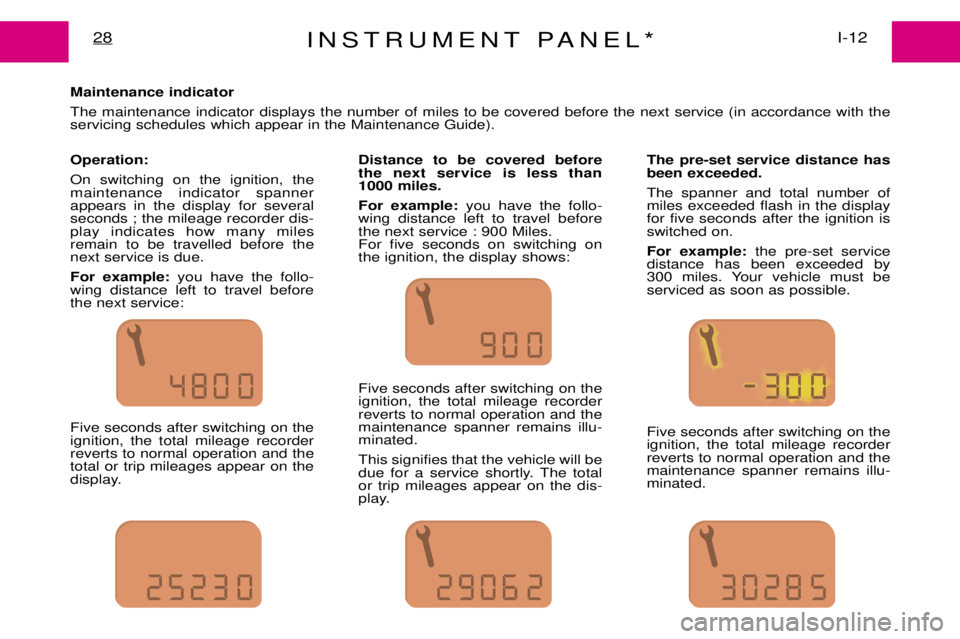
Maintenance indicator The maintenance indicator displays the number of miles to be covered before the next service (in accordance with the servicing schedules which appear in the Maintenance Guide). Operation: On switching on the ignition, the maintenance indicator spannerappears in the display for severalseconds ; the mileage recorder dis-play indicates how many milesremain to be travelled before thenext service is due. For example: you have the follo-
wing distance left to travel before the next service: Five seconds after switching on the ignition, the total mileage recorderreverts to normal operation and thetotal or trip mileages appear on the
display. Distance to be covered beforethe next service is less than
1000 miles. For example:
you have the follo-
wing distance left to travel before the next service : 900 Miles.For five seconds on switching onthe ignition, the display shows: Five seconds after switching on the ignition, the total mileage recorderreverts to normal operation and themaintenance spanner remains illu-minated. This signifies that the vehicle will be
due for a service shortly. The totalor trip mileages appear on the dis-
play. The pre-set service distance hasbeen exceeded. The spanner and total number of miles exceeded flash in the displayfor five seconds after the ignition isswitched on. For example:
the pre-set service
distance has been exceeded by
300 miles. Your vehicle must beserviced as soon as possible. Five seconds after switching on the ignition, the total mileage recorderreverts to normal operation and themaintenance spanner remains illu-minated.
Page 30 of 149
INSTRUMENT PANEL*29I-12
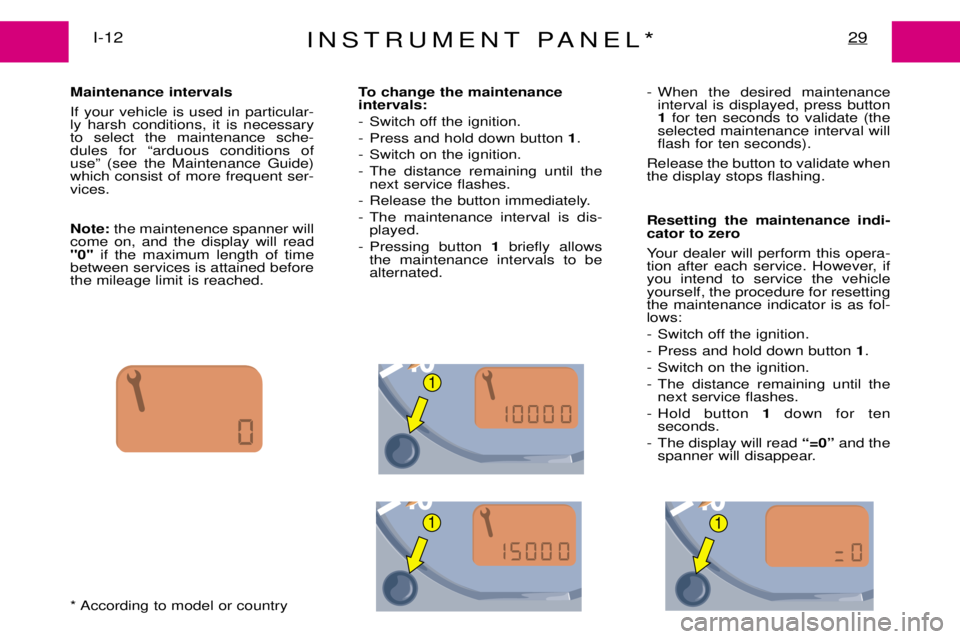
Maintenance intervals If your vehicle is used in particular- ly harsh conditions, it is necessaryto select the maintenance sche-dules for Òarduous conditions ofuseÓ (see the Maintenance Guide)which consist of more frequent ser-vices. Note:the maintenence spanner will
come on, and the display will read ''0'' if the maximum length of time
between services is attained beforethe mileage limit is reached. To change the maintenance intervals:
- Switch off the ignition.
- Press and hold down button
1.
- Switch on the ignition.
- The distance remaining until the next service flashes.
- Release the button immediately.
- The maintenance interval is dis- played.
- Pressing button 1briefly allows
the maintenance intervals to be alternated. - When the desired maintenance
interval is displayed, press button1 for ten seconds to validate (the
selected maintenance interval willflash for ten seconds).
Release the button to validate whenthe display stops flashing. Resetting the maintenance indi- cator to zero
Your dealer will perform this opera-
tion after each service. However, ifyou intend to service the vehicleyourself, the procedure for resettingthe maintenance indicator is as fol-lows:
- Switch off the ignition.
- Press and hold down button 1.
- Switch on the ignition.
- The distance remaining until the next service flashes.
- Hold button 1down for ten
seconds.
- The display will read Ò=0Óand the
spanner will disappear.
* According to model or country
1
11
Page 31 of 149
INSTRUMENT PANEL*I-12
30
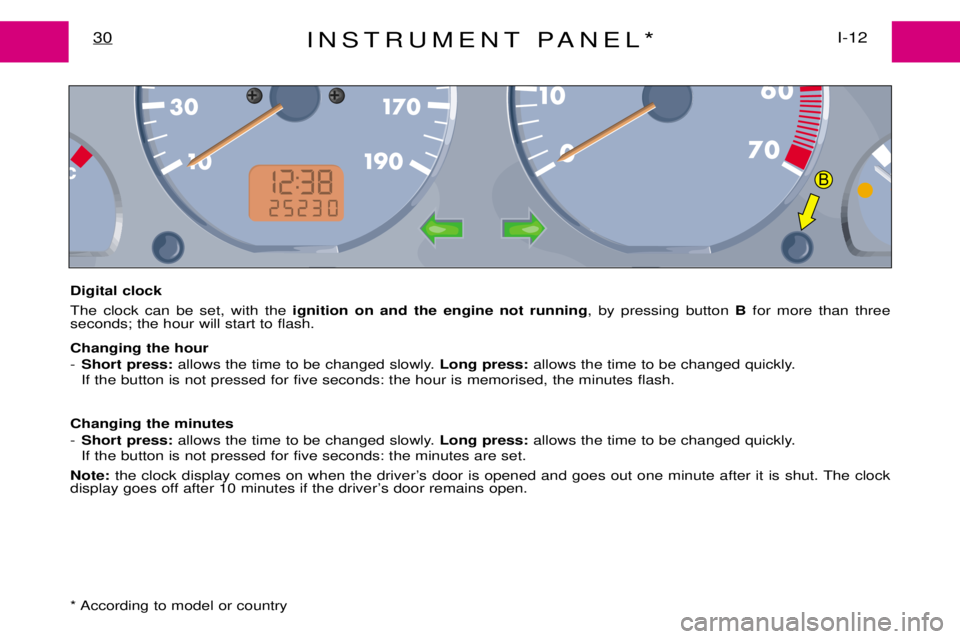
Digital clock The clock can be set, with the ignition on and the engine not running , by pressing button Bfor more than three
seconds; the hour will start to flash. Changing the hour - Short press: allows the time to be changed slowly. Long press:allows the time to be changed quickly.
If the button is not pressed for five seconds: the hour is memorised, the minutes flash.
Changing the minutes- Short press: allows the time to be changed slowly. Long press:allows the time to be changed quickly.
If the button is not pressed for five seconds: the minutes are set.
Note: the clock display comes on when the driverÕs door is opened and goes out one minute after it is shut. The clock
display goes off after 10 minutes if the driverÕs door remains open.
* According to model or country
B
Page 34 of 149
INSTRUMENT PANEL*33I-12
1Left hand air vent
2 Left hand loudspeaker (Tweeter)
3 Cruise control switch
4 Controls for: ¥ Horn¥ Lighting¥ Direction indicators¥ Front foglamps¥ Fog lamps
5 Instrument panel
6 Radio control on steering wheel
7 Controls for:¥ Windscreen wiper¥ Windscreen wash¥ Rear screen wiper
8 Centre air vents
9 Radio housing or oddments pocket
10 Electronic key indicator lamp 11
Passenger Airbag*
12 Right hand loudspeaker
(Tweeter)
13 Right hand air vent
14 Glovebox
15 Controls for:
¥ Air conditioning or heating/
air distribution
16 Front ashtray with cigar lighter
17 Gear lever
18 Controls for:
¥ Air conditioning¥ Hazard warning lamps¥ Rear screen demister
19 Steering lock and ignition switch
20 Fuse box access
21 Driver's airbag 22
Steering column adjustment lever
23 Cruise control lever
24 Controls for:
¥ Adjusting the headlamps¥ Dashboard lighting rheostat
25 Oddments pocket
26 Bonnet release lever
* According to model or country