Page 128 of 436
2-36
To close the liftgate, pull down on the handle, then
firmly shut the liftgate. Don't drive with the liftgate
open, even slightly. See ªEngine Exhaustº in the Index.
A message in your message center will warn you if the
liftgate is not completely closed. See ªRear Hatch Ajar
Warning Messageº in the Index.
Theft
Vehicle theft is big business, especially in some cities.
Although your vehicle has a number of theft
-deterrent
features, we know that nothing we put on it can make
it impossible to steal. However, there are ways you
can help.
Key in the Ignition
If you leave your vehicle with the keys inside, it's an
easy target for joy riders or professional thieves
-- so
don't do it.
When you park your vehicle and open the driver's door,
you'll hear a chime reminding you to remove your key
from the ignition and take it with you. Always do this.
Your steering wheel will be locked, and so will your
ignition and transaxle. Also remember to lock the doors.
Page 134 of 436

2-42
New Vehicle ªBreak-Inº
NOTICE:
Your vehicle doesn't need an elaborate
ªbreak
-in.º But it will perform better in
the long run if you follow these guidelines:
�Don't drive at any one speed -- fast or
slow
-- for the first 500 miles (805 km).
Don't make full
-throttle starts.
�Avoid making hard stops for the first
200 miles (322 km) or so. During this time
your new brake linings aren't yet broken
in. Hard stops with new linings can mean
premature wear and earlier replacement.
Follow this breaking
-in guideline every
time you get new brake linings.
�Don't tow a trailer during break
-in.
See ªTowing a Trailerº in the Index for
more information.
Ignition Positions
With the key in the ignition, you can turn the switch to
five positions.
ACCESSORY (A): This is the position in which you
can operate your electrical power accessories. Press in the
ignition switch as you turn the top of the key toward you.
LOCK (B): This is the only position in which you can
remove the key. This position locks your steering wheel,
ignition and transaxle.
Page 135 of 436

2-43
NOTICE:
If your key seems stuck in LOCK and you can't
turn it, be sure you are using the correct key;
if so, is it all the way in? If it is, then turn the
steering wheel left and right while you turn the
key hard. But turn the key only with your hand.
Using a tool to force it could break the key or the
ignition switch. If none of this works, then your
vehicle needs service.
OFF (C): This position unlocks the steering wheel,
ignition and transaxle, but does not send electrical
power to any accessories. Use this position if your
vehicle must be pushed or towed, but never try to
push
-start your vehicle. A warning chime will sound
if you open the driver's door when the ignition is off
and the key is in the ignition.RUN (D): This is the position to which the switch
returns after you start your engine and release the
switch. The switch stays in RUN when the engine is
running. But even when the engine is not running,
you can use RUN to operate your electrical power
accessories, and to display some instrument panel
warning lights.
START (E): This position starts the engine. When the
engine starts, release the key. The ignition switch will
return to RUN for normal driving.
If the engine is not running, ACCESSORY and RUN
are positions that allow you to operate your electrical
accessories, such as the radio.
Retained Accessory Power (RAP)
With RAP, the power windows, the power rear quarter
windows (if equipped), audio system and the optional
electronic level control (ELC) will continue to work up
to 10 minutes after the ignition key is turned to OFF
and none of the doors are opened.
Page 149 of 436
2-57
Horn
You can sound the horn by pressing the horn symbols
on your steering wheel.
Tilt Wheel
A tilt steering wheel allows you to adjust the steering
wheel before you drive. You can also raise it to the
highest level to give your legs more room when you exit
and enter the vehicle.
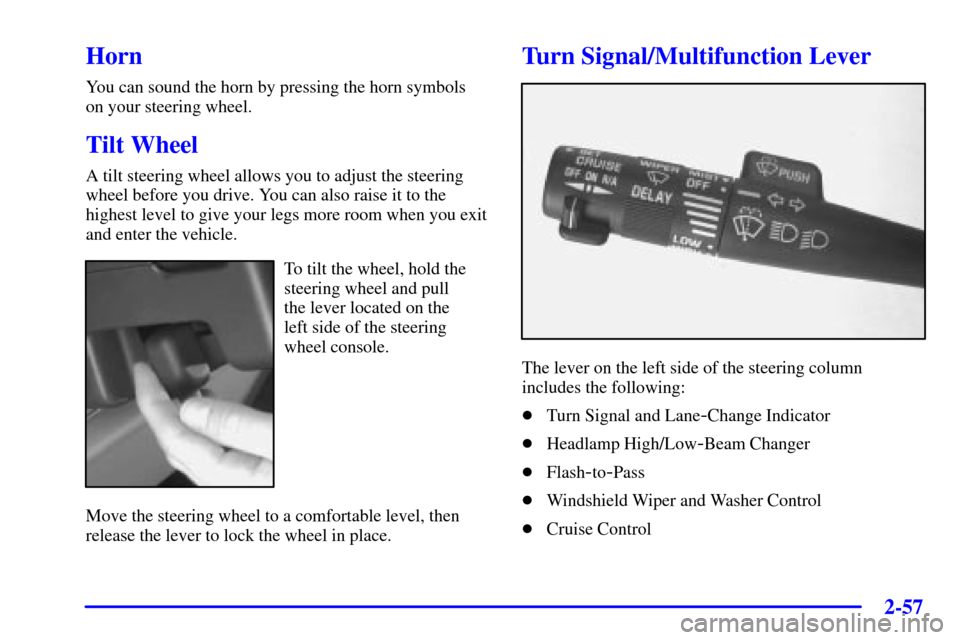
To tilt the wheel, hold the
steering wheel and pull
the lever located on the
left side of the steering
wheel console.
Move the steering wheel to a comfortable level, then
release the lever to lock the wheel in place.
Turn Signal/Multifunction Lever
The lever on the left side of the steering column
includes the following:
�Turn Signal and Lane
-Change Indicator
�Headlamp High/Low
-Beam Changer
�Flash
-to-Pass
�Windshield Wiper and Washer Control
�Cruise Control
Page 156 of 436
2-64
Using Cruise Control on Hills
How well your cruise control will work on hills depends
upon your speed, load and the steepness of the hills.
When going up steep hills, you may have to step on the
accelerator pedal to maintain your speed. When going
downhill, you may have to brake or shift to a lower gear
to keep your speed down. Of course, applying the brake
takes you out of cruise control. Many drivers find this to
be too much trouble and don't use cruise control on
steep hills.
Ending Cruise Control
There are two ways to turn off the cruise control:
�Step lightly on the brake pedal, or
�move the cruise switch to OFF.
Erasing Cruise Speed Memory
When you turn off the cruise control or the ignition,
your cruise control set speed memory is erased.Exterior Lamps
The exterior lamp control is located to the left of the
steering column.
Page 180 of 436
2-88
OnStar� System (If Equipped)
OnStar is a vehicle communications system that
offers a variety of services and provides a hands
-free
communication link between you and the OnStar Center.
A service subscription agreement and fee are required
in order to receive OnStar service. Services are available
24 hours a day, 7 days a week. For more information,
call 1
-888-ONSTAR-7 (1-888-667-8277).
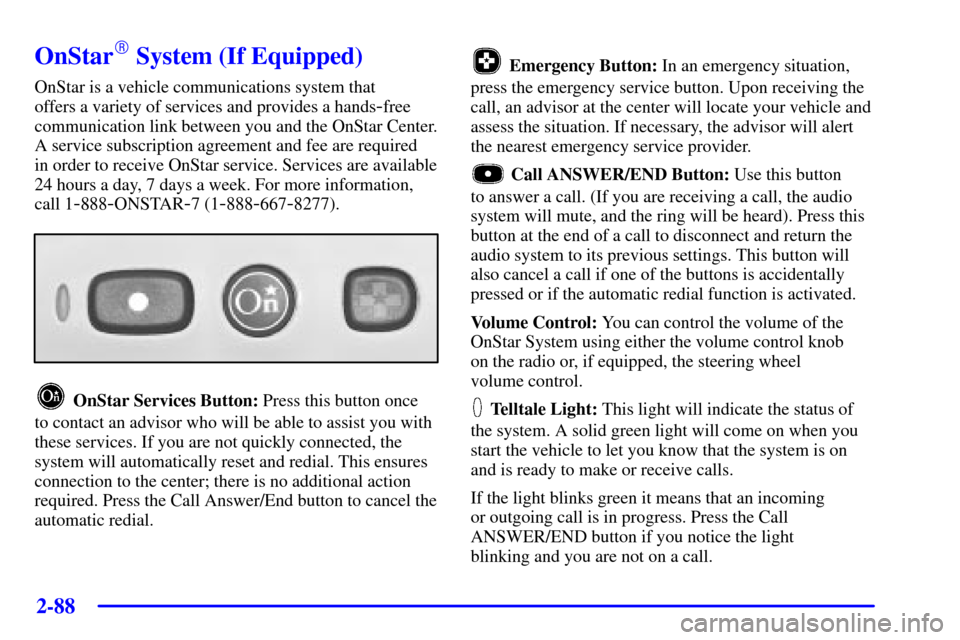
OnStar Services Button: Press this button once
to contact an advisor who will be able to assist you with
these services. If you are not quickly connected, the
system will automatically reset and redial. This ensures
connection to the center; there is no additional action
required. Press the Call Answer/End button to cancel the
automatic redial.
Emergency Button: In an emergency situation,
press the emergency service button. Upon receiving the
call, an advisor at the center will locate your vehicle and
assess the situation. If necessary, the advisor will alert
the nearest emergency service provider.
Call ANSWER/END Button: Use this button
to answer a call. (If you are receiving a call, the audio
system will mute, and the ring will be heard). Press this
button at the end of a call to disconnect and return the
audio system to its previous settings. This button will
also cancel a call if one of the buttons is accidentally
pressed or if the automatic redial function is activated.
Volume Control: You can control the volume of the
OnStar System using either the volume control knob
on the radio or, if equipped, the steering wheel
volume control.
Telltale Light: This light will indicate the status of
the system. A solid green light will come on when you
start the vehicle to let you know that the system is on
and is ready to make or receive calls.
If the light blinks green it means that an incoming
or outgoing call is in progress. Press the Call
ANSWER/END button if you notice the light
blinking and you are not on a call.
Page 187 of 436
2-95
The main components of the instrument panel are the following:
A. Side Vents
B. Front Vents
C. Turn Signal/Multifunction Lever
D. Hazard Warning Flasher Switch
E. Instrument Panel Cluster
F. Center Vents
G. Audio System
H. Side Vents
I. Exterior Lamp Control
J. Hood Release
K. Audio Steering Wheel Controls (Option)
L. HornM. Ignition Switch
N. Audio Steering Wheel Controls (Option)
O. Climate Controls
P. Rear Fan Controls (Option)
Q. Cupholder Tray
R. Accessory Power Outlet
S. Storage Bin
T. Instrument Panel Switchbank
U. Glove Box
V. Front Vents
W. Instrument Panel Fuse Block
Page 212 of 436

3-
3-1
Section 3 Comfort Controls and Audio Systems
In this section, you'll find out how to operate the comfort control and audio systems offered with your vehicle.
Be sure to read about the particular systems supplied with your vehicle.
3
-2 Comfort Controls
3
-2 Air Conditioning with Temperature Control
3
-5 Air Conditioning with Dual Temperature
Control (Option)
3
-9 Rear Window Defogger
3
-9 Rear Climate Control (Option)
3
-11 Ventilation System
3
-12 Audio Systems
3
-12 Setting the Clock
3
-13 AM-FM Stereo with Compact Disc Player
with Radio Data Systems (RDS) and
Automatic Tone Control
3
-20 AM-FM Stereo with Cassette Tape and
Compact Disc Player with Radio Data
Systems (RDS) and Automatic Tone
Control (If Equipped)3
-30 AM-FM Stereo with 6-Disc Compact Disc
Player with Programmable Equalization and
Radio Data Systems (RDS) (Option)
3
-41 Rear Seat Audio (Option)
3
-42 Theft-Deterrent Feature
3
-43 Audio Steering Wheel Controls (If Equipped)
3
-44 Understanding Radio Reception
3
-44 Tips About Your Audio System
3
-45 Care of Your Cassette Tape Player
3
-46 Care of Your Compact Discs
3
-46 Care of Your Compact Disc Player
3
-46 Integrated Windshield Antenna