Page 96 of 371

2-31
Locking Rear Axle
Your locking rear axle can give you additional traction
on snow, mud, ice, sand or gravel. It works like a
standard axle most of the time, but when one of the
rear wheels has no traction and the other does, this
feature will allow the wheel with traction to move
the vehicle.
All-Wheel Drive
There is no lever or switch to engage or disengage the
front axle. It is fully automatic and adjusts as needed for
road conditions. Your vehicle has an active transfer case
allowing two
-wheel-drive operation on dry roads. The
transfer case will shift automatically into all
-wheel drive
on slippery surfaces. You may feel an extra shift when
the all
-wheel drive engages.
Horn
To sound the horn, press the center pad on the
steering wheel.
Tilt Wheel
You should adjust the
steering wheel before
you drive. The tilt lever
is located on the driver's
side of the steering column,
under the turn signal lever.
You can raise it to the highest level to give your legs
more room when you enter and exit the vehicle.
To tilt the wheel, hold the steering wheel and pull
the lever toward you. Move the steering wheel to a
comfortable level, then release the lever to lock the
wheel in place.
Do not adjust the steering wheel while driving.
ProCarManuals.com
Page 97 of 371
2-32
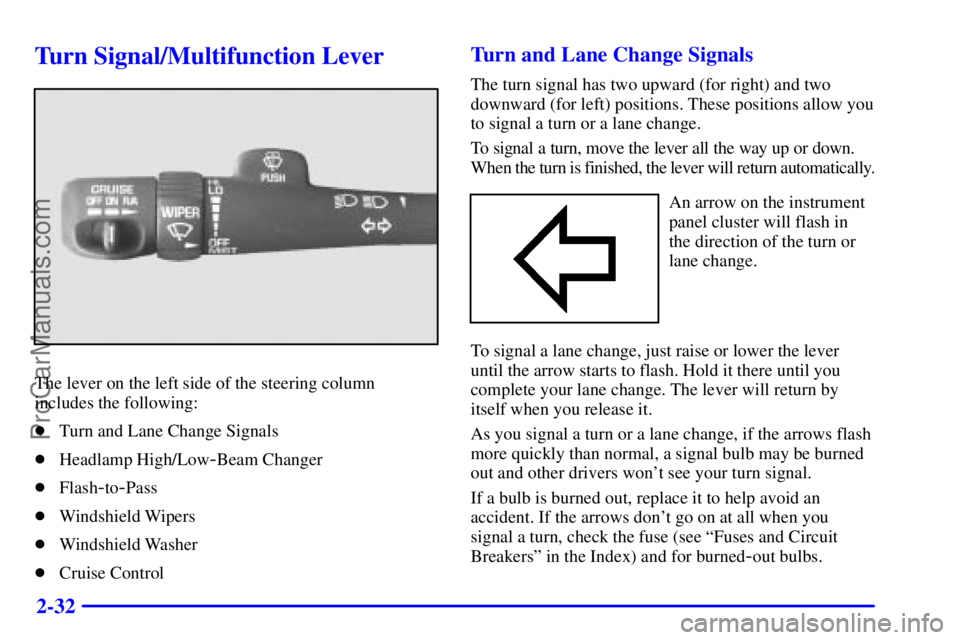
Turn Signal/Multifunction Lever
The lever on the left side of the steering column
includes the following:
�Turn and Lane Change Signals
�Headlamp High/Low
-Beam Changer
�Flash
-to-Pass
�Windshield Wipers
�Windshield Washer
�Cruise Control
Turn and Lane Change Signals
The turn signal has two upward (for right) and two
downward (for left) positions. These positions allow you
to signal a turn or a lane change.
To signal a turn, move the lever all the way up or down.
When the turn is finished, the lever will return automatically.
An arrow on the instrument
panel cluster will flash in
the direction of the turn or
lane change.
To signal a lane change, just raise or lower the lever
until the arrow starts to flash. Hold it there until you
complete your lane change. The lever will return by
itself when you release it.
As you signal a turn or a lane change, if the arrows flash
more quickly than normal, a signal bulb may be burned
out and other drivers won't see your turn signal.
If a bulb is burned out, replace it to help avoid an
accident. If the arrows don't go on at all when you
signal a turn, check the fuse (see ªFuses and Circuit
Breakersº in the Index) and for burned
-out bulbs.
ProCarManuals.com
Page 99 of 371

2-34
For steady wiping at low speed, turn the band away
from you to LO. For high
-speed wiping, turn the
band further, to HI. To stop the wipers, move the
band to OFF.
Be sure to clear ice and snow from the wiper blades
before using them. If they're frozen to the windshield,
carefully loosen or thaw them. If your blades do become
worn or damaged, get new blades or blade inserts.
Windshield Washer
There's a paddle marked with the windshield washer
symbol on the top of the multifunction lever. To spray
washer fluid on the windshield, push the paddle. The
wipers will clear the window and then either stop or
return to your preset speed.
CAUTION:
In freezing weather, don't use your washer until
the windshield is warmed. Otherwise the washer
fluid can form ice on the windshield, blocking
your vision.
Rear Window Washer/Wiper
This switch is located to the
right of the steering wheel
on the instrument panel.
To turn the rear wiper on, slide the switch to either
LO or HI. For delayed wiping, slide the switch to LO.
For steady wiping, slide the switch to HI. To turn the
wiper off, slide the switch to OFF.
To wash the window, press the wash button located
on the switch. The switch must be in either the HI or
LO position.
The rear window washer uses the same fluid bottle
as the windshield washer. However, the rear window
washer will run out of fluid before the windshield
washer. If you can wash your windshield but not
your rear window, check your fluid level.
ProCarManuals.com
Page 121 of 371

2-56
Emergency Button: In an emergency situation,
press the emergency service button. Upon receiving the
call, an advisor at the center will locate your vehicle and
assess the situation. If necessary, the advisor will alert
the nearest emergency service provider.
Call ANSWER/END Button: Use this button
to answer a call. (If you are receiving a call, the audio
system will mute, and the ring will be heard). Press this
button at the end of a call to disconnect and return the
audio system to its previous settings. This button will
also cancel a call if one of the buttons is accidentally
pressed or if the automatic redial function is activated.
Volume Control: You can control the volume of the
OnStar System using either the volume control knob
on the radio or using the steering wheel volume control
(if equipped).
Telltale Light: This light will indicate the status of
the system. A solid green light will come on when you
start the vehicle to let you know that the system is on
and is ready to make or receive calls.
If the light blinks green it means that an incoming
or outgoing call is in progress. Press the Call
ANSWER/END button if you notice the light
blinking and you are not on a call.
The light will be red in the event of an OnStar system
malfunction. If this occurs press the OnStar button to
attempt to contact an advisor. If the connection is made,
the advisor will assist you with steps to take to make
sure that the system is functioning properly. If you
cannot contact the advisor, take your vehicle to your
dealership as soon as possible for assistance.
ProCarManuals.com
Page 129 of 371
2-64
The Instrument Panel--Your Information System
The main components of your instrument panel are the following:
A. Air Vents
B. Turn Signal/Multifunction Lever
C. Instrument Panel Cluster
D. Lamp Controls
E. Fog Lamps
F. Brake ReleaseG. Audio Steering Wheel Controls
(If Equipped)
H. Rear Window Washer/Wiper
I. Rear Liftgate Glass Release
J. Ashtray
K. Comfort ControlsL. Rear Window and
Mirror Defogger
M. Accessory Power Outlets
N. Audio System
O. Glove Box
ProCarManuals.com
Page 144 of 371
3-
3-1
Section 3 Comfort Controls and Audio Systems
In this section, you'll find out how to operate the comfort control and audio systems offered with your vehicle.
Be sure to read about the particular systems supplied with your vehicle.
3
-2 Comfort Controls
3
-2 Electronic Climate Control
3
-5 Air Conditioning
3
-5 Heating
3
-5 Defogging and Defrosting
3
-6 Rear Window Defogger
3
-7 Ventilation System
3
-8 Audio Systems
3
-8 Setting the Clock
3
-8AM-FM Stereo with Cassette Tape and
Compact Disc Player with Automatic
Tone Control3
-15 Console-Mounted CD Changer
(If Equipped)
3
-18 Theft-Deterrent Feature
3
-20 Audio Steering Wheel Controls
(If Equipped)
3
-21 Understanding Radio Reception
3
-21 Tips About Your Audio System
3
-22 Care of Your Cassette Tape Player
3
-23 Care of Your Compact Discs
3
-23 Care of Your Compact Disc Player
3
-23 Fixed Mast Antenna
ProCarManuals.com
Page 163 of 371
3-20 Audio Steering Wheel Controls
(If Equipped)
If your vehicle has this feature, you can control certain
radio functions using the buttons on your steering wheel.
PROG: Press this
button to play a
station you have
programmed on the
radio preset buttons
on the selected band.
If a cassette tape is playing, press this button to play the
other side of the tape. If a compact disc is playing in the
console
-mounted CD changer, press this button to go to
the next available CD.SEEK: Press the up arrow to tune to the next
radio station and the down arrow to tune to the
previous radio station.
If a cassette tape or compact disc is playing,
the player will advance with the up arrow and reverse
with the down arrow.
MUTE: Press this
button to silence the
system. Press it again
to turn on the sound.
VOL: Press the
up or down arrow
to increase or
decrease volume.
ProCarManuals.com
Page 167 of 371
4-
4-1
Section 4 Your Driving and the Road
Here you'll find information about driving on different kinds of roads and in varying weather conditions. We've also
included many other useful tips on driving.
4
-2 Your Driving, the Road and Your Vehicle
4
-3 Defensive Driving
4
-4 Drunken Driving
4
-7 Control of a Vehicle
4
-7 Braking
4
-10 Steering
4
-12 Off-Road Recovery
4
-13 Passing
4
-14 Loss of Control
4
-15 Operating Your Vehicle Off Paved Roads
4
-28 Driving at Night4
-29 Driving in Rain and on Wet Roads
4
-32 City Driving
4
-33 Freeway Driving
4
-34 Before Leaving on a Long Trip
4
-35 Highway Hypnosis
4
-35 Hill and Mountain Roads
4
-37 Winter Driving
4
-40 Recreational Vehicle Towing
4
-41 Loading Your Vehicle
4
-43 Towing a Trailer
ProCarManuals.com


