2001 NISSAN QUEST ESP
[x] Cancel search: ESPPage 48 of 304
child's size. Generally, infants up to about
1 year and less than 20 pounds (9 kg)
should be placed in rear facing child re-
straints. Forward facing child restraints
are available for children who outgrow rear
facing child restraints.
WARNING
Infants and children need special pro-
tection. The vehicle's seat belts may
not fit them properly. The shoulder belt
may come too close to the face or neck.
The lap belt may not fit over their small
hip bones. In an accident, an improp-
erly fitting seat belt could cause seri-
ous or fatal injury. Always use appro-
priate child restraints.
All US States and Canadian provinces re-
quire the use of approved child restraints for
infants and small children. See ``Child re-
straints'' later in this section.
In addition, there are many types of child
restraints available for larger children which
should be used for maximum protection.
NISSAN recommends that all pre-teens
and children be restrained in the rear
seat if possible. According to accidentstatistics, children are safer when prop-
erly restrained in the rear seat than in the
front seat.
This is especially important because your
vehicle has a supplemental restraint sys-
tem (Air bag system) for the front passen-
ger (For precautions, see ``Supplemental
restraint system'' earlier in this section).
Infants and small children
NISSAN recommends that infants and small
children be placed in a child restraint that
complies with the Federal Motor Vehicle
Safety Standards or Canadian Motor Ve-
hicle Safety Standards. You should choose
a child restraint that fits your vehicle and
always follow the manufacturer's instruc-
tions for installation and use.
Larger children
Children who are too large for child re-
straints should be seated and restrained by
the seat belts which are provided.
If the child's seating position has a shoulder
belt that fits close to the face or neck, the use
of a booster seat (commercially available)
may help overcome this. The booster seat
should raise the child so the shoulder belt is
properly positioned across the top, middleportion of the shoulder and the lap belt is low
on the hips. The booster seat should fit the
vehicle seat and have a label certifying that
it complies with Federal Motor Vehicle
Safety Standards or Canadian Motor Ve-
hicle Safety Standards. Once the child has
grown enough so the shoulder belt is no
longer on or near the face and neck, use the
shoulder belt without the booster seat.
WARNING
Never let a child stand or kneel on any
seat and do not allow a child in the
cargo areas while the vehicle is mov-
ing. The child could be seriously in-
jured or killed in an accident or sudden
stop.
PREGNANT WOMEN
NISSAN recommends that pregnant women
use seat belts. The seat belt should be worn
snug, and always position the lap belt as
low as possible around the hips, not the
waist. Place the shoulder belt over your
shoulder and across your chest. Never run
the lap/shoulder belt over your abdominal
area. Contact your doctor for specific rec-
ommendations.
Seats, restraints and supplemental air bag systems
1-41
ZX
Page 86 of 304
shoulder harness retractor is in the emer-
gency locking mode.
WARNING
The automatic locking mode (child re-
straint mode) must be reactivated each
time you place a child in the integrated
child safety seats.
In addition to the automatic locking retrac-
tors, the integrated child safety seat shoul-
der harnesses are equipped with emer-
gency locking retractors. The automatic
locking mode is best to use, especially for
children who need help staying properly
positioned in the seat and its harnesses (for
example, children who are younger and
smaller), because the belts are always
locked. In the emergency locking mode, the
shoulder belts only lock in a sudden stop or
accident, allowing a child more freedom of
movement. Use the emergency locking
mode only if you judge your child able to
remain properly positioned in the integrated
child safety seat.
Removing the child
1. Release the chest clip.
2. Release the left and right shoulder har-ness tongues from the belt buckle by
pressing the red belt buckle button.
3. Move the left and right shoulder har-
nesses aside and assist the child from
the integrated child safety seat.
Storing the Integrated Child Safety
Seat
1. Be sure the shoulder harnesses are fully
retracted and resting inside the inte-
grated child safety seat recess. It is not
necessary to reconnect the shoulder har-
nesses and belt buckle prior to storing
the integrated child safety seat.
2. While holding onto, but not pulling, the
cushion release strap, rotate the cushion
upward until it fits flush with the second
row seat back cushion and locks into
position.
3. Be sure the integrated child safety seat is
locked in the stowed position by grasping
the safety seat cushion and attempting to
lower it without pulling the cushion re-
lease strap. If the integrated child safety
seat is not locked in the stowed position,
repeat steps one through three.
Integrated Child Safety Seat main-
tenance
cTo clean the shoulder harnesses and belt
buckle webbing, apply a mild soap solu-
tion or any solution recommended for
cleaning upholstery or carpets. Then
brush the webbing, wipe it with a cloth
and allow it to dry in the shade. Do not
allow the shoulder harnesses to retract
until they are completely dry.
cThe integrated child safety seats cloth
removable pads may be cleaned with
mild soap and water. The cloth remov-
able pads are attached to the seats with
fastener strips, and may be easily re-
moved. The pads are machine washable.
Fo best results, machine wash in cold
water in the gentle cycle. Tumble dry on
low heat. Do not use chlorine bleach, and
do not dry clean.
CAUTION
Failure to follow the washing instruc-
tions provided on the cloth removable
pads may result in premature wear or
damage.
Seats, restraints and supplemental air bag systems
1-79
ZX
Page 127 of 304

d) Return to the Integrated HomeLinkT
Universal Transceiver in the vehicle,
and depress the programmed
HomeLinkTbutton for the duration of
the fast blink on the Integrated
HomeLinkTUniversal Transceiver (1
to 2 seconds). Release the button,
and repress to confirm that the system
has trained.
e) Your garage door opener should now
recognize your Integrated HomeLinkT
Universal Transceiver. You may use
either your Integrated HomeLinkTUni-
versal Transceiver or your original
hand held transmitter to open your
garage door.
IF YOUR VEHICLE IS EVER
STOLEN
If your vehicle has been stolen, you should
change the codes of any device that was
programmed into the Integrated HomeLinkT
Universal Transceiver as soon as possible.
Consult the owners manual of each device,
or call the manufacturer or dealer of those
devices.
When your vehicle is recovered, you will
have to reprogram the IntegratedHomeLinkTUniversal Transceiver with
your new transmitter information.
FFC Notice:
This device complies with FCC rules part
15. Operation is subject to the following
two conditions: (1) This device may not
cause harmful interference and (2) This
device must accept any interference that
may be received, including interference
that may cause undesired operation.
The transmitter has been tested and
complies with FCC and DOC/MDC rules.
Changes or modifications not expressly
approved by the party responsible for
compliance could void the user's author-
ity to operate the device.
DOC: ISTC 1763K1313
FCC I.D.: CB2V67690
2-38Instruments and controls
ZX
Page 130 of 304
cAlways be sure that hands and feet
are clear of the door frame to avoid
injury while closing a sliding door.
cWhen opening a sliding door on a
slope, ensure that it is fully open and
that it does not close by itself.
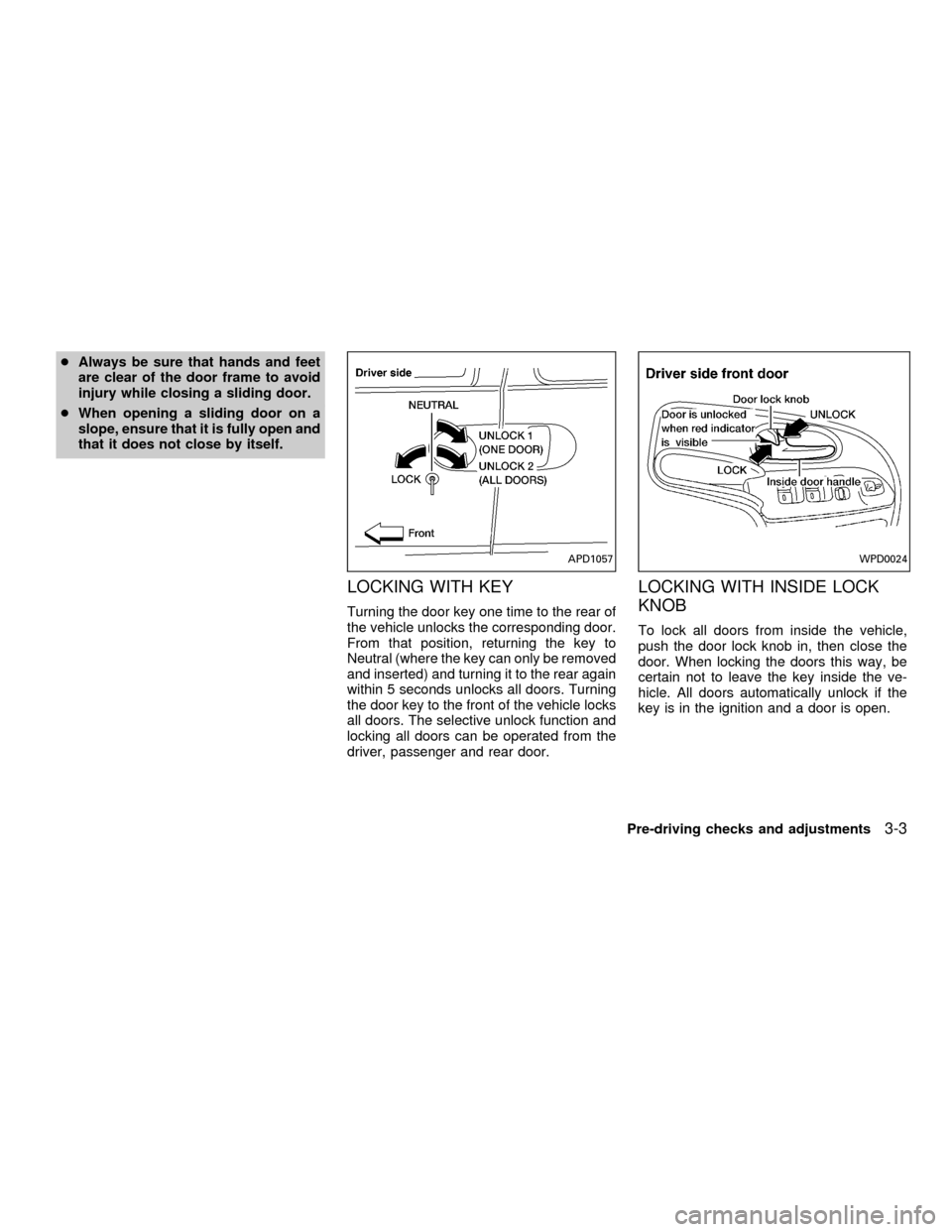
LOCKING WITH KEY
Turning the door key one time to the rear of
the vehicle unlocks the corresponding door.
From that position, returning the key to
Neutral (where the key can only be removed
and inserted) and turning it to the rear again
within 5 seconds unlocks all doors. Turning
the door key to the front of the vehicle locks
all doors. The selective unlock function and
locking all doors can be operated from the
driver, passenger and rear door.
LOCKING WITH INSIDE LOCK
KNOB
To lock all doors from inside the vehicle,
push the door lock knob in, then close the
door. When locking the doors this way, be
certain not to leave the key inside the ve-
hicle. All doors automatically unlock if the
key is in the ignition and a door is open.
APD1057WPD0024
Pre-driving checks and adjustments3-3
ZX
Page 132 of 304

CHILD SAFETY SLIDING DOOR
LOCKS
Child safety locking helps prevent doors
from being opened accidentally, especially
when small children are in the vehicle.When the lever is in the LOCK position,
the sliding doors can be opened only
from the outside.
APD1075
APD1056
Pre-driving checks and adjustments3-5
ZX
Page 157 of 304

To operate the rear seat air conditioner, the
engine must be running.
The rear seat air conditioner can be turned
on and off from the front controls. If the rear
seat fan control lever on the front panel is set
to OFF, the rear air conditioner is turned off.
If it is set to any of the fan speed positions, air
is discharged from the rear vents at the
corresponding speed. When the rear seat
fan control lever on the front panel is set to
REAR A/C, the rear seat passengers control
their own fan speed.
The rear seat air conditioner only works when
the front seat air conditioner is operating.
CONTROLS
Fan control dial
This dial turns the fan on and off, and
controls fan speed.
WHA0016
REAR SEAT AIR
CONDITIONER (if so equipped)
4-14Heater, air conditioner and audio systems
ZX
Page 164 of 304
Clock operation
The clock is on in the display regardless of
what mode, media, or function the radio is in
as long as the ignition is in ACC or ON.
Clock set
Press the RDS/CLK button until SELECT
HOURS is displayed then use the SEL
buttons to change the hour, press
the RDS/CLK button again until SELECT
MINS is displayed then use the SEL
buttons to change the minutes.
The display will return to clock priority mode
in 10 seconds or press the RDS/CLK button
to return to the clock display.
Selecting the desired band
Push the AM or FM buttons to change to AM
or FM band reception.
The FM stereo indicator, ST illuminates during
FM stereo reception. When the stereo broad-
cast signal is weak, the radio automatically
changes from stereo to monaural reception.
FM-AM radio operation
MUTE button
Push the MUTE button to mute out the
radio.TUNE buttons
WARNING
The radio should not be tuned while
driving so full attention may be given to
vehicle operation.
Use the
orbuttons for manual
tuning. To move quickly through the chan-
nels, hold either of the tune buttons down
for more than 0.5 seconds.
AUTO SET
Press the AUTO button while listening to the
radio to activate the auto set feature. When
AUTO is depressed for less than 5 seconds,
the display window momentarily indicates
AUTO ON, and the radio seeks the first six
strong stations for the respective band. The
first six strong stations are then stored in
order in memory buttons one through six.
Only stations in the selected band are set,
and the station seek begins from the last
frequency stored in memory button six. If
AM, FM, SCAN, TUNE, SEEK, AUTO or a
memory button is pushed while auto set is
operating, auto set is canceled and AUTO
OFF shows in the display window.AUTO LOAD
Press the AUTO button for longer than 5
seconds while listening to the radio to acti-
vate the auto load feature. When AUTO is
depressed for longer than 5 seconds, the
display window momentarily indicates
AUTO LOAD, and the radio seeks the first
six strong stations for every band. The first
six strong stations are then stored in order
in memory buttons one through six for each
band (AM, FM1, and FM2).
SEEK tuning
Push the SEEKorbuttons to find the
next broadcast station. Pushing the
SEEKS up andbutton SEEKS down.
Pushing the button again continues the SEEK
function. Once the highest broadcast station
is reached, the radio continues in the SEEK
mode at the lowest station. Once the lowest
broadcast station is reached, the radio con-
tinues in the SEEK mode at the highest
station.
SCAN tuning
Push the SCAN tuning button, SCAN illumi-
nates in the display. SCAN tuning begins
from low to high frequencies and stops at
each broadcasting station for 5 seconds.
Heater, air conditioner and audio systems
4-21
ZX
Page 170 of 304

Clock operation
The clock is on in the display regardless of
what mode, media, or function the radio is in
as long as the ignition is in ACC or ON.
Clock set
Press the RDS/CLK button until SELECT
HOURS is displayed then use the SEL
buttons to change the hour, press
the RDS/CLK button again until SELECT
MINS is displayed then use the SEL
buttons to change the minutes.
The display will return to the previous radio
station, tape or CD that was being played
previous to setting the clock in 7 seconds or
you may press the RDS/CLK button until the
previous display appears.
Selecting the desired band
Push the AM buttons to change to AM band
or push the FM button to change to FM1 or
FM2 band reception.
The FM stereo indicator, ST illuminates
during FM stereo reception. When the ste-
reo broadcast signal is weak, the radio
automatically changes from stereo to mon-
aural reception.
FM-AM Radio operation
MUTE button
Push the MUTE button to mute out the
radio.
TUNE buttons
WARNING
The radio should not be tuned while
driving so full attention may be given to
vehicle operation.
Use the
orbuttons for manual
tuning. To move quickly through the chan-
nels, hold either of the tune buttons down
for more than 0.5 seconds.
AUTO SET
Press the AUTO button while listening to the
radio to activate the auto set feature. When
AUTO is depressed for less than 5 seconds,
the display window momentarily indicates
AUTO ON, and the radio seeks the first six
strong stations for the respective band. The
first six strong stations are then stored in
order in memory buttons one through six.
Only stations in the selected band are set,and the station seek begins from the last
frequency stored in memory button six. If
AM, FM, SCAN, TUNE, SEEK, AUTO or a
memory button is pushed while auto set is
operating, auto set is canceled and AUTO
OFF shows in the display window.
AUTO LOAD
Press the AUTO button for longer than 5
seconds while listening to the radio to acti-
vate the auto load feature. When AUTO is
depressed for longer than 5 seconds, the
display window momentarily indicates
AUTO LOAD, and the radio seeks the first
six strong stations for every band. The first
six strong stations are then stored in order
in memory buttons one through six for each
band (AM, FM1, and FM2).
SEEK tuning
Push the SEEKorbuttons to find the
next broadcast station. Pushing the
SEEKS up andbutton SEEKS down.
Pushing the button again continues the SEEK
function. Once the highest broadcast station
is reached, the radio continues in the SEEK
mode at the lowest station. Once the lowest
broadcast station is reached, the radio con-
Heater, air conditioner and audio systems4-27
ZX