2001 NISSAN PATHFINDER ECO mode
[x] Cancel search: ECO modePage 126 of 289

AUTOMATIC OPERATION
Cooling and/or dehumidified heating
(AUTO)This mode may be used all year round. The
system works automatically to maintain a
constant temperature. Air flow distribution and
fan speed are also controlled automatically.
1. Push the AUTO button on. (AUTO will
appear on the display.)
2. Push the temperature control button
to set the desired temperature.
IFor normal operation, adjust the tempera-
ture control button to about 75ÉF (24ÉC).
IThe temperature of the passenger compart-
ment will be maintained automatically. Air
flow distribution and fan speed are also
controlled automatically.
Heating (ECON)Use this mode when you need to heat only.
1. Push the ECON (Economy) button on.
(ECON appears on the display.)
2. Push the temperature control button
to set the desired temperature.
IThe temperature of the passenger compart-ment will be maintained automatically. Air
flow distribution and fan speed are also
controlled automatically.
IDo not set the temperature lower than the
outside air temperature. Otherwise the sys-
tem may not work properly.
IIf the windows fog up, do not use the ECON
mode.
Dehumidified defogging1. Push the DEF
switch on. (The indica-
tor light will come on.)
2. Push the temperature control button
to set the desired temperature.
ITo remove ice or fog from the outside of the
windows, push the manual fan control but-
tonand set to the maximum position.
IAs soon as possible after the windshield is
clean, push the AUTO button to return to
the auto mode.
IWhen the DEF
button is pushed, the
air conditioner will automatically be turned
on at outside temperatures above 23ÉF
(þ5ÉC) (for VQ35DE engine models) or
28ÉF (þ2ÉC) (for VG33E engine models) to
defog the windshield. The air recirculation
mode will automatically be turned off.Outside air is drawn into the passenger com-
partment to improve defogging performance.
MANUAL OPERATION
Fan speed controlPush the fan control button
to change
the fan speed manually.
IPush the AUTO button to return to auto-
matic control of the fan speed.
Air recirculationPush the air recirculation button
to recir-
culate interior air inside the vehicle. The indi-
cator light will come on.
Push it again to draw outside air into the
passenger compartment. The indicator will go
out.
IThe air recirculation button cannot be
activated when the air conditioner is in the
DEF mode.
Air flow controlPushing the MODE button selects the air outlet
to provide:
: Air flow from center and side ventilators.: Air flow from center and side ventilators
and foot outlets.
Heater, air conditioner and audio systems
4-9
Z
00.1.10/R50-D/V5
X
Page 132 of 289
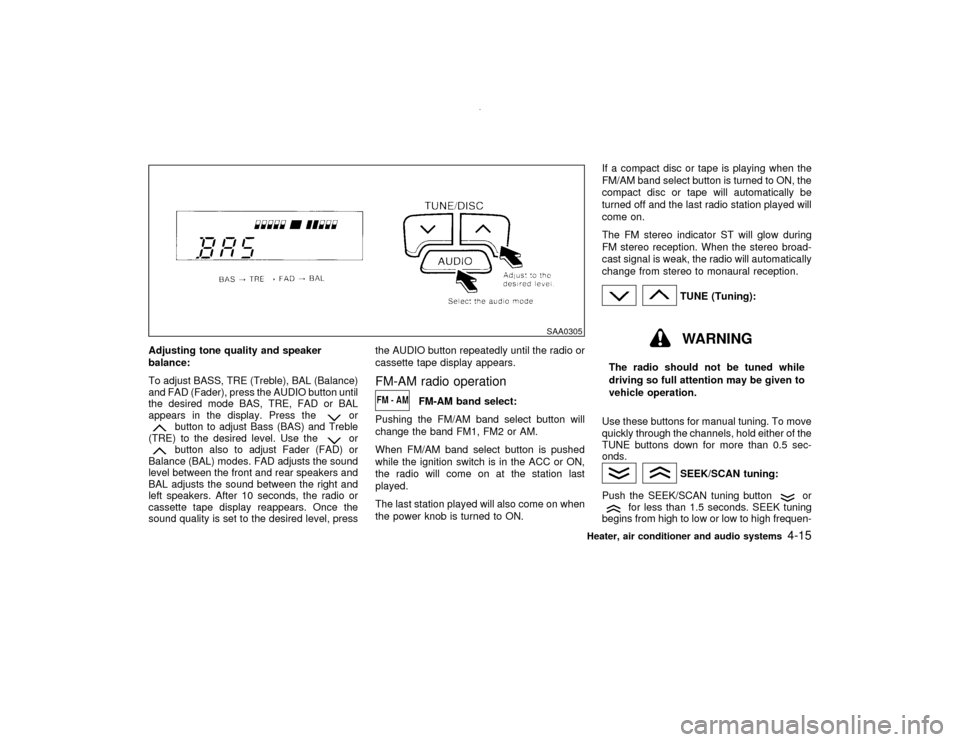
Adjusting tone quality and speaker
balance:
To adjust BASS, TRE (Treble), BAL (Balance)
and FAD (Fader), press the AUDIO button until
the desired mode BAS, TRE, FAD or BAL
appears in the display. Press the
or
button to adjust Bass (BAS) and Treble
(TRE) to the desired level. Use the
or
button also to adjust Fader (FAD) or
Balance (BAL) modes. FAD adjusts the sound
level between the front and rear speakers and
BAL adjusts the sound between the right and
left speakers. After 10 seconds, the radio or
cassette tape display reappears. Once the
sound quality is set to the desired level, pressthe AUDIO button repeatedly until the radio or
cassette tape display appears.
FM-AM radio operation
FM-AM band select:
Pushing the FM/AM band select button will
change the band FM1, FM2 or AM.
When FM/AM band select button is pushed
while the ignition switch is in the ACC or ON,
the radio will come on at the station last
played.
The last station played will also come on when
the power knob is turned to ON.If a compact disc or tape is playing when the
FM/AM band select button is turned to ON, the
compact disc or tape will automatically be
turned off and the last radio station played will
come on.
The FM stereo indicator ST will glow during
FM stereo reception. When the stereo broad-
cast signal is weak, the radio will automatically
change from stereo to monaural reception.
TUNE (Tuning):WARNING
The radio should not be tuned while
driving so full attention may be given to
vehicle operation.
Use these buttons for manual tuning. To move
quickly through the channels, hold either of the
TUNE buttons down for more than 0.5 sec-
onds.
SEEK/SCAN tuning:
Push the SEEK/SCAN tuning button
or
for less than 1.5 seconds. SEEK tuning
begins from high to low or low to high frequen-
SAA0305
Heater, air conditioner and audio systems
4-15
Z
00.1.10/R50-D/V5
X
Page 137 of 289
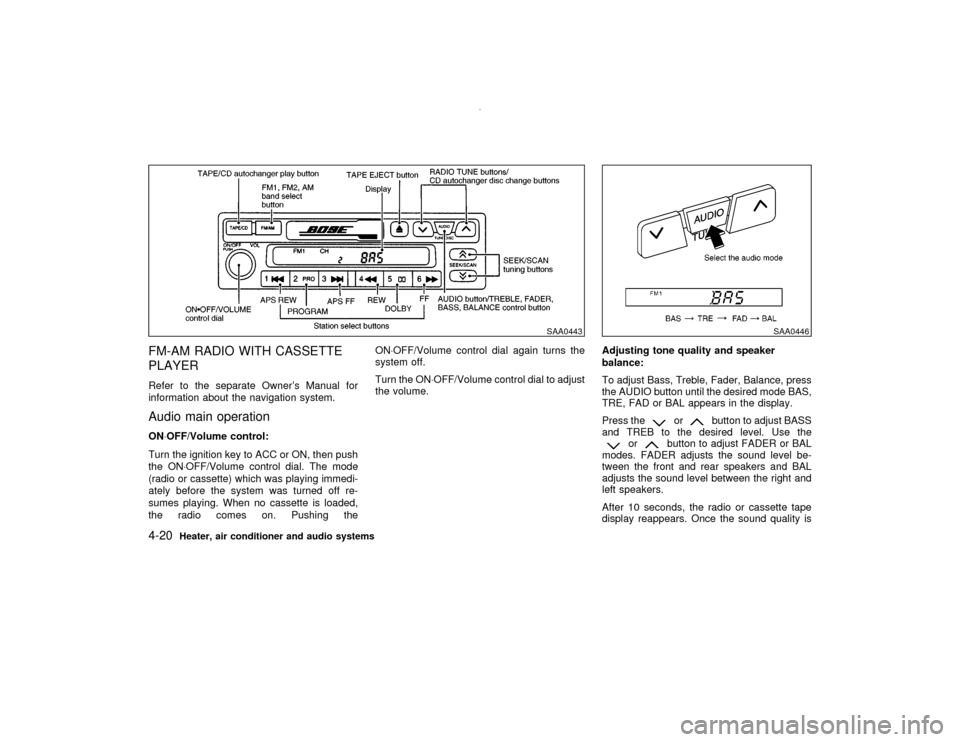
FM-AM RADIO WITH CASSETTE
PLAYERRefer to the separate Owner's Manual for
information about the navigation system.Audio main operationON×OFF/Volume control:
Turn the ignition key to ACC or ON, then push
the ON×OFF/Volume control dial. The mode
(radio or cassette) which was playing immedi-
ately before the system was turned off re-
sumes playing. When no cassette is loaded,
the radio comes on. Pushing theON×OFF/Volume control dial again turns the
system off.
Turn the ON×OFF/Volume control dial to adjust
the volume.Adjusting tone quality and speaker
balance:
To adjust Bass, Treble, Fader, Balance, press
the AUDIO button until the desired mode BAS,
TRE, FAD or BAL appears in the display.
Press the
or
button to adjust BASS
and TREB to the desired level. Use the
or
button to adjust FADER or BAL
modes. FADER adjusts the sound level be-
tween the front and rear speakers and BAL
adjusts the sound level between the right and
left speakers.
After 10 seconds, the radio or cassette tape
display reappears. Once the sound quality is
SAA0443
SAA0446
4-20
Heater, air conditioner and audio systems
Z
00.1.10/R50-D/V5
X
Page 138 of 289
set to the desired level, press the AUDIO
button repeatedly until the radio or cassette
tape display appears.Radio/Cassette tape priority modeIn this mode, the radio station illuminates in the
display during radio operation. During cassette
tape operation, TAPE illuminates in the dis-
play.FM-AM radio operation
FM-AM band select:
Push the FM-AM band select button to listen to
the radio and tune in the desired station.
Pushing the FM-AM band select button will
change the band FM1, FM2 or AM.
When FM/AM band select button is pushed
while the ignition switch is in the ACC or ON,
the radio will come on at the station last
played.
The last station played will also come on when
the power knob is turned to ON.
If a compact disc or tape is playing when the
FM/AM band select button is turned to ON, the
compact disc or tape will automatically be
turned off and the last radio station played will
come on.The FM stereo indicator, ST illuminates during
FM stereo reception. When the stereo broad-
cast signal is weak, the radio automatically
changes from stereo to monaural reception.
TUNE (Tuning):WARNING
The radio should not be tuned while
driving so full attention may be given to
vehicle operation.
Use these buttons for manual tuning. To move
quickly through the channels, hold either of the
TUNE buttons down for more than 0.5 sec-
onds.
SEEK/SCAN tuning:
Push the SEEK/SCAN tuning button
or
for less than 1.5 seconds. SEEK tuning
begins from high to low or low to high frequen-
cies and stops at the next broadcasting sta-
tion.
Push the SEEK/SCAN tuning button
or
for more than 1.5 seconds. SCAN illumi-
nates in the display window. SCAN tuning
begins from high to low or low to high frequen-
cies and stops at each broadcasting station for10 seconds. Pushing the button again during
this 10 second period stops SCAN tuning and
the radio remains tuned to that station.
If any of the SEEK/SCAN tuning buttons is not
pushed within 10 seconds, SCAN tuning
moves to the next station.
Heater, air conditioner and audio systems
4-21
Z
00.1.10/R50-D/V5
X
Page 139 of 289
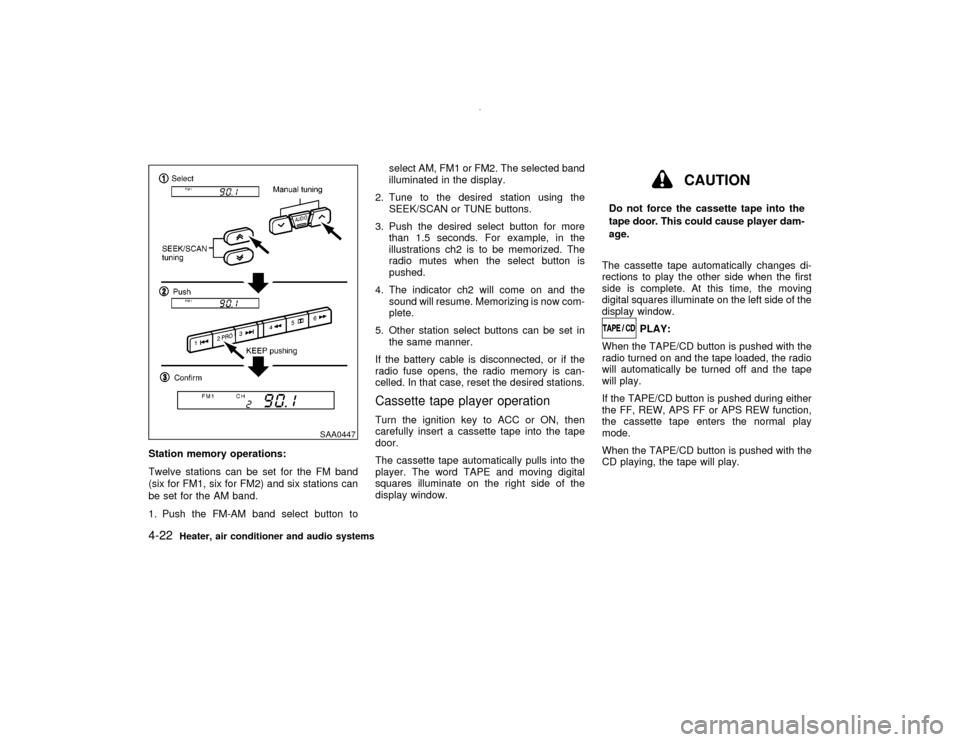
Station memory operations:
Twelve stations can be set for the FM band
(six for FM1, six for FM2) and six stations can
be set for the AM band.
1. Push the FM-AM band select button toselect AM, FM1 or FM2. The selected band
illuminated in the display.
2. Tune to the desired station using the
SEEK/SCAN or TUNE buttons.
3. Push the desired select button for more
than 1.5 seconds. For example, in the
illustrations ch2 is to be memorized. The
radio mutes when the select button is
pushed.
4. The indicator ch2 will come on and the
sound will resume. Memorizing is now com-
plete.
5. Other station select buttons can be set in
the same manner.
If the battery cable is disconnected, or if the
radio fuse opens, the radio memory is can-
celled. In that case, reset the desired stations.
Cassette tape player operationTurn the ignition key to ACC or ON, then
carefully insert a cassette tape into the tape
door.
The cassette tape automatically pulls into the
player. The word TAPE and moving digital
squares illuminate on the right side of the
display window.
CAUTION
Do not force the cassette tape into the
tape door. This could cause player dam-
age.
The cassette tape automatically changes di-
rections to play the other side when the first
side is complete. At this time, the moving
digital squares illuminate on the left side of the
display window.
PLAY:
When the TAPE/CD button is pushed with the
radio turned on and the tape loaded, the radio
will automatically be turned off and the tape
will play.
If the TAPE/CD button is pushed during either
the FF, REW, APS FF or APS REW function,
the cassette tape enters the normal play
mode.
When the TAPE/CD button is pushed with the
CD playing, the tape will play.
SAA0447
4-22
Heater, air conditioner and audio systems
Z
00.1.10/R50-D/V5
X
Page 141 of 289
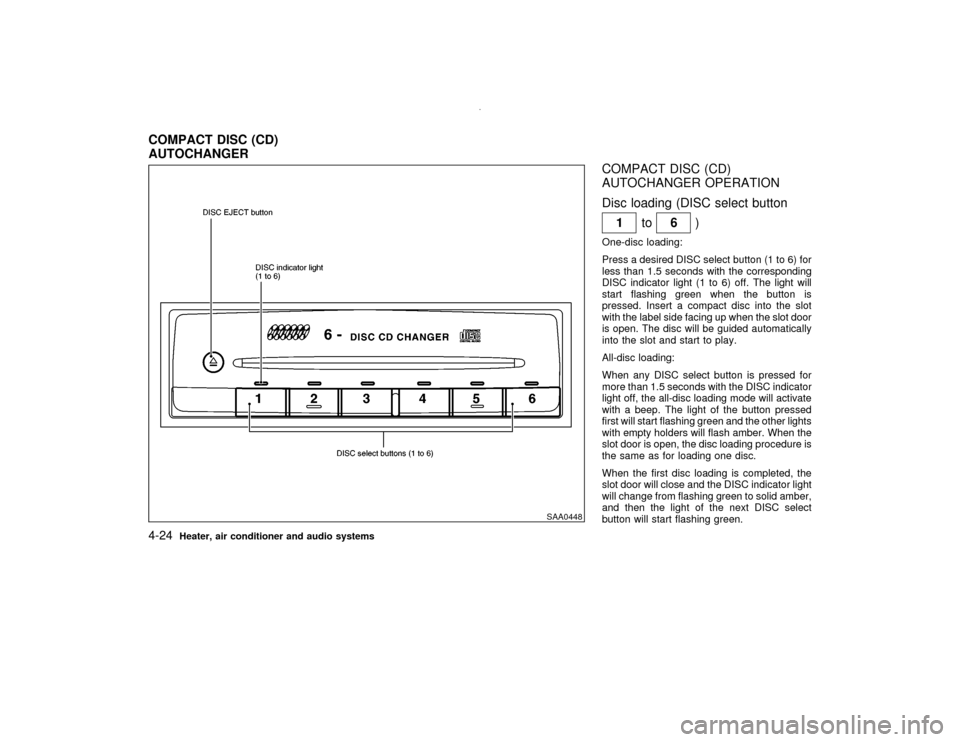
COMPACT DISC (CD)
AUTOCHANGER OPERATION
Disc loading (DISC select button
1to
6)
One-disc loading:
Press a desired DISC select button (1 to 6) for
less than 1.5 seconds with the corresponding
DISC indicator light (1 to 6) off. The light will
start flashing green when the button is
pressed. Insert a compact disc into the slot
with the label side facing up when the slot door
is open. The disc will be guided automatically
into the slot and start to play.
All-disc loading:
When any DISC select button is pressed for
more than 1.5 seconds with the DISC indicator
light off, the all-disc loading mode will activate
with a beep. The light of the button pressed
first will start flashing green and the other lights
with empty holders will flash amber. When the
slot door is open, the disc loading procedure is
the same as for loading one disc.
When the first disc loading is completed, the
slot door will close and the DISC indicator light
will change from flashing green to solid amber,
and then the light of the next DISC select
button will start flashing green.
SAA0448
COMPACT DISC (CD)
AUTOCHANGER4-24
Heater, air conditioner and audio systems
Z
00.1.10/R50-D/V5
X
Page 142 of 289
The disc loading procedure is the same as
above, and so continue on.
When all the discs are set or no more discs are
loaded for about 15 seconds after the slot door
is open, the first disc loaded will start to play.
CAUTION
When loading, wait for green light at the
CD slot and insert only one disc at a
time. Forcing in the compact disc could
damage the player.
Hold the disc only on the edges and center
hole. Never touch the surface of the disc.Disc eject (DISC EJECT button
)
One-disc eject:
When the DISC EJECT button is pressed for
less than 1.5 seconds while a disc is playing or
stopped, the current or last disc played will be
ejected.
When the DISC EJECT button is pressed, the
DISC indicator light will start flashing amber
until the disc is ready to be ejected. The light
will turn off when the disc is ejected.To select a disc to eject, press the DISC
EJECT button within 3 seconds after a DISC
select button is pressed, or do it in reverse
order.
All-disc eject:
When the DISC EJECT button is pressed for
more than 1.5 seconds while any disc is play-
ing or stopped, the all-disc eject mode will
activate with a beep.
When the DISC EJECT button is pressed, the
all DISC indicator lights of the disc stored
holder will start flashing amber. Each light will
turn off when the disc is ejected. When the disc
is released from the slot and then the slot door
is closed, the unit will start to eject the next
disc, and so on continuously upto full disc
eject. After all discs are ejected, the all DISC
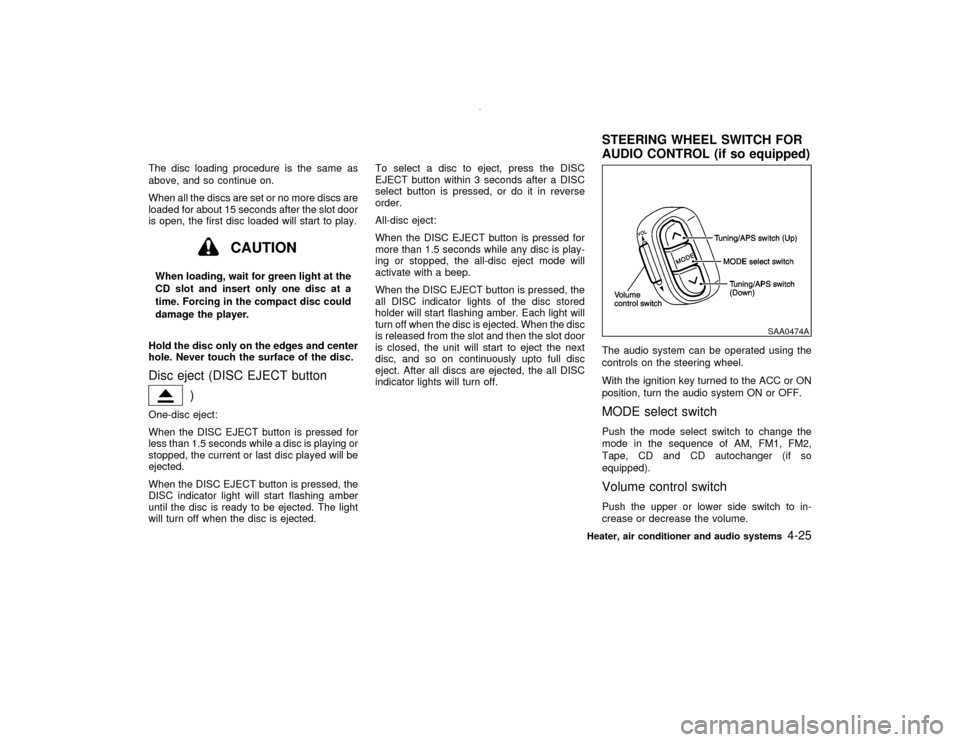
indicator lights will turn off.The audio system can be operated using the
controls on the steering wheel.
With the ignition key turned to the ACC or ON
position, turn the audio system ON or OFF.
MODE select switchPush the mode select switch to change the
mode in the sequence of AM, FM1, FM2,
Tape, CD and CD autochanger (if so
equipped).Volume control switchPush the upper or lower side switch to in-
crease or decrease the volume.
SAA0474A
STEERING WHEEL SWITCH FOR
AUDIO CONTROL (if so equipped)
Heater, air conditioner and audio systems
4-25
Z
00.1.10/R50-D/V5
X
Page 145 of 289

IIf you must make a call while your
vehicle is in motion, the hands free
cellular phone operational mode (if
so equipped) is highly recommended.
Exercise extreme caution at all times
so full attention may be given to ve-
hicle operation.
IIf a conversation in a moving vehicle
requires you to take notes, pull off the
road to a safe location and stop your
vehicle before doing so.
CAUTION
IKeep the antenna as far as possible
away from the Engine Control Module
(ECM).
IKeep the antenna wire more than 8 in
(20 cm) away from the Multiport Fuel
Injection harness. Do not route the
antenna wire next to any harness.IAdjust the antenna standing-wave ra-
tio as recommended by the manufac-
turer.
IConnect the ground wire from the CB
radio chassis to the body.
IFor details, consult an authorized
NISSAN dealer.4-28
Heater, air conditioner and audio systems
Z
00.1.10/R50-D/V5
X