Page 97 of 247
OPENER OPERATIONTo open the fuel filler lid, push the opener
switch. To lock, close the fuel filler lid securely.
FUEL FILLER CAPThe fuel filler cap is a ratcheting type. Tighten
the cap clockwise until ratcheting clicks are
heard.
Put the fuel filler cap on the cap holder while
refueling.
WARNING
IGasoline is extremely flammable and
highly explosive under certain condi-
tions. You could be burned or seri-ously injured if it is misused or mis-
handled. Always stop the engine and
do not smoke or allow open flames or
sparks near the vehicle when refuel-
ing.
IFuel may be under pressure. Turn the
cap one-half turn, and wait for any
hissing sound to stop to prevent fuel
from spraying out and possible per-
sonal injury. Then remove the cap.
IDo not attempt to top off the fuel tank
SPA0986
SPA0653
FUEL FILLER LID3-12
Pre-driving checks and adjustments
Z
00.1.17/A33-D/V5.0
X
Page 98 of 247

after the fuel pump nozzle shuts off
automatically.
Continued refueling may cause fuel
overflow, resulting in fuel spray and
possibly a fire.
IUse only a genuine fuel filler cap as a
replacement. It has a built-in safety
valve needed for proper operation of
the fuel system and emission control
system. An incorrect cap can result in
a serious malfunction and possible
injury.
INever pour fuel into the throttle body
to attempt to start your vehicle.
CAUTION
IIf fuel is spilled on the car body, flush
it away with water to avoid paint dam-
age.
ITighten until the fuel filler cap clicks.
Failure to tighten the fuel filler cap
properly may cause the
mal-
function indicator lamp (MIL) to illu-minate. If the
lamp illuminates
because the fuel filler cap is loose or
missing, tighten or install the cap and
continue to drive the vehicle. The
lamp should turn off after a few
driving trips. If the
lamp does
not turn off after a few driving trips,
have the vehicle inspected by an au-
thorized NISSAN dealer.
IFor additional information, see the
ªMalfunction indicator lamp (MIL)º in
the ª2. Instruments and controlsº
section.
TILT OPERATIONPull the lock lever and while holding down,
adjust the steering wheel up or down to the
desired position.
Push the lock lever back into place to lock the
steering wheel in place.
WARNING
Do not adjust the steering wheel while
driving. You could lose control of your
vehicle and cause an accident.
SPA0234
STEERING WHEEL
Pre-driving checks and adjustments
3-13
Z
00.1.17/A33-D/V5.0
X
Page 99 of 247
CAUTION
Store the main sun visor after storing
the extension sun visor.
INSIDE MIRRORThe night position will reduce glare from the
headlights of vehicles behind you at night.
WARNING
Use the night position only when neces-
sary, because it reduces rear view clar-
ity.
AUTOMATIC ANTI-DAZZLING
INSIDE MIRROR (if so equipped)The inside mirror is designed so that it auto-
matically changes reflection according to the
intensity of the headlight of the following ve-
hicle.
When the inside mirror is in the AUTO position,
excessive glare from the headlights of the
vehicle behind you will be reduced. When the
switch of the inside mirror is in the OFF
position, the inside mirror will operate nor-
mally.
SPA0991
SPA0470
SPA1109
SUN VISORS MIRRORS3-14
Pre-driving checks and adjustments
Z
00.1.17/A33-D/V5.0
X
Page 100 of 247
OUTSIDE MIRRORS
WARNING
Objects viewed in the outside mirror on
the passenger side are closer than they
appear. Be careful when moving to the
right. Using only this mirror could cause
an accident. Use inside mirror or glance
over your shoulder to properly judge
distances to other objects.
The outside mirror will operate only when theignition switch is in the ACC or ON position.
Turn the control knob to right or left to select
the right or left outside mirror, then adjust.
Foldable outside mirrorsPush the outside mirror backward to fold it.
SPA0987
MPA0008
Pre-driving checks and adjustments
3-15
Z
00.1.17/A33-D/V5.0
X
Page 104 of 247

WARNING
IThe air conditioner cooling function
operates only when the engine is run-
ning.
IDo not leave children, impaired
adults, or pets alone in your vehicle.
On hot, sunny days, temperatures in
a closed vehicle could quickly be-
come high enough to cause severe or
possibly fatal injuries to people oranimals.
IDo not use the recirculation mode for
long periods as it may cause the
interior air to become stale and the
windows to fog up.
IPositioning of the heating or air con-
ditioning controls should not be done
while driving, so full attention may be
given to vehicle operation.
CONTROLS
Fan control dialThis dial turns the fan on and off, and controls
fan speed.Air flow control buttonsThese buttons allow you to select the air flow
outlets.
Ð Air flows from center and side venti-
lators.Ð Air flows from center and side venti-
lators and foot outlets.Ð Air flows mainly from foot outlets.Ð Air flows from defroster outlets and
foot outlets.Ð Air flows mainly from defroster out-
lets.
Temperature control/MAX A/C leverThis lever allows you to adjust the temperature
of the outlet air.
MAX A/C:
When the temperature control/MAX A/C lever
is moved to the left end, the air conditioner
cooling will start automatically and the A/C
SAA0468
HEATER AND AIR CONDITIONER (Manual)
Heater, air conditioner and audio systems
4-3
Z
00.1.17/A33-D/V5.0
X
Page 110 of 247

WARNING
IThe air conditioner cooling function
operates only when the engine is run-ning.
IDo not leave children, impaired
adults, or pets alone in your vehicle.On hot, sunny days, temperatures in
a closed vehicle could quickly be-
come high enough to cause severe or
possibly fatal injuries to people or
animals.
IDo not use the recirculation mode for
long periods as it may cause the
interior air to become stale and the
windows to fog up.
IPositioning of the heating or air con-
ditioning controls should not be done
while driving, so full attention may be
given to vehicle operation.
Start the engine and operate the controls to
activate the air conditioner.
AUTOMATIC OPERATION
Cooling and/or dehumidified heating
(AUTO)This mode may be normally used all year
round as the system automatically works to
keep a constant temperature. Air flow distribu-
tion and fan speed are also controlled auto-
matically.
SAA0463
HEATER AND AIR CONDITIONER
(Automatic) (if so equipped)
Heater, air conditioner and audio systems
4-9
Z
00.1.17/A33-D/V5.0
X
Page 112 of 247

AMBIENT TEMPERATURE
SWITCH (AMB)Push the ambient temperature switch. The
outside ambient temperature will be displayed
for approximately 5 seconds.
The ambient temperature sensor is located
in front of the radiator. The sensor may be
affected by road or engine heat, wind direc-
tion and other driving conditions. The dis-
play may differ from the actual ambient
temperature or the temperature displayed
on various signs or billboards.OPERATING TIPSWhen the engine coolant temperature and
outside air temperature are low, the air flow
from the foot outlets may not operate for a
maximum of 150 seconds. However, this is not
a malfunction. After the coolant temperature
warms up, the air flow from the foot outlets will
operate normally.The sensor on the instrument panel helps
maintain a constant temperature; do not put
anything on or around this sensor.The air conditioning system in your NISSAN
vehicle is charged with a refrigerant designed
with the environment in mind.This refrigerant
will not harm the earth's ozone layer.How-
ever, special charging equipment and lubricant
are required when servicing your NISSAN air
conditioner. Using improper refrigerants or lu-
bricants will cause severe damage to your air
conditioning system. See ªCapacities and rec-
ommended fuel/lubricantsº in the ª10. Techni-
cal and consumer informationº section for air
conditioning system refrigerant and lubricant
recommendations.
Your NISSAN dealer will be able to service
your environmentally friendly air conditioning
system.
WARNING
The air conditioner system contains re-
frigerant under high pressure. To avoid
personal injury, any air conditioner ser-
vice should be done only by an experi-
enced technician with proper equip-
ment.
HA1011
SERVICING AIR CONDITIONER
Heater, air conditioner and audio systems
4-11
Z
00.1.17/A33-D/V5.0
X
Page 117 of 247
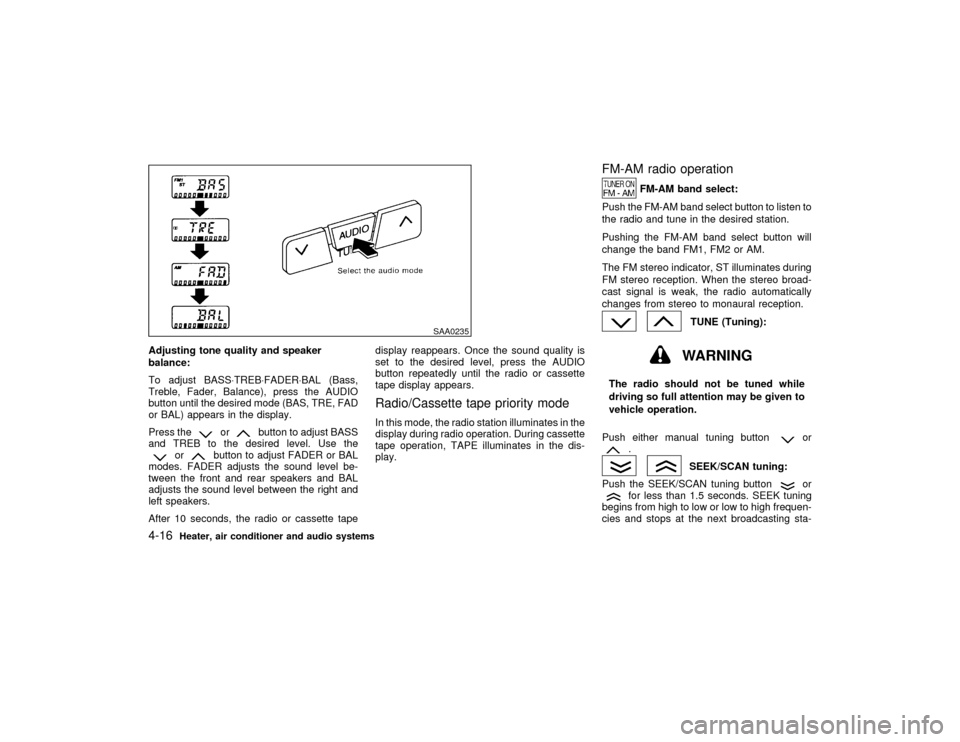
Adjusting tone quality and speaker
balance:
To adjust BASS×TREB×FADER×BAL (Bass,
Treble, Fader, Balance), press the AUDIO
button until the desired mode (BAS, TRE, FAD
or BAL) appears in the display.
Press the
or
button to adjust BASS
and TREB to the desired level. Use the
or
button to adjust FADER or BAL
modes. FADER adjusts the sound level be-
tween the front and rear speakers and BAL
adjusts the sound level between the right and
left speakers.
After 10 seconds, the radio or cassette tapedisplay reappears. Once the sound quality is
set to the desired level, press the AUDIO
button repeatedly until the radio or cassette
tape display appears.
Radio/Cassette tape priority modeIn this mode, the radio station illuminates in the
display during radio operation. During cassette
tape operation, TAPE illuminates in the dis-
play.
FM-AM radio operation
FM-AM band select:
Push the FM-AM band select button to listen to
the radio and tune in the desired station.
Pushing the FM-AM band select button will
change the band FM1, FM2 or AM.
The FM stereo indicator, ST illuminates during
FM stereo reception. When the stereo broad-
cast signal is weak, the radio automatically
changes from stereo to monaural reception.
TUNE (Tuning):WARNING
The radio should not be tuned while
driving so full attention may be given to
vehicle operation.
Push either manual tuning button
or
.
SEEK/SCAN tuning:
Push the SEEK/SCAN tuning button
or
for less than 1.5 seconds. SEEK tuning
begins from high to low or low to high frequen-
cies and stops at the next broadcasting sta-
SAA0235
4-16
Heater, air conditioner and audio systems
Z
00.1.17/A33-D/V5.0
X