Page 65 of 247

Headlight beam selectTo select the high beam, push the lever for-
ward. Pull it back to select the low beam.Passing signalPulling the lever toward you will flash the
headlight high beam.Daytime running light system
(Canada only)The headlights automatically illuminate at a
reduced intensity when the engine is started
with the parking brake released. The daytime
running lights operate with the headlight switch
in the OFF position or in the
position.
Turn the headlight switch to theposition
for full illumination when driving at night.
If the parking brake is applied before the
engine is started, the daytime running lights do
not illuminate. The daytime running lights illu-
minate once the parking brake is released.
The daytime running lights will remain on until
the ignition switch is turned off.
WARNING
When the daytime running light system
is active, tail lights on your vehicle are
not on. It is necessary at dusk to turn on
your headlights. Failure to do so could
cause an accident injuring yourself and
others.TURN SIGNAL SWITCH
Turn signalMove the lever up or down to signal the turning
direction. When the turn is completed, the turn
signals cancel automatically.Lane change signalTo indicate a lane change, move the lever up
or down to the point where lights begin flash-
ing.To turn the fog lights on, turn the headlight
switch to the
position, then turn the
switch to theposition. To turn them off,
turn the switch to the OFF position.
The headlights must be on for the fog lights to
operate.
SIC0880
FOG LIGHT SWITCH (if so
equipped)
2-18
Instruments and controls
Z
00.1.17/A33-D/V5.0
X
Page 66 of 247
Push the switch on to warn other drivers when
you must stop or park under emergency con-
ditions. All turn signal lights will flash.
Some state laws may prohibit the use of the
hazard warning flasher switch while driv-
ing.
WARNING
IIf stopping for an emergency, be sure
to move the vehicle well off the road.IDo not use the hazard warning flash-
ers while moving on the highway un-
less unusual circumstances force
you to drive so slowly that your ve-
hicle might become a hazard to other
traffic.
ITurn signals do not work when the
hazard warning flasher lights are on.
The flasher can be actuated with the ignition
switch either off or on.
To sound the horn, push the center pad area of
the steering wheel.
SIC1232
SIC1280
HAZARD WARNING FLASHER
SWITCHHORN
Instruments and controls
2-19
Z
00.1.17/A33-D/V5.0
X
Page 69 of 247
The cigarette lighter element is an accessory.
A genuine NISSAN cigarette lighter unit can be
purchased from your local NISSAN dealer.
The cigarette lighter operates when the igni-
tion switch is in the ACC or ON position.
Push the lighter in all the way. When the lighter
is heated, it will spring out.
Return the lighter to its original position after
use.
WARNING
The cigarette lighter should not be used
while driving so full attention may be
given to vehicle operation.
CAUTION
The cigarette lighter socket is a power
source for the cigarette lighter element
only. The use of the cigarette lighter
socket as a power source for any other
accessory is not recommended.
TRAYS
WARNING
The storage tray should not be used
while driving so full attention may be
given to vehicle operation.
SIC1233
SIC1243
CIGARETTE LIGHTER AND
ASHTRAY (accessory)STORAGE2-22
Instruments and controls
Z
00.1.17/A33-D/V5.0
X
Page 70 of 247
GLASSES CASEThe glasses case can be opened by pushing
the button.
WARNING
The glasses case should not be used
while driving so full attention may be
given to vehicle operation.
CAUTION
IDo not use for anything other than
glasses.
IDo not leave glasses in the glasses
case while parking in direct sunlight.
The heat may damage the glasses.
CUP HOLDER
WARNING
The cup holder should not be used while
driving so full attention may be given to
vehicle operation.
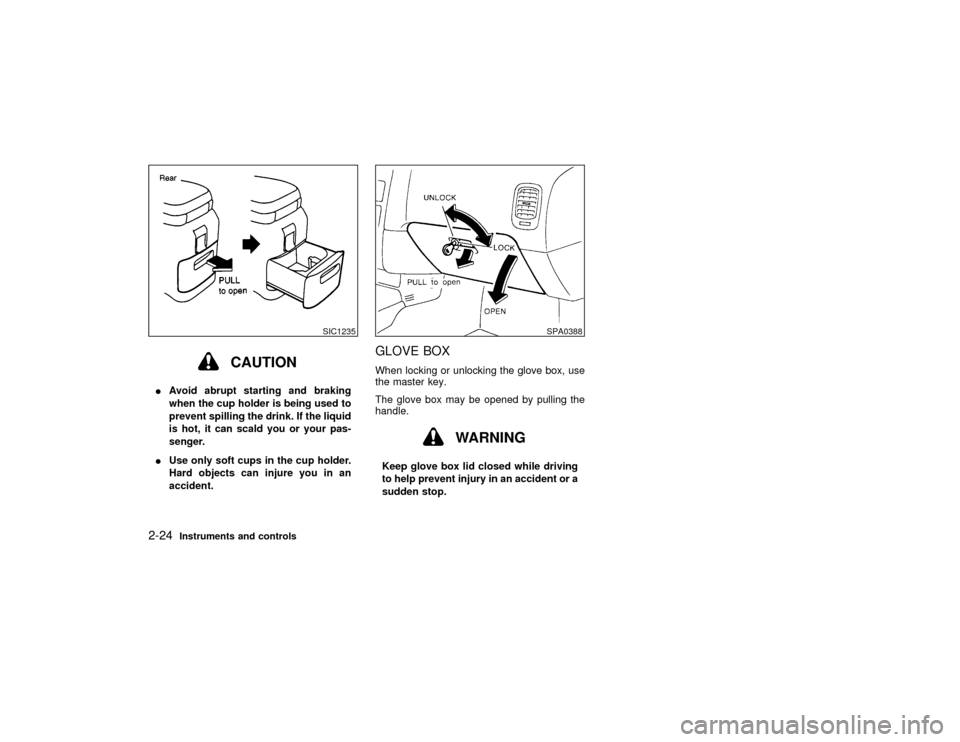
For larger cups, remove the inside tray.
SIC1238
SIC1279A
Instruments and controls
2-23
Z
00.1.17/A33-D/V5.0
X
Page 71 of 247
CAUTION
IAvoid abrupt starting and braking
when the cup holder is being used to
prevent spilling the drink. If the liquid
is hot, it can scald you or your pas-
senger.
IUse only soft cups in the cup holder.
Hard objects can injure you in an
accident.
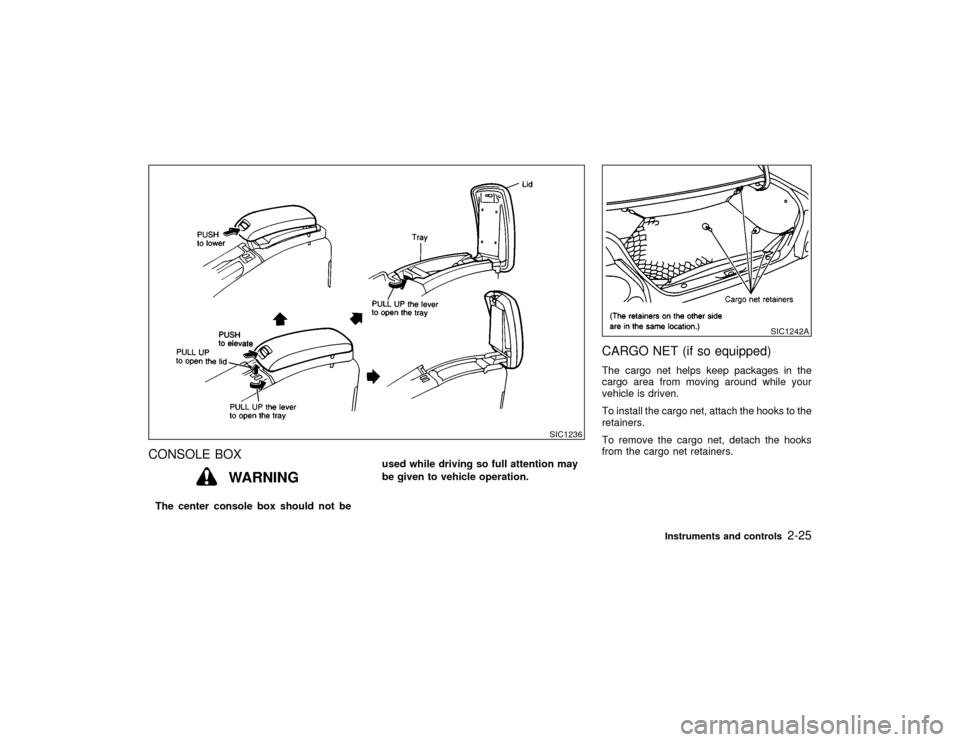
GLOVE BOXWhen locking or unlocking the glove box, use
the master key.
The glove box may be opened by pulling the
handle.
WARNING
Keep glove box lid closed while driving
to help prevent injury in an accident or a
sudden stop.
SIC1235
SPA0388
2-24
Instruments and controls
Z
00.1.17/A33-D/V5.0
X
Page 72 of 247
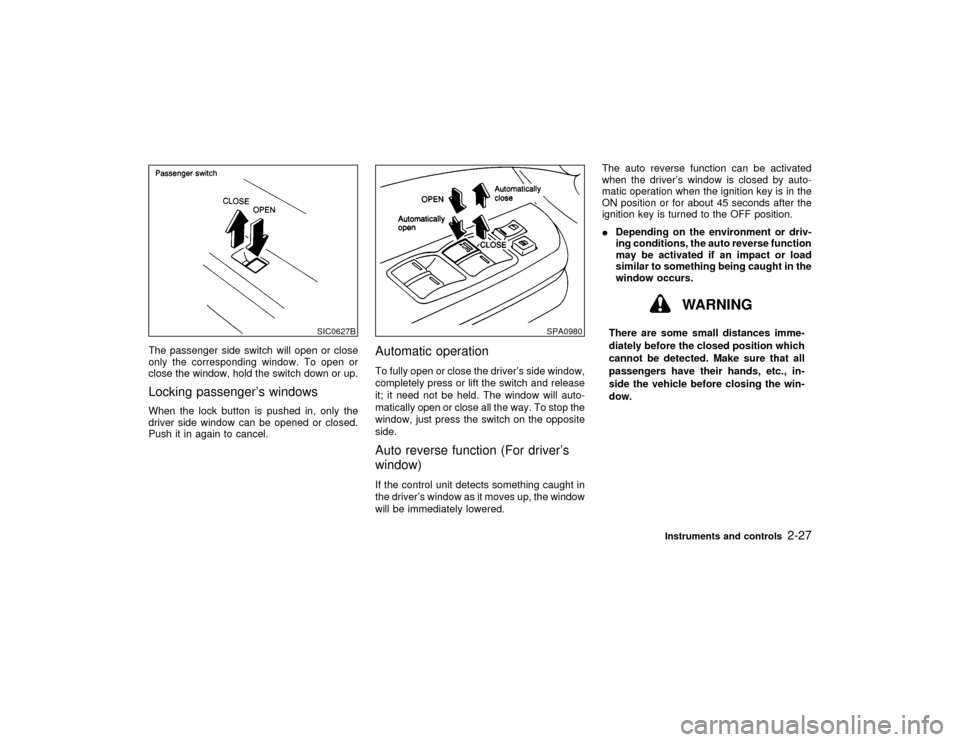
CONSOLE BOX
WARNING
The center console box should not beused while driving so full attention may
be given to vehicle operation.
CARGO NET (if so equipped)The cargo net helps keep packages in the
cargo area from moving around while your
vehicle is driven.
To install the cargo net, attach the hooks to the
retainers.
To remove the cargo net, detach the hooks
from the cargo net retainers.
SIC1236
SIC1242A
Instruments and controls
2-25
Z
00.1.17/A33-D/V5.0
X
Page 73 of 247

WARNING
IProperly secure all cargo to help pre-
vent it from sliding or shifting.
IBe sure to secure hooks into the
retainers. The cargo restrained in the
net must not exceed 30 lb (13.6 kg) or
the net may not stay secured.
POWER WINDOWS
WARNING
IMake sure that all passengers have
their hands, etc. inside the vehicle
before closing the windows. Use the
window lock switch to prevent unex-
pected use of the power windows.
IDo not leave children unattended in-
side the vehicle. They could unknow-
ingly activate switches or controlsand become trapped in a window.
Unattended children could become
involved in serious accidents.
The power windows operate when the ignition
key is in the ON position and for about 45
seconds, after the ignition key is turned to the
OFF position. If the driver's door or the front
passenger's door is opened during this period
of about 45 seconds, power to the windows is
canceled.
To open or close the window, push down or
pull up the switch and hold it. The main switch
(driver side switches) will open or close all the
windows.
SIC0929
WINDOWS
2-26
Instruments and controls
Z
00.1.17/A33-D/V5.0
X
Page 74 of 247
The passenger side switch will open or close
only the corresponding window. To open or
close the window, hold the switch down or up.Locking passenger's windowsWhen the lock button is pushed in, only the
driver side window can be opened or closed.
Push it in again to cancel.
Automatic operationTo fully open or close the driver's side window,
completely press or lift the switch and release
it; it need not be held. The window will auto-
matically open or close all the way. To stop the
window, just press the switch on the opposite
side.Auto reverse function (For driver's
window)If the control unit detects something caught in
the driver's window as it moves up, the window
will be immediately lowered.The auto reverse function can be activated
when the driver's window is closed by auto-
matic operation when the ignition key is in the
ON position or for about 45 seconds after the
ignition key is turned to the OFF position.
IDepending on the environment or driv-
ing conditions, the auto reverse function
may be activated if an impact or load
similar to something being caught in the
window occurs.
WARNING
There are some small distances imme-
diately before the closed position which
cannot be detected. Make sure that all
passengers have their hands, etc., in-
side the vehicle before closing the win-
dow.
SIC0627B
SPA0980
Instruments and controls
2-27
Z
00.1.17/A33-D/V5.0
X