Page 16 of 341
13 IntroductionWhere to find it
The Operator’s Manual is divided into eight sections:
• Instruments and controls: An overview of all the controls that can be operated from the driver’s seat.
•Operation: Information on the vehicle’s equipment and its operation.
•Driving: Important information on driving.
• Instrument cluster display: Displays and indicator lamps on the instrument cluster with brief instructions.
• Practical hints: Assistance and instructions in the event of an emergency.
• Car care: Instructions on caring for your vehicle.
• Technical data: All the important technical data for your vehicle as well as consumer information such as fuels,
coolants, lubricants etc. is contained here.
•Index: Key terms to help you find a topic quickly.
Other documents may also be supplied, depending on your vehicle’s equipment.
Explanation of color used:
Warning notices for the protection of yourself and
others appear on red background.
Page 28 of 341

25 Central locking system
Technical
data Instruments
and controlsOperationDrivingInstrument
cluster displayPractical hints Car care Index Electronic main key
The electronic main key has an integrated radio
frequency and infrared remote control, plus removable
mechanical key.
The remote control (1) operates all locks on the vehicle.
The mechanical key (2) works only in the driver’s door,
trunk, and storage compartment locks.When using the mechanical key (2) for lock operations,
it can be removed by sliding it out of the remote control.
To do so, move locking tab (3) to the right and slide the
mechanical key (2) in direction of arrow (4).
The remote control transmitter is located in the
electronic main key.
The infrared receivers are located in the front door
handles.
Note:
Remove the mechanical key from the electronic main
key w hen u sing vale t pa rk ing service. To prevent ac cess
to trunk or storage compartments lock them separately
and retain the mechanical key.
See page 39 for separate locking of trunk and page 163
for locking of glove box.
P80.35-2031-26
1
3
4
2
Page 29 of 341
26 Central locking system
Technical
data Instruments
and controlsOperationDrivingInstrument
cluster displayPractical hints Car care Index
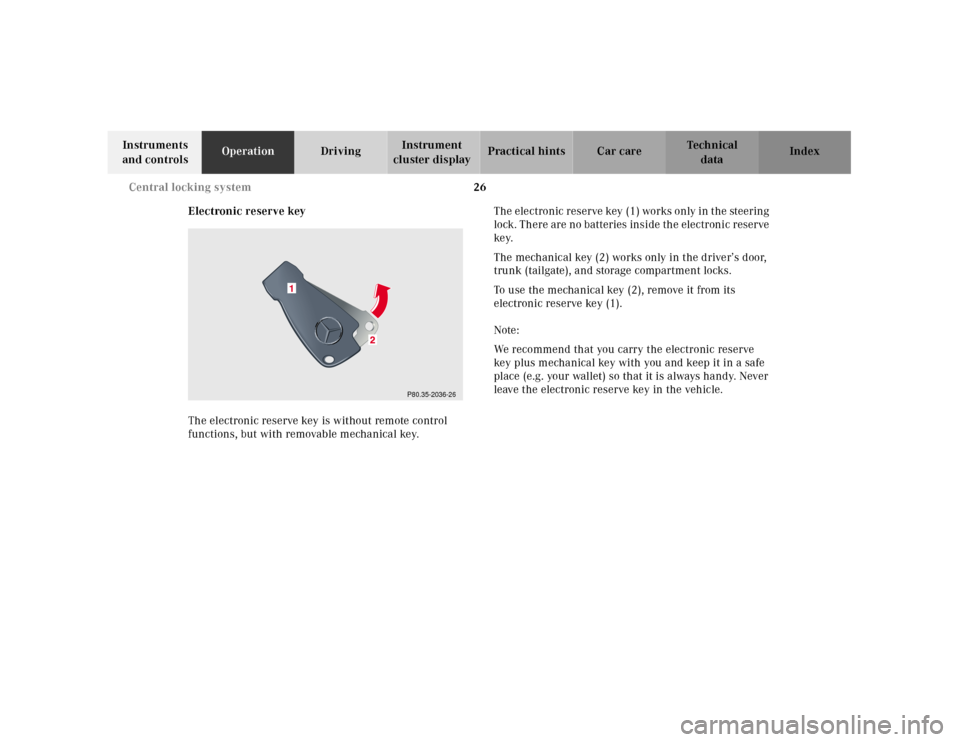
Electronic reserve key
The electronic reserve key is without remote control
functions, but with removable mechanical key.The electronic reserve key (1) works only in the steering
lock. There are no batteries inside the electronic reserve
ke y.
The mechanical key (2) works only in the driver’s door,
trunk (tailgate), and storage compartment locks.
To use the mechanical key (2), remove it from its
electronic reserve key (1).
Note:
We recommend that you carry the electronic reserve
key plus mechanical key with you and keep it in a safe
place (e.g. your wallet) so that it is always handy. Never
leave the electronic reserve key in the vehicle.
P80.35-2036-26
1
Page 31 of 341
28 Central locking system
Technical
data Instruments
and controlsOperationDrivingInstrument
cluster displayPractical hints Car care Index
General notes on the central locking system
If the electronic key is inserted in the steering lock, the
vehicle cannot be locked or unlocked with the remote
control.
If the vehicle cannot be locked or unlocked:
•Aim tra nsmitter eye a t a re ceiver of eith er front d oor
handle. Check the batteries of the electronic main
key, see page 291 or to synchronize the remote
control, see page 293.
•Use the mechanical key to unlock the vehicle. To
sta rt engine, insert th e electronic key in th e stee ring
lock. There could be a slight delay until the
electronic key can be turned in the steering lock.Important!
When unlocking the driver’s door with the mechanical
key, the exterior lamps will flash and the alarm will
sound.
To cancel the alarm, insert the electronic key in the
steering lock or press buttonŒ or‹ on the
electronic main key.
Page 33 of 341
30 Central locking system
Technical
data Instruments
and controlsOperationDrivingInstrument
cluster displayPractical hints Car care Index
6Infrared receiver in driver’s door handle7Infrared receiver in front passenger door handle
6
P80.30-2137-26
7
P80.30-2138-26
Page 37 of 341
34 Central locking system
Technical
data Instruments
and controlsOperationDrivingInstrument
cluster displayPractical hints Car care Index
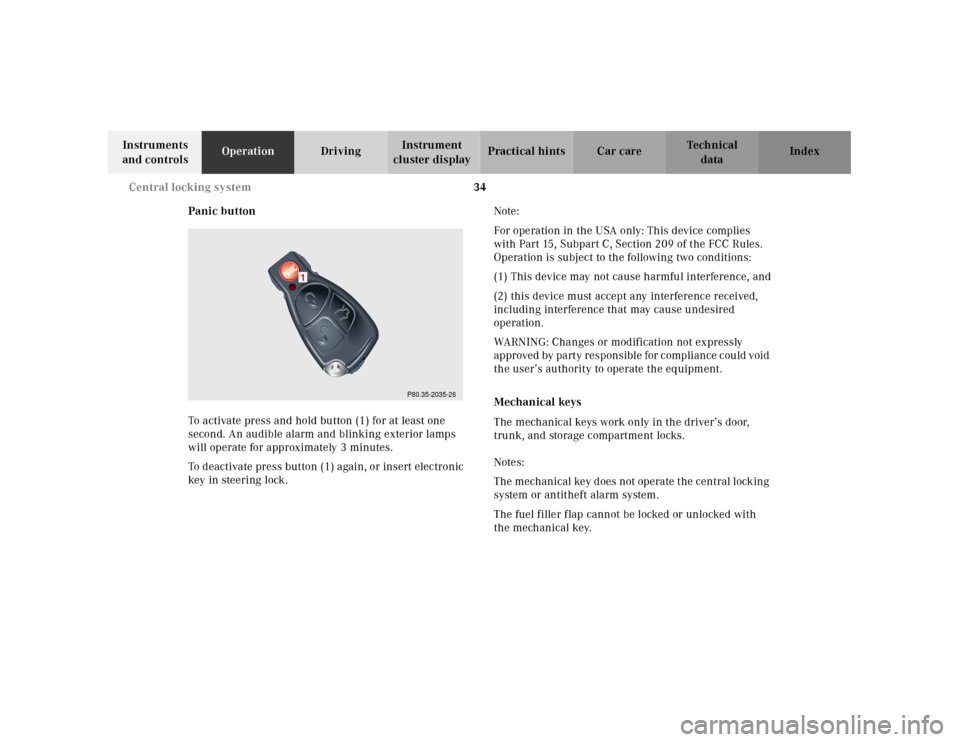
Panic button
To activate press and hold button (1) for at least one
second. An audible alarm and blinking exterior lamps
will operate for approximately 3 minutes.
To deactivate press button (1) again, or insert electronic
key in steering lock.Note:
For operation in the USA only: This device complies
with Part 15, Subpart C, Section 209 of the FCC Rules.
Operation is subject to the following two conditions:
(1) This device may not cause harmful interference, and
(2) this device must accept any interference received,
including interference that may cause undesired
operation.
WARNING: Changes or modification not expressly
approved by party responsible for compliance could void
the user’s authority to operate the equipment.
Mechanical keys
The mechanical keys work only in the driver’s door,
trunk, and storage compartment locks.
Notes:
The mechanical key does not operate the central locking
system or antitheft alarm system.
The fuel filler flap cannot be locked or unlocked with
the mechanical key.
P80.35-2035-26
1
Page 38 of 341
35 Central locking system
Technical
data Instruments
and controlsOperationDrivingInstrument
cluster displayPractical hints Car care Index Doors
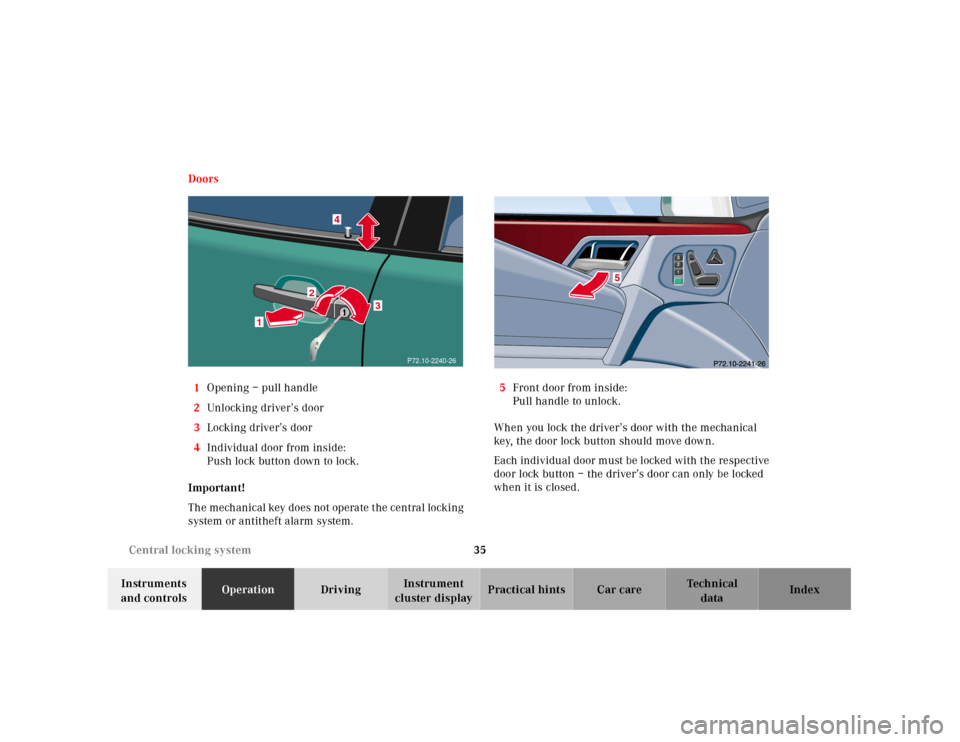
1Opening – pull handle
2Unl ock ing driver’s door
3Locking driver’s door
4Individual door from inside:
Push lock button down to lock.
Important!
The mechanical key does not operate the central locking
system or antitheft alarm system.5Front door from inside:
Pull handle to unlock.
When you lock the driver’s door with the mechanical
key, the door lock button should move down.
Ea ch individu al door m ust be l ocked with t he re spective
door lock button – the driver’s door can only be locked
when it is closed.
1
2
3
4
P72.10-2240-26
Page 39 of 341
36 Central locking system
Technical
data Instruments
and controlsOperationDrivingInstrument
cluster displayPractical hints Car care Index
If the vehicle has previously been locked from the
outside, opening a door from the inside will trigger the
alarm. When opening a door while the central locking
system is in the:
•selective unlocking mode, only that individual door
is unlocked. The remaining doors, the trunk and
fuel filler flap remain locked.
•global unlocking mode, all doors, the trunk and fuel
filler f lap are unlocked.
Notes:
In case of a malfunction in the central locking system
the doors can be locked and unlocked individually.
To lock, push down lock buttons and turn mechanical
key in driver’s door lock to position 3. In addition lock
the trunk.To unlock, pull inside door handles or turn mechanical
key in driver’s door lock to position 2.
Rear doors can only be opened from inside by first
pulling up the door lock button.
When unlocking the driver’s door with the mechanical
key, the exterior lamps will flash and the alarm will
sound.
To cancel the alarm, insert the electronic key in the
steering lock or press buttonŒ or‹ on the
electronic main key.