Page 121 of 424
118 Instrument cluster
Te ch n ica l
data Instruments
and controlsOperationDrivingInstrument
cluster displayPractical hints Car care Index
Speedometer (9)
When the cruise control is activated, the segments on
the speedometer scale between the set speed to the top
of the scale are illuminated. Cruise control, see
page 250.
When the Distronic (DTR) is activated, one or two
segments around the speed stored in memory light up
in the speedometer dial. Distronic (DTR), see page 253.Note:
The speed display is set to read out for
•USA in mph
•Canada in km/h.
Page 124 of 424
121 Multifunction steering wheel, multifunction display
Te ch n ica l
data Instruments
and controlsOperationDrivingInstrument
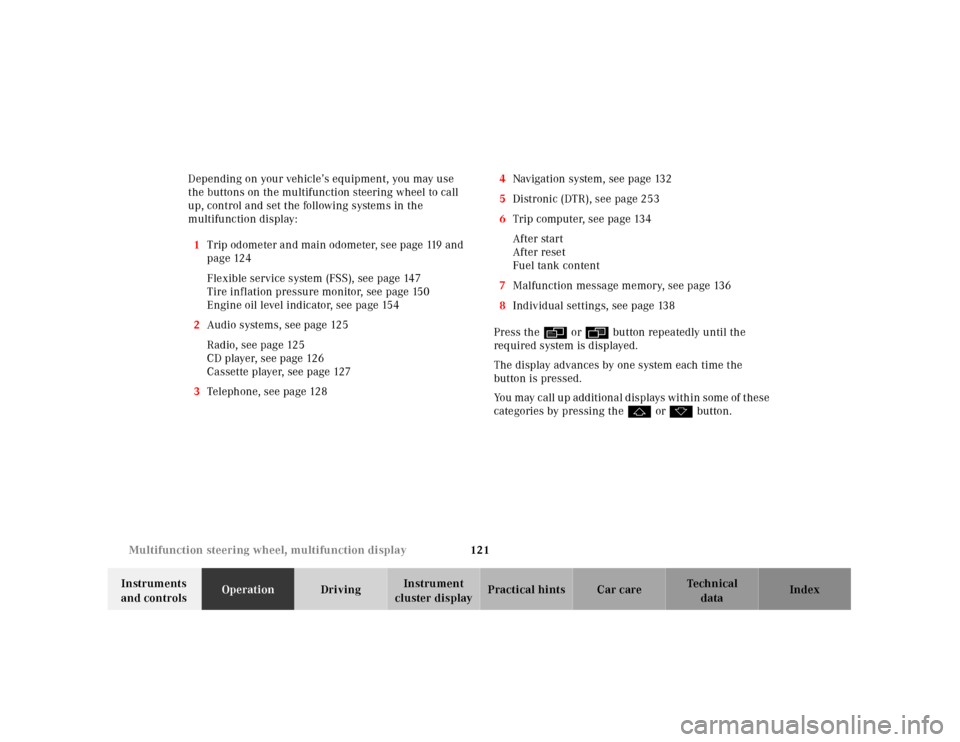
cluster displayPractical hints Car care Index Depending on your vehicle’s equipment, you may use
the buttons on the multifunction steering wheel to call
up, control and set the following systems in the
multifunction display:
1Trip odometer and main odometer, see page 119 and
page 124
Flexible service system (FSS), see page 147
Tire inflation pressure monitor, see page 150
Engine oil level indicator, see page 154
2Audio systems, see page 125
Radio, see page 125
CD player, see page 126
Cassette player, see page 127
3Telephone, see page 1284Navigation system, see page 132
5Distronic (DTR), see page 253
6Trip computer, see page 134
After start
After reset
Fuel tank content
7Malfunction message memory, see page 136
8Individual settings, see page 138
Press theè orÿ button repeatedly until the
required system is displayed.
The display advances by one system each time the
button is pressed.
You may call up additional displays within some of these
categories by pressing thej or kbutton.
Page 136 of 424
133 Multifunction steering wheel, multifunction display
Te ch n ica l
data Instruments
and controlsOperationDrivingInstrument
cluster displayPractical hints Car care Index Distronic (DTR) 1Distronic (DTR) is deactivated. The actual
distance (4) and the should-be distance (5) to the
vehicle in front (3) are displayed.
2Distronic (DTR) is activated.
The message “DTR OFF” appears for five seconds
when Distronic is being deactivated.
3Vehicle ahead. Only appears if a vehicle is detected
ahead.
4Actual distance to vehicle ahead.
5Should-be distance to vehicle ahead.
6Own vehicle.
Press theè or ÿbutton repeatedly until the
required system is displayed.
Distronic (DTR), see page 253.
Pressing theè or ÿbutton displays the next or
previous system.
Page 212 of 424
207 Contents - Driving
Te ch n ica l
data Instruments
and controlsOperationDrivingInstrument
cluster displayPractical hints Car care Index
DrivingControl and operation of radio
transmitters ...............................208
The first 1 000 miles
(1 500 km) .................................209
Maintenance ...................................209
Tele Aid ........................................... 210
Catalytic converter ........................220
Emission control ............................221
Starter switch .................................222
Starter switch – KEYLESS-GO ......224
Starting and turning off
the engine ..................................227
Automatic transmission ...............229
Parking brake .................................238Driving instructions ...................... 239
Drive sensibly – save fuel ........ 239
Drinking and driving ................ 239
Pedals .......................................... 240
Power assistance ........................ 240
Brakes .......................................... 240
Driving off ................................... 241
Parking ........................................ 242
Tires ............................................. 243
Snow chains ............................... 245
Winter driving instructions ..... 246
Deep water .................................. 248
Passenger compartment ........... 248
Traveling abroad ........................ 249
Cruise control ................................ 250Distronic (DTR) ..............................253
Brake assist system
(BAS) ...........................................268
Antilock brake system
(ABS) ...........................................269
Electronic stability program
(ESP) ........................................... 271
Active body control (ABC) ............275
Level control system ...................... 276
Parking assist (Parktronic) ..........279
What you should know
at the gas station .......................284
Check regularly
and before a long trip ...............287
Page 258 of 424
253 Driving systems
Te ch n ica l
data Instruments
and controlsOperationDrivingInstrument
cluster displayPractical hints Car care Index Distronic (DTR)
(optional)
When activated the Distronic system increases driving
convenience, for example over long distances, as it
automatically maintains a speed set by the driver by
actively regulating the throttle setting. It also maintains
within certain limitations a preset distance to a vehicle
ahead.
With Distronic switched off, the multifunction display
continues to show the distance to the vehicle ahead, if
so selected, see page 266.
The distance notification function can be activated
separately, see page 264.
In Distronic mode, if the distance sensor detects a
slower moving vehicle directly ahead, your vehicle
speed will be reduced to the extent permitted by
red uced t hrottl e a nd up to 20% of veh icl e bra king power,
so that you follow that vehicle at a preset distance, see
page 265.
Maximum range of detection is approximately 500 ft.
(150 m).Any given speed between 25 mph (Canada: 30 km/h)
and 110 mph (Canada: 180 km/h) can be maintained
with the Distronic by operating the control lever on the
steering column.
Wa r n i n g !
Distronic is a convenience system, its speed
adjustment reduction capability is intended to
make cruise control more effective and usable
when traffic speeds vary. It is not, however,
intended to nor does it replace the need for extreme
care. The responsibility for the vehicle speed and
the distance to the vehicle ahead, including most
importantly brake operation to assure safe stopping
distance, rests always with the driver.Wa r n i n g !
Distronic requires familiarity with its operational
characteristics. We strongly recommend that you
review the following information carefully before
operating the system.
Page 259 of 424
254 Driving systems
Te ch n ica l
data Instruments
and controlsOperationDrivingInstrument
cluster displayPractical hints Car care Index
Note:
For operation in the USA only: This device complies
with Part 15, Subpart C, Section 209 of the FCC Rules.
Operation is subject to the following two conditions:
(1) This device may not cause harmful interference, and
(2) this device must accept any interference received,
including interference that may cause undesired
operation.
Any unauthorized modification to this device could void
the user’s authority to operate the equipment
.
Wa r n i n g !
Only use Distronic if the traffic and weather
conditions make it advisable to travel at a steady
speed.Use of Distronic can be dangerous on winding
roads or in heavy traffic because conditions do not
allow safe driving at a steady speed.
Use of Distronic can be dangerous on slippery
roads. Rapid changes in tire adhesion can result in
wheel spin and loss of control.
Distronic does not act upon adverse sight distance
conditions. Do not use Distronic during conditions
of fog and heavy rain, snow or sleet.The “Resume” function should only be operated if
the driver is fully aware of the previously set speed
and wishes to resume this particular preset speed.Distronic does not recognize accordingly and will
not react to stationary objects. It is designed and
intended only to maintain a set speed and keep a
set distance from moving objects in front of it.
Page 260 of 424
255 Driving systems
Te ch n ica l
data Instruments
and controlsOperationDrivingInstrument
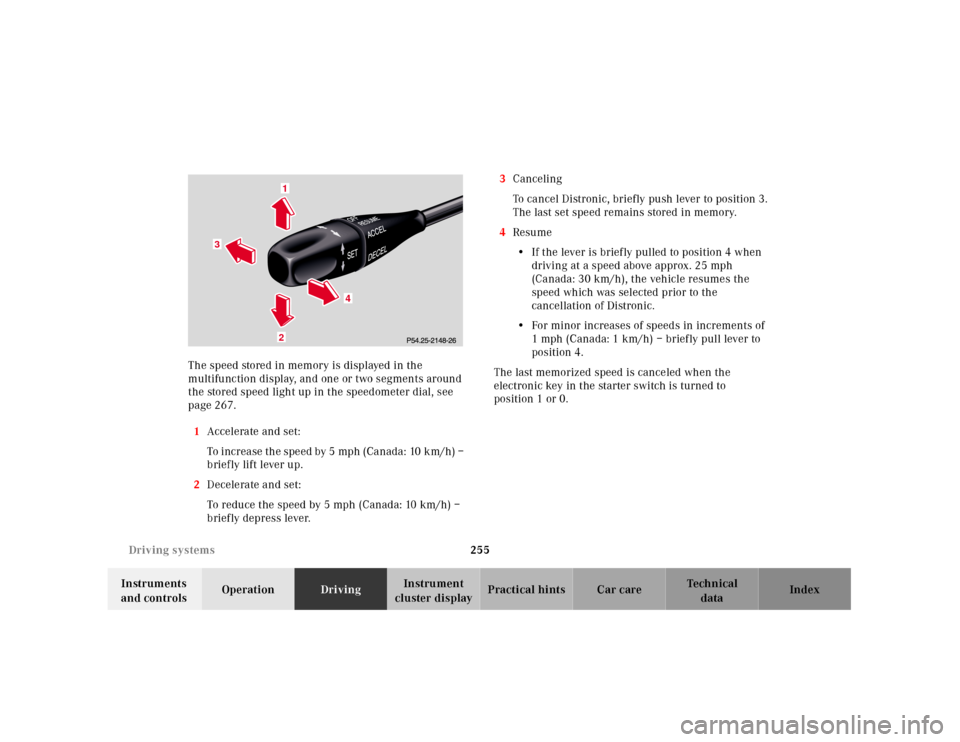
cluster displayPractical hints Car care Index The speed stored in memory is displayed in the
multifunction display, and one or two segments around
the stored speed light up in the speedometer dial, see
page 267.
1Accelerate and set:
To increase the speed by 5 mph (Canada: 10 km/h) –
brief ly lift lever up.
2Decelerate and set:
To reduce the speed by 5 mph (Canada: 10 km/h) –
briefly depress lever.3Canceling
To cancel Distronic, briefly push lever to position 3.
The last set speed remains stored in memory.
4Resume
•If the lever is brief ly pulled to position 4 when
driving at a speed above approx. 25 mph
(Canada: 30 km/h), the vehicle resumes the
speed which was selected prior to the
cancellation of Distronic.
•For minor increases of speeds in increments of
1 mph (Canada: 1 km/h) – briefly pull lever to
position 4.
The last memorized speed is canceled when the
electronic key in the starter switch is turned to
position 1 or 0.
1
3
4
2
Page 261 of 424
256 Driving systems
Te ch n ica l
data Instruments
and controlsOperationDrivingInstrument
cluster displayPractical hints Car care Index
Activation of Distronic
Any given speed above approximately 25 mph
(Canada: 30 km/h) can be maintained:
•Normally the vehicle is accelerated to the desired
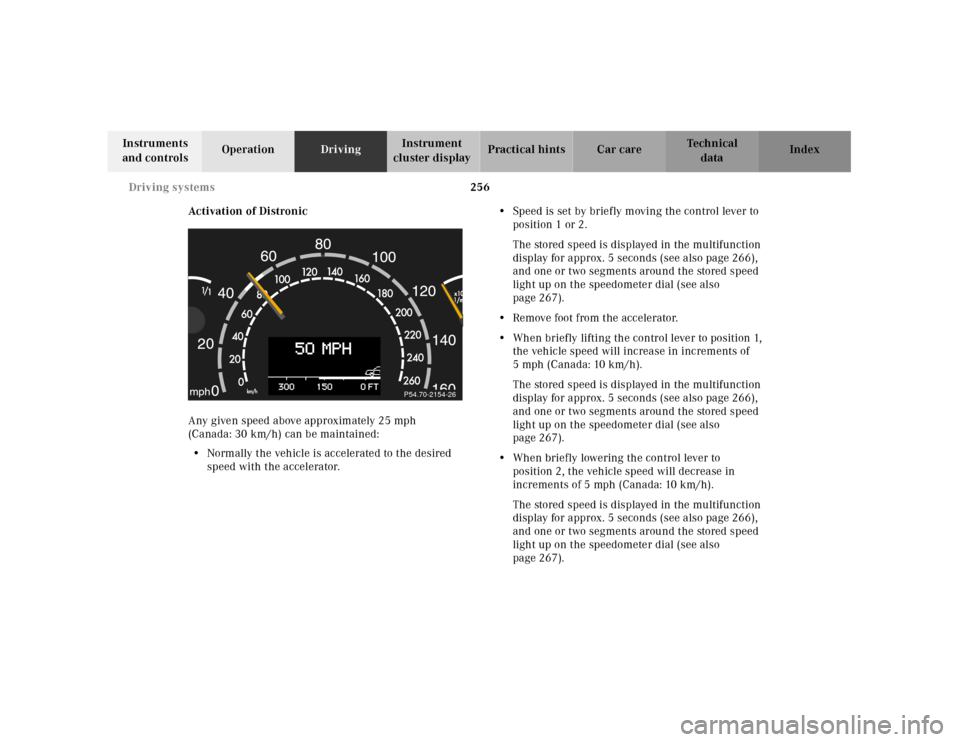
speed with the accelerator.•Speed is set by briefly moving the control lever to
position 1 or 2.
The stored speed is displayed in the multifunction
display for approx. 5 seconds (see also page 266),
and one or two segments around the stored speed
light up on the speedometer dial (see also
page 267).
•Remove foot from the accelerator.
•When briefly lifting the control lever to position 1,
the vehicle speed will increase in increments of
5mph (Canada:10km/h).
The stored speed is displayed in the multifunction
display for approx. 5 seconds (see also page 266),
and one or two segments around the stored speed
light up on the speedometer dial (see also
page 267).
•When briefly lowering the control lever to
position 2, the vehicle speed will decrease in
increments of 5 mph (Canada: 10 km/h).
The stored speed is displayed in the multifunction
display for approx. 5 seconds (see also page 266),
and one or two segments around the stored speed
light up on the speedometer dial (see also
page 267).
P54.70-2154-26