2001 MERCEDES-BENZ CL500 activate
[x] Cancel search: activatePage 5 of 424

2 Contents
Safety guidelines for the
seat belt, emergency
tensioning retractor
and airbag .................................. 100
Infant and child
restraint systems ....................... 102
Steering wheel adjustment .......... 105
Rear view mirrors .......................... 106
Rear view mirror,
automatic antiglare ................... 106
Memory function ............................111
Instrument cluster ..........................114
Multifunction steering wheel,
multifunction display ............... 120
Trip and main odometer,
FSS, tire inflation pressure
monitor and
engine oil level indicator ......... 124
Audio systems ................................ 125
Radio ............................................ 125
CD player ..................................... 126
Cassette player ........................... 127
Telephone ........................................ 128
Telephone book .......................... 128
Redialing ..................................... 130Incoming call ...............................131
Navigation system ..........................132
Distronic (DTR) ...............................133
Trip computer .................................134
Malfunction/warning
message memory ......................136
Individual settings .........................138
Setting the audio volume ............. 146
Flexible service system
(FSS) ........................................... 147
Tire inflation
pressure monitor .......................150
Engine oil level indicator ..............154
Engine oil consumption ................155
Exterior lamp switch ......................156
Headlamp mode ..............................157
Night security illumination ..........158
Headlamp cleaning system ...........159
Combination switch .......................160
Hazard warning flasher
switch ..........................................163
Automatic climate control .............164
Display and controls ..................166
Dust filter .....................................167Basic setting ............................... 168
Special settings .......................... 169
Air recirculation ......................... 171
Activated charcoal filter ............ 172
Economy mode ........................... 173
Residual engine heat
utilization .................................... 174
Switching the automatic
climate control on and off ......... 175
Front center console storage
compartment ventilation .......... 175
Rear window defroster .................. 176
Rear passenger compartment
adjustable air outlets ................ 177
Power windows ............................... 178
Sliding/pop-up roof ....................... 181
Interior lighting ............................. 184
Rear window sunshade ................. 186
Sun visors ....................................... 187
Vanity mirrors ................................ 187
Interior ............................................ 188
Storage compartments
and armrests .............................. 188
Glove box ..................................... 189
Page 30 of 424
27 Contents - Operation
Te ch n ica l
data Instruments
and controlsOperationDrivingInstrument
cluster displayPractical hints Car care Index CD player ..................................... 126
Cassette player ........................... 127
Telephone ........................................ 128
Telephone book .......................... 128
Redialing ..................................... 130
Incoming call .............................. 131
Navigation system .......................... 132
Distronic (DTR) ............................... 133
Trip computer ................................. 134
Malfunction/warning
message memory ...................... 136
Individual settings ......................... 138
Setting the audio volume .............. 146
Flexible service system
(FSS) ............................................ 147
Tire inflation
pressure monitor ...................... 150
Engine oil level indicator .............. 154
Engine oil consumption ................ 155
Exterior lamp switch ..................... 156
Headlamp mode ............................. 157Night security illumination ..........158
Headlamp cleaning system ...........159
Combination switch .......................160
Hazard warning flasher
switch ..........................................163
Automatic climate control .............164
Display and controls ..................166
Dust filter .....................................167
Basic setting ................................168
Special settings ...........................169
Air recirculation ......................... 171
Activated charcoal filter ........... 172
Economy mode ........................... 173
Residual engine heat
utilization .....................................174
Switching the automatic
climate control on and off ........ 175
Front center console storage
compartment ventilation .......... 175
Rear window defroster .................. 176
Rear passenger compartment
adjustable air outlets ............... 177Power windows ............................... 178
Sliding/pop-up roof ....................... 181
Interior lighting ............................. 184
Rear window sunshade ................. 186
Sun visors ....................................... 187
Vanity mirrors ................................ 187
Interior ............................................ 188
Storage compartments
and armrests .............................. 188
Glove box ..................................... 189
Coat hooks ...................................... 192
Cup holder ...................................... 193
Ashtrays .......................................... 196
Lighter ............................................. 198
Parcel net in trunk ........................ 199
Cargo tie-down hooks ....................200
Parcel net in front
passenger footwell ....................200
Telephone, general ........................ 201
Garage door opener .......................202
Infrared reflecting windshield ....206
Page 31 of 424
28 Central locking system
Te ch n ica l
data Instruments
and controlsOperationDrivingInstrument
cluster displayPractical hints Car care Index
Vehicle keys and KEYLESS-GO-cards (optional)
Included with your vehicle are:
•2 electronic main keys with integrated radio
frequency and infrared remote controls plus
removable mechanical key.
The locking tabs for the mechanical key portion of
the two electronic main keys are a different color to
help distinguish each individual key.
•1 electronic reserve key without remote control
functions, plus removable mechanical key.
•Ve h i c l e s w i t h K E Y L E S S - G O :
2 K EY L ES S -G O - c a r d s w it h o u t r e m ov a b l e m e ch a n ic a l
key.Ve h i c l e s w i t h K E Y L E S S - G O :
See page 44 on how to use the electronic key together
with the KEYLESS-GO-card.
Important!
In the case of the loss of a KEYLESS-GO-card, electronic
keys or mechanical keys, please, contact an authorized
Mercedes-Benz Center or call 1-800-FOR-MERCedes (in
the USA), or 1-800-387-0100 (in Canada) as soon as
possible to have the keys or KEYLESS-GO-card
deactivated.
Wa r n i n g !
When leaving the vehicle always remove the
electronic key from the starter switch and take the
KEYLESS-GO-card (if so equipped) with you, and
lock your vehicle. Do not leave children unattended
in the vehicle, or with access to an unlocked
vehicle. Unsupervised use of vehicle equipment
may cause serious personal injury.
Page 35 of 424

32 Central locking system
Te ch n ica l
data Instruments
and controlsOperationDrivingInstrument
cluster displayPractical hints Car care Index
Start lock-out
Important!
Operating with electronic key:
Removing the electronic key from the starter switch
activates the start lock-out. The engine cannot be
started.
Inserting the electronic key in the starter switch
deactivates the start lock-out.
Operating with KEYLESS-GO:
Turning off the engine with the start-/stop button on the
gear selector lever activates the start lock-out. For
turning off the engine with KEYLESS-GO, see page 228.
Starting the engine with the start-/stop button
deactivates the start lock-out, if a valid KEYLESS-GO-
card is recognized inside the vehicle. For starting the
engine with KEYLESS-GO, see page 227. The engine
cannot be started with a KEYLESS-GO-card outside the
vehicle.Note:
In case the engine cannot be started (vehicle’s battery is
in order), the system is not operational. Contact an
authorized Mercedes-Benz Center or call 1-800-FOR-
MERCedes (in the USA), or 1-800-387-0100 (in Canada).
Page 39 of 424
36 Central locking system
Te ch n ica l
data Instruments
and controlsOperationDrivingInstrument
cluster displayPractical hints Car care Index
Locking and unlocking with remote control
Unlocking:
Press transmit buttonŒ. All turn signal lamps blink
once to indicate that the vehicle is unlocked.
The remote control can be programmed for two kinds of
unlocking modes (see below):
Selective unlocking mode –
Press transmit buttonŒ once to unlock driver’s door
and fuel filler flap.
Press transmit buttonΠtwice to unlock both doors,
fuel filler flap, and trunk.
Global unlocking mode –
Press transmit buttonΠonce to unlock both doors,
fuel filler flap, and trunk.
Notes:
If the trunk was previously locked separately, it will
remain locked, see page 53.
The presently active unlocking mode (selective or
global) can only be determined by unlocking the vehicle
with the remote control (see below for changing mode).If within 40 seconds of unlocking with the remote
control, neither door nor trunk is opened, the electronic
key is not inserted in the starter switch, or the central
locking switch is not activated, the vehicle will
automatically lock.
Locking:
Press transmit button‹ once. All turn signal lamps
blink three times to indicate that the vehicle is locked. If
they do not blink three times, a door or trunk is not
properly closed.
Note:
If the vehicle cannot be locked or unlocked by pressing
the transmit button, then it may be necessary to change
the batteries in the electronic main key (if ok, battery
check lamp in electronic main key will light briefly
when pressing transmit button) or to synchronize the
remote control, see pages 363 and 365.
Page 41 of 424

38 Central locking system
Te ch n ica l
data Instruments
and controlsOperationDrivingInstrument
cluster displayPractical hints Car care Index
KEYLESS-GO
Important!
For the KEYLESS-GO-system to function properly, the
operator should observe the following:
•The driver should carry the KEYLESS-GO-card with
him/her.
•To av oi d r a d io t r a n s m is s i on i n te rf e r e n c e , n e ve r sto r e
the KEYLESS-GO-card together with other electronic
items (e.g. cellular telephones, other KEYLESS-GO-
cards) or metallic objects (e.g. coins, metal foil).
•To lock or unlock the vehicle, the card must be
recognized by the system as being located outside
the vehicle. The card must be in close proximity to a
door or the trunk lid (approx. 3 ft. [1 m]). To activate
the start/stop button function, the KEYLESS-GO-
card must be recognized by the system as being
located inside the vehicle.
•If the KEYLESS-GO-card is positioned farther away
from the vehicle (e.g. inside clothing or a briefcase)
and can no longer be recognized by the system, the
vehicle cannot be locked or the engine started via
the KEYLESS-GO-system.•If th e K EYLESS-GO-ca rd is rem oved f rom th e vehicl e
while the engine is running, or by placing the card
in front of the center armrest (see page 190), the
message “CHIP-CARD – NOT RECOGNIZED!” will
appear repeatedly in the multifunction display,
seepage318.
Find the card or change its present location (e.g.
place it on the front passenger seat or insert it in
shirt pocket).
•If the message “CHIP-CARD – NOT RECOGNIZED”
is ignored for an extended period of time (approx.15
minutes), the engine could stop by itself during a
vehicle stop (e.g. traffic light). The vehicle can then
no longer be centrally locked or the engine
restarted. You must first find the card or change its
present location (e.g. place it on the front passenger
seat or insert it in shirt pocket). Start the engine
again. See page 224.
•Do not forget, the engine can be started by anyone
with a KEYLESS-GO-card that is left inside the
vehicle. Leaving the chip-card behind when exiting
and locking the vehicle, the message “CHIP-CARD –
STILL IN VEHICLE” appears in the multifunction
display, see page 318.
Page 43 of 424
40 Central locking system
Te ch n ica l
data Instruments
and controlsOperationDrivingInstrument
cluster displayPractical hints Car care Index
Locking and unlocking with KEYLESS-GO-card
Unlocking:
Grasp either door handle. All turn signal lamps blink
once to indicate that the vehicle is unlocked.
The KEYLESS-GO-card can be programmed for two
kinds of unlocking modes (see below):
Selective unlocking mode –
Grasp driver’s door handle to unlock driver’s door and
fuel filler flap.
Grasping the passenger door, centrally unlocks the
vehicle.
Global unlocking mode –
G ra sp eith er door h andle to unlock both d oors, f uel f ill er
flap, and trunk.
For choosing global or selective mode on KEYLESS-GO-
card, see page 43.Notes:
The door which was unlocked, can be opened
immediately after the audible click. The other door can
be opened after its lock button rises up.
If the trunk was previously locked separately, it will
remain locked, see page 53.
The presently active unlocking mode (selective or
glob al) can b e de termined by pre ssing t he button on th e
KEYLESS-GO-card (see page 43 for changing mode).
If within 40 seconds of unlocking with the
KEYLESS-GO-card, neither door nor trunk is opened,
the electronic key is not inserted in the starter switch,
or the central locking switch is not activated, the vehicle
will automatically lock.
Page 50 of 424
47 Central locking system
Te ch n ica l
data Instruments
and controlsOperationDrivingInstrument
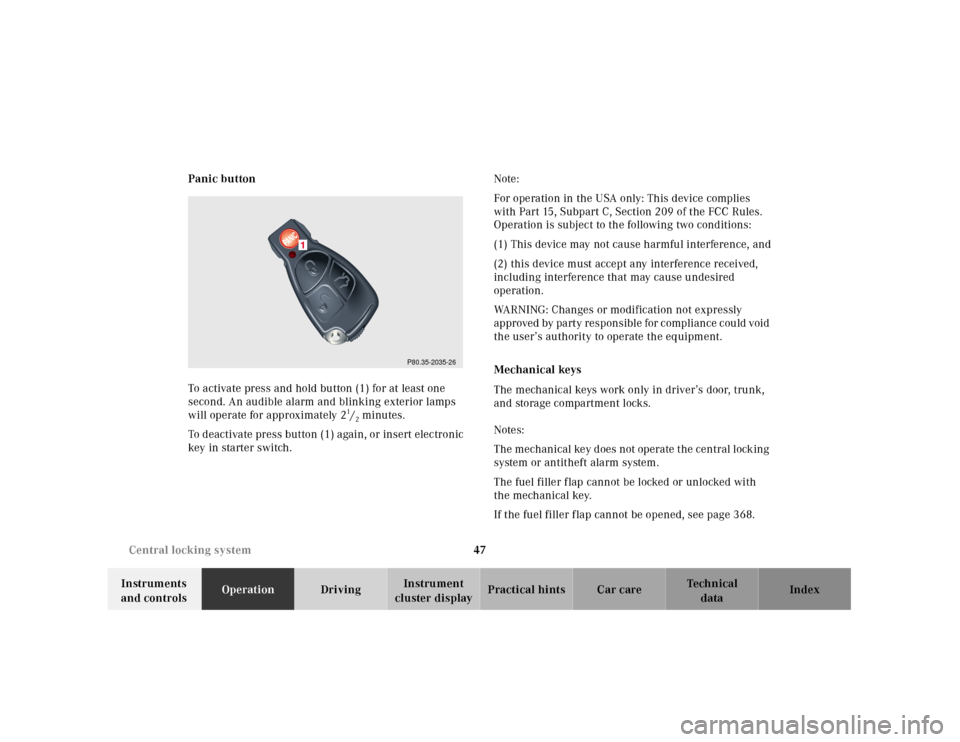
cluster displayPractical hints Car care Index Panic button
To activate press and hold button (1) for at least one
second. An audible alarm and blinking exterior lamps
will operate for approximately 2
1/2minutes.
To deactivate press button (1) again, or insert electronic
key in starter switch.Note:
For operation in the USA only: This device complies
with Part 15, Subpart C, Section 209 of the FCC Rules.
Operation is subject to the following two conditions:
(1) This device may not cause harmful interference, and
(2) this device must accept any interference received,
including interference that may cause undesired
operation.
WARNING: Changes or modification not expressly
approved by party responsible for compliance could void
the user’s authority to operate the equipment.
Mechanical keys
The mechanical keys work only in driver’s door, trunk,
and storage compartment locks.
Notes:
The mechanical key does not operate the central locking
system or antitheft alarm system.
The fuel filler flap cannot be locked or unlocked with
the mechanical key.
If the fuel filler f lap cannot be opened, see page 368.
P80.35-2035-26
1