Page 211 of 448

3-43
Unlocking the Theft-Deterrent Feature After a
Power Loss
Enter your secret code as follows; pause no more than
15 seconds between steps:
1. Turn the ignition on. LOC will appear on the display.
2. Press MN and 000 will appear on the display.
3. Press MN again to make the last two digits agree
with your code.
4. Press HR to make the first one or two digits agree
with your code.
5. Press AM
-FM after you have confirmed that the
code matches the secret code you have written down.
The display will show SEC, indicating the radio is
now operable and secure.
If you enter the wrong code eight times, INOP will
appear on the display. You will have to wait an hour with
the ignition on before you can try again. When you try
again, you will only have three chances to enter the
correct code before INOP appears.
If you lose or forget your code, contact your dealer.Disabling the Theft
-Deterrent Feature
Enter your secret code as follows; pause no more than
15 seconds between steps:
1. Turn the ignition to ACCESSORY or RUN.
2. Turn the radio off.
3. Press the ª1º and ª4º buttons together. Hold them
down until SEC shows on the display.
4. Press MN and 000 will appear on the display.
5. Press MN again to make the last two digits agree
with your code.
6. Press HR to make the first one or two digits agree
with your code.
7. Press AM FM after you have confirmed that the code
matches the secret code you have written down. The
display will show
---, indicating that the radio
is no longer secured.
If the code entered is incorrect, SEC will appear on the
display. The radio will remain secured until the correct
code is entered.
When battery power is removed and later applied to a
secured radio, the radio won't turn on and LOC will
appear on the display.
To unlock a secured radio, see ªUnlocking the
Theft
-Deterrent Feature After a Power Lossº earlier
in this section.
ProCarManuals.com
Page 212 of 448
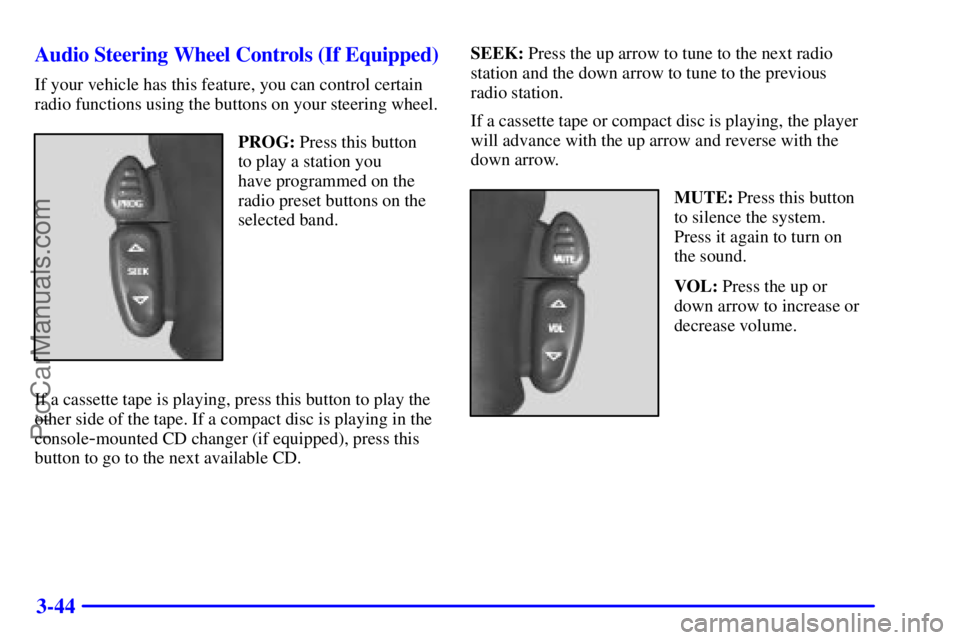
3-44 Audio Steering Wheel Controls (If Equipped)
If your vehicle has this feature, you can control certain
radio functions using the buttons on your steering wheel.
PROG: Press this button
to play a station you
have programmed on the
radio preset buttons on the
selected band.
If a cassette tape is playing, press this button to play the
other side of the tape. If a compact disc is playing in the
console
-mounted CD changer (if equipped), press this
button to go to the next available CD.SEEK: Press the up arrow to tune to the next radio
station and the down arrow to tune to the previous
radio station.
If a cassette tape or compact disc is playing, the player
will advance with the up arrow and reverse with the
down arrow.
MUTE: Press this button
to silence the system.
Press it again to turn on
the sound.
VOL: Press the up or
down arrow to increase or
decrease volume.
ProCarManuals.com
Page 215 of 448

3-47
If your vehicle is equipped with the AM-FM Stereo with
Cassette Tape Player:
1. Turn the ignition to RUN or ACCESSORY.
2. Turn the radio on.
3. Insert the scrubbing action cleaning cassette.
4. Within five seconds, press and hold the REV and
FWD buttons at the same time for three seconds.
The tape symbol on the display will flash, showing
that the broken tape detection feature is no
longer active.
5. Eject the cleaning cassette after the manufacturer's
recommended cleaning time.
If your vehicle is equipped with the AM
-FM Stereo with
Cassette Tape Player and Automatic Tone Control:
1. Turn the ignition to RUN or ACCESSORY.
2. Turn the radio off.
3. Press and hold the TAPE AUX button for five
seconds. The tape symbol on the display will flash
for two seconds.4. Insert the scrubbing action cleaning cassette.
5. Eject the cleaning cassette after the manufacturer's
recommended cleaning time.
When the cleaning cassette has been ejected, the broken
tape detection feature is active again.
You may also choose a non
-scrubbing action, wet-type
cleaner which uses a cassette with a fabric belt to clean
the tape head. This type of cleaning cassette will not
eject on its own. A non
-scrubbing action cleaner may
not clean as thoroughly as the scrubbing type cleaner.
The use of a non
-scrubbing action, dry-type cleaning
cassette is not recommended.
After you clean the player, press and hold EJECT for
five seconds to reset the CLN indicator. The radio will
display
--- to show the indicator was reset.
Cassettes are subject to wear and the sound quality
may degrade over time. Always make sure the cassette
tape is in good condition before you have your tape
player serviced.
ProCarManuals.com